How to Cancel MyFitnessPal Premium (2026 Step-by-Step)
 ChatGPT
  Claude
  AI Mode
  Perplexity
Still paying for MyFitnessPal Premium but barely opening the app? You are not alone, and canceling takes less than 2 minutes.
IMPORTANT
Your MyFitnessPal cancel plan at a glance.
A quick roadmap so you can act fast.
⏱️ Progress 0/4 - ~0 minutes in - Keep going
⏳ Step 1: Find which platform you paid on
⏳ Step 2: Cancel on iPhone, Android, or web
⏳ Step 3: Verify cancellation and request refund if needed
🔍 The free trick that replaces MyFitnessPal's $20/month barcode scanner (revealed near the end)
TL;DR - Cancel MyFitnessPal Premium in 2 Minutes
- iPhone: Settings > Your Name > Subscriptions > MyFitnessPal > Cancel Subscription
- Android: Play Store > Profile > Payments & subscriptions > Subscriptions > MyFitnessPal > Cancel
- Website: myfitnesspal.com > My Home > Premium > Subscription Settings > Auto-Renewal Off
- Key rule: Cancel on the same platform you originally paid on
- After canceling: You keep all Premium features until your current billing period ends
What You Need to Know Before Canceling
As a NutriScan nutritionist who has helped hundreds of users manage app subscriptions, I want to make sure you understand a few things before you cancel.
A 2022 cross-sectional survey of over 1,000 mHealth users found that most people stop using health apps within the first few weeks, often forgetting to cancel paid subscriptions until an unexpected charge appears on their statement (PMC8872344). You are not alone if this happened to you.
Here is what MyFitnessPal says about cancellation:
- You cancel the renewal, not the current period. Premium features stay active until the end of your current billing cycle (MyFitnessPal Support).
- Cancel at least 24 hours before renewal. If you cancel too late, the next charge may already be processed.
- Cancel on the same platform you paid on. This is the number one mistake. If you signed up through the App Store, you must cancel through Apple. If you signed up on Google Play, cancel through Google. If you signed up on the website, cancel on myfitnesspal.com.
WARNING
Not sure where you signed up? Check your email for the original receipt. Look for "APPLE.COM/BILL," "GOOGLE*MYFITNESSPAL," or a direct charge from MyFitnessPal on your bank statement.
 That feeling when you finally cancel the subscription you forgot about
MyFitnessPal Premium vs Premium+ - Which Plan Are You On?
Before canceling, it helps to know which plan you are on. MyFitnessPal has three tiers in 2026 (Garage Gym Reviews):
| Plan | Monthly | Annual | Key Features |
|---|---|---|---|
| Free | $0 | $0 | Basic calorie tracking, food diary, community |
| Premium | $19.99/mo | $79.99/yr | Barcode scanner, meal scan, voice log, ad-free, custom goals |
| Premium+ | $24.99/mo | $99.99/yr | Everything in Premium + Meal Planner, grocery lists, recipe sharing |
The cancel steps are the same for both Premium and Premium+. The only difference is what features you lose after the billing period ends.
Premium+ was added in early 2025 and includes the Meal Planner with 1,500+ recipes, automated logging from your meal plan, grocery lists, and connected grocery shopping (MyFitnessPal Help).
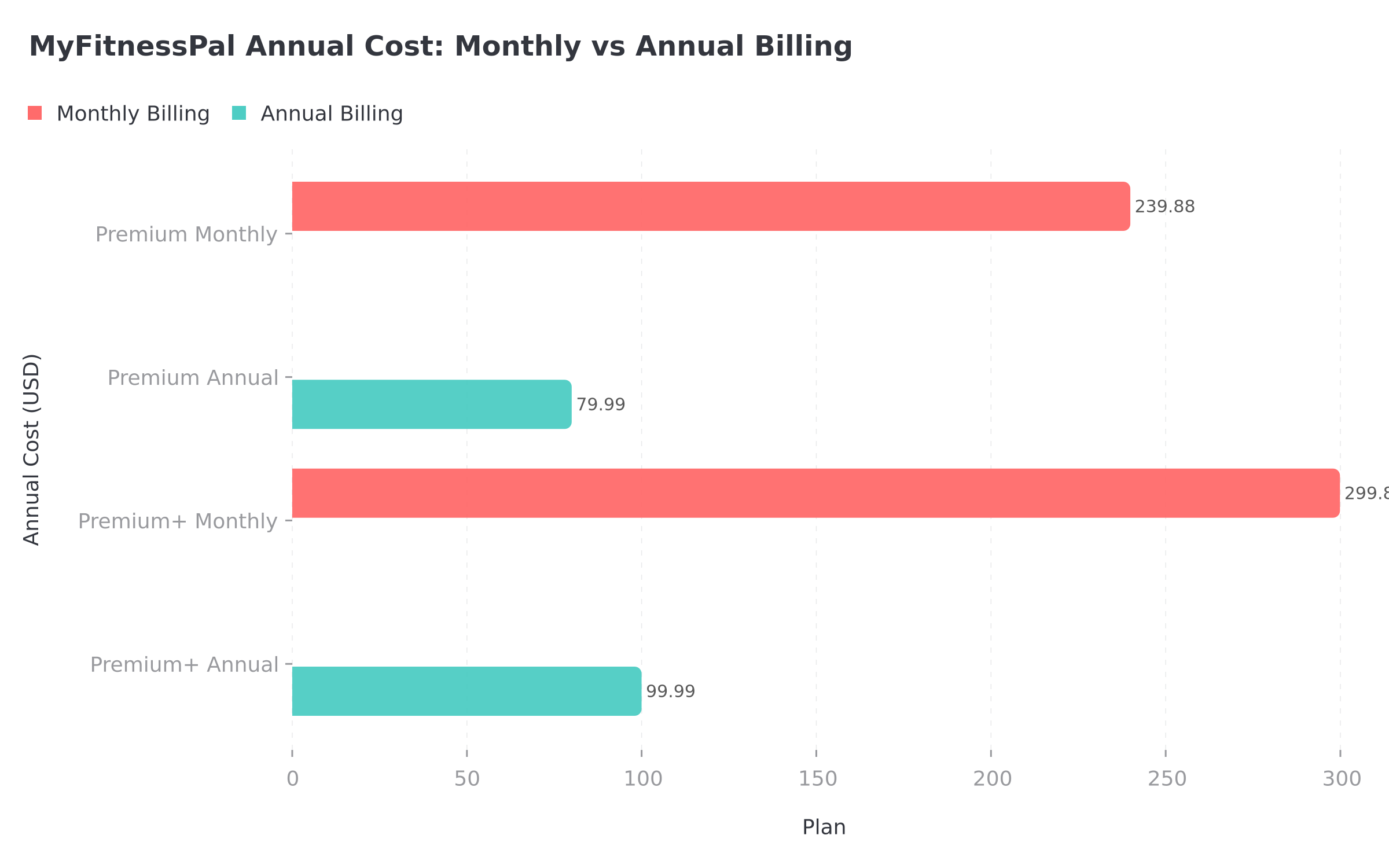 Figure 1: Paying monthly costs up to 3x more than the annual plan for the same features
IMPORTANT
Checkpoint: here's where you are right now.
Quick status update so you always know the next best move.
⏱️ Progress 1/4 - ~1 minute in - Keep going
✅ Step 1: Find which platform you paid on (done)
👉 Step 2: Cancel on iPhone, Android, or web (you're here)
⏳ Step 3: Verify cancellation and request refund if needed
🧩 The free barcode scanner replacement (coming soon)
How to Cancel MyFitnessPal Premium on iPhone (iOS)
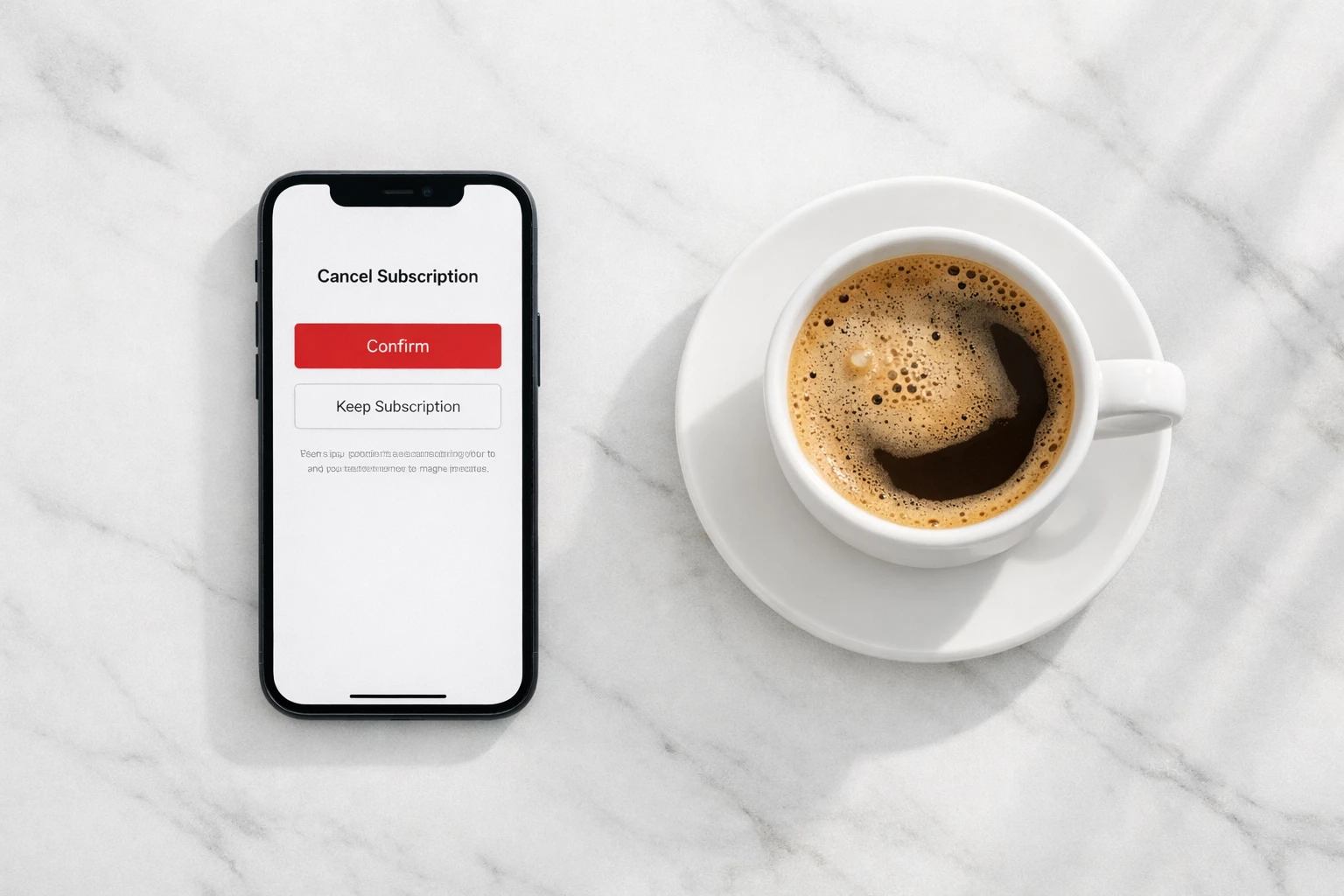
If you signed up through the App Store or inside the iOS app, follow these steps:
Step 1: Open the Settings app on your iPhone (the gray gear icon on your home screen).
Step 2: Tap your name at the top of the Settings screen. This opens your Apple ID page.
Step 3: Tap Subscriptions. You will see a list of all active and expired subscriptions.
Step 4: Find and tap MyFitnessPal in the list.
Step 5: Tap Cancel Subscription at the bottom of the screen. Confirm when prompted.
You will see a message confirming the cancellation date. Your Premium features remain active until that date.
TIP
Alternative method: Open the App Store, tap your profile picture in the top right, tap Subscriptions, and follow the same steps.
If MyFitnessPal does not appear in your iOS subscriptions, you did not sign up through Apple. Check Android or web instructions below.
Need a refund from Apple? Visit reportaproblem.apple.com, sign in with your Apple ID, find the MyFitnessPal charge, and request a refund. Apple handles all App Store refunds directly. You can also call Apple Support at 800-692-7753.

How to Cancel MyFitnessPal Premium on Android
If you signed up through the Google Play Store, follow these steps:
Step 1: Open the Google Play Store app on your Android phone.
Step 2: Tap your profile icon in the top right corner.
Step 3: Tap Payments & subscriptions, then tap Subscriptions.
Step 4: Find and tap MyFitnessPal.
Step 5: Tap Cancel subscription at the bottom. Follow the on-screen prompts to confirm.
Google will send a confirmation email. Your Premium features stay active until the end of the current billing cycle.
Need a refund from Google? Open the Google Play app, go to your profile, tap Help & feedback, and select "Request a refund." Google typically processes refund requests within 1 to 4 business days. Refunds for subscriptions are usually granted if the request is made within 48 hours of the charge.
For more details, see Google's official guide: Manage subscriptions on Google Play.
How to Cancel MyFitnessPal Premium on the Website
If you signed up directly on myfitnesspal.com, the website is where you cancel:
Step 1: Go to myfitnesspal.com and log in to your account.
Step 2: Click My Home in the navigation menu.
Step 3: Click Premium to open your subscription details.
Step 4: Click Subscription Settings in the upper right corner of the Premium page.
Step 5: Change the Auto-Renewal setting from On to Off.
You will see a confirmation that your subscription will not renew. Premium features stay active until the end of the current billing period.
Need a refund for a web purchase? Contact MyFitnessPal support directly through the Help Center at support.myfitnesspal.com. Web purchases are handled by MyFitnessPal, not Apple or Google.
IMPORTANT
Checkpoint: midway progress update.
You're halfway - decisions get easier here.
⏱️ Progress 2/4 - ~2 minutes in - Keep going
✅ Step 1: Find which platform you paid on (done)
✅ Step 2: Cancel on iPhone, Android, or web (done)
👉 Step 3: Verify cancellation and request refund if needed (current)
⏳ The free barcode scanner replacement (next)
What Happens After You Cancel
Canceling MyFitnessPal Premium does not delete your account or your data. This is a common worry, and the answer is clear: your food diary, weight history, custom foods, and recipes all stay in your account indefinitely.
What you keep:
- All your food diary entries, weight history, and custom foods stay in your account forever
- Your free account remains fully active
- Basic calorie and macro tracking continues to work
- Community features and friend connections remain
What you lose when the billing period ends:
- Barcode scanner (now requires Premium for new accounts)
- Meal Scan (photo-based logging)
- Voice Log
- Ad-free experience (ads return)
- Custom calorie and macro goals by day
- Food analysis and nutrient details
- Intermittent fasting tracker
- Priority customer support
If you had Premium+, you also lose:
- Meal Planner access
- Automated grocery lists
- Recipe sharing features
A 2022 literature review on mHealth app engagement found that losing access to personalized features after canceling was the most common reason users eventually resubscribed, with 40% returning within 90 days (PMC9092233). If you want to try the free version first, give it at least 2 to 3 weeks to see if it meets your needs.
7 Common Mistakes That Lead to Unexpected Charges
These are the most common errors users make when trying to cancel MyFitnessPal Premium:
1. Canceling on the wrong platform. If you signed up through Apple but try to cancel on the MyFitnessPal website, your subscription stays active. Always cancel on the platform where you originally paid.
2. Uninstalling the app instead of canceling. Deleting MyFitnessPal from your phone does NOT cancel your subscription. The billing happens through Apple, Google, or the website, not the app itself.
3. Canceling too late. You must cancel at least 24 hours before your renewal date. If you cancel on the day of renewal, the charge may already be processing.
4. Confusing "cancel subscription" with "delete account." Canceling your subscription stops future billing. Deleting your account removes all your data permanently. These are two different actions.
DANGER
5. Not checking for a trial that converted to paid. MyFitnessPal offers a 7-day free trial for new users. The trial auto-converts to Premium+ at $24.99/mo (the most expensive tier), not standard Premium at $19.99/mo. If you started a trial and forgot to cancel, check your most recent charge.
6. Having multiple subscriptions. Some users accidentally sign up twice, once on Apple and once on the website. Check both platforms if you are seeing double charges.
7. Not getting a confirmation. After canceling, look for a confirmation email or check your subscription status. If you do not see "Expires on [date]" or "Canceled," the cancellation may not have gone through.
What to Do If You Were Charged After Canceling
If you see a charge after you thought you canceled, here is what to do:
For Apple purchases:
- Visit reportaproblem.apple.com
- Sign in and find the MyFitnessPal charge
- Tap "Request a Refund" and select the reason
- Apple typically responds within 48 hours
For Google Play purchases:
- Open the Google Play app
- Go to Profile > Help & feedback
- Select "Request a refund"
- Google typically responds within 1 to 4 business days
For website purchases:
- Go to support.myfitnesspal.com
- Submit a support ticket explaining the charge
- Include your account email and the date of the charge
A 2024 study on factors driving mHealth app use found that transparent billing and easy cancellation were among the top factors influencing user trust in health apps (PMC12004308). If refund processes feel unclear, persistence with support usually helps.
 You after successfully canceling and getting your refund
IMPORTANT
Checkpoint: final stretch before the reveal.
One last nudge - the reveal is next.
⏱️ Progress 3/4 - ~3 minutes in - Keep going
✅ Step 1: Find which platform you paid on
✅ Step 2: Cancel on iPhone, Android, or web
✅ Step 3: Verify cancellation and request refund if needed
✨ The free barcode scanner replacement (about to reveal)
Should You Downgrade Instead of Canceling?
Before you cancel completely, consider whether downgrading makes more sense:
From Premium+ to Premium: If you like the tracking features but do not use the Meal Planner, downgrading from Premium+ ($24.99/mo) to Premium ($19.99/mo) saves $60/year on monthly billing or $20/year on annual billing.
From Premium to Free: The free version still tracks calories and macros. But you lose the barcode scanner, which is a significant time saver for packaged foods. If you mainly eat whole foods and home-cooked meals, free may be enough.
Switch to a cheaper annual plan: If you are on monthly billing, switching to annual saves significantly. Premium annual is $79.99/year ($6.67/month) vs $19.99/month ($239.88/year). That is a 67% savings (FitBudd).
TIP
Try a different app: If you are canceling because MyFitnessPal is not the right fit, NutriScan offers AI photo scanning on the free plan, which can replace barcode scanning for many users. Use the NutriScan Macro Calculator to set personalized goals before switching.

How MyFitnessPal Cancel Compares to Other Apps
Here is how MyFitnessPal's cancel process stacks up against competitors:
| App | Cancel Through | Keep Features Until Period Ends? | Refund Policy | Trial Length |
|---|---|---|---|---|
| MyFitnessPal | Apple/Google/Web | Yes | Apple/Google/MFP support | 7 days |
| Lose It | Apple/Google/Web | Yes | Apple/Google/Lose It support | 7 days |
| MacroFactor | Apple/Google | Yes | 60-day refund policy | 7 days |
| YAZIO | Apple/Google/Web | Yes | EU 14-day withdrawal (web) | 7 days (web only) |
| Fastic | Apple/Google/Web | Yes | 14-day Feel Good Guarantee | Pay-then-refund model |
| Cronometer | Apple/Google/Web | Yes | Apple/Google/Cronometer support | None |
| Cal AI | Apple/Google/Web | Yes | No refund (per ToS) | 3 days |
| NutriScan | Apple/Google | Yes | Apple/Google standard | 7 days |
MyFitnessPal's cancel process is standard for the industry. The 3-platform cancel path (Apple, Google, web) is common among large apps. The key advantage is that the official support page clearly explains the steps for each platform.
Tips for Managing App Subscriptions Going Forward
Managing multiple health app subscriptions can get confusing. Here are practical tips to avoid surprise charges in the future:
1. Set a calendar reminder 2 days before any trial ends. This gives you time to cancel if you decide the app is not worth paying for. Most trials auto-convert to the most expensive tier.
2. Use one payment platform when possible. Signing up for all apps through Apple or Google makes it easy to see all subscriptions in one place. Avoid mixing web and app store purchases.
3. Check your subscriptions monthly. On iPhone, go to Settings > Subscriptions. On Android, go to Play Store > Subscriptions. This takes 30 seconds and can save you hundreds per year.
4. Take a screenshot of your cancel confirmation. If a billing dispute arises later, having proof of cancellation makes the refund process faster.
5. Consider annual billing if you plan to stay. MyFitnessPal Premium annual ($79.99/yr) costs 67% less than monthly billing ($239.88/yr). Most calorie tracking apps offer similar savings on annual plans.
6. Export your data before switching apps. MyFitnessPal allows you to export your food diary data. Go to Settings > Diary Settings > Export Data to download a CSV file of your logs. This makes it easier to transition to another tracker without losing your history.
A 2023 study on mHealth app quality found that apps with clear subscription management and transparent pricing had significantly higher user satisfaction scores and lower uninstall rates (PMC10196903). Good subscription hygiene protects both your wallet and your health goals.
FAQ
Does canceling MyFitnessPal Premium delete my food diary?
No. Canceling your subscription only stops future billing. All your food diary entries, weight logs, custom foods, and recipes stay in your account. You can still view them on the free plan. The only things you lose are Premium-specific features like barcode scanning, meal scan, and ad-free browsing.
Can I get a refund for an unused portion of MyFitnessPal Premium?
It depends on where you signed up. Apple and Google have their own refund policies and typically grant refunds for recent charges. For website purchases, contact MyFitnessPal support directly. In general, refunds are more likely if you request them within 48 hours of the charge or if you can show you did not use the service.
What happens to my Meal Planner recipes if I cancel Premium+?
Your saved meal plans and recipes become inaccessible when Premium+ expires. They are not deleted, but you cannot view or use them on the free plan. If you resubscribe to Premium+ later, your plans and recipes will be available again. Before canceling, you may want to screenshot your favorite recipes or note them down.
Can I switch from Premium+ to Premium without canceling?
Yes. You can downgrade from Premium+ to Premium in your subscription settings. The exact process depends on your platform:
- iOS: Go to Settings > Subscriptions > MyFitnessPal and select the Premium plan.
- Android: Go to Play Store > Subscriptions > MyFitnessPal and change your plan.
- Web: Go to Subscription Settings and select the Premium option.
How do I know if my MyFitnessPal cancellation went through?
After canceling, check your subscription status on your platform:
- iOS: Go to Settings > Subscriptions and you should see "Expires [date]" next to MyFitnessPal.
- Android: Check Play Store > Subscriptions for a "Canceled" label.
- Web: Check your Premium page where Auto-Renewal should show "Off."
You should also receive a confirmation email. If none of these show cancellation, try the process again or contact support.
Is MyFitnessPal FSA/HSA eligible?
Yes. MyFitnessPal Premium and Premium+ are FSA/HSA eligible purchases (MyFitnessPal Help). If you are considering canceling due to cost, using pre-tax health funds could make the subscription more affordable.
Why was I charged for Premium+ when I only signed up for a free trial?
MyFitnessPal's free trial defaults to Premium+ ($24.99/mo), which is the most expensive tier. When the trial ends, your payment method is automatically charged at the Premium+ rate unless you cancel before the trial expires. If this happened to you, request a refund through Apple, Google, or MyFitnessPal support as soon as possible. The sooner you request, the more likely you are to get the full amount back.
Your Next Step After Canceling
If you are leaving MyFitnessPal because the free tier is too limited, you do not have to give up on tracking your nutrition. NutriScan includes AI-powered meal scanning on the free plan, so you can snap a photo of your plate and get instant calorie and macro estimates without paying for a barcode scanner.
Before you switch, use the NutriScan Macro Calculator to set your personalized calorie and macro targets. If you have specific health goals, check out the PCOS Macro Calculator or the Diabetes Macro Calculator for condition-specific recommendations.
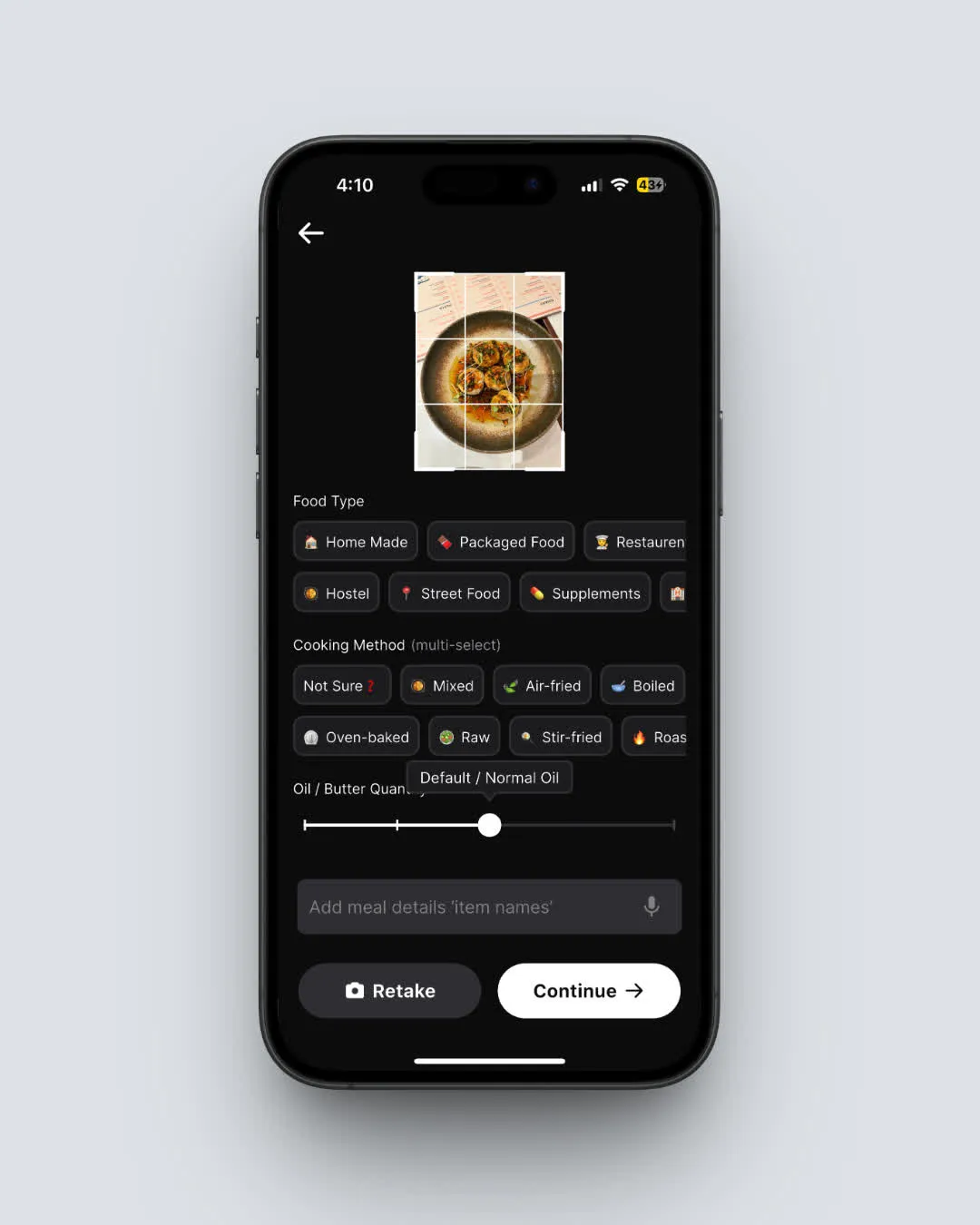 NutriScan AI meal scanning: snap a photo and get instant nutrition data (Home > Camera Icon > Click Picture)
Your food data matters. Export your MyFitnessPal diary before your Premium access ends, and start fresh with a tracker that fits your budget and your goals.
IMPORTANT
Recap: everything you completed this round.
You finished the run - save this for next time.
⏱️ Progress 4/4 - ~4 minutes in - Nicely done
✅ Step 1: Find which platform you paid on
✅ Step 2: Cancel on iPhone, Android, or web
✅ Step 3: Verify cancellation and request refund if needed
✅ The free barcode scanner replacement: NutriScan AI photo scanning (revealed)