NutriScan Referral Program: How "Invite and Earn" Works (Free Premium Time)
 ChatGPT
  Claude
  AI Mode
  Perplexity
What if every friend you helped start tracking their meals also earned you free Premium access? 🤔
TL;DR - NutriScan Invite and Earn Guide
What it is: A double-sided referral program where both you and your friend earn free Premium time
How it works: Share your unique link ➡️ Friend signs up ➡️ Both get 1 week Premium free
Reward tiers: 1 referral = 1 week, 5 referrals = 1 month, 10 referrals = 3 months of Premium
Where to find it: Home screen > "Invite and Earn" button
No deadline: Referrals count forever as long as the friend completes sign-up through your link
IMPORTANT
Your referral roadmap at a glance.
Here is exactly what you will learn in this guide.
⏱️ Progress 0/4 - ~0 minutes in - Keep going ⏳ How the program works + reward tiers ⏳ Step-by-step guide to earn 3 months free ⏳ Why no other nutrition app offers this 🔍 The one sharing trick that doubles your referral success rate (revealed near the end)
As a NutriScan nutritionist, I often hear the same question from users who love the app: "How do I get Premium without paying?" The answer is surprisingly simple. NutriScan has a built-in referral program called Invite and Earn that rewards you with free Premium time every time a friend signs up through your link. No coupon codes, no promotions to wait for.
A 2024 study on factors driving mHealth app use found that social influence and peer recommendations are among the strongest predictors of app adoption (PMC). When someone you trust recommends a nutrition tracker, you are far more likely to download it, try it, and stick with it. NutriScan built Invite and Earn around this exact idea.
 That feeling when your referral rewards start stacking up
What Is the NutriScan Invite and Earn Program? 🎁
Invite and Earn is NutriScan's double-sided referral program. When you share your unique referral link and a friend downloads the app and signs up, both of you receive 1 week of NutriScan Premium for free.
Here is how the reward tiers work:
| Referrals | Your Reward | Friend's Reward |
|---|---|---|
| 1 | 1 week Premium | 1 week Premium |
| 5 | 1 month Premium | 1 week Premium each |
| 10 | 3 months Premium | 1 week Premium each |
The program is cumulative. Every successful referral counts toward the next milestone. If you refer 10 friends, you unlock the maximum reward of 3 months of Premium access completely free.
Why double-sided referrals work
Research on referral marketing shows that 78% of successful referral programs reward both the referrer and the referred person, and 65% of referrers prefer programs where the reward is shared (impact.com). NutriScan follows this proven model.
How to Find Your Referral Link 📱
Getting started takes less than 30 seconds.
- Open the NutriScan app
- Go to your Home screen
- Tap the "Invite and Earn" button (visible below the insights widgets)
- Your unique referral link appears on screen
- Tap "Share" to send it via WhatsApp, iMessage, email, Instagram DM, or any messaging app
Your referral link is tied to your account. Every time someone uses it to sign up, the system automatically credits both accounts.
You can also see your total successful referrals on the Invite and Earn screen. This counter updates in real time, so you always know how close you are to the next milestone.
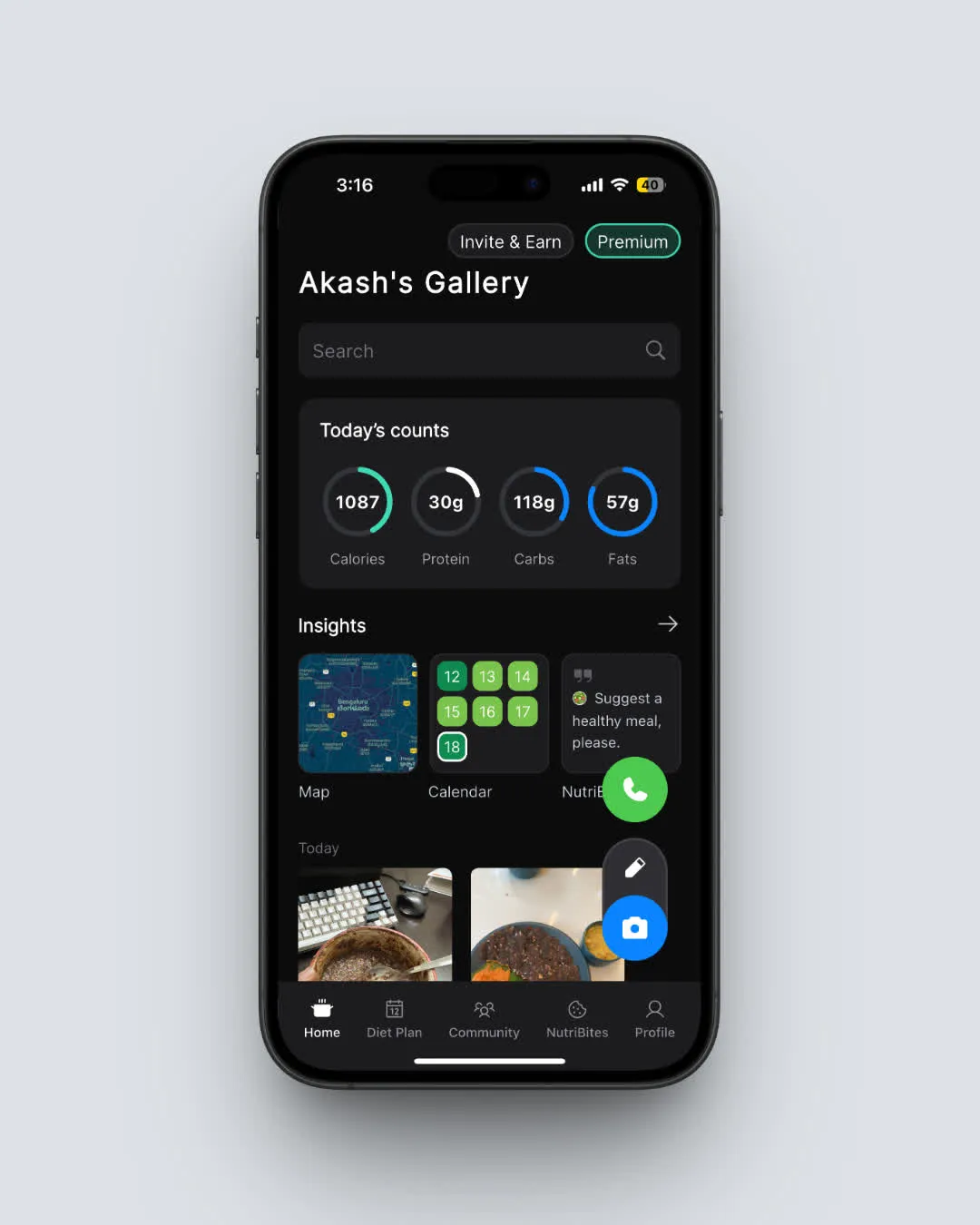 Home screen > Invite and Earn button is visible below the insights widgets
IMPORTANT
Checkpoint: here is where you are right now.
Quick status update so you know the next best move.
⏱️ Progress 1/4 - ~1 minute in - Keep going
✅ How the program works + reward tiers (done) 👉 Step-by-step guide to earn 3 months free (you are here) ⏳ Why no other nutrition app offers this 🧩 The one sharing trick (coming soon)
What Your Friend Gets When They Sign Up 🎉
When a friend taps your referral link and creates a NutriScan account, they immediately receive 1 week of Premium access. This gives them full access to every Premium feature:
- Unlimited Monika AI calls (free plan allows 4 per week)
- Personalized 28-day diet plans with recipes, portions, and supplement recommendations
- Micronutrient tracking for vitamins and minerals
- Recipe recommendations based on nutritional gaps
- Grocery list generation from diet plans
- Advanced macro reports and insights for tracking long-term patterns
This is the same Premium experience that costs $9.99 per month or $59.99 per year on the App Store. Your friend gets to try every feature before deciding whether to subscribe.
A systematic review of mHealth dissemination strategies found that peer-driven distribution consistently outperforms paid advertising for long-term engagement (PMC). When your friend hears about NutriScan from you rather than from an ad, they are more likely to actually use it.

Step-by-Step Guide: How to Earn 3 Months of Free Premium 🚀
Follow these steps to maximize your referral rewards.
Step 1: Open the Invite and Earn screen. Tap the button on your Home screen. Note your current referral count.
Step 2: Identify your first 5 potential referrals. Think about people who already care about nutrition: friends who go to the gym, family members watching their diet, coworkers who meal prep, or anyone who has asked about your food tracking habit.
Step 3: Share your link personally. Send a direct message rather than posting publicly. A study on mHealth engagement found that personal recommendations from trusted contacts had significantly higher conversion rates than broadcast messages (PMC). A text to a friend works better than an Instagram story.
Step 4: Explain what they get. Tell your friend they will receive 1 free week of Premium immediately after signing up. Mention specific features they would care about: meal scanning for someone who hates manual logging, diet plans for someone who wants a structured eating plan, or Monika AI for someone who wants voice-based nutrition coaching.
Step 5: Help them take their first scan. Once they download the app, suggest they scan their next meal right away. The first scan takes about 10 seconds and shows the full nutritional breakdown.
Step 6: Check your progress. Return to the Invite and Earn screen to see your updated count. Watch for the celebration modal that pops up when a referral is confirmed.
 That celebration moment when your referral count goes up
Step 7: Keep going to 10. After 5 referrals, you have earned 1 month. Push to 10 for 3 months. Ask the first five friends if they know anyone else who would enjoy the app.
Real-World Examples of How Referrals Add Up 💡
Here are three common ways users build up their free Premium time.
The family sharer. Priya in Mumbai shares her link with her parents, brother, and two cousins. All five sign up. She hits the 5-referral milestone and earns 1 full month of Premium. Each family member also gets a free week to try meal scanning for Indian food.
The gym group. Carlos in Austin shares his link in a WhatsApp group of 12 gym friends who all track macros. Ten of them sign up. Carlos unlocks 3 months of Premium for free. His friends each get a week to test the AI meal scanner before their next cutting phase.
The slow-and-steady referrer. Mika in Helsinki shares her link one friend at a time over several weeks. After her third referral, she has earned 3 weeks of Premium. By the time she reaches 5, she gets the full month. No rush, no pressure.
No Deadline
Referrals count forever as long as the friend completes sign-up through your link. There is no expiration on your referral link or your accumulated rewards.
What Makes NutriScan's Referral Program Different from Other Apps 📊
Most nutrition apps do not offer referral programs at all. I checked the current programs across 12 popular calorie tracking and fasting apps:
| App | Referral Program | Reward |
|---|---|---|
| NutriScan | Yes - Invite and Earn | 1 week Premium per referral + tier bonuses |
| MyFitnessPal | No | N/A |
| MacroFactor | No | N/A |
| Cronometer | No | N/A |
| Lose It | No | N/A |
| Lifesum | No | N/A |
| YAZIO | No | N/A |
| Foodvisor | No | N/A |
| Fastic | No | N/A |
| Cal AI | No | N/A |
| Simple | No | N/A |
| Noom | Limited - occasional promotions | Varies |
NutriScan is one of the only nutrition tracking apps with a permanent, structured referral program. Most competitors rely on seasonal discounts, coupon codes, or app store promotions.
Research from Harvard Business Review and Wharton Business School shows that referred customers spend 16% more and stay longer than customers acquired through advertising (impact.com). Users who come through Invite and Earn are more likely to actually track their meals consistently.
IMPORTANT
Checkpoint: midway progress update.
You are halfway through this guide. The savings breakdown is next.
⏱️ Progress 2/4 - ~2 minutes in - Keep going
✅ How the program works + reward tiers (done) ✅ Step-by-step guide to earn 3 months free (done) 👉 Why no other nutrition app offers this (current) ⏳ The one sharing trick (next)
How NutriScan's Referral Rewards Compare to Subscription Costs 💰
Let us put the referral value in perspective.
| Method | Cost | Premium Duration |
|---|---|---|
| Monthly subscription | $9.99/month | 1 month |
| Annual subscription | $59.99/year (~$5.00/month) | 12 months |
| 1 referral | Free | 1 week |
| 5 referrals | Free | 1 month |
| 10 referrals | Free | 3 months |
If you refer 10 friends, you save $29.97 compared to 3 months of the monthly plan. Even 1 referral saves you roughly $2.50 (one week of the monthly plan value).
For users in price-sensitive markets like India, the savings are even more meaningful. NutriScan's regional pricing starts at Rs 499 per month. Five referrals save you Rs 499. Ten referrals save you Rs 1,497.
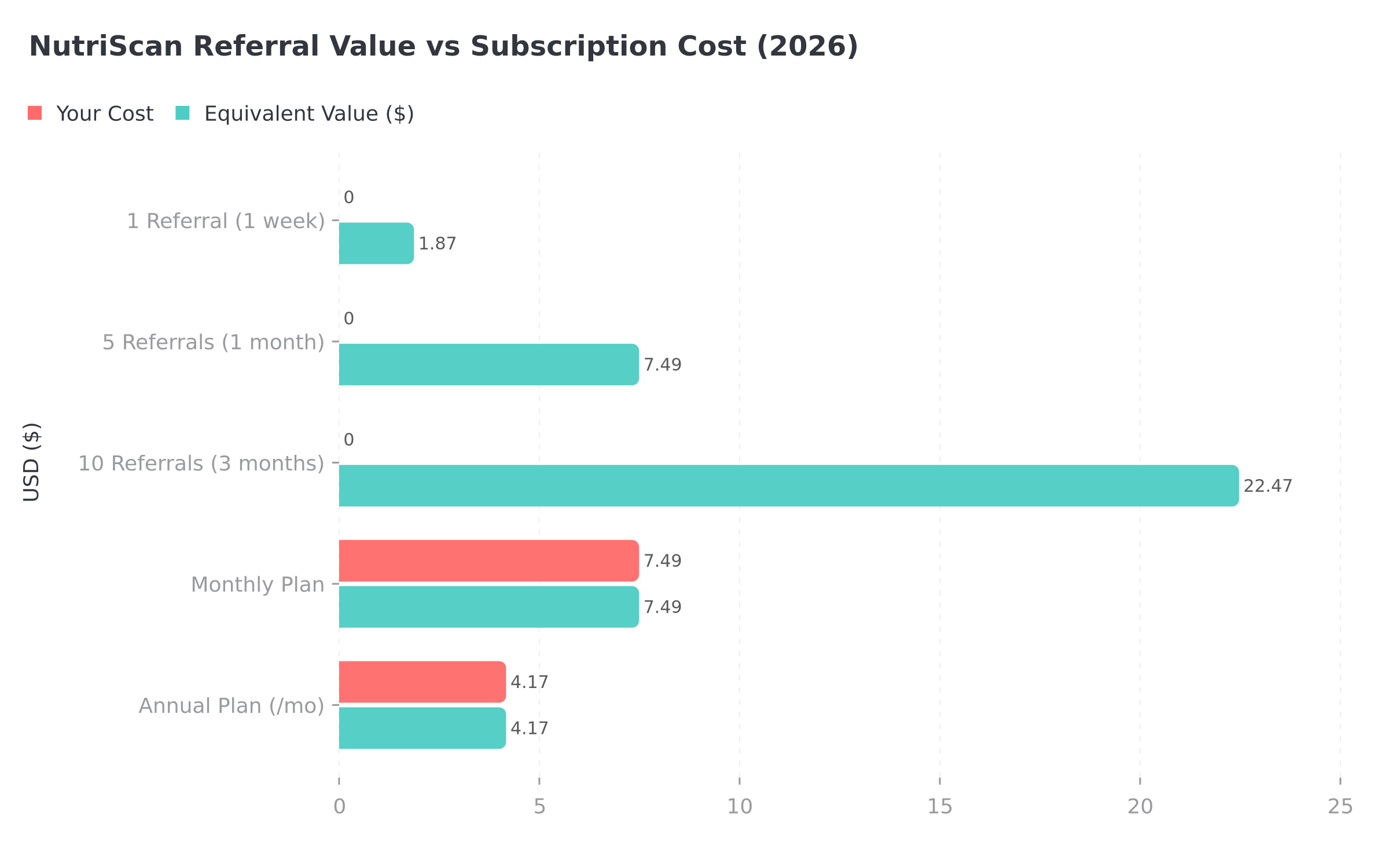 Figure 1: Referral rewards give you the same Premium access at zero cost. The more friends you refer, the more you save.
Tips to Get More Successful Referrals 🎯
Not every shared link leads to a sign-up. Here are 7 practical tips to increase your success rate.
Share after a great meal scan. Screenshot your scan result showing detailed macros and NutriScore, then send it with your link. Visual proof is more convincing than words alone.
Time it right. January (New Year goals), early summer (body composition focus), and the start of any fitness program are peak times when friends are most open to trying a nutrition app.
Use the "Copy to Today" trick. Show friends how fast repeat logging is. When they see you log breakfast in 2 seconds by copying yesterday's meal, they understand the time savings.
Target one friend at a time. A personal message to one friend converts better than blasting your link to a group. Share why you like the app specifically for their situation.
Follow up once. If a friend has not signed up after 3 days, send one gentle follow-up. After that, move on. Pushing too hard damages the referral relationship.
Share your NutriScore progress. If your weekly NutriScore has improved since you started tracking, share that data. Progress stories are powerful motivators.
Mention the free week. Always lead with what the friend gets. "You get a free week of Premium" is a stronger opening than "I get rewards if you sign up."
Research on user engagement in health apps shows that the first week of use determines whether someone becomes a long-term user (PMC). The free Premium week from your referral gives your friend the best possible first experience.
IMPORTANT
Checkpoint: final stretch before the reveal.
One last section before the trick that doubles your success rate.
⏱️ Progress 3/4 - ~3 minutes in - Keep going
✅ How the program works + reward tiers ✅ Step-by-step guide to earn 3 months free ✅ Why no other nutrition app offers this ✨ The one sharing trick (about to reveal)
What Happens After the Free Premium Expires 🔄
When your referral reward period ends, your account automatically returns to the free plan. Here is what stays and what changes:
What you keep on the free plan:
- Unlimited AI meal scans (no scan limits)
- Daily calorie and macro tracking
- NutriScore ratings for every meal
- NutriBites AI assistant (ask questions about your meals)
- 4 Monika AI calls per week
- Apple Health and Google Fit sync
- Copy meals and hydration tracking
What pauses until you re-subscribe or earn more referrals:
- Unlimited Monika AI consultations
- Personalized 28-day diet plans
- Micronutrient tracking (vitamins, minerals)
- Recipe recommendations and grocery lists
- Advanced macro reports
No data is lost. Your meal history stays in the cloud. If you subscribe later or earn more referral time, everything is restored.
You can also keep earning referral rewards to maintain continuous Premium access. A user who consistently refers 1-2 friends per month can keep Premium active indefinitely without paying.
 When you realize you can keep Premium going forever through referrals

The One Sharing Trick That Doubles Your Success Rate 🎯
You have been patient. Here is the simple approach that turned my referral conversion from 1-in-5 to nearly 1-in-2:
Scan your meal in front of them.
That is it. Instead of sending a link cold, wait until you are eating with a friend. Pull out your phone, take a photo of your plate, and let them watch NutriScan identify every item, estimate portions, and show the full macro breakdown in about 10 seconds.
Then say: "Want to try? You get a free week of Premium if you sign up through my link."
Why it works:
- Live demo removes doubt. They see the app working on real food in real time. No screenshots, no marketing speak.
- Curiosity is at peak. They just watched you get instant nutrition data for the meal sitting in front of them. They want the same thing for their plate.
- The ask is effortless. You are not selling. You are sharing something you already use. The referral link is just the delivery mechanism.
- Immediate action. They can download and scan their own plate right there. The first scan hooks most users.
A study on mHealth adoption found that seeing a peer use a health app in person was the single strongest predictor of download intent (PMC). Your live scan is worth more than any text message or social media post.
IMPORTANT
Recap: everything you learned in this guide.
Save this for reference when you start sharing your link.
⏱️ Progress 4/4 - ~4 minutes in - Nicely done
✅ How the program works + reward tiers ✅ Step-by-step guide to earn 3 months free ✅ Why no other nutrition app offers this ✅ The one sharing trick (revealed)
Common Mistakes to Avoid When Sharing Your Referral Link ⚠️
Even with a straightforward program, some users run into issues. Here are the most common mistakes and how to avoid them.
Sharing a screenshot instead of the link. A screenshot of the Invite and Earn screen does not contain a clickable referral link. Always use the Share button to send the actual link.
Sharing with people who already have accounts. The referral only counts for brand-new users. If someone reinstalls the app but had an account before, it will not register.
Not following up after sharing. Many people intend to download an app but forget. One friendly reminder 2-3 days later can double your conversion rate.
Expecting instant credit. The referral credit appears after your friend completes sign-up, not just after they click the link. Make sure they actually create an account.
Sharing in large public groups. Posting your link in a Facebook group of strangers rarely works. Personal, one-to-one messages convert much better.
Important
Your referral link only works for new sign-ups. If a friend already has a NutriScan account, the referral will not count even if they use your link.
Why Referral Programs Work Better Than Discounts for Health Apps 🧠
Most nutrition apps rely on seasonal discounts to attract new users. Black Friday sales, New Year promotions, and app store price drops are temporary. They attract deal-seekers who may not stick with the app.
Referral programs work differently. When you invite a friend to NutriScan, you are making a personal recommendation. That personal endorsement carries more weight than any advertisement.
The mHealth apps market was valued at $12.33 billion in 2024 and is projected to reach $32.41 billion by 2033 (Yahoo Finance). As more people download nutrition apps, the ones that grow through personal recommendations tend to build more engaged user bases.
A cross-sectional survey of mHealth users found that app abandonment rates are highest in the first 14 days (PMC). Having a friend who uses the same app dramatically reduces the chance of dropping off during that critical window. The referral program helps every new user actually succeed.
Frequently Asked Questions ❓
Do both the referrer and the referred friend get rewards?
Yes. When a friend downloads NutriScan through your referral link and completes sign-up (Google, Apple ID, or mobile number), both accounts receive 1 week of Premium for free.
Is there a limit to how many friends I can refer?
No cap. You can share your link with as many friends as you want. Every successful referral adds 1 week, and milestone bonuses (5 and 10 referrals) stack on top.
What if my friend already has a NutriScan account?
The referral link only works for new sign-ups. Existing account holders do not count as referrals. They need to be a first-time user signing up through your link.
How do I know when a referral is successful?
You receive a push notification when a friend successfully signs up through your link. A celebration modal also appears on your Home screen. Your referral count updates on the Invite and Earn page.
Can I use the referral program while on a paid subscription?
Yes. If you already have a paid Premium subscription and earn referral time, the free Premium weeks are added to the end of your current billing cycle. No paid time is lost.
What if my referral link is not working?
Make sure you are sharing the exact link from the Invite and Earn screen in your app. If the issue persists, contact NutriScan support at [email protected]. Include your account email and a screenshot of the Invite and Earn screen.
Does the referral program work in all countries?
Yes. The Invite and Earn program works globally. The Premium features unlocked through referrals are the same regardless of location.
Conclusion 📝
NutriScan's Invite and Earn program is one of the simplest ways to get free Premium access to a nutrition tracker. Share your link, help a friend start tracking their meals, and both of you earn a week of full access. Stack 10 referrals, and you unlock 3 full months.
No other major nutrition app offers this kind of structured, permanent referral program. The next time you are eating with a friend, scan your meal, show them the magic, and share your link. You will both be better off for it.
If you want to understand your nutritional needs before sharing, try our macro calculator or explore the NutriScore guide to see what Premium insights look like.
Ready to start earning? Open NutriScan, tap "Invite and Earn" on your Home screen, and send your first referral link today.