YAZIO 7-Day Free Trial: How to Cancel in Time and Avoid a Charge (2026)
 ChatGPT
  Claude
  AI Mode
  Perplexity
Signed up for YAZIO PRO and already worried about forgetting to cancel? You are not alone.
TL;DR - YAZIO Trial Cancel Guide
The problem: YAZIO's 7-day PRO trial auto-renews to a paid plan ($23.90-$47.90/year) if you don't cancel in time
The fix: Cancel on the same platform where you signed up (App Store, Google Play, or yazio.com) at least 24 hours before the trial ends
Safest move: Cancel on day 1 and still enjoy the full 7 days of PRO features with zero risk
Already charged? Request a refund through Apple, Google, or YAZIO directly (website purchases have a 14-day EU withdrawal right)
I see this question every single week in the NutriScan community: "I signed up for YAZIO PRO and forgot to cancel the trial. Now I got charged." Research from the Journal of Medical Internet Research shows that participant dropout and engagement decline are among the most common challenges in mobile health app studies (JMIR 2022). Many people sign up for a free trial, explore the app for a day or two, and then forget to cancel before the 7 days run out.
YAZIO is one of the most popular calorie tracking apps in the world, with over 100 million downloads and a 4.7 out of 5 rating on the App Store. Its PRO version unlocks AI photo logging, 1,500+ recipes, intermittent fasting timers, and detailed nutrient breakdowns. But the PRO trial converts to a paid subscription automatically if you do not cancel in time.
This guide covers exactly how to cancel on every platform, what happens after you cancel, and how to get a refund if you missed the deadline.
IMPORTANT
Your YAZIO cancel plan at a glance.
Here is your roadmap to avoid getting charged.
⏱️ Progress 0/4 - ~0 minutes in - Keep going
⏳ What the trial includes (and what you lose)
⏳ Step-by-step cancel guides for every platform
⏳ 9 tips to never get charged by accident
🔍 The 10-second trick that makes trial charges impossible (revealed near the end)
 That moment you realize your free trial just became a paid subscription
What You Get During the 7-Day Free Trial
Before we talk about canceling, here is what the YAZIO PRO trial actually includes. During your 7 days, you get full access to every PRO feature with no limits (YAZIO Help Center):
| Feature | Free Version | PRO Trial (7 Days) |
|---|---|---|
| Calorie and macro tracking | Yes | Yes |
| AI photo food logging | No | Yes |
| 1,500+ recipes | No | Yes |
| Intermittent fasting timer | Basic | Full protocols (16:8, 18:6, 20:4) |
| Nutrient breakdown (vitamins, minerals) | No | Yes |
| Custom meal plans | No | Yes |
| Ad-free experience | No | Yes |
| Body measurements tracking | No | Yes |
Important
The 7-day free trial is offered occasionally and is available only on the YAZIO website. You cannot start a free trial directly inside the app. If you subscribed through the App Store or Google Play Store, your subscription may have started as a paid plan from day one. This distinction matters because where you signed up determines how you cancel.
Real-World Examples: How People Get Charged by Accident
Here are three common scenarios I hear about regularly:
The "I Thought Deleting the App Would Cancel It" Mistake
Maria downloaded YAZIO, started the free trial on the website, used it for three days, then deleted the app from her phone. She assumed that removing the app would stop the subscription. It did not. YAZIO's official help page states clearly: "Your PRO subscription will continue even if you uninstall the app or delete your user account" (YAZIO Cancel Guide). Maria got charged $47.90 for an annual plan she never intended to keep.
The "Cancel on the Wrong Platform" Confusion
James signed up for YAZIO PRO through the App Store on his iPhone. When he wanted to cancel, he went to yazio.com and clicked "Cancel subscription." But his subscription was not listed there because Apple manages App Store purchases. He thought it was canceled and got charged the following month.
Key Rule
Cancel on the same platform where you purchased. App Store purchase = cancel through Apple. Google Play purchase = cancel through Google. Website purchase = cancel through yazio.com.
The "24-Hour Window" Surprise
Priya activated her YAZIO trial on a Monday. She planned to cancel on Sunday evening, the last day of her 7-day trial. But Apple requires cancellation at least 24 hours before the trial ends (Apple Support). By the time she tried to cancel on Sunday night, the renewal had already been triggered.
IMPORTANT
Checkpoint: here is where you are right now.
Quick status update so you always know the next best move.
⏱️ Progress 1/4 - ~1 minute in - Keep going
✅ What the trial includes (done)
👉 Step-by-step cancel guides (you are here)
⏳ 9 tips to never get charged
🧩 The 10-second trick (coming soon)

5 Facts You Need to Know Before Canceling
Fact 1: Canceling does not delete your data. Your food logs, weight history, and account stay intact. You simply lose access to PRO features after your current period ends.
Fact 2: Canceling does not trigger an immediate refund. Cancellation and refunds are separate processes. Canceling stops future charges, but you still have access until the end of your paid period (YAZIO Refund Guide).
Fact 3: You cannot pause your subscription. Once you choose a plan (monthly, 3-month, or annual), that duration is locked for the entire billing cycle. You can only cancel to prevent the next renewal.
Fact 4: The subscription contract depends on where you bought it. If you purchased through Apple, your contract is with Apple. YAZIO cannot cancel or refund App Store or Play Store purchases on your behalf.
Fact 5: YAZIO PRO pricing varies. The App Store lists multiple tiers: $11.90/month, $23.99 for 3 months, $34.99 for 6 months, and $23.90-$47.90/year depending on promotions.
Step-by-Step: How to Cancel YAZIO PRO on Every Platform
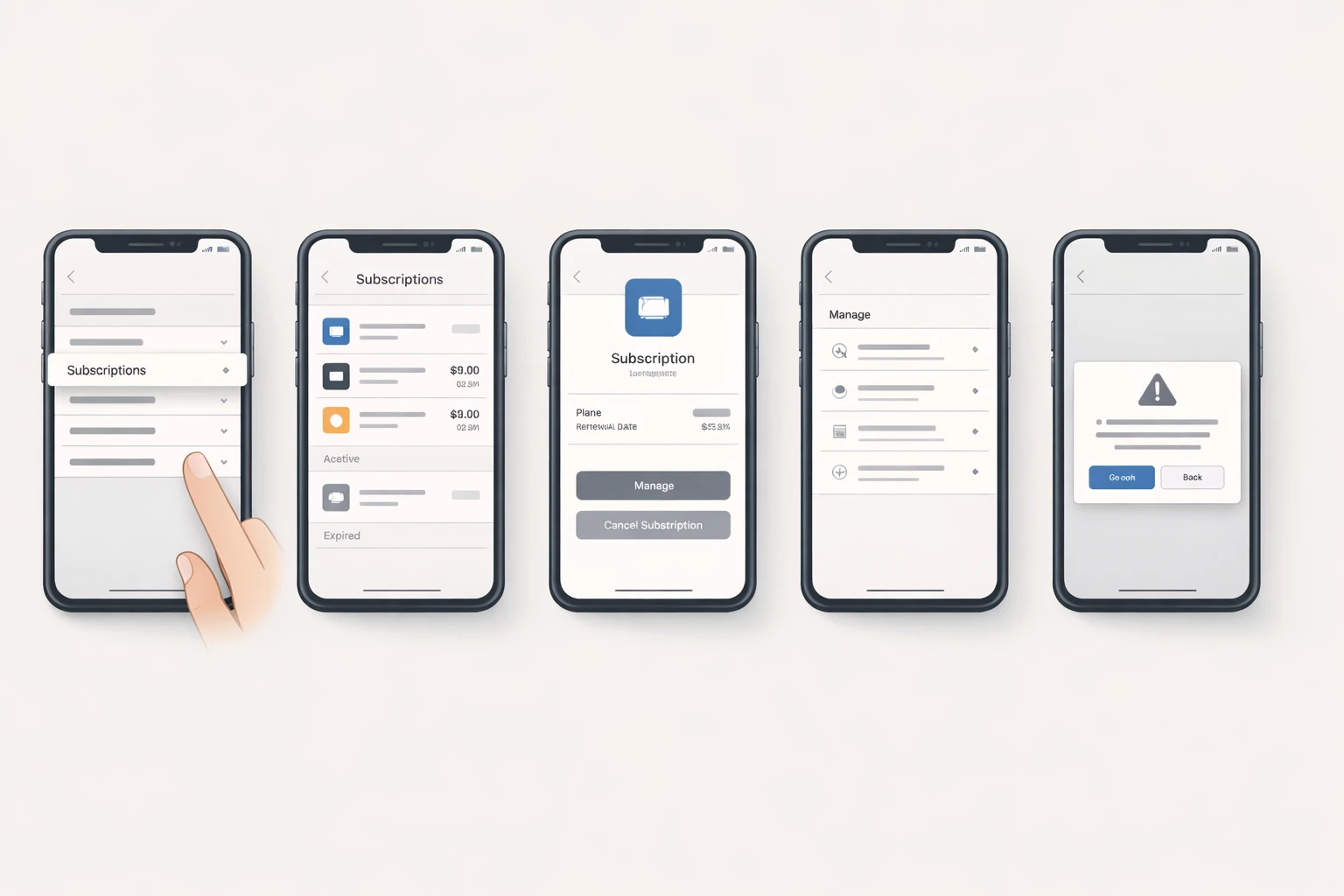 Follow the platform-specific steps below to cancel your YAZIO subscription
Cancel YAZIO PRO on iPhone (App Store)
If you subscribed through the Apple App Store (YAZIO Cancel Guide):
- Open the Settings app on your iPhone (not the YAZIO app)
- Tap your Apple ID name at the top of the screen
- Tap Subscriptions
- Find YAZIO in the list of active subscriptions and tap it
- Tap Cancel Subscription and confirm
- You will see a confirmation message showing the date your PRO access expires
Alternative Method
Open the App Store > tap your profile picture > Subscriptions > YAZIO > Cancel.
Cancel YAZIO PRO on Android (Google Play Store)
If you subscribed through Google Play (YAZIO Cancel Guide):
- Open the Google Play Store app on your Android phone
- Tap your profile picture in the top right
- Tap Payments and subscriptions
- Tap Subscriptions
- Find the YAZIO subscription and tap it
- Tap Cancel subscription and follow the on-screen instructions
- Your subscription will expire at the end of the current billing period
Cancel YAZIO PRO on the Website
If you signed up through yazio.com (YAZIO 7-Day Trial Guide):
- Go to yazio.com/app/account and log in
- Find your active subscription under your account settings
- Click Cancel subscription
- Confirm by clicking Unsubscribe
- You will see the status change to "Canceled" with your subscription end date
In-app fallback (if the website method does not work)
- Open the YAZIO app
- Go to the Profile tab
- Tap Settings > Account > Subscription
- Tap Cancel Subscription and confirm
- The status will show "Canceled" and your expiration date
IMPORTANT
Checkpoint: midway progress update.
You are halfway - the best tips are next.
⏱️ Progress 2/4 - ~2 minutes in - Keep going
✅ What the trial includes (done)
✅ Step-by-step cancel guides (done)
👉 9 tips to never get charged (current)
⏳ The 10-second trick (next)
9 Tips to Avoid Getting Charged After Your YAZIO Trial
Tip 1: Set a calendar reminder for day 5. Do not wait until day 7. Give yourself a 2-day buffer. Apple requires at least 24 hours before the trial ends.
Tip 2: Take a screenshot of your subscription confirmation. When you sign up, save a screenshot that shows where you purchased (website, App Store, or Google Play).
Tip 3: Cancel on day 1 if you just want to test. You can cancel immediately after signing up and still keep PRO access for the full 7 days. Canceling early does not cut your trial short.
Tip 4: Check your bank statement identifier. "APPLE.COM/BILL" means Apple. "GOOGLE*YAZIO" means Google Play. "YAZIO GMBH" means the website.
Tip 5: Do not rely on deleting the app. Removing YAZIO from your phone does nothing to your subscription.
Tip 6: Use the YAZIO app itself to check your status. Go to Profile > Settings > Account > Subscription to see if your subscription is active, canceled, or expired.
Tip 7: Know your refund window. Website purchases have a 14-day withdrawal right under EU law. App Store and Google Play purchases go through their respective refund processes.
Tip 8: Compare what you lose. Before canceling, check which PRO features you actually used. If you only used basic calorie tracking and the fasting timer, the free version covers both.
Tip 9: Check for seasonal promotions. YAZIO frequently runs discounts during New Year, back-to-school season, and Black Friday. Annual plans sometimes drop to $23.90/year.
IMPORTANT
Checkpoint: final stretch before the reveal.
One last nudge - the 10-second trick is next.
⏱️ Progress 3/4 - ~3 minutes in - Keep going
✅ What the trial includes
✅ Step-by-step cancel guides
✅ 9 tips to never get charged
✨ The 10-second trick (about to reveal)
How YAZIO's Trial Compares to Other Calorie Tracking Apps
| App | Trial Length | Cancel Deadline | Auto-Renew Price |
|---|---|---|---|
| YAZIO | 7 days (website only) | 24 hours before end | $23.90-$47.90/yr |
| MyFitnessPal | 30 days (Premium+) | 24 hours before end | $79.99/yr |
| MacroFactor | 7 days | 24 hours before end | $71.99/yr |
| Lose It | 7 days | 24 hours before end | $39.99/yr |
| Fastic | 7-14 days | 24 hours before end | $79.99/yr |
| NutriScan | 7 days | 24 hours before end | $49.99/yr |
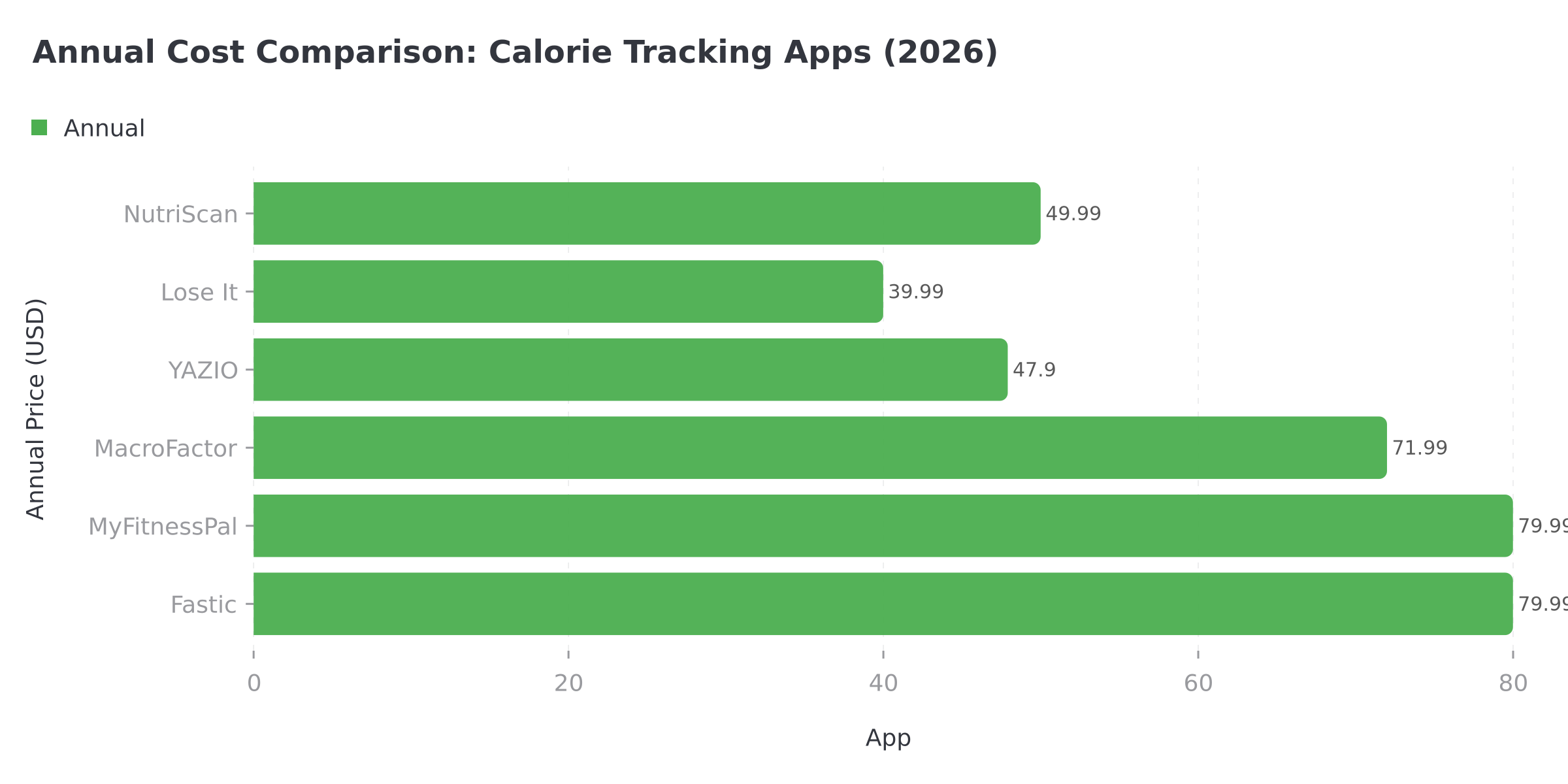 Figure 1: Annual pricing comparison shows significant cost differences between popular calorie tracking apps
 Choosing the right calorie tracker means weighing features against cost and your specific tracking needs
A 2021 systematic review in JMIR mHealth and uHealth found that nutrition apps are effective at changing eating behavior, but widespread long-term adoption remains a challenge. Cost concerns and subscription confusion were identified as key barriers to continued use (PMC 8409150).
YAZIO's trial is competitive in length but limited to website signups. Most competitors offer in-app trials through the App Store and Google Play, making the signup and cancel process more straightforward. If you are comparing calorie trackers, our guide to the best free AI calorie tracking apps breaks down the top options side by side.
How to Get a Refund If You Missed the Cancellation Window
If you got charged after your trial ended, here is what you can do based on where you purchased:
Refund for App Store (Apple) Purchases
- Go to reportaproblem.apple.com
- Sign in with your Apple ID
- Find the YAZIO charge in your purchase history
- Select "Request a refund" and choose your reason
- Apple typically responds within 48 hours
First-Time Refund
If this is your first refund request and you explain you forgot to cancel the trial, approval is likely.
Refund for Google Play Purchases
- Go to play.google.com/store/account/orderhistory
- Find the YAZIO subscription charge
- Click Report a problem next to the charge
- Select "I'd like to request a refund" and fill in the details
- Google typically processes refund requests within 1-4 business days
Refund for Website (yazio.com) Purchases
Website purchases come with stronger protections. Under EU consumer law, you have a 14-day withdrawal right from the date you signed up (YAZIO Refund Guide):
- Send an email to [email protected] stating you want to withdraw from the contract
- Include your registered email address and the date of purchase
- YAZIO must process your refund within 14 days of receiving your withdrawal notice
EU Consumer Rights
YAZIO is a German company (YAZIO GmbH, based in Erfurt) and follows EU consumer protection regulations. The 14-day cooling-off period applies regardless of whether you have used the app or not.

What the Research Says About App Trial Cancellations
A 2022 JMIR literature review of mobile health app engagement found that substantial participant dropout is an "omnipresent challenge" across mHealth studies, and unclear subscription terms contribute to user frustration (JMIR 2022).
Apple and Google have both updated their subscription policies in recent years. Apple now sends reminder notifications before a trial converts to a paid subscription. Google Play shows a clear "trial ends on [date]" notice in the subscription details.
A retrospective study of mobile health app users found that consistent logging is the strongest predictor of weight loss success, but only 20-30% of users maintain daily logging after the first month (PMC 9906313). This means many trial users stop logging well before their 7 days are up, making it easy to forget about cancellation.
For YAZIO specifically, the 7-day trial window is short. The AI photo logging, custom meal plans, and detailed nutrient analysis take time to evaluate properly. If you need more time to decide, canceling the trial and switching to the free version is always an option.
The 10-Second Trick That Makes Trial Charges Impossible
You have been patient. Here it is: cancel immediately after you sign up.
That is the entire trick. The moment you activate the YAZIO 7-day trial, open your phone settings and cancel the subscription right there. It takes 10 seconds. You keep full PRO access for all 7 days, but the auto-renewal is already dead. No calendar reminder needed. No last-minute rush. No risk.
This works because Apple, Google, and YAZIO all honor the full trial period even after cancellation. You paid nothing, you lose nothing, and you still get to test every PRO feature for the full week.
If you decide PRO is worth keeping after your trial, just resubscribe. The price is the same.
IMPORTANT
Recap: everything you completed this round.
You finished the run - save this for next time.
⏱️ Progress 4/4 - ~4 minutes in - Nicely done
✅ What the trial includes
✅ Step-by-step cancel guides
✅ 9 tips to never get charged
✅ The 10-second trick (revealed)
Track Without the Surprise: Try NutriScan
If subscription anxiety is keeping you from tracking your meals consistently, NutriScan offers AI-powered meal scanning with a generous free tier. Our macro calculator helps you set personalized goals, and our calorie tracking guide walks you through building a sustainable tracking habit.
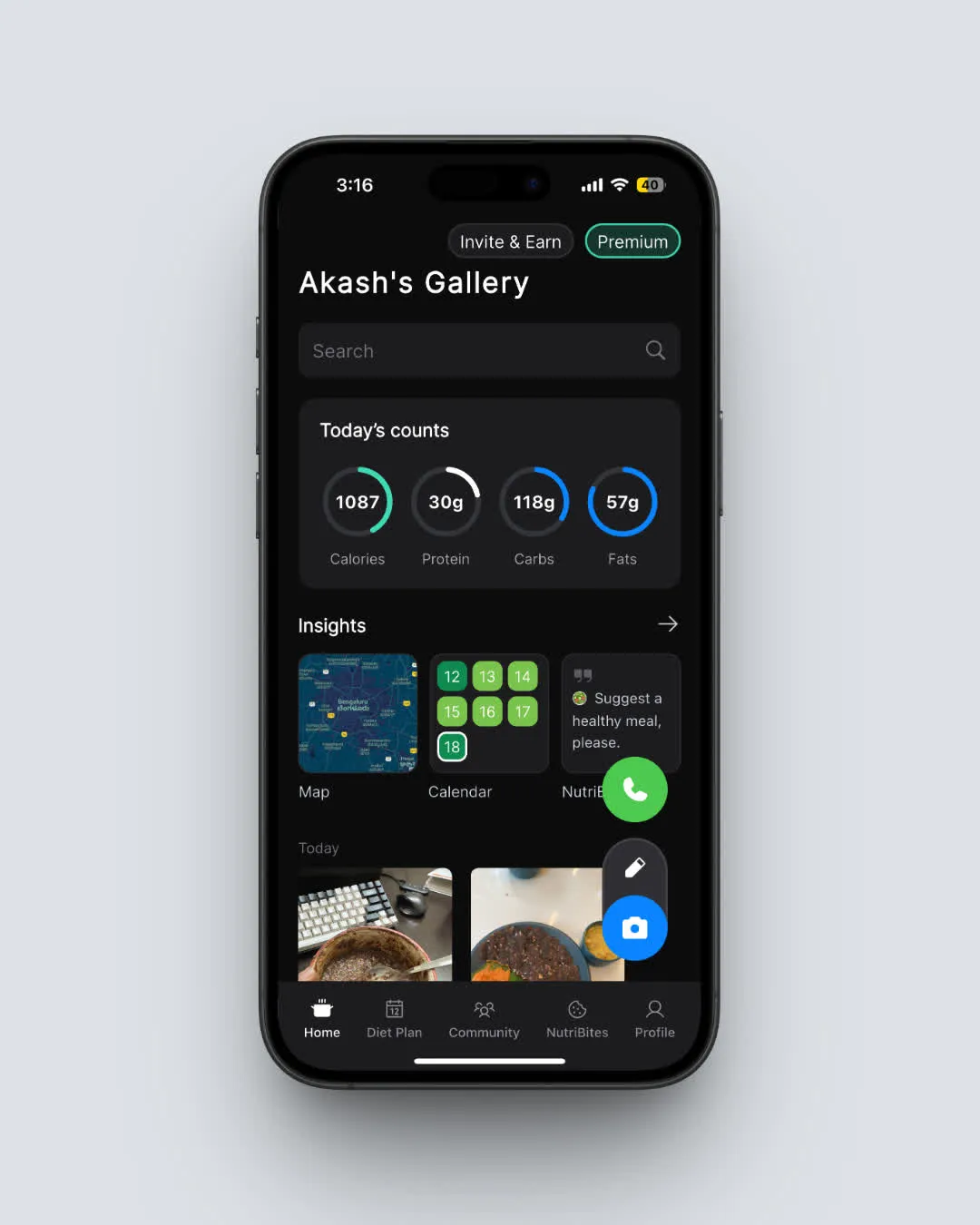 NutriScan's home screen: track calories, protein, carbs, and fat with AI meal scanning (Home > Daily View)
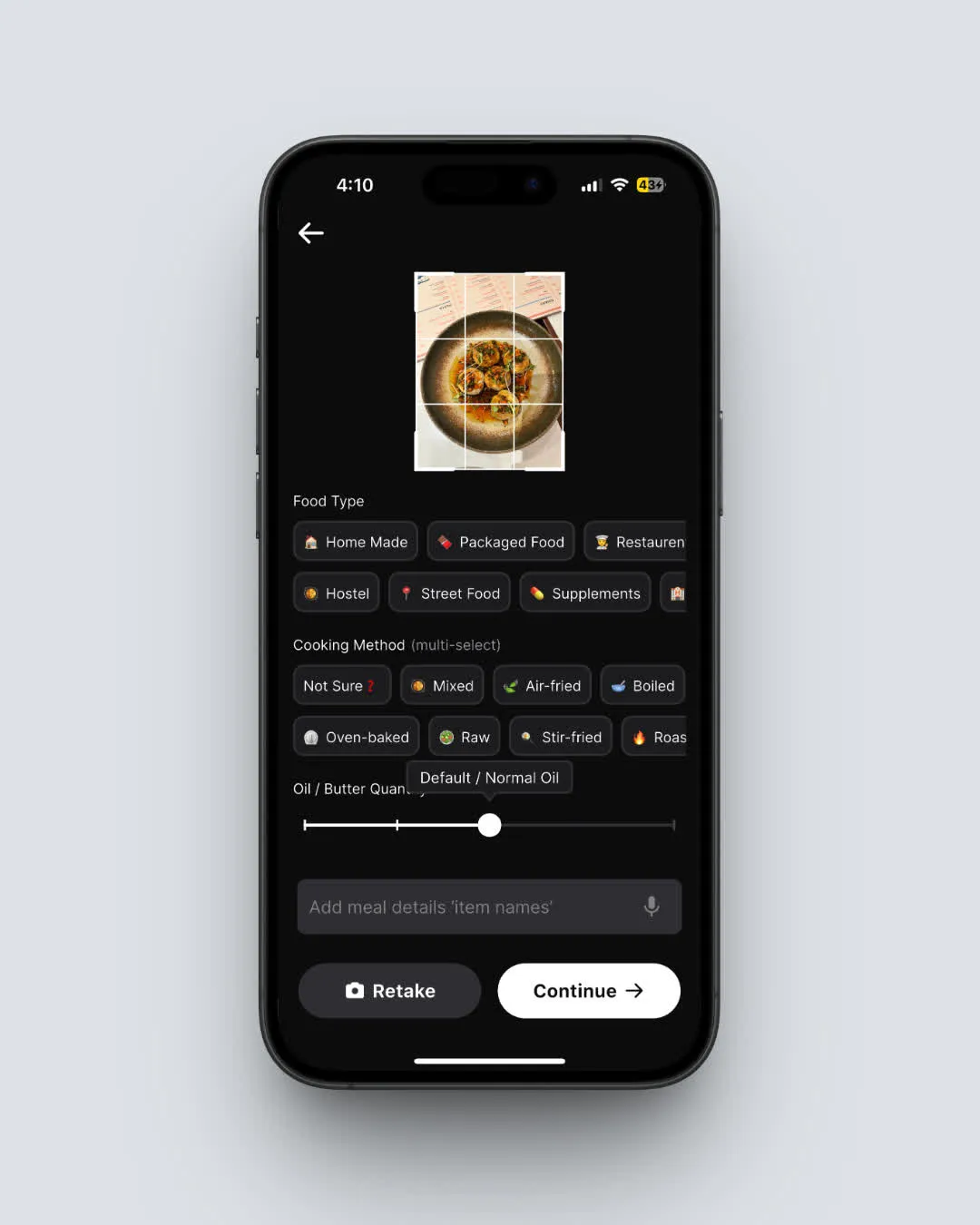 Snap a photo of your meal and NutriScan identifies the food instantly (Home > Camera Icon > Crop Picture)
 The relief when you cancel your trial before the charge hits
Download NutriScan and start tracking your meals today with no surprise charges and no hidden timers.
FAQ
Does canceling the YAZIO free trial remove my food logs?
No. Canceling your subscription does not delete your data. Your food logs, weight history, and account remain intact. You simply lose access to PRO features after your trial or paid period ends, and the app reverts to the free version.
Can I get a YAZIO free trial more than once?
The 7-day free trial is typically a one-time offer per account. Once you have used it, YAZIO does not offer it again on the same account. Creating a new account to get another trial violates the terms of service.
What happens if I cancel the YAZIO trial on day 1?
You keep full PRO access for the remaining days of your trial. Canceling early simply stops the automatic renewal. You will not be charged, and you can use all PRO features until the 7 days are up.
Is YAZIO PRO worth keeping after the trial?
It depends on your tracking needs. YAZIO PRO costs $23.90 to $47.90 per year (depending on promotions) and unlocks AI photo logging, 1,500+ recipes, detailed nutrient tracking, and advanced fasting tools. If you track food daily and use the recipes and fasting features, the annual cost works out to about $0.07 to $0.13 per day. If you only need basic calorie tracking, the free version may be enough.
How do I know which platform I used to subscribe?
Check your bank or credit card statement. "APPLE.COM/BILL" means Apple App Store. "GOOGLE*YAZIO" means Google Play Store. "YAZIO GMBH" means the YAZIO website. You can also open the YAZIO app, go to Profile > Settings > Account > Subscription, which shows your subscription source and status.
Can I switch from a monthly YAZIO PRO plan to an annual plan?
You cannot change the duration of an active subscription. You must first cancel your current plan, wait for it to expire, and then sign up for a new plan with your preferred duration (YAZIO Help Center). The annual plan saves 50-75% compared to paying monthly.
Does YAZIO offer a student discount?
Yes. YAZIO offers up to 40% off the 12-month PRO plan for students through Student Beans. You need to verify your student status to unlock the discount.