YAZIO Coupon Code: Where to Enter It and What to Do If It Fails
 ChatGPT
  Claude
  AI Mode
  Perplexity
TL;DR - YAZIO Coupon Code Guide
Where to enter: YAZIO website only (yazio.com/app/onboarding/coupon) - not inside the app
Best deal: 40% student discount via Student Beans ($28.75/year) or 20% off on official promo page ($38.32/year)
Common fix: Copy and paste codes exactly - they are case-sensitive. Remove extra spaces before and after
Key rule: Coupon codes only apply to the 12-month subscription plan
If code fails: Check expiration, capitalization, plan type, and existing PRO status
IMPORTANT
Your YAZIO coupon plan at a glance.
A quick roadmap so you can act fast.
⏱️ Progress 0/4 - ~0 minutes in - Keep going
⏳ Where coupon codes actually work (website vs app)
⏳ Step-by-step redemption guide
⏳ Troubleshooting when codes fail
🔍 The one free trick that beats every coupon code (revealed near the end)
 When you can't find where to enter that YAZIO coupon code...
You found a YAZIO coupon code. Maybe a friend shared it, maybe you spotted it on a deal site, maybe an influencer dropped it in a video caption. Either way, you are ready to save money on YAZIO PRO - but you cannot find where to type it in.
You are not alone. As a NutriScan nutritionist who has tested dozens of nutrition apps, I can tell you that coupon code redemption is one of the most common support questions across every calorie tracking app. A 2024 study on mHealth app engagement found that unclear subscription flows are a leading cause of user frustration and app abandonment (PMC - User Engagement and Abandonment of mHealth). YAZIO has over 50 million users worldwide, and their help center article on coupon codes shows that only 5 out of 23 readers found the instructions helpful (YAZIO Help Center). That means most people still leave confused.
This guide will walk you through exactly where to enter your YAZIO coupon code, what to do when it does not work, and how to find the best discounts available right now.
Where YAZIO Coupon Codes Actually Work
Here is the first thing most people get wrong: you cannot enter a YAZIO coupon code inside the app. Coupon codes only work on the YAZIO website. If you have been tapping around in the iPhone or Android app looking for a "promo code" box, that is why you cannot find one.
YAZIO handles coupon codes through a dedicated web page. This is different from apps like MyFitnessPal or Lose It, where you can sometimes apply codes during the in-app checkout flow. With YAZIO, the entire coupon process happens in your phone or computer browser - not inside the app itself.
This matters because the purchase platform determines how your subscription is managed. When you use a coupon code on the YAZIO website, your subscription is billed directly by YAZIO (through their payment processor). When you subscribe through the App Store or Google Play Store, Apple or Google handles the billing. These are two separate systems, and mixing them up is the number one reason coupon codes "fail."
The Three Purchase Platforms
| Platform | How You Subscribed | Coupon Code Support |
|---|---|---|
| YAZIO Website | Browser checkout at yazio.com | Yes - full coupon support |
| Apple App Store | In-app purchase on iPhone/iPad | No - Apple does not allow external codes |
| Google Play Store | In-app purchase on Android | No - Google does not allow external codes |
WARNING
If you already have a YAZIO PRO subscription through Apple or Google, a website coupon code will not replace it. You would need to cancel the app store subscription first, wait for it to expire, and then use the coupon code on the website to start a new subscription.
 Most YAZIO users search inside the app for a coupon field that does not exist
IMPORTANT
Checkpoint: here's where you are right now.
Quick status update so you always know the next best move.
⏱️ Progress 1/4 - ~1 minute in - Keep going
✅ Where coupon codes work (done)
👉 Step-by-step redemption guide (you're here)
⏳ Troubleshooting when codes fail
🧩 The one free trick that beats every coupon code (coming soon)
Real-World Examples: When Coupon Codes Go Wrong
Example 1: The Case-Sensitive Trap. Sarah found a YAZIO code on a coupon site. She typed "YAZIO20" but the actual code was "Yazio20." The code was rejected. YAZIO coupon codes are case-sensitive, so one wrong capital letter or lowercase letter will make the code fail. Always copy and paste instead of typing manually.
Example 2: The Wrong Account. James received a YAZIO gift code from his partner. He went to the redemption page and created a new account. But when he opened the app, he logged into his old account. The PRO status did not show up because the code was tied to the new account he just created. The fix was simple: log into the app with the same email address he used on the website.
Example 3: The Expired Code. Maria found a "50% off YAZIO PRO" code on a deal website from 2024. She entered it correctly, but the site returned an error. Most YAZIO coupon codes have expiration dates. Third-party deal sites often list expired codes alongside current ones, with no clear way to tell which still work.

How Coupon Codes and Discount Systems Actually Work
Behind the scenes, nutrition app coupon codes follow a predictable pattern. Every coupon code is a unique string stored in the company's database with specific rules attached to it: how many times it can be used, when it expires, which subscription plan it applies to, and whether it requires a new account.
YAZIO's coupon system is website-only because they use a direct payment processor rather than routing everything through Apple or Google. This gives YAZIO more control over pricing and promotions - they can offer bigger discounts because they avoid the 15-30% commission that app stores charge on in-app purchases.
A 2024 study on mHealth app dissemination strategies found that promotional pricing and discount codes are among the most effective methods for converting free users to paid subscribers, second only to in-app prompts (PMC - Dissemination Strategies for mHealth Apps). The study also noted that apps offering web-based payment options alongside app store billing typically achieve higher conversion rates because they can offer more flexible pricing.
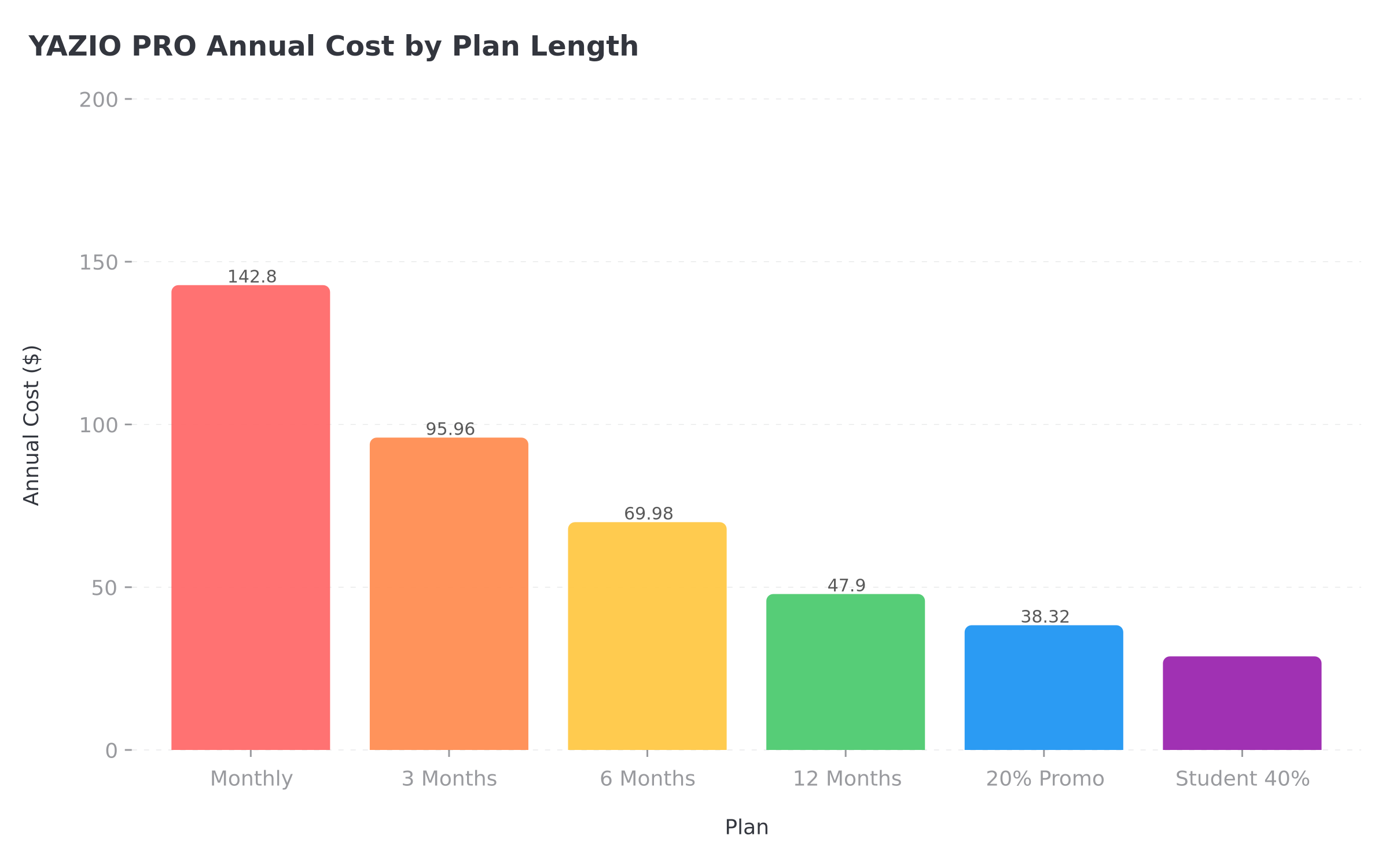 Figure 1: YAZIO PRO pricing across all plan lengths - the annual plan saves 66% compared to paying monthly
Step-by-Step: How to Redeem a YAZIO Coupon Code
Follow these steps exactly. Each one matters.
Step 1: Open the Redemption Page in Your Browser
Go to yazio.com/app/onboarding/coupon in your phone or computer browser. Do not open the YAZIO app. You need a browser - Safari, Chrome, Firefox, or any other browser.
Step 2: Sign In or Create an Account
Log in with your existing YAZIO account email and password. If you do not have an account yet, create one. Important: Remember the exact email address you use here. You will need it later.
Step 3: Click "Redeem Coupon Code"
On the next page, you will see a button or link that says "Redeem coupon code." Click it. A text field will appear where you can enter your code.
Step 4: Enter the Code Exactly
Type or paste your coupon code. Pay attention to:
- Capital vs lowercase letters (codes are case-sensitive)
- Spaces before or after the code (remove them)
- The number zero vs the letter O
- The number one vs the lowercase letter l
Step 5: Complete Payment
After the code is accepted, the discounted price will show on screen. Confirm the purchase. You will receive a confirmation email from YAZIO.
Step 6: Open the App and Log In
Download the YAZIO app from the App Store or Google Play Store if you do not have it. Open it and log in with the same email address you used in Step 2. Your PRO status should activate automatically.
Step 7: Force-Sync If PRO Does Not Appear
If the app still shows the free version after logging in:
- On Android: Force-close the app (swipe it away from recent apps), then reopen it
- On iPhone: Go to Profile ➡️ Settings ➡️ Account ➡️ Restore subscription
- Website purchase: Log out of the app, then log back in
TIP
According to the YAZIO Help Center, syncing issues between website purchases and the app are common. The force-close or logout method works in most cases.
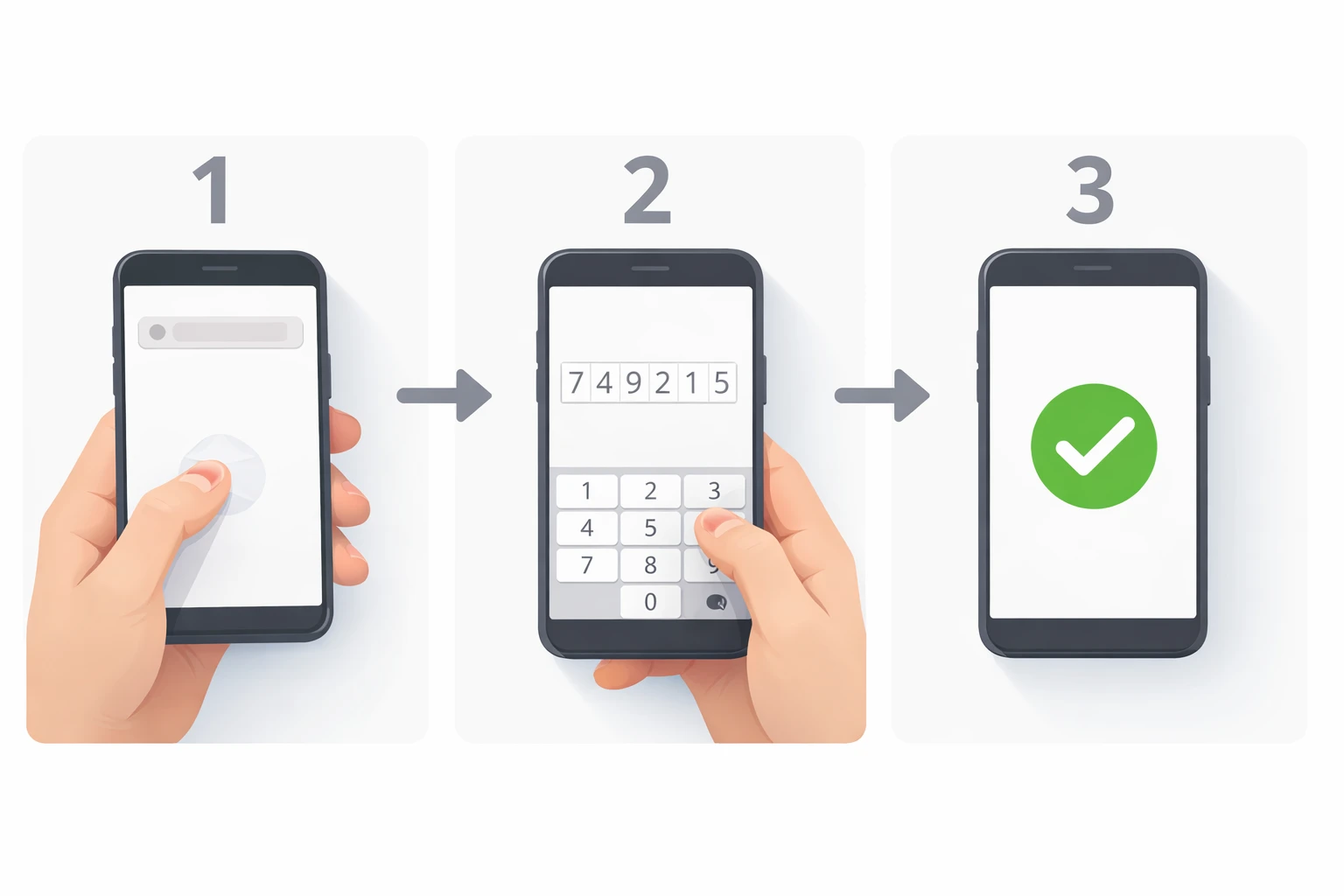 The 7-step process from opening your browser to seeing PRO in the app
IMPORTANT
Checkpoint: midway progress update.
You're halfway - the troubleshooting section is next.
⏱️ Progress 2/4 - ~2 minutes in - Keep going
✅ Where coupon codes work (done)
✅ Step-by-step redemption guide (done)
👉 Troubleshooting when codes fail (current)
⏳ The one free trick that beats every coupon code (next)
Tips and Tricks for Getting the Best YAZIO Deal
Here are seven practical ways to pay less for YAZIO PRO.
1. Use the official promo page first. YAZIO maintains a permanent discount page at yazio.com/en/promo-code. As of March 2026, it offers 20% off the 12-month PRO subscription. The discount is applied automatically - no code needed.
2. Check Student Beans if you are a student. YAZIO offers a 40% student discount on the 12-month PRO plan through Student Beans. That brings the price down to $28.75 per year, which works out to $2.39 per month. You need to verify your student status to access the deal.
3. Coupon codes only apply to 12-month subscriptions. YAZIO's official FAQ states: "There are currently no coupon codes for the 3-month subscription." If you want the shortest possible commitment with a discount, the 12-month plan with a code is still your only option.
4. Always copy and paste codes. Never type a coupon code manually. Codes are case-sensitive, and one wrong character means rejection. Copy directly from the source and paste into the code field.
5. Check the expiration date. Third-party coupon sites list YAZIO deals, but many codes expire without the sites updating their pages. If a code does not work, try the official YAZIO promo page instead.
6. Only new or non-PRO users qualify for most deals. The Student Beans discount specifically states: "Only new and registered users without a current YAZIO PRO membership are eligible." Most coupon codes have similar restrictions.
7. Compare the total cost before choosing a plan. YAZIO PRO pricing without any coupon:
| Plan | Regular Price | Per Month |
|---|---|---|
| Monthly | $11.90/mo | $11.90 |
| 3 Months | $23.99 | $8.00 |
| 6 Months | $34.99 | $5.83 |
| 12 Months | $47.90 | $3.99 |
With the 20% official promo, the annual plan drops to about $38.32 ($3.19/mo). With the 40% student discount, it drops to $28.75 ($2.39/mo). Even without a coupon, the annual plan already saves 66% compared to paying monthly.
Research and Data: Why Discount Codes Matter for Health Apps
The relationship between pricing and long-term health app usage is well-documented. A 2024 cross-sectional study on factors driving mHealth app adoption found that perceived value - the gap between what users pay and what they feel they receive - is a primary predictor of continued use (PMC - Factors Driving the Use of Mobile Health Apps). Users who felt they got a good deal during sign-up were significantly more likely to remain active after 90 days.
A separate 2024 study on predicting long-term engagement in mHealth apps found that the first 14 days of paid subscription use are critical (PMC - Predicting Long-Term Engagement in mHealth Apps). Users who logged food consistently during those first two weeks had a 3-4x higher retention rate at the 6-month mark. This means that getting a discount and starting your subscription at the right time - when you are motivated and ready to commit - matters more than the discount amount itself.
YAZIO's approach of offering permanent website discounts reflects a broader industry trend. Apps are learning that a lower entry price combined with a strong onboarding experience produces better outcomes than a higher price with a free trial that most users forget to cancel.
For a deeper look at how calorie tracking apps compare on features and pricing, check out our best monthly plan under $10 guide.
What to Do When Your YAZIO Coupon Code Fails
If you entered a code and it did not work, go through this checklist:
Check 1: Are you on the right page? Codes must be entered at yazio.com/app/onboarding/coupon - not inside the app, and not on the general YAZIO homepage.
Check 2: Is the code case-sensitive? Try different capitalizations. "YAZIO20" and "yazio20" and "Yazio20" are three different codes.
Check 3: Has the code expired? Most promotional codes have an expiration date. If you found the code on a third-party site, check when the page was last updated.
Check 4: Does the code apply to your plan? YAZIO coupon codes currently only apply to the 12-month PRO subscription. If you are trying to apply a code to a 3-month or 6-month plan, it will not work.
Check 5: Do you already have PRO? Most coupon codes require that you do not have a current PRO subscription. If you are already a PRO member, you typically cannot stack a new code on top of your existing plan.
Check 6: Are there extra spaces? When copying a code from a website or email, hidden spaces sometimes get included before or after the code text. Delete everything in the code field and re-paste, then manually check for any whitespace.
Check 7: Try the official promo page. If the third-party code does not work, go directly to yazio.com/en/promo-code. The 20% discount there is always active and does not require entering any code.
Check 8: Contact YAZIO support. If none of the above works and you believe the code should be valid, reach out to YAZIO's support team through the chat widget on help.yazio.com or email them directly.
IMPORTANT
Checkpoint: final stretch before the reveal.
One last nudge - the free trick is next.
⏱️ Progress 3/4 - ~3 minutes in - Keep going
✅ Where coupon codes work
✅ Step-by-step redemption guide
✅ Troubleshooting when codes fail
✨ The one free trick that beats every coupon code (about to reveal)

How YAZIO Compares to Other App Discounts
YAZIO is not the only nutrition app that offers coupon codes and student discounts. Here is how the discount landscape looks across popular apps:
| App | Coupon Codes | Student Discount | Where to Redeem |
|---|---|---|---|
| YAZIO | Yes (website only) | 40% via Student Beans | yazio.com/app/onboarding/coupon |
| MyFitnessPal | Occasional promo | No | In-app or website |
| Lose It | Rare promotions | No | In-app |
| Lifesum | Varies by campaign | No official program | Website or in-app |
| Fastic | Feel Good Guarantee (14 days) | No | In-app or website |
| Cronometer | Seasonal sales | No | Website |
| NutriScan | Generous free plan | Referral discounts | In-app |
 When the coupon code finally works and you see the discount applied
YAZIO stands out for having a permanent, always-available discount on the website (20% off) plus a verified student program. Most other nutrition apps rely on occasional seasonal sales or limited-time promotions. If you want to compare cancellation processes across these apps, our YAZIO cancellation guide has the full walkthrough.
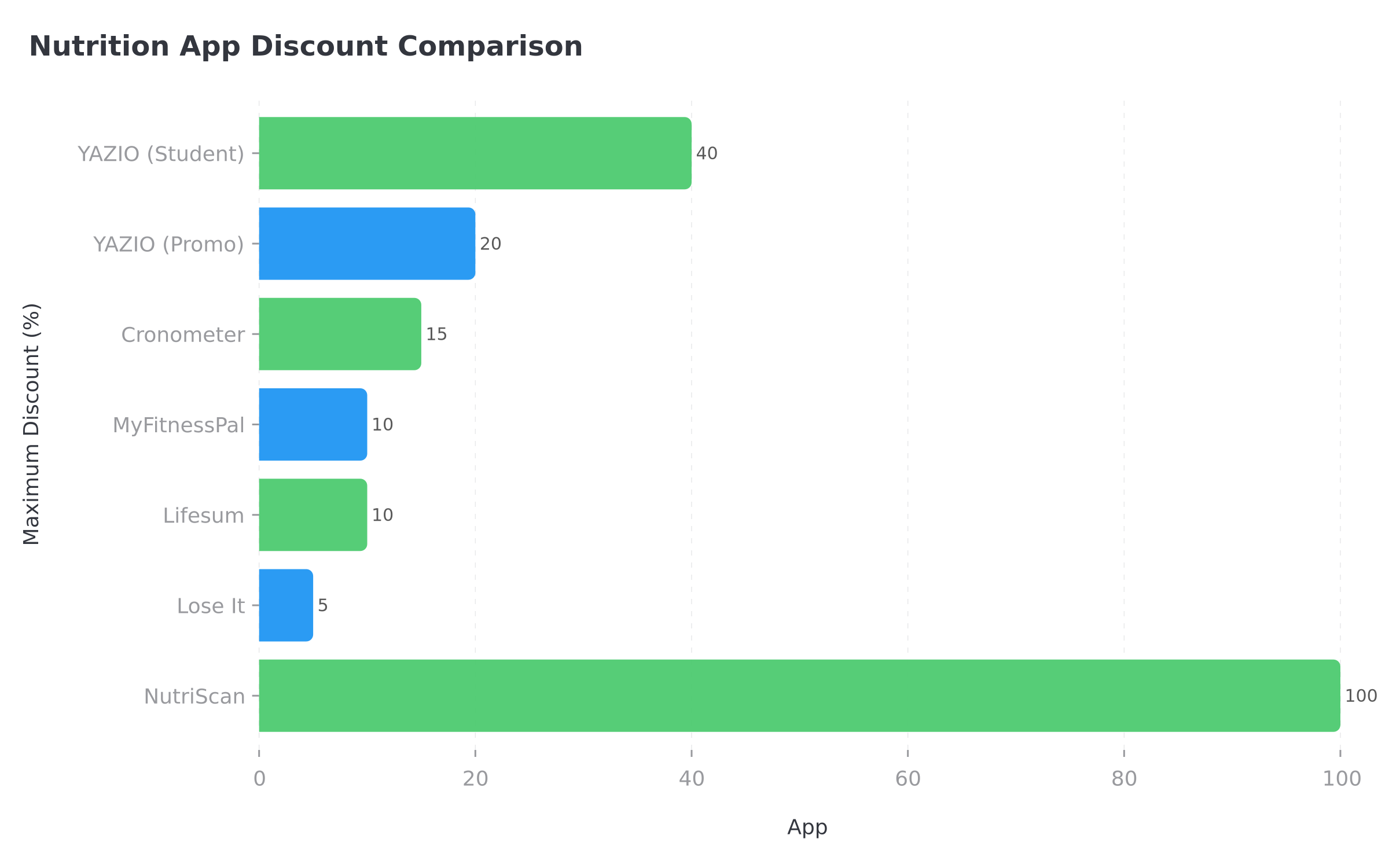 Figure 2: How YAZIO's permanent discount stacks up against competitors' occasional deals
The Free Trick That Beats Every Coupon Code
You have been patient. Here is the approach that saves more money than any coupon: use a free plan that actually works.
Most people chase coupon codes because they assume the free version of a calorie tracking app is too limited. With YAZIO's free tier, you get basic food logging and a limited food database. But here is what many users miss: some apps give you significantly more on their free plans.
NutriScan, for example, offers AI-powered food scanning, macro tracking, and personalized meal insights on its free plan - features that YAZIO locks behind PRO. Before you spend $28-48 per year on YAZIO PRO with a coupon, consider whether a free app covers what you actually need.
Here is a quick comparison:
| Feature | YAZIO Free | YAZIO PRO | NutriScan Free |
|---|---|---|---|
| Food logging | Basic | Full database | Full database |
| AI food scanning | No | No | Yes |
| Macro tracking | Limited | Full | Full |
| Personalized insights | No | Yes | Yes (AI-powered) |
| Price | $0 | $28.75-47.90/year | $0 |
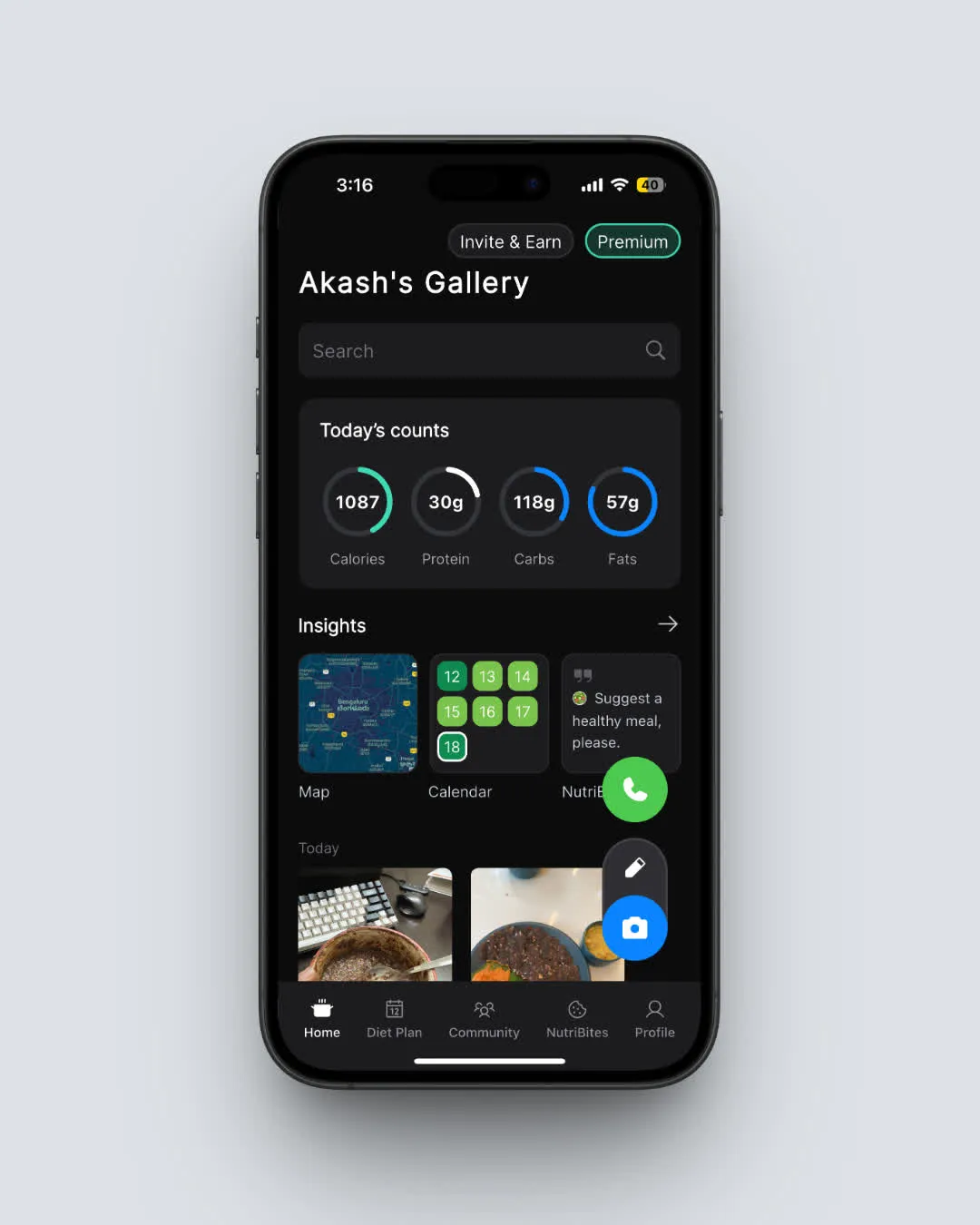 NutriScan's home screen - free AI-powered macro tracking with no subscription needed (Home > Daily Breakdown)
TIP
Before hunting for coupon codes, try a free plan that includes the features you need. You might save yourself the coupon hunt entirely. Start NutriScan's free plan here.
IMPORTANT
Recap: everything you completed this round.
You finished the run - save this guide for your next coupon code.
⏱️ Progress 4/4 - ~4 minutes in - Nicely done
✅ Where coupon codes work
✅ Step-by-step redemption guide
✅ Troubleshooting when codes fail
✅ The one free trick that beats every coupon code (revealed)
Conclusion
Getting the best price on YAZIO PRO comes down to three things: knowing that coupons only work on the website (not in the app), entering codes carefully (case-sensitive, no extra spaces), and checking the official promo page before hunting on third-party sites.
The 20% discount on yazio.com/en/promo-code is always available. Students can get 40% off through Student Beans. And the annual plan at full price ($47.90/year, about $3.99/month) is already one of the best values in calorie tracking.
If you want an option with a generous free plan that includes AI-powered food scanning, give NutriScan a try - it offers features that many premium apps charge for.
Whatever app you choose, the research is clear: starting with a plan you can afford and logging consistently for the first two weeks matters more than any discount code. For help understanding your nutritional needs, try our macro calculator to plan a sustainable eating strategy.
Frequently Asked Questions
Can I use a YAZIO coupon code inside the app?
No. YAZIO coupon codes can only be redeemed on the YAZIO website at yazio.com/app/onboarding/coupon. You need to log in through your browser, enter the code, and then sync the purchase with your app by logging in with the same account. This is because in-app purchases go through Apple or Google, which do not support external promotional codes.
Why is my YAZIO coupon code not working?
The most common reasons are: the code has expired, you are entering it with the wrong capitalization (codes are case-sensitive), you already have an active PRO subscription, or you are trying to apply the code to a plan length it does not cover. Most YAZIO coupons only work on the 12-month subscription. Try the official promo page at yazio.com/en/promo-code for a guaranteed 20% discount.
Does YAZIO offer a student discount?
Yes. YAZIO offers a 40% discount on the 12-month PRO subscription through Student Beans. The discounted price is $28.75 per year ($2.39 per month). You need to verify your student status through the Student Beans platform. Only new users and existing users without a current PRO membership are eligible.
Can I use a coupon code if I already subscribe through the App Store?
Not directly. If you have an active YAZIO PRO subscription through the Apple App Store or Google Play Store, you need to cancel that subscription first and wait for it to expire. Once your app store subscription ends, you can then use a coupon code on the YAZIO website to start a new subscription at the discounted price. Your data and progress will remain in your account.
What is the cheapest way to get YAZIO PRO in 2026?
The cheapest option is the Student Beans 40% discount at $28.75 per year ($2.39/month). If you are not a student, the next best option is the official promo page (yazio.com/en/promo-code) at 20% off the 12-month plan (about $38.32/year or $3.19/month). Without any discount, the annual plan is $47.90/year ($3.99/month). Paying monthly at $11.90/month is the most expensive option at $142.80 per year.
Are third-party YAZIO coupon codes safe to use?
Codes from established platforms like Student Beans are verified and safe. Codes from general coupon aggregator sites are sometimes outdated or expired. YAZIO's official recommendation is to use their own promo code page. Never enter personal information on unfamiliar coupon sites, and avoid "coupon generators" or sites that ask you to complete surveys before revealing a code - those are typically scams.
How do I know if my YAZIO coupon was applied correctly?
After entering the code on the redemption page, the discounted price should display on screen before you confirm payment. If the total still shows the full price, the code was not applied. Check the error message (if any) for clues. After purchase, your confirmation email from YAZIO will show the amount charged. Compare this to the expected discounted price to confirm the coupon worked.