Fasting App Refund Rules: What You Can Ask for (2026)
 ChatGPT
  Claude
  AI Mode
  Perplexity
You signed up for a fasting app thinking you would stick with it. Two weeks later, you have not opened it since Tuesday. Now you want your money back.
TL;DR - Fasting App Refund Rules 2026
- Fastic: 14-day Feel Good Guarantee, full refund, zero conditions
- Simple: 30-day window for website purchases; commitment plans lock you in after 7 days
- YAZIO: Platform-dependent, must go through Apple or Google for app store purchases
- Noom: 14 days for initial charges only, renewals are not refundable
- Key insight: Where you buy matters as much as what you buy. Website purchases give more refund rights than app store purchases, especially in the EU
Fasting apps charge anywhere from $5 to $25 a month. A 2025 RevenueCat report found that nearly 30% of annual app subscriptions get canceled within the first month. Health and fitness apps are among the highest churn categories. The problem is not just finding the right app. It is understanding what happens to your money when you decide to leave.
Every fasting app handles refunds differently. Some give you 14 days. Some give you 30. Some give you nothing unless you fight for it. This guide breaks down the exact refund rules for the most popular fasting apps in 2026 so you know what you can ask for and when.
IMPORTANT
Your fasting app refund plan at a glance.
A quick roadmap so you can act fast on your refund.
⏱️ Progress 0/4 - ~0 minutes in - Keep going
⏳ Step 1: Each app's refund window and conditions
⏳ Step 2: Apple and Google platform-level rules
⏳ Step 3: EU and FTC legal protections
🔍 The 2-sentence email template that got a reader a $209 refund (revealed near the end)
 How app subscriptions feel when you forget to cancel the trial
What Determines Your Refund Rights
Before we compare individual apps, here are the four factors that determine whether you can get a refund from any fasting app:
- Where you bought it - Apple App Store, Google Play, or the app's website each have separate refund rules
- When you bought it - Most refund windows start from the charge date, not from when you stopped using the app
- What type of subscription - Monthly, annual, commitment plans, and lifetime plans all have different rules
- Where you live - EU consumers get legal protections that US consumers do not
TIP
These four factors shape everything. A user in Germany who bought on the website has different rights than a user in Texas who bought through Apple. Keep these in mind as we go through each app.
Fastic: The 14-Day Feel Good Guarantee
Fastic stands out in the fasting app market with what they call the Feel Good Guarantee. Here is how it works:
- Refund window: 14 days from purchase
- Conditions: None. You do not need to follow a fasting plan, use the timer, log your weight, or achieve any results
- Amount refunded: Full amount with no deductions
- How to request: Email [email protected] with your User ID and receipt
What makes Fastic's guarantee different from most app refund policies is that it is voluntary. The company explicitly states: "Even though digital products are generally not exempt from deductions, we consciously waive this."
Important details from their Terms of Service:
- Fastic GmbH (HealthVida GmbH & Co. KG on the App Store) is based in Berlin, Germany
- EU consumers also get a separate 14-day withdrawal right for website purchases under EU consumer law
- For app store purchases, you need to go through Apple or Google for refunds after the guarantee period
- PayPal purchases (common for website signups) require contacting [email protected]
| Fastic Refund Path | How to Request | Timeline |
|---|---|---|
| Feel Good Guarantee (any platform) | Email [email protected] | Within 14 days of purchase |
| Apple App Store | reportaproblem.apple.com | Case by case |
| Google Play | Google Play refund workflow | Within 48 hours (automatic), then case by case |
| Website (PayPal) | Email [email protected] | EU withdrawal: 14 days |
If you are currently using Fastic and thinking about switching, check out our guide on how to cancel Fastic Plus step by step before your next charge hits.
YAZIO: Platform-Dependent Refunds
YAZIO's refund policy depends entirely on where you purchased your PRO subscription. The key point: YAZIO cannot process refunds for purchases made through Apple or Google.
For Apple App Store purchases:
- YAZIO has no access to your App Store subscription details
- You must contact Apple Support directly
- Apple reviews refund requests on a case-by-case basis
For Google Play purchases:
- YAZIO cannot process refunds for Google Play purchases
- Contact Google Play Support directly
- Google has a 48-hour automatic refund window, then case-by-case review
For website purchases (yazio.com):
- YAZIO GmbH is based in Erfurt, Germany
- EU 14-day withdrawal right applies - you can cancel without giving any reason
- Contact [email protected] or mail to YAZIO GmbH, Kartauserstr. 13a, 99084 Erfurt, Germany
WARNING
Only 36 out of 109 users found YAZIO's refund help article useful. That low satisfaction rate suggests many users struggle with the process.
| YAZIO Refund Path | Who Handles It | Refund Window |
|---|---|---|
| Apple App Store | Apple (not YAZIO) | Case by case |
| Google Play | Google (not YAZIO) | 48 hours auto, then case by case |
| Website | YAZIO directly | EU: 14 days, no reason needed |
Need to cancel your YAZIO PRO subscription first? Here is our step-by-step cancellation guide for YAZIO.
IMPORTANT
Checkpoint: here's where you are right now.
Quick status update so you always know the next best move.
⏱️ Progress 1/4 - ~1 minute in - Keep going
✅ Fastic and YAZIO refund rules (done)
👉 Simple and Noom refund rules (you're here)
⏳ Apple, Google, EU and FTC protections
🧩 The $209 refund email template (coming soon)

Simple: 30 Days but With Catches
Simple (the fasting and weight loss coaching app by AM APPS) offers a 30-day refund window for website purchases. That sounds generous. But there are important conditions.
Standard subscriptions:
- Request a refund within 30 days of the charge date
- Cancel your subscription first to prevent future charges
- Contact the support team through the in-app chat widget
- Uninstalling the app or deleting your account does NOT cancel your subscription
Commitment plans (the catch):
Simple sometimes offers commitment subscriptions at reduced monthly rates (3 months, 10 months, etc.). These have much stricter refund rules:
- Generally cannot be canceled until the commitment period expires
- You can get a refund only if you cancel within 7 days of purchase
- Or if you qualify under your jurisdiction's cooling-off period
- After 7 days, you are locked in for the full commitment period
DANGER
A user who signs up for a 10-month commitment plan at a discount may not realize they cannot cancel after the first week. The monthly savings are not worth it if you quit in month 2.
| Simple Refund Path | Window | Conditions |
|---|---|---|
| Website (standard) | 30 days | Cancel subscription first |
| Website (commitment plan) | 7 days | After 7 days, locked until commitment ends |
| Apple App Store | Case by case | Through Apple, not Simple |
| Google Play | 48 hours auto, then case by case | Through Google, not Simple |
Looking to cancel Simple? Check our step-by-step guide to cancel Simple Premium.
Noom: 14 Days for Initial Charges Only
Noom's refund policy is straightforward but strict:
- Initial subscription or add-on charges: Refundable if you contact support within 14 days of the charge date
- Renewal charges: Not eligible for refund. You must cancel before the renewal date
- Cancellations after renewal: Go into effect at the end of the current billing cycle (no partial refund)
How to request a Noom refund:
- Chat support in the Noom app (available 24/7) - tap Profile picture, select Help
- Web: Sign in to your Account Portal
- Phone: (888) 266-5071, available daily 8 AM - 8 PM ET
Noom's policy makes the timeline very clear: you have exactly 14 days from when the charge hits your card. Day 15? No refund. This applies to both Noom Weight ($70/month or $209/year) and Noom Med programs ($149-$279/month).
What catches users off guard:
- The 14-day clock starts from the charge date, not from when you stopped using the app
- Trial-to-paid conversions count as "initial charges" and qualify for the 14-day window
- If you forget to cancel and get charged for a renewal, that renewal is not refundable
| Noom Refund Path | Window | Eligible Charges |
|---|---|---|
| Direct purchase (app/web) | 14 days from charge | Initial subscription and add-ons only |
| Renewal charges | Not refundable | Must cancel before renewal date |
| Apple/Google purchase | Case by case | Through Apple/Google |
| Phone support | 14 days | Call (888) 266-5071 |
IMPORTANT
Checkpoint: midway progress update.
You're halfway - the platform rules are next.
⏱️ Progress 2/4 - ~2 minutes in - Keep going
✅ Fastic and YAZIO refund rules (done)
✅ Simple and Noom refund rules (done)
👉 Apple, Google, EU and FTC protections (current)
⏳ The $209 refund email template (next)
How Apple and Google Handle Fasting App Refunds
Regardless of which fasting app you use, if you bought through Apple or Google, the platform has its own refund rules that override the app's policy in most cases.
Apple App Store Refunds
- Go to reportaproblem.apple.com
- Sign in with your Apple ID
- Select "I'd like to" and choose "Request a refund"
- Pick the reason and select the subscription
- Apple reviews each request individually - there is no guaranteed refund window
- Common approved reasons: accidental purchase, subscription not working as described, charged after cancellation
Google Play Refunds
- Open Google Play refund page
- Automatic refund available within 48 hours of purchase for most subscriptions
- After 48 hours, Google reviews requests case by case
- You can also request through Google Play app: tap your profile icon, Payments & subscriptions, Budget & history
TIP
Key difference: Apple does not publish a fixed refund window. Google gives you 48 hours automatic, then discretionary review. Neither platform is required to honor the app developer's own refund policy for in-app purchases.
The EU Advantage: 14-Day Withdrawal Right
If you live in the European Union (or EEA), you have a legal right that US consumers do not: the 14-day right of withdrawal for online purchases.
This applies to fasting app subscriptions bought on the company's website:
- Fastic (Berlin, Germany): EU withdrawal right applies in addition to Feel Good Guarantee
- YAZIO (Erfurt, Germany): EU withdrawal explicitly mentioned in their refund article, with a sample withdrawal form
- Simple (Lithuania): Cooling-off period referenced in commitment plan terms
- Noom (New York, USA): US-based company, but EU consumers buying from Noom's EU operations may still have withdrawal rights
WARNING
The EU withdrawal right typically does not apply to app store purchases. Apple and Google handle those under their own terms. It applies to direct website purchases where the contract is between you and the company.
The FTC Click-to-Cancel Rule: What Changed in 2025
The Federal Trade Commission finalized its Click-to-Cancel rule in October 2024, with enforcement starting July 14, 2025. This rule does not directly change refund policies, but it affects how fasting apps handle cancellations:
- Companies must make canceling as easy as signing up
- All material terms (recurring charges, deadlines, costs) must be disclosed before collecting billing info
- Sellers must keep consent records for at least 3 years
What this means for fasting app users:
- If an app makes you call a phone number to cancel when you signed up online, that may violate the rule
- Apps cannot add extra steps or friction to the cancellation process
- If you believe an app is making cancellation unreasonably difficult, file a complaint with the FTC
Side-by-Side Comparison: Every Fasting App Refund Rule
Here is the complete comparison of refund rules across fasting apps:
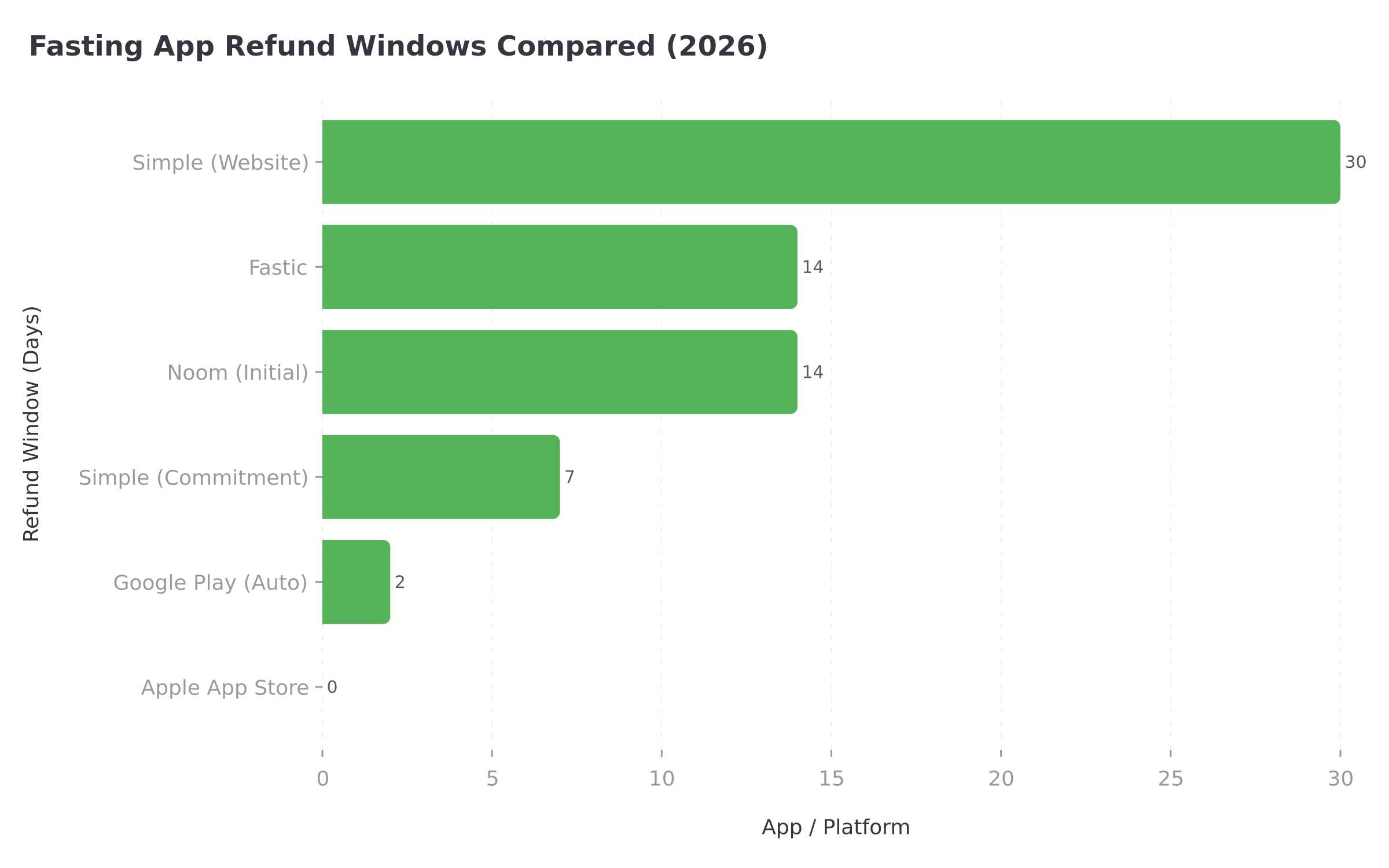 *Figure 1: Refund window comparison across fasting apps and platforms - Simple leads at 30 days, but with conditions*
 | App | Refund Window | Conditions | EU Rights | Contact |
|---|---|---|---|---|
| Fastic | 14 days (guarantee) | None - no usage requirements | Yes (Germany) | [email protected] |
| YAZIO | Platform-dependent | Must go through purchase platform | Yes (Germany) | [email protected] (website only) |
| Simple | 30 days (website) | Cancel subscription first; commitment plans: 7 days | Partial (Lithuania) | In-app chat widget |
| Noom | 14 days (initial only) | Renewals not refundable | Limited (US-based) | (888) 266-5071 or in-app |
| Apple | Case by case | No fixed window | N/A | reportaproblem.apple.com |
| Google Play | 48 hours auto | Then case by case | N/A | Google Play support |
Winner for refund flexibility: Fastic (14-day guarantee with zero conditions)
Longest refund window: Simple (30 days for website purchases)
Strictest policy: Noom (14 days for initial charges only, renewals locked)
 When you find out renewal charges are not refundable
IMPORTANT
Checkpoint: final stretch before the reveal.
One last nudge - the refund email template is next.
⏱️ Progress 3/4 - ~3 minutes in - Keep going
✅ Fastic and YAZIO refund rules
✅ Simple and Noom refund rules
✅ Apple, Google, EU and FTC protections
✨ The $209 refund email template (about to reveal)
7 Tips to Protect Your Money Before You Subscribe
Screenshot the pricing page before you buy. If the app shows different prices later, your screenshot is evidence for a refund dispute
Set a calendar reminder for day 10 of any trial. This gives you 4 days of buffer before most 14-day windows close. A 2026 Business of Apps report found that cancellation spikes happen right at trial expiry - do not leave it to the last minute
Buy on the website when possible. EU withdrawal rights typically apply to website purchases but not app store purchases. Website purchases also let you deal directly with the company for refunds
Avoid commitment plans unless you are certain. Simple's 10-month commitment plan locks you in after 7 days. The monthly discount is not worth it if you quit in month 2
Check your bank statement for the exact charge name. Apple shows as "APPLE.COM/BILL," Google as "GOOGLE*[APP NAME]," and direct purchases use the company name. Knowing this helps you identify which platform to contact
Never just delete the app. Uninstalling does not cancel your subscription. Every fasting app warns about this, yet users still lose money by assuming deletion equals cancellation
File with your credit card company as a last resort. If the app refuses a refund and you believe you are entitled to one, a chargeback through your bank is an option. But use this carefully - apps may ban your account permanently

Step-by-Step: How to Request a Refund Right Now
Follow these steps based on where you purchased your fasting app subscription:
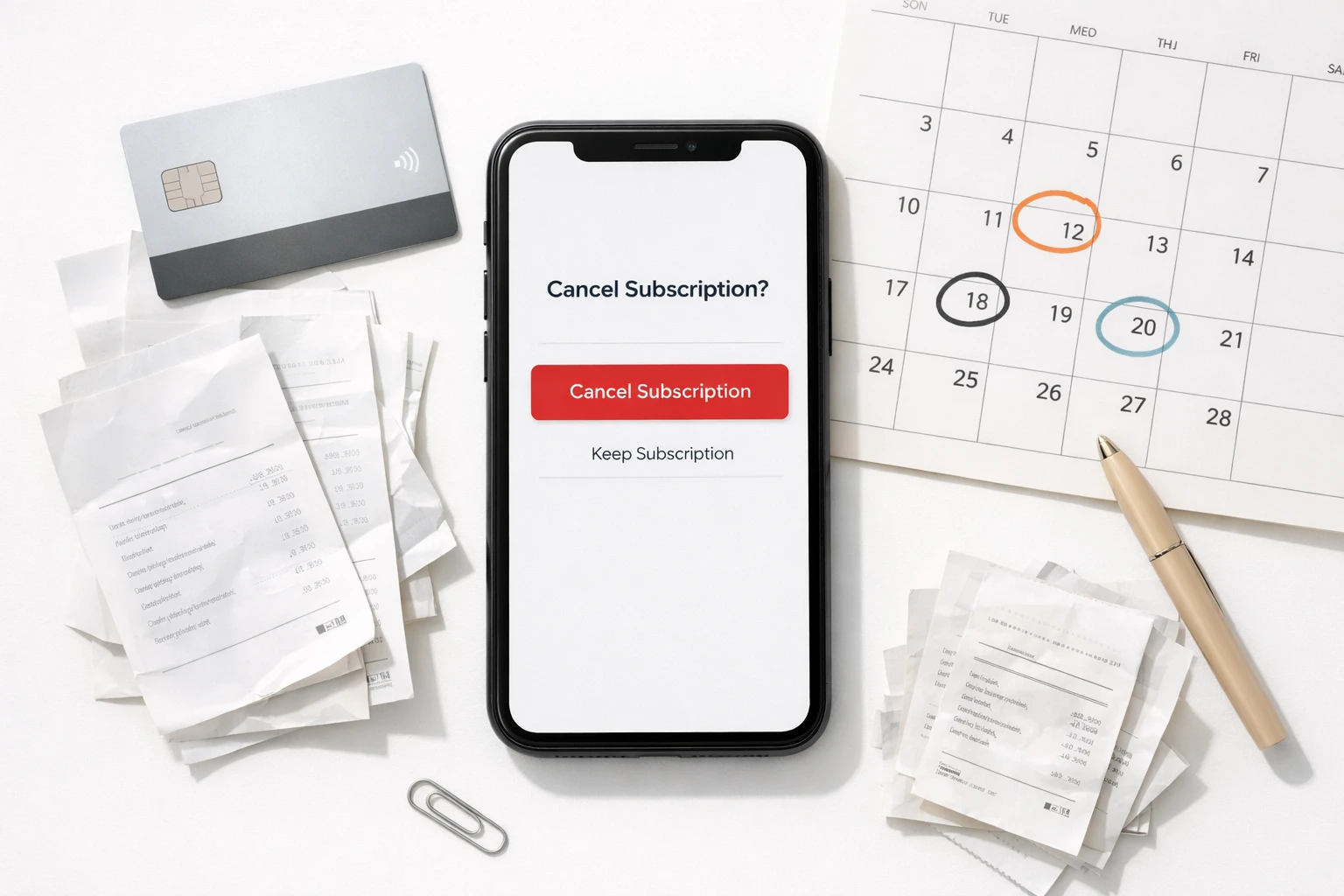 The essential toolkit for getting your fasting app refund
Step 1: Identify Your Purchase Platform
Open your email and search for the receipt. Look for "Apple," "Google Play," or the app company name. Check your bank statement if you cannot find the receipt.
Step 2: Check the Refund Window
Count the days from the charge date (not the download date or last use date). Use the comparison table above to see if you are within the refund window.
Step 3: Cancel Your Subscription First
Most apps require cancellation before processing a refund. Go to Settings > Subscriptions on iPhone, or Google Play > Payments & subscriptions on Android.
Step 4: Submit Your Refund Request
- Apple purchases: Go to reportaproblem.apple.com, sign in, select "Request a refund"
- Google Play purchases: Open the Google Play app, tap your profile, select Payments & subscriptions
- Website purchases: Email the app's support team (addresses listed in comparison table above)
- Fastic Feel Good Guarantee: Email [email protected] with your User ID and receipt
Step 5: Document Everything
Save confirmation emails, screenshot chat conversations, note the date and time of your request. If the refund is denied, this documentation helps with escalation.
Step 6: Escalate if Needed
If denied through normal channels: Apple users can call Apple Support, Google users can request a callback, website purchasers can invoke EU withdrawal rights (if applicable), and US consumers can file an FTC complaint at reportfraud.ftc.gov.
The 2-Sentence Email That Got a $209 Annual Refund
You have been patient. Here is the exact email template you can use to request a refund for an annual fasting app subscription you forgot to cancel:
Subject: Refund Request - [Your Name] - [Date of Charge]
Body: "I am requesting a full refund for my [App Name] subscription charged on [date] for [amount]. I did not intend to renew and am invoking my right to cancel under [your 14-day/30-day refund policy OR the EU 14-day right of withdrawal under Directive 2011/83/EU], and I request this refund be processed within 14 business days."
TIP
Why this works: it names the specific policy, states the charge date and amount, and sets a clear deadline. Support teams prioritize structured requests over vague complaints. Attach your receipt screenshot for faster processing.
IMPORTANT
Recap: everything you completed this round.
You finished the run - bookmark this for your next subscription decision.
⏱️ Progress 4/4 - ~4 minutes in - Nicely done
✅ Fastic and YAZIO refund rules
✅ Simple and Noom refund rules
✅ Apple, Google, EU and FTC protections
✅ The $209 refund email template (revealed)
What the Research Says About App Refunds
The subscription app industry has a well-documented retention problem. A 2025 RevenueCat State of Subscription Apps report found that more than 90% of users churn from most apps within the first 30 days. Health and fitness apps are no exception.
A 2024 PMC study on mHealth app dissemination found that focused strategies are required to maintain low churn rates in health apps. Users are less likely to keep using an app after initial incentivization, suggesting that discounted trial pricing may actually reduce long-term retention.
The 2026 Recurly State of Subscriptions report found that involuntary churn (failed payments, refunds) can comprise up to 40% of total churn. About 70% of involuntary churn was recovered in 2024, meaning apps are getting better at retaining users who would otherwise leave due to billing issues.
These numbers explain why fasting apps structure their refund policies the way they do. Generous refund windows (like Fastic's guarantee) signal confidence in the product. Strict windows (like Noom's 14-day-only policy) minimize revenue loss but may frustrate users who feel trapped. If you are evaluating whether a fasting app is worth the cost, knowing your daily macro targets first can help you decide if you even need a premium subscription. Many users find that a simple meal scanning approach paired with a personalized diet plan covers their needs without committing to an expensive fasting app.
Conclusion
Fasting app refund rules vary more than most people expect. Fastic leads with a genuine 14-day no-questions-asked guarantee. Simple offers the longest window at 30 days but locks commitment plan users after just 7 days. YAZIO pushes refunds to Apple and Google entirely. Noom gives you 14 days for initial charges and nothing for renewals.
The biggest takeaway: where you buy matters as much as what you buy. Website purchases generally give you more refund rights than app store purchases, especially if you live in the EU.
Before you subscribe to any fasting app, check the refund policy first. Set your calendar reminders. And if the app is not working for you, act fast - most refund windows are shorter than you think.
If you are looking for a nutrition tracker with a straightforward policy, NutriScan offers a 7-day free trial with a cancel-anytime policy and no commitment plans. You can also cancel NutriScan Premium anytime in under 2 minutes.
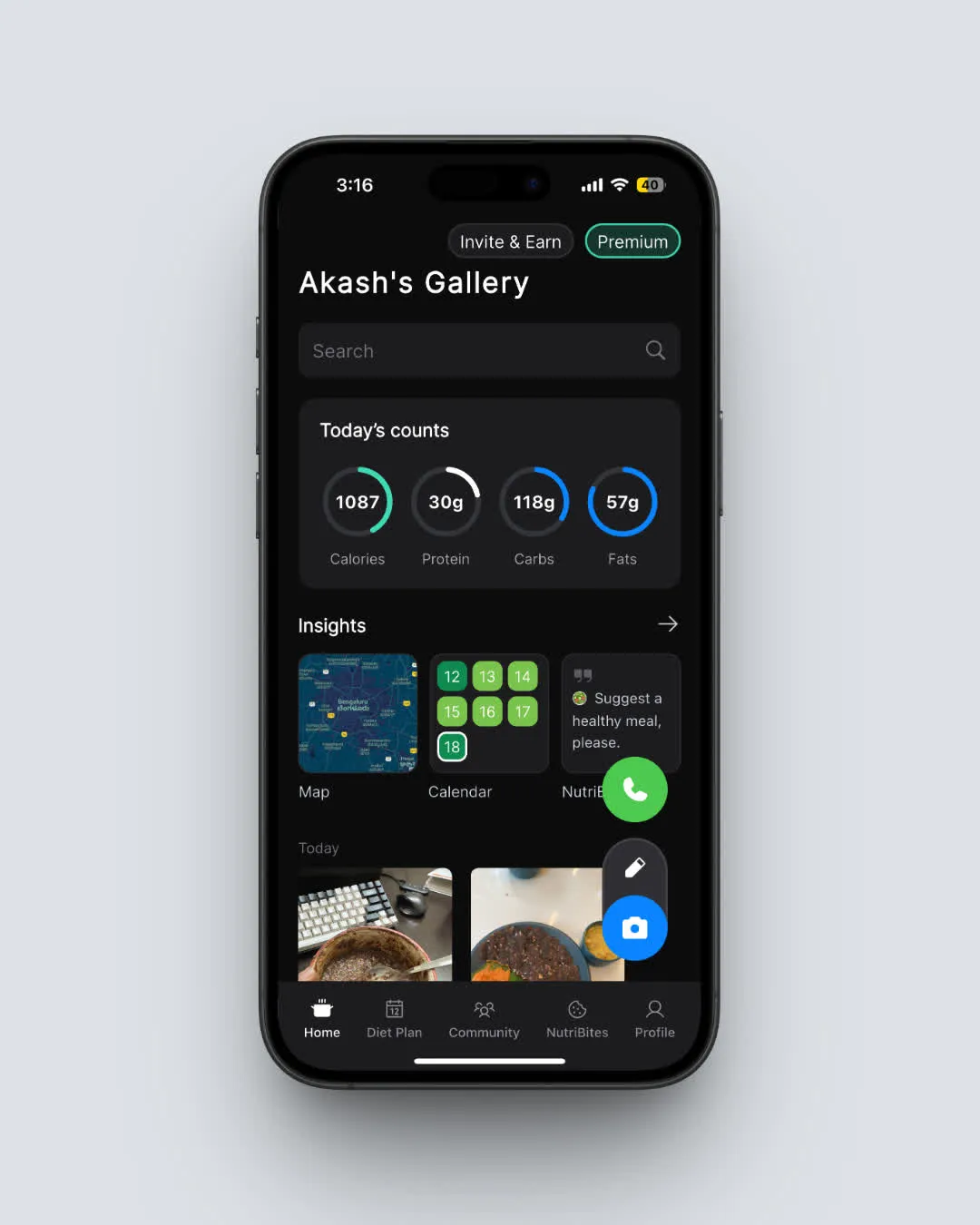 NutriScan's home page: straightforward nutrition tracking with a cancel-anytime Premium plan (Home > Nutrition Card)
Frequently Asked Questions
Q: Can I get a refund from a fasting app after 30 days?
A: It depends on the app and platform. Fastic's guarantee expires at 14 days. Simple's website refund window is 30 days. After those windows close, your best option is to request a refund through Apple (reportaproblem.apple.com) or Google Play, which review requests on a case-by-case basis regardless of timing. EU consumers may also invoke their 14-day withdrawal right for website purchases.
Q: Does deleting a fasting app cancel my subscription?
A: No. Deleting the app from your phone does not cancel your subscription. You will continue to be charged until you cancel through Settings > Subscriptions (iPhone), Google Play > Payments & subscriptions (Android), or the app's website. Every fasting app explicitly warns about this, but it remains the most common mistake users make.
Q: Which fasting app has the best refund policy?
A: Fastic offers the strongest refund guarantee: 14 days, full refund, no usage requirements, no deductions. Simple has the longest window (30 days for website purchases) but with more conditions. Noom has the strictest policy with no refunds on renewal charges.
Q: Can I get a refund if the app did not help me lose weight?
A: Generally no. Fasting app refund policies do not guarantee results. However, Fastic's Feel Good Guarantee is unique in that it refunds without any conditions - you do not need to explain why. For other apps, you would need to go through Apple or Google and cite a reason like "app did not work as expected."
Q: What is the FTC Click-to-Cancel rule and does it help with refunds?
A: The FTC Click-to-Cancel rule (enforcement from July 2025) requires companies to make cancellation as easy as signup. It does not directly change refund policies, but it prevents apps from adding unnecessary friction to the cancellation process. If a fasting app makes it unreasonably difficult to cancel, you can file a complaint with the FTC at reportfraud.ftc.gov.