How to Cancel NutriScan Premium (2026 Step-by-Step Guide)
 ChatGPT
  Claude
  AI Mode
  Perplexity
TL;DR
Cancel NutriScan Premium through your iPhone Settings or Google Play Store. NutriScan also has an in-app cancel button that walks you through it. Deleting the app does NOT stop billing. Your meal data stays safe in the cloud after canceling.
A 2025 survey of over 3,400 mobile health app users found that 62% of people who download a health app stop using it within three months. Plans change, goals shift, and sometimes a subscription just does not fit your budget anymore.
As a NutriScan nutritionist, I want canceling to be as simple as signing up. This guide walks you through every step so you can cancel NutriScan Premium in under two minutes, no matter which device you use.
Full disclosure: This article is published by the NutriScan team. We want you to stay, but we also want you to make the best choice for yourself.
 Scrolling through settings trying to find that cancel button. We have got you covered.
IMPORTANT
Your NutriScan Premium cancellation plan at a glance.
A quick roadmap so you can cancel without surprise charges.
⏱️ Progress 0/4 - ~0 minutes in - Keep going
⏳ Step 1: Save your data before canceling
⏳ Step 2: Follow the cancel steps for your device
⏳ Step 3: Understand what stays on the free plan
🔍 The one mistake that keeps charging people even after they think they canceled (revealed near the end)
Why People Cancel (and Why That Is OK)
People cancel nutrition app subscriptions for many reasons. None of them are wrong.
Budget shifts. A new expense pops up and a $9.99 monthly charge needs to go. A 2022 literature review of 29 mHealth studies found that cost was one of the top three barriers to continued app use.
Goal reached. You hit your target weight or built the eating habits you wanted. The app did its job.
Trying something else. Maybe you want to test a different tracker. Canceling first prevents double billing.
Trial ending. You signed up for the 7-day free trial and decided free scanning is enough for now.
Life got busy. A cross-sectional study of 1,717 mHealth users found that lack of time and low motivation were the leading causes of app abandonment.
Whatever your reason, the cancel process takes about 90 seconds.
What You Keep on the Free Plan
Before you cancel, here is what stays available at no cost:
| Feature | Free Plan | Premium Plan |
|---|---|---|
| Meal Scanning | 15 per week | Unlimited |
| Nutrition Analysis | Basic | Comprehensive |
| NutriBites AI Assistant | Yes | Yes |
| Meal History | 7 days | Unlimited |
| Insights and Analytics | Basic | Advanced |
| Monika Voice AI Nutritionist | No | Yes |
| Personalized Diet Plans | No | Yes |
| Supplement Recommendations | No | Yes |
| Lifestyle Guidance | No | Yes |
The free plan still gives you 15 scans per week and NutriBites AI. For many casual trackers, that is plenty.
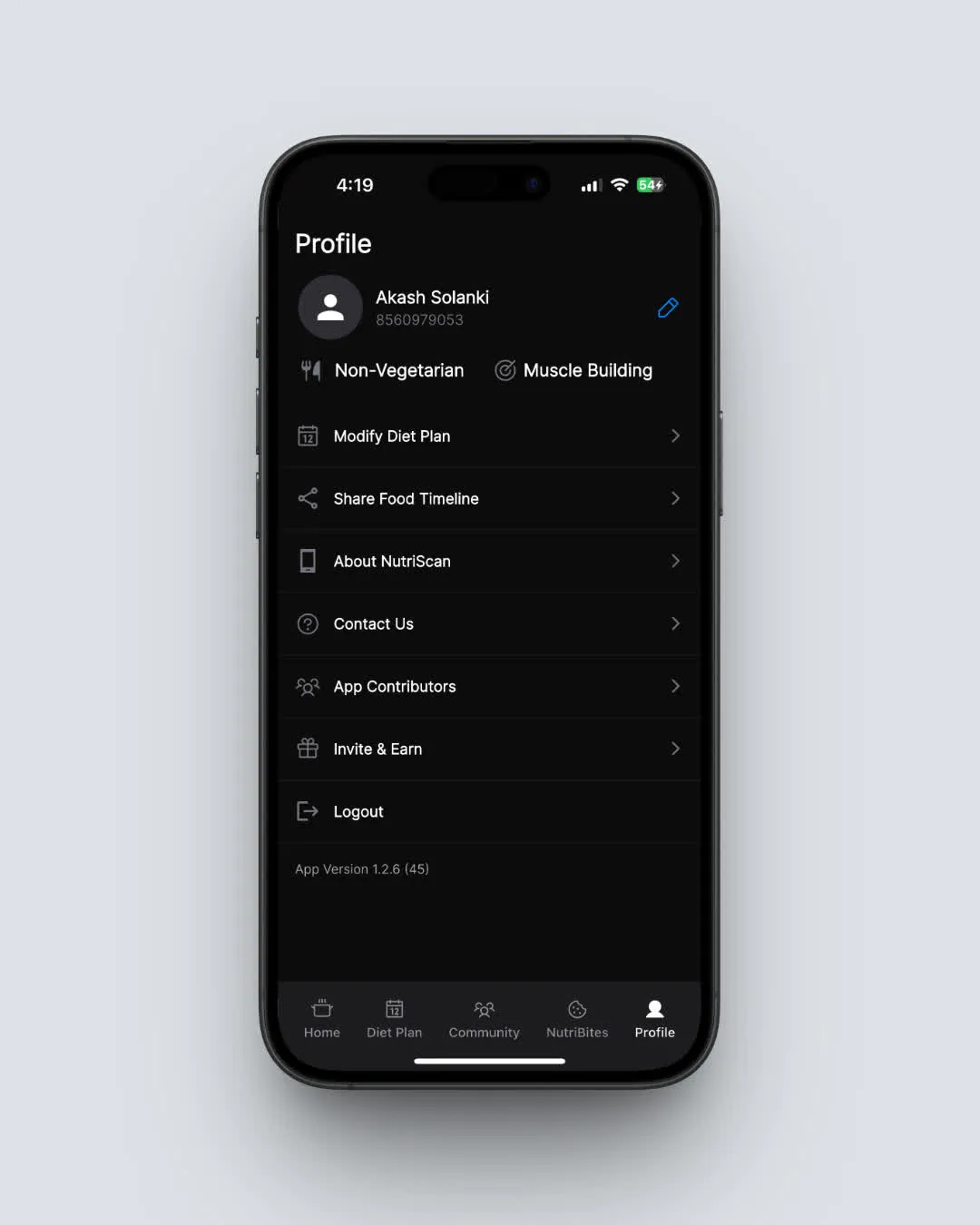 NutriScan Profile page. Tap Manage Subscription to view or cancel your plan. Path: Home > Bottom Nav Profile
IMPORTANT
Checkpoint: You know what stays free.
⏱️ Progress 1/4 - ~1 minute in - Keep going
✅ Step 1: Save your data before canceling
👉 Step 2: Follow the cancel steps for your device (you are here)
⏳ Step 3: Understand what stays on the free plan
🧩 That billing trap reveal is coming soon...
5 Things to Do Before You Cancel
1. Check your billing date
Open your device subscription settings to see when your next charge hits. If renewal is tomorrow, cancel today. If it is in three weeks, you can keep using Premium until then.
2. Export or screenshot your data
Go to your meal timeline and screenshot any nutrition breakdowns you want to keep. Your 7-day history stays on the free plan, but older data will not be visible once you downgrade.
3. Save your diet plan
If you have a Premium diet plan, take screenshots of your meal suggestions, supplement recommendations, and daily targets. These disappear after your Premium period ends.
4. Check the Invite and Earn program
Instead of paying, you might keep Premium for free. NutriScan's Invite and Earn program gives you 1 week of Premium for each friend who signs up using your link. Five successful referrals earn 1 full month. Ten referrals earn 3 months. Check our pricing and referral guide for details.
5. Share your food timeline
Before losing unlimited history, go to Profile > Share Food Timeline. Create a shareable URL of your meals. Send it to a nutritionist, friend, or save it for yourself.
TIP
The Share Food Timeline feature creates a permanent link to your meal history. Even after downgrading, anyone with the link can view your shared timeline.

How to Cancel NutriScan Premium: Step-by-Step
NutriScan subscriptions are managed through the Apple App Store or Google Play Store. There is no web cancel option. You must cancel on the same platform where you subscribed.
WARNING
NutriScan is one of the few nutrition apps with a built-in cancel button. Most competitors (MyFitnessPal, Lose It, YAZIO) require you to navigate to device settings on your own.
Cancel on iPhone (iOS)
Method 1: Through NutriScan App (Recommended)
- Open NutriScan
- Tap the Profile tab (bottom right)
- Tap Upgrade (shows your current plan name)
- Tap Cancel Subscription
- Complete the brief cancellation survey
- You will be directed to your iPhone's subscription settings
- Tap NutriScan in the list
- Tap Cancel Subscription
- Confirm by tapping Confirm
Method 2: Through iPhone Settings
- Open Settings on your iPhone
- Tap your name at the top (Apple ID)
- Tap Subscriptions
- Find and tap NutriScan
- Tap Cancel Subscription
- Confirm cancellation
Method 3: Through the App Store
- Open the App Store
- Tap your profile icon (top right)
- Tap Subscriptions
- Find and tap NutriScan
- Tap Cancel Subscription
- Confirm
After canceling, you will see the expiration date. Your Premium features stay active until that date.
Cancel on Android
Method 1: Through NutriScan App (Recommended)
- Open NutriScan
- Tap the Profile tab
- Tap Upgrade
- Tap Cancel Subscription
- Complete the brief cancellation survey
- You will be directed to Google Play's subscription management
- Tap NutriScan in the list
- Tap Cancel subscription
- Select a reason and tap Continue
- Tap Cancel subscription to confirm
Method 2: Through Google Play Store
- Open the Google Play Store
- Tap your profile icon (top right)
- Tap Payments and subscriptions
- Tap Subscriptions
- Find and tap NutriScan
- Tap Cancel subscription
- Select a reason and confirm
Your Premium access continues until the end of your current billing period.
IMPORTANT
Checkpoint: Cancel steps done.
⏱️ Progress 2/4 - ~3 minutes in - Keep going
✅ Step 1: Save your data before canceling
✅ Step 2: Follow the cancel steps for your device
👉 Step 3: Understand what stays on the free plan (current)
🧩 That billing trap reveal? Next section.
What Happens After You Cancel
Here is a timeline of what to expect:
Immediately after canceling:
- Your subscription status changes to "cancelled" but Premium stays active
- No further charges will be made
- You can still use all Premium features until your billing period ends
On your expiration date:
- Premium features (diet plans, Monika AI, unlimited scans) become unavailable
- Your account drops to the free plan automatically
- You keep 15 scans per week and NutriBites AI
- Your meal history shrinks to the last 7 days of visible data
Your data is safe:
- All meal history stays stored in the cloud
- If you resubscribe later, your full history comes back
- Uninstalling the app does not delete your data
- Your account, preferences, and settings are preserved
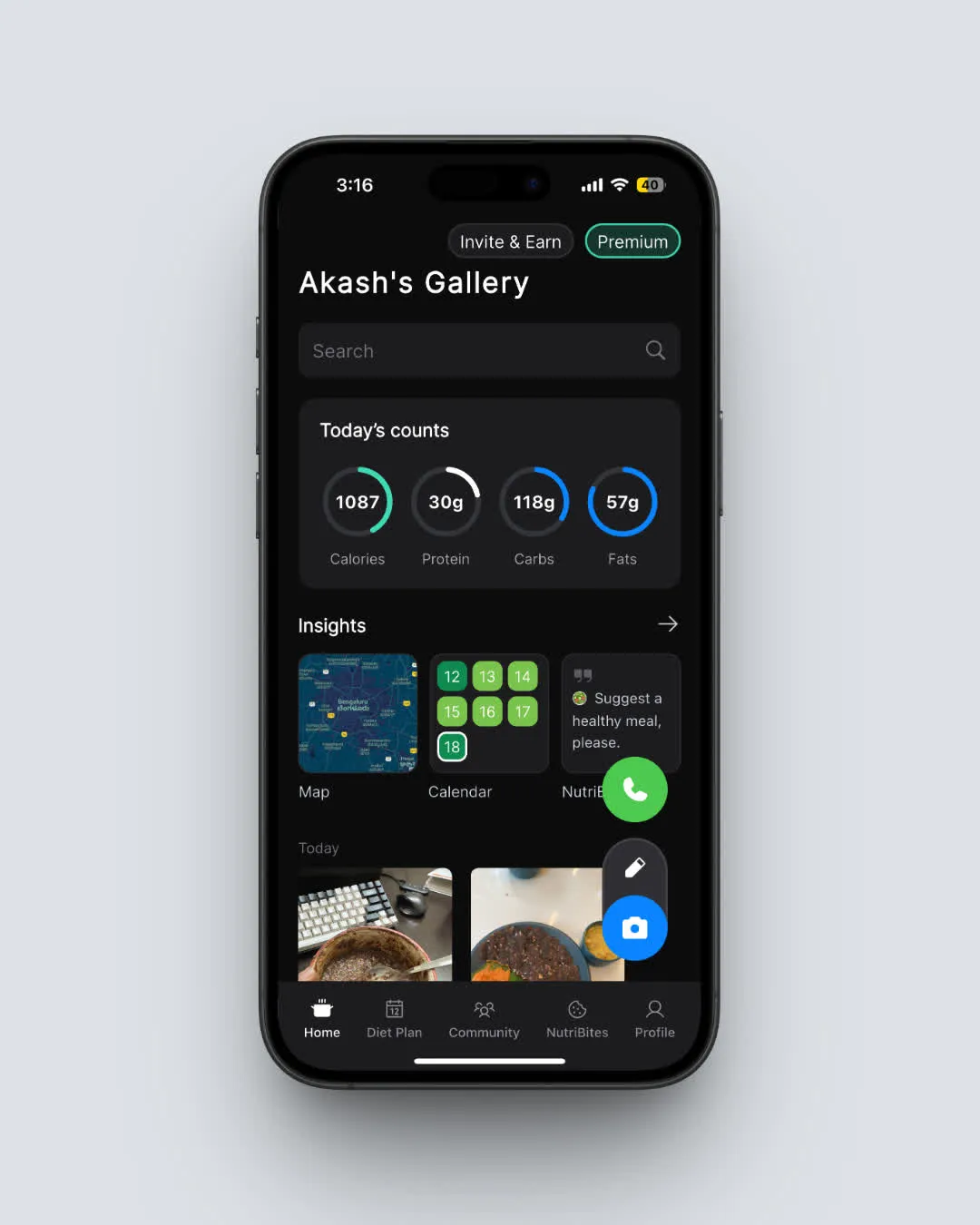 NutriScan home page with daily nutrition breakdown. Free plan users keep basic insights and 15 weekly scans. Path: Home
6 Common Mistakes to Avoid
1. Deleting the app instead of canceling
Uninstalling NutriScan does not cancel your subscription. Your billing continues through Apple or Google until you explicitly cancel in your device settings. This is the number one mistake across all app subscriptions.
IMPORTANT
Checkpoint: final stretch before the reveal.
⏱️ Progress 3/4 - ~4 minutes in - Keep going
✅ Step 1: Save your data before canceling
✅ Step 2: Follow the cancel steps for your device
✅ Step 3: Understand what stays on the free plan
✨ The billing trap (about to reveal)
BILLING TRAP REVEALED
Deleting the NutriScan app does NOT cancel your subscription. Apple and Google keep billing you until you cancel through your device subscription settings. Always cancel first, then delete if you want.
2. Canceling on the wrong platform
If you subscribed on iPhone, you must cancel through Apple. If you subscribed on Android, you must cancel through Google Play. Switching devices does not transfer your subscription management.
3. Waiting until the last minute
If your renewal date is March 15, cancel by March 14 at the latest. Some users report that same-day cancellations occasionally process after the charge goes through due to timezone differences.
4. Expecting an immediate refund
Canceling stops future charges but does not refund the current billing period. You keep Premium access until your paid period ends. For refund requests, see the section below.
5. Thinking cancel means delete
Canceling your subscription is different from deleting your account. Your meals, preferences, and NutriBites history remain intact. You can re-subscribe at any time and pick up where you left off.
6. Not checking which plan you are on
NutriScan has had different plan names over time, including "Track" and "Premium." Check Profile > Upgrade to confirm your exact plan name. Legacy plans show in your App Store or Google Play subscription list under the same NutriScan entry.
DANGER
Never assume deleting an app cancels your subscription. This applies to every app, not just NutriScan. Always verify through Settings > Subscriptions (iPhone) or Google Play > Payments and subscriptions (Android).
How to Request a Refund
If you were charged unexpectedly or want to request a refund, the process depends on your platform.
Apple (iPhone/iPad):
- Go to reportaproblem.apple.com
- Sign in with your Apple ID
- Find the NutriScan charge
- Select "Request a refund"
- Choose a reason and submit
Apple typically processes refund requests within 48 hours. Approval is at Apple's discretion.
Google Play (Android):
- Open Google Play Store
- Tap your profile icon > Payments and subscriptions
- Tap Budget and history
- Find the NutriScan charge
- Tap the transaction, then "Report a problem"
- Select a reason and submit
Google Play offers refunds within 48 hours of purchase in most cases. After 48 hours, refund approval depends on the circumstances.
Direct support:
Email [email protected] with your transaction details. Include your name, email address, device model, and a screenshot of the charge. The support team responds within 1-2 business days.
NutriScan Pricing at a Glance
Understanding what you have been paying helps you decide whether to cancel or switch plans. For a full breakdown, see our NutriScan pricing guide.
| Plan | Price (US) | Per Month Cost | Billing |
|---|---|---|---|
| Premium Monthly | $9.99/mo | $9.99 | Monthly |
| Premium Yearly | $59.99/yr | $5.00 | Annual |
Regional pricing varies. Users in India see Rs 499/month, while users in other regions see different amounts. Check your App Store or Google Play for your exact price.
If you are on the monthly plan and want to keep Premium but spend less, consider switching to the annual plan. The yearly plan at $59.99 saves 50% compared to paying monthly ($9.99 x 12 = $119.88).
How NutriScan Compares: Cancel Difficulty
Not all nutrition apps make canceling equally easy. Here is how NutriScan stacks up against competitors.
| App | Cancel Paths | In-App Cancel Button | Web Cancel | Free Plan After Cancel |
|---|---|---|---|---|
| NutriScan | 2 (Apple, Google) | Yes | No | Yes (15 scans/week) |
| MyFitnessPal | 3 (Apple, Google, Web) | No | Yes | Yes (limited) |
| MacroFactor | 2 (Apple, Google) | No | No | No |
| Lose It | 3 (Apple, Google, Web) | No | Yes | Yes |
| Lifesum | 5 (Apple, Google, Web, Paddle, Galaxy) | No | Yes | Yes |
| YAZIO | 3 (Apple, Google, Web) | No | Yes | Yes |
| Fastic | 3 (Apple, Google, PayPal) | No | No | Yes |
| Cal AI | 3 (Apple, Google, Web) | No | Yes | Limited |
NutriScan is one of the few nutrition apps with a built-in cancel button that walks you through the process directly from the app.
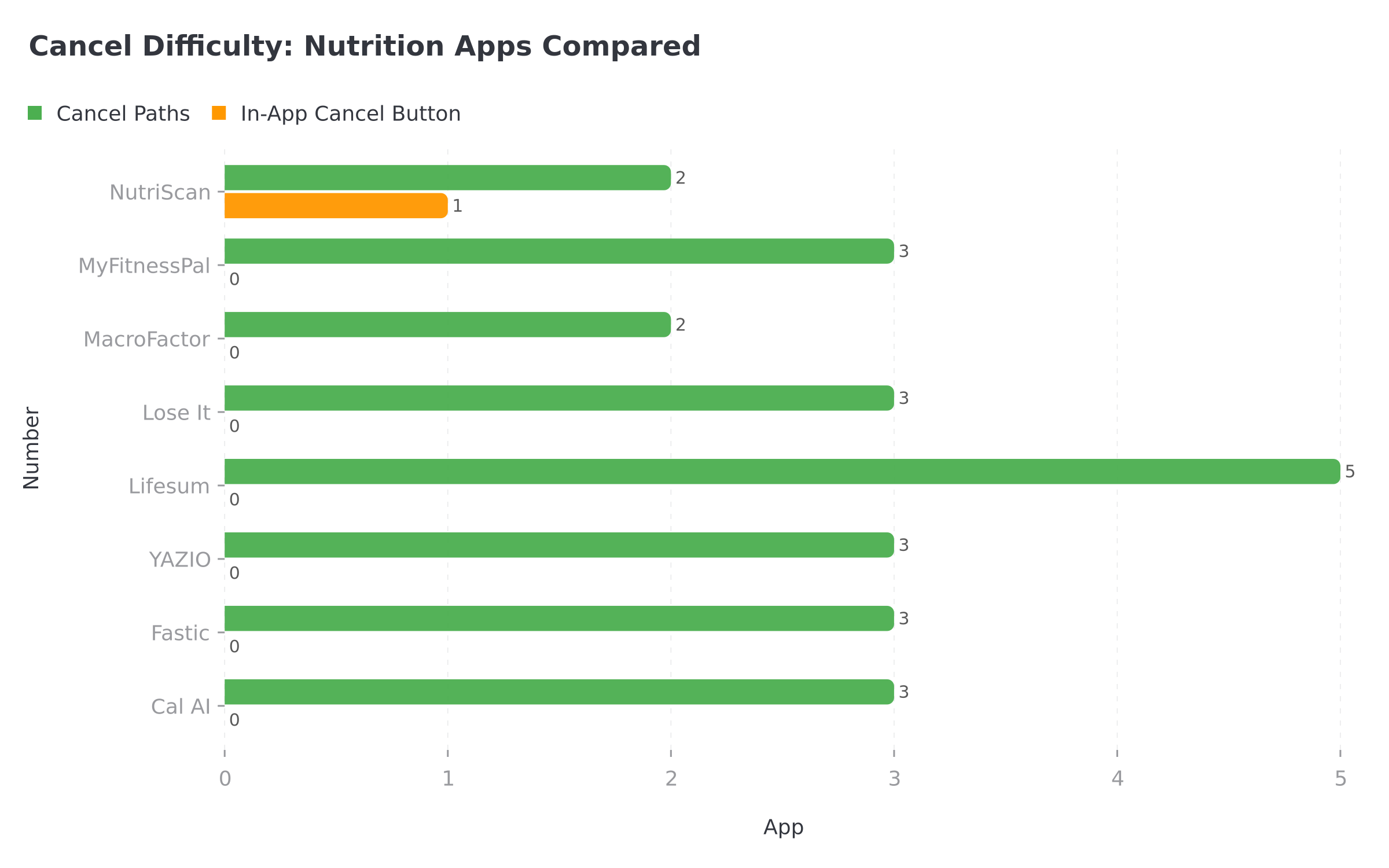
Figure 1: NutriScan has fewer cancel paths because it includes an in-app cancel button, something most competitors lack.
 That is the face of someone who just canceled in under 2 minutes.

Alternatives to Canceling
If you like NutriScan but the price is a concern, consider these options:
Switch to the free plan. You still get 15 meal scans per week, NutriBites AI, and basic insights. Many users find this is enough for maintaining healthy habits. You can still use the macro calculator and meal scanning features.
Use the Invite and Earn program. Each friend who signs up with your link gives you one free week of Premium. Refer five friends for a full month free. Refer ten friends for three months free.
Wait for a promotional offer. NutriScan occasionally offers discounted annual plans. You might see a retention offer when you start the cancel flow.
Switch from monthly to annual. If you are on the $9.99 monthly plan, switching to the $59.99 annual plan saves you $59.89 per year (50% savings).
Contact support. If you have a specific issue driving you to cancel, email [email protected]. The team responds within 1-2 business days.
Research: Why People Leave and Come Back
A 2024 scoping review in the Journal of Medical Internet Research found that most users stop using health apps within the first two weeks, but those who pass the 30-day mark are significantly more likely to maintain long-term use.
A 2022 literature review on mHealth engagement identified that push notifications, goal tracking, and social features were the most effective retention strategies. Apps that gave users visible progress toward their goals saw 40% higher retention rates over 6 months.
Research from 2022 also found that 73% of users who abandoned health apps did so because the app did not fit their daily routine, not because the app was bad. Users who returned after a break reported higher satisfaction than first-time users.
The takeaway: if you cancel now and come back later, your experience will likely be better the second time because you already know the features.
Conclusion
Canceling NutriScan Premium is straightforward. Open the app, go to Profile > Upgrade > Cancel Subscription, complete the brief survey, and confirm in your device's subscription settings. The whole process takes less than two minutes.
Your data stays safe in the cloud, and you keep access to the free plan with 15 scans per week and NutriBites AI. If your plans change later, you can resubscribe at any time and your full meal history will be waiting for you.
If you decide to keep tracking your nutrition, even the free version of NutriScan helps you stay aware of what you eat. Use the free insights dashboard and NutriScore guide to keep learning. And if you want to explore Premium again, your personalized diet plan is just one tap away.
IMPORTANT
Recap: everything you completed this round.
⏱️ Progress 4/4 - All done - Nicely done
✅ Step 1: Save your data before canceling
✅ Step 2: Follow the cancel steps for your device
✅ Step 3: Understand what stays on the free plan
✅ Billing trap revealed: Always cancel through device settings, never just delete the app
FAQ
Does deleting the NutriScan app cancel my subscription?
No. Deleting the app does not cancel your subscription. You must cancel through your iPhone Settings > Subscriptions or Google Play Store > Payments and subscriptions. If you only delete the app, charges will continue until you explicitly cancel.
Will I lose my meal data if I cancel Premium?
Your data stays safely stored in the cloud. The free plan only shows your most recent 7 days of meal history. If you resubscribe later, your full history becomes visible again. No data is deleted when you cancel.
Can I get a refund for NutriScan Premium?
For Apple: visit reportaproblem.apple.com and request a refund for the NutriScan charge. For Google Play: open your transaction history and report a problem. You can also email [email protected] with your transaction details. Refund approval depends on the platform's policies and timing.
What happens to my diet plan after I cancel?
Your personalized diet plan becomes unavailable once your Premium period ends. Screenshot any recipes, supplement recommendations, or daily targets you want to keep before your expiration date. If you resubscribe, you can generate a new updated diet plan.
Can I switch from Premium to a cheaper plan instead of canceling?
NutriScan currently offers one Premium tier with monthly ($9.99/mo) or annual ($59.99/yr) billing. If you are on monthly billing, switching to annual saves 50%. There is only one Premium level above the free plan, so you cannot downgrade to a middle tier.
How do I know which platform I subscribed through?
Check your email for a receipt from Apple or Google. On iPhone, go to Settings > your name > Subscriptions. On Android, go to Google Play > Payments and subscriptions > Subscriptions. If NutriScan appears in your list, that is the platform managing your billing.
Can I use NutriScan Premium on multiple devices after canceling?
After canceling, your account stays active across devices until your billing period ends. Once you drop to the free plan, you can still sign in on any device. Your free plan features (15 scans/week, NutriBites AI, 7-day history) work on all devices.
How long does it take for cancellation to take effect?
Cancellation takes effect immediately in terms of stopping future charges. You keep Premium access until the end of your current billing cycle. For example, if you paid on March 1 and cancel on March 15, you still have Premium until March 31 (for monthly) or until March 1 of the following year (for annual).
I canceled but I am still being charged. What should I do?
First, verify you canceled on the correct platform. Check both iPhone Settings > Subscriptions and Google Play > Payments and subscriptions to confirm NutriScan shows as cancelled. If the charge persists, contact [email protected] with a screenshot of your subscription status and the unexpected charge. The support team will investigate within 1-2 business days.