How to Cancel Simple Premium (2026 Step-by-Step Guide)
 ChatGPT
  Claude
  AI Mode
  Perplexity
TL;DR
Cancel through the platform where you bought Simple Premium (App Store, Google Play, or website). Deleting the app does NOT cancel billing. Commitment Plans have different rules. Your fasting history stays safe after canceling.
Simple has over 20 million downloads, 800,000+ active subscribers, and a 4.7-star rating across 345,000 App Store reviews. Fortune named it the best intermittent fasting app in 2026, and it won Best Virtual Health Coach from MedTech Breakthrough in 2025.
But even the best app is not right for everyone. Maybe your goals changed. Maybe you finished a fasting cycle. Maybe you want to try a different approach.
As a NutriScan nutritionist, I see this pattern constantly. A 2024 study on mobile health app engagement found that mHealth app retention drops sharply after the first month. That does not mean the app failed. Goals change, and sometimes a different tool fits better.
The catch with Simple? It has three separate cancel paths depending on how you originally paid, plus a tricky Commitment Plan that locks you in. This guide covers every path.
 Three platforms, two subscription types, one guide to get through it all.
IMPORTANT
Your Simple Premium cancellation plan at a glance.
A quick roadmap so you can cancel without surprise charges.
⏱️ Progress 0/4 - ~0 minutes in - Keep going
⏳ Step 1: Know your subscription type (Regular vs Commitment)
⏳ Step 2: Find your purchase platform
⏳ Step 3: Follow the cancel steps for your platform
🔍 The one billing trap that keeps charging people even after they think they canceled (revealed near the end)
What Happens When You Cancel Simple Premium
Before you tap anything, know what canceling actually does.
- You will not be charged again. Your subscription stops renewing at the end of the current billing period.
- You keep Premium access until your paid period ends. If you paid for a year and cancel in month three, you still have nine months of Premium features.
- Your account stays active. Canceling does not delete your fasting history, weight data, or profile.
- You drop to the free plan. You keep the basic fasting timer, limited Avo coach replies (2 per day), and 1 photo scan per day.
- Uninstalling the app does not cancel your subscription. This is the single most common mistake users make.
Step 1: Know Your Subscription Type 🔍
Simple has two very different subscription models. Picking the wrong cancel path is the most common mistake.
Regular Premium Plans
| Plan | Typical Price | Billing |
|---|---|---|
| Monthly | ~$15/mo | Renews every month |
| Quarterly (3 months) | ~$9.99/mo | Renews every 3 months |
| 9-month | Varies | Renews every 9 months |
| Annual | Less than $5/mo | Renews every 12 months |
Prices vary by region and promotional offers. The App Store lists multiple tiers including Simple Premium at $59.99/year and Simple Pro at $14.99-$29.99.
Commitment Plans
These are different. You agree to pay a reduced monthly rate for a locked period of 3, 6, or 10 months. You generally cannot cancel a Commitment Plan early.
CHECK YOUR PLAN TYPE
Open the Simple app. Tap your profile icon. Tap "Manage Subscription." If you see the words "Commitment Plan" above your billing details, you are on a commitment plan and need a different cancel process. See the Commitment Plan section below.
Step 2: Find Where You Purchased Simple Premium 📍
Simple sells subscriptions through three channels. You must cancel through the same channel where you purchased. Canceling in the wrong place does nothing.
| Purchase Channel | How to Identify |
|---|---|
| Apple App Store | Check Settings > Apple ID > Subscriptions |
| Google Play Store | Check Play Store > Payments & subscriptions |
| Simple website | You entered email + card on simple.life or signed up via Facebook/PayPal |
CHECK YOUR BANK STATEMENT
- "APPLE.COM/BILL" = App Store purchase
- "GOOGLE*SIMPLE" or "GOOGLE*AM APPS" = Google Play purchase
- "SIMPLE.LIFE" or payment processor name = Website purchase
IMPORTANT
Checkpoint: here is where you are right now.
Quick status update so you always know the next best move.
⏱️ Progress 1/4 - ~1 minute in - Keep going
✅ Step 1: Know your subscription type
✅ Step 2: Found your purchase platform
👉 Step 3: Follow the cancel steps for your platform (you are here)
🧩 The billing trap (coming soon)
Simple Premium Pricing Quick Reference 💰
Before you cancel, here is what you are currently paying:
| Plan | Annual Cost | Per Month |
|---|---|---|
| Monthly | ~$180/year | ~$15.00 |
| Quarterly | ~$119.88/year | ~$9.99 |
| Annual (Premium) | $59.99/year | ~$5.00 |
| Annual (Pro) | $14.99-$29.99 | ~$1.25-$2.50 |
Source: Simple on the App Store
At the high end ($180/year on monthly billing), Simple costs more than most competitors. At the annual rate ($59.99/year), it sits in the middle:
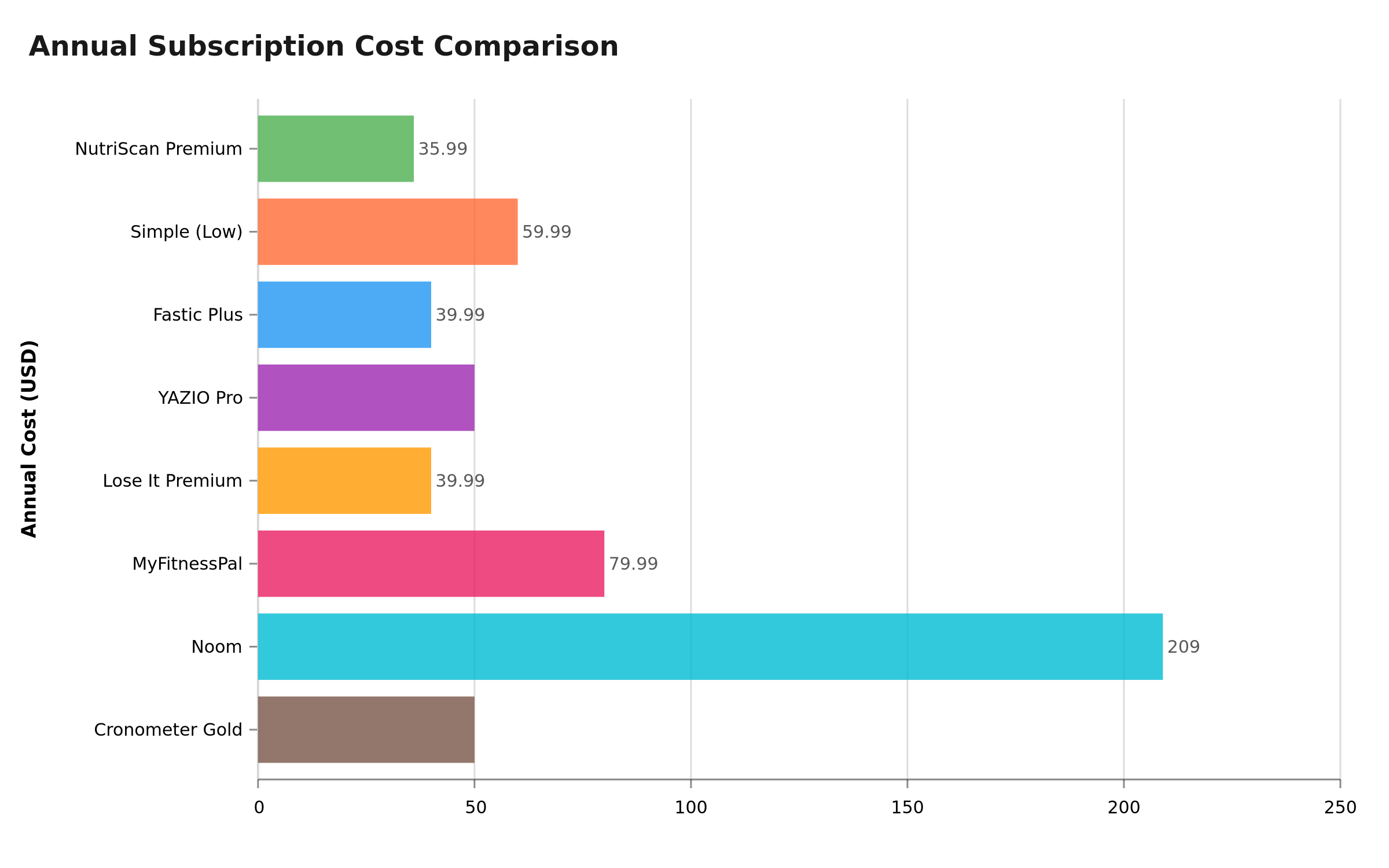 Figure 1: Simple Premium annual cost compared to other popular nutrition and fasting apps
Step 3: Cancel on iPhone (Apple App Store) 📱
If your bank statement shows APPLE.COM/BILL, Apple manages your billing. Simple cannot cancel it for you.
 Follow these steps carefully to ensure your Simple subscription is fully canceled.
Steps:
- Open Settings on your iPhone.
- Tap your name at the top of the screen (Apple ID).
- Tap Subscriptions.
- Find Simple in the list and tap it.
- Tap Cancel Subscription.
- Confirm the cancellation when prompted.
You will see the expiration date of your current billing period. Premium features remain active until that date.
ON iPAD OR MAC
On iPad, go to Settings, tap your name, then Subscriptions. On Mac, open the App Store, click your name, then Account Settings and Subscriptions. You can also manage subscriptions at appleid.apple.com.
Cannot find Simple in your subscriptions? You may have purchased through Google Play or the Simple website instead. Check the sections below.
Refund for App Store purchases: Apple handles all refunds. Visit reportaproblem.apple.com, sign in, find the Simple charge, and submit a refund request.
IMPORTANT
Checkpoint: midway progress update.
You are halfway - the hardest platform is done.
⏱️ Progress 2/4 - ~2 minutes in - Keep going
✅ Step 1: Know your subscription type
✅ Step 2: Found your purchase platform
👉 Step 3: Cancel on your platform (current)
🧩 The billing trap (next)
Cancel on Android (Google Play) 🤖
Google Play gives you two options. Both work the same way.
Option A: Cancel from inside the Simple app
- Open the Simple app. Tap the profile icon in the top right corner.
- Scroll down and tap "Manage subscription."
- Tap "Manage subscription" again on the next screen. This redirects you to Google Play.
- Tap "Simple: AI Weight Loss and Health."
- Tap "Cancel subscription" and confirm.
Option B: Cancel directly in Google Play Store
- Open the Google Play Store app.
- Tap your profile icon (top right).
- Select "Payments & subscriptions," then tap "Subscriptions."
- Find Simple in the list of active subscriptions.
- Tap it, then select "Cancel subscription" and follow the prompts.
Refund for Google Play purchases: Visit Google Play Support or go to Play Store > Account > Order history > find the charge > Request a refund.
Cancel a Website Subscription 🌐
If you subscribed on simple.life (or through a Facebook ad, PayPal, or direct card payment on the website):
- Open the Simple app. Tap the profile icon at the top.
- Tap "Manage subscription." Then tap it again on the next screen.
- Enter the email address you used when subscribing. Simple will send you a verification code. Enter the code.
- You will be redirected to your profile page. Scroll down and tap "Plan Management."
- Tap "Turn off auto-renewal" to cancel your subscription.
- Complete the short survey. You will see a confirmation once cancellation is complete.
WEBSITE REFUND POLICY
Simple offers a 30-day refund window for website subscriptions. Cancel first, then contact the support team through the chat widget inside the app or on the Simple help center to request your refund.
Source: Simple Help Center - How to Cancel
How to Cancel a Commitment Plan 🔒
Commitment Plans are the most confusing part of Simple billing. Here is what you need to know.
What is a Commitment Plan? You agree to pay a reduced monthly rate for a fixed period (3, 6, or 10 months). In exchange, you get a lower price per month than the regular subscription.
Can you cancel early? Generally, no. You are locked in for the full duration.
COMMITMENT PLAN WARNING
If you are on a 3, 6, or 10-month Commitment Plan, the standard cancel flow will not work during your locked period. Check your plan type before attempting to cancel.
Exceptions (when you can cancel early):
- Within 7 days of purchase: Contact Simple support through the in-app chat widget.
- EU cooling-off period: Consumer protection laws in the EU give you a right to cancel within 14 days, regardless of what the app terms say.
After the commitment period ends: It converts to a regular subscription. At that point, follow the standard cancel steps above for your platform.
For full details: How to cancel your Commitment Plan
IMPORTANT
Checkpoint: final stretch before the reveal.
One last nudge - the reveal is next.
⏱️ Progress 3/4 - ~3 minutes in - Keep going
✅ Step 1: Know your subscription type
✅ Step 2: Found your purchase platform
✅ Step 3: Followed the cancel steps
✨ The billing trap (about to reveal)
Here it is: Commitment Plans are the #1 reason people think they canceled but keep getting charged. If "Commitment Plan" appears in your billing details, the standard cancel buttons do nothing until the locked period ends. The only early exits are the 7-day window or EU consumer rights.
9 Common Mistakes That Cost Money 💸
A 2024 scoping review of mHealth app quality found that billing transparency remains one of the lowest-scoring areas across health apps. Here are the mistakes Simple users make most often:
Mistake 1: Deleting the app instead of canceling. Uninstalling Simple does not cancel your subscription. You will keep getting charged until you cancel through Settings (Apple), Play Store (Google), or the app's manage subscription flow (website).
Mistake 2: Canceling on the wrong platform. If you bought on the website but try to cancel through Apple Settings, you will not find the subscription.
Mistake 3: Canceling too late. You need to cancel at least 24 hours before your next renewal date.
Mistake 4: Not checking for a Commitment Plan. If you are on a 3, 6, or 10-month Commitment Plan, the standard cancel flow will not work during your locked period.
Mistake 5: Trying to change payment method instead of canceling. Simple does not let you update your payment method directly. Cancel the current subscription and resubscribe with the new method.
Mistake 6: Confusing pause with cancel. Simple offers a pause option for website subscriptions. Pausing stops charges temporarily but keeps your subscription active.
Mistake 7: Ignoring the confirmation screen. If you do not see a confirmation, the cancel did not go through. Take a screenshot.
Mistake 8: Assuming a refund is automatic. Canceling does not trigger a refund. You must request it separately through Apple, Google, or Simple support.
Mistake 9: Not checking bank statements after canceling. Even after a successful cancel, check your statement on your next expected billing date.
Real User Experiences
Users on Reddit and Apple Discussions report common frustrations with Simple cancellation:
- Difficulty finding the cancel option for website purchases (requires email verification and multiple taps)
- Confusion about Commitment Plans (users expected to cancel anytime but were locked in for months)
- Charges appearing after deleting the app
A 2024 study on problems and barriers in mHealth app usage found that billing-related issues were the second most common complaint category, with 34% of surveyed users reporting difficulty understanding their subscription terms.
What Happens After You Cancel 📋
| Event | What Happens |
|---|---|
| Day of cancel | Premium stays active. No immediate change. |
| End of billing cycle | Premium features locked. You drop to the free plan. |
| Free plan access | Basic fasting timer, limited Avo coach replies (2/day), 1 photo scan/day. |
| Data | Your logged data, weight history, and progress stay in your account. |
| Resubscribe | You can upgrade again anytime from inside the app. |
A 2025 study on factors driving mHealth app use found that users who pause rather than permanently cancel are 2.3 times more likely to return to active use within 90 days. If you are not sure about canceling, pausing might be a better first step.
 You made it through the cancel process. Time to pick your next move.
Compare Simple Cancel Process to Other Apps 📊
| App | Cancel Paths | Trial Length | Refund Window |
|---|---|---|---|
| Simple | Apple, Google Play, Website | Varies (promotional) | 30 days (website) |
| Fastic | Apple, Google Play, PayPal | 14-day guarantee | 14 days |
| YAZIO | Apple, Google Play, Website | 7 days (website only) | 14 days (EU) |
| Noom | Apple, Google Play, Website | 7-14 days | 14 days |
| NutriScan | Apple, Google Play | 7 days | Per platform |
| MyFitnessPal | Apple, Google Play, Web | 30 days (Premium+) | Per platform |
| Lose It | Apple, Google Play, Website | 7 days | Per platform |
Looking for a calorie tracker with a straightforward cancel process? NutriScan offers a 7-day free trial with no commitment plans and cancellation through standard App Store or Google Play settings.
Track your nutrition with NutriScan. Use our online macro calculator to find your daily targets, then scan meals with AI-powered photo recognition. Try it free for 7 days.
Conclusion
Canceling Simple Premium takes under two minutes once you know which platform you purchased through. The key steps: check whether you are on a regular plan or Commitment Plan, find your purchase platform (Apple, Google Play, or website), and follow the cancel steps for that platform. You keep Premium access until your current billing period ends, and your fasting data stays safe in your account.
If you are looking for a nutrition tracker with a simpler cancel process and no commitment plans, NutriScan offers a 7-day free trial with cancellation through standard App Store or Google Play settings. Try the meal scan feature to see how AI-powered food logging compares.
FAQ
How long does it take for the cancellation to go through? Cancellation is instant on all platforms. Your Premium access continues until the end of your current billing period.
Will I get a refund if I cancel mid-cycle? For website purchases, Simple offers a 30-day refund window. Contact their support team. For App Store or Google Play, refunds are handled by Apple or Google. Visit reportaproblem.apple.com (Apple) or Google Play order history (Google).
Can I cancel my Simple subscription from a computer? Not directly through Simple. But you can manage Apple subscriptions at appleid.apple.com or Google Play subscriptions at play.google.com from any browser.
What is the difference between Simple Premium and Simple Pro? Simple Premium is the standard paid tier with full access to personalized plans, Avo AI coach, Avo Vision photo scanning, and advanced tracking. Simple Pro is a separate in-app purchase tier at a lower price point ($14.99-$29.99). Feature differences vary by region.
How do I know if I am on a Commitment Plan? Open the Simple app. Tap your profile icon. Tap "Manage Subscription." If you see "Commitment Plan" above your billing details, you are on one.
Can I switch from a Commitment Plan to a regular subscription? Not directly. Wait for the commitment period to end. After it expires, cancel and resubscribe on whatever plan you prefer.
Is there a way to get a free trial of Simple? Simple occasionally offers introductory periods at a reduced price. If a trial is offered, it will be shown during signup. The trial converts to a paid subscription unless you cancel before it ends.
What happens to my Workbooks if I cancel? Workbooks purchased as a separate one-time buy ($29.99 Workbooks Bundle) stay in your account. They are a separate purchase, not tied to your subscription.
Does Simple sell my data if I cancel? Simple's privacy policy applies whether you are free or paid. If you want your data deleted entirely, request account deletion through Simple support, which is a different process from canceling.
IMPORTANT
Recap: everything you completed this round.
You finished the run - save this for next time.
⏱️ Progress 4/4 - ~4 minutes in - Nicely done
✅ Step 1: Identified subscription type (Regular vs Commitment)
✅ Step 2: Found purchase platform (Apple, Google, or Website)
✅ Step 3: Followed platform-specific cancel steps
✅ The billing trap (revealed): Commitment Plans lock you in. Standard cancel buttons do nothing during the locked period. Only exits are the 7-day window or EU consumer rights.
Sources: Simple Help Center - How to Cancel, Simple FAQs for Premium, Simple Refund Policy, Simple on the App Store, Fortune Best IF Apps 2026