Pregnancy Nutrition Tracking: A Guide to Eating for Two
 ChatGPT
  Claude
  AI Mode
  Perplexity
Pregnancy nutrition tracking means logging what you eat against the targets that change the moment you get pregnant. Iron rises from 18 mg a day to 27 mg. Folate goes to 600 mcg, calcium to 1,000 mg. Calories barely move in the first trimester, then you add roughly 340 a day in the second and 450 in the third. So "eating for two" comes down to one extra snack and a much closer eye on a short list of nutrients.
I tracked through my own pregnancy, and the log caught an iron gap my body was only hinting at. Below is what to log, the number to aim for on each nutrient, and how to set an app up so it does the arithmetic while you get on with your day.
What Pregnancy Nutrition Tracking Actually Does for You
Pregnancy brings a wave of questions. Am I getting enough folic acid? Is this craving for pickles and ice cream normal? How much iron do I actually need? Feeling lost is normal. I have been there, staring at my plate, wondering if I was doing enough.
A tracking app answers those questions with your own data instead of a forum thread. You log a meal, you see where iron, folate and calcium landed against your targets, and you fix tomorrow's shopping list. That is the whole loop. If you want the food side first, our pregnancy diet plan for each trimester covers what goes on the plate before you start counting it. 🍎
How Three Moms Used a Pregnancy Nutrition Tracker
My friend Sarah was expecting her first child and drowning in contradictory advice. One website said avoid all soft cheese, another said some were fine. Her aunt insisted on three glasses of milk a day, and Sarah is lactose intolerant. She started logging her food just to get a clear picture, and the log showed her calcium adding up from fortified almond milk, spinach and tofu. Watching that number climb turned mealtime anxiety into something she could act on.
Maria was on her second pregnancy, with morning sickness that ran well into her second trimester. Some days plain crackers and ginger ale were all she could keep down, and she worried her baby was going short. Logging helped her twice over. She noted symptoms next to meals and started spotting what set the nausea off. And on the days she could eat, she went hunting for the most nutrition per bite. A small smoothie with spinach, a banana and a scoop of protein powder was something she could tolerate, and the log showed it carried potassium, folate and protein.
Chloe had mild anemia before she conceived, so she knew iron would be the fight. Her doctor put her on a supplement, and she tracked iron from food on top of that. She learned to pair lentils and chicken with bell peppers or oranges, since vitamin C lifts iron absorption, and she watched the iron bar fill each day. At her check-ups she had a week of logs to talk through instead of a guess.
How I Caught My Own Iron Gap by Tracking
TL;DR - Eat for Two: Pregnancy Nutrition Tracking Guide
• Who it's for: Pregnant women seeking evidence-based nutrition guidance, expecting mothers wanting to track nutrient intake for healthy pregnancy
• Main outcomes: Optimal fetal development, proper weight gain (25-35 lbs), prevent nutrient deficiencies, increased maternal energy, healthier pregnancy outcomes
• Key nutrients: Iron (27mg daily), Folate (600mcg), Choline, Calcium (1000mg), plus 340-450 extra calories in later trimesters
• Timeframe: Start tracking early pregnancy, monitor throughout all trimesters, establish habits for breastfeeding preparation
• How NutriScan helps: Pregnancy macro calculator, nutrient tracking, meal planning, and a 28-day diet plan on Premium
In my second trimester I hit a tiredness that was heavier than the ordinary pregnancy kind. I blamed poor sleep and pushed through for a week. Then I opened the nutrient report on the meals I had been casually logging, and my iron was sitting under 27 mg a day, every day.
So I changed the shopping list. Lentils into the soups, a small portion of lean red meat a few times a week, dried apricots and pumpkin seeds for snacks, and a glass of orange juice with my iron-fortified cereal so the iron actually absorbed.
Two weeks later the fatigue lifted. The log is what connected what I was eating to how I felt, and it did it a lot faster than waiting for the next blood panel.
How Many Extra Calories You Need in Each Trimester
On calories, "eating for two" is a myth. Through the first trimester, weeks 1 to 13, your energy needs barely move. In the second, weeks 14 to 27, add about 340 calories a day. From week 28 to the birth, about 450. That is a small bowl of Greek yogurt with berries and nuts, not a second dinner.
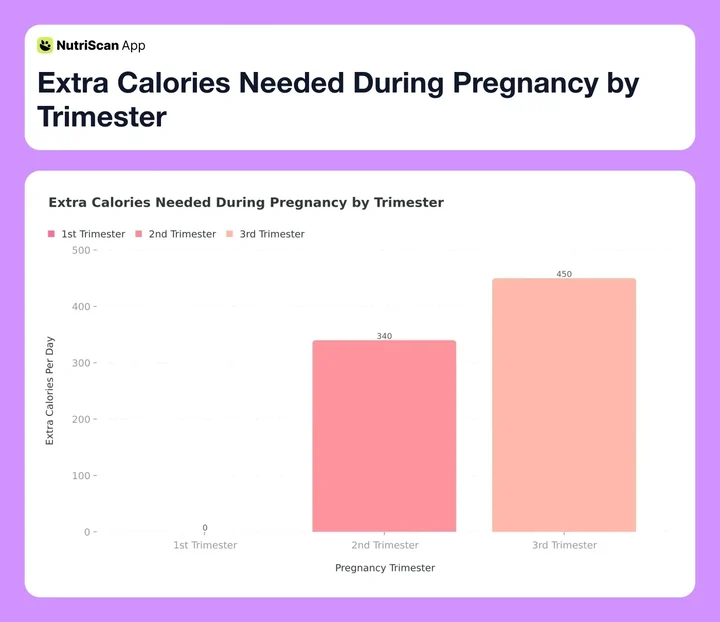 Figure 1: Calorie needs increase gradually through pregnancy, so there is no need to double your portions
Key Nutrients to Track in Pregnancy, and How Much
Iron, folate, choline and calcium are the four that move the most in pregnancy. Here is the number to aim for on each.
The Folate Foundation: Folic acid (or its natural form, folate) is a B vitamin that is critical for preventing major birth defects of the baby's brain and spine, known as neural tube defects. The need for this nutrient is so high that most health organizations recommend a supplement in addition to a folate-rich diet. Foods rich in folate include leafy green vegetables, beans, peanuts, and fortified cereals.
Iron is a Super-Carrier: During pregnancy, your blood volume increases by almost 50% to support your baby. To make all this extra blood, you need a lot more iron. The daily requirement jumps from 18 mg for non-pregnant women to 27 mg. This iron is what helps carry oxygen to your baby. As I learned firsthand, an iron deficiency can lead to fatigue, weakness, and anemia.
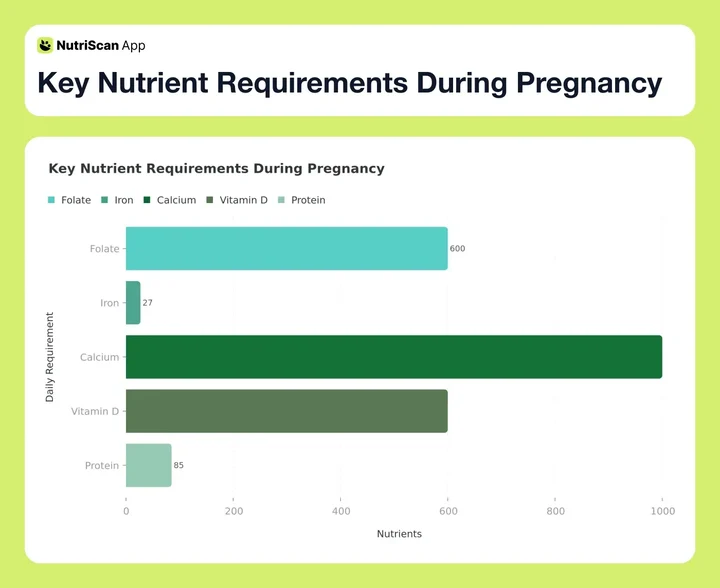 Figure 2: Essential nutrients and their daily requirements during pregnancy
The Choline-Brain Connection: Choline is a less-famous but equally important nutrient. It plays a significant role in the baby's brain and spinal cord development. Emerging research continues to underline its importance. A 2022 study published in The American Journal of Clinical Nutrition found that higher maternal choline intake during the second and third trimesters was associated with better information processing speeds in infants. This suggests that getting enough choline, found in eggs, lean meat, fish, and legumes, directly supports your baby's cognitive development from the very beginning.
Calcium for Bones: You and your baby both need calcium for strong bones and teeth. If you don't get enough calcium from your diet, your body will take it from your own bones to give to your developing baby. The recommended amount is around 1,000 mg per day. Dairy products are a great source, but so are sardines, fortified plant milks, and dark leafy greens like kale.
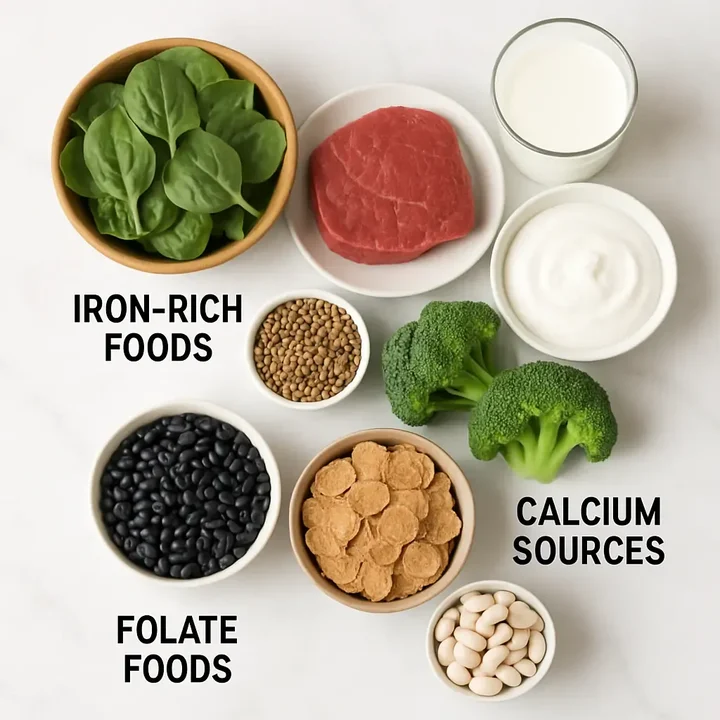 Essential pregnancy nutrients organized by category - iron-rich foods, calcium sources, and folate foods
A tracker turns these numbers into a grocery list you can shop. Our pregnancy macro calculator does the arithmetic for you, giving personalized daily targets based on your trimester and your pre-pregnancy weight.
7 Tips for Tracking Your Pregnancy Nutrition
Getting started with nutrition tracking can feel like one more thing to do on your already long list. But with the right approach, it can simplify your life. Here are my top tips for making it work for you.
Plan Ahead, Stress Less: Spend 30 minutes on a Sunday loosely planning the week. Not a rigid schedule, just a few anchor meals: lentil soup for lunches, chicken stir-fry one night, salmon another. Pre-log them and you can see whether the week is balanced before you start cooking.
Photograph the Meals a Database Cannot Guess 📱: NutriScan reads a plate from a photo, so the fastest route for a cooked meal is a picture rather than a search. There is no barcode scanner; packaged food goes in through the Packaged Food tag with manual or voice entry. Save your photo scans for the mixed bowls and restaurant plates that a search box gets wrong. Free gives you 5 scans a week, Premium is unlimited, and anything you log once sits in your recents for a one-tap repeat.

The NutriScan app's food scanner makes logging meals quick and accurate - perfect for busy expecting mothers
- Focus on the "Big Five" Nutrients: Instead of getting overwhelmed by tracking every single vitamin and mineral, start by focusing on the most important ones for pregnancy: Folate, Iron, Calcium, Vitamin D, and Protein. Most good apps will allow you to highlight these on your dashboard. By ensuring you meet these five targets, you'll naturally be eating a more balanced and healthy diet overall.

Your personalized dashboard gives you an instant overview of your daily nutrition progress, making it easy to spot any gaps
Track Your Water 💧: Water forms amniotic fluid, builds new tissue and carries nutrients to your baby, and it takes the edge off constipation and swelling. Set a goal in the app's water tracker, usually 8 to 12 glasses a day, and log what you drink.
Listen to Your Body: The app is a guide, not a dictator. Cravings and aversions run hard in pregnancy. If broccoli turns your stomach one week, swap it for something with a similar nutrient profile rather than forcing it down. Craving red meat may be your body asking for iron.
Customize Your Goals with Each Trimester: Your nutritional needs change as your pregnancy progresses. A good app will automatically adjust your calorie recommendations based on your trimester. You can also manually adjust your goals for specific nutrients in consultation with your doctor. For instance, you might want to increase your focus on Omega-3 (DHA) in the third trimester, as it's a key period for brain development.
Do a 5-Minute Evening Review: Before you go to bed, take a quick look at your daily report. Where did you succeed? What was missing? Maybe you notice you were low on calcium. This isn't about feeling guilty. It's about gathering information. "Okay, tomorrow I'll make sure to have yogurt with my breakfast or a glass of fortified almond milk as a snack." This small habit of reflection and planning makes the next day even better.
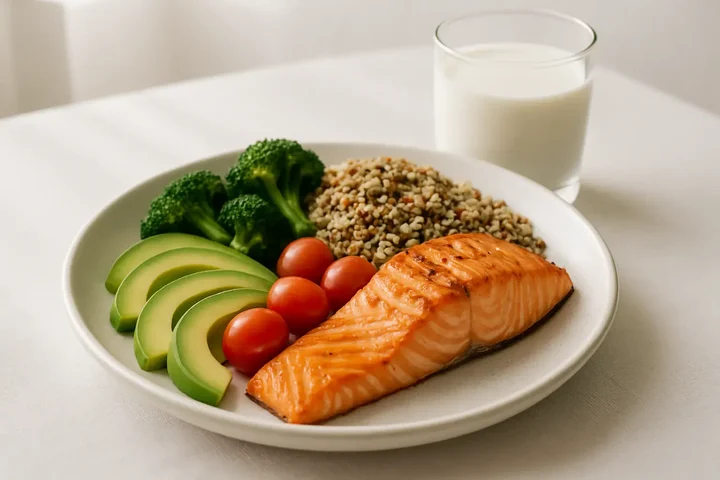 Modern nutrition tracking makes it easy to log healthy pregnancy meals and monitor key nutrients
How to Start Tracking Pregnancy Nutrition, Step by Step
Alright, let's walk through how you can begin using a nutrition tracking app today. Think of it as setting up your personal nutrition assistant.
Step 1: Create Your Personalized Pregnancy Profile
First you tell the app about you. NutriScan's onboarding asks for the pieces that set your targets.
- Your Goal: Pick Pregnancy from the goal list. That one choice reshapes the targets the app builds for you.
- Body Details: Height, pre-pregnancy weight, and date of birth. This is the baseline for your energy needs.
- Activity Level: Be honest. Mostly sedentary at a desk, lightly active, or a regular exercise routine? It moves your daily calorie budget by hundreds.
- Food Preference: Veg, non-veg, vegan or mixed, so the suggestions you get are food you would actually eat.
Once this is done, the app will generate your initial daily targets for calories, protein, carbs, and fats. This is your starting point.
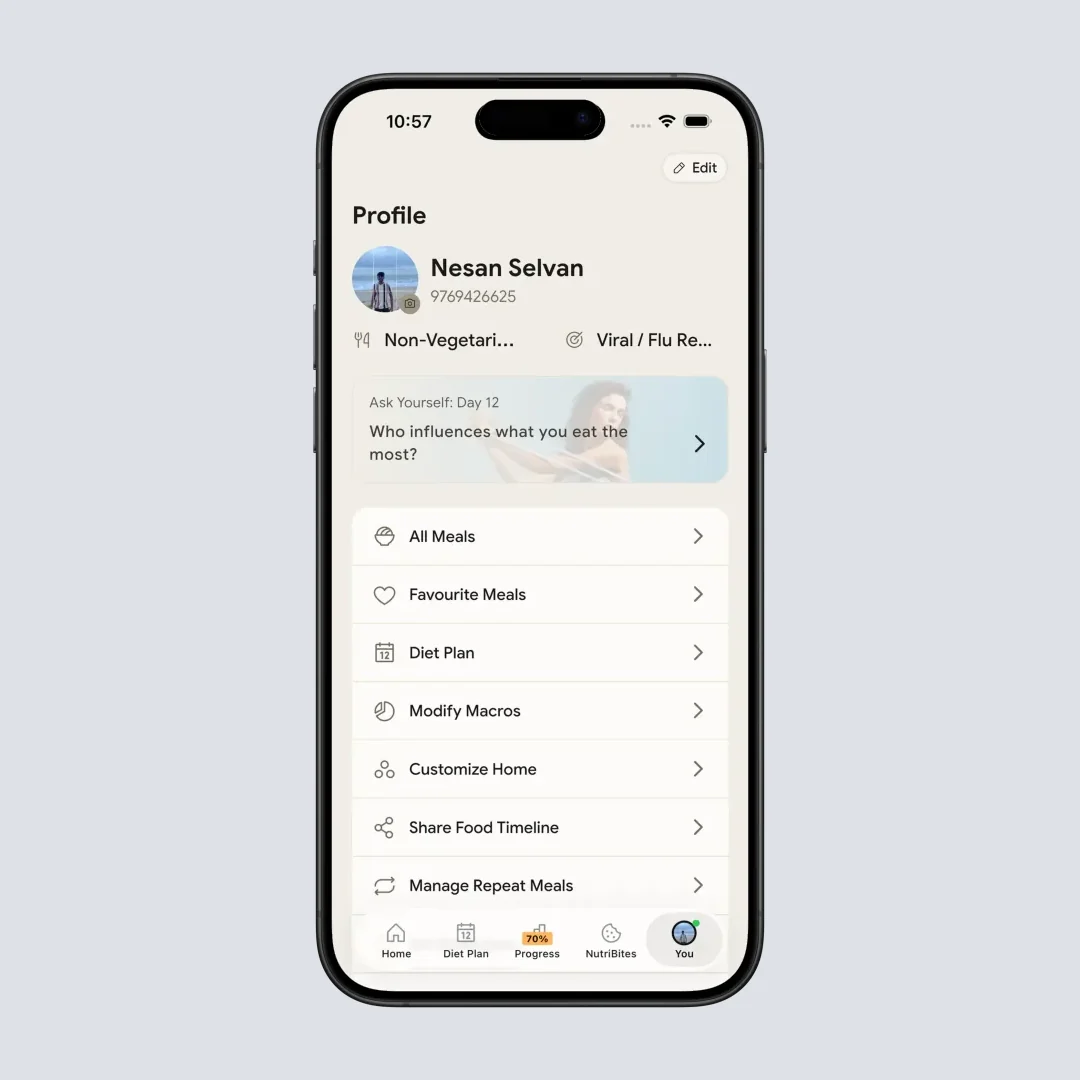
Setting up your pregnancy profile ensures you get personalized nutrition targets that adjust with each trimester
Step 2: Fine-Tune Your Nutrient Targets
This is where you go from a generic plan to your plan. Navigate to the "Nutrient Goals" section of the app. While the app will have good defaults for pregnancy, you can customize them.
- Highlight Key Nutrients: As we discussed, you'll want to prominently display Folate, Iron, Calcium, Vitamin D, and Protein. Most apps let you choose which nutrients appear on your main dashboard for easy viewing.
- Adjust Based on Medical Advice: If you are diagnosed with iron-deficiency anemia, your doctor may set an iron target above the standard 27 mg. Change the number in the app to match their orders so the app is checking your plan, not a generic one.
Step 3: The Art of Daily Logging
Consistency is the key to getting useful data. Aim to log your food as you go, or at the end of each meal.
- Breakfast: Say you have a bowl of fortified cereal with milk and a banana. Type the cereal and the milk in as Packaged Food, or say them out loud with voice entry. Then search for "banana" and pick the portion size. Under a minute, start to finish.
- Lunch: You had a homemade chicken salad sandwich. You can use the "Create a Recipe" feature. Input the ingredients once (chicken, mayonnaise, celery, whole wheat bread). Now, "Chicken Salad Sandwich" is saved, and you can log it with one tap in the future.
- Snacks & Dinner: Mix scanning, searching and saved recipes. The app gets faster as it learns what you eat often. If you cannot find the exact brand of cheese, a generic equivalent is fine. You want a good overall picture, not a lab measurement.
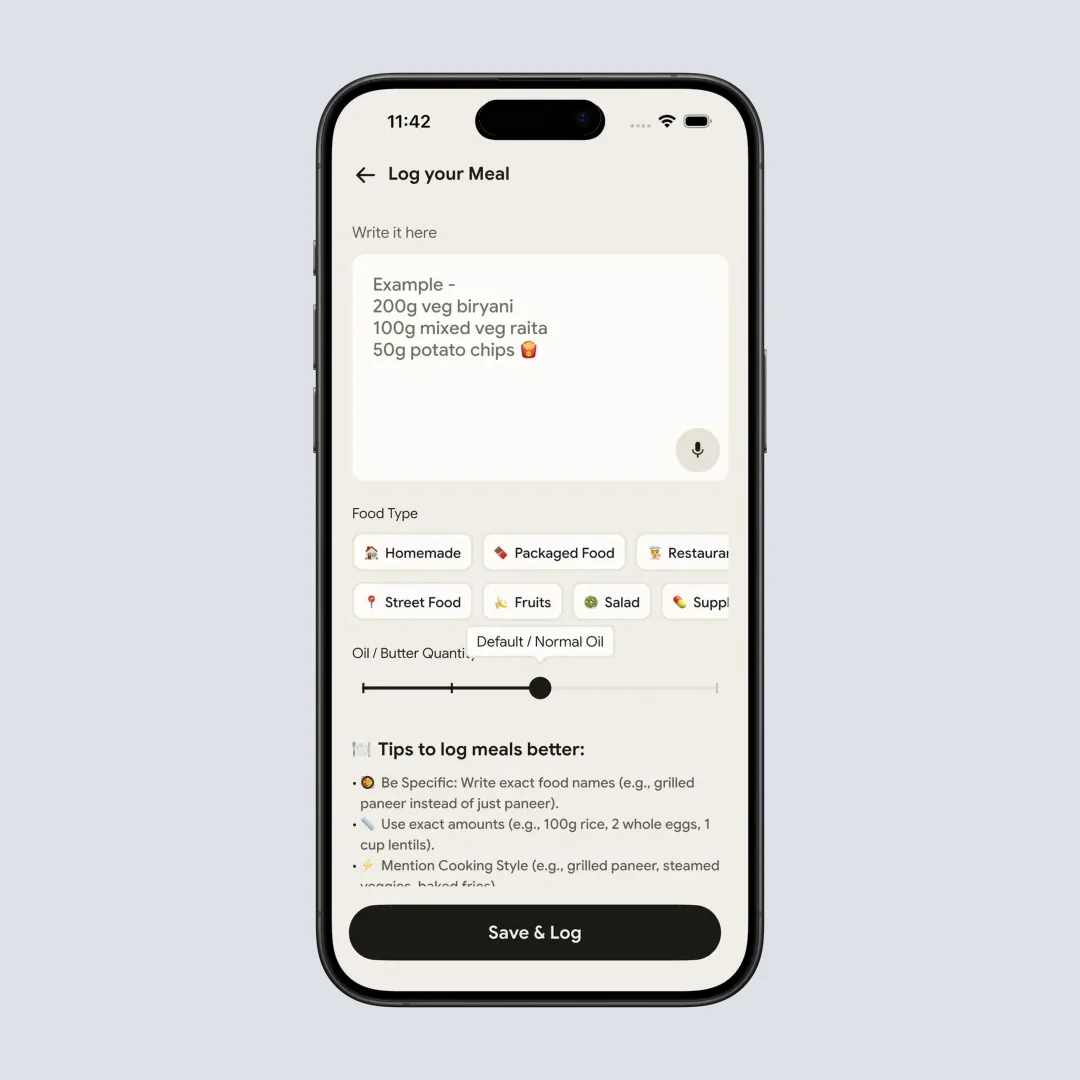
Manual logging is simple and intuitive - perfect for homemade meals and recipes you create yourself
Step 4: Analyze and Act on Your Daily Report
This is the step that pays for the logging. Once the day is logged, open the "Report" or "Diary" section. You'll see a breakdown of your intake.
- Look at the Bars: You'll likely see bar charts showing your intake versus your goals. Is your protein bar full? Great! Is your calcium bar only halfway? That's useful information.
- Identify Gaps: If calcium came up short, tap the nutrient and you get the foods that fix it, yogurt, cheese, sardines, tofu, which is tomorrow's shopping list written for you.
- Celebrate Wins: Mark the days you hit your folate goal or drank all your water. Small wins keep the habit alive through a tired trimester. 🎉
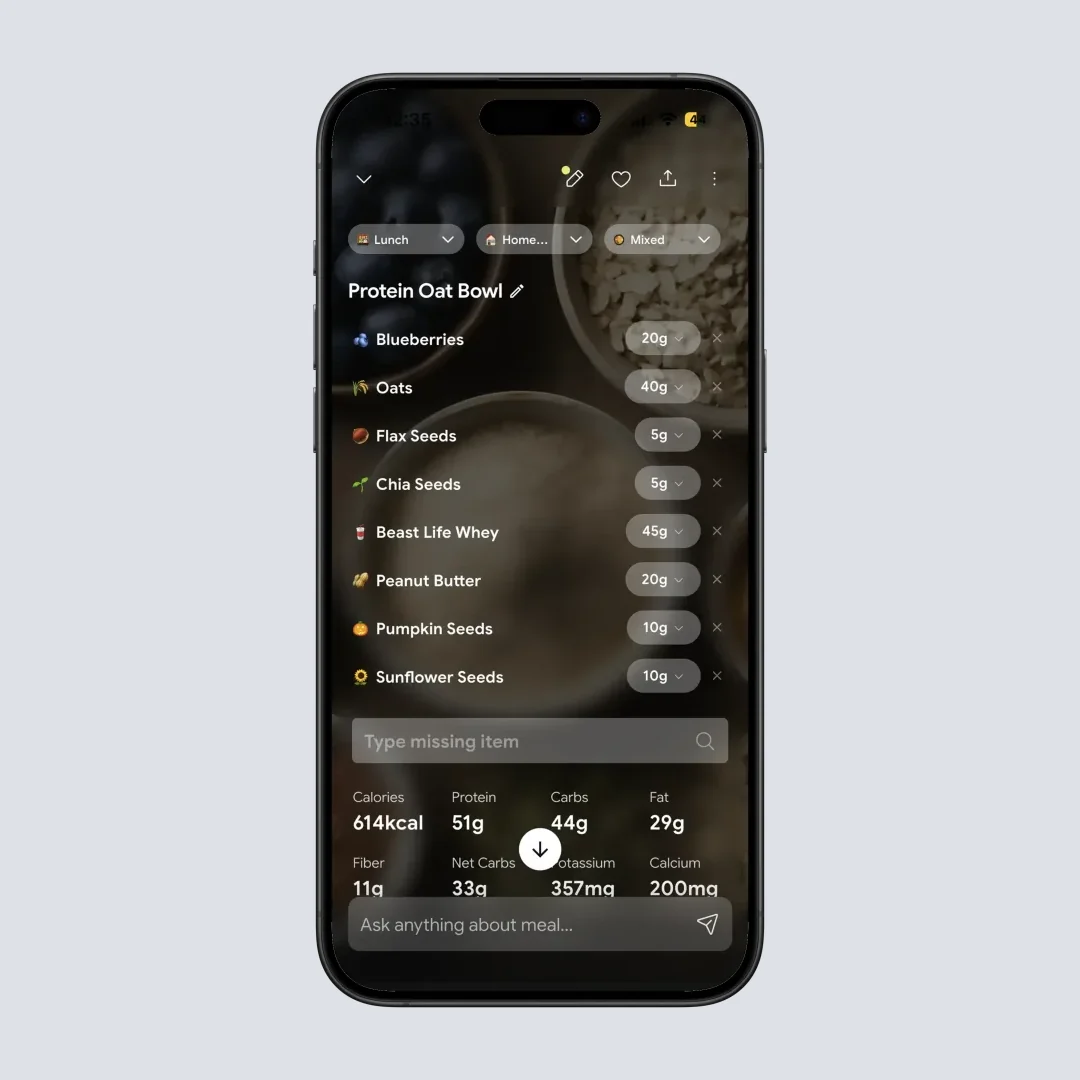
Detailed nutrition breakdowns help you understand exactly where you stand with each essential pregnancy nutrient
Step 5: Track More Than Just Food
Food is only part of the picture. Use the rest of what the app records.
- Hydration: NutriScan counts water alongside calories, protein, carbs, fat and fiber in your macros breakdown, so a glass logged is a glass you can see on the day's summary.
- Ask Your Own Timeline: NutriBites lets you chat with your meal history. Ask it which days ran low on iron, or what you ate on the mornings that went badly, and it answers from your own log rather than a generic chart.
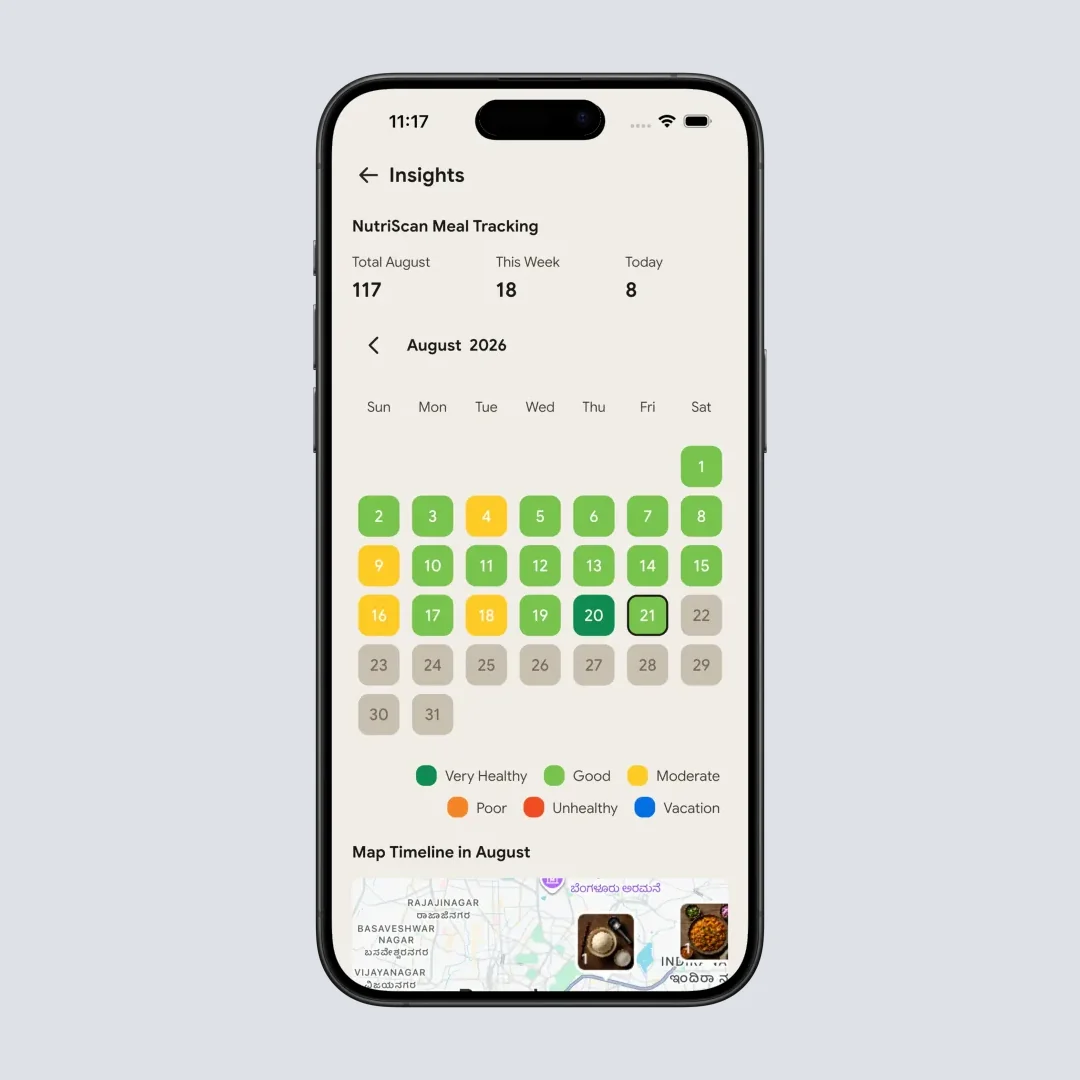
Track patterns in your eating habits and energy levels throughout your pregnancy journey with visual insights
Step 6: Share and Discuss with Your Healthcare Team
Your nutrition app is a powerful communication tool.
- Request Your Data: NutriScan doesn't have an in-app export button yet, but support can send a secure copy of your food diary that you can forward to your doctor or dietitian before an appointment.
- Show, Don't Just Tell: Instead of saying "I think I'm eating well," you can pull out your phone and show them your nutrient breakdown for the past week. This allows for a much more productive conversation. You can ask specific questions like, "I'm struggling to meet my iron target through food alone. Can we discuss my supplement dosage?" It makes you an active participant in your healthcare.
How Much Protein to Eat in Pregnancy, and When
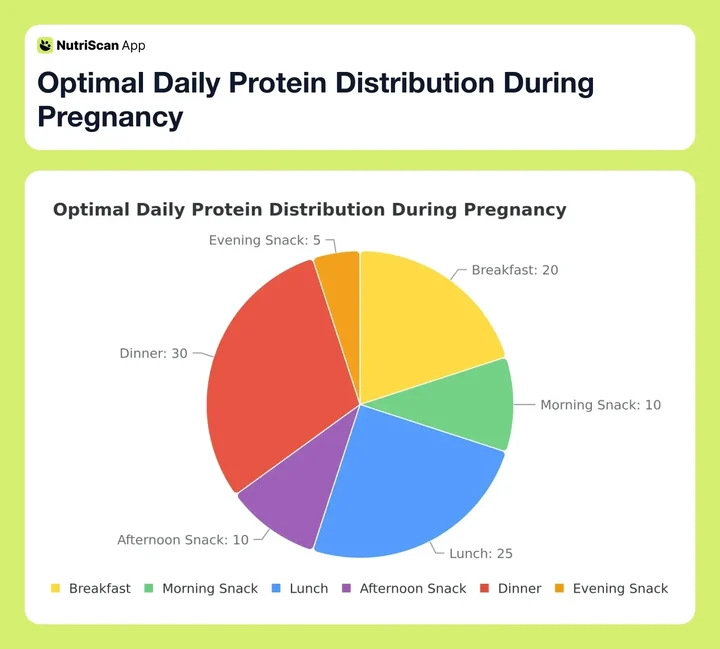 Figure 3: How to distribute your daily protein intake for optimal absorption and sustained energy
Spreading protein through the day helps absorption and keeps energy steadier than one large evening serving. Aim for 20 to 30 g at main meals and 10 to 15 g at snacks. For the trimester by trimester numbers, see our guide to protein in pregnancy.
Research Backing Digital Health Tools in Pregnancy
It's important that our choices are backed by solid evidence. The use of digital health tools in pregnancy is a growing field of study, and the results are very promising. A study published in the Journal of Medical Internet Research looked at how pregnant women used mobile apps for health information. The findings showed that women highly valued apps that provided personalized tracking and reassurance. They felt more in control and better informed about their health choices. The act of tracking itself was found to increase their awareness and lead to positive dietary changes.
Another important area of research is gestational diabetes, a condition where women develop high blood sugar during pregnancy. Dietary management is the primary treatment. A 2023 systematic review in the journal Nutrients analyzed multiple studies on digital health interventions for gestational diabetes. The review concluded that women who used apps to monitor their diet and blood sugar levels showed better adherence to dietary recommendations and had improved glycemic control compared to those receiving standard care alone. This shows that for specific conditions, a tracking app can be a powerful medical support tool.
Choline keeps turning up too. Cornell University research has linked maternal choline intake to infant brain development, which is why it earns a place on the short list of nutrients worth watching rather than the long one.
Tracking Your Pregnancy Nutrition with NutriScan
NutriScan runs the loop this guide describes: photograph the meal, read the nutrients, fix the gap tomorrow.
- Photo scan for real plates. Point the camera at a cooked meal and it returns calories, protein, carbs, fat and micronutrients. Micronutrients come with every meal on both plans, with nothing held back for Premium.
- A pregnancy goal, not a generic one. Pick Pregnancy during onboarding and your targets get built around it instead of around weight loss.
- NutriScore on every meal. Five bands, Dark Green through Red, so you can tell in a second whether a plate helped.
- Monika, the voice AI nutritionist. Ask her about an iron target or a food you are unsure of. Free gets 4 calls a week, Premium is unlimited.
- NutriBites. Chat with your meal timeline to find the pattern behind a low-iron week.
Premium adds the 28-day personalized diet plan, weekly meal-plan suggestions, a goal-based grocery list and supplement recommendations. If you are still in the planning stage, our 28-day diet plan to get pregnant covers the months before conception, and the NutriScan for pregnancy page shows what the app tracks for expecting mothers.
Every new account gets a 7-day Premium trial. The trial starts through your app store; whether a card is collected depends on your platform and region.
Frequently Asked Questions
Q: Is it safe to track my food and calories during pregnancy?
A: Yes, when done with the right mindset. The goal of tracking during pregnancy is awareness, not restriction. You are not trying to "diet" or lose weight. Instead, you are using the tool to ensure you are meeting your increased calorie and nutrient needs. It helps you confirm you are eating enough of the right things. Always set your app to a "pregnancy" mode, which will calculate targets for weight gain and increased nutrients, and always discuss your dietary plan with your healthcare provider.
Q: How many extra calories do I really need during pregnancy?
A: This is a common question! The needs change by trimester and are based on your pre-pregnancy weight and activity level. Here is a general guideline:
- First Trimester (Weeks 1-13): 0 extra calories per day. Your body is working hard, but your energy needs haven't increased yet.
- Second Trimester (Weeks 14-27): About 340 extra calories per day. This is like adding a snack of an apple with two tablespoons of peanut butter.
- Third Trimester (Weeks 28-40+): About 450 extra calories per day. This could be a bowl of oatmeal with berries and nuts.
A good nutrition app will automatically calculate these adjustments for you based on your due date.
Q: What are the most important nutrients to track for a healthy pregnancy?
A: While a balanced diet is best, some nutrients are particularly vital during pregnancy. The top ones to keep an eye on are:
- Folate/Folic Acid: Crucial for preventing neural tube defects. Aim for at least 600 mcg per day from foods and supplements.
- Iron: Needed to make extra blood for you and your baby. Aim for 27 mg per day.
- Calcium: Builds your baby's bones and teeth. Aim for 1,000 mg per day.
- Vitamin D: Helps your body absorb calcium and is important for immune function. Aim for 600 IU per day.
- Protein: A primary building block for your baby's cells. Aim for around 70-100 grams per day.
- DHA (Omega-3): Critical for baby's brain and eye development. While not always a default nutrient to track, it's a good one to monitor.
Q: I have terrible morning sickness. How can a tracking app possibly help me?
A: Morning sickness can be very difficult, and it's understandable to feel that tracking is the last thing you want to do. However, it can help in a few ways. First, you can use the notes section to track when you feel nauseous and what you ate beforehand, potentially identifying trigger foods. Second, on the days you can eat, the app helps you make every bite count. You can identify and choose foods that are both easy to tolerate and nutrient-dense, like a fruit smoothie, yogurt, or a piece of whole-grain toast with avocado. It helps you maximize nutrition when your appetite is limited.
Q: Can a nutrition app replace the advice from my doctor or a registered dietitian?
A: No. It is very important to understand that a nutrition tracking app is a support tool, not a replacement for professional medical advice. Your doctor, midwife, or a registered dietitian can provide personalized recommendations based on your individual health history, blood work, and specific needs. The app is there to help you implement their advice and track your progress. Always consult with your healthcare team before making any significant changes to your diet or starting a supplement regimen.