NutriScan App Reviews: What Users Really Think
 ChatGPT
  Claude
  AI Mode
  Perplexity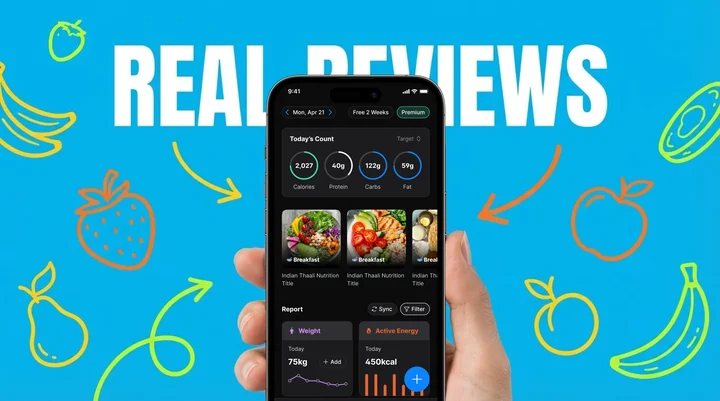
NutriScan app reviews land in the same shape almost every time. The praise is about speed and coverage: the AI photo scan reads a plate of biryani or a bowl of hawker noodles in seconds, with nobody typing ingredients. The criticism narrows to two things, layered mixed dishes that need a manual correction after the scan, and diet planning sitting behind Premium. The free plan covers 5 meal scans a week, 4 Monika voice calls, macros, NutriScore and micronutrients on every meal, with no cap on meal history. No review I read reported crashes, lost data or wildly wrong numbers. If you want a longer single-user verdict, we wrote one in our honest NutriScan review.
That pattern matters because accuracy is what people actually quit over. Researchers found that one-third of nutrition app users would reject an app solely because it gave incorrect calorie or nutrient information (Vasiloglou et al., 2021).
TL;DR - NutriScan App Reviews Summary
- Who it is for: People eating diverse cuisines who want AI-powered meal scanning instead of manual logging
- Top strengths: Fast AI scanning, global cuisine recognition, cooking method awareness, condition-specific diet plans
- Common criticisms: Complex mixed dishes may need correction, some features require Premium subscription
- Key insight: A JMIR mHealth quality assessment found star ratings did not track objective quality scores - use the free plan to form your own opinion
When I started looking into NutriScan app reviews, I went past the star ratings, which can be misleading, and read the stories, the frustrations, the wins, and the honest feedback that helps someone decide whether an app is worth their time.
Why App Reviews Matter More Than Star Ratings
A surprising study published in JMIR mHealth found that the app with the lowest quality scores in their assessment was actually the most popular one with users, based on star ratings and reviews (Choi et al., 2021). Star ratings do not always reflect true quality.
 When you realize star ratings might not tell the whole story
Researchers have developed something called the Mobile App Rating Scale (MARS) to evaluate health apps more objectively. This scale looks at five key areas: engagement, functionality, aesthetics, information quality, and subjective experience (JMIR mHealth, 2015). When I analyze NutriScan reviews, I am keeping these dimensions in mind rather than just counting stars.
Research from a systematic review found that 328 different factors affect whether someone continues using a nutrition app or abandons it (König et al., 2021). The top reasons people quit are time-consuming data entry, incomplete food databases, and not trusting the accuracy.
What Users Love About NutriScan: The Positive Reviews
The AI Photo Scanning Gets Praise
The most consistent positive feedback I found centers around NutriScan's AI meal scanning feature. Users repeatedly mention how much time it saves compared to traditional logging methods.
The same comparison comes up again and again: point the camera at a plate of biryani instead of typing out its ingredients one by one.
This aligns with what research shows about user preferences. A European survey of 2,382 people found that 54.8% preferred apps that could analyze a photo quickly, even if slightly less accurate, over apps requiring multiple photos or manual entry (Vasiloglou et al., 2021). Speed and convenience matter enormously.

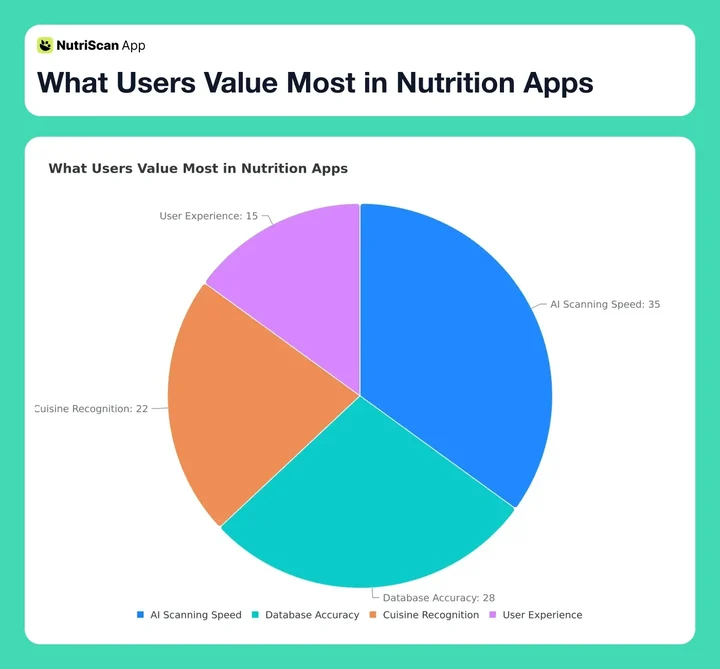 Figure 1: Survey data shows AI scanning speed is the top priority for nutrition app users
The Global Cuisine Recognition
A recurring theme in positive reviews is NutriScan's ability to recognize non-Western foods.
A 2024 study from the University of Sydney found that many nutrition apps underestimate Asian diet calories by an average of 1,520 kilojoules - that is about 363 calories of error per day (Nutrients, 2024). For someone trying to lose weight, that kind of error could sabotage their entire effort.
Users from India, Singapore, and the Middle East frequently mention that NutriScan recognizes their local dishes without them first having to search for a generic English description like "Indian lentil curry" and hope it lands close enough.
Pro Tip
When scanning Indian meals, spread items apart on your plate for better AI recognition. Stacked rotis or overlapping curries are harder for any AI to identify accurately.
The Cooking Method Recognition
Several reviews highlight that NutriScan asks about cooking methods. Deep-fried vs steamed vs grilled - these distinctions significantly affect nutritional content.
This feature addresses a gap identified in research. A study analyzing popular nutrition apps found that emerging technologies like image recognition were "not present in the most popular nutrition apps" despite their potential to improve accuracy (Franco et al., 2016). NutriScan's inclusion of 11 cooking method options shows attention to this detail.
The NutriScore System
Users appreciate getting a color-coded rating for each meal rather than just raw numbers. The NutriScore (from dark green to red) provides quick, visual feedback on meal quality. Learn more about how NutriScore works and what each rating means.
Research published in The Lancet Regional Health found that people who regularly consume foods with better Nutri-Score ratings have lower cardiovascular disease risk (The Lancet, 2024).

What Users Criticize: The Negative Reviews
Mixed Dishes Sometimes Need Correction
The most common criticism is that complex mixed dishes - especially those with many hidden ingredients - sometimes require manual adjustment. Users report that a layered casserole or a soup with multiple components might not be perfectly identified on first scan.
This is actually a known challenge in AI food recognition. Researchers note that "the sheer visual diversity of food is staggering" and that the same dish can look dramatically different based on who prepared it (NYU Engineering, 2024).
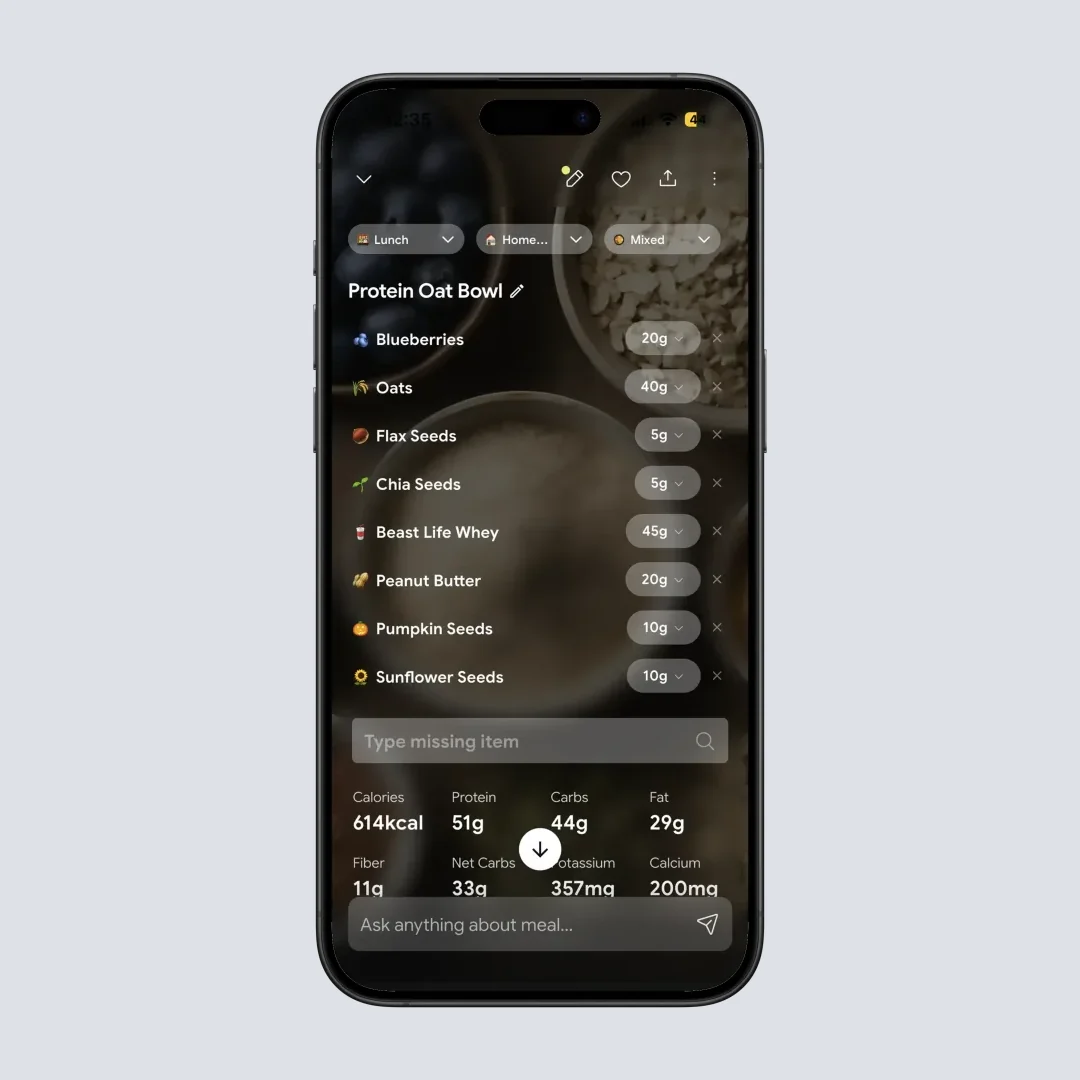
NutriScan provides editing tools for this - users can adjust portions, add missing items, and correct identifications. But some users wish it was more accurate on the first try.
Premium Features Require Subscription
Several reviews mention frustration that diet planning is Premium only and that Monika, the AI nutritionist, is capped at 4 voice calls a week on the free plan. The free version covers 5 meal scans a week, macros, NutriScore and micronutrients, but the planning features are paid.
This criticism appears across many nutrition apps. A content analysis of 72,084 user reviews found that "charges associated with app use" was one of the biggest complaint categories across diet-tracking apps (Zečević et al., 2021). Users want more value for free. Our free vs Premium pricing breakdown lists what each plan includes.
Note on Pricing
The free version keeps 5 meal scans a week, 4 Monika voice calls, micronutrients on every meal and full meal history with no cap.
Learning Curve for New Users
Some reviews mention that NutriScan has many features, and it takes time to discover everything it can do. The app includes meal scanning, diet planning, voice logging, repeat meals, favorite meals, community features, and more.
Research confirms this is a general mHealth challenge. A study found that "nutrition apps can be specifically helpful for new users and that the learning curve is steepest in the beginning" (van et al., 2023). The same study noted that apps are most effective among people with limited prior nutrition knowledge - exactly the people who might feel overwhelmed initially.
Three Composite Scenarios Built From Review Themes
The three sketches below are composites assembled from themes that repeat across reviews. They are examples of how the app fits a goal, not individual reviewers, and they carry no measured outcomes.
Scenario 1: Carb Counting With Type 2 Diabetes
Take a common setup: someone in their forties with Type 2 diabetes, told by a doctor to count carbs, who has already dropped two manual-logging apps because half their regular meals were missing from the database and typing each one took too long.
Here the scan gives a carb count for the plate straight away, and the diabetes diet plan suggests meals that fit both cultural preferences and the targets. Blood sugar results depend on medication, activity and diet as a whole, so treat the app as a way to see what you eat, not as a treatment.
Research supports this experience. A scoping review found that nutrition apps can produce behavior changes that improve chronic disease outcomes, particularly when they include personalized feedback and goal setting (Salas-Groves et al., 2023). If you want to calculate your ideal macros for diabetes management, try our diabetes macro calculator.
Scenario 2: Eating for PCOS
Take someone in their thirties with PCOS who has found that plain calorie counting does not match how her body handles carbs and insulin. Generic apps tell her to eat less, which leaves the hormonal side untouched.
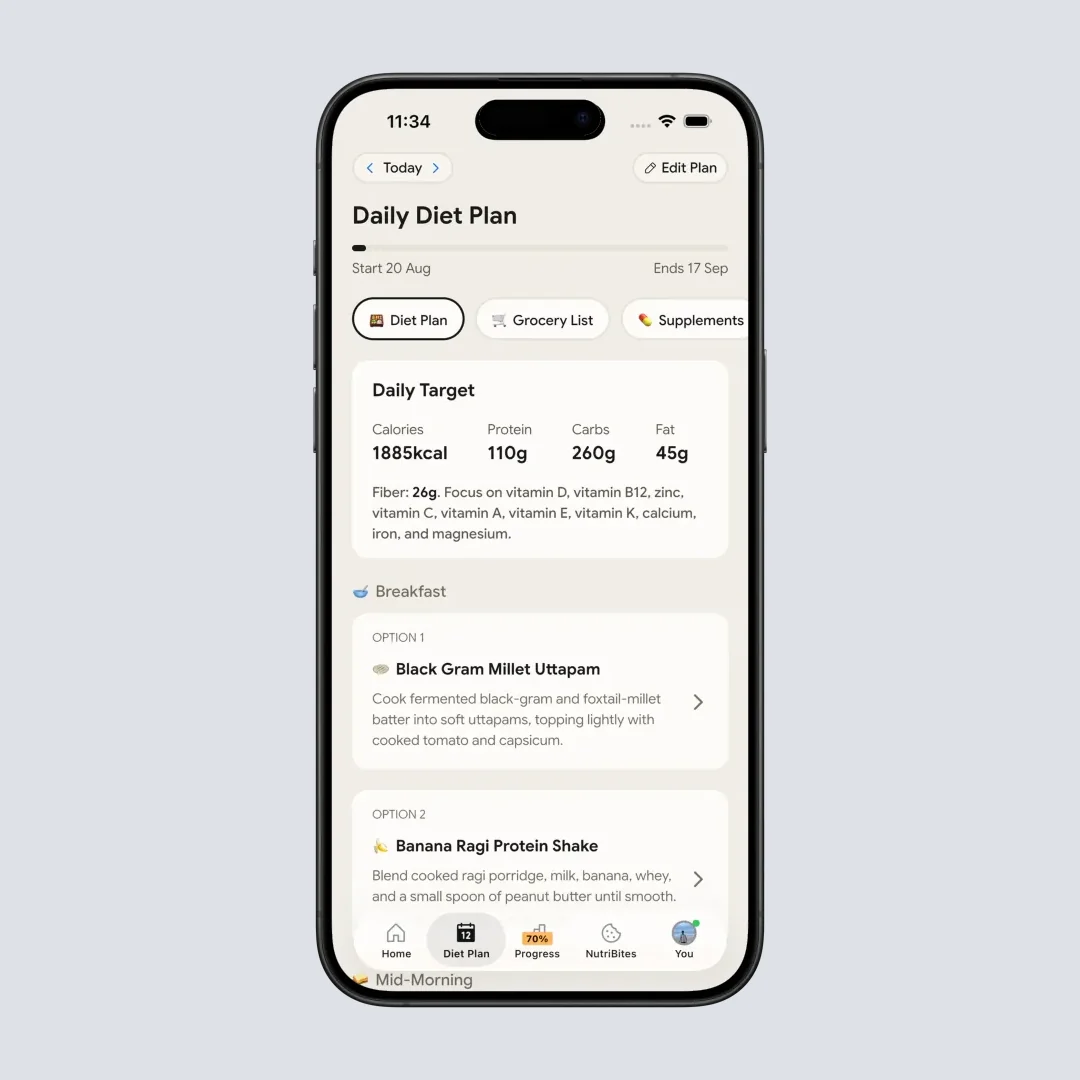
The PCOS diet plan focuses on low-glycemic foods, fiber and anti-inflammatory eating patterns, and the NutriScore separates meals that suit that pattern from meals that are simply low in calories. Weight and cycle changes vary from person to person, so this is a way to organize the choices rather than a promised result.
For more on PCOS management through nutrition, check out our comprehensive guide to meal tracking for PCOS. You can also use our PCOS macro calculator to find your optimal protein, carb, and fat ratios.
Scenario 3: Tracking Protein on Hawker Food
Take a lifter in Singapore who trains five days a week and eats mostly hawker food: char kway teow, chicken rice, fish ball soup. Most apps hold no entry for these, so protein becomes guesswork.
Scanning the plate gives a protein figure to work from, the muscle gain plan structures meals around training days, and the repeat meal feature copies a fixed breakfast instead of scanning it again.
Use our free online macro calculator to get personalized recommendations based on your goals.
The Feature Combination Reviewers Keep Naming
One pattern runs through the positive reviews. The draw is the combination of NutriScore visual feedback with condition-specific diet planning rather than any single feature on its own.
The diabetes scenario needs carb counts. The PCOS scenario needs meal quality ratings, not just calorie totals. The muscle gain scenario needs hawker food recognized in the first place.
Traditional apps give you numbers. NutriScan gives you context for your specific health situation.
The NutriScore tells you if a meal is good or bad for your condition, not just whether it fits a calorie budget. The condition-specific plans mean the app understands that a PCOS user needs different advice than a pregnant user, even if they eat the exact same meal.
Research supports this approach. A 2023 study found that apps combining multiple behavior change strategies - self-monitoring, personalized feedback, goal setting, and education - produced significantly better outcomes than single-strategy apps (Salas-Groves et al., 2023). NutriScan's integration of scanning, scoring, and condition-specific planning hits all four.
Reviews from people managing diabetes, PCOS or pregnancy tend to dwell on this fit. The condition-specific plans were built in from the start rather than bolted on as a "diabetes mode" after launch.
NutriScan vs Traditional Apps: Feature Comparison
How NutriScan compares to traditional nutrition apps, based on reviews and research:
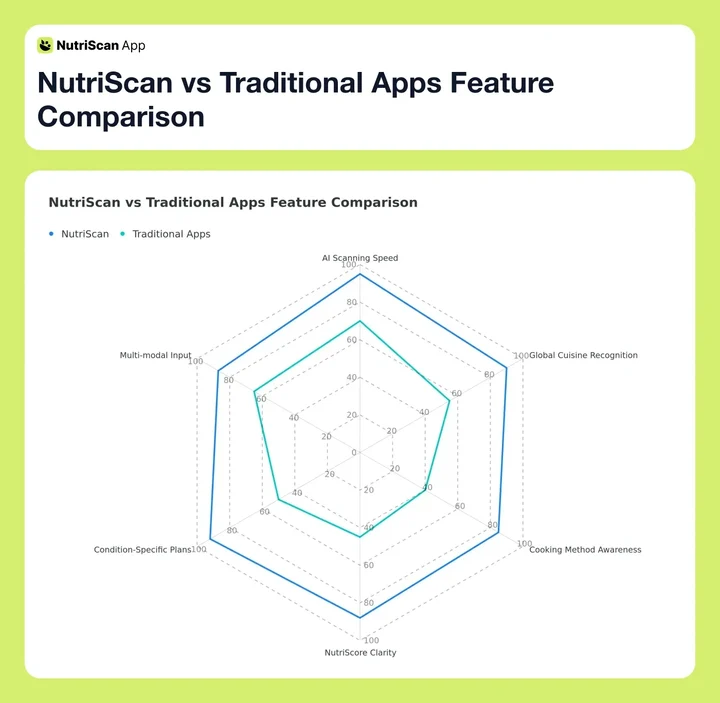 Figure 2: Radar chart comparing NutriScan against traditional nutrition apps across 6 key dimensions
| Feature | NutriScan | Traditional Apps |
|---|---|---|
| AI Photo Scanning | Yes, instant | Rare or slow |
| Global Cuisine Database | Strong (Indian, Asian, Middle Eastern) | Limited (mostly Western) |
| Cooking Method Tracking | 11 options | Usually none |
| Condition-Specific Plans | Diabetes, PCOS, Pregnancy, etc. | Generic or none |
| NutriScore Feedback | Color-coded A-E rating | Usually just numbers |
| Voice Logging | Yes | Rare |
7 Factors to Consider When Reading NutriScan Reviews
Here are the factors worth focusing on when you read reviews:
Factor 1: Database Accuracy for Your Cuisine
Reviews from people who eat similar foods to you matter most. If you eat primarily South Asian cuisine, look for reviews from South Asian users. A University of Sydney evaluation of 18 food-tracking apps found manual-logging apps overestimated energy on a Western diet by an average of 1,040 kilojoules while underestimating an Asian diet by an average of 1,520 kilojoules, so coverage really does shift with cuisine.
Factor 2: Consistency of Use Patterns
Look for reviews that mention long-term use (3+ months), not just first impressions. Peterson and colleagues, following 220 women through a year of weight maintenance, found that women who logged at least 3 days a week for at least half the year lost weight while less consistent loggers gained it (Obesity, 2014).
Factor 3: Goal Alignment
Reviews from users with similar health goals are more relevant. Someone tracking for pregnancy has different needs than someone tracking for weight loss. NutriScan offers condition-specific plans, so look for reviews from users with your condition.
Factor 4: Technical Environment
App performance can vary by phone model and operating system. If reviews mention crashes or slow loading, check if those users have similar devices to yours.
Factor 5: Time Investment Expectations
A systematic review of nutrition app use found that entering foods being too time-consuming was a leading reason people stop using these apps. Reviews that mention how much time users spend daily give realistic expectations.
Factor 6: Feature Usage Depth
Some reviews only discuss basic scanning. More useful are reviews that discuss diet planning, NutriBites questions, voice logging, and other advanced features.
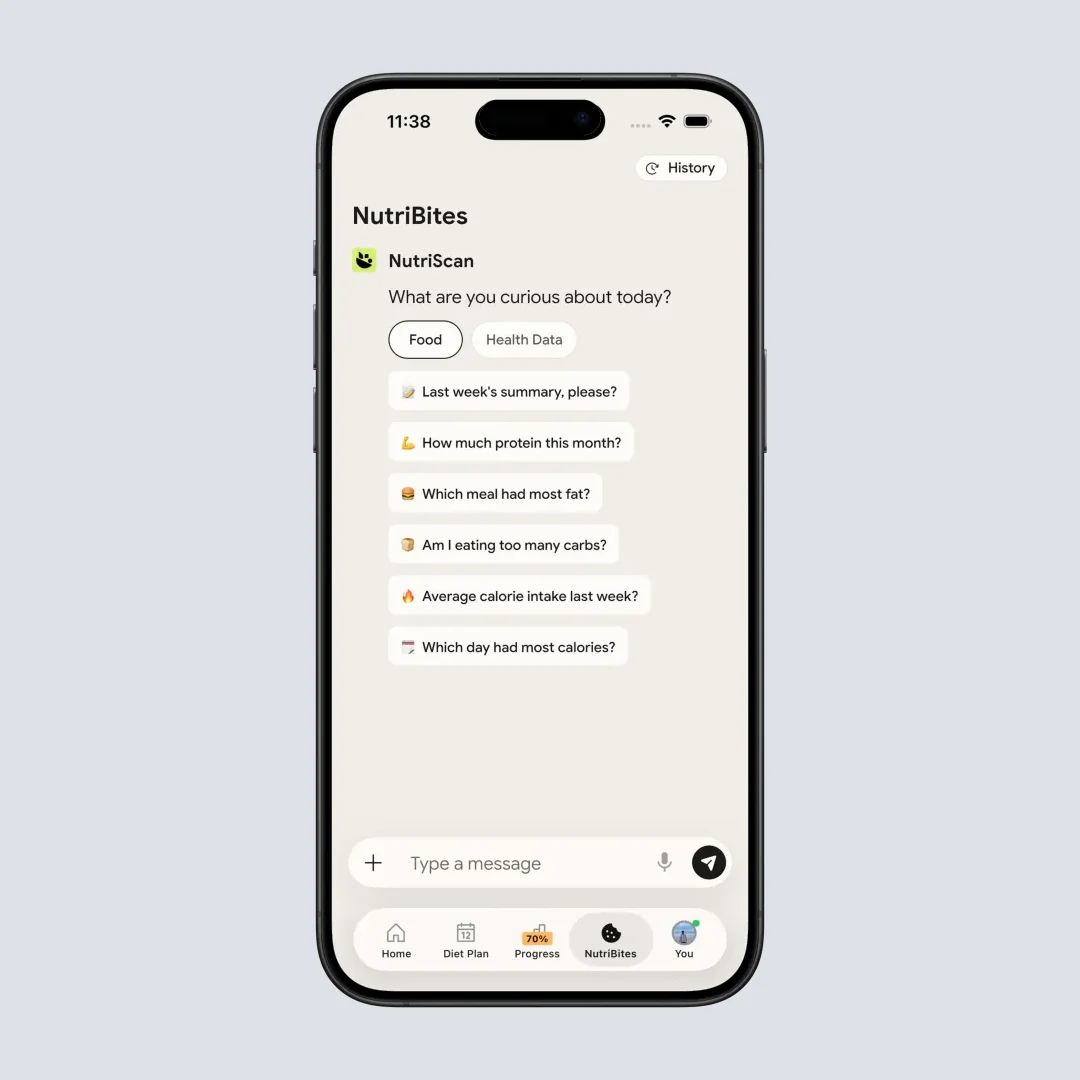
Factor 7: Support Experience
When things go wrong, how responsive is support? Reviews mentioning contact with the NutriScan team reveal service quality beyond the app itself.

How to Evaluate NutriScan for Yourself: A Step-by-Step Process
Rather than relying solely on others' reviews, here is how I recommend testing NutriScan for your specific needs:
Step 1: Download and Complete Onboarding Thoughtfully
During onboarding, select your accurate goal (weight loss, muscle gain, diabetes, PCOS, pregnancy, or viral recovery) and food preferences. This data shapes your entire experience - do not rush through it.
A Cambridge meta-analysis of 12 randomized trials of digital self-monitoring found tailored interventions significantly more effective than non-tailored ones (Obesity Reviews, 2021).
Step 2: Test the AI Scanner with Your Typical Meals
On your first three days, scan meals you eat regularly. This tests whether the AI recognizes your specific cuisine and cooking style. Note any foods that need manual correction.
Step 3: Compare Accuracy Against Known Values
Pick one packaged food with a nutrition label and scan it. Compare NutriScan's output to the label. This gives you a concrete accuracy benchmark.
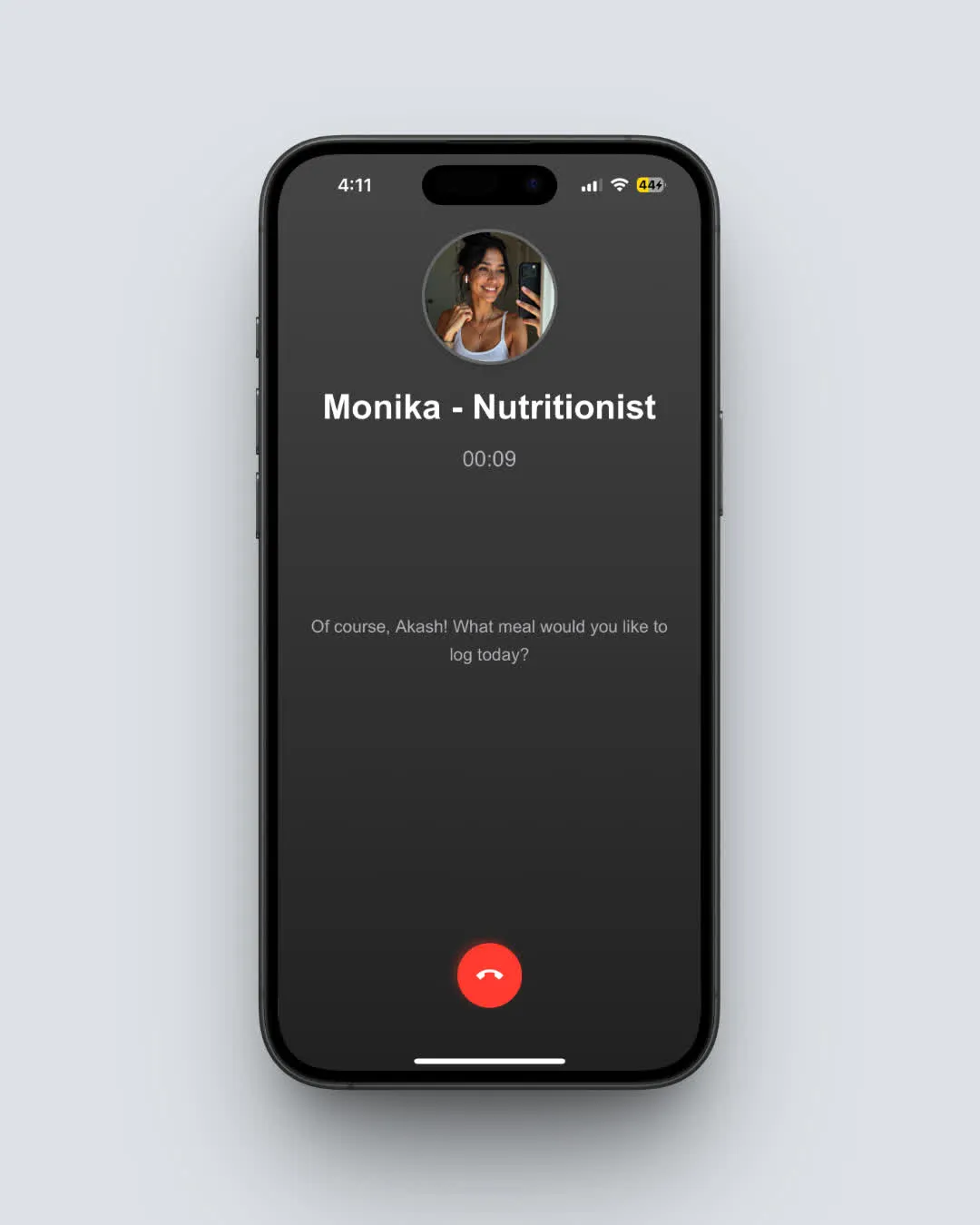
Step 4: Try the Voice and Text Logging
Not every meal can be photographed. Test the voice logging ("I had two rotis and dal") and manual text entry to see if these alternatives work for your lifestyle.
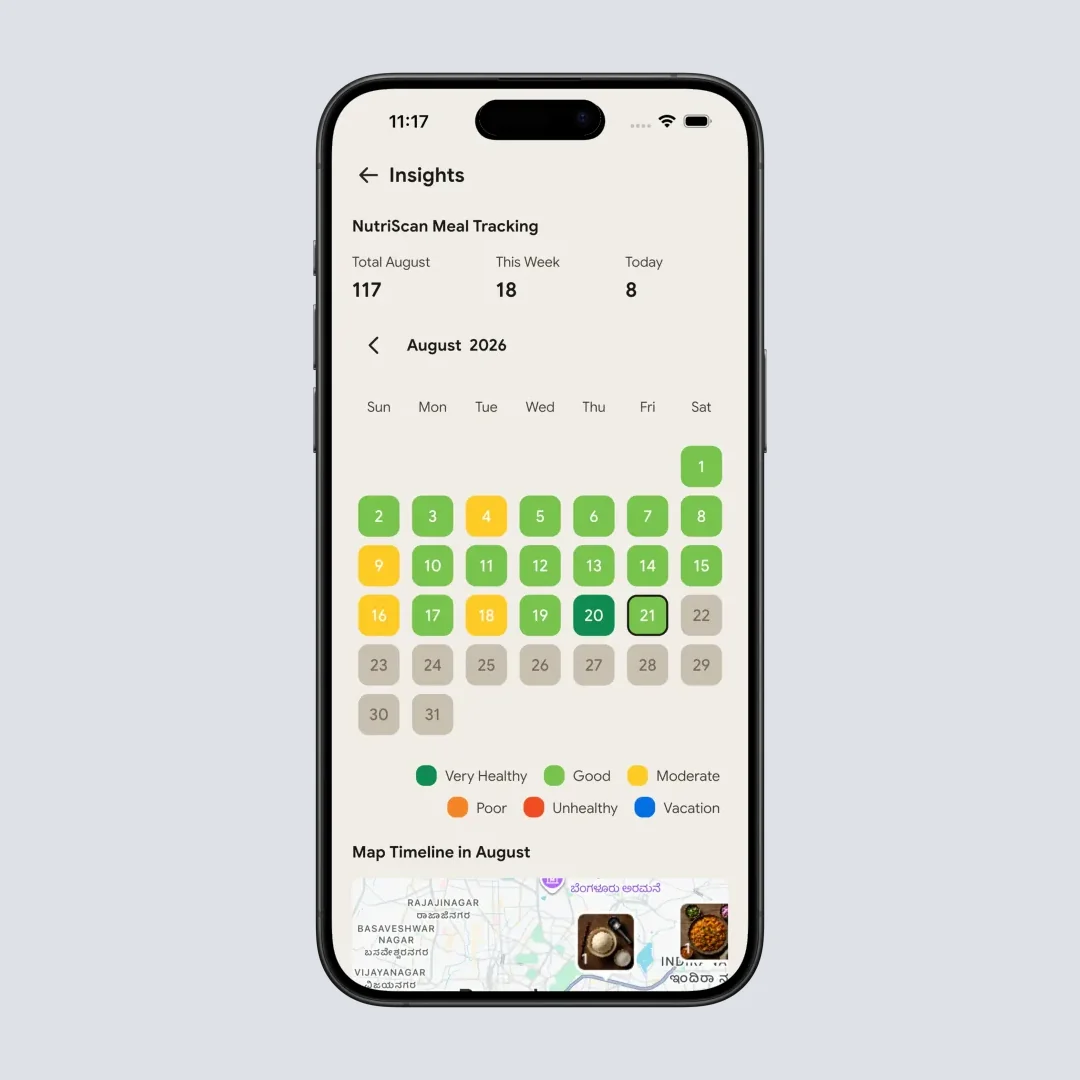
Step 5: Evaluate the NutriScore Feedback
After a few days, look at your daily NutriScore trends and nutrition insights. Does the color-coding help you understand meal quality? Does it influence your choices?
Step 6: Test the Diet Plan Feature
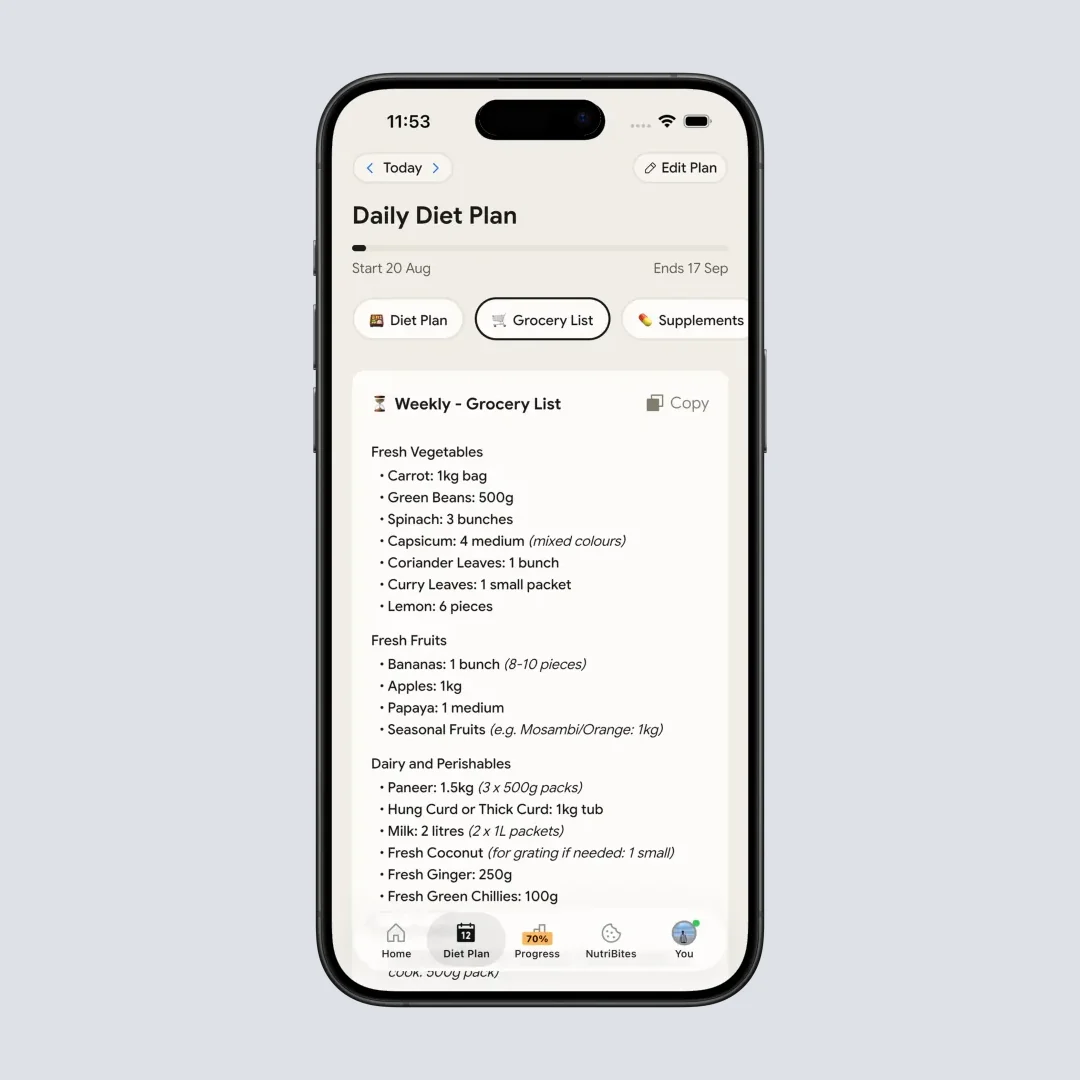
On Premium, specifically test the 28-day diet plan feature. See if the meal suggestions match your preferences and if the grocery list is useful.
Step 7: Decide Based on Your Experience
After one week, you will have enough personal data to make an informed decision. Compare your experience against the reviews you have read - does your experience align?
 That feeling when you find the right nutrition app for your needs
What Research Says About Nutrition App Effectiveness
The broader evidence on whether nutrition apps work is worth a look.
Evidence Point 1: Apps Lead to Weight Loss
A 2024 study in Obesity Science & Practice found a clear dose-response relationship: the more people use tracking apps, the more weight they lose (Obesity Science & Practice, 2024). Consistency matters more than perfection.
Evidence Point 2: AI Features Improve Satisfaction
Research in JMIR found that users of AI-assisted food tracking apps reported higher satisfaction, citing ease of use, personalized feedback, and motivational features (Panayotova, 2025). The AI reduces burden.
Evidence Point 3: Behavior Change Requires Multiple Strategies
A scoping review found that apps combining multiple strategies - self-monitoring, goal setting, feedback, and education - produced better behavior change outcomes than single-strategy apps (Salas-Groves et al., 2023). NutriScan's combination of scanning, planning, AI coaching, and community fits this model.
Evidence Point 4: Usability Predicts Continued Use
Usability was the most frequently identified barrier in a systematic review of nutrition app users. Reviews consistently mention NutriScan's ease of use, suggesting this barrier is addressed.
NutriScan App Review Verdict: The Balanced View
After analyzing reviews and research, here is my balanced assessment:
What NutriScan Does Well
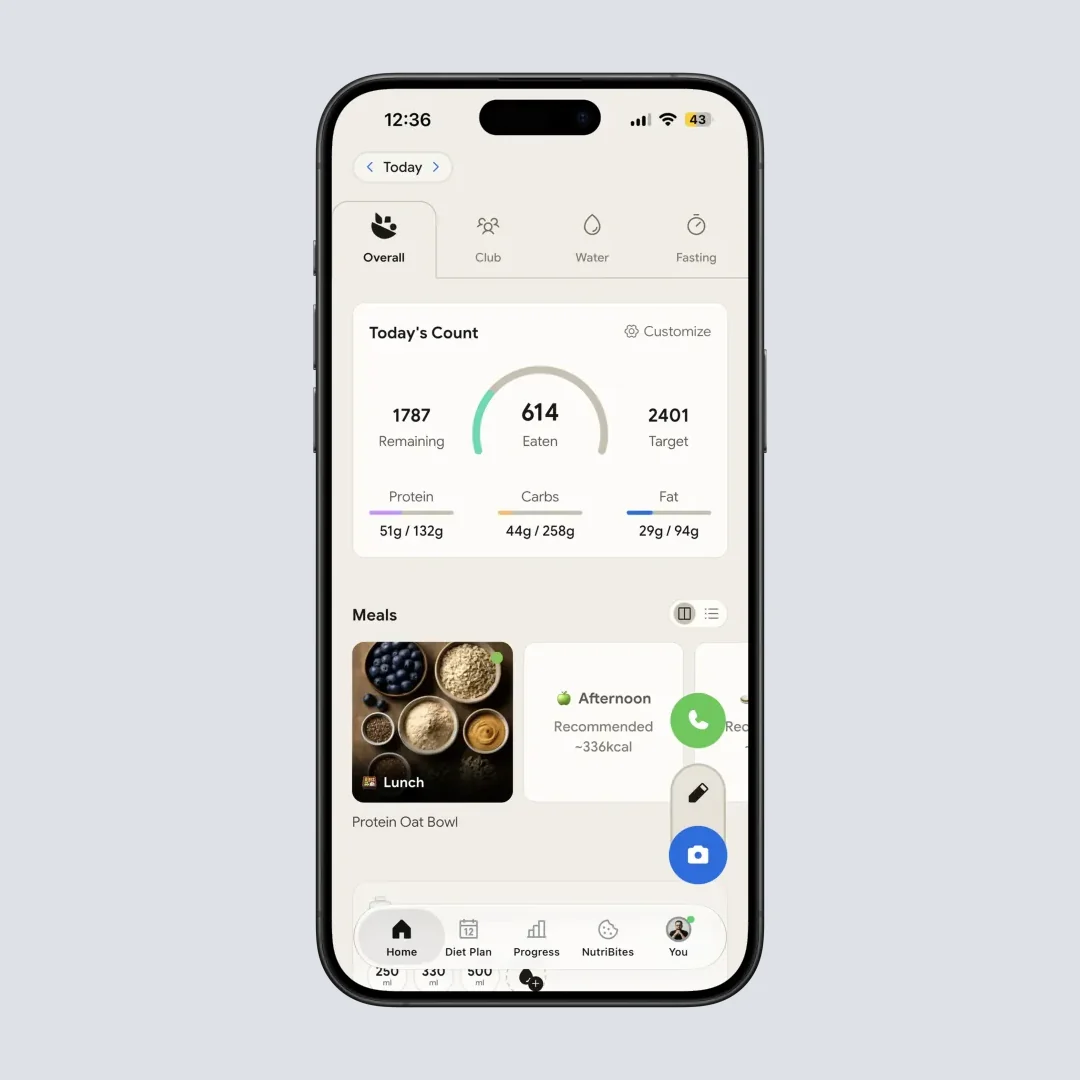
- AI scanning saves time - Users consistently report faster logging than manual entry apps
- Global cuisine recognition - Strong performance with Indian, Asian, Middle Eastern foods
- Cooking method awareness - Distinguishes between preparation methods that affect nutrition
- NutriScore clarity - Color-coded feedback helps users understand meal quality quickly
- Condition-specific planning - Diet plans for diabetes, PCOS, pregnancy address specific needs
- Multi-modal input - Photo, voice, and text options for different situations
- Repeat meal features - Daily repeat and copy functions reduce logging burden
- Active development - Regular updates suggest ongoing improvement
Where NutriScan Has Room to Grow
- Complex mixed dishes - May require manual adjustment for accuracy
- Premium dependency - Some useful features require subscription
- Feature density - New users need time to discover all capabilities
- Portion estimation variability - Works better with spread-out rather than stacked food
Who Should Try NutriScan Based on Reviews
Based on the pattern of positive and negative reviews, NutriScan seems best suited for:
- People eating diverse, non-Western cuisines
- Those with specific health conditions (diabetes, PCOS, pregnancy)
- Users who value time-saving over manual control
- People who want meal quality feedback, not just calorie counts
- Users willing to invest in a premium experience
NutriScan may be less ideal for:
- Users who only eat simple, easily identifiable Western foods
- Those who want everything free
- People who prefer detailed manual macro entry
- Users who distrust AI-generated data
Frequently Asked Questions About NutriScan Reviews
Q: What do NutriScan app reviews say overall?
A: Reviews praise the AI photo scan for speed and for reading non-Western dishes like biryani, dal tadka and hawker food. The recurring complaints are layered mixed dishes needing a manual correction after the scan, and diet planning being Premium only. The free plan covers 5 meal scans a week, 4 Monika voice calls, macros, NutriScore and micronutrients on every meal, with no cap on meal history.
Q: Is NutriScan the same app as GetNutriSync?
A: No. GetNutriSync is a different product and NutriScan has no connection to it. NutriScan is listed as NutriScan on the App Store and Google Play and lives at nutriscan.app, so reviews of one say nothing about the other. Check the developer name and the website on the store listing before you judge either. Our NutriScan trust guide covers how to verify the listing.
Q: Are NutriScan reviews trustworthy?
A: Like any app, NutriScan has a mix of genuine and potentially biased reviews. I recommend focusing on detailed reviews that describe specific use cases rather than generic praise or criticism. In a JMIR mHealth assessment of 29 highly rated nutrition apps, the app users rated highest scored lowest on the objective MARS quality scale. Use the free plan to form your own opinion.
Q: How does NutriScan compare to MyFitnessPal in reviews?
A: MyFitnessPal advertises a larger database (20.5 million foods on its own homepage) but relies heavily on user-contributed data, which can be inaccurate. NutriScan's AI scanning approach takes less time but may need correction for complex dishes. Reviews suggest NutriScan performs better for global cuisines, while MyFitnessPal has more packaged Western foods. Your choice depends on what you eat and how much time you want to spend logging. We put the two side by side in our NutriScan vs MyFitnessPal comparison.
Q: Do negative NutriScan reviews mention specific problems?
A: The most common complaints in negative reviews are: mixed dishes needing correction, premium features being paid, and initial learning curve. A content analysis of 72,084 diet-tracking app reviews found app charges drew the lowest ratings of any complaint topic, so paid-feature frustration is common across the category. None of the negative reviews I found mentioned fundamental flaws like crashes, data loss, or completely wrong nutrition data.
Q: What do healthcare professionals say about NutriScan?
A: While I did not find peer-reviewed studies specifically on NutriScan, the features it includes (photo logging, personalized plans, condition-specific guidance) align with what research recommends for effective nutrition apps. The app includes a disclaimer recommending users consult healthcare providers for medical decisions, which is appropriate.
Q: How long do users typically use NutriScan before reviewing?
A: Most detailed reviews come from users who have used the app for 1-3 months. First-week reviews tend to focus on initial impressions rather than effectiveness. Prioritize reviews from longer-term users.
Ready to see for yourself? The best way to evaluate any nutrition app is personal experience. Download NutriScan and test whether it matches your needs, cuisine, and goals.
