NutriScan vs Noom: Subscription Cost and Features Compared
 ChatGPT
  Claude
  AI Mode
  Perplexity
 Noom costs $70 for a single month or $209 up front for a year, which averages $17.42 a month, and it pairs manual logging with a daily psychology lesson. NutriScan is about $59 a year, with a free plan that keeps 5 AI meal scans a week, macros, micronutrients and a NutriScore on every meal. Take Noom for coached habit change, NutriScan for fast logging and 28-day plans for diabetes, PCOS or pregnancy.
Last verified: August 23, 2026
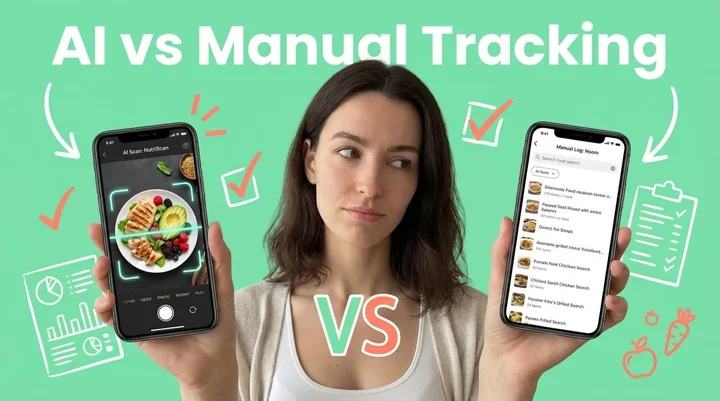
TL;DR - NutriScan vs Noom
Noom subscription cost: $70 for a single month, or $209 charged up front for 12 months, which averages $17.42 a month. Noom Med, the medication side, runs $99 to $279 a month.
NutriScan cost: about $59 a year, plus a free plan with 5 AI meal scans a week, macros, micronutrients and a NutriScore on every meal. Both figures are standard US prices as of mid 2026 and change by region.
Main difference: NutriScan reads a meal from one photo in seconds. Noom asks you to search and log every item by hand, then adds a daily psychology lesson.
Pick Noom if: emotional eating is the habit you need to break and you want a human coach checking in by text.
Pick NutriScan if: you want fast logging, non-Western food recognized properly, and 28-day plans for diabetes, PCOS, pregnancy or muscle gain.
A Noom subscription costs $70 if you buy one month, or $209 charged up front for a year, which averages $17.42 a month. NutriScan Premium is about $59 a year, and the free plan keeps 5 AI meal scans a week with no cap on meal history. Prices here are standard US prices as of mid 2026 and change by region. The money buys different things. Noom sells daily lessons and a human coach on top of manual food logging. NutriScan sells a scanner that reads your plate from a photo, plus 28-day diet plans built around a condition. For the full Noom price ladder, including Noom Med, see our Noom cost breakdown.
About 45% of people who track with a nutrition app report losing weight (Market.us Research). The gap between the ones who keep going and the ones who quit is usually friction rather than willpower.
NutriScan publishes this post, and we make a competing app. This comparison uses published features, prices and cited sources. Whether you are trying to lose weight, manage diabetes, handle PCOS symptoms, or eat healthier during pregnancy, this comparison will help you pick the one you will still be using in three months.
 Choosing between nutrition apps can feel overwhelming - let me help you decide
The Real Problem with Meal Tracking Apps
Let me be honest with you. Most diet apps fail for one simple reason - they make logging food feel like a full-time job.
Studies show that manual food logging has a high attrition rate because of the considerable effort required to self-monitor diet (PMC Research). Each food item needs to be individually entered, and if you eat varied meals, you are spending more time logging than actually eating.
For many people the problem is not motivation but a tool that demands too much effort.
This is exactly where NutriScan and Noom take very different approaches. Let me break down what each app offers and help you decide which fits your lifestyle better.
What is Noom?
Noom launched in 2008 and has grown into one of the most recognized weight loss apps globally. The app uses psychology-based lessons and a color-coded food system to help users understand their eating habits.
Here is how Noom works:
Color-Coded Food System: Foods are grouped into three categories - green (low calorie density), yellow (moderate), and orange (high calorie density). The idea is simple - eat more green foods, fewer orange foods.
Daily Educational Lessons: Short 5-10 minute lessons teach you about nutrition psychology, emotional eating, and behavior change.
Human Coaching: You get matched with a coach who checks in via text messages.
Manual Food Logging: You search and log each food item manually from their database.
Research indicates that 75% of Noom users maintained at least 5% weight loss after one year, and 49% maintained 10% weight loss (PubMed Study). These are solid numbers for a digital weight loss program.
Important Considerations
Pricing: Noom costs approximately $70 per month on shorter plans, or around $17 per month with a 12-month commitment billed upfront. That is $209+ paid at once for the annual plan.
Time Commitment: The app requires daily engagement with lessons, food logging, and coach messages. Studies note that Noom requires your attention throughout the day.
Focus: Noom primarily targets weight loss through general behavior change. It does not offer specific meal plans for conditions like diabetes, PCOS, or pregnancy.
What is NutriScan?
NutriScan takes a different approach to nutrition tracking. Instead of manual logging, you simply take a photo of your meal - and AI does the rest.
Here is what makes NutriScan different:
AI-Powered Meal Scanning: Just click a picture of your meal. The app instantly identifies every item and provides detailed nutritional breakdown - calories, proteins, carbs, fats, fiber, and 20+ micronutrients. See the meal scan guide for details on how photo logging works.
NutriScore Rating: Each meal gets a health score from 1-100, showing you exactly how nutritious your choice was. Dark green means excellent, red means you might want to choose differently next time. Learn more about how NutriScore works.
Condition-Specific Diet Plans: 28-day personalized meal plans designed specifically for weight loss, muscle gain, diabetes management, PCOS, or pregnancy nutrition. Explore the full diet plan guide to understand customization options.
Voice Assistant (Monika): Ask questions about your meals hands-free. "Is this good for my blood sugar?" or "What should I eat for dinner based on my lunch?"
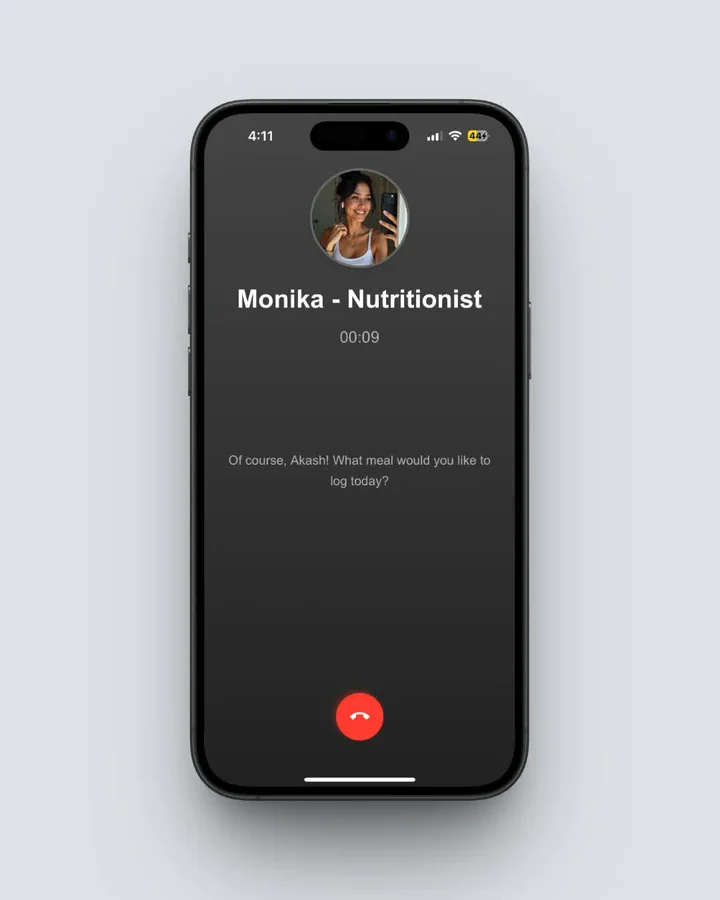 Monika, NutriScan's AI voice assistant, lets you ask nutrition questions and log meals hands-free (Path: Home > Click Call Button)
Regional Food Recognition: The app recognizes local cuisines from India, Middle East, Europe, America, and Asia - including home-cooked meals, street food, and restaurant dishes.
Cooking Method Detection: NutriScan identifies 11 different cooking methods (deep-fried, steamed, grilled, etc.) and adjusts nutritional calculations accordingly.
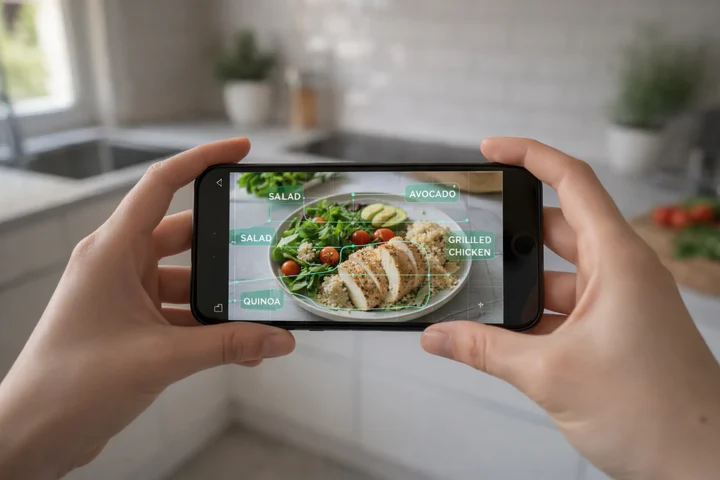 AI-powered meal scanning takes just seconds compared to minutes of manual logging

NutriScan's crop screen lets you select food type, cooking method, and oil level for accurate nutrition analysis (Path: Home > Camera Icon > Click Picture)

Head-to-Head Feature Comparison
Let me put both apps side by side so you can see the differences clearly. Prices are standard US prices as of mid 2026 and change by region.
| Feature | NutriScan | Noom |
|---|---|---|
| Meal Logging Method | AI photo scan, voice, or text | Manual database search |
| Micronutrient Tracking | Yes - 20+ nutrients | Limited - mainly calories |
| Condition-Specific Plans | Diabetes, PCOS, Pregnancy, Weight Loss, Muscle Gain | Weight Loss focus only |
| Regional Food Recognition | Global cuisines including local dishes | Primarily Western foods |
| Cooking Method Detection | 11 methods detected | Not available |
| Health Score per Meal | NutriScore (1-100) | Color categories only |
| AI Voice Assistant | Yes - Monika | No |
| Human Coaching | No, Monika AI voice instead | Yes, by text on all plans |
| Community Features | Club leaderboard, top 50 ranked | Support groups |
| Grocery List Generation | Yes - weekly and monthly | No |
| Psychology Lessons | No | Yes - daily lessons |
| Free Trial | Free plan | 7 days (features limited) |
| Monthly Cost | yearly (weekly in some regions) | $70 for a single month |
| Annual Cost | about $59/yr | $209 charged up front |
As a Calorie Count App, Which One Logs Faster
Research from the Journal of Medical Internet Research shows that mobile apps can help patients lose weight as well as or better than traditional interventions, but they require user engagement to be effective (PMC Research).
If logging food takes too long, you will stop doing it.
A study on mobile nutrition tracking apps found that dietary self-monitoring requires documenting details of one's dietary intake, and adherence is directly linked to weight loss success (Nutrients Journal).
With Noom, you need to:
- Open the app
- Search for each food item
- Select the correct portion
- Repeat for every item on your plate
- Log for breakfast, lunch, dinner, and snacks
That is a lot of taps per meal.
With NutriScan:
- Take a photo
- Review the instant analysis
- Adjust portions if needed (optional)
- Done
Far fewer steps per meal.
Quick logging is easier to keep up on a busy day. A tool that takes several minutes per meal is the one most likely to get skipped after work.
The Regional Food Challenge
Here is something many app reviews do not mention - most nutrition apps struggle with non-Western foods.
Research on AI food recognition systems notes that training datasets often fail to represent global food diversity, which can lead to inaccuracies in nutrient estimation (Journal of Medical Internet Research).
If you eat:
- Indian dal, roti, sabzi
- Middle Eastern hummus and falafel
- Asian stir-fries and rice dishes
- Latin American rice and beans
- African stews and grains
You might struggle with Noom's database, which is heavily weighted toward Western cuisines.
NutriScan was built differently. The AI recognizes home-cooked meals, street food, restaurant dishes, and packaged foods from multiple countries. It even adjusts for cooking methods - a steamed fish has very different nutrition than a deep-fried one.
Pro Tip
For someone who eats traditional Indian food daily, a photo scan with a cooking-method and oil prompt covers dal chawal and aloo paratha without hours of manual searching.
Managing Specific Health Conditions
This is where the two apps differ most significantly.
Noom's Approach: The app focuses primarily on weight loss through psychology and behavior change. While this works for general weight management, it does not provide specialized guidance for medical conditions.
NutriScan's Approach: The app offers 28-day diet plans specifically designed for:
Diabetes Management: Meal plans focused on blood sugar control, glycemic index, and carbohydrate distribution throughout the day. Try the Diabetes Macro Calculator for personalized targets.
PCOS (Polycystic Ovary Syndrome): Anti-inflammatory foods, hormone-supporting nutrition, and blood sugar stabilization. Research shows that 8-13% of reproductive-age women worldwide have PCOS, and dietary modifications can lead to 45% improvement in ovulation (PCOS Research). Check out NutriScan for PCOS for specialized support, or use the PCOS Macro Calculator to get started.
Pregnancy Nutrition: Trimester-specific meal recommendations, focusing on folate, iron, calcium, and other pregnancy-critical nutrients
Muscle Gain: Higher protein distribution, workout-aligned meal timing. Use the Online Macro Calculator to determine your ideal protein intake.
Post-Viral Recovery: Easily digestible, immunity-supporting meals
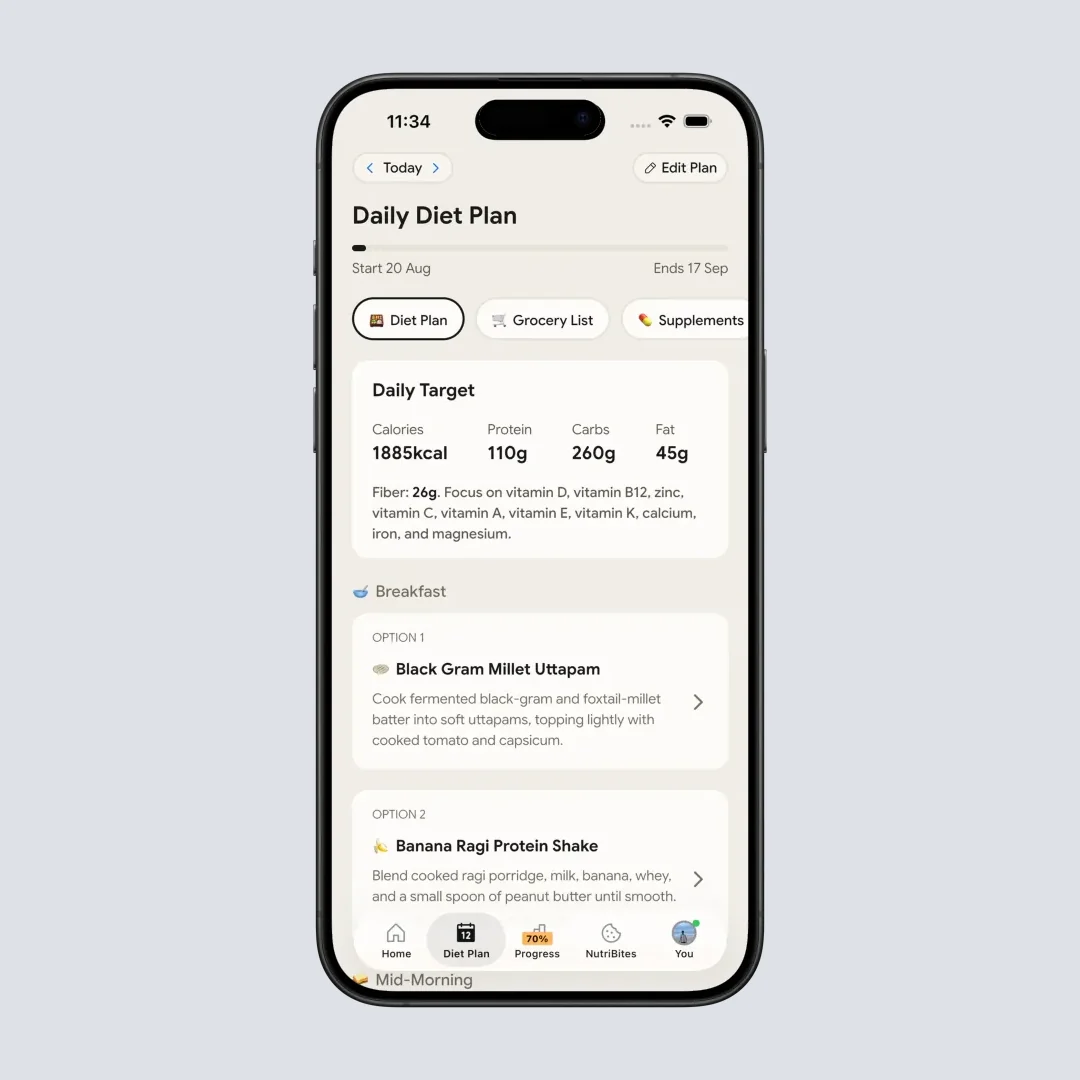
NutriScan's personalized 28-day diet plan with daily macro targets and meal options (Path: Home > Bottom Nav Diet Plan)
A systematic review in Frontiers in Nutrition highlighted the integration of technology into personalized health solutions, emphasizing efforts to develop tools for dietary self-tracking and pregnancy-specific nutrition evaluation (Frontiers in Nutrition).
If you are managing a specific health condition, having targeted meal plans rather than generic "eat less" advice makes a significant difference.
Real-World User Scenarios
Four people, same two apps, different outcomes.
Sarah (34, marketing manager, Los Angeles), weight loss. With Noom she finishes the lessons on her commute, then quits logging by week three because her restaurant lunches never match a database entry cleanly. With NutriScan she photographs the same lunches, including the Thai takeout.
Anita (28, software engineer, Bangalore), PCOS. Noom's database has no accurate entry for idli sambar or curd rice, so she builds custom foods by hand and gets no PCOS guidance. With NutriScan she picks PCOS during onboarding, gets a 28-day plan of anti-inflammatory foods built around Indian cooking, and the scanner reads her home-cooked meals.
Robert (52, teacher, Dubai), type 2 diabetes. Noom's color code teaches him calorie density but never shows glycemic impact or how his carbs are spread across the day. With NutriScan he sets Diabetes as the goal, the plan targets blood sugar stability, and every scanned meal puts carbohydrate content up front.
Maria (29, first-time mom, Singapore), pregnancy. Noom's weight loss framing is the wrong tool for her, since she is not trying to lose weight. With NutriScan she sets Pregnancy and her trimester, and the 28-day plan emphasizes folate, iron and calcium while each scan shows the micronutrients that matter now.
The Psychology Factor: Does It Matter?
Noom's biggest selling point is its psychology-based approach. The app teaches cognitive behavioral therapy (CBT) techniques to address emotional eating and build long-term habits.
Research confirms that CBT-based techniques in Noom coaching have been shown to improve weight loss outcomes (U.S. News Health).
This is genuinely helpful - if you struggle with:
- Emotional eating
- Stress eating
- Understanding why you eat (not just what)
- Building new habits from scratch
Noom's educational content can help.
However, many people already know WHY they eat poorly. They know that stress triggers snacking. They know that portion sizes matter. What they lack is a practical, quick way to track food without disruption.
NutriScan does not offer psychology lessons, but it does offer something equally practical - frictionless tracking that actually fits into real life. You are more likely to build good habits when the tracking tool does not feel like homework.
Noom Subscription Cost vs NutriScan Pricing
Prices below are standard US prices as of mid 2026 and change by region.
Noom subscription:
- One month, bought on its own: $70
- 12 months: $209 charged up front, which averages $17.42 a month
- Noom Med, the medication side: $99 a month for telehealth, up to $279 a month with GLP-1 medication shipped to you
NutriScan pricing:
- Free: 5 AI meal scans a week, macros, micronutrients, a NutriScore on every meal, 4 Monika voice calls a week, the fasting timer, and meal history with no cap
- Premium: about $59 a year, which adds unlimited scanning, 28-day diet plans, weekly meal-plan suggestions, grocery lists and supplement suggestions
The gap that matters is the up-front one. A Noom annual subscription asks for $209 before you know whether you will still be logging in March. NutriScan Premium is about $59 a year, and the free tier stays usable. Five free scans a week is enough to test the scanner on the meals that usually break a food database, your curries, your restaurant plates, your mixed bowls, before you pay anything.
Full plan detail sits in the NutriScan pricing guide, and if you want the Noom numbers pulled apart properly, including whether the coaching justifies them, read is Noom worth it.

Where Optavia Fits Next to Noom and NutriScan
Optavia shows up in the same searches as Noom, and it answers a different question than either app here. Optavia is a Medifast program built on prepackaged Fuelings, the shakes, bars and soups, plus one home-cooked Lean and Green meal a day on its best known 5&1 plan. An independent coach, usually someone who ran the program themselves, checks in with you (Optavia).
The Optavia diet replaces your food. Noom and NutriScan leave your food alone and change how you record it. That difference shows up in three places.
Cost structure. With Optavia you are buying a monthly food order rather than an app subscription, so the running cost sits well above what any tracker charges. A Noom subscription at $70 a month, or $17.42 on the annual plan, and NutriScan Premium at about $59 a year are both priced as software.
What happens afterward. Optavia has a transition phase that moves you off Fuelings and back onto ordinary meals, and that is usually the point where people go looking for a tracker. Both Noom and NutriScan work as that landing spot.
Your own cooking. If you eat home-cooked regional food, Optavia's plan structure and Noom's database both steer you toward foods they already recognize. NutriScan's scanner is built to read the plate you actually cooked.
Weighing all three: Optavia when you want the food decisions taken away from you for a few months, Noom when you want lessons and a coach, NutriScan when you want to keep eating your own food and log it in seconds. Our best Noom alternatives roundup covers the tracker side in more detail.
The Decision Shortcut That Saves Hours of Research
Here is a simple 3-question filter that gives you the answer in 60 seconds:
Question 1: Do you have a specific health condition (diabetes, PCOS, pregnancy)?
- Yes -> NutriScan (condition-specific meal plans)
- No -> Go to Question 2
Question 2: How much time can you spend on tracking daily?
- Under 10 minutes -> NutriScan (photo scanning takes seconds)
- 20+ minutes -> Go to Question 3
Question 3: Is understanding eating psychology your main goal?
- Yes -> Noom (psychology lessons and coaching)
- No -> NutriScan (practical tracking without the homework)
That is it. Three questions. Most people get their answer at Question 1 or 2.
What the Research Says About App Effectiveness
Three findings worth knowing before you pay for either app:
A 2024 study in the Nutrients journal found that using mobile applications plus dietitian intervention is beneficial for short-term weight loss, and dietary compliance significantly impacts weight loss effectiveness (Nutrients Journal).
Another study published in Obesity Science and Practice showed that 42.20% of active mobile app users lost at least 5% of their body weight at 52 weeks follow-up (Wiley Online Library).
Research in the Journal of Medical Internet Research highlighted that AI techniques have shown great potential to improve the accuracy and efficiency of dietary assessment using food images (JMIR Research).
The common thread is adherence. The best app is the one you will actually use consistently. Technology that reduces friction leads to better adherence, which leads to better results. NutriScan's Insights feature helps you track progress over time with detailed analytics.
Recommendation
Based on the features and prices above:
Choose Noom if:
- Your sole focus is weight loss (no specific health conditions)
- You want to understand the psychology behind your eating
- You have 20+ minutes daily for lessons and manual logging
- You eat primarily Western foods
- You are comfortable with upfront annual payment
- You want human coaching via text
Choose NutriScan if:
- You want quick, AI-powered meal tracking (photo, voice, or text)
- You are managing diabetes, PCOS, pregnancy, or building muscle
- You have less than 10 minutes daily for tracking
- You eat diverse cuisines including home-cooked and regional foods
- You prefer a lower overall cost
- You want personalized 28-day diet plans with grocery lists
- You value micronutrient tracking beyond just calories
- You want a voice assistant for hands-free queries
For most busy people - especially those managing specific health conditions or eating non-Western diets - NutriScan provides more practical value with less daily effort.
 Finding the right nutrition app can make all the difference in reaching your health goals
Run NutriScan's free plan and Noom's trial in the same week and log every meal in both, including the messy ones. The app you are still opening on day seven is the one to pay for.
Frequently Asked Questions
1. Can NutriScan replace a nutritionist or dietitian?
NutriScan is designed as a tracking and guidance tool, not a replacement for medical professionals. For complex health conditions, always consult your doctor or registered dietitian. However, NutriScan can complement professional care by providing accurate daily tracking, helping you follow prescribed meal plans, and giving your healthcare provider detailed data about your eating habits. The AI-powered analysis and condition-specific meal plans are based on nutritional science, but they work best alongside professional medical advice.
2. Does Noom work for people with diabetes?
Noom's color-coded system focuses on calorie density rather than glycemic impact. While eating fewer high-calorie foods may indirectly help blood sugar, the app does not specifically track carbohydrate distribution, glycemic index, or blood sugar-relevant nutrients. For diabetes management, you might want an app that specifically addresses blood sugar control - which is why NutriScan includes diabetes-specific 28-day meal plans with carbohydrate tracking. That said, Noom's psychology lessons can still help diabetics understand emotional eating triggers.
3. How accurate is AI food recognition in NutriScan?
AI food recognition has improved significantly. A 2024 scoping review in the Journal of Medical Internet Research found that advancements in AI techniques have shown great potential to improve the accuracy and efficiency of dietary assessment (JMIR Research). NutriScan uses multiple data points, your photo, the selected food type (home-cooked, restaurant, street food and five others), the cooking method and any portion adjustment, to produce its estimate. NutriScan puts its own accuracy at about 95% for foods its database covers. Packaged food does not go through the camera at all, you tag it as Packaged Food and enter it by text or voice.
4. How much is a Noom subscription?
Noom Weight is $70 if you buy a single month. The 12-month plan is $209 charged up front, which averages $17.42 a month. Noom Med, the medication side of the business, runs $99 a month for telehealth and up to $279 a month once GLP-1 medication is shipped to you. NutriScan Premium is about $59 a year for comparison. These are standard US prices as of mid 2026 and change by region, and Noom runs promotions often, so check the current rate before you buy.
5. How does Optavia compare to Noom and NutriScan?
Optavia is a food program rather than a tracking app. You buy prepackaged Fuelings, cook one Lean and Green meal a day and check in with an independent coach. Noom and NutriScan both let you keep eating your own food and change how you record it, Noom through manual logging plus psychology lessons, NutriScan through AI photo scanning. Because the Optavia diet is a monthly food order, its running cost sits in a different bracket from either app subscription.
6. Which is the better calorie count app, NutriScan or Noom?
For plain calorie counting, NutriScan is faster: one photo returns calories, protein, carbs, fat and micronutrients in seconds, and micronutrients are not gated behind Premium. Noom gives you a calorie budget plus its green, yellow and orange color code, which teaches calorie density well but still needs manual searching for every item. If you want to compare more trackers on price, see the cheapest nutrition apps roundup.
7. Which app is better for weight loss specifically?
Both apps can support weight loss, but through different mechanisms. Noom's psychology-based approach works well if emotional eating is your main challenge and you want educational content. A 2023 study found that 75% of Noom users maintained at least 5% weight loss after one year (May et al., 2023). NutriScan works well if you want quick tracking with visual feedback (NutriScore) showing exactly how healthy each meal is. Research shows that more frequent app use correlates with better weight loss results (PMC Research), so choose whichever app you are more likely to use consistently every day. If the version of Noom you are weighing is the medication program, our Noom Med program cost breakdown covers what that adds. To go straight to a weight loss setup in NutriScan, start with NutriScan for weight loss.
Ready to start your health journey? Download NutriScan today. Snap a photo of your next meal and see the difference AI-powered nutrition tracking can make.
