NutriScan vs Cronometer: Complete 2025 Comparison
 ChatGPT
  Claude
  AI Mode
  Perplexity
 NutriScan reads a meal from a photo and includes 5 AI scans a week on the free plan; Cronometer tracks 84 micronutrients from a verified database and keeps Photo Log on Gold. Take Cronometer if you want vitamin and mineral detail, NutriScan if logging in about 10 seconds is what keeps you consistent. NutriScan Premium is about $59 a year.
Last verified: August 23, 2026
| NutriScan | Cronometer | |
|---|---|---|
| Free photo scans | 5 a week | None, Photo Log is Premium |
| Micronutrients | Key micros on every meal | 84 tracked |
| Voice AI | Monika, 4 calls a week free | Not offered |
| Diet plans | 28-day plans on Premium | Not offered, tracking only |
| Premium price | about $59 a year | Gold subscription |
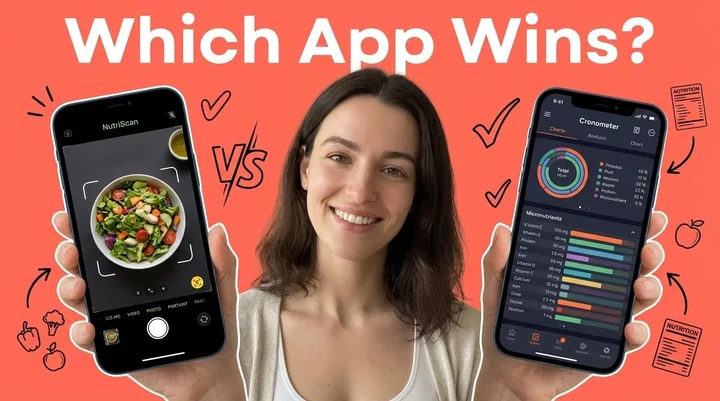
Have you ever wondered why two people eating the same food can have completely different health results?
TL;DR - NutriScan vs Cronometer Comparison
NutriScan strengths: AI photo logging (5 scans a week free, unlimited on Premium), regional food recognition, personalized diet plans (Premium), voice assistant (Monika), NutriBites chat feature
Cronometer strengths: 84 micronutrient tracking, verified USDA database, detailed data for nutrition enthusiasts
Best for ease of use: NutriScan - photo-based logging takes 10 seconds vs 15 minutes for manual entry
Best for detailed tracking: Cronometer - if you need to monitor specific vitamin and mineral levels
Bottom line: Choose NutriScan if consistency matters more than granular data; choose Cronometer if you love detailed numbers
Here is something that might surprise you - a 2024 randomized controlled trial published in Nature Medicine found that people following personalized dietary programs showed much better improvements in weight, cholesterol, and gut health compared to those following standard government nutrition guidelines (Nature Medicine, 2024). This tells us one thing clearly - what works for your friend may not work for you.
I have spent months testing both NutriScan and Cronometer, and let me tell you - choosing the right nutrition app is like choosing the right pair of running shoes. The best one is the one that fits YOUR feet, not the one with the most features.
In this comparison, I am going to break down everything you need to know about these two apps so you can make the smartest choice for your health journey.
Why Does Choosing the Right Nutrition App Actually Matter?
Before we jump into the comparison, let me share why this decision is so important. According to market research, diet and nutrition app users have grown rapidly with a projected 27% increase in global users from 2019 to 2023. About 45% of users reported successful weight loss through app utilization. That is nearly half of all users seeing real results.
But here is the catch - mobile health apps have a high dropout rate. A 2023 study published in Current Reports in Obesity found that many apps fail because they require too much manual effort to log meals, which leads people to give up (Ufholz & Werner, 2023). This is exactly why the method of food logging matters so much.
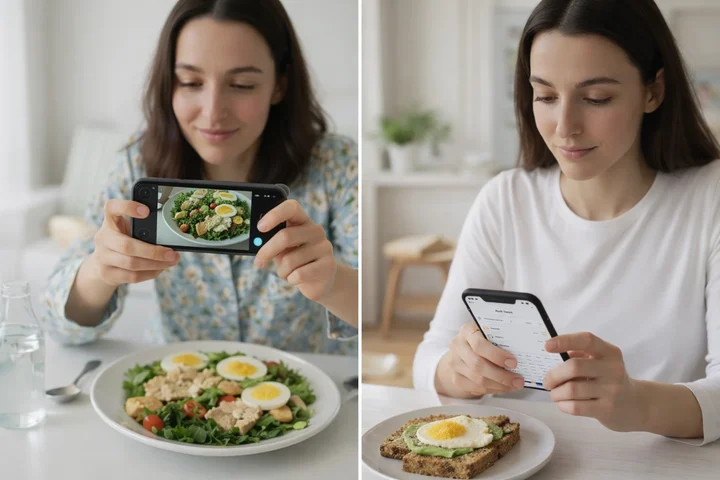 The difference between photo-based and manual logging can determine whether you stick with your nutrition tracking
Research from the University of Sydney in 2024 tested 18 popular nutrition apps and found significant differences in accuracy, quality, and behavior change potential (Nutrients, 2024). Some apps overestimated calories for Western diets by an average of 1040 kJ, while underestimating Asian diets by 1520 kJ. This tells us accuracy varies a lot depending on what you eat.
 Tracking your home-cooked meals should be as easy as making them
The Tale of Two Approaches: Manual Logging vs AI Photo Recognition
Let me tell you about two friends of mine - both wanted to lose weight and get healthier.
Rahul's Story
Rahul is a software engineer working in Bangalore. He downloaded Cronometer because everyone said it was the "gold standard" for micronutrient tracking. For the first week, he religiously logged every bite. But by week three, the manual entry became exhausting. He ate a traditional South Indian breakfast - idli, sambar, coconut chutney, and filter coffee. Searching for each item, estimating portions, and entering everything took him 15 minutes. He eventually stopped logging lunch meals because his workday was too busy. By month two, he had completely stopped using the app.
Priya's Story
Priya runs a small business in Mumbai. She tried NutriScan and was impressed that she could just take a photo of her thali and get instant nutrition breakdown. Even when she ate her mom's homemade rajma chawal, the AI recognized the items and gave her reasonably accurate nutrition data. She has been using the app for 6 months now because it takes her only 10 seconds to log a meal. The low friction made all the difference.
Amit's Story
Amit is a fitness enthusiast in Delhi who tracks every macro religiously. He uses Cronometer and loves seeing exactly how much zinc, magnesium, and B12 he is getting. For him, the manual entry is not a burden - it is part of his routine. He meal preps on Sundays and enters all recipes once. The detailed micronutrient data helps him optimize his supplement stack.
Key Insight
These stories highlight a key difference between the two apps - the fundamental approach to food logging. Neither approach is wrong, but they serve different types of users.
NutriScan App: The AI-First Approach
NutriScan is built around one simple idea - make nutrition tracking so easy that anyone can stick with it. Here is what makes it different:
Photo-Based Meal Recognition
Just click a picture of your food and the app does the work. This is not just about convenience - it is about consistency. A 2024 systematic review found that AI-based food image recognition methods have the potential to match or even exceed the accuracy of human estimations (Shonkoff et al., 2023). The review analyzed multiple studies and found that AI methods are showing real promise in reducing the errors that come from manual food logging.

NutriScan's scan screen lets you select food type tags and cooking methods for more accurate nutrition data (Home > Camera Icon > Click Picture)
Regional Food Database
This is where NutriScan really shines for people eating non-Western diets. Whether you are eating biryani in Hyderabad, dim sum in Singapore, or a falafel wrap in Dubai, NutriScan recognizes local and regional foods that other apps often miss. You can also select food type tags like Home Made, Packaged Food, Restaurant, Street Food, or Hotel Buffet to improve accuracy.
Cooking Method Recognition
The app lets you specify how food was prepared - whether it was deep-fried, air-fried, steamed, grilled, or roasted. This matters because cooking methods significantly affect calorie content. A deep-fried samosa has very different nutrition than an air-fried one.
Goal-Based Personalized Diet Plans
The app creates customized meal plans based on your specific health goals - whether that is weight loss, muscle gain, diabetes management, PCOS, or pregnancy nutrition. A 2024 study in the American Journal of Clinical Nutrition found that personalized nutrition approaches can lead to better dietary behavior changes compared to standard guidelines (AJCN, 2024).
NutriBites - AI Chat Feature
You can actually talk to the app about your eating patterns. Ask questions like "Why am I feeling tired after lunch?" and it analyzes your meal history to give insights. This moves beyond simple tracking into pattern detection.
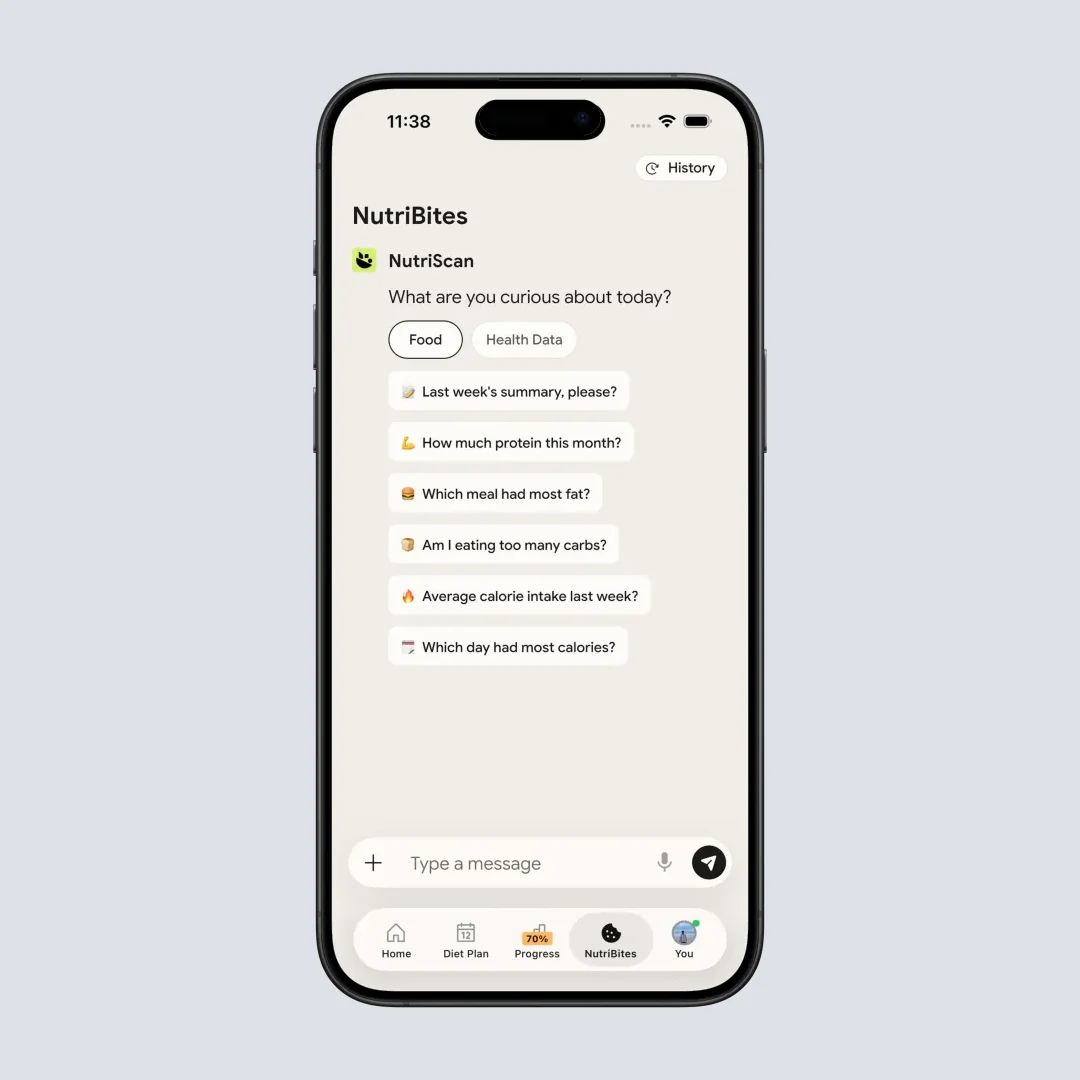
NutriBites lets you chat with your meal timeline to get personalized insights (Home > Bottom Nav - NutriBites)
Voice-Powered AI Assistant
NutriScan offers a feature where you can talk with Monika, an AI nutritionist. You can ask questions by voice, even ask to log meals verbally. This hands-free approach is perfect when you are cooking or eating.
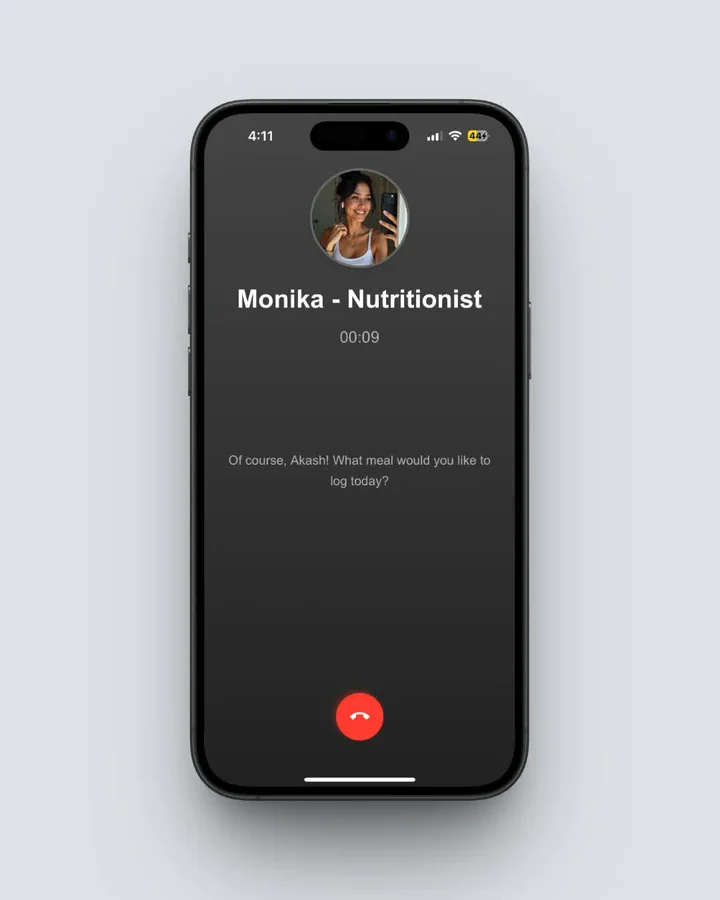 Talk with Monika, your AI nutritionist, to ask questions or log meals by voice (Home > Click Call Button)
NutriScore System
Each meal gets a score showing how healthy it is. This gamification element helps you make better choices over time without becoming obsessive about numbers. The daily NutriScore is calculated based on the weighted average of all meals that day.

Cronometer: The Data-Detailed Approach
Cronometer has been around since 2005 and has built a solid reputation for serious nutrition enthusiasts. Here is what it offers:
84 Micronutrient Tracking
This is Cronometer's biggest selling point. While most apps track basic macros (calories, protein, carbs, fat), Cronometer goes deep into vitamins, minerals, amino acids, and more. For people with specific deficiencies or health conditions, this level of detail is valuable.
Verified Food Database
Cronometer uses data from USDA, NCCDB, and other verified sources. They manually review user submissions before adding them to the database, which means higher accuracy for foods that are in their system. The app now has over 1.1 million verified foods.
Gold Subscription Features
Their premium plan includes AI photo logging (added recently), repeat items automation, custom biometrics, nutrition scores highlighting up to 8 nutrient areas, and food suggestions to help meet goals.
Health Connect Integration
Cronometer syncs well with other health platforms like Apple Health, Google Fit, Fitbit, Garmin, and more. This creates a unified view of your health data.
Keto and Special Diet Support
The app has specific settings for keto, paleo, vegan, and other specialized eating approaches. You can easily track net carbs vs total carbs for low-carb dieters.
Head-to-Head Feature Comparison
| Feature | NutriScan | Cronometer |
|---|---|---|
| AI Photo Logging | Core feature (free) | Premium only |
| Micronutrients Tracked | Key micros + top 4 per meal | 84 micronutrients |
| Personalized Diet Plans | Yes (Premium) | No (tracks only) |
| Regional Food Recognition | Strong (Asia, Middle East, etc.) | Limited |
| Voice Assistant | Yes (Monika AI) | No |
| Barcode Scanning | Yes | Yes |
| Calorie Tracking | Yes | Yes |
| Community Features | Leaderboard & rankings | Limited |
| Meal Insights & Pattern Detection | Yes (NutriBites) | Basic reports |
| Free Version | Photo logging included | Manual logging only |
| Premium Price | Affordable | Higher |
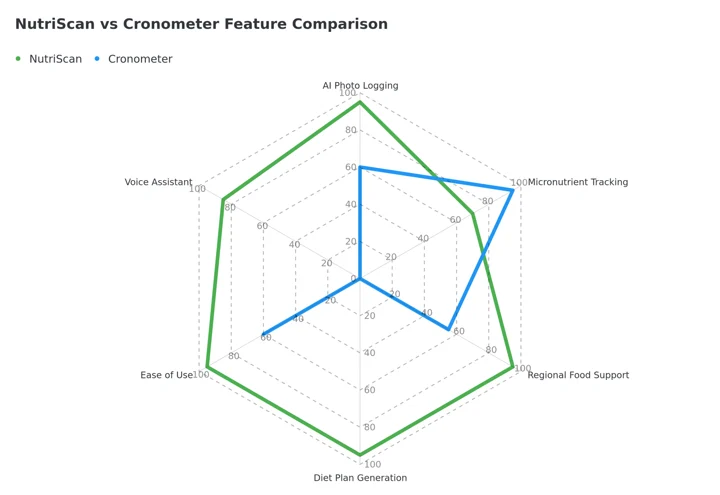 Figure 1: NutriScan leads on ease of use, regional food support, and diet planning, and Cronometer scores nothing on diet plans or a voice assistant because it does not offer either. Cronometer wins micronutrient tracking.
7 Tips to Choose the Right Nutrition App for You
Based on my testing and research, here are my honest tips:
Tip 1: Consider Your Logging Style
If you are the type who gets bored with manual data entry, choose NutriScan. Research consistently shows that easier logging methods lead to better long-term adherence. A 2024 observational study found that the more people actively used their nutrition app, the more weight they lost (Obesity Science & Practice, 2024). Learn more about how NutriScan's meal scanning works.
Tip 2: Think About What You Actually Eat
If you eat a lot of home-cooked regional foods, NutriScan will likely serve you better. If you mostly eat packaged Western foods with barcodes, Cronometer's database will be very accurate.
Tip 3: Know Your Health Goals
Want a diet plan that tells you what to eat? NutriScan offers personalized diet plans for various health goals. Want to track everything you eat and figure out the plan yourself? Cronometer might be your choice. You can also try our online macro calculator to get started.
Tip 4: Check Your Budget
NutriScan offers AI photo logging in its free version, while Cronometer requires Gold subscription for this feature. Calculate the yearly cost before committing.
Tip 5: Consider Your Tech Comfort Level
Cronometer has more settings and options, which some people love and others find overwhelming. NutriScan has a simpler interface that works better for beginners.
Tip 6: Think Long-Term
The best app is the one you will actually use 6 months from now. Ask yourself - will I still be manually logging every meal in February? Be honest with yourself.
Tip 7: Try Before You Buy
Both apps have free versions. Use each one for at least a week before deciding. Pay attention to how you feel using the app, not just the features list.
 Finding the right app leads to consistent tracking and real results
Step-by-Step Guide: How to Get Started With Your Chosen App
Whether you pick NutriScan or Cronometer, follow these steps for success:
Step 1: Set Up Your Profile Correctly
Enter accurate information about your age, height, weight, and activity level. This matters because all calorie calculations are based on these numbers. Research from Taipei Medical University found that nutrition tracker apps combined with proper profile setup significantly enhanced weight loss outcomes (Nutrients, 2024).
Step 2: Define Your Primary Goal
Be specific. "Lose weight" is too vague. "Lose 5 kg in 3 months while maintaining energy for my morning runs" is better. Your app needs to know what you are optimizing for.
Step 3: Log Everything for the First Week
Do not skip anything - not even that small cookie after lunch. This first week of complete data helps the app (and you) understand your actual eating patterns. Many people are surprised by what they discover.
Step 4: Review Your Patterns After 7 Days
Look at your weekly report. When do you eat the most calories? Are you getting enough protein? Are there days when your nutrition is much worse? These insights are gold.
Step 5: Make One Change at a Time
Do not try to fix everything at once. Pick one thing - maybe adding more vegetables at dinner or reducing evening snacks. Small consistent changes beat dramatic diets every time. Check out our NutriScore guide to understand how your meals are rated.
Step 6: Use the Support Features
In NutriScan, use NutriBites to ask questions about your eating habits. You can also explore your meal insights for pattern detection. In Cronometer, use the nutrient targets to identify deficiencies. The app should be working for you, not just storing data.
Step 7: Track Beyond Food
Both apps allow tracking water, weight, and activity. Use these features to see the full picture of your health journey.
Important Note
If you have specific health conditions like diabetes, PCOS, or are pregnant, always consult with a healthcare professional before making significant dietary changes based on app recommendations.
Research-Backed Insights on Nutrition Apps
The science is clear that nutrition tracking apps work when people actually use them. Here is what recent research tells us:
A systematic review in Frontiers in Nutrition highlighted that personalized nutrition has become a new trend for providing dietary advice based on individual characteristics, moving away from one-size-fits-all approaches (Frontiers in Nutrition, 2024).
Another 2024 study found that AI is reshaping nutrition in ways that were previously not possible. Technologies like machine learning and mobile applications are changing how accurate dietary tracking can be (Kassem et al., 2025). The review noted that AI has significantly reduced the errors common in traditional nutrition assessment methods.
What does this mean for you? It means that AI-powered apps like NutriScan represent the direction nutrition technology is heading. While traditional manual-entry apps like Cronometer have their place, the future is moving toward easier, smarter, more personalized solutions.
The Honest Truth: Which One Should You Pick?
Let me give you my straightforward opinion based on different user types:
Choose NutriScan if you:
- Want the easiest possible meal logging experience
- Eat lots of home-cooked or regional foods
- Need a ready-made diet plan, not just tracking
- Get bored with manual data entry
- Want AI-powered insights about your eating patterns
- Are new to nutrition tracking
- Have health goals like weight loss, diabetes management, or PCOS
- Prefer voice interaction over typing
Choose Cronometer if you:
- Love detailed data and want to track 84+ micronutrients
- Have specific nutrient deficiencies you need to monitor closely
- Mostly eat packaged foods with available barcode data
- Enjoy manually entering food and controlling every detail
- Already have a diet plan and just need tracking
- Are comfortable with more complex app interfaces
- Want to sync with multiple fitness devices and apps

Real Impact on Your Health Journey
The most important thing is not which app has more features - it is which app you will actually use consistently. A 2024 study in JMIR Formative Research emphasized that the effectiveness of nutrition apps depends heavily on continued engagement over time (JMIR, 2024).
Think about it this way - a simple app you use daily beats a complex app you abandon after two weeks. Your health journey is a marathon, not a sprint. Pick the tool that will run alongside you for the long haul.
I have seen people transform their health with both apps. The common factor among success stories is not the app they used - it is that they kept using it. They built the habit. They made it part of their daily routine.
Conclusion: Your Health, Your Choice
Both NutriScan and Cronometer are solid nutrition tracking apps. They just serve different needs and different users.
If I had to summarize in one sentence: NutriScan makes nutrition tracking easier so more people can stick with it, while Cronometer provides deeper data for those who want more control.
My personal recommendation? If you are reading this comparison and feeling overwhelmed by the choice, go with NutriScan. The AI photo logging removes the biggest barrier to consistent tracking - the effort required to log meals. And consistency is what truly drives results.
Ready to start your health journey? Download NutriScan and take a photo of your next meal. See how easy healthy eating can be when the right technology supports you.
Related App Comparisons
Looking for more comparisons? Check out these detailed guides:
- NutriScan vs MacroFactor - Compare NutriScan with MacroFactor for adaptive macro tracking and bodybuilding goals
- NutriScan vs HealthifyMe - Compare NutriScan with HealthifyMe for Indian users and those looking for dietitian support
- NutriScan vs Fooducate - See how NutriScan stacks up against Fooducate for food grade scoring and healthy alternatives
Frequently Asked Questions
Q1: Is NutriScan accurate for Indian foods and regional cuisines?
Yes, NutriScan is specifically designed to recognize regional and local foods from various cuisines including Indian, Asian, Middle Eastern, and more. The AI model has been trained on many different food images beyond just Western dishes. While Cronometer relies primarily on USDA and verified databases which focus more on Western foods, NutriScan's AI approach handles home-cooked and regional meals better. You can also add audio or text descriptions to improve accuracy for complex dishes.
Q2: Does Cronometer offer AI photo logging like NutriScan?
Cronometer added AI photo logging in 2024, but it is only available for Gold (premium) subscribers. NutriScan includes AI photo meal recognition in its free version, making it accessible to everyone. Additionally, NutriScan was built from the ground up with photo-first logging, while Cronometer added it as an extra feature to its traditional manual-entry system.
Q3: Can these apps help with specific health conditions like diabetes or PCOS?
NutriScan offers goal-based personalized diet plans specifically designed for conditions like diabetes, PCOS, pregnancy, and weight management. The app creates meal recommendations based on your health goal, food preferences, and lifestyle. Try our PCOS macro calculator or diabetes macro calculator to get started. Cronometer tracks detailed nutrients which is useful for monitoring, but it does not provide specific diet plans for health conditions - you need to bring your own plan and use Cronometer to track adherence.
Q4: Which app is better for weight loss?
Both apps can support weight loss, but they approach it differently. Research shows that consistency in logging is the biggest factor in weight loss success with nutrition apps. NutriScan's easier photo-based logging may lead to better long-term adherence for many users. It also provides NutriScore ratings and insights that help identify eating patterns that may be hurting your weight loss efforts. Cronometer provides more detailed calorie and macronutrient data for those who want precise control.
Q5: Are these apps worth the premium subscription cost?
It depends on your goals. NutriScan's premium plan includes personalized diet plans, grocery lists, recipes, and unlimited AI assistant calls - essentially a digital nutritionist experience. This provides value if you need guidance on what to eat, not just tracking what you ate. Cronometer Gold gives you AI photo logging, advanced insights, and detailed reporting. If you only need basic tracking, both apps offer functional free versions. But if you are serious about your health goals, the premium features can accelerate your progress significantly.
