NutriScan vs Lose It: Best Food Tracking App
 ChatGPT
  Claude
  AI Mode
  Perplexity
 Lose It logs food by manual search, 3 to 5 minutes on a plate with several items, where NutriScan reads the same plate from a photo in 15 to 30 seconds. Lose It Premium is $79.99 a year with no monthly plan after the 2026 increase; NutriScan is about $59 a year. NutriScan's free plan keeps 5 AI meal scans a week, 4 Monika calls, and NutriScore and micronutrients on every meal.
Last verified: August 23, 2026
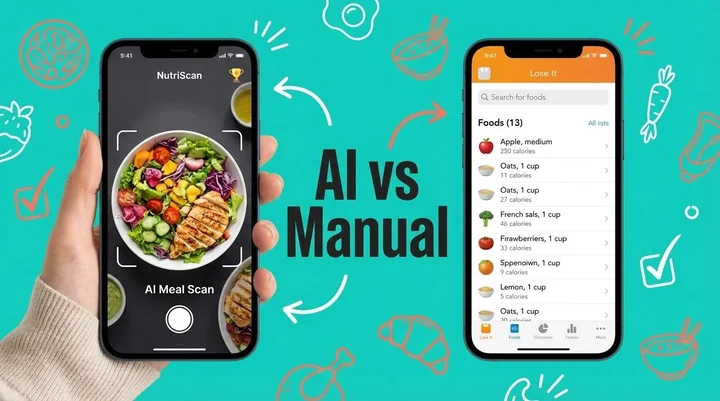
NutriScan wins on speed and on food a database has never seen. A photo scan logs a meal in 15 to 30 seconds, where Lose It's manual search runs 3 to 5 minutes on a plate with several components. NutriScan Premium is about $59 a year, Lose It Premium is $79.99 a year with no monthly plan. Those are standard US prices as of mid 2026 and they change by region. Free NutriScan gives you 5 scans a week, 4 Monika voice calls, and a NutriScore plus micronutrients on every meal. Lose It stays the better pick if you eat mostly packaged food with barcodes or you want group challenges.
TL;DR - NutriScan vs Lose It Comparison Guide
The core difference: Lose It uses manual database searching while NutriScan uses AI-powered photo scanning for instant meal analysis
Time savings: NutriScan takes 15-30 seconds per meal vs 3-5 minutes with Lose It's manual logging
Best for: Lose It works well for packaged foods and Western diets; NutriScan excels with home-cooked meals, regional cuisines, and specific health conditions
Unique features: NutriScan offers personalized 28-day diet plans, NutriScore ratings, voice logging with Monika, and vacation mode - features Lose It doesn't provide
Verdict: For busy people eating diverse foods, NutriScan's AI approach leads to better long-term consistency
Most people who download a health tracking app quit fast. A 2024 scoping review in the Journal of Medical Internet Research found that a median of 70% of users abandoned lifestyle apps within the first 100 days, and listed the time it takes to enter data among the reasons they gave (JMIR Scoping Review on App Abandonment). I lived that loop: typing every food item, searching endless databases, guessing portion sizes. Tracking one lunch took longer than eating it.
I started with Lose It because everyone was talking about it. The app has been around since 2008, and its App Store listing says it has helped over 57 million users (Lose It! on the App Store). After weeks of manual logging I switched to NutriScan, and the daily effort dropped to a photo. Here is an honest comparison of the two, so you can pick the one that fits your goals. If you only want the money side, our Lose It pricing breakdown covers every tier.
 When manual food logging feels like a never-ending task
The Real Problem with Traditional Food Tracking
Tracking food is boring, and the research agrees. A study from the National Institutes of Health found that people spend an average of 23 minutes per day on dietary self-monitoring when they first start, and this drops to about 15 minutes by month 6 (NIH Study on Electronic Dietary Self-Monitoring). That's still a lot of time!
Here's what happens with most food tracking apps:
- You eat a meal
- You open the app
- You search for each food item separately
- You guess the portion size
- You repeat this 3-5 times daily
- After 2 weeks, you give up
I went through this cycle three times before I found a better way. Motivation was never the missing piece. Manual logging simply asks for more effort than a busy day has to give.
The Hidden Cost of Manual Logging
Portion size is the guess sitting inside every manual log. When you're guessing portions and searching generic database entries, the numbers you see may not reflect what you actually ate.
Understanding Lose It: The Traditional Approach
Lose It has been in the market for 17 years now. The app uses a classic calorie counting approach where you manually search and log every food item. Let me break down what you get:
What Lose It Offers:
- Database of 47+ million food items
- Barcode scanner for packaged foods, Premium on most new accounts
- Photo logging called "Snap It", a Premium feature
- Fitness tracker integration
- Social features and challenges
- Weekly reports and insights
The app works on a simple principle - track calories in, track calories out, lose weight. And for many people, this works! Research shows that consistent self-monitoring is the cornerstone of behavioral weight loss programs (PMC Study on Self-Monitoring).
Lose It was designed primarily for Western eating patterns. If you eat dal chawal, biryani, dosa, or any regional cuisine - good luck finding accurate entries in their database! And even when you find something similar, the nutritional values often don't match because homemade food varies so much in preparation.
NutriScan: The AI-First Approach
NutriScan takes a completely different route. Instead of making you search through databases, you simply take a photo of your meal. The AI analyzes everything on your plate - whether it's a complex thali, a street food snack, or a restaurant meal.
What Makes NutriScan Different:
- AI-powered instant meal analysis from photos
- Voice input for hands-free logging with Monika
- Support for regional and cultural foods globally
- Personalized diet plans for specific health conditions
- NutriScore system to rate meal quality
- Detailed micronutrient tracking beyond just calories
When I first tried NutriScan, I was skeptical. How could an AI understand my grandmother's recipe? But when I photographed my homemade rajma chawal and it identified not just the dish but estimated the oil content and cooking method - I was impressed. The app even asked me to confirm the food type (home made, restaurant, street food) to improve accuracy.
How NutriScan Improves Accuracy
When scanning a meal, NutriScan lets you select from 8 food types and 11 cooking methods, plus adjust oil levels. This contextual information helps the AI provide estimates that match your actual meal rather than generic database values.

NutriScan's scan process: snap your meal, select food type and cooking method, get instant nutrition data

NutriScan vs Lose It: 7 Key Differences
1. Time to Log a Meal
| App | Time Required | Method |
|---|---|---|
| Lose It | 3-5 minutes per meal | Search, select portions, add each item separately |
| NutriScan | 15-30 seconds | Click photo, confirm food type, done |
Research from the University of Sydney suggests that reducing the burden of food logging is one of the key factors for long-term adherence to nutrition apps (University of Sydney Study on AI Food Tracking). When logging takes less time, you're more likely to keep doing it.
2. Accuracy for Home-Cooked Meals
Lose It: Limited - relies on generic database entries that may not match your cooking style
NutriScan: Higher accuracy - AI considers cooking method, oil levels, and regional preparation styles
A study in the Journal of Medical Internet Research found that AI-based dietary assessment tools can adapt to diverse food types when properly trained, though challenges remain for mixed dishes (JMIR AI Dietary Assessment Study). NutriScan specifically asks you about cooking method (steamed, fried, grilled) and oil level to improve estimates.
3. Health Condition Support
Lose It: General weight loss focus with basic macro tracking
NutriScan: Specific diet plans for diabetes, PCOS, pregnancy, muscle gain, and viral recovery
This matters most for people managing a condition, not just a calorie target. Research shows that personalized nutrition guided by technology can significantly improve outcomes for conditions like Type 2 Diabetes (Frontiers in Endocrinology Study on Personalized Nutrition). Try the Diabetes Macro Calculator to understand your ideal daily targets.
For women with PCOS, managing diet is particularly challenging. The World Health Organization estimates that PCOS affects 10% to 13% of reproductive-age women (WHO fact sheet on polycystic ovary syndrome), and diet plays a major role in symptom management. NutriScan offers dedicated PCOS diet tracking with insights about how specific foods affect hormone balance and insulin sensitivity. You can also use the PCOS Macro Calculator to get personalized nutrition targets.
4. Learning About Your Food
Lose It: Shows calories and basic macros
NutriScan: Provides NutriScore, micronutrients, and answers food-related questions through NutriBites
One thing I love about NutriScan is the NutriBites feature where you can ask questions about your eating patterns. "Why do I feel bloated after dinner?" or "What's missing in my diet?" The app reads your meal history and answers, which makes the log something you learn from instead of a chore you fill in.
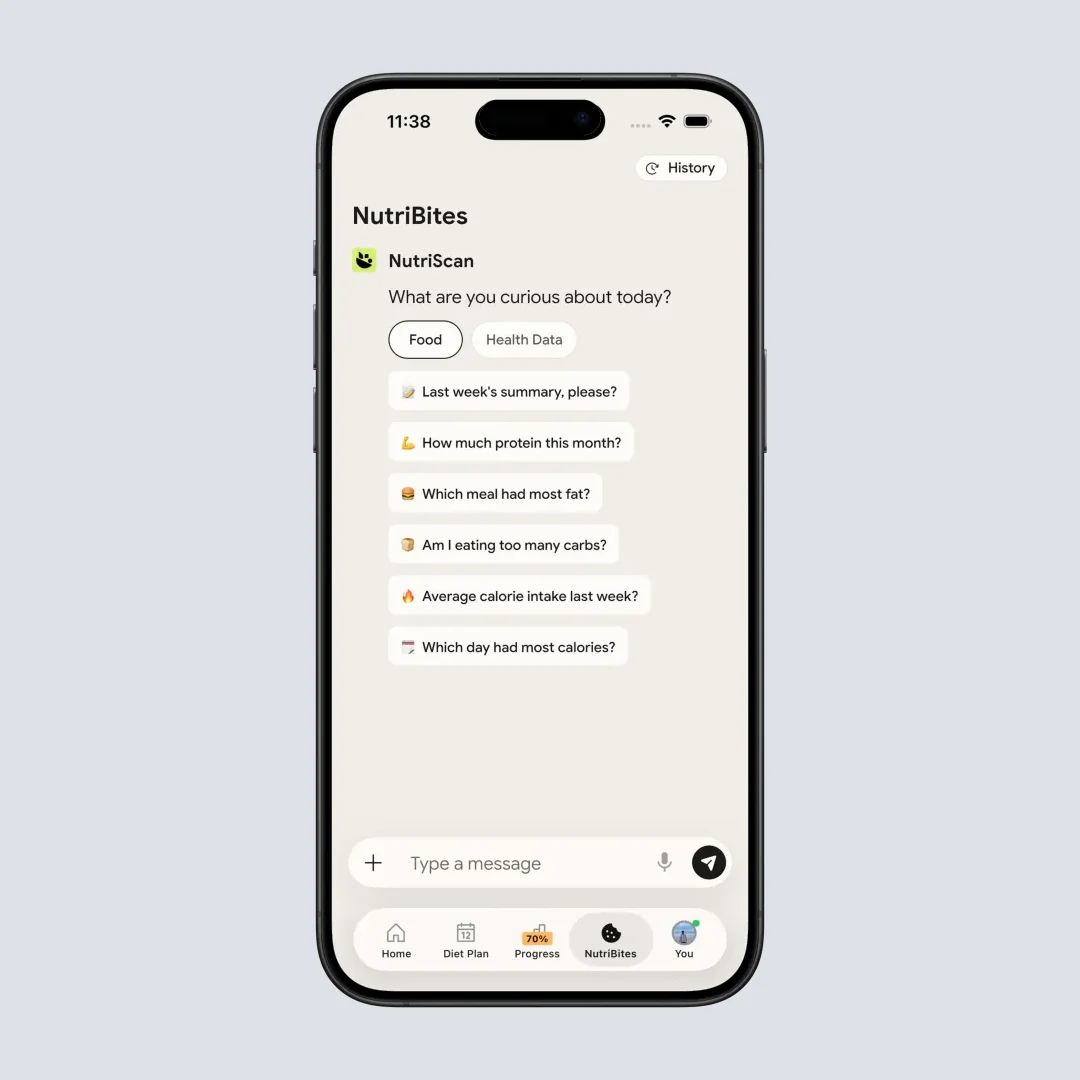
NutriBites lets you ask questions about your eating patterns and get personalized insights (Home > Bottom Nav - NutriBites)
5. Regional Food Recognition
Lose It: Strong for Western foods, limited for Asian, African, Middle Eastern cuisines
NutriScan: Built for global foods including Indian, Asian, Middle Eastern, and regional specialties
The AI food tracking space is evolving rapidly. Research highlights that training AI models with diverse food images is essential for accuracy across different cuisines (ScienceDaily Report on AI Food Tracking). NutriScan was built with this global approach from day one.
6. Diet Planning Features
Lose It: Basic meal suggestions, no personalized diet plans
NutriScan: 28-day personalized diet plans with grocery lists and recipes
This is where the apps differ most significantly. Lose It tracks what you eat. NutriScan tells you what to eat based on your goals, lifestyle, and food preferences. The diet plan feature creates a weekly schedule with breakfast, lunch, dinner, and snacks - all customized to your caloric needs and health goals.
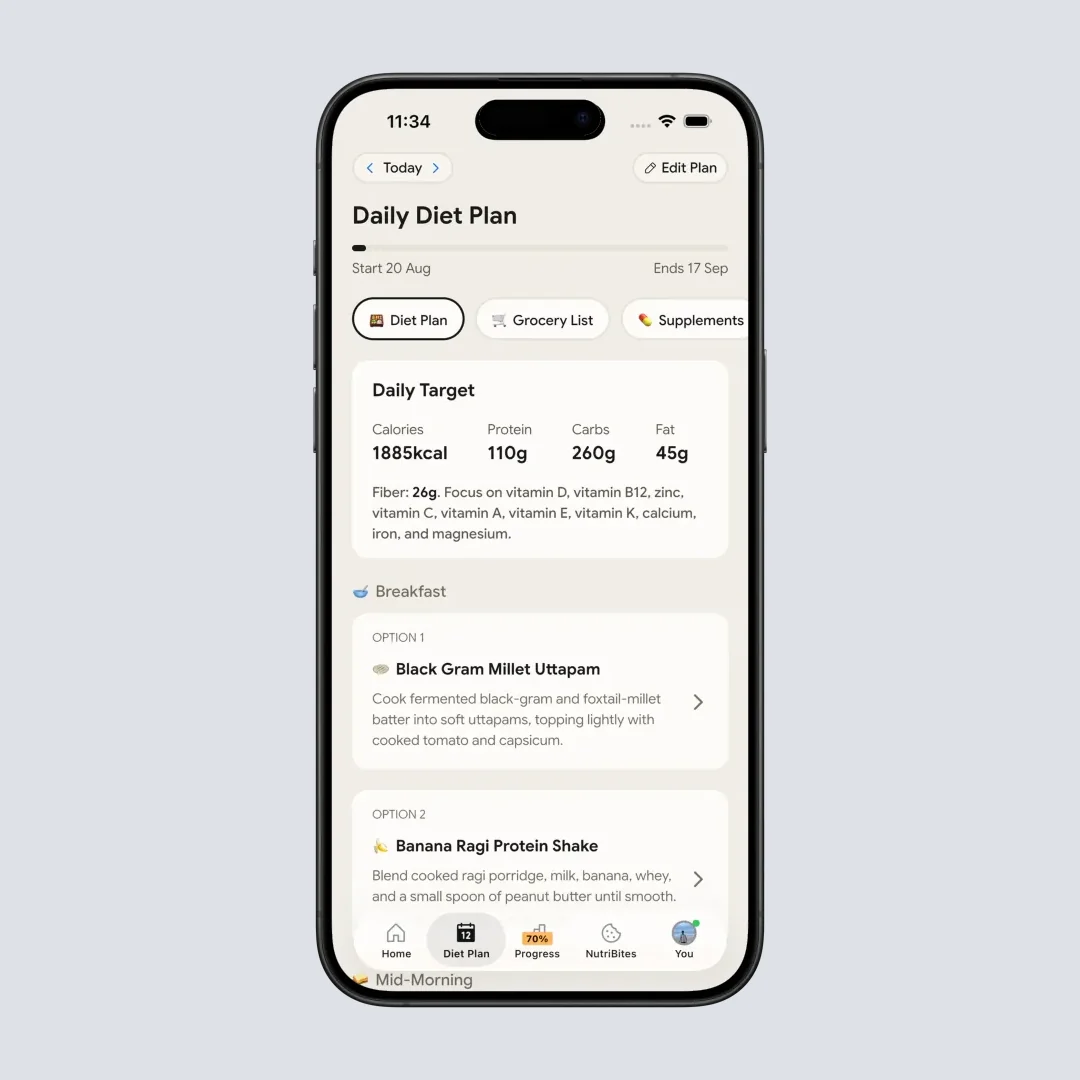
NutriScan's 28-day personalized diet plan shows daily meals tailored to your goals (Home > Bottom Nav Diet Plan)
7. Price: NutriScan about $59 a Year vs Lose It $79.99
| Feature | Lose It | NutriScan |
|---|---|---|
| Free Version | Calorie budget, food search, basic macros | 5 AI meal scans a week, 4 Monika calls, NutriScore and micronutrients on every meal |
| Premium Price | $79.99/year, no monthly plan | about $59/yr |
| Unique Premium Features | Advanced macros, meal planning | 28-day personalized diet plans, unlimited Monika calls, grocery lists |
| Free Trial | 7-day free trial | 7-day free trial |
Prices are standard US prices as of mid 2026 and change by region. Lose It raised Premium from $39.99 to $79.99 a year in 2026 and stopped selling a monthly plan (Lose It Membership Tiers & Pricing), so it now costs $20 more a year than NutriScan Premium rather than less.
Both apps offer free tiers. NutriScan Premium adds personalized diet planning, which Lose It does not sell at any tier. If you are weighing the Lose It upgrade on its own, we broke that down in is Lose It Premium worth it.
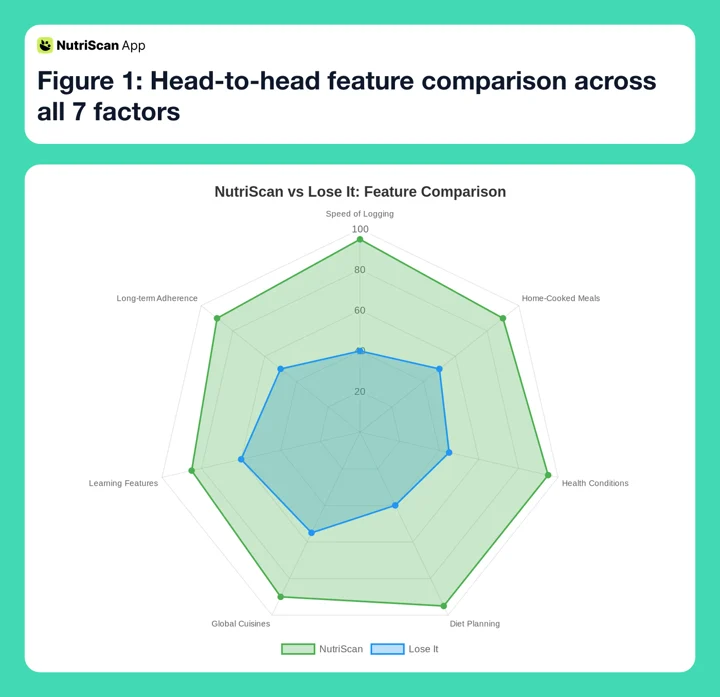 Figure 1: Head-to-head feature comparison across all 7 factors
Real Stories: How Users Actually Use These Apps
Three composite scenarios, written to show where the two apps diverge in daily use. They are examples, not individual users, and no outcome below is a measured result.
Scenario 1: The Busy Professional Take a 10-hour workday. Breakfast is idli with sambar, and in a search-first app that means one entry for the idli, one for the sambar, and one more for the chutney. Three lookups before the commute is where manual logging usually breaks, often inside the first couple of weeks. A photo of the same plate takes about 10 seconds, which is short enough to survive a rushed morning.
Scenario 2: The Diabetes Patient Say a doctor has asked you to watch carbs closely after a Type 2 diagnosis. Lose It gives you a total carb figure for the day, which tells you the number but not which meal moved it. NutriScan's diabetes plan splits the day meal by meal, so a 4 p.m. chai with biscuits shows up as its own carb load instead of disappearing into the daily total. What you do with that, and what it changes on your next HbA1c test, stays between you and your doctor.
Scenario 3: The Restaurant Lover Now take someone eating out four or five times a week. Lose It's database covers chain restaurants reasonably well and independent local kitchens far less, so a neighborhood Lebanese or Indian place often has no entry to find. NutriScan reads the plate from a photo instead, and the "restaurant food" tag adjusts estimates for the higher oil and salt restaurant cooking usually carries.
 When food tracking takes seconds instead of minutes
The Science Behind Effective Food Tracking
Let's get into what actually makes food tracking work for weight loss. A meta-analysis published in Obesity Reviews found that digital self-monitoring of both diet and physical activity leads to an average weight loss of 2.87 kg more than control groups (PubMed Meta-Analysis on Digital Self-Monitoring).
Consistency matters more than precision here. The same research found that tailored interventions were significantly more effective than one-size-fits-all approaches. This is exactly why NutriScan's personalized diet plans work better than generic calorie counting.
Another study found that people who tracked their food for at least 5 days per week (consistent trackers) lost nearly 10 pounds over a year, while inconsistent trackers saw no significant weight loss (PMC Study on Dietary Tracking and Weight Loss).
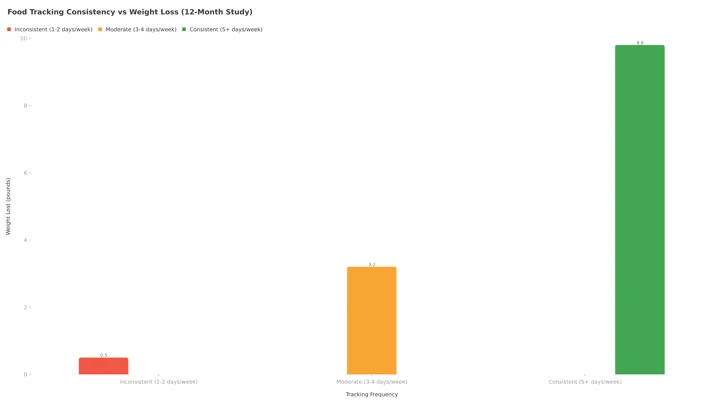 Figure 2: How tracking consistency impacts weight loss outcomes. Weight lost is in pounds over 12 months, so consistent trackers land just under the 10 pounds the study reports and inconsistent trackers land at no meaningful loss.
Step-by-Step: How to Get the Most from Each App
Getting Started with Lose It
Step 1: Download the app and create your profile with weight goals
Step 2: Set your daily calorie budget based on activity level
Step 3: Start logging every meal by searching the database
Step 4: Use the barcode scanner for packaged foods, Premium on most new accounts
Step 5: Check weekly reports to track progress
Step 6: Join challenges for motivation
Step 7: Adjust your goals monthly based on results
Getting Started with NutriScan
Step 1: Download the app and select your primary health goal (weight loss, muscle gain, diabetes, PCOS, pregnancy, viral recovery)
Step 2: Complete the onboarding with your food preferences (veg, non-veg, vegan, eggitarian)
Step 3: Enter your physical stats and activity level
Step 4: Get your personalized macro targets (Calories, Protein, Carbs, Fat, Fiber, Water) - or use the Online Macro Calculator to preview your targets
Step 5: Start scanning meals - just point, shoot, and confirm the food type and cooking method
Step 6: Use voice input with Monika when your hands are full
Step 7: Generate your 28-day diet plan for structured guidance (Premium feature) - learn more in the Diet Plan Guide
Step 8: Track your NutriScore to improve meal quality over time
NutriScan Food Type Tags
When scanning or manually logging meals, you can select from these 8 food types for better accuracy:
- Home Made
- Packaged Food
- Restaurant / Cafe
- Office
- Hostel
- Street Food
- Supplements
- Hotel / Event Buffet
Tips and Tricks for Successful Food Tracking
Tip 1: Track Before You Forget Both apps work best when you log immediately after eating, while you can still see what was on the plate. NutriScan's quick photo feature makes this easier since you can snap a picture in seconds.
Tip 2: Don't Obsess Over Exact Numbers Whether you eat 1,847 or 1,892 calories doesn't really matter. What matters is the pattern over weeks and months. Focus on consistency rather than precision.
Tip 3: Use the Repeat Feature If you eat the same breakfast daily, why log it every time? Both apps allow you to copy previous meals. NutriScan has a "Start Daily Repeat" feature that automatically logs recurring meals on your selected weekdays.
Tip 4: Track Snacks Too Snacks are the easiest thing to leave out of a log. That handful of chips or those two biscuits with chai add up. Track everything, even small bites.
Tip 5: Review Your Patterns Weekly Both apps offer weekly summaries. But NutriScan's Insights feature shows you patterns in a calendar view with color-coded NutriScores (Dark Green to Red). This visual feedback helps identify when and why you tend to overeat.
Tip 6: Connect with Health Apps Sync with Apple Health or Google Fit for a complete picture. Both Lose It and NutriScan support this integration. NutriScan's Report section shows widgets for Weight, Active Energy, Steps, Sleep, and your macro/micronutrient data.
Tip 7: Be Honest About Portion Sizes The biggest source of tracking error is portion estimation. When in doubt, round up. It's better to overestimate than to fool yourself with tiny portions. NutriScan lets you adjust portions with a simple +/- control.
Which Food Tracking App Should You Pick?
Choose Lose It if:
- You eat mostly packaged foods with barcodes
- You're comfortable with manual data entry
- You follow a Western diet
- You want a simple calorie-in-calorie-out approach
- You enjoy social features and group challenges
Neither one fits? We compared the rest of the field in the best Lose It alternatives.
Choose NutriScan if:
- You eat home-cooked or regional foods
- You want quick, photo-based logging
- You have specific health conditions (diabetes, PCOS, pregnancy)
- You need a structured diet plan, not just tracking
- You want to understand your food better, not just count calories
- You travel or eat different cuisines regularly
If photo logging is the part you care about, the AI food tracker page walks through how the scan works before you install anything.
Understanding the NutriScore System
One feature that sets NutriScan apart is the NutriScore rating system. Every meal you log gets a score from A to E, with colors ranging from dark green (excellent) to red (needs improvement). This isn't just about calories - it considers the overall nutritional quality of your meal.
The formula takes into account:
- Balance of macronutrients (protein, carbs, fat)
- Presence of fiber and micronutrients
- Cooking method and oil content
- Portion sizes relative to your goals
Your daily NutriScore is calculated as: (Sum of Meal Calories x Meal NutriScore Weight) / Total Calories of Day. This means a heavy, unhealthy dinner impacts your score more than a small snack.
The Calendar view in Insights shows your NutriScore colors across the month, making it easy to spot patterns. Many users find that seeing a streak of green days motivates them more than just hitting a calorie target.
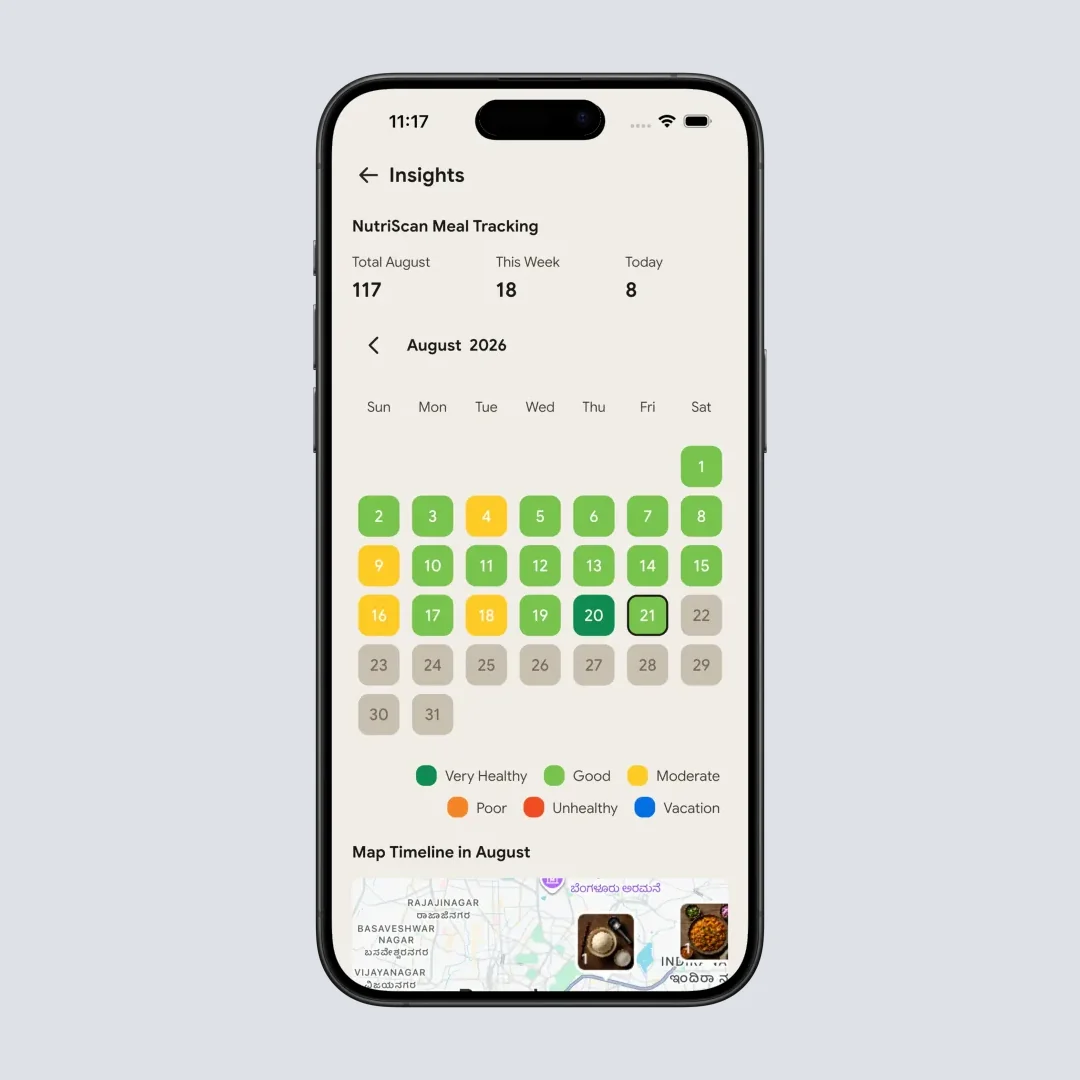
The Insights calendar makes your eating patterns visible at a glance with NutriScore colors

The Voice-Powered Assistant: Monika
Another unique feature in NutriScan is Monika, the voice-powered AI nutritionist assistant. Instead of typing or photographing, you can simply call Monika and speak naturally about what you ate or ask nutrition questions.
This is particularly useful when:
- Your hands are dirty while cooking
- You're driving and want to log a meal you just had
- You prefer talking over typing
- You want to ask quick questions about nutrition
Free users get 4 calls per week, while premium users get unlimited access. The ability to log meals through voice eliminates yet another friction point in the tracking process.
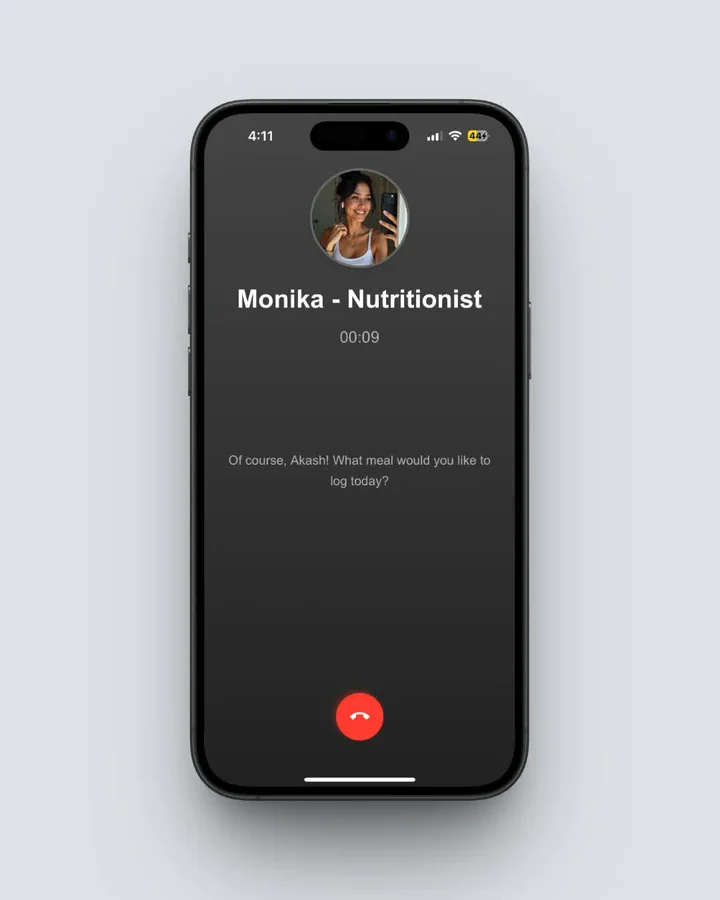 Talk to Monika to log meals or ask nutrition questions hands-free (Home > Click Call Button)
What Happens When You Fall Off Track?
Everyone has days when they don't track. Maybe you're on vacation, at a wedding, or just feeling overwhelmed.
Lose It's approach: Your streak breaks, you feel guilty, and many people just stop using the app entirely.
NutriScan's approach: The Vacation Mode feature lets you officially "pause" tracking without guilt. When you toggle vacation mode, your home screen shows a vacation banner, and the calendar marks those days with a different color (blue). You can even log meals during vacation (showing a split diagonal cell), and your streaks continue without penalty.
This psychological design makes a big difference. By acknowledging that breaks happen and building them into the system, NutriScan helps users return to tracking more easily.
The Vacation Mode Advantage
Unlike traditional apps that penalize breaks, NutriScan's Vacation Mode:
- Continues your tracking streaks
- Shows vacation days as gaps on shared profiles (privacy)
- Allows optional meal logging without affecting your main progress
- Provides a daily "Still on vacation?" prompt
Is NutriScan Better Than Lose It?
After using both apps extensively, here's my honest assessment:
Lose It is a solid, established app that has helped millions of people lose weight through traditional calorie counting. If you eat a lot of packaged foods and don't mind spending time logging, it works well.
NutriScan removes the biggest barrier to consistent tracking, which is the time each entry costs. The condition-specific plans take it past calorie counting, and the AI reads cuisines a Western database was never built for.
For most people, especially those eating home-cooked meals or managing specific health conditions, NutriScan will likely lead to better long-term adherence and results.
| Category | Winner | Why |
|---|---|---|
| Speed of logging | NutriScan | 15 seconds vs 3-5 minutes |
| Home-cooked meals | NutriScan | AI adapts to cooking methods |
| Packaged foods | Lose It | Barcode scanning, Premium on most new accounts. NutriScan uses the Packaged Food tag with photo, manual or voice entry |
| Health conditions | NutriScan | Dedicated plans for diabetes, PCOS, etc. |
| Western diet | Lose It | Larger Western food database |
| Global cuisines | NutriScan | Built for diverse foods |
| Diet planning | NutriScan | 28-day personalized plans |
| Social features | Lose It | Groups and challenges |
| Long-term adherence | NutriScan | Easier daily use, vacation mode |
Frequently Asked Questions
Q1: Is NutriScan accurate for complex meals with multiple items?
A: Yes, NutriScan's AI can identify multiple items on a plate. For very complex meals like a thali with 8-10 items, you might need to make small adjustments using the edit and add item features, but the initial estimates are usually within 10-15% accuracy. The app also learns from your corrections to improve over time.
Q2: Can Lose It track micronutrients like fiber and vitamins?
A: Lose It Premium offers some micronutrient tracking, but it's limited compared to NutriScan. NutriScan shows top 4 micronutrients for each meal (ordered by highest content) and tracks fiber, potassium, calcium, and other nutrients that are important for overall health.
Q3: How does NutriScan handle restaurant and street food?
A: NutriScan has specific tags for restaurant food, street food, hotel buffet, and packaged food. When you select "restaurant food," the AI adjusts estimates for typically higher oil, salt, and portion sizes. For street food, it accounts for the cooking methods commonly used like deep-frying.
Q4: Does consistent food tracking lead to eating disorders?
A: A longitudinal study of 24 women found that anxiety and emotional eating fell while they used a food tracking app, but that the risk of disordered eating behavior rose one month after the study ended (Mobile Food Tracking Apps: Do They Provoke Disordered Eating Behavior?). Those participants had no diagnosed eating disorder, so the study does not answer the question for people who do. Use either app as a tool for awareness, not obsession, and consult a healthcare professional if you notice unhealthy patterns.
Q5: Which app is better for long-term weight maintenance?
A: A 2014 study in Obesity following 220 women found that high frequency plus high consistency of dietary self-monitoring, meaning more than 3 days a week, predicted long-term weight management success (Dietary Self-Monitoring and Long-Term Success With Weight Management). NutriScan's photo-based logging makes it easier to maintain the habit long-term. The vacation mode feature also helps when you need a break without feeling guilty.
Q6: Can I use NutriScan for muscle gain, not just weight loss?
A: Absolutely. NutriScan supports multiple health goals including muscle gain. When you select muscle gain as your goal during onboarding, the app adjusts your macro targets to emphasize protein intake and provides diet plan recommendations focused on supporting muscle growth and recovery.
Q7: Does NutriScan work offline?
A: The AI meal scanning requires an internet connection to process images. However, you can use manual text or voice logging for meals when offline, and the data will sync when you reconnect.
Q8: Is Lose It or NutriScan cheaper?
A: NutriScan Premium is about $59 a year. Lose It Premium is $79.99 a year and no longer sells a monthly plan, so NutriScan costs $20 less over a year. Both are standard US prices as of mid 2026 and change by region. Both apps also have a free tier and a 7-day trial, and the trial starts through your app store, so whether a card is collected depends on your platform and region.
Q9: Does NutriScan have a barcode scanner?
A: No. Barcode scanning is a Lose It feature, and on most new Lose It accounts it sits behind Premium. In NutriScan you log a packaged item with the Packaged Food tag using a photo of the label, manual entry, or voice.
Taking the First Step
Whatever app you choose, the most important thing is to start. The Obesity Reviews meta-analysis cited above put digital self-monitoring about 2.87 kg ahead of no monitoring, and it only counts if you keep doing it. The best app is the one you'll actually use.
If manual logging is what keeps stopping you, download NutriScan and use the 7-day Premium trial. The trial starts through your app store, and whether a card is collected depends on your platform and region. Photograph your meals for a week and see how the instant read changes the habit. Already paying Lose It and switching? Here is how to cancel Lose It Premium.
Download NutriScan App and log tomorrow's breakfast with a photo.
