Is Lose It Premium Worth It? App Cost and Free vs Premium
 ChatGPT
  Claude
  AI Mode
  Perplexity
  Photo by Hrushi Chavhan on Unsplash
As a NutriScan nutritionist, I get asked whether Lose It Premium is worth it more often than almost anything else. Lose It Premium is worth paying for if you log every day and want voice logging, photo scanning, macro tracking, and fitness device syncing. It is not worth paying for if you log a few times a week and only need a calorie number. The Lose It app is free to download. Premium costs $79.99 a year, which works out to $6.67 a month, and there is no monthly plan any more. Prices here are standard US prices as of mid 2026 and change by region. That annual price doubled from $39.99, so Lose It now costs the same as MyFitnessPal Premium.
Lose It is one of the most popular calorie tracking apps in the world, with over 57 million users and more than 150 million pounds lost since its launch in 2008.
A 2024 observational study in Obesity Science & Practice analyzed 53,482 users of the SIMPLE app, which logs food, weight, fasting and activity, and found that the more days people logged, the more they lost. Active users had a median weight loss of 4.20% at 12 weeks and 5.04% at 26 weeks, and up to 50.26% of them reached a clinically significant loss of 5% or more (Huntriss et al., 2024). The question is not whether logging helps. The question is whether the paid tools in Lose It Premium make tracking easier, faster, or more accurate for you.
I spent weeks testing both versions and reading through hundreds of real user reviews. Here is what I found.
Is Lose It Premium Worth It? The Short Answer
Here is the verdict on one screen, with the detail underneath.
TL;DR, the Lose It Premium verdict for 2026
- Best for: Daily trackers who want voice/photo logging, macro data, and fitness device syncing
- Price: $79.99 a year, which is $6.67 a month. There is no monthly plan
- Key change: Premium doubled from $39.99 to $79.99, putting it level with MyFitnessPal Premium and above Cronometer Gold
- Skip it if: You only need basic calorie counting a few times per week, or you were about to buy it for the low price
- Also changed: Macro tracking moved from free to paid in a recent update
Lose It Premium vs Free: What Each Version Gets You 🆓
Before you decide if Premium is worth it, you need to know exactly what each version offers. Lose It splits features into two clear tiers.
Free version includes:
- Basic calorie tracking with a daily calorie budget
- A weight loss plan based on your profile, activity level, and goals
- Access to a food database with 56 million items
- Community features (add friends, join groups)
- Daily, weekly, and monthly calorie views
- Custom weight and measurement goals
Premium version adds:
- Photo meal logging (Snap It), point your camera at food and the app identifies it
- AI voice logging, say "I had two eggs, toast with butter and jam" and the meal logs automatically
- Barcode scanner for packaged foods
- Full macronutrient tracking (protein, carbs, fat, sugar)
- Advanced health metrics (blood pressure, glucose, cholesterol, body measurements, sleep)
- Intermittent fasting tracker
- Meal planning and custom macro targets
- Personalized insights that analyze your eating patterns
- Fitness app syncing (Fitbit, Garmin, Withings, Google Fit, Apple HealthKit)
- Higher-calorie day scheduling (flexible calorie banking)
The free version handles basic calorie counting well. But if you want to track macros, use voice or photo logging, or connect your fitness devices, you need to pay.
 When meal logging is this quick, you actually stick with it
Macro Tracking Moved to Paid
Lose It moved macro tracking from the free tier to the paid tier in a recent update. If you used Lose It a few years ago and had free macro tracking, that feature now requires Premium. This change frustrated many long-time users, and it is worth knowing before you download the app expecting free macro data.

How Much Does the Lose It App Cost? Premium Pricing in 2026 💰
Lose It uses dynamic pricing, which means the price you see depends on how long you have used the free version, seasonal promotions, and your location. According to the official Lose It support page, prices adjust based on several factors.
Lose It raised its Premium price in 2026. The plan that used to cost $39.99 a year now costs $79.99, and the monthly option is gone. Here is the current structure, from Lose It's own membership page (Lose It membership tiers and pricing). Prices are standard US prices as of mid 2026 and change by region.
| Plan | Price | Monthly Cost |
|---|---|---|
| Monthly | Not offered | n/a |
| Annual | $79.99/year, auto-renewing | $6.67 |
| Lifetime | $299.99 one-time, or $229.99 for active Premium members | Varies |
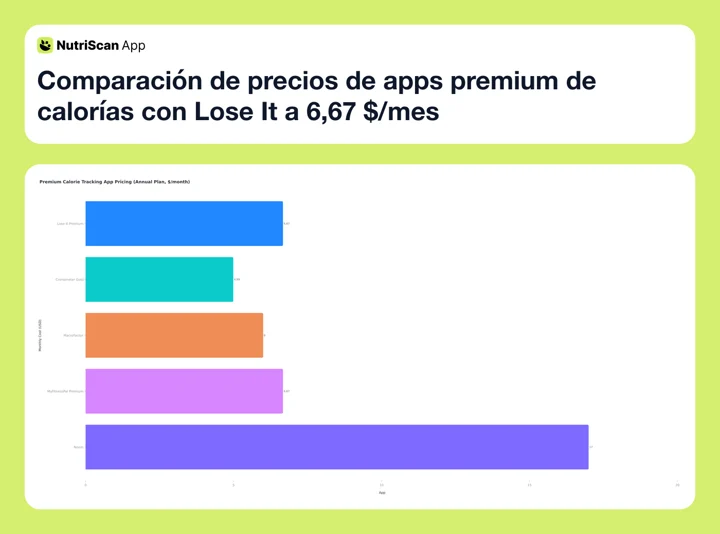 Figure 1: Monthly-equivalent prices across premium calorie trackers. Lose It Premium is $6.67 a month on the $79.99 annual plan, level with MyFitnessPal Premium and above MacroFactor at $6.00 and Cronometer Gold at $4.99. Noom is the outlier at about $17 (Lose It membership tiers and pricing).
The annual plan is now the only subscription. At $6.67 per month it is no longer a budget tracker, and the old "half the price of MyFitnessPal" argument is gone: both cost $79.99 a year. The lifetime license is $299.99 if you are on a free or basic account, and $229.99 if you already pay for Premium (Updates to Lose It membership pricing).
Wait for a Discount
Lose It often shows discounts to free users who have been using the app for a while. Some Reddit users reported annual offers as low as $23.99 after about a month on the free version (r/LoseitApp), and Black Friday deals once brought the lifetime plan to around $60. Both of those datapoints predate the 2026 increase, so treat them as the shape of the discount rather than the size of it.
Lose It also accepts FSA and HSA payments, which is a nice bonus if you have a flexible spending account through your employer. Not many calorie tracking apps offer this, so it gives Lose It an edge for users in the United States who want to use pre-tax health dollars on a wellness subscription.
Another pricing detail worth noting: if you purchase your subscription through the Apple App Store or Google Play Store, your Premium access only works on that platform (iOS or Android) and on loseit.com. To get cross-platform access on both iOS and Android automatically, you need to subscribe through loseit.com directly. If you switch phones between iPhone and Android, this is something to keep in mind before choosing where to buy.
Three Tracking Patterns and Which Tier Fits 👥
 Photo by Andrew Valdivia on Unsplash
These three profiles are worked examples built from the usage patterns described above, not individual users. Not everyone needs the same features.
Pattern 1: tracking a few times a week Someone who logs a few times a week can search the food database by hand and stay on the free tier. No macros, no fitness tracker, 5 to 10 items a day. Manual search is fine at that volume, so photo and voice logging solve a problem this person does not have.
Pattern 2: eating out four or five times a week Restaurant and takeaway meals are slow to find in a database. Voice logging and photo logging cut roughly 3 to 5 minutes per meal, which is 20 minutes or more across a week at that frequency. Add the barcode scanner for packaged snacks and Fitbit sync to keep food and activity in one place, and Premium earns its price in time rather than in results.
Pattern 3: training and tracking protein, carbs and fat separately The free tier shows total calories only, so anyone who needs a macro split has to pay. Premium adds full macro breakdowns, custom macro targets, and higher-calorie day scheduling for training days versus rest days. NutriScan's macro calculator will give you the targets to enter.
What the Research Says About Tracking Features 🔬
Does it actually matter how you log food? A 2024 Cochrane systematic review pooled 18 randomized trials covering 2,703 adolescents and adults with overweight or obesity and did not find a clear benefit from smartphone apps. Compared with no or minimal intervention, body weight at 12 months was 2.5 kg lower with an app, but the confidence interval ran from 6.8 kg lower to 1.7 kg higher and the review rated that evidence low certainty. The authors concluded the effects are minor and mostly not clinically significant (Metzendorf et al., 2024).
A trial designed to answer that question directly is now finishing. Spark randomized 176 US adults with overweight or obesity across eight combinations of tracking dietary intake, step counts and body weight over a 6-month digital program, to see which of the three actually drives weight loss. The protocol is published in JMIR Research Protocols, data collection closed in June 2025, and the results are not out yet (Patel et al., 2025).
What does this mean for Lose It users? The evidence suggests that the act of consistent logging matters more than the app itself. But features that reduce friction, like voice logging and photo scanning, can help you stay consistent longer. If a feature saves you 3 minutes per meal, you are more likely to log every meal instead of giving up by day 10.
Lose It claims that Premium members lose an average of three times as much weight as free members. That number likely reflects engagement bias (people who pay are more committed), but the correlation still suggests value in the paid features.
Stories from Real Lose It Users 💬
The best way to judge an app is to hear from people who actually use it.
A registered nurse reviewed Lose It for Everyday Health in 2025 after using the app for over a year. She lost 27 pounds and praised the food database, the easy logging process, and the weekly calorie view that helped her see the bigger picture even after a bad day (Brusie, 2025).
On Reddit, one user wrote: "LoseIt is the best app I've used for managing my weight. It is simple, intuitive, and it offers all the features I need to stay disciplined and on-track" (r/LoseitApp).
Another paid for the lifetime subscription: "LoseIt has a lifetime premium option, so you pay once and never have to pay again. I got it for like $60 on a Black Friday sale a few years ago" (r/loseit).
But not everyone is happy. A common complaint on Reddit is that macro tracking, which was once free, is now locked behind the paywall: "The lose it app now doesn't let you see your daily macros without a subscription. I can't afford all these subscriptions!" (r/1200isplenty). Several users also criticized a recent UI redesign that made the interface feel more cluttered. One Google Play review with 148 upvotes said: "Latest update is TERRIBLE. Now a large panel of redundant buttons pops up when you add food. PLEASE make everything more compact so we can see more than one or two items on any given screen."
Another long-time user noted: "I really do love this app. I paid for the Lifetime so you know I'm a fan. However, there are A LOT of foods that just aren't on here so most days I'm straight up making new ones to then track." The food database has 56 million items, but niche or regional foods sometimes require manual entry, which takes extra time.
What About Food Database Accuracy?
These mixed reviews paint an honest picture. Lose It works well for most people, but it is not perfect. The food database accuracy depends partly on user-submitted entries, and the recent design changes have divided the community. Always use the verified foods filter to get the most accurate nutritional data.
7 Tips for Getting the Most Out of the Lose It App 💡
Whether you use the free or paid version, these tips will help you get better results.
1. Use the verified foods filter. The database includes user-submitted entries that can be inaccurate. Turn on the verified foods setting so you only see entries checked by the Lose It team.
2. Set your weight loss pace to moderate. Going too aggressive (2 pounds per week) sets your calorie budget too low. Lose It will warn you if you try to go below 1,500 calories per day. A moderate pace of 0.5 to 1 pound per week is more sustainable.
3. Log before you eat, not after. This forces you to think about portions before they hit your plate. It takes 30 seconds and can prevent overeating.
4. Use the weekly view, not just the daily view. One bad day does not ruin your week. The weekly calorie view shows your average and helps you stay motivated even after an off day.
5. Try the free version for 2 to 4 weeks first. Track consistently with just the basic tools. If you find yourself wishing for faster logging or macro data, then upgrade. There is no rush.
6. Wait for a discount before upgrading, and wait longer now. Lose It uses dynamic pricing that drops the longer you stay on the free tier. Use the free version for 3 to 4 weeks and the app will likely offer you a discounted annual plan. That matters more since the list price doubled to $79.99. At full price the $229.99 lifetime license for existing subscribers breaks even in under three years, so if you already know you will keep tracking, run that number before you renew. Black Friday and New Year deals are the moments to check.
7. Connect your fitness tracker if you have one. Premium syncs with Fitbit, Garmin, Withings, Google Fit, and Apple HealthKit. Seeing your food and activity data in one place gives you a clearer picture of your calorie balance.
Bonus Tip: Exercise Calories
Lose It has an optional setting that lets you add exercise calories back into your daily budget. If you burn 300 calories from a workout, you can choose to "eat back" those calories or keep them separate. Most nutrition experts recommend keeping them separate for weight loss, since exercise calorie estimates are often inaccurate. But for heavy exercisers (running 5+ miles), adding some calories back can prevent under-eating.
 Free or Premium? Here is how to decide without overthinking it
Step-by-Step: How to Decide If Lose It Premium Is Right for You 📋
Follow these 5 steps to make the right decision for your situation.
Step 1: Download Lose It and use the free version for at least 7 days. Track every meal. See if the basic calorie counter meets your needs.
Step 2: Identify your pain points. After a week, ask yourself: Am I frustrated by slow manual searching? Do I wish I could see my macros? Do I want to connect my Fitbit or Apple Watch? Write down what is missing.
Step 3: Check the Premium feature list against your pain points. If your biggest frustration is logging speed, voice and photo logging will help. If you want macro tracking, Premium unlocks it. If your only issue is the food database, the free version already has 56 million items.
Step 4: Compare the cost to alternatives. At $79.99 a year, Lose It Premium costs exactly what MyFitnessPal Premium costs, and $20 more than Cronometer Gold at $59.99 a year. YAZIO PRO is $47.90. Lose It used to win this comparison on price alone; now you have to want its interface, its voice logging, or its FSA and HSA eligibility.
Step 5: Start with the 7-day free trial. New users who have never tried Premium get a 7-day trial. Use it to test voice logging, photo scanning, and macro tracking. Cancel before the trial ends if you decide it is not worth it.

What Recent Studies Say About App-Based Weight Loss 📊
Start with why weight is worth tracking at all. A 2023 Scientific Reports analysis of US data estimated that people above the obesity threshold were 35% more likely to have hypertension, 28% more likely to have hyperlipidemia, and 11% more likely to have diabetes (Dettoni et al., 2023).
Practitioners who work with clients report the same pattern, though this is clinical opinion rather than trial evidence. Sarah Herrington, a certified nutrition specialist and personal trainer, told Everyday Health (Brusie, 2025): "Calorie counters can be useful for individuals monitoring a chronic health condition, those who want to maximize athletic performance, and those who simply wish to have more mental or physical energy."
Registered dietitian Lena Bakovic added: "One of the greatest benefits of using a calorie or macronutrient counting app is a sense of accountability and awareness for the user. I've had many clients tell me that once they logged their foods, they became aware of how much or how little of something they were eating."
These expert opinions align with what most Lose It users report: the app itself is a tool. The value comes from using it consistently. Premium features reduce the effort required to stay consistent, which is where the real benefit lies.
Who Should Pay for Lose It Premium (and Who Should Not)
Pay for Premium if you:
- Want voice or photo logging to save time
- Need full macro tracking (protein, carbs, fat)
- Use a fitness tracker and want all data in one app
- Practice intermittent fasting and want a built-in timer
- Want personalized insights about your eating patterns
- Plan to use the app for more than 3 months (annual plan makes sense)
Stick with the free version if you:
- Only want basic calorie counting
- Track meals 3 or fewer times per week
- Do not care about macros
- Are testing calorie tracking for the first time
- Are on a tight budget, since $79.99 a year is real money for a calorie counter
Consider a different app if you:
- Want detailed micronutrient tracking (try Cronometer)
- Need a behavior coaching approach (try Noom)
- Want voice logging without paying for an annual plan (see how a voice activated calorie counter handles it)
- Want AI photo scanning with instant nutritional breakdowns (try NutriScan for fast photo-based logging with real-time suggestions on what to eat next)

NutriScan's AI photo scanning gives you instant calorie and macro breakdowns with no manual searching needed. Home > Camera Icon > Click Picture
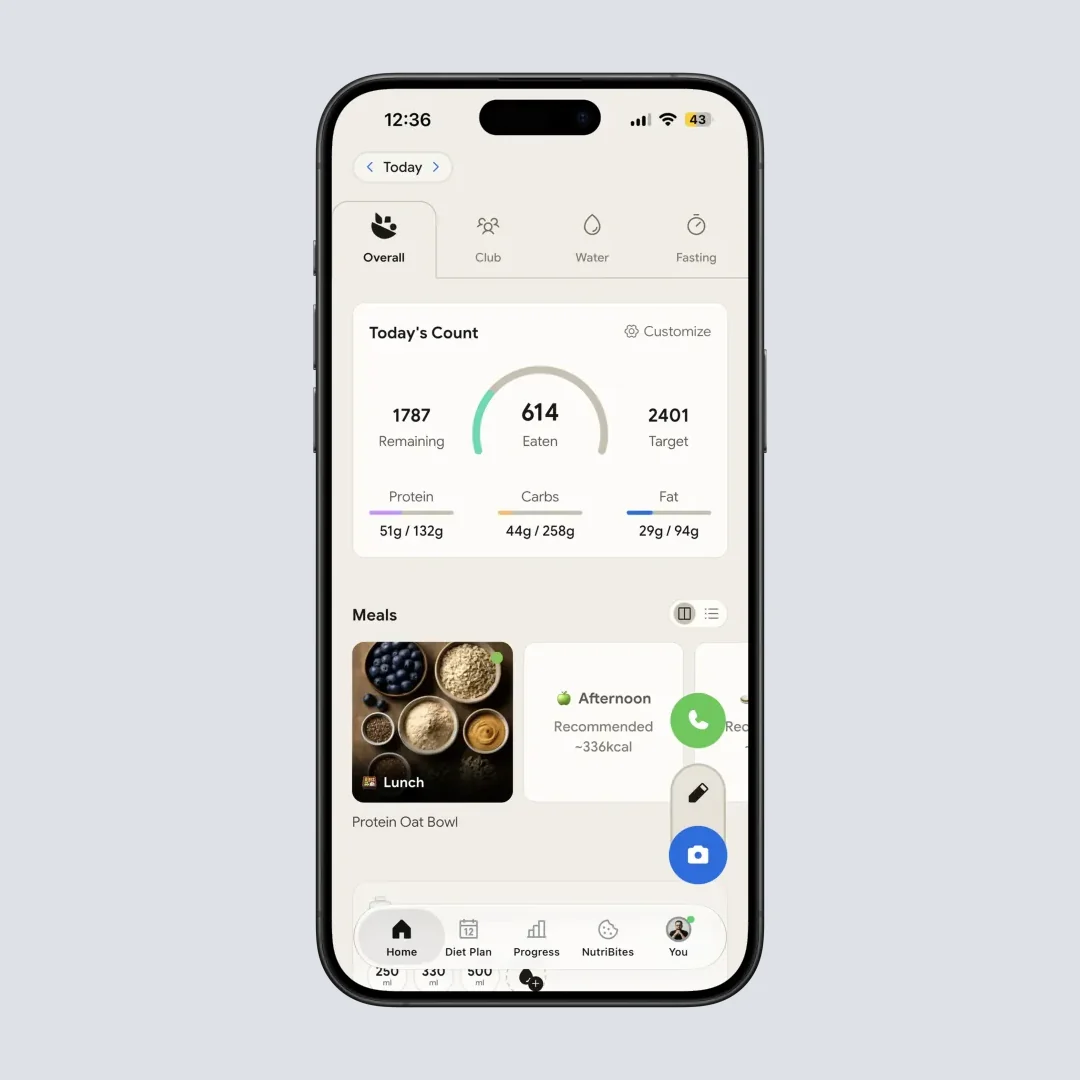
NutriScan's home screen gives you a full daily breakdown of calories, protein, carbs, and fat at a glance. Home > Dashboard
Conclusion
Lose It Premium is worth it for users who track daily and want faster logging, macro data, and device syncing. The voice and photo logging features alone can save you 15 to 20 minutes per week. What changed in 2026 is the price: at $79.99 a year, or $6.67 a month, Lose It is no longer the cheap option, and it costs the same as MyFitnessPal Premium and more than Cronometer Gold. Buy it because the app suits how you log, not because it undercuts the field.
For casual trackers or people just starting out, the free version is solid, and the case for staying on it got stronger. Start there, track for a few weeks, and upgrade only when you hit a wall with the basic tools.
The most important thing is consistency. Whether you use Lose It free, Lose It Premium, or another tracker like NutriScan, logging your meals regularly is what drives results. Pick the tool that makes it easiest for you to show up every day.
Frequently Asked Questions ❓
Is Lose It Premium worth the money in 2026?
It is a closer call than it was. Premium adds voice logging, photo scanning, macro tracking, and device syncing, but the 2024 Cochrane review found no clear weight loss benefit from the apps themselves (Metzendorf et al., 2024), so the case for paying rests on whether those features keep you logging. The annual plan went from $39.99 to $79.99, which is $6.67 a month (Lose It membership tiers and pricing). If you log every day and those features keep you consistent, it still pays for itself. If you log a few times a week, it does not.
What is the difference between Lose It free and Premium?
The free version tracks calories, offers a food database of 56 million items, and provides daily/weekly calorie views. Premium adds photo and voice logging, barcode scanning, full macro tracking, intermittent fasting tools, fitness device syncing, and personalized eating insights.
How much does Lose It Premium cost per month?
There is no monthly Premium plan any more. Premium is $79.99 per year, or $6.67 a month, and it auto-renews annually. The lifetime license is $299.99 for free and basic accounts and $229.99 for active Premium members (Lose It membership tiers and pricing). Lose It uses dynamic pricing, so you may see lower offers after using the free version for a few weeks.
Is the Lose It app free?
The Lose It app is free to download, and the free tier tracks calories against a daily budget, searches a food database of 56 million items, and shows daily, weekly, and monthly views. Macros, voice logging, photo logging, the barcode scanner and fitness device syncing sit behind Premium at $79.99 a year. New users get a 7-day Premium trial.
Can I use Lose It to track macros for free?
No. Full macro tracking (protein, carbs, fat, sugar) requires Premium. The free version only shows total calorie counts. This is a common frustration among users who remember when macros were available on the free plan.
Is Lose It better than MyFitnessPal?
Price no longer decides it. Both annual plans cost $79.99. Lose It has a cleaner interface, voice logging, and FSA and HSA eligibility; MyFitnessPal has a larger food database, more third-party integrations, and still sells a monthly plan, which Lose It does not. Both are effective calorie trackers. For AI-powered photo scanning with meal suggestions, you can also try NutriScan.