Should You Pay for MyFitnessPal in 2026?
 ChatGPT
  Claude
  AI Mode
  Perplexity
Pay for MyFitnessPal Premium if you scan packaged food most days, set macro targets in grams, train on a split where rest days and training days need different numbers, or you have stopped opening the app because of the ads. Stay free if you cook from scratch, eat out most nights, log a few days a week, or only want a rough calorie number. That is the verdict, and the rest of this post is the reasoning behind it, reader type by reader type. Premium is $19.99 a month or $79.99 a year, Premium+ is $24.99 or $99.99, both standard US prices as of mid 2026 and both varying by region. The free plan still does manual logging fine, but the barcode scanner and gram-based macros went behind the paywall years ago, which is what makes this a real decision instead of an obvious one.
As a NutriScan nutritionist, I have run the free plan, Premium, and Premium+ side by side. A 2025 umbrella review covering 261 primary studies and 62,407 participants found mobile app interventions produced an average weight reduction of 1.32 kg (Couto and de Almeida, 2025). Tracking works. Whether the paid tier adds enough on top of free is the part worth arguing about. This post answers whether to pay at all. If that part is already settled and you only need to pick a tier, the Premium vs Premium+ comparison does that job.
TL;DR - MyFitnessPal Premium and Premium+
- Premium ($79.99/yr) is worth it for: heavy barcode scanners, gram-based macro trackers, athletes with different training-day targets, anyone who hates ads
- Premium+ ($99.99/yr) adds the Meal Planner, 1,500+ recipes, automated grocery lists, and Instacart/Walmart+ sync for $20 more a year
- Skip both if: you track casually, cook everything from scratch, or eat out most days
- Best price: always annual. Monthly Premium costs $239.88 a year for the same thing
- Alternative: NutriScan at about $59 a year, with 5 free photo scans a week on the free plan
How Much Does MyFitnessPal Cost in 2026? 💵
Two paid tiers, two billing cycles. Prices are standard US prices as of mid 2026 and change by region.
| Plan | Monthly | Annual | Per day (annual) | Per month (annual) |
|---|---|---|---|---|
| Free | $0 | $0 | $0 | $0 |
| Premium | $19.99 | $79.99 | $0.22 | $6.67 |
| Premium+ | $24.99 | $99.99 | $0.27 | $8.33 |
Paying monthly for Premium costs $239.88 over a year against $79.99 annual, a 67% penalty. Premium+ monthly costs $299.88 against $99.99 annual, so monthly billing throws away $199.89. If you subscribe at all, subscribe annually.
The gap between the two tiers is smaller than it looks. On annual billing, Premium+ costs $20 more per year than Premium, about $1.67 a month. On monthly billing that same gap is $5 a month, or $60 a year. Our full MyFitnessPal pricing guide breaks down every regional variation.
MyFitnessPal also accepts FSA and HSA payments for both tiers, which very few nutrition apps do (MyFitnessPal Help Center). Paying with pre-tax health dollars cuts the effective cost by roughly 20% to 35% depending on your bracket.
 Before you pay, work out whether you actually cook. Most of this decision turns on that.
What the Free Plan Still Gives You 💰
The free tier is thinner than it was in 2018, but it is not useless.
Free plan includes:
- Food and exercise logging by manual text search
- Custom foods, meals, and recipes
- Macronutrients viewed and set by percentage
- Measurement logging and past progress
- Partner app links (Apple Health, Google Fit, Fitbit, Garmin)
- Diary sharing, printable reports, community message boards
Free plan does not include:
- Barcode scanner
- Macros by gram
- Meal Scan (AI photo logging)
- Ad-free experience
- Food analysis, quick-add macros, food timestamps
- Different goals by day, multi-day logging
- Intermittent fasting tracker
- Data export, priority support (free users get no file export at all; see which nutrition apps let you export your data)
If you never relied on barcode scanning or gram targets, free covers a basic calorie counter fine. If you did, free will feel like a downgrade of the app you remember.
What MyFitnessPal Premium Adds 🔓
Barcode scanner
Point the camera at a packaged food and the app pulls nutrition data from a database of over 20 million items. Scanning takes about 2 seconds against 20 to 30 seconds of manual search. This is the single feature most people miss after dropping to free, and the main reason to pay.
Macros by gram
Free users set macro targets as percentages, which shift every time the calorie goal changes. Premium sets fixed gram targets for protein, carbs, and fat. That matters for body recomposition, a coach's prescription, or any structured program.
Meal Scan (AI photo logging)
Photograph your plate and MyFitnessPal identifies the food and estimates portions. Accuracy varies, and a Garage Gym Reviews 2026 analysis found user-submitted database entries can be inconsistent, but it speeds up home-cooked meals.
TIP
NutriScan's AI meal scanning works on the free plan too. Free gives you 5 photo scans a week with full macros, micronutrients and a NutriScore on each one; Premium removes the limit. Try it here.
Everything else in Premium
- Ad-free interface across the app
- Food analysis with detail beyond basic macros
- Different calorie and macro goals by day, for training versus rest days
- Intermittent fasting tracker with fasting and eating windows
- Quick-add macros, multi-day logging, food timestamps
- Exercise calorie settings, net carbs, macro goals by meal
- Home screen dashboard, recipe discovery, workout routines
- Data export as CSV and priority customer support
A scoping review of 46 calorie-counting apps across 68 studies published from 2013 to 2024 found that users rate automation and low tracking effort highest, and that manual entry and thin food databases are the main barriers. In one of the reviewed studies, self-monitoring with MyFitnessPal fell from 5.4 days a week at week 4 to 1.4 days a week by week 12 (Dugas et al., JMIR mHealth and uHealth 2026). The features behind the paywall are the ones that cut the effort.

What Premium+ Adds Over Premium ⭐
Premium+ is Premium plus one block of features built around the Meal Planner. If you are already on Premium and only want to know whether that extra $20 is worth it, we break the upgrade down feature by feature in MyFitnessPal Premium vs Premium+.
| Feature | Premium ($79.99/yr) | Premium+ ($99.99/yr) |
|---|---|---|
| Barcode scanner, Meal Scan, voice logging | Yes | Yes |
| Macros by gram, net carbs, goals by meal | Yes | Yes |
| Ad-free, food analysis, priority support | Yes | Yes |
| Intermittent fasting tracker | Yes | Yes |
| Meal Plan Builder | No | Yes |
| 1,500+ goal-friendly recipes | No | Yes |
| Automated grocery lists | No | Yes |
| Instacart and Walmart+ sync | No | Yes |
| Meal Prep Mode | No | Yes |
| Diet preference filters | No | Yes |
| Budget and time customizations | No | Yes |
| Recipe and grocery list sharing | No | Yes |
| Automatic meal plan logging | No | Yes |
MyFitnessPal launched Premium+ in late 2024 to answer the most common user request: tell me what to eat. The Meal Planner supports 10 diet approaches, Balanced, Flexitarian, Keto, Low-Carb, Mediterranean, Paleo, Pescatarian, Vegan, Vegetarian, and Whole-Food Focus (MyFitnessPal Support). A CNET review found the tool produced specific, usable plans rather than vague suggestions.
The recipe library runs past 1,500 options, each with full nutrition data matched to your calorie and macro goals. Setup takes a calorie target, a macro split, a diet type, a budget level (budget-friendly, moderate, or premium) and a time per meal (under 15 minutes, under 30, or any). Add a meal from the planner to your diary and it logs automatically, with no manual entry.
 Photo by Towfiqu barbhuiya on Unsplash
Grocery list integration is the part testers rate highest. Premium+ builds a categorized shopping list (produce, dairy, meat, pantry) from your weekly plan, sends it to Instacart or Walmart+ for delivery or pickup, and lets you share it with a partner or roommate. Meal Prep Mode groups the batch cooking. MyFitnessPal's Winter 2026 release added recipe search filters by ingredient, diet approach, and meal type, plus favoriting for future plans (MyFitnessPal Blog, 2026).
A 2024 review of mHealth apps for obesity and diabetes reported higher adherence to dietary recommendations among app users, and better goal achievement when the dietary plan was tailored to the person rather than generic (Spinean et al., 2024). Combining a plan with automatic logging is the mechanism Premium+ is selling.
The wider literature points the same way. A 2024 systematic review of 39 randomized controlled trials found internet-based smartphone apps consistently improved healthy eating behaviors, both nutrition-specific apps and social media based ones (Seid et al., 2024). A 2025 survey of mHealth app users found unobtrusiveness, meaning how little the app gets in your way, had the strongest correlation with the intention to keep using it (Mohd Johari et al., 2025).
Is MyFitnessPal Premium Worth It? Who Should Pay 👍
1. People who eat packaged food. Protein bars, frozen meals, canned goods, anything with a barcode. If you scan more than three items a day, the scanner alone covers the $0.22 daily cost.
2. Anyone on prescribed macro targets. 150g protein, 200g carbs, 70g fat is a Premium instruction. Percentages drift as calories change; grams do not.
3. Lifters and athletes cycling intake. Different goals by day, exercise calorie settings, and macro-by-meal targets exist for people whose nutrition moves with their training. A 2024 observational study of app users found a dose-response relationship between app activity and weight loss: a 10% increase in activity went with an extra 0.43 kg lost at 12 weeks and 0.69 kg at 52 weeks (Huntriss et al., 2024). The more of these features you use, the better the outcome.
4. People who log 3 to 5 times a day. Ads on free add friction to a habit that only works through repetition.
5. People who share logs with a coach. Data export produces CSV files of food and weight history. Free does not.
Who should pay the extra $20 for Premium+
Cook at home four or more days a week, use Instacart or Walmart+, follow a named diet, meal prep on weekends, or share cooking with a household. If planning is the part you dread, this tier is aimed at you. If you already know what you are cooking on Wednesday, stop at Premium.
Who Should Not Pay for MyFitnessPal Premium 👎
1. Casual trackers. Occasional logging for rough awareness does not need scanning or gram macros.
2. Cooks who work from scratch. Barcode scanning only reads packages. Home-cooked dishes still need ingredient-level entry, and Meal Scan is less accurate on mixed plates than on a single food.
TIP
For home cooking, NutriScan's AI photo scanning handles Indian and international mixed dishes without ingredient-by-ingredient entry. Snap a photo, get the macro breakdown. See how it works.
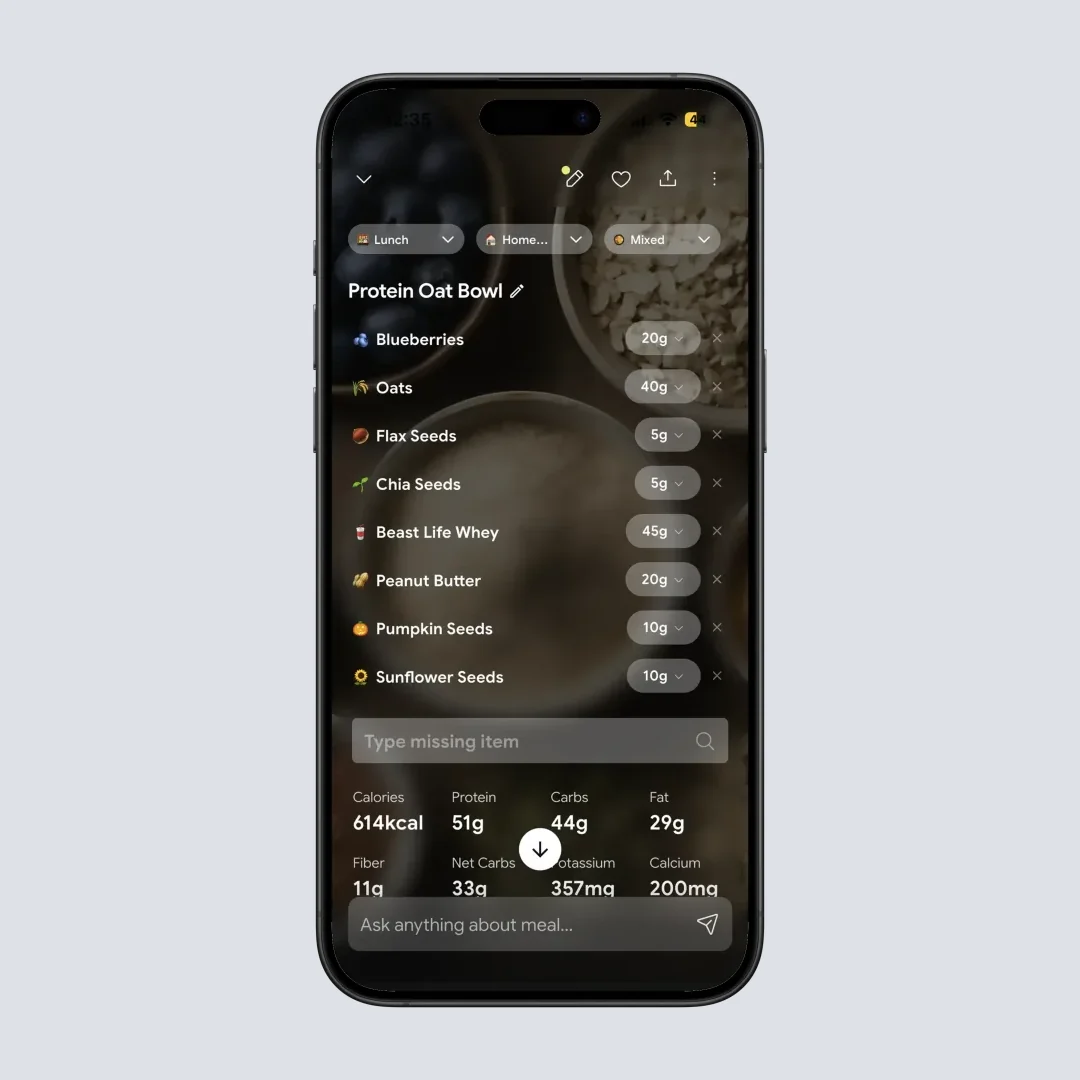
NutriScan's AI identifies home-cooked meals without a barcode. Path: Home > Camera Icon > Click Picture
3. People who eat out most days. Premium+ recipes assume a kitchen. Five restaurant meals a week and the Meal Planner sits unused. Standard Premium, or a cheaper app, fits better.
4. Anyone with a history of disordered eating. A 2021 study found people using calorie-tracking apps for weight and shape reasons were more likely to say the app contributed to food preoccupation and all-or-nothing thinking about food than people using one for health reasons (Messer et al., Eating Behaviors, 2021). More tracking features do not help here.
WARNING
If tracking triggers anxiety, obsessive food thoughts, or guilt around eating, step back from any calorie counting app, free or paid. Your mental health matters more than macro precision.
5. Macro-only trackers. If macros are the whole job, MacroFactor at $71.99 a year adds adaptive TDEE coaching and verified food data that MyFitnessPal does not match. Cronometer's free tier also covers macros.
6. People chasing free workarounds. A Reddit discussion reports that changing your country setting sometimes restores the barcode scanner on free. It is unreliable and MFP has closed similar gaps before.
MyFitnessPal Premium Discount: When the Price Actually Drops 🏷️
MyFitnessPal discounts are seasonal, not code-based. The repeating pattern:
- Black Friday and Cyber Monday (late November): 40% to 50% off the annual plan, which puts Premium near $40 to $50 for the year. The deepest cut of the year.
- January New Year promotions: 30% to 40% off, the second-best window.
- FSA and HSA payment: an effective 20% to 35% saving available year round, no sale required.
- Win-back emails and partner bundles: lapsed free users and some partner offers get real codes.
- Student discount: none. MyFitnessPal does not run one.
Codes listed on coupon aggregator sites almost always just deep-link to the standard annual price. Our MyFitnessPal discount guide covers which codes work and the month-by-month sale calendar.
MyFitnessPal Free Trial: How It Works ⏱️
New subscribers get a 7-day free trial of Premium or Premium+ (MyFitnessPal Premium). Not the month-long trial MFP ran in earlier years.
Eligibility is one per account: you qualify if you have never used MyFitnessPal or never redeemed a trial. The trial defaults to Premium+ pricing, so if you want the cheaper Premium tier you have to select it from the Premium legacy page rather than accepting the default.
Seven days is short. Log every meal from day one instead of easing in, set up a full week of meal plans if you are testing Premium+, and put a calendar reminder on day 6. The full trial and cancellation guide walks through the billing timing.
WARNING
The trial auto-converts to a paid subscription. Cancel more than 24 hours before the renewal date, on the platform you signed up with. Canceling in the wrong place does nothing.
How to Cancel MyFitnessPal Premium 🚫
Cancel where you paid. Apple, Google Play, and MyFitnessPal web are separate billing systems, and MyFitnessPal's support page states you "must process a request for cancellation of your renewal using the same platform on which you originally paid" (MyFitnessPal Support).
- iPhone: Settings > your name > Subscriptions > MyFitnessPal > Cancel Subscription
- Android: Google Play Store > profile picture > Payments & subscriptions > Subscriptions > MyFitnessPal > Cancel subscription
- Web: myfitnesspal.com > My Home > Premium > Subscription Settings > switch Auto-Renewal to Off
After canceling you keep Premium features until the billing period ends, then the account reverts to free. Food log history and custom foods survive. You lose barcode scanning, gram macros, and the ad-free view. If you are not sure which platform you used, search your email for a purchase receipt from Apple, Google, or MyFitnessPal.
How MyFitnessPal Premium Compares to Other Apps 🔄
Prices below are standard US prices as of mid 2026 and change by region.
| App | Annual price | Barcode scan | Macros by gram | AI photo log | Meal planner | Free tier |
|---|---|---|---|---|---|---|
| MyFitnessPal Premium | $79.99 | Yes | Yes | Yes | No | Limited |
| MyFitnessPal Premium+ | $99.99 | Yes | Yes | Yes | Yes, 1,500+ recipes | Limited |
| MacroFactor | $71.99 | Yes | Yes | No | No | None |
| Cronometer Gold | $59.99 | Yes | Yes | Yes | No | Generous |
| Lose It Premium | $79.99 | Yes | Yes | Yes | No | Limited |
| YAZIO PRO | $47.90 | Yes | Yes | Yes | Yes | Limited |
| NutriScan Premium | about $59/yr | No | Yes | Yes | Yes | 5 scans a week |
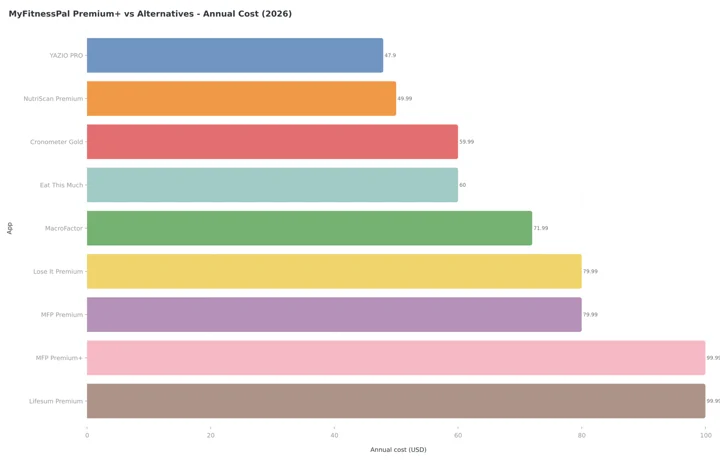 Figure 1: Annual subscription costs across top nutrition apps. MyFitnessPal Premium+ ties with Lifesum Premium at the top at $99.99 (Lifesum's list price, often discounted). MFP Premium and Lose It Premium both sit at $79.99, Cronometer Gold at $59.99, and YAZIO PRO is the cheapest here at $47.90.
MyFitnessPal is not the cheapest; YAZIO PRO is, at $47.90. What it has instead is the largest food database at 20 million-plus items, the widest device compatibility, and the most active community. Lose It Premium moved from $39.99 to $79.99 this year and now matches MFP dollar for dollar.
On the meal planning side, Eat This Much is a dedicated planner at about $60 a year with auto grocery lists and Instacart sync, but no calorie tracking and no barcode scanner, so you would run two subscriptions to match Premium+. Lifesum Premium lists at $99.99 with basic meal suggestions and no grocery list. If you want more options, see our roundup of the best MyFitnessPal alternatives or the head-to-head NutriScan vs MyFitnessPal comparison.
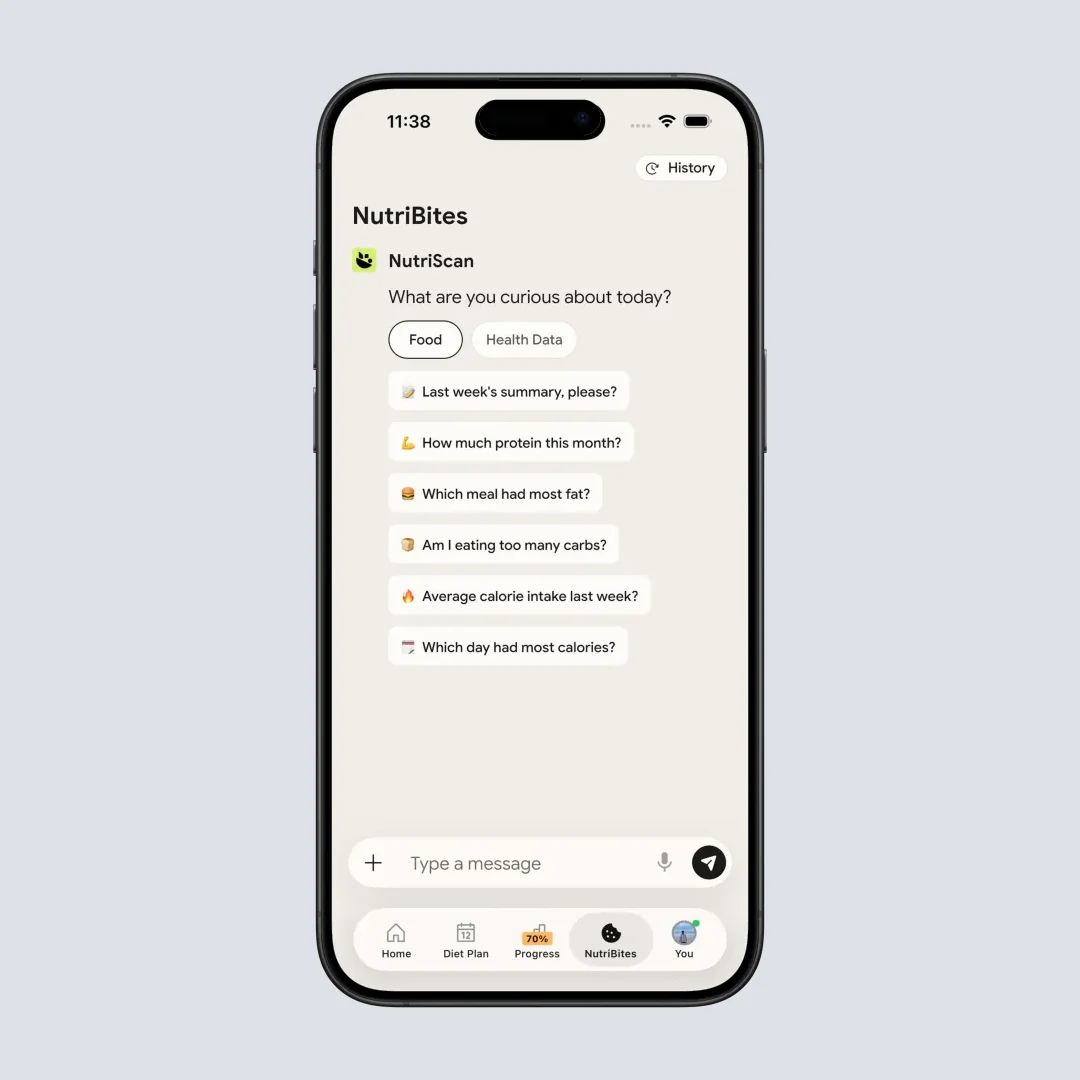
NutriScan's NutriBites gives AI meal suggestions based on what you have already eaten. Path: Home > NutriBites
What Users and Reviewers Report 💬
Garage Gym Reviews, which has tested more than 20 nutrition apps, rates MyFitnessPal 4.42 out of 5. Their registered dietitian Sydney Lappe, who used it for five years, called it "one of the easiest apps I have ever used" and "my favorite service for straight-up calorie/macro tracking" (Garage Gym Reviews, 2026).
On the App Store, MyFitnessPal holds 4.7 out of 5 from over 2.1 million reviews. On Google Play it carries 4.4 out of 5 from 2.76 million reviews.
Praise concentrates on the database size, device syncing, and progress tracking. Complaints concentrate on features migrating from free to paid, occasional crashes, and ads on the free plan.
Four Mistakes That Cost People Money ⚠️
Paying monthly "just to try it." A single month of Premium+ costs $24.99. The 7-day trial costs nothing and shows you the same features.
Upgrading to Premium+ without setting diet preferences. The Meal Planner defaults to generic balanced meals. People skip setup, dislike the plans, blame the feature, cancel. Five minutes of preferences changes the output.
Missing the cancel deadline. The trial converts automatically, and the 24-hour rule before renewal is real. Set the day 6 reminder.
DANGER
Treating Premium+ as a dietitian. The Meal Planner suggests recipes. It does not account for medical conditions, allergies beyond its basic filters, or medication interactions. With specific health needs, work with a registered dietitian and use the app for logging convenience.
 The $20 annual gap between Premium and Premium+ works out to $1.67 a month.
The Verdict 📝
MyFitnessPal Premium is worth $79.99 a year if you scan packaged foods regularly, need gram-based macro targets, or log often enough that ads wear on you. At $0.22 a day it is cheap against most health spending, and the food database is still the biggest in the category.
It is not worth it if you track casually, cook everything from scratch, or only need a calorie number. The free plan covers that, and manual search is workable at low volume.
Premium+ at $99.99 earns its extra $20 only if you cook at home and want the planning handled. Automated grocery lists and delivery sync save real time for people who actually shop and cook. For everyone else it is a feature that goes unopened.
Whichever way you lean, take the 7-day trial, use every paid feature from day one, and cancel on day 6 if the habit did not form. If you want AI photo scanning without a paywall in front of it, track your meals with NutriScan: the free plan gives 5 photo scans a week with full macros, micronutrients and a NutriScore on each one. You can also try our calorie counter app or set your targets first with the macro calculator.
Frequently Asked Questions ❓
Q: Is MyFitnessPal Premium worth it?
A: Worth it at $79.99 a year if you scan packaged food most days, need macro targets in grams rather than percentages, or want the ads gone. Not worth it if you cook from scratch, track casually, or only want a rough calorie number. The free plan still covers manual logging and custom recipes.
Q: How much does MyFitnessPal cost?
A: As of mid 2026, Premium is $19.99 a month or $79.99 a year, and Premium+ is $24.99 a month or $99.99 a year. Annual billing works out to $0.22 a day for Premium and $0.27 a day for Premium+. Prices are standard US prices and change by region.
Q: Is there a MyFitnessPal Premium discount?
A: The reliable discounts are seasonal. Black Friday and Cyber Monday cut 40% to 50% off the annual plan, and January promotions run 30% to 40% off. There is no student discount. FSA and HSA payments cut the effective cost 20% to 35% year round.
Q: Is Premium+ worth the extra $20 per year over Premium?
A: Yes if you cook at home and dislike planning. Premium+ adds the Meal Plan Builder, 1,500+ recipes, automated grocery lists, Instacart and Walmart+ sync, Meal Prep Mode, and diet filters. If you already know what to eat, Premium is enough.
Q: Can I get MyFitnessPal Premium features for free?
A: The free plan covers manual logging, custom foods and recipes, macros by percentage, partner app syncing, and printable reports. Barcode scanning, gram macros, Meal Scan and ad removal are paid. New subscribers get a 7-day free trial of Premium or Premium+, not the month-long trial MyFitnessPal ran in previous years.
Q: How do I cancel MyFitnessPal Premium?
A: Cancel on the platform you paid on. iPhone: Settings > your name > Subscriptions > MyFitnessPal > Cancel Subscription. Android: Google Play > profile > Payments & subscriptions > Subscriptions > MyFitnessPal > Cancel. Web: myfitnesspal.com > My Home > Premium > Subscription Settings > Auto-Renewal off. Do it more than 24 hours before renewal.
Q: What happens if I cancel MyFitnessPal Premium?
A: You keep Premium features until the current billing period ends, then the account drops to free. Food log history and custom foods are preserved. You lose barcode scanning, gram-based macros, and the ad-free experience.
Q: How does MyFitnessPal Premium compare to MacroFactor?
A: MacroFactor costs $71.99 a year and includes adaptive TDEE coaching and verified food data. MyFitnessPal has the larger food database at 20 million-plus items, better device compatibility, and a more active community. MacroFactor suits serious macro coaching; MyFitnessPal suits general-purpose tracking.
Q: Does MyFitnessPal accept FSA or HSA payments?
A: Yes. Premium and Premium+ are both eligible for FSA and HSA reimbursement in the United States (MyFitnessPal Support). Check with your plan administrator for submission requirements.
Q: Is MyFitnessPal safe for people trying to lose weight?
A: Calorie tracking apps can support weight loss when used responsibly. A 2021 study in Eating Behaviors (Messer et al.) found people using them for weight and shape reasons were more likely to say the app contributed to food preoccupation and all-or-nothing thinking than people tracking for health reasons. If you notice those signs, take a break from tracking or speak to a healthcare provider.
