Fastic Money-Back Guarantee: How to Request a Refund
 ChatGPT
  Claude
  AI Mode
  Perplexity
Fastic calls its refund promise the "Feel Good Guarantee." The name sounds simple. The details are not always as clear as they should be.
Users often struggle with the exact meaning of "within the trial," the steps needed to get a refund, and the differences between the guarantee and the EU withdrawal right. This guide covers every angle so you can make a confident decision - whether you are signing up for the first time or trying to get your money back right now. NutriScan publishes this post, and we make a competing app. NutriScan publishes this post, and we make a competing app.
TL;DR - Fastic Refund Guide
- What it is: Fastic's Feel Good Guarantee gives you 14 days to try Fastic Plus with a full refund if you are unhappy - no conditions, no deductions
- Key steps: Identify purchase source (Apple/Google/Website) ➡️ Request refund through correct channel ➡️ Cancel subscription separately ➡️ Verify refund on statement
- Watch out for: The 14-day clock starts from purchase date, not first app open. Canceling the app does not equal canceling the subscription
- Free alternative: NutriScan's free plan gives you 5 meal scans a week
 When you try to understand what "within the trial period" actually means...
A 2024 study on factors driving mobile health app use found that cost concerns and unclear subscription terms are among the top barriers to adoption. If a refund policy confuses users, they hesitate to try the app at all. That makes clarity around the guarantee a win for both sides.
What Is the Fastic Feel Good Guarantee? 🛡️
The Feel Good Guarantee is a voluntary money-back promise from Fastic GmbH, the Berlin-based company behind the Fastic intermittent fasting app. Here is what it says on the official Feel Good Guarantee page:
- You can try Fastic completely free for 14 days
- If you decide within this period that Fastic is not right for you, Fastic will refund the full amount
- No deductions whatsoever - even though digital products generally allow deductions, Fastic waives this
- No usage requirements - you do not need to follow a fasting plan, use the timer, update your weight, or hit any results
Key Takeaway
That last point matters. Some health app guarantees require you to use the app daily for a set number of days or fail to reach a specific goal before you qualify for a refund. Fastic's guarantee has none of those conditions.
What Counts as "Within the Trial"? ⏰
This is where most users get confused. Fastic uses two separate 14-day windows, and they overlap but are not the same thing.
1. The Feel Good Guarantee (14 Days)
This is Fastic's own voluntary promise. It starts when you sign up and pay. You get 14 days to try Fastic Plus. If you want your money back for any reason during those 14 days, you can request a full refund with no questions asked and no conditions.
2. The EU Statutory Withdrawal Right (14 Days)
Because Fastic GmbH is based in Berlin, Germany, EU consumer protection law also applies to website purchases. Under EU law, you have 14 days from the day you sign up to withdraw from the contract without giving any reason. This is a legal right, not a voluntary promise.
The key difference: the EU withdrawal right may reduce your refund if you already used premium features during those 14 days. The Fastic cancellation policy states: "If you have requested that the services begin during the withdrawal period, you must pay us an appropriate amount corresponding to the proportion of services already provided."
The Feel Good Guarantee, by contrast, offers a full refund with no deductions regardless of how much you used the app.
Which One Should You Use?
| Feel Good Guarantee | EU Withdrawal Right | |
|---|---|---|
| Who qualifies | All users (any country) | EU/EEA consumers (website purchases) |
| Window | 14 days from signup | 14 days from contract conclusion |
| Usage deductions | None | Possible (pro-rated) |
| Contact | [email protected] | [email protected] or formal letter |
| Legal backing | Voluntary company policy | EU consumer law |
Important Distinction
If you are within 14 days, the Feel Good Guarantee is the better option because it promises a full refund with no deductions. The EU withdrawal right is your backup if Fastic disputes your guarantee claim.
How the Guarantee Compares to Other Fasting Apps 📊
Fastic's approach is unusual in the fasting and nutrition app market. Here is how it compares:
| App | Trial Type | Refund Guarantee | Conditions |
|---|---|---|---|
| Fastic | Pay upfront, 14-day guarantee | Full refund, no conditions | None |
| Simple | No free trial | 30-day window (website only) | Commitment plans lock after 7 days |
| YAZIO | 7-day free trial (website only) | EU withdrawal only | Pro-rated deduction possible |
| Noom | 14-day initial period | No refund after 14 days | Renewals non-refundable |
| MyFitnessPal | 7-day free trial | No stated refund window | Apple/Google refund only |
| NutriScan | Free plan | Apple/Google standard | Varies by platform |
The biggest difference: most apps offer a free trial where you are not charged during the trial period. Fastic charges you upfront and then offers a refund if you are unhappy. This pay-first model is why the Feel Good Guarantee exists - it is designed to make the upfront charge feel less risky.
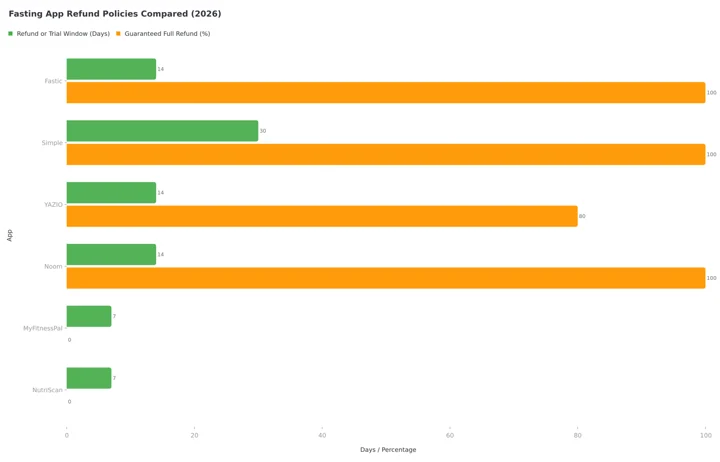 Figure 1: Fasting app refund policies at a glance. Fastic and Simple refund in full inside their window, Noom refunds nothing after day 14, and YAZIO offers EU withdrawal only with a possible pro-rated deduction. MyFitnessPal and NutriScan promise no refund of their own, both send you to Apple or Google, where the outcome varies by platform.
A 2023 discrete choice experiment on consumer preferences for purchasing mHealth apps found that money-back guarantees significantly increase purchase intent compared to no-refund policies.
Getting a refund? What NutriScan gives you free
Fastic charges first and refunds later. NutriScan charges nothing until you want unlimited scans.
| Fastic Plus (paid) | NutriScan |
|---|---|
| Charged upfront, 14 days to ask for the money back | Nothing to pay to start, and the free plan has no time limit |
| Full AI food scanner is a Plus feature | Photo food scan, 5 a week free, unlimited on Premium |
| Personalized daily plan is a Plus feature | 28-day diet plans with macros, a grocery list and swaps. Premium in NutriScan too |
| Fasting timer, free in Fastic | Fasting timer with schedules, history and streaks, free here too |
Fastic Plus is $79.99 a year at list price. NutriScan Premium is about $59 a year, and you can stay on the free plan for as long as you want.
Real-World Refund Experiences 💬
User experiences with Fastic refunds are mixed, based on public reviews and forum posts.
What works well:
- Users who email [email protected] within 14 days and include their User ID, registered email, and receipt generally report successful refunds
- The guarantee page clearly states no usage conditions, which gives users confidence
- Fastic has a 4.8/5 rating on the App Store with 246K+ ratings, suggesting most users are satisfied
What causes problems:
- Users who purchased through the App Store or Google Play sometimes try to email Fastic directly for a refund, but app store purchases must be refunded through the app store
- Some users report confusion about whether the 14-day clock starts from download, from payment, or from activating Premium
- Trustpilot reviews mention cases where users felt the cancellation process was harder than expected
- Users who miss the 14-day window have very limited options
Common Pitfall
If you think you might want a refund, start the process early. Do not wait until day 13 or 14. Technical delays, weekends, and processing times can push you past the window.
Step-by-Step: How to Request a Fastic Refund 📝
The process depends on where you purchased your subscription. Follow the path that matches your purchase method.
Step 1: Identify Where You Purchased
Check your email for a receipt. Look for:
- APPLE.COM/BILL on your bank statement = Apple App Store purchase
- GOOGLE*FASTIC or similar = Google Play purchase
- PayPal or credit card charge from Fastic GmbH = Website purchase
Step 2: Request the Refund
If you purchased through Apple App Store:
- Go to reportaproblem.apple.com
- Sign in with your Apple ID
- Find the Fastic charge in your purchase history
- Select "I'd like to request a refund"
- Choose a reason and submit
Apple reviews refund requests case by case. There is no guaranteed approval, but requests within 14 days of purchase are usually honored.
If you purchased through Google Play:
- Open play.google.com/store/account/subscriptions
- Find your Fastic subscription
- Select "Cancel subscription"
- Then go to the Google Play refund workflow
- Follow the steps to request a refund
Google Play offers automatic refunds within 48 hours of purchase. After that, refund requests go through review.
If you purchased through the Fastic website:
- Send an email to [email protected]
- Include your User ID (found in the app under Profile or Settings)
- Include your registered email address
- Include your receipt or payment confirmation
- State that you are requesting a refund under the Feel Good Guarantee
Fastic processes website refunds using the same payment method you used originally.
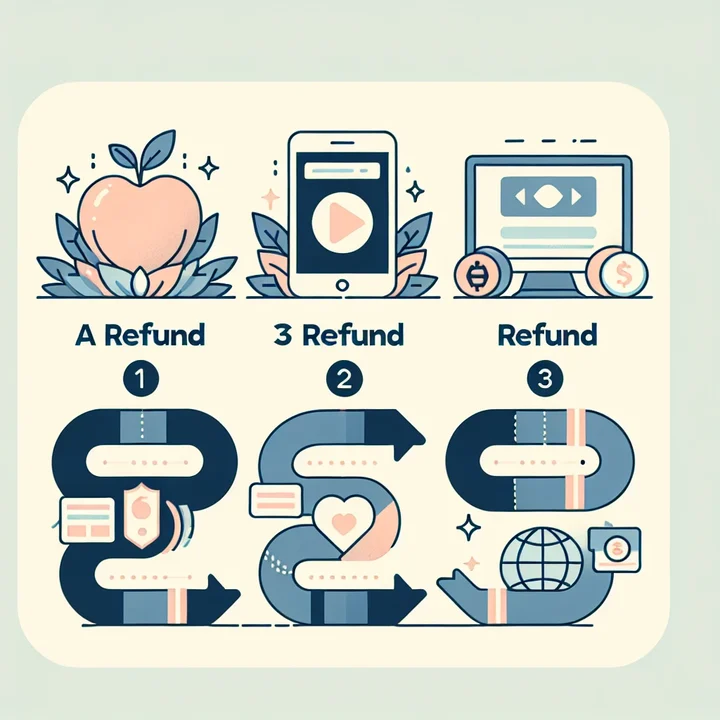 Three paths to your Fastic refund - pick the one that matches your purchase method
Step 3: Confirm Cancellation
Refund Does Not Equal Cancellation
Getting a refund does not automatically cancel your subscription. Make sure you also cancel to prevent future charges:
- Apple: Settings ➡️ [Your Name] ➡️ Subscriptions ➡️ Fastic ➡️ Cancel
- Google Play: Play Store ➡️ Profile ➡️ Payments & subscriptions ➡️ Subscriptions ➡️ Fastic ➡️ Cancel
- Website: Email [email protected] or cancel through your Fastic account
Step 4: Save Your Confirmation
Keep a copy of:
- Your refund request email
- Any confirmation from Fastic, Apple, or Google
- Your bank statement showing the original charge
Step 5: Verify the Refund
Refunds typically take 5-10 business days to appear on your statement. If you do not see the refund after 14 business days, follow up with Fastic at [email protected] or dispute the charge with your bank.
 That feeling when the refund finally hits your bank account
What the Terms of Service Actually Say 📋
The Fastic Terms of Service, updated March 2, 2026, contain several important details about refunds.
Trial subscriptions (Section 7.3):
- The trial period is free - no fee is due during the trial
- Fastic may require payment details when you sign up
- Conversion to a paid subscription after the trial requires "prior information and the user's express consent"
Paid subscriptions with a free period (Section 7.4):
- Some offers include a free initial period (for example, "first month free")
- The paid contract is concluded immediately - the free period is NOT a trial
- The 14-day statutory withdrawal period starts from contract conclusion, regardless of the free period length
Termination and refunds (Section 7.6.1):
- Ordinary termination only takes effect at the end of the initial term
- Ordinary termination is "not refundable as such"
- Payment obligations remain even after termination
Service changes (Section 12.2):
- If Fastic significantly changes its services, you can terminate early
- You may be entitled to a "prorated refund for the unused portion"
Critical Distinction
The distinction between trial subscriptions and paid subscriptions with a free period is critical. If your offer is labeled as a "free period" rather than a "trial," the paid contract already exists from day one.
7 Common Mistakes That Cost Users Money 💸
Based on support forums and user reviews, these are the most common refund mistakes:
Waiting until the last day. The 14-day clock starts from the day you purchase, not from the day you first open the app. Start the refund process by day 10 at the latest.
Emailing Fastic for an App Store purchase. If you bought through Apple or Google, Fastic cannot process your refund. You must go through the app store.
Confusing cancellation with refund. Canceling your subscription stops future charges but does not refund the current payment. You need to explicitly request a refund.
Not including your User ID. For website purchases, Fastic needs your User ID to locate your account. Without it, the refund process is delayed.
Assuming the guarantee covers renewals. The Feel Good Guarantee applies to your initial 14 days only. If your subscription renews and you want a refund for the renewal, you are subject to standard refund policies (which are much less generous).
Deleting the app instead of canceling. Uninstalling the Fastic app does not cancel your subscription. The subscription lives in your Apple or Google account, not in the app itself.
Missing the EU withdrawal window. If you purchased through the website and you are an EU consumer, you have a separate 14-day withdrawal right. But if you used Premium features during that period, Fastic can deduct a pro-rated amount.
Related: How to cancel Fastic Plus step by step · Fastic pricing 2026: free vs Plus, trial and refund · Fasting app refund rules: what you can ask for
Tips for Making the Most of Your 14-Day Window 💡
If you want to give Fastic a fair chance before deciding:
Start on a Monday. This gives you two full weeks including weekends to test fasting routines in different settings.
Try at least 3 fasting schedules. Fastic offers 16:8, 14:10, 18:6, and other plans. Test more than one to see which fits your lifestyle.
Use the Academy courses. Fastic Plus includes educational courses on fasting, nutrition, and habits. These are a core part of the paid experience.
Set a calendar reminder for day 10. This gives you 4 days of buffer to request a refund if needed.
Screenshot your progress. If you do decide to leave, your data may not be exportable. Save anything you want to keep.
Compare with free alternatives. During your 14 days, also try a free fasting timer or a free tier of another app like NutriScan (which offers 5 free scans a week and NutriBites AI at no cost). Use the online macro calculator to set baseline targets, then compare what Fastic Plus actually adds to your tracking workflow.
Regulatory Context: What Protects You Beyond the Guarantee ⚖️
Two regulatory frameworks are relevant:
EU Consumer Protection (Active)
Fastic GmbH is based in Berlin, Germany. All EU/EEA consumers who purchase through the website have a 14-day statutory withdrawal right under the EU Consumer Rights Directive. This right exists independently of the Feel Good Guarantee and cannot be waived by Fastic. The Fastic cancellation policy provides a sample withdrawal form and the company's postal address.
US FTC Rules (In Flux)
The FTC's Click-to-Cancel rule, which would have required companies to make cancellation as easy as signup, was vacated by the Eighth Circuit in July 2025. However, the FTC can still enforce subscription transparency under the Restoring Online Shoppers' Confidence Act (ROSCA) and Section 5 of the FTC Act. In January 2026, the FTC submitted a new Advance Notice of Proposed Rulemaking to restart the process.
For US users, this means: there is no federal "click to cancel" requirement yet, but the FTC is actively pursuing companies that make cancellation unnecessarily difficult.
A 2024 focus group study on mHealth barriers found that cost concerns, low willingness to pay, and confusing app marketplaces were key obstacles preventing sustained user engagement.
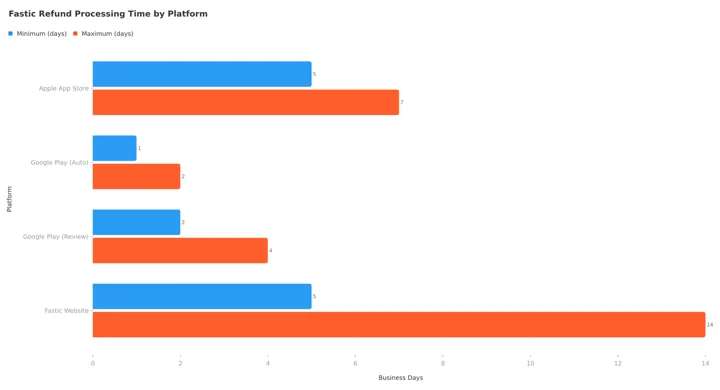 Figure 2: Expected refund processing times vary by purchase platform
Conclusion
The Fastic Feel Good Guarantee is genuinely more generous than most health app refund policies. No usage requirements, no conditions, and a full refund within 14 days. But the details matter: you need to know where you purchased, follow the correct refund path, and act before the window closes.
If you are considering a fasting or nutrition tracking app and want to compare options before committing, NutriScan's free plan gives you 5 AI meal scans a week plus full nutrition tracking. Track your fasting and nutrition journey with NutriScan to see which approach fits your goals.
Try NutriScan on Your Own Meals
NutriScan gives you 5 free scans a week, NutriBites AI insights, and a full macro calculator. Get started with NutriScan.
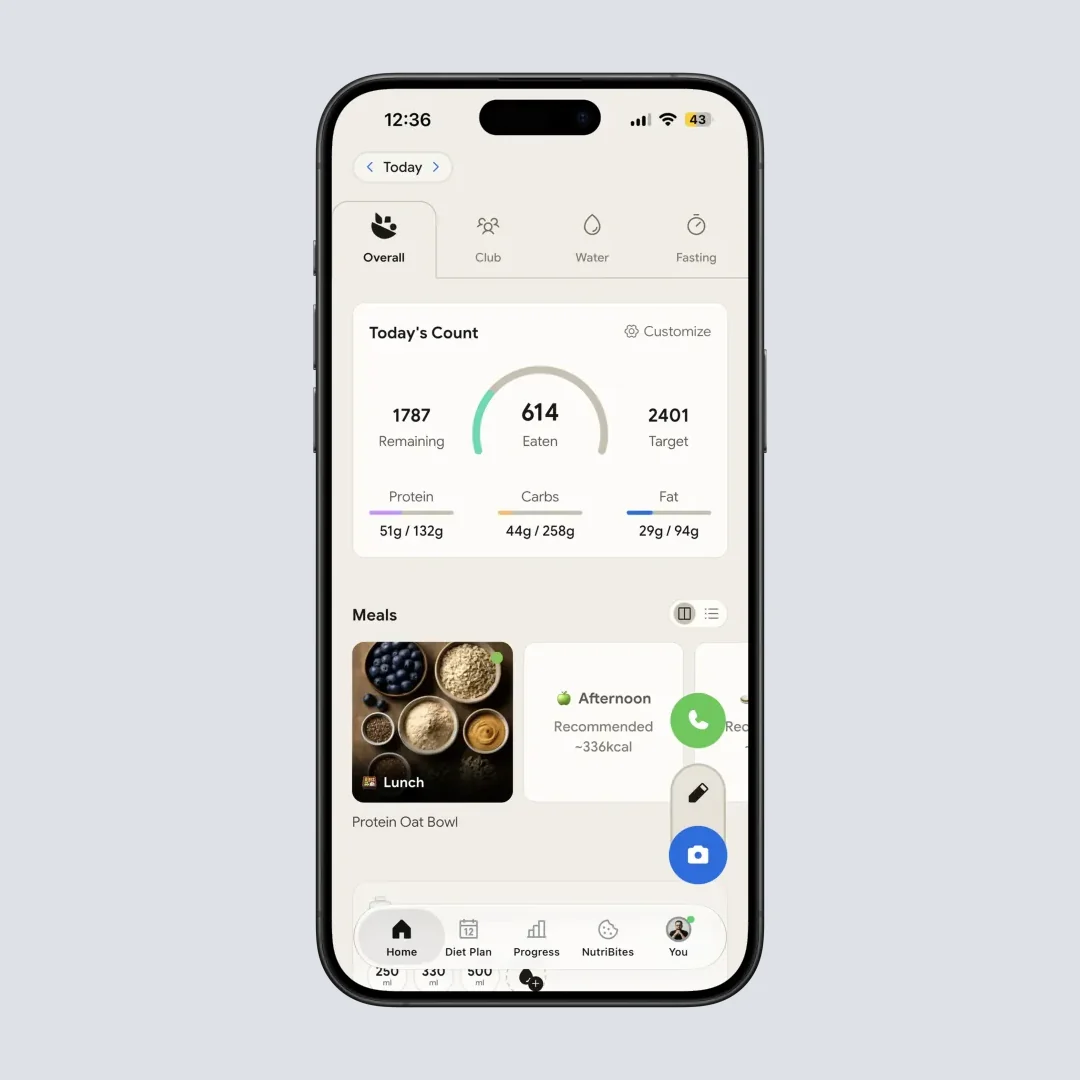
NutriScan's home page - track your daily calories and macros on the free plan (Home > Nutrition Card)
Frequently Asked Questions ❓
Q: Does the Feel Good Guarantee apply to all Fastic plans?
A: The guarantee applies to Fastic Plus subscriptions. The guarantee page does not distinguish between monthly, 3-month, or annual plans. If you signed up for any paid plan and are within 14 days, you should be eligible.
Q: Can I use the guarantee more than once?
A: The Terms of Service do not explicitly limit the guarantee to one use per user. However, the trial subscription section states that Fastic "reserves the right to change the scope of services of the trial subscription or to no longer offer trial subscriptions in the future." In practice, creating multiple accounts to claim repeated refunds would likely be flagged as misuse under Section 10.4.
Q: What happens to my data after a refund?
A: Your account is not deleted when you get a refund. You keep your free-tier access, fasting logs, and any data you entered. However, Premium features (courses, advanced insights, meal plans) will be locked.
Q: How long does the refund take?
A: Apple refunds typically appear within 5-7 business days. Google Play refunds within 48 hours for auto-approved cases, or up to 4 business days for reviewed cases. Website refunds from Fastic depend on the payment method but generally take 5-14 business days.
Q: Is there a phone number I can call for refund support?
A: Fastic lists a phone number in their legal documents: +49 30 41735147 (Berlin, Germany). However, the primary support channel is email at [email protected]. The Freshdesk help center does not mention phone support for refund requests.
Q: What if I am outside the 14-day window?
A: After 14 days, your options are limited. For app store purchases, you can still try requesting a refund through Apple or Google, but approval is not guaranteed. For website purchases, you can invoke the EU withdrawal right if you are an EU consumer, but Fastic may deduct for services already used. Your best fallback is to cancel the subscription to prevent future charges.
Q: Does the guarantee apply to the Fastic Rewards Program?
A: The Terms of Service state that Rewards Program subscriptions are "not sold as a regular subscription" but are "granted as part of the Fastic Rewards Program." Since these are free subscriptions earned through program participation, the money-back guarantee does not apply - there is no money to refund.