What Makes NutriScan Different From Other Food Tracking Apps
 ChatGPT
  Claude
  AI Mode
  Perplexity
NutriScan is photo-first. You snap the plate, and within seconds you get calories, macros, every micronutrient and a NutriScore, with no database search and no typing. Three things separate it from MyFitnessPal, HealthifyMe and the rest. It is trained on Indian and regional mixed dishes, the plates a Western food database reads wrong. It hands you every micronutrient free, with no paywall. And it reads your meal history for patterns, so it can tell you what changed on the day you felt bloated. Free covers 5 scans a week, 4 Monika voice calls a week and unlimited meal history. Premium, about $59 a year in the US as of August 2026 and priced differently by region, lifts both caps and adds the 28-day diet plan.
TL;DR - Why NutriScan Is Different
The Problem: Most food tracking apps are built for Western foods, make you type everything manually, and cannot recognize mixed Indian dishes accurately
The Solution: NutriScan uses AI photo scanning to instantly analyze your meals, understands regional Indian foods, and provides health insights beyond just calorie counting
Key Features: Photo-first logging, voice input with Monika AI, NutriScore rating, personalized diet plans, and support for health conditions like diabetes, PCOS, and pregnancy
The Free Tier: 5 meal scans a week, 4 Monika voice calls a week, NutriScore, all micronutrients and unlimited meal history at no cost
Getting Started: Download the app, set your health goal, and scan your first meal in under 60 seconds
According to the World Health Organization, poor eating habits are among the top risk factors for cardiovascular diseases, diabetes, and certain cancers. Yet most of us struggle to track what we eat properly, because traditional food logging is too hard and too boring to stick with.
I went through this myself. I downloaded app after app, used each one for about a week, then quit. Typing every meal, searching huge databases, guessing portion sizes, it felt like a second job. I am not alone in that.
 That moment when you find a food tracking app that actually works
A study from the University of Washington found that people quit food journaling because it takes too much effort and is time-consuming. They sometimes loosely followed recipes or only ate partial portion sizes, making it difficult to log meals accurately. One respondent even said it was easier to just scan a code on some processed stuff and be done with it.
This is exactly why we built NutriScan App, a tracker that understands your food, your culture, and your health goals without making you work hard for it.
The Real Problem With Most Food Tracking Apps
Most nutrition apps have three big problems.
Problem 1: They Are Built For Western Food Only
Research from the University of Sydney published in Nutrients journal in 2024 found something very interesting. When they tested 18 popular food tracking apps, manual food-logging apps overestimated energy intake for Western diets by an average of 1040 kilojoules. But for Asian diets? They underestimated by an average of 1520 kilojoules.
This means if you eat dal, roti, biryani, or any regional food, most apps are giving you wrong numbers. Your whole tracking becomes useless. We walk through the manual workaround in our guide to counting calories in Indian food.
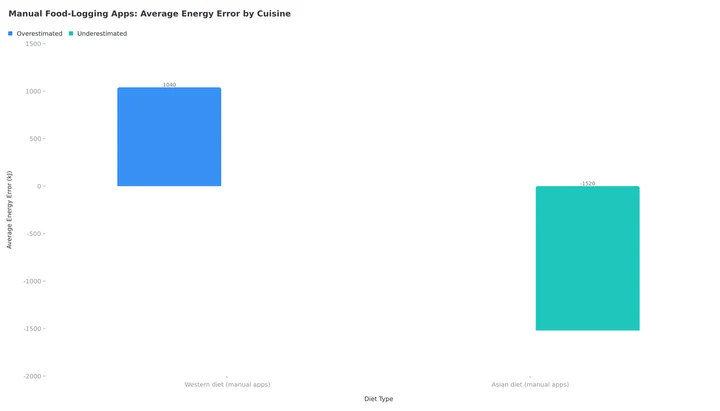 Figure 1: Manual food-logging apps overestimate Western diets by an average of 1040 kJ and underestimate Asian diets by an average of 1520 kJ (University of Sydney, Nutrients 2024). The AI-app errors for beef pho and pearl milk tea are percentages, not kilojoules, so they are covered separately in the next section.
Problem 2: AI Cannot Recognize Mixed Dishes
The same study showed that AI-integrated food apps often had difficulty accurately identifying energy content for mixed Asian dishes. For example, the calories for beef pho were overestimated by 49 percent, while pearl milk tea had calorie underestimations of up to 76 percent.
Most AI food recognition is trained on separated Western foods on a plate. They cannot understand a bowl of sambar rice or a plate of chole bhature where everything is mixed together. We compared how the main photo apps handle this in our roundup of the best app for photo logging mixed dishes.
Problem 3: Time-Consuming Data Entry
According to research published in Bruno et al., 2017, personal diet management often involves manual food logging that is time consuming and tedious. This creates what researchers call user fatigue, leading many to abandon the habit within weeks.
Nobody has 10 minutes to type out every ingredient in their home-cooked meal three times a day.
Why This Matters
If your food tracking app is giving you wrong calorie counts for your regular meals, you could be eating 300-500 calories more or less than you think. Over a month, that is a difference of 9,000-15,000 calories - enough to gain or lose over 1 kg of body weight without knowing why.
How NutriScan Is Different: 6 Things Other Food Tracking Apps Miss
We built NutriScan around one question: what would make food tracking as easy as breathing?
1. Just Click and Know - No Typing Needed
With NutriScan, you simply take a photo of your meal. That is it. Our AI does the rest.
You snap a photo of your breakfast idli sambar. Within seconds, you get:
- Total calories
- Protein, carbs, and fat breakdown
- All micronutrients like fiber, calcium, potassium, free on every plan and never gated behind Premium, which is rarer than it sounds once you compare the best apps for micronutrient tracking
- A NutriScore telling you how healthy this meal is
You skip the database search, the ingredient typing and the portion guesswork.
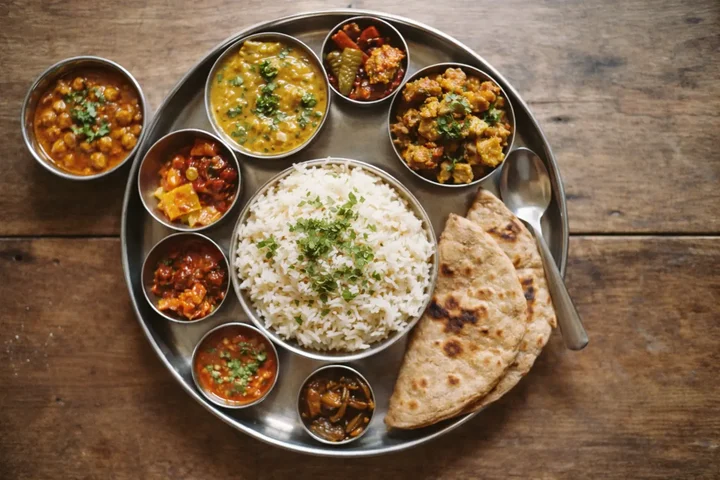 A traditional Indian thali - NutriScan can recognize all items in complex mixed meals

NutriScan makes meal logging simple - just snap a photo and select food type (Home > Camera Icon > Click Picture). Learn more in our meal scan guide.
The app recognizes both individual items and mixed dishes. Whether it is a simple apple or a complex plate of thali with six different items - NutriScan understands it all.
2. Understands Your Regional and Local Food
Most apps are built in America or Europe. Their food databases have thousands of entries for burgers and pizzas. But try finding pav bhaji or dosa or khichdi? Good luck.
We built NutriScan with Indian and regional foods at the core. Our AI has been trained specifically on:
- South Indian dishes like sambar, rasam, uttapam
- North Indian foods like paratha, rajma chawal, paneer dishes
- Street foods like pani puri, vada pav, chaat
- Regional specialties from all over India
According to the University of Sydney researchers, to enhance the credibility and accuracy of nutrition apps, creators should engage dietitians in their development and train AI models with diverse food images, particularly for mixed and culturally varied dishes. This is exactly what we did.
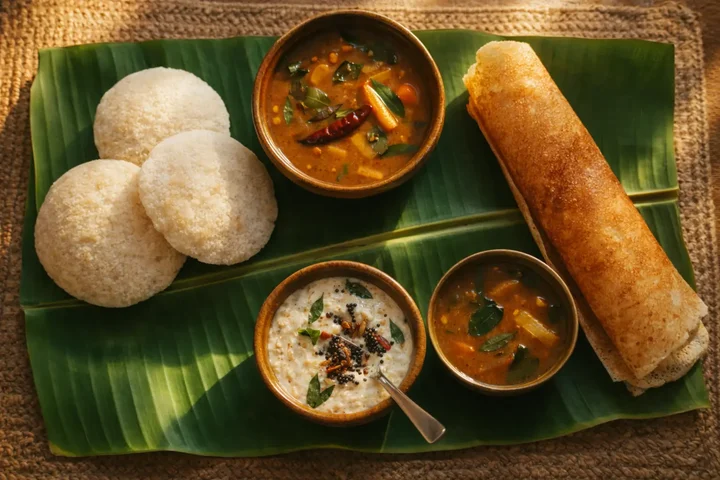 NutriScan recognizes authentic South Indian meals like idli, dosa, and sambar with high accuracy
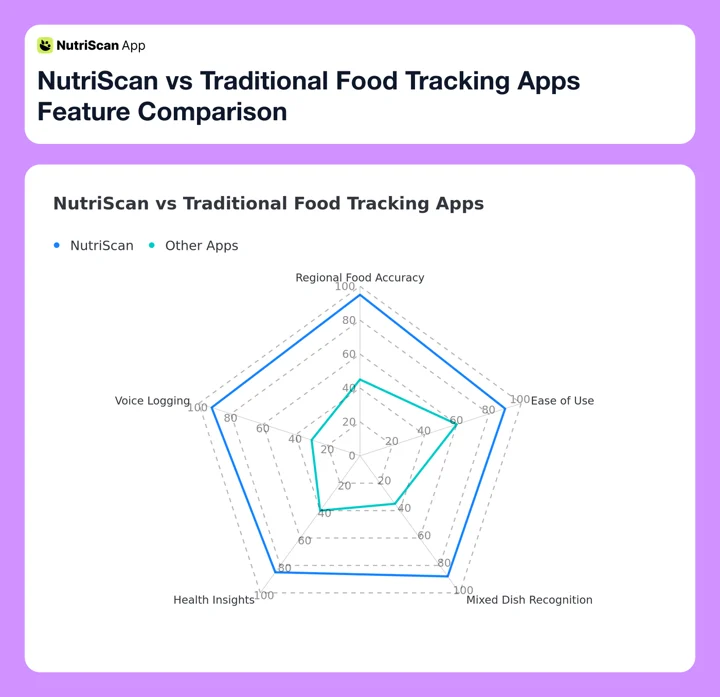 Figure 2: NutriScan outperforms traditional food tracking apps in regional food accuracy, mixed dish recognition, and health insights
3. More Than Tracking - Your Health Detective
Feeling bloated after meals? Got food poisoning? Low energy in the afternoon? Most apps just show you numbers. But NutriScan is different.
NutriScan checks your past meals, finds what was different, and gives smart insights to prevent problems next time. Think of it as a health detective in your pocket.
For example, if you suddenly feel bloated, NutriScan can look at your recent meals and tell you - maybe yesterday you had more fiber than usual, or you ate a new food that your body is not used to. This kind of pattern detection is something traditional calorie counters simply cannot do. Check out our insights guide to learn more about tracking patterns.
Pro Tip
Use NutriBites (Home > Bottom Nav - NutriBites) to ask questions like "What was different about today's meals?" or "Why did I feel low energy yesterday?" Get AI-powered insights based on your actual eating history.
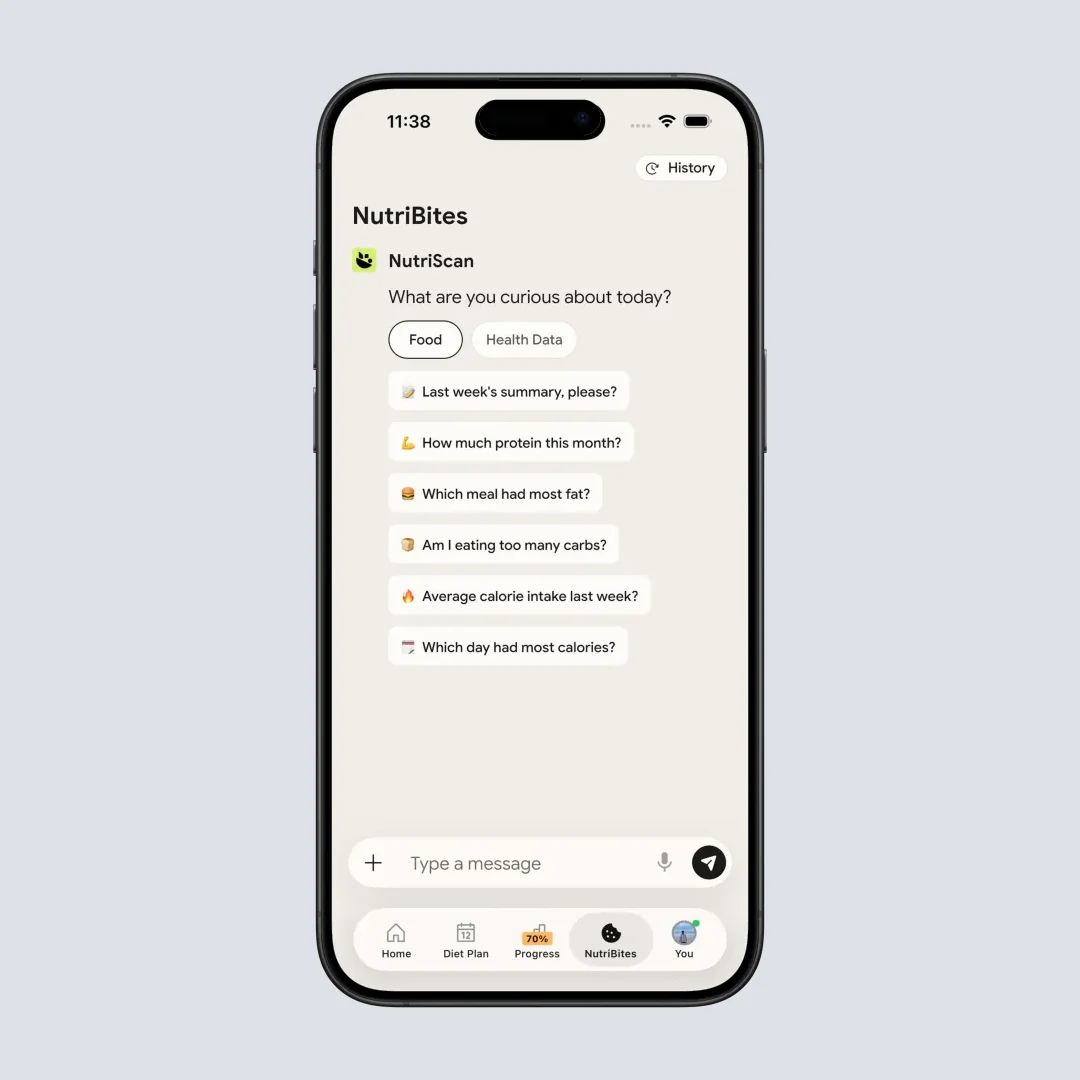
NutriBites lets you chat with your meal timeline and get personalized insights (Home > Bottom Nav - NutriBites)
4. Voice Input for Even Faster Logging
Sometimes you do not even want to take a photo. Maybe you are eating in a dark restaurant. Or you just want to quickly log your morning tea.
With NutriScan, you can simply speak. Say what you ate and the app logs it for you. Just say something like "I had two rotis with dal and some salad" and the app understands and logs everything. Logging a meal this way takes about five seconds. If voice is your main input, see our pick for the best app for voice food logging.
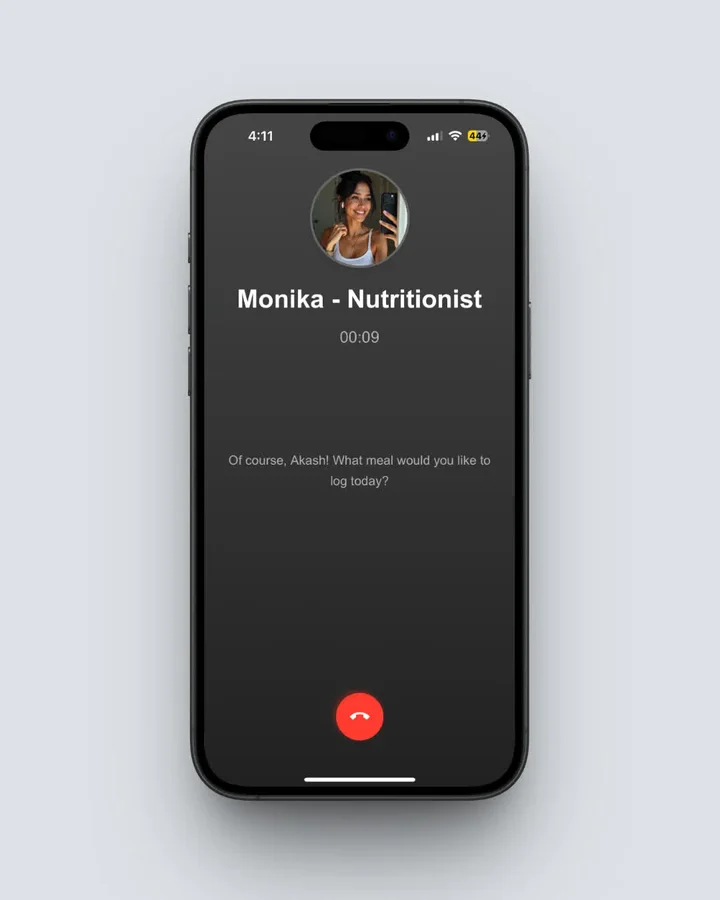 Talk with Monika, NutriScan's voice-powered AI nutritionist, to log meals hands-free (Home > Click Call Button)
5. Personalized Diet Plans Based on Your Goals
Research from JMIR mHealth and uHealth shows that personalized nutrition advice can improve diet quality by 6.1 percent compared to general guidelines. Their study found that 64 percent of participants who received personalized advice were still following some of the guidance months later.
Beyond logging, NutriScan builds a complete diet plan personalized to you based on:
- Your health goal - whether it is weight loss, muscle gain, or managing conditions like diabetes, PCOS, or pregnancy
- Your food preferences - vegan, vegetarian, or non-veg
- Your lifestyle and activity level
- Your regional food habits
This means you get a diet plan that actually fits your life. Not some generic plan that tells you to eat quinoa and avocado when you actually prefer rice and dal.
 Personalized nutrition plans make healthy eating feel achievable and natural
6. Works For Multiple Health Conditions
Different health conditions need different nutrition approaches. A study in JMIR mHealth and uHealth found that mHealth apps involving nutrition can significantly improve health outcomes in people with chronic diseases. The study recommends that nutrition apps should be built specifically for different populations to support effective behavior change.
NutriScan is built to support:
- Weight Loss - With proper macro tracking and calorie awareness. Use our online macro calculator to find your ideal targets
- Muscle Gain - Focusing on protein intake and workout nutrition
- Diabetes Management - Tracking carbs and sugar impact on blood glucose. See our diabetes macro calculator for personalized targets
- PCOS - Understanding foods that help balance hormones. Check out our PCOS macro calculator and PCOS meal tracking guide
- Pregnancy - Ensuring proper nutrients for mother and baby
- Post Surgery Recovery - Foods that help healing
- Viral and Flu Recovery - Nutrition to boost immunity
Each goal has a different approach in how NutriScan analyzes your food and gives recommendations.
7 Tips To Get Maximum Benefits From NutriScan
Now that you understand what makes NutriScan different, here are some tips to get the most out of it.
Tip 1: Log Your First Meal Within 24 Hours
Do not wait for next Monday or next month. Download the app and log your very first meal today. Even if it is just a cup of tea.
Tip 2: Be Consistent For At Least 10 Days
A University College London study put habit formation at roughly 10 weeks on average. But you will start seeing patterns in your eating within just 10 days of consistent logging. The more you log, the smarter NutriScan gets about your eating patterns.
Tip 3: Use Voice When Photos Are Not Convenient
In meetings? Eating while driving? Use voice logging. Just speak what you ate. This keeps your tracking streak alive without any hassle. NutriScan has a voice-powered AI assistant named Monika who can help you log meals and answer nutrition questions.
Tip 4: Check Your NutriScore Daily
Every meal gets a NutriScore from dark green (excellent) to red (needs improvement). According to research published in Nature Food, the Nutri-Score system is a scientifically validated front-of-pack nutrition label that helps people make better food choices. Make it a habit to check your daily score and try to improve it bit by bit.
Tip 5: Use the Ask More Feature
After logging a meal, tap on Ask More. Ask questions like "Is this meal good for weight loss?" or "How much protein did I get today?" or "What should I eat next to balance this meal?" This interactive feature helps you learn about nutrition without reading boring textbooks.
Tip 6: Set Up Repeat Meals
Do you eat the same breakfast every day? Use the Repeat Meal feature (Home > Long Press Meal Item > Start Daily Repeat). Set it once, and it automatically logs every day. This saves time and keeps your tracking consistent. Many of us have routine meals, and NutriScan makes tracking them super simple.
Tip 7: Review Weekly Insights
Every week, look at your insights. Check the calendar view showing your NutriScore colors. Look at patterns. Are weekends worse than weekdays? Are your dinners less healthy than lunches? These insights help you make targeted improvements. The map feature also shows where you eat most often.
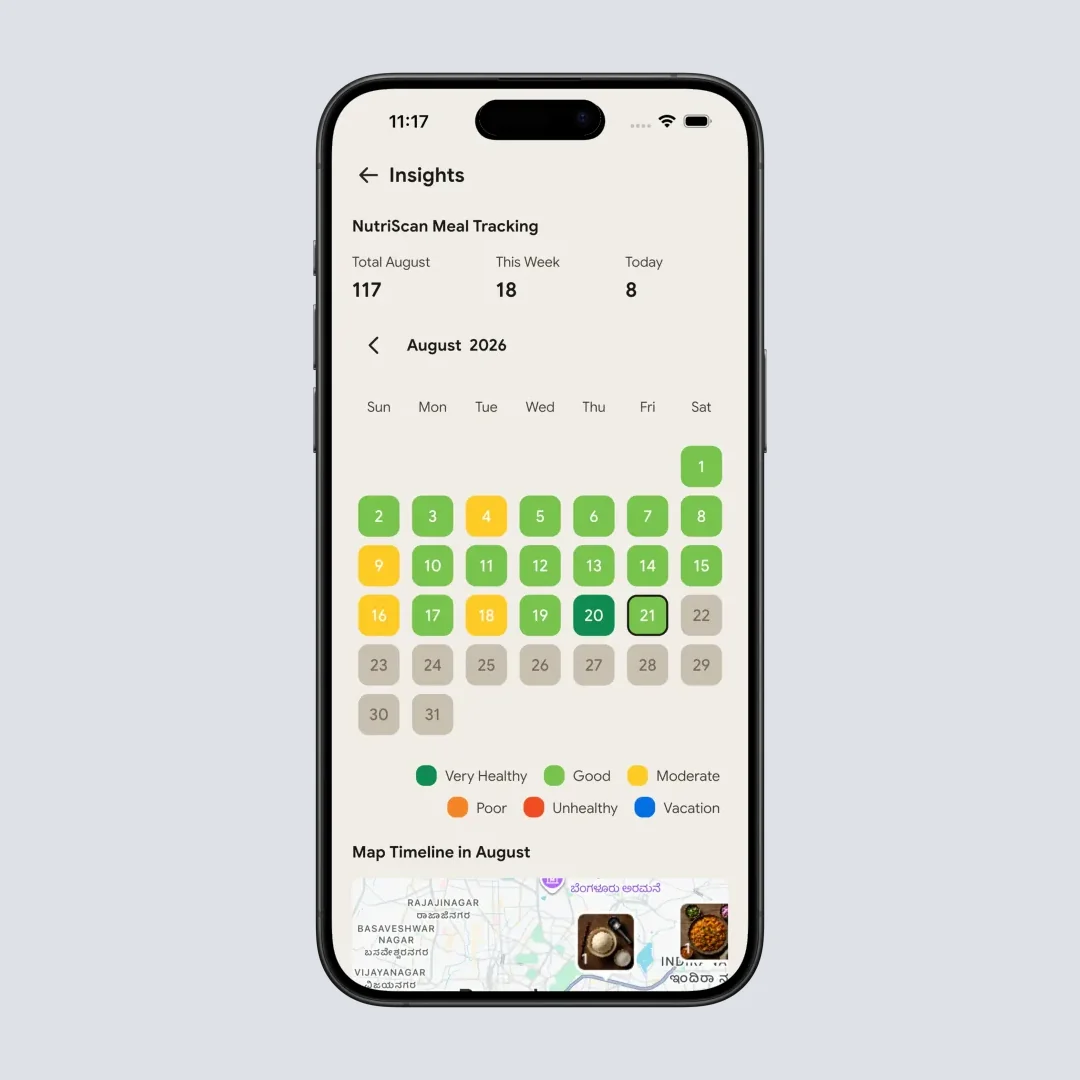
Calendar view shows your NutriScore colors at a glance - spot patterns and track progress (Home > Insights Widget)
 The feeling when your consistent tracking starts showing real health results
Step-by-Step Guide: How To Start With NutriScan
Let me walk you through exactly how to begin your journey with NutriScan.
Step 1: Download and Set Your Goal
Download NutriScan from the App Store or Play Store. During onboarding, select your primary goal. Are you here for weight loss? Muscle gain? Managing diabetes? Be honest because this shapes your entire experience.
Step 2: Enter Your Body Stats
Input your height, weight, age, and activity level. This helps NutriScan calculate your daily calorie and macro targets. The app uses scientific formulas including the 4-4-9 rule where calories equal protein grams times 4, plus carbs grams times 4, plus fat grams times 9.
Step 3: Set Your Food Preferences
Tell the app whether you are vegetarian, non-vegetarian, vegan, or mixed. This ensures your diet recommendations and suggestions match what you actually want to eat.
Step 4: Scan Your First Meal
Take a clear photo of your meal. Select the food type - is it homemade, from a restaurant, packaged food, or street food? Also select the cooking method - deep fried, steamed, grilled, etc. This helps improve accuracy.
Step 5: Explore the Nutrition Details
After scanning, explore the full breakdown. See calories, proteins, carbs, fats, and top micronutrients. Check your NutriScore. Read the three meal-related questions that give you quick insights about your meal.
Step 6: Ask Questions About Your Meal
Use NutriBites to talk with your meal timeline. Ask questions like "What was different about today's meals?" or "Why did I feel low energy yesterday?" Get AI-powered insights based on your actual eating history.
Step 7: Get Your Diet Plan (Premium)
If you want a complete personalized diet plan, fill in the detailed questionnaire about your lifestyle, eating schedule, food restrictions, and kitchen availability. NutriScan will generate a 28-day diet plan with specific meals, recipes, and a grocery list. Learn more about how our diet plan feature works.
The Science Behind Our NutriScore
NutriScan uses a NutriScore system to rate every meal from dark green (most healthy) to red (least healthy). This is inspired by the scientifically validated Nutri-Score labeling system used in European countries.
According to research published in The Lancet Regional Health Europe, the Nutri-Score is a scientifically validated nutrition label that has been associated with better cardiovascular health outcomes. The 2023 updated algorithm aligns better with food-based dietary guidelines and helps people make healthier food choices.
In NutriScan, your daily NutriScore is calculated as:
NutriScore of Day = Sum of (Meal Calories multiplied by Meal NutriScore Weight) divided by Total Calories of Day
This means a heavy unhealthy meal has more impact on your score than a small snack. It gives you a true representation of your nutrition quality. The weekly NutriScore follows a similar weighted formula across all days.
How NutriScore Colors Work
- Dark Green (A): Excellent - highly nutritious meals with balanced macros and rich micronutrients
- Light Green (B): Good - healthy meals with minor room for improvement
- Yellow (C): Moderate - acceptable but could be healthier
- Orange (D): Below Average - needs improvement in nutritional balance
- Red (E): Poor - high in unhealthy components, should be occasional only
Three Worked Examples: Weight Loss, PCOS and Diabetes
These are worked examples built from the patterns described above, not accounts of individual users.
Someone eating mostly South Indian food who wants to lose weight
The usual sticking point is the database. Log sambar, idli or rasam in an app built on Western foods and the totals swing by hundreds of calories, which is the University of Sydney finding above: Asian diets underestimated by an average of 1520 kilojoules. Photo-first logging removes that step, because the plate is read as the mixed dish it is instead of matched to the nearest entry someone typed in. Weight loss still comes from a calorie deficit, but the numbers you are steering by describe the food actually on your plate.
Someone managing PCOS
The useful work here is pattern-finding, not calorie totals. Log consistently for a couple of weeks, then use the calendar view and NutriBites to ask what is common to the days that went badly. Recurring answers tend to be things like heavily processed foods and very late dinners. Once a candidate shows up, you change one thing and keep logging to see whether the pattern breaks. NutriScan will not diagnose the trigger for you, it will show you what repeats.
Someone managing type 2 diabetes
Carbohydrate per meal is the number that matters, and it is on the scan result along with the full micronutrient breakdown, free on every plan. The NutriScore gives the same meal a color, so a plate can be checked at a glance before it becomes another line in a spreadsheet. Pair it with the diabetes macro calculator to set the per-meal carb target you are checking against, and treat any change to medication or diet as a conversation with your doctor.
Why Accuracy Matters More Than Features
Many apps boast hundreds of features. Those features do not help if the basic calorie count is wrong.
As per research from JMIR Formative Research, image-recognition dietary assessment apps can be effective for tracking when they are accurate and easy to use. The key is reducing the burden on users while maintaining accuracy.
At NutriScan, we focus on getting the basics right first:
- Accurate food recognition, especially for Indian and regional foods
- Correct portion estimation with adjustable serving sizes
- Reliable micronutrient data from verified food databases
- Easy user experience with minimal steps to log meals
Everything else is built on that foundation.
Club: Community and Accountability
Club, the leaderboard tab, shows the top 50 ranked users based on their NutriScore and meal consistency.
Your rank is calculated using a formula that considers total meals logged, average NutriScore, and a consistency bonus:
Rank = (Total Meals x Avg NutriScore) + Consistency Bonus
You can also make your meal timeline public and share it with friends and family. When people know you are tracking, you tend to make better choices.
Frequently Asked Questions
Q: Is NutriScan accurate for Indian home-cooked meals?
A: Yes. Unlike most apps that are trained on Western foods, NutriScan has been specifically developed to recognize Indian and regional cuisines. Whether you eat dal chawal, roti sabzi, dosa sambar, or any regional specialty - our AI understands it. You can also select cooking methods like deep-fried, steamed, or grilled to improve accuracy further.
Q: Can I use NutriScan if I have diabetes or PCOS?
A: Yes. NutriScan supports multiple health goals including diabetes management and PCOS. A review in JMIR mHealth and uHealth found nutrition apps improve health outcomes in people with chronic conditions when they are built for those needs. NutriScan creates personalized recommendations based on your specific health goal. For the condition-specific picks, see our roundups of the best app for PCOS meal tracking and the best app for tracking carbs for diabetes.
Q: How is NutriScan different from MyFitnessPal or HealthifyMe?
A: Three main differences. First, NutriScan is photo-first, so you snap a photo instead of typing. Second, it is trained on Indian and regional mixed dishes, where Western-built databases misread portions. Third, it reads your meal history for patterns, so it can point at what changed on a day you felt off. For head-to-head detail, read NutriScan vs HealthifyMe and our list of MyFitnessPal alternatives.
Q: Is NutriScan free, and what does Premium add?
A: Free covers 5 meal scans a week, 4 Monika voice calls a week, NutriScore on every meal, every micronutrient with no gating, the fasting timer, NutriBites and unlimited meal history. Premium removes the scan and call caps and adds the 28-day personalized diet plan, weekly meal-plan suggestions, a goal-based grocery list and supplement recommendations. US pricing is about $59 a year as of August 2026 and changes by region.
Q: How does the NutriScore work and why should I care?
A: NutriScore rates your meals across five bands, from dark green (healthiest) to red (needs improvement). It is modeled on the Nutri-Score label used across Europe, which The Lancet Regional Health Europe links to better cardiovascular outcomes. Checking your daily score tells you at a glance whether you are on track.
Take The First Step Today
Unhealthy diets contribute to more than 40 million deaths worldwide each year. That is more than any other risk factor. But tracking your nutrition does not have to be hard.
According to the WHO, in 2022, approximately 2.5 billion adults were overweight, including 890 million living with obesity. Diet-related diseases like cardiovascular problems, diabetes, and certain cancers are directly linked to what we eat.
Self-monitoring through apps does lead to positive behavior change. A systematic review published in Frontiers in Digital Health found that internet-based smartphone apps consistently improved consumers' healthy eating behaviors.
You do not need perfect eating. You need awareness, and a photo takes two seconds.
Download NutriScan and scan your first meal. Five free scans a week is enough to test the scanner on the meals that usually break a food database, your curries, your restaurant plates, your mixed bowls, before you decide whether it is worth paying for.
Ready to start your health journey?
