What Is NutriScan App Known For? AI Meal Scans, NutriScore
 ChatGPT
  Claude
  AI Mode
  Perplexity
NutriScan is known for photo meal scanning. Point the camera at a plate, and in seconds you get calories, macros, micronutrients, and a NutriScore for that meal. Around the scanner sit Monika, the voice AI nutritionist you can call; NutriBites, a chat over your own meal timeline; an intermittent fasting timer; and a 28-day personalized diet plan on Premium. The free plan covers 5 scans and 4 Monika calls a week, with micronutrients and full meal history on both plans. Premium lifts both caps and costs about $59 a year, standard US price as of August 2026, which changes by region.
TL;DR - What NutriScan is Known For
- AI Photo Scanning: Take a picture of any meal and get instant nutrition breakdown in seconds
- NutriScore System: Every meal gets a grade from A to E with a matching color band, Dark Green through Red, tuned to your health goal
- Pattern Detection: The app finds what in your diet might be causing bloating, low energy, or weight gain
- Personalized Diet Plans: 28-day meal plans with recipes, grocery lists, and daily targets
- Voice AI Assistant: Talk to Monika, your AI nutritionist, anytime you have questions
- Regional Food Recognition: Built specifically to understand Indian and local cuisines
I have been there too - staring at my plate full of homemade curry, having zero clue about how many calories or nutrients I just ate. Here is a surprising fact: research published in Nature Medicine found that people following personalized dietary programs showed better improvements in weight, cholesterol, and gut health compared to those following general dietary guidelines (Nature Medicine, 2024). This tells us something important - generic nutrition advice does not work for everyone. We need something more personal, more intelligent, and easier to use.
That is why NutriScan exists. Here is what each part of it actually does, what the free plan covers, and where Premium starts to matter.
The Problem We All Face
Manual food logging is painful. I know because I tried it for months. Searching through databases, guessing portion sizes, forgetting to log that mid-afternoon snack - it felt like a part-time job! A study from the University of Sydney found that while AI-integrated nutrition apps offer convenience over manual food-logging, they need careful use because accuracy varies depending on the type of food (Nutrients Journal, 2024).
 The struggle is real: manual food logging takes too much time and effort
The reality is that most people give up on food tracking within the first two weeks. Why? Because it takes too much time and effort. Yet research shows that consistent dietary self-monitoring is directly linked to weight loss success. A study in the journal Obesity found that participants who tracked their food regularly lost significantly more weight than those who tracked occasionally (Harvey et al., 2019).
Making tracking fast enough that people keep doing it is the whole design problem, and that is the gap NutriScan was built for.
 When you finally find a food tracking method that actually works
What Makes NutriScan Different?
1. Click, Do Not Type - AI Photo Recognition
The first thing NutriScan is known for is quick meal logging. Instead of typing every ingredient and searching through endless food databases, you take a picture of your meal. Click, and within seconds you get a complete nutrition breakdown. We compared the category in our roundup of the best AI photo calorie counter apps, and the same scanner powers our food scanner app page.
I remember the first time I scanned my breakfast - a plate of poha with vegetables. The app identified every component: the flattened rice, the potatoes, the peanuts, the curry leaves. It even asked me about the cooking method - was it stir-fried with low oil or high oil? This level of detail matters because the same dish cooked differently can have very different nutritional profiles.
How Food Type Detection Works
NutriScan recognizes food from different categories and adjusts calculations accordingly:
- Home Made meals
- Packaged Food
- Restaurant or Cafe food
- Street Food
- Supplements
- Hotel or Event Buffet

Path: Home > Camera Icon > Click Picture - NutriScan instantly analyzes your meal
2. NutriScore - Your Meal's Report Card
Every meal you scan gets a NutriScore, a letter grade from A to E paired with one of five color bands: Dark Green, Green, Yellow, Orange, Red. The scoring rests on published research. Learn more in our detailed NutriScore guide. A large European study published in The Lancet Regional Health showed that consuming foods with lower nutritional value (higher Nutri-Score) was linked to higher cardiovascular disease risk (Lancet Regional Health, 2024).
What I love about NutriScan's scoring system is that it adapts to YOUR goals. A meal that scores perfectly for someone building muscle might score differently for someone managing diabetes. This personalization is key because, as research shows, there is large variability in how people respond to different foods (Nature Medicine, 2024).
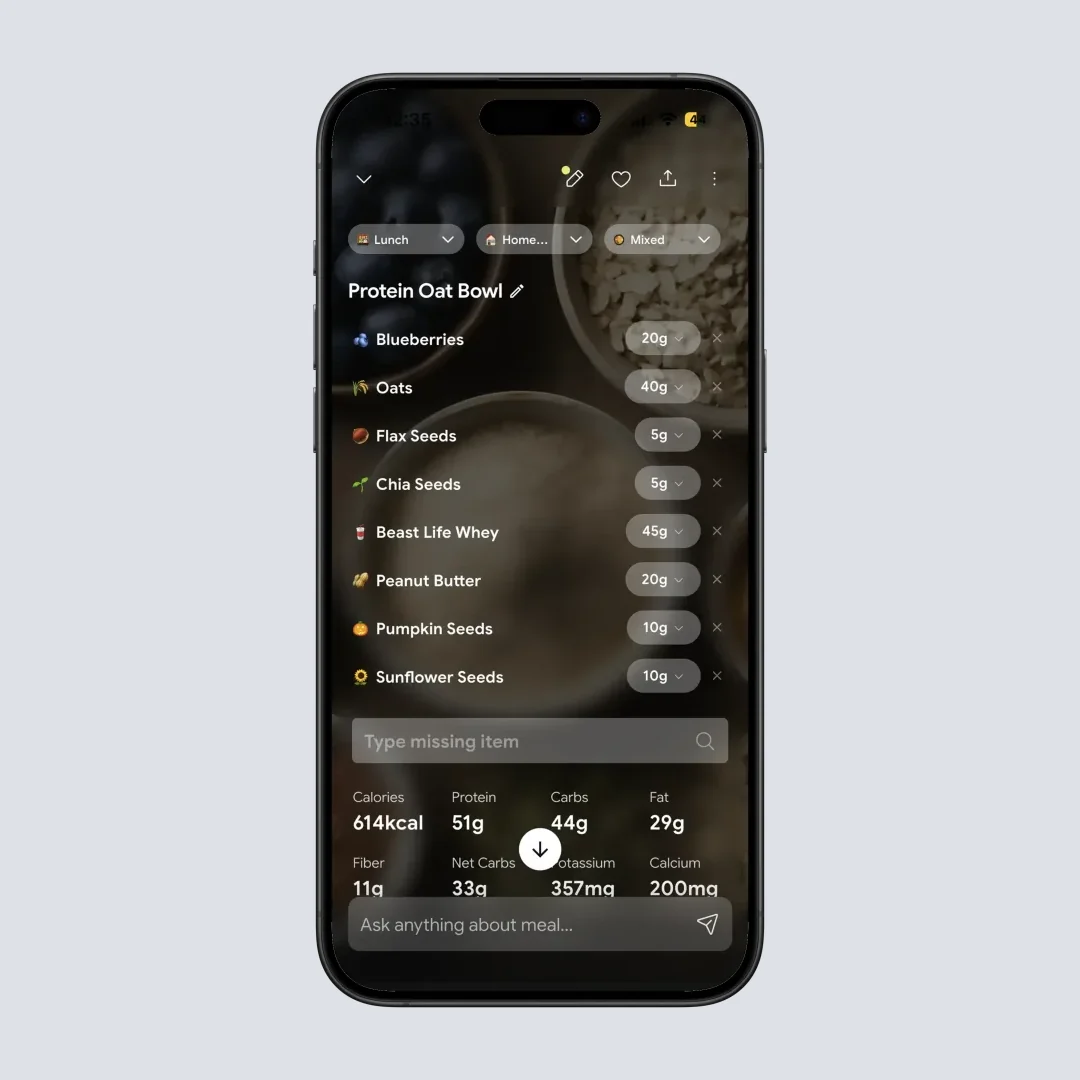
Path: Home > Meal Item - See your NutriScore with detailed macro and micronutrient breakdown
3. Pattern Detection Across Your Meal History
Most food tracking apps stop at calories. NutriScan reads your eating patterns over time and helps you work out what might be causing a problem.
Bloating after meals, an afternoon energy dip, a suspected bad meal: NutriScan can check your past meals, find what was different, and give smart insights to prevent it next time.
The app includes a feature called NutriBites - where you can literally talk to your meal timeline. Ask questions like "What did I eat last week that had the most protein?" or "Show me meals that might have caused my bloating." The AI analyzes your data and gives you answers with relevant meal cards.
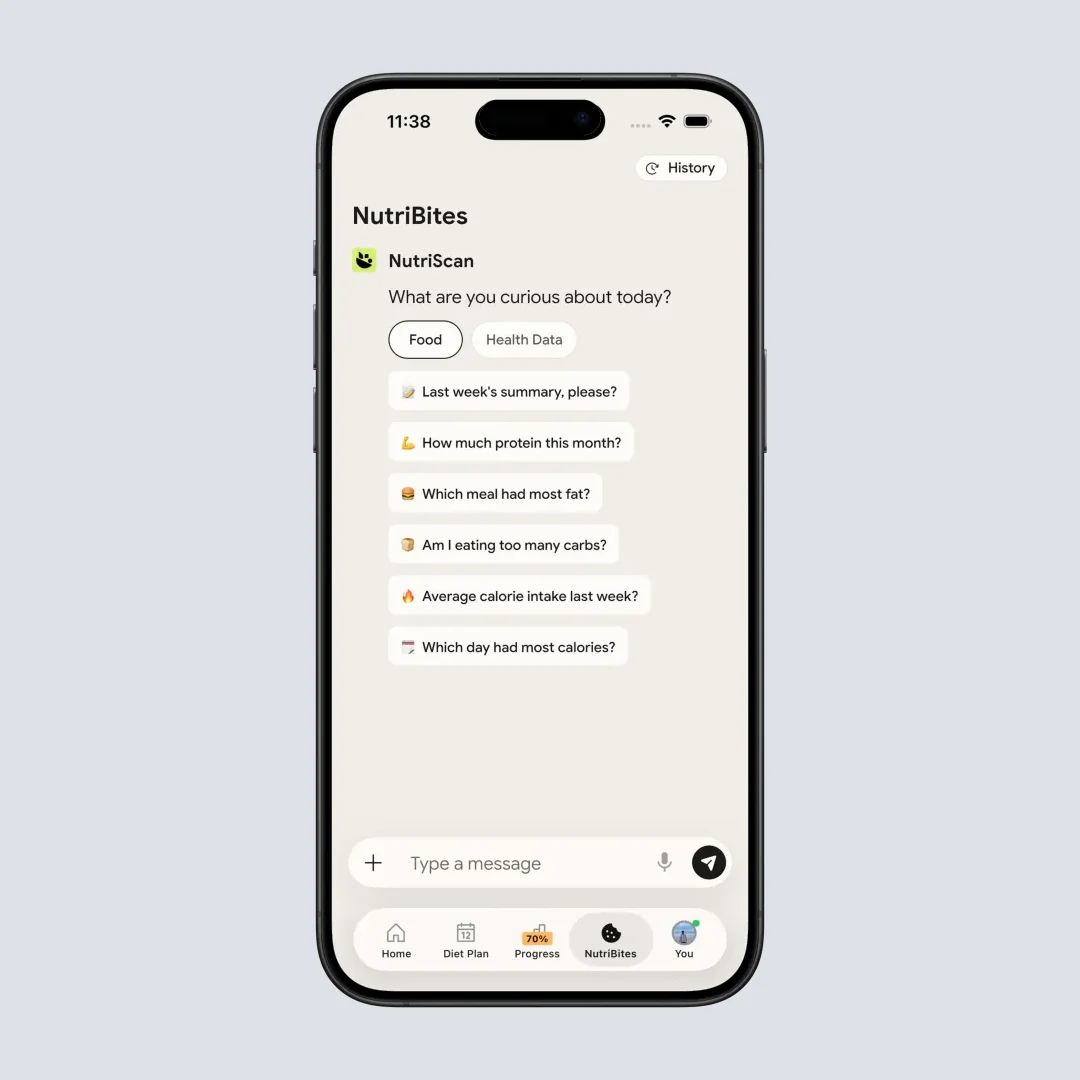
Path: Home > Bottom Nav - NutriBites - Ask questions and get personalized insights from your meal history
Three Worked Examples
These are worked examples built from the patterns described above, not individual users; the app behavior is real, the people are not.
Breastfeeding and Short on Time
Someone who has just had a baby wants to keep protein, iron, and calcium up while breastfeeding, and has no energy left for manual logging. A photo scan takes seconds, and micronutrients come back on every meal on both plans, so iron and calcium are numbers on the screen instead of a guess. The Insights calendar makes a run of low days visible at a glance, which is the point worth raising at the next doctor visit.
Watching Carbs with Type 2 Diabetes
Someone told by their doctor to watch carbs, eating a cuisine where carbs hide in the rice, the roti, and the sweet lassi. Each scan puts a carb number on the plate. Because the NutriScore is tuned to the diabetes goal, it grades two versions of the same favorite dish against each other, so the better one for blood sugar is obvious without doing the arithmetic. Try our diabetes macro calculator to get started.
Chasing a Daily Protein Target
Someone building muscle who assumes their meals are high in protein and cannot tell where the day falls short. Scanning every meal turns that assumption into a per-meal protein number, and the daily total shows the size of the gap, which is what a bigger portion or a protein-heavy snack gets aimed at. Calculate your own macro targets with our online macro calculator.
Why Personalization Matters
A systematic review found that personalized nutrition programs can help individuals with motivation, behavior change, and achieving health outcomes better than generic population-based guidelines (Shyam et al., 2022).

The Diet Plan That Feels Like You
Premium adds planning on top of tracking. The diet plan is built from:
- Your health goal (Weight Loss, Muscle Gain, Diabetes, Pregnancy, PCOS, Viral recovery)
- Your age, gender, height, and weight
- Your activity level
- Your food preferences (Vegan, Vegetarian, Eggitarian, Non-Veg)
- Your eating schedule
- Foods you cannot eat due to allergies or preferences
- What is available in your kitchen
When you complete the diet plan setup, NutriScan creates a 28-day plan with daily macro and micronutrient targets. Each eating schedule slot (Breakfast, Mid-Morning, Lunch, Afternoon, Dinner, Bed Time) gets two meal options with:
- Quick recipes
- Portion sizes
- Benefits
- Things to avoid
- Full nutrition breakdown
And here is something practical - the app generates weekly and monthly grocery lists so you know exactly what to buy!
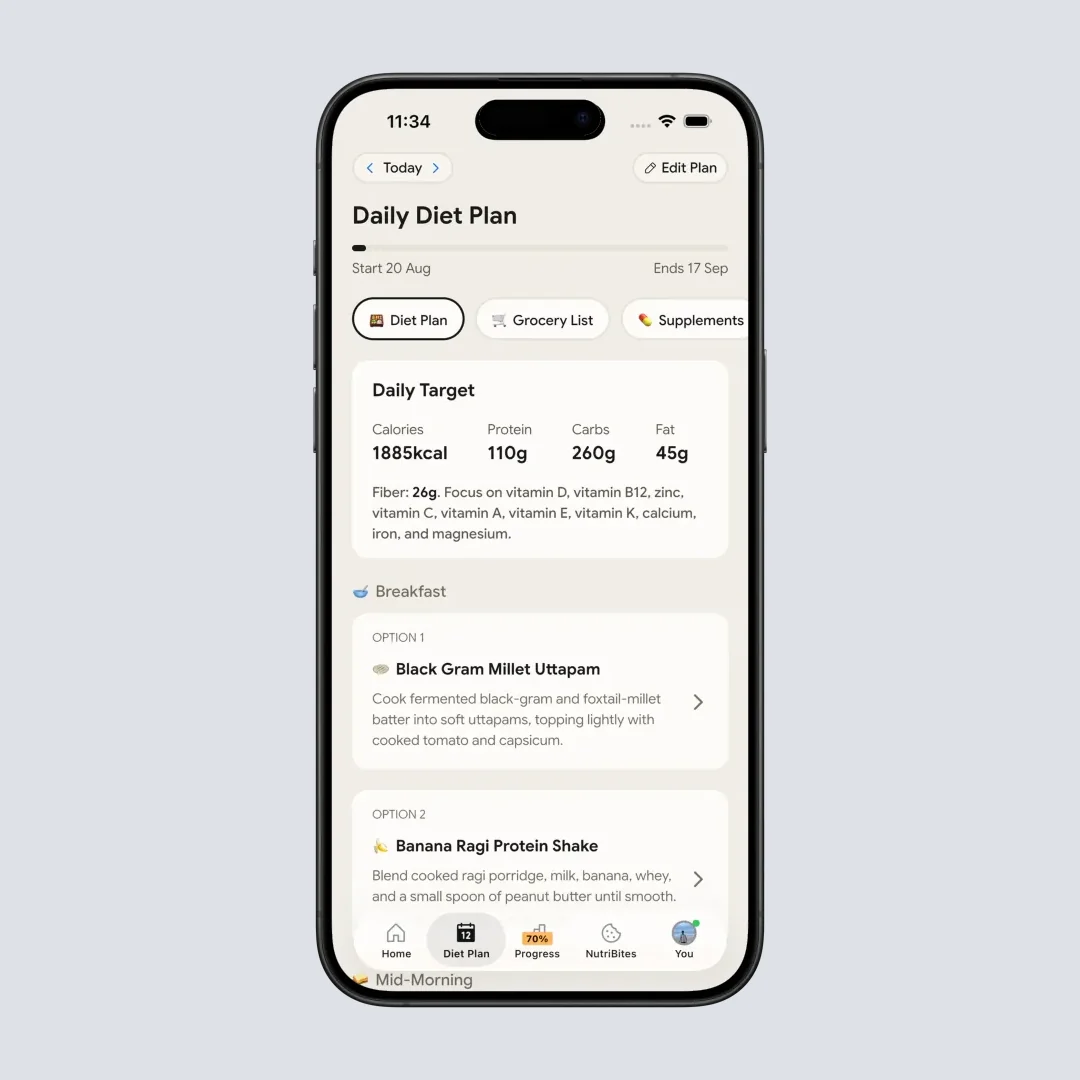
Path: Home > Bottom Nav Diet Plan - Your personalized 28-day meal plan with recipes
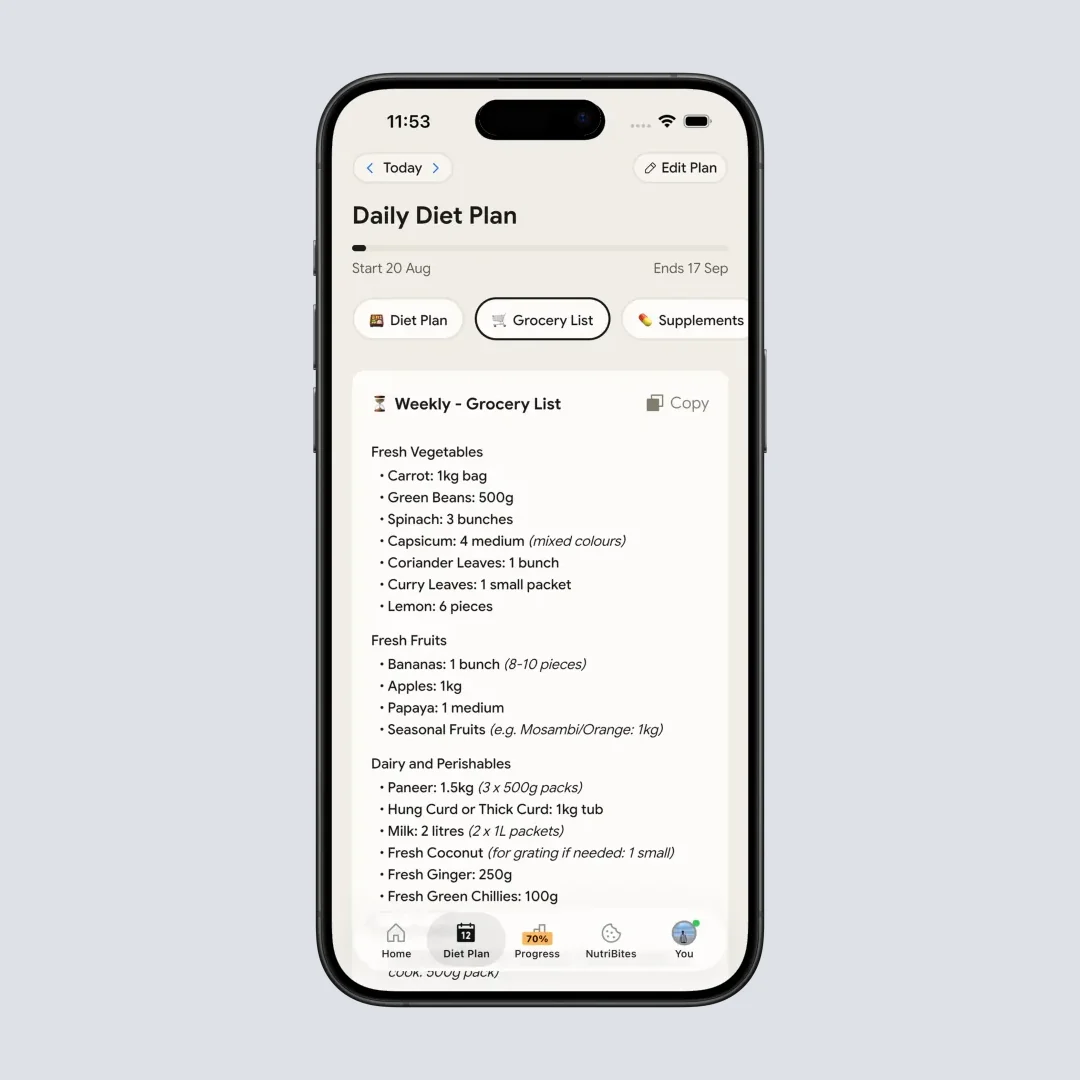
Path: Home > Bottom Nav Diet Plan > Grocery List - Weekly and monthly grocery lists generated automatically
 When your diet plan finally matches your taste preferences
7 Tips to Get the Most from NutriScan
Based on my experience and what research tells us about successful food tracking, here are practical tips:
Tip 1: Scan Before You Eat Take the photo when food is on the plate, not after you have eaten half. This gives the AI the clearest view of your actual meal. Research shows that accurate portion estimation is one of the biggest challenges in nutrition apps (University of Sydney, 2024).
Tip 2: Use the Cooking Method Tags When you scan, select the accurate cooking method - whether it is deep-fried, air-fried, steamed, or grilled. This can significantly change the calorie count. A deep-fried samosa has way more calories than an air-fried one!
Tip 3: Set Up Your Food Preferences Early Complete the Food Preference Form after your first two meal scans. This helps the AI give you personalized NutriScores based on your specific health goals.
Tip 4: Use Voice Input When Typing is Hard Making breakfast while wrangling kids? Use the voice input feature to describe what you are adding to your meal. It is faster than typing and works surprisingly well.
Tip 5: Check Insights Weekly Open the Insights widget at least once a week. Look at your calendar view showing NutriScore colors for each day. Patterns become obvious - maybe Fridays are always red because of weekend party food! See our Insights guide for more details.
Tip 6: Use Repeat Meals for Routine Foods If you eat the same breakfast daily (like I do with my oatmeal), set it as a repeat meal. You save scanning time while still getting accurate tracking.
Tip 7: Sync with Apple Health or Google Fit Connect NutriScan with your health apps. This gives you a complete picture - how your steps, sleep, and activity connect with your eating patterns.
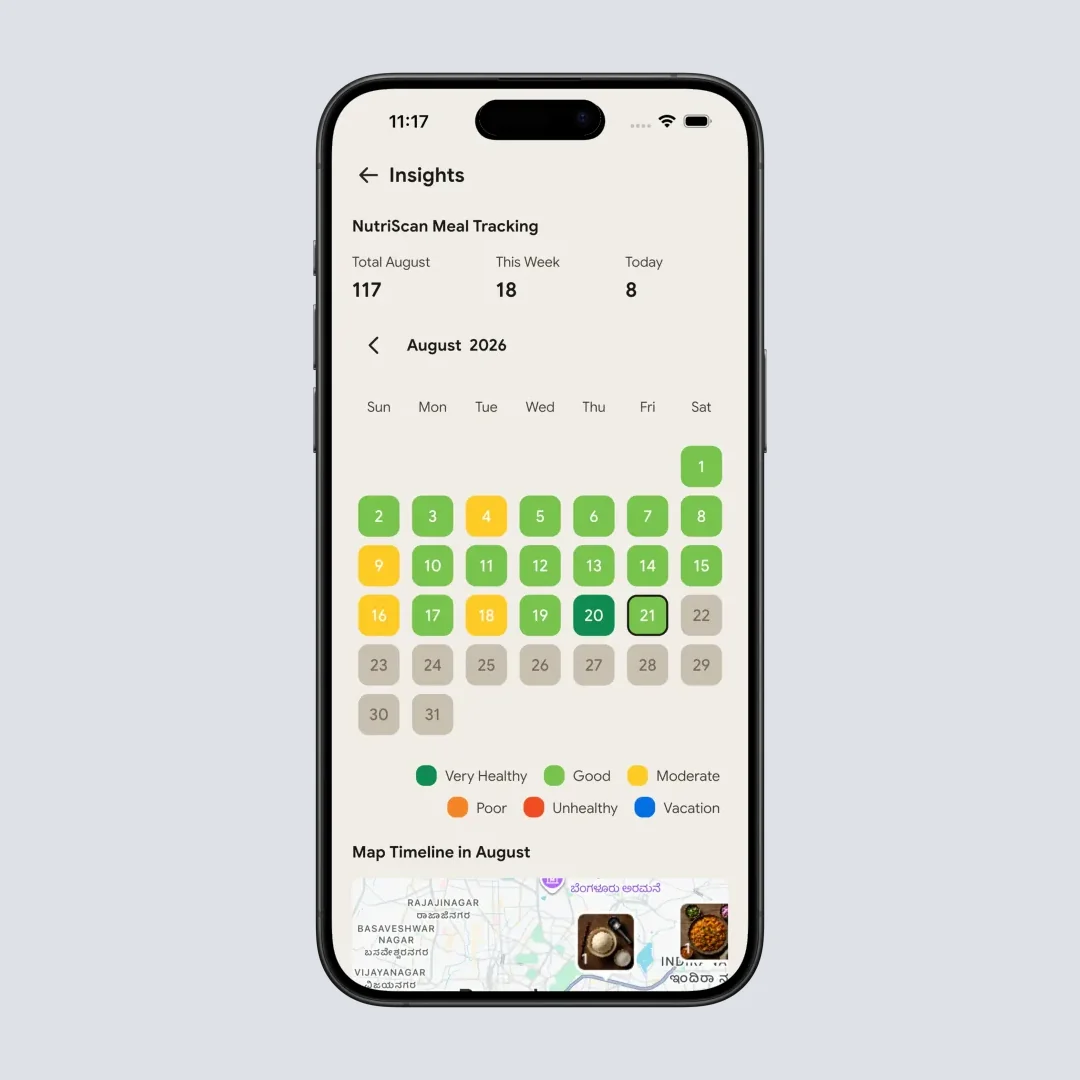
Path: Home > Insights Widget - See your nutrition patterns at a glance with color-coded calendar
Step-by-Step: Your First Week with NutriScan
Let me walk you through exactly how to start using NutriScan effectively:
Step 1: Download and Set Your Goal Download NutriScan from App Store or Play Store. During onboarding, select your primary health goal. The app will ask about your age, gender, height, weight, and activity level. This information is used to calculate your daily calorie and macro targets using established formulas - the 4-4-9 rule where Calories = (Protein g x 4) + (Carbs g x 4) + (Fat g x 9).
Step 2: Complete Your First 2 Scans Open the camera, take pictures of your next two meals. Do not worry about being perfect - just scan what you eat. After these first scans, you will be asked to complete the Food Preference Form with your first name, food preference, and goal. Check our meal scanning guide for best practices.
Step 3: Explore Your Nutrition Details After each scan, tap on the meal to see full details. You will see macros (Calories, Protein, Carbs, Fat) and your top 4 micronutrients ordered from high to low. There is also a NutriScore with a description of what it means.
Step 4: Ask Questions Notice the "Nutrition Breakdown and Ask More" button? Use it! Ask things like "Is this meal good for weight loss?" or "What nutrient am I missing?" The AI will answer based on your specific meal.
Step 5: Check Your Home Dashboard Daily Your home page shows today's nutrition count with a visual progress tracker. If you are on the Premium plan, the pie chart shows progress toward your daily goals - carbs and fat will turn red if you exceed your targets.
Step 6: Set Up Your Diet Plan (Premium) If you want guided eating, go to Diet Plan from the bottom navigation. Fill in the detailed questionnaire about your lifestyle, eating patterns, food preferences, and restrictions. The AI builds your personalized 28-day diet plan with specific meal recommendations. Learn more in our Diet Plan guide.
Step 7: Review and Adjust After a week, check your Reports section. Filter by day, week, or month to see trends in your nutrition. Are you consistently low on fiber? High on sodium? These insights help you make better choices going forward.
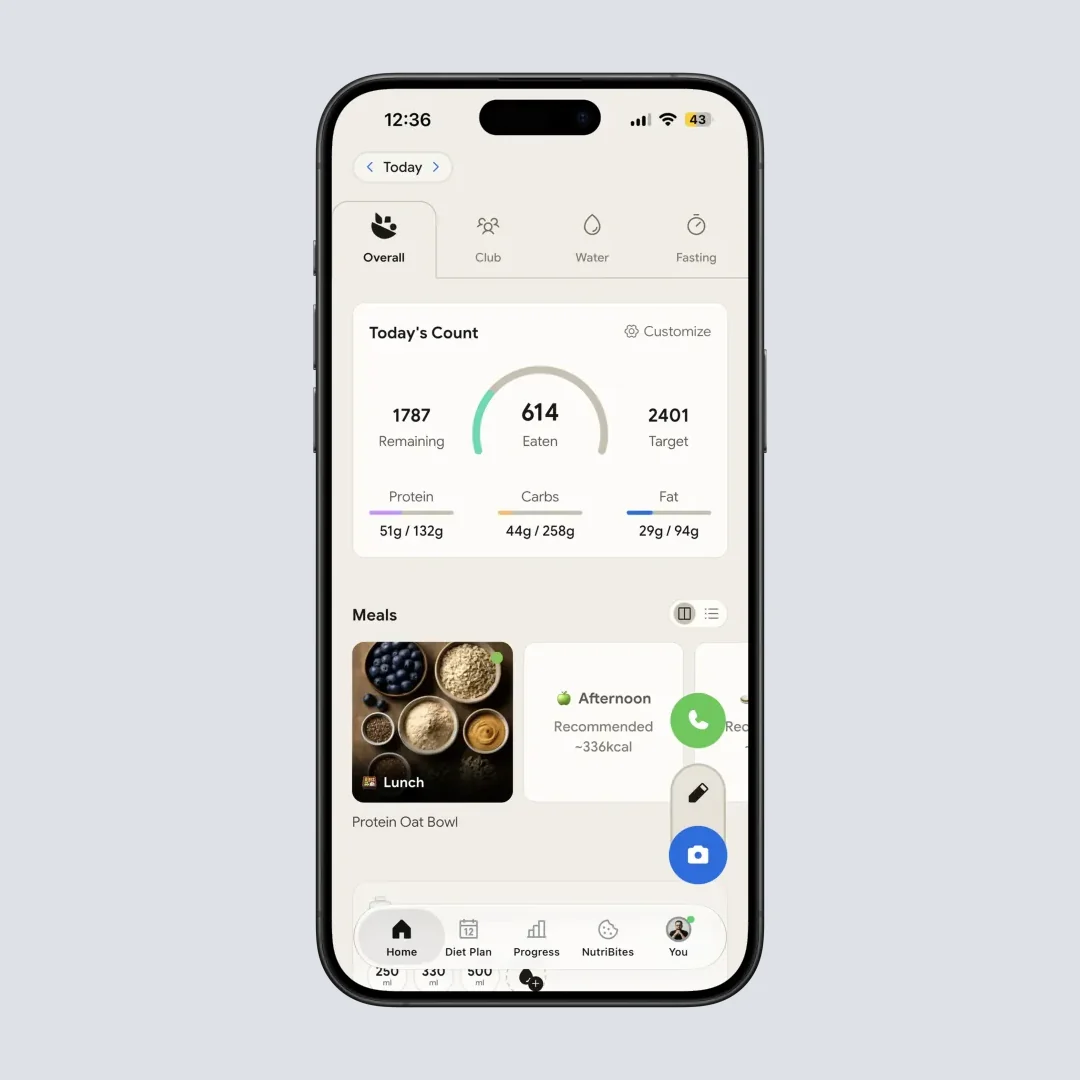
Path: Home - Your daily nutrition dashboard with progress tracking
What Goals Can NutriScan Help With?
NutriScan supports six main health goals:
| Goal | How NutriScan Helps | Key Nutrients Tracked |
|---|---|---|
| Weight Loss | Track calories, understand portion sizes, identify hidden calories | Calories, Fiber, Protein |
| Muscle Gain | Monitor protein intake across meals, ensure macro balance | Protein, Carbs, Calories |
| Diabetes Management | Track carbohydrates carefully, get warnings when carb intake spikes | Carbs, Fiber, Sugar |
| Pregnancy | Ensure adequate intake of key nutrients critical for mother and baby | Folic Acid, Iron, Calcium |
| PCOS Management | Balance macros to help manage insulin resistance | Carbs, Fiber, Protein |
| Viral/Flu Recovery | Focus on immunity-boosting nutrients and adequate hydration | Vitamin C, Zinc, Hydration |
NutriScan Free vs Premium: What You Get and What It Costs
The free plan covers scanning and full nutrition. Premium removes the weekly caps and adds planning. Premium runs about $59 a year, standard US price as of August 2026 that changes by region.
Free Plan Benefits
- 5 AI meal scans a week
- 4 Monika voice calls a week
- Macros and micronutrients on every meal, nothing gated
- NutriBites chat, the fasting timer, and the Club leaderboard
- Complete meal history, with no 7-day cap
Premium Plan Benefits
- Everything in the free plan, with unlimited scanning
- Personalized goal-based diet planning
- Detailed recipes with nutritional breakdowns
- Weekly and monthly grocery lists
- Lifestyle and supplement recommendations
Premium also takes Monika off the 4-call weekly limit. Tap the call button and ask any nutrition question. Want to log a meal by voice? Monika can do that too. For how that stacks up against the paid tiers elsewhere, see our nutrition app pricing comparison.
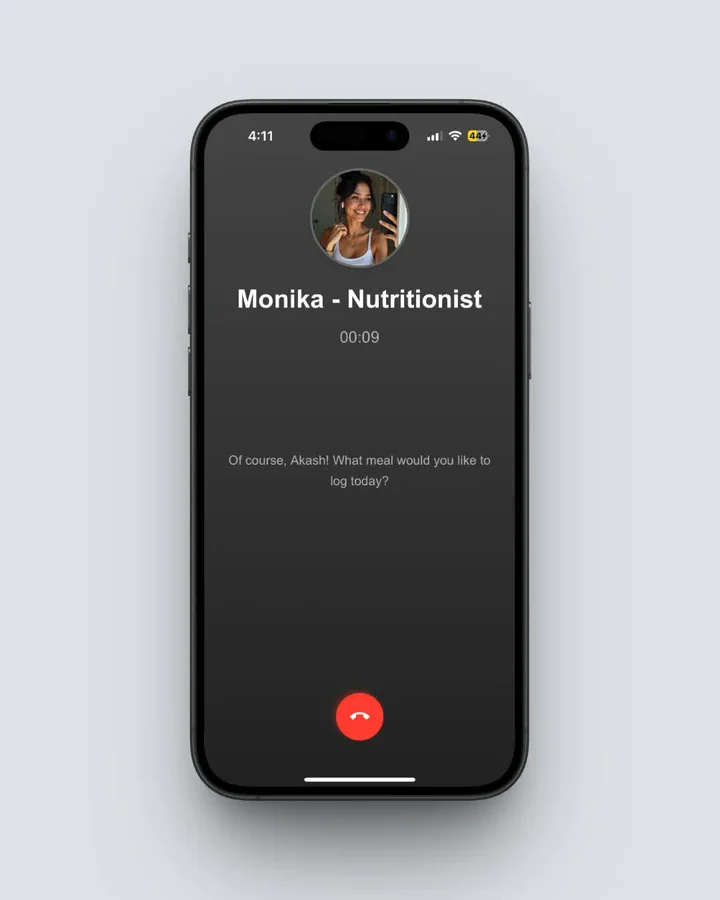 Path: Home > Click Call Button - Talk to Monika, your AI nutritionist
The Hidden Feature Most Users Miss
Most nutrition apps punish you for taking breaks. Miss a day? Streak gone. Skip tracking on vacation? Your consistency score tanks. This creates anxiety and makes tracking feel like a chore rather than a helpful habit.
NutriScan has a feature called Vacation Mode - and it changes everything about sustainable tracking.
When you enable Vacation Mode, the app understands you are taking a deliberate break. Your streak stays intact. Your insights are not skewed by missing data. When you return, you pick up exactly where you left off - no guilt, no penalty, no starting over.
Research on habit formation shows that flexibility in tracking leads to better long-term adherence than rigid all-or-nothing systems. People who can pause without punishment are more likely to continue tracking for months rather than burning out after a few weeks.
This simple feature addresses one of the biggest reasons people quit food tracking - the guilt spiral of missing a day. With Vacation Mode, NutriScan treats you like a human, not a robot.
Privacy and Your Data
I know some of you worry about sharing food photos and health data with an app. NutriScan takes this seriously. The app uses secure cloud services for data storage and processing. Your meal photos are used only to analyze nutrition - they are not shared or used for advertising.
Community and Connection
Tracking does not have to be solitary. The app includes Club, a leaderboard where you can see how you rank among the top 50 users on a formula that combines total meals logged, average NutriScore, and consistency. It is a light way to stay motivated on the weeks when the habit wobbles.
There is also Invite & Earn. When a friend signs up through your link, both of you get 1 week of Premium. Five successful referrals earn you a month, ten earn you three months, and there is no cap on how many friends you can invite.
The Future of Food Tracking
As AI technology improves, NutriScan continues to evolve. The app already supports multiple languages including English, Deutsch, Espanol, Francais, and Hindi. New features are regularly pushed through app updates.
The goal is straightforward: help every person understand their food, spot patterns in their nutrition, and catch problems early.
The Science Behind Personalized Nutrition
Research consistently shows that personalized approaches work better than one-size-fits-all advice:
- A randomized controlled trial with 347 participants found those following a personalized dietary program had better improvements in triglycerides, body weight, and gut microbiome composition (Nature Medicine, 2024)
- A 10-week personalized nutrition program found significant reductions in calorie intake (256 fewer calories daily), carbohydrates (22g less), and sugar (13g less), along with decreases in BMI and body fat percentage (de et al., 2021)
- The CDC has recognized that behavioral weight loss interventions which include self-monitoring of diet are key to achieving healthy lifestyle behaviors (CDC, 2024)
Conclusion: Is NutriScan Right for You?
NutriScan is known for making food tracking fast enough to keep doing. The point is awareness: knowing your dinner ran short on protein so you add an egg tomorrow, and catching patterns before they turn into problems.
Research consistently shows that people who track their food make better choices. And NutriScan removes the biggest barrier - the time and effort needed for tracking.
Download NutriScan and put the scanner on the meals a food database usually gets wrong, your curries, your restaurant plates, your mixed bowls. Five free scans a week is enough to judge it before you pay.

Frequently Asked Questions
Is NutriScan accurate for Indian and regional foods?
Yes! NutriScan is specifically designed to understand Indian and regional cuisines. The AI has been trained on thousands of local dishes - from idli sambar to chole bhature. When you select the cooking method and oil level, the accuracy improves further. Research shows that AI food recognition generally works better when foods are clearly visible on the plate (Nutrients Journal, 2024), so try to take clear photos for best results.
How is NutriScore calculated in the app?
NutriScore is calculated based on multiple factors including calories, protein, carbs, fat, fiber, and micronutrients. The score adapts based on your health goal. For example, a high-protein meal scores better for muscle gain goals, while a low-carb meal scores better for diabetes management. The daily NutriScore is calculated using the formula: (Sum of Meal Calories x Meal NutriScore Weight) / Total Calories of Day. This weighted approach means bigger meals have more impact on your daily score.
Can I use NutriScan if I have specific allergies or dietary restrictions?
During the diet plan setup, you can specify foods you need to avoid. The app will not recommend those foods in your personalized meal plan. When scanning regular meals, the app identifies ingredients - so if you see something you are allergic to, you will know before eating. However, always check ingredients yourself for severe allergies as AI recognition is not perfect.
Does NutriScan work offline?
The meal scanning feature requires internet connection because the AI processing happens on secure cloud servers. However, you can view your previously scanned meals and history offline. When you are back online, any pending data syncs automatically.
How much does NutriScan cost?
Premium is about $59 a year in the US. That's a standard price as of August 2026 that changes by region; the US App Store sometimes shows promotional offers below that rate. The free plan stays free: 5 scans and 4 Monika calls a week, with micronutrients and full history included.
Does NutriScan have a barcode scanner?
No. Packaged food goes in through the Packaged Food tag with manual or voice entry, and the pack label can be photographed like any other meal. A barcode scanner is listed as a future update, not a shipped feature, so do not pick the app expecting one today.
How does NutriScan compare to other apps like MyFitnessPal or HealthifyMe?
The main difference is simplicity and localization. While other apps require manual searching through databases, NutriScan uses AI photo recognition for instant logging. Additionally, NutriScan is built specifically for Indian and regional foods - understanding that "dal" can mean 100 different things depending on region and preparation. The NutriScore system also provides quick visual feedback rather than just raw numbers. We break both matchups down in HealthifyMe vs NutriScan and our list of MyFitnessPal alternatives. Studies show that front-of-pack style labels like Nutri-Score help consumers make better food choices quickly (RIVM Netherlands, 2024).
Track smarter. Eat better. Live healthier.