Best MyFitnessPal Alternatives: 7 Apps Ranked by Goal
 ChatGPT
  Claude
  AI Mode
  Perplexity
 MyFitnessPal Premium is $79.99 a year, and barcode scanning, macro goals and Meal Scan photo logging all sit behind it. Every pick here costs less: Foodnoms $40, YAZIO $47.90, Cronometer and MyNetDiary $59.99, MacroFactor $71.99, NutriScan about $59. NutriScan is the one to take if free photo logging is the point, at 5 AI scans a week on the free plan.
Last verified: August 23, 2026
| App | Annual price | Free tier |
|---|---|---|
| MyFitnessPal Premium | $79.99 | Yes, with ads and a paywall |
| Foodnoms | $40.00 | Yes |
| YAZIO | $47.90 | Yes |
| Cronometer | $59.99 | Yes, unlimited logging |
| NutriScan | about $59/yr | Yes, 5 photo scans a week |
| MyNetDiary | $59.99 | Yes, ad-free |
| MacroFactor | $71.99 | No, 7-day trial only |
The best alternative to MyFitnessPal depends on what pushed you out. MacroFactor at $71.99 a year gives you adaptive macro coaching, YAZIO at $47.90 a year is the cheapest full tracker and throws in a fasting timer, and Cronometer at $59.99 a year counts up to 95 nutrients. MyNetDiary at $59.99 a year is the closest ad-free swap. NutriScan is free with 5 scans a week for photo logging curries and restaurant plates, Foodnoms at $40 a year keeps it simple and private on iPhone, and Lose It at $79.99 a year, up from $39.99 before its 2026 rise, has the fastest photo and voice entry. Prices are standard US prices as of mid 2026 and change by region.
As a NutriScan nutritionist, I have watched that switch play out with real users all year. Someone who logged for months without issue suddenly hits a wall: a redesign that moved features, a barcode scan that now needs a subscription, or a diary view crowded with ads and social prompts that were never there before. A 2024 scoping review in the Journal of Medical Internet Research found that adults abandon health and lifestyle apps at high rates, and the most common triggers were usability friction, paywalled features, and a growing sense that the app had stopped serving them (Kidman et al., JMIR 2024).
MyFitnessPal is not a bad app. It has 20 years of food database history and more integrations than most apps in this category. But 2025 and early 2026 brought a wave of changes that pushed enough users toward the exit that Reddit threads on the topic now regularly hit hundreds of comments. The seven alternatives below are ordered by the goal most likely driving your search.
Why Users Are Leaving MyFitnessPal in 2026
Before picking a replacement, naming the specific frustration matters. Different pain points point toward different apps.
Barcode scanner behind a paywall. MyFitnessPal moved barcode scanning to Premium in 2022. In 2026, Premium runs $79.99 per year and Premium+ runs $99.99 per year. Many long-term free users have never accepted this change, and it remains the top complaint on community threads. A February 2026 comparison by Foodnoms noted that MFP's barcode paywall is the single most-cited reason for switching in user-written reviews (foodnoms.com, Feb 2026).
The March 2026 redesign. App Store ratings for MyFitnessPal dropped by 0.77 stars in a single month following the redesign - one of the sharpest single-month rating declines recorded for any major nutrition app (MyNetDiary, April 2026). Common complaints included moved menus, a slower path to the diary, and a home screen that required more scrolling to reach the daily log.
 Waiting for the diary to load through three menus and two ads... we've all been there.
Ads and tracking SDKs in the free tier. MyFitnessPal's free plan includes third-party advertising and data-collection SDKs. Privacy-focused users in particular flag this as a reason to move, especially since several alternatives offer ad-free free tiers.
Database accuracy. MFP's 20 million-plus entries are largely crowdsourced and unverified. A 2020 JMIR study confirmed that MFP performs well for total energy, protein, carbohydrate, and fat - but shows meaningful error rates for cholesterol, sodium, and micronutrients (Evenepoel et al., JMIR 2020). For users tracking beyond macros, this matters.
Logging speed. A January 2026 test logged the same 127 food entries in both MFP and MyNetDiary on identical iOS devices. MFP required 1,035 actions; MyNetDiary required 711 - a 45% difference in taps for the same result (MyNetDiary, April 2026).
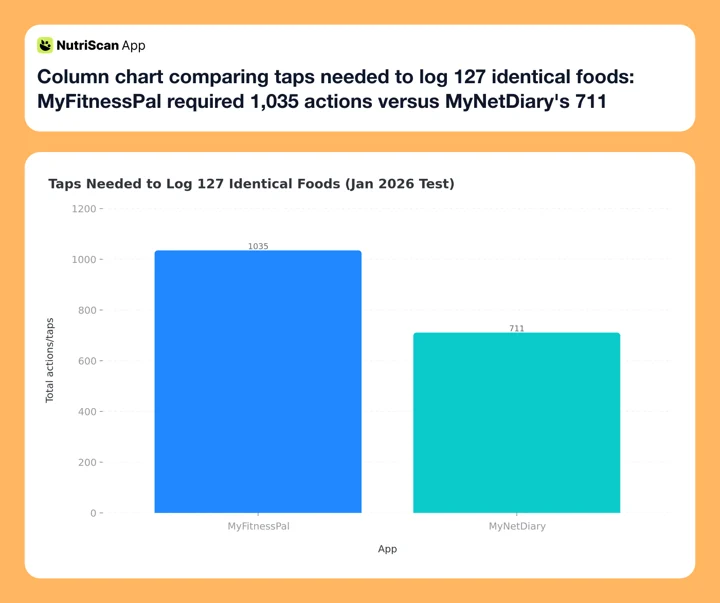 Figure 1: The same 127 foods took 45% more taps to log in MyFitnessPal than in MyNetDiary (January 2026 test).
Social and notification overload. A 2026 Reddit thread in r/CICO titled "MyFitnessPal is spammy now" gathered hundreds of comments from users describing push notifications that were not requested, content feeds inserted into the diary tab, and prompts to connect with friends that appeared mid-logging.
How to Pick the Right MyFitnessPal Alternative
Not every MFP user wants the same replacement. Answer two questions before you download anything:
- What was I actually using MFP for? Macros only? Weight loss accountability? Barcode scanning? Indian food search? A fasting timer?
- What pushed me to leave? Price? Ads? Logging speed? Data accuracy? Social noise? The redesign?
The match between your answer to question 1 and your answer to question 2 determines which alternative will actually hold your habit. An app with better macro coaching will not fix a problem caused by slow logging, and a cheaper plan will not fix bad database accuracy.

The 7 Best MyFitnessPal Alternatives, by Goal
1. Best for Macro Coaching: MacroFactor
MacroFactor does one thing no other app in this list does: it watches your actual body weight trend over time and adjusts your calorie and macro targets week by week based on your real measured metabolism - not a formula.
This matters if you have ever reached a plateau on MFP and had no idea whether to eat more, eat less, or stay the same. MacroFactor answers that question automatically. After a few weeks of data, the app calculates your personal total daily energy expenditure from your weight change, then updates your targets accordingly. For a deeper head-to-head, see our MacroFactor vs MyFitnessPal 2026 comparison.
The logging experience is clean and fast. There is no social feed, no newsfeed tab, and no notification noise beyond what you configure. Garage Gym Reviews rated the app 4.7/5 in their 2026 review, calling the adaptive algorithm its clearest differentiator from every other paid tracker.
Pricing: $11.99 per month, $47.99 for 6 months, or $71.99 per year. No free tier after a 7-day trial.
Fixes: Logging noise, lack of adaptive feedback, social clutter.
Watch out for: If you were using MFP for free, MacroFactor requires a paid subscription from day 8. It is a real investment.
2. Best for Fast Snap It and Say It Logging: Lose It
Lose It Premium raised its price in 2026 and now costs $79.99 per year, the same as MFP Premium, with no monthly plan offered (Lose It Membership Tiers and Pricing). A lifetime license is $299.99, or $229.99 if you already pay for Premium. If the reason you are leaving MFP is the bill, Lose It no longer solves that; YAZIO at $47.90 and Foodnoms at $40 do. What Lose It still wins on is speed of entry.
The app covers the full tracking stack: barcode scanning, a food database with 33 million-plus entries, photo logging via "Snap It," voice logging via "Say It," recipe import, exercise tracking, and wearable sync. The free tier is one of the more generous among MFP alternatives, including the core food diary and goal tracking without requiring an upgrade. We compared it against two other paid plans in our Lose It vs MyFitnessPal vs Lifesum breakdown.
A 2022 study in Obesity Science & Practice (Payne and Turk) found that self-monitoring frequency predicted weight loss outcomes in app users - and Lose It's quick logging tools are designed specifically to reduce the time between eating and logging so that consistency stays high (Payne et al., 2022). Everyday Health's RN-reviewed rating for Lose It is 5.0/5.
Pricing: Free (generous) or $79.99 per year Premium. Lifetime $299.99, or $229.99 for existing Premium members.
Fixes: Ads, barcode paywall (free tier includes barcode for existing accounts), slow manual entry. Not price.
Watch out for: The 2026 price rise doubled the annual cost, so re-check the number before you renew. Also, as of early 2026, barcode scanning has been gated for new accounts. If you are creating a fresh account, verify whether this feature is available to you before committing.
3. Best for Fasting Plus Tracking: YAZIO
If you used MFP alongside a separate fasting timer app, YAZIO combines both into one interface. The fasting timer includes protocol templates (12:12, 14:10, 16:8, 18:6, and custom), a visual countdown, and fasting history charts. The calorie tracker runs in parallel with the same daily log.
YAZIO PRO adds a 4 million-plus food database, meal plans, recipes, and wearable sync with Apple Watch, Fitbit, Garmin, and Google Fit. At $47.90 per year standard and as low as $23.90 during promotional windows, it sits comfortably below MFP's price tier.
Forbes Health named YAZIO one of the best intermittent fasting apps of 2026 with a 4.1/5 rating. The App Store lists 45,000-plus ratings at 4.7/5. The free plan covers fasting timer and basic food tracking but does not include meal plans or wearable sync.
Pricing: Free or $47.90 per year PRO.
Fixes: Price, social clutter, the need for a separate fasting app.
Watch out for: YAZIO moved its barcode scanner to PRO-only in a recent update. Free users cannot scan. If barcode scanning is essential, this matters.
4. Best for Photo and AI Logging: NutriScan
For users whose main frustration with MFP is searching a database for every meal - especially mixed dishes, curries, restaurant plates, or home-cooked food with no clear barcode - photo logging removes that friction almost entirely.
NutriScan is built around photo-first logging. The free plan includes 5 scans a week, with no subscription and no timer running down. Five will not cover every meal, so spend them on the plates a database cannot describe, the curry, the thali, the restaurant dinner. After a photo, the app returns an estimate with macros and calories - our meal scan guide walks through the full flow.

NutriScan's photo logging: Home > Camera Icon > Click Picture > Crop Picture - no database search required.
What makes NutriScan different from other photo trackers is the follow-up prompt. After scanning a meal, the app asks about oil level (No Oil, Low Oil, Medium Oil, or High Oil) and cooking method from 11 tags (Deep-fried, Air-fried, Stir-fried, Grilled, Steamed, Boiled, Roasted, and more). This detail is not cosmetic. For Indian food, stir-fries, and curries, oil changes the calorie count by 50 to 200 calories per meal. A 2025 evaluation in Nutrients ran ChatGPT against 114 meal photographs and measured a mean absolute percentage difference of 26.9% across the 16 nutrients it estimated (O'Hara et al., Nutrients 2025). Oil and cooking method are two of the variables a photo cannot show, which is why NutriScan asks instead of guessing. Curious how NutriScan stacks up against other photo scanners? See our Cal AI vs NutriScan photo scanner comparison.
Pricing: Free (5 scans per week) or Premium at about $59 a year (7-day trial).
Fixes: Database friction for complex meals, Indian food, restaurant logging.
Best for: MFP users who want to stop searching and start scanning.
5. Best for Micronutrients: Cronometer
Cronometer tracks up to 95 nutrients on Gold and up to 84 on the free tier - vitamins, minerals, amino acids, and fatty acids - compared to MFP's standard macro-and-calorie view. If you ever opened MFP and wished it would tell you whether you were hitting vitamin D, iron, calcium, or omega-3 targets, Cronometer is the direct upgrade.
The free tier is generous: unlimited logging with no ads, the barcode scanner, 7-day nutrition reports, and access to the USDA FoodData Central database alongside several lab-analyzed sources. Gold ($4.99 a month billed annually at $59.99, or $10.99 month to month) adds Oracle Nutrient Search, Photo Log, Voice Log, a fasting timer, the Crono Coach AI, cross-variable charting (plot any nutrient against any health marker), and custom targets. Full plan details in our Cronometer pricing guide: Basic vs Gold vs Pro.
Cronometer Gold at $59.99 per year costs $20 less than MFP Premium at $79.99 per year, and provides substantially more nutrient depth. For users on vegetarian or vegan diets, or anyone managing a deficiency, the gap in nutrient coverage is significant.
Pricing: Free (unlimited, no ads) or Gold at $59.99 per year.
Fixes: Nutrient depth, ad-free experience, price.
Watch out for: Cronometer's food database is smaller than MFP's 20 million-plus entries. Restaurant chains and international branded foods have weaker coverage.
6. Best for No Ads and Verified Data: MyNetDiary
MyNetDiary is the closest direct swap for MFP as a full-featured calorie tracker. The free tier has no ads and no tracking SDKs. The food database contains 2 million-plus staff-verified entries versus MFP's crowdsourced collection. The app tracks 108 nutrients. And the annual plan at $59.99 per year costs $20 less than MFP Premium.
The most significant differentiator from MFP is the Diabetes Tracker mode: blood glucose logging, insulin and medication tracking, carb-count toggle, A1C and cholesterol tracking, and an Insight Engine that flags patterns between food choices and blood sugar readings. For MFP users who are also managing prediabetes or Type 2 diabetes, this is a category-defining feature.
A 2025 randomized trial (Burke et al., Obesity, N=502) found that app-based self-monitoring predicted clinically meaningful 3-month weight outcomes when users maintained consistent logging - and MyNetDiary's lower logging tap-count (711 versus MFP's 1,035 for the same meals, as shown in Figure 1) helps keep that consistency intact (Burke et al., 2025).
Pricing: Free (ad-free, includes barcode scanning) or $59.99 per year Premium.
Fixes: Ads, tracking SDKs, database accuracy, price, logging speed.
Best for: MFP users who want the same tracker experience, upgraded on every axis that MFP has degraded.
7. Best for Simplicity and Privacy (iOS Only): Foodnoms
Foodnoms removes everything MFP added over 20 years and returns to the basics: fast logging, free barcode scanning, and no account required. Data syncs via iCloud by default. There are no social features, no news feed, no push notification campaigns, and no ads.
It is not a replacement for power users who need adaptive coaching, fasting timers, or deep nutrient analysis. But for the large group of MFP users who were only ever using it as a simple food diary - log what I ate, see my calorie total - Foodnoms is faster, cleaner, and cheaper.
Pricing: Free or $40 per year Foodnoms+.
Fixes: Ads, social clutter, pricing, barcode paywall.
Watch out for: iOS, iPadOS, and macOS only. No Android app as of 2026.
MyFitnessPal Alternatives Compared: Price and Free Tier
| Goal | Best Pick | Annual Price | Free Tier |
|---|---|---|---|
| Simple + privacy (iOS) | Foodnoms | $40.00 | Yes |
| Fasting plus tracking | YAZIO | $47.90 | Yes |
| Micronutrients | Cronometer | $59.99 | Yes (unlimited) |
| Photo and AI logging | NutriScan | about $59/yr | 5 scans/week |
| No ads + verified data | MyNetDiary | $59.99 | Yes (ad-free) |
| Macro coaching | MacroFactor | $71.99 | 7-day trial only |
| Fast Snap It logging | Lose It | $79.99 | Yes (generous) |
| MFP (for reference) | MFP Premium | $79.99 | Yes (ads, paywall) |
Standard US prices as of mid 2026. They change by region.
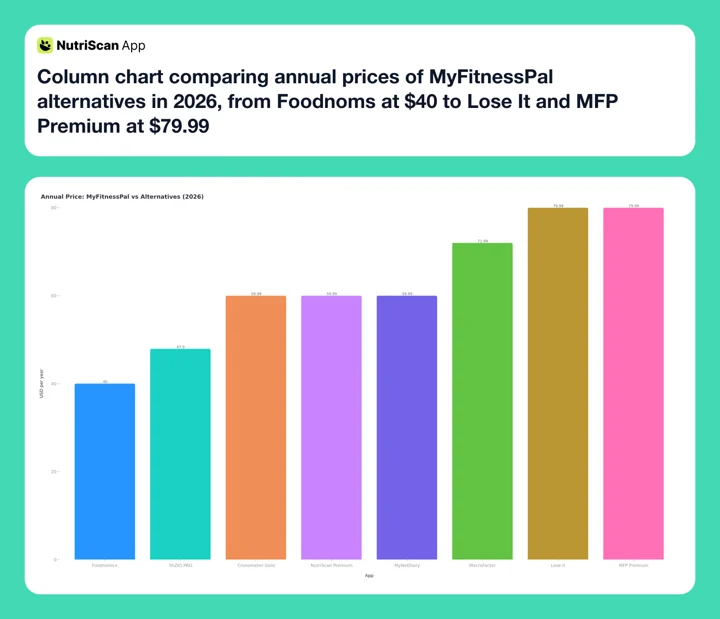 Figure 2: Six of the seven alternatives undercut MFP Premium's $79.99 annual price. Lose It matches it after the 2026 rise, and Foodnoms at $40 is the cheapest on the list.
How to Switch from MyFitnessPal Without Breaking Your Habit
Switching apps mid-habit is where most people fall off. Keep the routine intact during the transition instead of rebuilding everything on day one.
Step 1: Export your MFP data before anything else. If you have Premium, go to MyFitnessPal.com, sign in, and click Reports > Export. Three CSVs with your food diary history, weight log, and exercise records arrive by email. Free accounts do not get the export tool, so print the full report or file a privacy Transfer Request instead. Every route, with exact taps for iOS and Android, is in how to export your MyFitnessPal data. Download and save it before you cancel. You may not need it immediately, but you will want it if you need to reference an old meal or body weight entry. If you are on Premium, our step-by-step MyFitnessPal Premium cancellation guide walks through the full process.
Step 2: List your top 20 most-used meals. Most people log the same 20 to 30 meals 80% of the time. Before cancelling MFP, open your diary history and note your most frequent entries with serving sizes. These are the first foods to rebuild in the new app - not your entire food library.
 Photo by Steve Daniel on Unsplash
Step 3: Run both apps in parallel for 7 days. Do not cancel MFP immediately. Log in both the old app and the new one for one week. This confirms the new app matches your daily flow before you lose access to MFP history and saved foods. It also reveals gaps, like meals that are hard to find in the new database.
Step 4: Rebuild by meal type, not alphabetically. Start with breakfast, which is usually your most repeated meal. Then lunch. Then dinner. Use barcode scanning or photo logging for speed. Manual search for every ingredient slows the habit down when momentum matters most.
Step 5: Set macro targets on day one, not day seven. New apps default to a generic TDEE calculation. Spend 5 minutes entering your weight, height, activity level, and goal before your first full logging day. If you want an independent baseline to compare against, our free online macro calculator gives you targets in under a minute. Your calorie target in the new app may differ from MFP's output by 50 to 150 calories - this is normal and reflects different formula choices, not an error.
 Day 7 of the parallel run, new app feels like home, MFP subscription cancelled. That feeling.
What Research Says About Switching Apps
The 2024 scoping review by Kidman et al. in JMIR looked specifically at when and why adults abandon lifestyle and mental health apps. Beyond the trigger reasons, the review found a consistent pattern: users who perceived visible, short-term feedback from an app were significantly less likely to abandon it in the first 30 days.
If the original problem was that logging felt like data entry with no payoff, choosing a replacement that gives fast feedback - MacroFactor's expenditure trend, Cronometer's nutrient radar, NutriScan's meal quality breakdown after a scan - may reduce the risk of abandoning the habit again.
The review also noted that transitions between apps were less disruptive when users started the new app during an active tracking period rather than after a break. If you are still logging in MFP, start the parallel run today.

5 Tips for Staying on Track During the Switch
Skip custom recipe migration in week one. Custom recipes are the hardest data to move. Log simple meals first and only rebuild recipes you use at least twice a week.
Ignore social features for the first month. Every app on this list will ask you to add friends, join challenges, or share progress. Skip all of it for 30 days. Building the logging habit comes first.
Check macro targets against your previous MFP settings. Different apps use different TDEE formulas - some use Mifflin-St Jeor, others use Harris-Benedict, and MacroFactor measures your actual expenditure. Your daily calorie target may shift by 100 to 200 calories in the first week. Treat this as calibration, not error.
Use photo logging as a bridge if you are moving to NutriScan, Cal AI, or Foodnoms. Photo logging lowers the friction of learning a new database, and you can go back to manual search later.
Keep your MFP account active for 30 days after switching. That window is your safety net for referencing old entries and confirming the new app holds up before you lose access to MFP history.
Conclusion
MyFitnessPal built a strong foundation over two decades, and the 2026 version asks a real price for it: $79.99 a year for Premium, ads and a barcode paywall on the free tier. Six of the seven apps above cost less than that.
Pick the one that answers the reason you are leaving. If the reason was price, YAZIO at $47.90 a year. If it was nutrient depth, Cronometer. If it was searching a database for every curry, scanning the plate is faster than typing it, and the Indian food tracker comparison runs that test against HealthifyMe too.
Track your meals with NutriScan - 5 free photo scans a week, spent on the meals a database gets wrong.
FAQ
What is the best alternative to MyFitnessPal? It depends on why you are leaving. MacroFactor ($71.99 a year) is best for adaptive macro coaching, YAZIO ($47.90 a year) for fasting plus the lowest price on a full tracker, Cronometer ($59.99 a year) for micronutrients, MyNetDiary ($59.99 a year) for an ad-free like-for-like swap, and NutriScan (free, 5 scans a week) for photo logging complex meals.
Can I export my data from MyFitnessPal before switching? Yes, but the built-in export is Premium only. Premium users get three CSVs by email from Reports > Export on the website. Free users can print the full report from the Food tab or file a Transfer Request at the MyFitnessPal Privacy Request Center. The full walkthrough is in how to export your MyFitnessPal data. Do this before cancelling, because a downgraded account loses the export tool.
Which MyFitnessPal alternative has the best free plan? MyNetDiary and Cronometer both offer ad-free free plans with no barcode paywall. NutriScan gives you 5 free photo scans a week. Lose It's free plan covers the core diary and exercise tracking. Foodnoms is fully free for basic logging with barcode scanning included.
Is MacroFactor worth the price if I was on MFP's free plan? MacroFactor has no free tier after a 7-day trial. If you were using MFP for free, MacroFactor at $71.99 per year is a substantial price increase. For users who want to start paying but are not ready to spend that much, YAZIO PRO ($47.90/year) or Cronometer Gold ($59.99/year) are better first steps. Lose It Premium is no longer one, since it went to $79.99 a year in 2026.
Which app is best for tracking Indian food? NutriScan's photo logging with oil-level and cooking-method prompts handles Indian meals - dal, biryani, sabzi, thali - better than database search for most users. HealthifyMe is the other strong option, with a dedicated Indian food database of 10 million-plus items and an Indian food photo scanner. See our full HealthifyMe vs MyFitnessPal India comparison.
Do these apps sync with Apple Watch or Google Fit? MacroFactor, YAZIO, Lose It, MyNetDiary, and NutriScan all sync with Apple Health and Google Fit. Foodnoms has a full native Apple Watch app with bidirectional Apple Health sync. Cronometer has Oura, Dexcom, and WHOOP integration but more limited direct wearable support.
How long does it take to fully transition to a new app? Most users stabilize their logging routine in a new app within 2 to 4 weeks, provided they start during an active tracking period and rebuild their top meals in the first few days. Running both apps in parallel for 7 days before cancelling MFP significantly reduces the disruption.