Best MyNetDiary Alternatives 2026 (No-Ads Trackers)
 ChatGPT
  Claude
  AI Mode
  Perplexity
 MyNetDiary runs the most complete ad-free free tier of this group, with 108 nutrients, but photo logging needs Premium at $59.99 a year and Premium Plus is $99.99. The seven picks span roughly $40 to $99.99 a year: Foodnoms about $40, YAZIO $47.90 list, Cronometer $59.99, MacroFactor $71.99, MyFitnessPal and Lose It $79.99, NutriScan about $59. NutriScan is the ad-free swap that puts photo scanning on the free plan, 5 scans a week.
Last verified: August 23, 2026

You picked MyNetDiary for the quiet, ad-free logging screen. So why are you shopping for a replacement? 🤔
TL;DR - Best MyNetDiary Alternatives 2026
• Who this is for: MyNetDiary users hitting one of three walls: photo/AI features behind two paywalls, database gaps on regional foods, or the weaker Android experience
• Top picks by exit reason: MacroFactor (adaptive coaching, zero ads), Cronometer (verified micronutrient data), MyFitnessPal (20M+ food database), NutriScan (free photo scanning with oil prompts)
• Reality check: MyNetDiary's free tier is the most complete ad-free one, but it is not the only ad-free option. Foodnoms and NutriScan run free tiers with no ads on narrower feature sets, and every other free plan here shows ads
• Prices: about $40 to $99.99 per year across the seven picks, most with 7-day trials
Smartphone tracking apps produce a modest but statistically significant drop in body weight and BMI over 4 to 6 months, yet their effect fades beyond 6 months as dropout rises, according to a 2025 meta-analysis of 11 randomized trials with 1,717 participants published in the Journal of Medical Internet Research (Pujia et al., 2025). As a NutriScan nutritionist who tests every major calorie tracker at least once a year, I lead with that finding because it frames the real question behind every app switch: the tracker that keeps you logging past month six is the one that works, and for many people that stops being MyNetDiary at some point.
IMPORTANT
Your MyNetDiary escape plan at a glance.
A quick roadmap so you can act fast.
⏱️ Progress 0/4 • ~0 minutes in • Keep going
⏳ Step 1: The three walls that push people out of MyNetDiary
⏳ Step 2: Seven alternatives matched to your exit reason
⏳ Step 3: The 5-step switch that protects your data and streak
🔍 The 100-day rule that decides whether ANY tracker works for you (revealed near the end)
MyNetDiary gets a lot right. Its free tier is the most complete ad-free free tier in 2026. It tracks 108 nutrients, the highest count among the five apps MyNetDiary tested against. Its 2 million food entries are 100 percent staff-verified against USDA and University of Minnesota NCC data, and in the company's own January 2026 logging test it needed 711 actions to log 127 entries, versus 1,003 for Cronometer and 1,035 for MyFitnessPal (MyNetDiary, 2026). That is a strong free product.
But people still leave. The photo and AI features sit behind two separate paywalls, the verified database trades coverage for accuracy, and the Android experience lags the iOS one. If one of those walls is the reason you are reading this, the guide below covers seven alternatives matched to what you need next, with special attention to the ad experience, since a quiet, ad-free logging screen is probably why you chose MyNetDiary in the first place.
Why People Look Beyond MyNetDiary in 2026 🚪
After reviewing app store feedback, MyNetDiary's own published comparisons, and my own testing notes, three frustrations come up repeatedly.
1. Photo and AI features sit behind two paywalls
The free tier is manual-first: search, barcode, and voice. Photo meal scanning requires Premium at $59.99 per year, and the AI Coach plus AI restaurant menu scanning require a separate Premium Plus tier at $99.99 per year (MyNetDiary, 2026). If you came for the famous free tier and later wanted the camera to do the work, the jump from $0 to $59.99 or $99.99 feels steep, especially when several competitors now include photo logging in cheaper plans or offer a free scanning allowance.
 Pointing a camera at your plate is the logging style people want in 2026, and it is exactly what MyNetDiary paywalls
2. The verified database trades coverage for accuracy
MyNetDiary's 2 million staff-verified entries are genuinely more reliable than crowdsourced catalogs. An accuracy study published in the Journal of Medical Internet Research found MyFitnessPal's crowdsourced database acceptable for energy and macronutrients on average but significantly less reliable for nutrients such as sodium and cholesterol (Evenepoel et al., 2020). But as Figure 1 below shows, 2 million entries is small next to the 20 million plus MyFitnessPal publishes (MyFitnessPal, 2026) or the 50 million plus in Lose It's own membership page (Lose It Membership Tiers and Pricing). If you eat regional dishes, international brands, or food from smaller restaurant chains, you will hit gaps and end up building custom entries by hand. Verified quality is real, and so is the coverage ceiling.
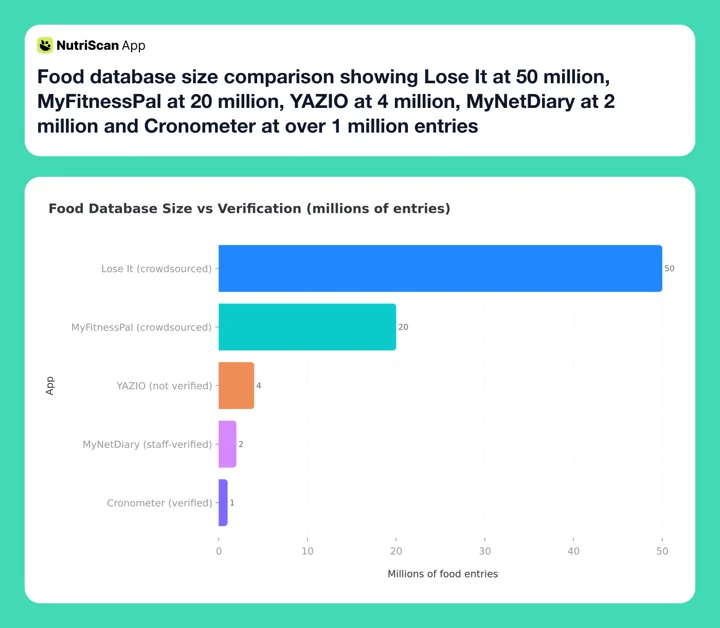 Figure 1: Bigger is not better by default. The two smallest databases here, MyNetDiary and Cronometer, are the only ones their vendors describe as verified. Figures are each vendor's own published count
3. The Android experience lags iOS
The built-in GPS exercise tracker is iOS-only. The gap shows up in ratings too: in MyNetDiary's own February 2026 one-month rolling averages, the app scored 4.4 on the App Store but 3.8 on Google Play (MyNetDiary, 2026). A 3.8 is still respectable, but Android users reviewing recent versions clearly have a less polished experience than iPhone users, and several alternatives treat both platforms equally.
IMPORTANT
Checkpoint: here's where you are right now.
Quick status update so you always know the next best move.
⏱️ Progress 1/4 • ~2 minutes in • Keep going
✅ Step 1: The three walls (done)
👉 Step 2: Seven alternatives matched to your exit reason (you're here)
⏳ Step 3: The 5-step switch plan
🧩 The 100-day rule (coming soon)
How I Chose These Alternatives 🧪
Every app below was screened against four questions:
- Ad experience. You left an ad-free app. Will the replacement interrupt you? I note the ad situation for every pick, free and paid.
- Data quality. Verified or crowdsourced database, and how each app handles the difference.
- Total yearly cost. List prices as of mid-2026, plus trial terms so you can test before paying.
- What it adds over MyNetDiary. Switching costs effort. A replacement must fix at least one of the three problems above.
One honest note up front: MyNetDiary's free tier is the most complete ad-free one here, but it is not the only ad-free free tier. Foodnoms runs a free plan with zero ads (Foodnoms+), and so does NutriScan, both on much narrower feature sets. Cronometer, MyFitnessPal, Lose It and YAZIO all put ads in their free plans, so with those four the realistic choices are a paid ad-free plan or tolerating ads until you decide to pay.
Quick Comparison: MyNetDiary vs the Alternatives 📊
| App | Ads in free tier | Annual price | Photo logging | Free trial | Best for |
|---|---|---|---|---|---|
| MyNetDiary (baseline) | No ads | $59.99 or $8.99/mo (Premium Plus $99.99) | Premium | Varies by platform | Ad-free free tier, 108 nutrients |
| MacroFactor | No free tier, no ads | $71.99 | Described/AI-assisted | 7 days | Adaptive coaching |
| Cronometer | Yes | $59.99 (Gold) | Gold (Photo Log) | Free tier (no trial published) | Verified micronutrient data |
| MyFitnessPal | Yes | $79.99 | Premium | 7 days | Database size, integrations |
| Lose It | Yes | $79.99 | Premium | Promotional (length not published) | Simple calorie budget, voice logging |
| YAZIO | Yes (long video ads) | $47.90 list, promos to $23.90 | PRO | 7 days (promotional) | Fasting plus tracking |
| Foodnoms | No ads | ~$40 | Premium | Free tier | Privacy, Apple-only polish |
| NutriScan | No ads, 5 free scans/wk | about $59/yr | Free allowance | 7 days | Photo logging with oil prompts |
Prices are standard US prices as of mid 2026 and change by region and promotion. Always confirm on the checkout screen. Sources: Lose It Membership Tiers and Pricing, Cronometer Gold, MyFitnessPal Premium, MacroFactor press kit, YAZIO App Store listing, Foodnoms, MyNetDiary. Figure 2 puts the ad-free cost of each option side by side.
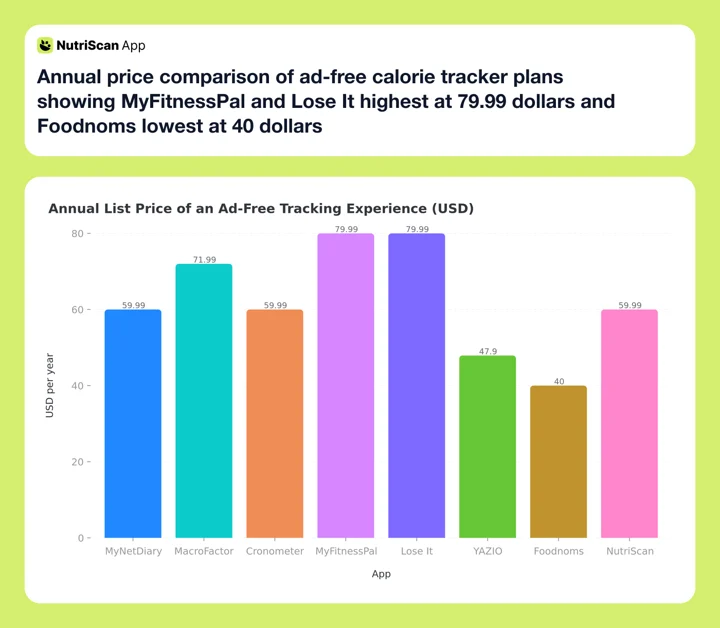 Figure 2: What an ad-free year costs at list price across the eight apps. Foodnoms at about $40 sits at the bottom, MyFitnessPal and Lose It share the top at $79.99, so the spread is roughly double from cheapest to priciest. YAZIO lists at $47.90 but runs 12-month promo prices as low as $23.90

1. MacroFactor: The Ad-Free Upgrade for Adaptive Coaching 🏋️
MacroFactor solves the ad question in the most direct way possible: there is no free tier, so there are no ads, ever. The entire app is built around an adaptive energy expenditure engine that recalculates your calorie and macro targets every week from your logged intake and weight trend. In Coached mode it applies the new targets for you; Collaborative and Manual modes hand that decision back to you. Where MyNetDiary's Advanced AutoPilot adjusts your goal inside Premium, MacroFactor makes adaptation the whole product.
Logging is fast, in the same spirit that made MyNetDiary pleasant: a clean search, quick portions, no interruptions. The subscription costs $71.99 per year (MacroFactor press kit), and the 7-day trial starts through your app store, so whether a card is collected depends on your platform.
Trade-off: you lose MyNetDiary's free tier entirely, and MacroFactor publishes no nutrient count, so nothing here matches MyNetDiary's 108.
Choose MacroFactor if your weight loss stalled on static targets and you want a coach-like engine instead of a bigger spreadsheet. For a deeper head-to-head, see our MacroFactor vs MyNetDiary comparison.
2. Cronometer: The Other Verified Database 🔬
Cronometer is MyNetDiary's closest philosophical sibling. Cronometer publishes a database of over 1 million lab-analyzed or verified foods, and its free tier tracks up to 84 nutrients with custom nutrient targets and the barcode scanner included (Cronometer Gold).
The catch for ad-refugees: Cronometer's free version shows ads. Removing them means Gold at $4.99 a month billed annually at $59.99, or $10.99 a month billed monthly (Cronometer Gold), almost exactly MyNetDiary Premium's price. Gold raises the nutrient count to 95 and adds Photo Log, Voice Log, a fasting timer, and Crono Coach. At that point you are paying the same money for fewer nutrients than MyNetDiary (95 vs 108) but gaining Cronometer's data transparency, which labels the source database behind every food entry (MyNetDiary, 2026), plus device sync and partner discounts with wearables such as WHOOP and Oura (Cronometer Gold).
Trade-off: logging is slower. In MyNetDiary's January 2026 test, Cronometer needed 41 percent more actions for the same 127 entries. The interface favors data inspection over speed.
Choose Cronometer if you care most about micronutrient transparency and want to see exactly where every number comes from. Our MyNetDiary vs Cronometer breakdown goes feature by feature.
Two picks down. Still ahead: five more apps and the 100-day rule that decides whether any of them stick.
3. MyFitnessPal: The Coverage Play 🌍
MyFitnessPal is the answer to MyNetDiary's biggest weakness: coverage. Its 20 million plus food entries (MyFitnessPal, 2026) and the 40 plus fitness integrations MyNetDiary counts (MyNetDiary, 2026) mean the obscure protein bar, the regional restaurant chain, and your gym equipment are all probably in the system already.
The cost of that coverage is the opposite trade MyNetDiary made. Most entries are user-submitted and unverified, so duplicates and outdated labels are common, and you need the habit of picking verified "Best Match" entries over random submissions. The free tier shows ads and has lost features over the years; the barcode scanner now requires Premium at $79.99 per year. The trial is 7 days (MyFitnessPal Premium), the same as almost everything else here, so you get one week of real meals to judge the database on.
There is also a documented consistency risk: a 2026 decade-long scoping review found MyFitnessPal users' logging frequency fell from 5.4 days per week to 1.4 days per week between weeks 4 and 12 in one included study (Dugas et al., 2026). A big database does not keep you logging by itself.
Choose MyFitnessPal if database dead-ends were the specific reason you left, and you will pay $79.99 to make them disappear. We compared the two directly in our MyNetDiary vs MyFitnessPal comparison.
4. Lose It: The Simplest Calorie Budget 💸
Lose It keeps the pitch short: log food, stay under your budget, lose weight. It was an early adopter of voice logging, its Snap It photo and Say It voice features sit in Premium with three free tries each, and the interface stays out of your way.
Pricing is the part that changed. Lose It Premium carried a $39.99 per year list price for years, which is what made it the cheap pick in every roundup. Lose It has since moved Premium to $79.99 per year with no monthly option (Lose It Membership Tiers and Pricing). That is $20 more than MyNetDiary Premium and identical to MyFitnessPal. Lifetime access is $299.99, or $229.99 if you are already an active Premium member, which at the new annual price pays for itself in under four years.
The free tier shows ads, the 50 million plus database Lose It publishes is overwhelmingly crowdsourced, and nutrient tracking beyond basics requires Premium.
Choose Lose It if you want the simplest possible calorie budget and value voice and photo entry over nutrient depth. Do not choose it to save money over MyNetDiary, because it no longer does. Our Lose It vs MyNetDiary comparison covers the fitness-sync details.
IMPORTANT
Checkpoint: midway progress update.
You're halfway - decisions get easier here.
⏱️ Progress 2/4 • ~5 minutes in • Keep going
✅ Step 1: The three walls (done)
✅ Step 2a: Four mainstream alternatives (done)
👉 Step 2b: Three specialist picks (current)
⏳ The 100-day rule (next)
5. YAZIO: Fasting Tools, With an Ad Warning ⏲️
YAZIO earns its place for one audience: people who want intermittent fasting protocols and calorie tracking in one app. The free tier includes fasting timers with 16:8, 5:2, and 6:1 protocols, plus a barcode scanner, and YAZIO's in-house library runs to 3,000 plus photographed recipes (YAZIO).
But if ads are why you chose MyNetDiary, read this twice: YAZIO's free tier has the worst ad experience of any major tracker. App Store and Google Play reviews repeatedly describe unskippable video ads of 30 to 60 seconds after food entries, and MyNetDiary's 2026 audit reached the same conclusion (MyNetDiary, 2026). Treat YAZIO as a paid app: the App Store lists the 12-month plan at $47.90, next to promo 12-month SKUs as low as $23.90 (YAZIO App Store listing), so expect $23.90 to $47.90 for a year depending on which promotion is running when you subscribe.
Trade-off: the 4 million food database is not staff-verified, and the free tier tracks only 4 nutrients.
Choose YAZIO if fasting structure matters more to you than nutrient depth, and you plan to pay for PRO rather than endure the free tier.
6. Foodnoms: The Quiet, Private Apple Option 🍎
Foodnoms is the closest thing to MyNetDiary's calm on this list. It is Apple-only, running on iPhone, iPad, Mac and Apple Watch, and its free plan carries zero ads and needs no account signup (Foodnoms+). The free tier covers basic logging with a barcode scanner, and Premium at roughly $40 a year adds nutrients such as net carbs, sodium, fiber and caffeine, plus Foodnoms AI, CSV export and charts. A $70 family plan shares one subscription with up to six people through Apple Family Sharing (Foodnoms, family sharing).
It is a small independent app, which cuts both ways. Foodnoms publishes no database size, so plan for more gaps than a 20 million entry catalog gives you, and there is no Android version at all, so it cannot fix MyNetDiary's Android gap. What it offers instead is polish: deep Apple Health integration, widgets, and a design that feels native to the platform.
Choose Foodnoms if you are an iPhone user who valued MyNetDiary's quiet more than its 108 nutrients, and privacy is a deciding factor.
Six down, one to go. The 100-day rule is two sections away, and it changes how you should read all of these picks.
7. NutriScan: Photo Logging That Asks About the Oil 📸
Full disclosure again: NutriScan is our app, so weigh this section with that in mind. I am including it because it addresses the first reason people leave MyNetDiary, photo logging cost, more directly than anything else here.
Research keeps finding the same weakness in photo-based tracking: AI identifies foods well but misses what it cannot see. A 2025 evaluation found 93.0 percent precision in food identification but systematic underestimation of medium and large portion sizes (O'Hara et al., 2025). Cooking oil is the biggest invisible variable: a tablespoon absorbed into a curry adds around 120 calories that no camera can count (USDA FoodData Central, record 171413). NutriScan handles this with an oil level slider (No Oil, Low Oil, Medium Oil, High Oil) and 11 cooking method options after every scan, so the estimate reflects how the dish was actually made. You can read how the pipeline works in our meal scan guide.

NutriScan's photo logging flow (Home > Camera Icon > Click Picture > Crop). After the scan, the oil slider and cooking method tags catch the calories the camera cannot see
The free tier is narrow but honest: 5 photo scans a week with no ads, Premium at about $59 a year (close to MyNetDiary Premium's list price), and a 7-day trial that starts through your app store. Five scans will not carry your daily log, but they are enough to point the camera at the curries and restaurant plates a database describes badly and see whether the numbers hold up. Manual text entry, voice input, and a fasting timer are included.
Trade-off: NutriScan's nutrient panel is built for everyday tracking, not MyNetDiary's 108-nutrient research depth, and there is no GPS exercise tracker.
Choose NutriScan if you want the camera to do most of the logging work, with prompts that catch the calories photos miss. For a direct feature-by-feature look, see our NutriScan vs MyNetDiary comparison.
How to Switch Without Losing Your Progress 🔄
Moving trackers costs less than people fear if you do it in order. Here is the five-step process I recommend:
- Export your MyNetDiary history first. Use the web account's export options to download your food and weight history before you cancel anything. Even if the new app cannot import it, you keep your baseline and trend data.
- Write down your current targets. Note your calorie goal, macro split, and starting weight from MyNetDiary so you can verify the new app's calculations against numbers you trust. Our free macro calculator gives you an independent second opinion on those targets.
- Run both apps in parallel for one week. Log everything in both. You will learn the new app's database gaps and logging speed on your real meals, not a reviewer's test meals.
- Rebuild your top 20 foods and recipes early. Most people eat the same core foods repeatedly. Recreating your custom entries and recipes in the first week removes most future logging friction.
- Cancel MyNetDiary before the renewal date, not after. If you are on Premium, cancel through the App Store or Google Play subscription screen at least 24 hours before renewal. The free tier stays available after you cancel, so you can keep it as an archive.
 Photo by Kei Scampa on Unsplash
 One week of parallel logging answers the question no review can: which app YOU keep opening

Tips for Keeping Your Tracking Habit Alive After the Switch 💡
The app matters less than the streak. These habits protect it:
- Log before you eat, not after. Pre-logging turns the tracker into a decision tool and survives busy evenings when after-the-fact logging dies.
- Set one fixed logging trigger per meal. Tie logging to an existing habit, such as after pouring your morning coffee. Consistency beats completeness.
- Use the fastest input for each situation. Barcode for packaged food, photo or voice when cooking, saved meals for repeats. Friction is cumulative.
- Accept good-enough estimates for restaurant meals. A 90 percent accurate log you keep beats a perfect log you abandon. Pick the closest entry and move on.
- Review one weekly trend, not daily numbers. Weight and intake bounce daily. A single Sunday check of the weekly average keeps motivation stable.
- Turn on exactly two reminders. Zero reminders lets the habit fade; six teaches you to ignore them all.

A one-glance daily breakdown (NutriScan Home tab) makes the Sunday weekly review a 30-second habit instead of a spreadsheet session
IMPORTANT
Checkpoint: final stretch before the reveal.
One last nudge - the reveal is next.
⏱️ Progress 3/4 • ~7 minutes in • Keep going
✅ Step 1: The three walls
✅ Step 2: Seven alternatives compared
✅ Step 3: The 5-step switch plan
✨ The 100-day rule (about to reveal)
The 100-Day Rule: What Actually Decides If Your Next Tracker Works 🔍
You've been patient. Here is the finding that should shape your final choice more than any feature list.
Abandonment is the default outcome, not the exception. A 2024 scoping review of lifestyle app use found around 70 percent of health app users stop using them within the first 100 days, and sorted 22 reasons for quitting into six groups: technical and functional issues, privacy concerns, poor user experience, content and features, time and financial costs, and evolving user needs (Kidman et al., 2024). That is the 100-day rule: whatever app you pick from this list, the odds say you will quit it within about three months. Choosing the app whose daily friction annoys you least is not a small preference, it is the main event.
Two more findings sharpen the picture:
First, the benefit window is real but front-loaded. The meta-analysis I opened with found significant weight and BMI reductions at 4 to 6 months, with effects fading afterward, partly due to dropout and the lack of personalized support in many apps (Pujia et al., 2025). Apps that adapt to you, through recalibrating targets or coaching feedback, are designed to attack exactly that fade.
Second, database quality quietly shapes your results. The JMIR accuracy study of MyFitnessPal found crowdsourced entries dependable for calories and macros on average but weak for micronutrients such as sodium and cholesterol (Evenepoel et al., 2020), and averages hide the duplicate and outdated entries that individual users select daily. If you switch to a crowdsourced-database app, favoring verified entries is worth the extra tap.
So the practical translation of the 100-day rule: pick for friction, not features. The app that logs your actual breakfast in the fewest annoyed seconds is the one that will still be on your home screen in month four.
How to apply the 100-day rule this week
Run your two shortlisted apps in parallel for one week (step 3 of the switch plan). Then ask one question: which one did you open without sighing? That app wins, regardless of what any comparison table says.
Who Should Stay With MyNetDiary 🏠
Switching is the wrong call for some readers, and it is worth saying so plainly.
Stay if the free tier covers you. No other free plan bundles 108 nutrients, a staff-verified database, barcode scanning, voice logging and zero ads at $0. If you are not missing photo logging or coaching, you already have the category's strongest free product.
Stay if you track a medical condition. MyNetDiary Premium carries blood glucose tracking with target ranges, insulin logging and medication tracking, and MyNetDiary says it stands alone on that depth among free calorie trackers (MyNetDiary, 2026). Our MyNetDiary pricing guide covers what each tier adds.
Stay if you work with a dietitian. The Professional Connect platform lets a dietitian or coach monitor your food log at no cost to either of you. MyNetDiary says no other app matches that, and points out that Cronometer charges professionals for Cronometer Pro (MyNetDiary, 2026).
Leave if you hit one of the three walls: you want photo or AI logging without a $99.99 tier, your foods keep missing from the 2 million entry database, or you are on Android and feel the platform gap every day.
Final Verdict: Match the Alternative to Your Reason for Leaving ✅
The seven apps above are not interchangeable. They map to specific exits:
- Left because targets never adapted? MacroFactor is the coaching engine, ad-free by design.
- Left for micronutrient transparency? Cronometer Gold keeps the verified-data philosophy.
- Left over database gaps? MyFitnessPal's 20 million plus entries close them, at the cost of verification.
- Left over price? Foodnoms at about $40 is the cheapest ad-free year here at list price, and YAZIO PRO lists at $47.90 with 12-month promos down to $23.90. Lose It is not the budget answer anymore at $79.99.
- Left for quiet and privacy on iPhone? Foodnoms is the calmest option in the category.
- Left because logging by search got old? NutriScan puts the camera first and asks the follow-up questions that keep photo estimates honest, with 5 free scans a week to test it on the meals a database describes badly. You can try NutriScan free or start the 7-day trial through your app store.
Whichever you choose, decide within a two-week parallel test and commit. The research is consistent: the tracker you still open in month seven is the only one that ever mattered.
IMPORTANT
Recap: everything you completed this round.
You finished the run - save this for next time.
⏱️ Progress 4/4 • ~9 minutes in • Nicely done
✅ Step 1: The three walls that push people out
✅ Step 2: Seven alternatives matched to exits
✅ Step 3: The 5-step switch plan
✅ The 100-day rule (revealed: pick for friction, not features)
Frequently Asked Questions ❓
Is MyNetDiary really free with no ads?
Yes. MyNetDiary's free tier shows zero ads and includes barcode scanning, voice logging, water tracking, and 108-nutrient tracking. It is the most complete ad-free free tier in 2026, though not the only one, since Foodnoms and NutriScan also run free tiers with no ads. Photo meal scanning, diet plans, and diabetes tracking require Premium at about $59 a year.
What is the best MyNetDiary alternative with no ads?
MacroFactor is the strongest fully ad-free alternative because it has no free tier and therefore no ads anywhere, at $71.99 per year. On iPhone, Foodnoms offers an ad-free experience for roughly $40 per year. NutriScan shows no ads and includes 5 free photo scans per week before its about $59 a year Premium.
Why is the MyNetDiary database smaller than MyFitnessPal's?
MyNetDiary staff-verifies every entry against USDA and University of Minnesota NCC data, which limits the catalog to about 2 million foods. MyFitnessPal accepts user submissions, which grows the catalog to over 20 million but introduces duplicates and errors. Verified entries are more accurate; crowdsourced catalogs cover more foods.
Does any alternative match MyNetDiary's 108 nutrients?
No. Cronometer comes closest, tracking up to 84 nutrients on its free tier and up to 95 on Gold, built on the same research-grade databases. Across the other apps MyNetDiary tested, counts run from 4 to 36 nutrients. If full micronutrient depth is your priority, MyNetDiary and Cronometer are the only two serious options.
Can I transfer my MyNetDiary data to a new app?
Directly, mostly no. Export your food and weight history from your MyNetDiary web account for your records, then set up the new app with the same calorie and macro targets. Most switchers rebuild their top custom foods and recipes manually in the first week, which covers the bulk of daily logging.