Best Cal AI Alternatives 2026 (AI Photo Calorie Trackers)
 ChatGPT
  Claude
  AI Mode
  Perplexity
 Cal AI publishes no standard price list, so you only see your number after the onboarding questionnaire, and Apple's listing shows in-app purchases from $0.99 to $29.99. Every alternative here publishes one: Cronometer Gold at $59.99, Lose It and MyFitnessPal at $79.99, Foodvisor about $83.99, NutriScan about $59 a year. NutriScan is the closest swap if you want to test photo scanning before paying, with 5 AI scans a week on the free plan.
Last verified: August 23, 2026
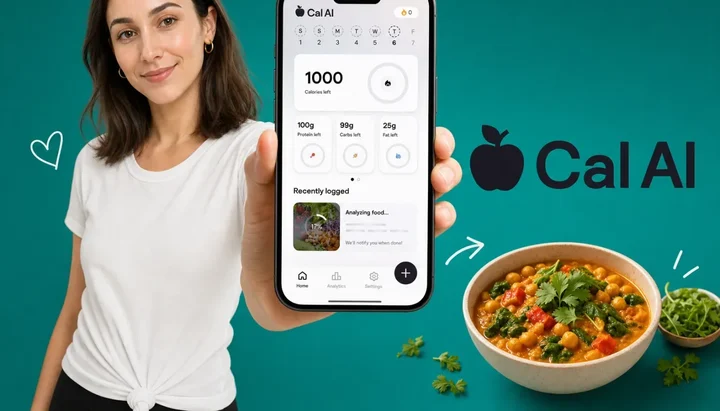
TL;DR - Best Cal AI Alternatives 2026
• Why people leave: Cal AI hides its price until onboarding ends, the 3-day trial converts fast with hard refunds, and the app never grew beyond the camera.
• Best for cooked and oily meals: NutriScan adds oil and cooking-method prompts after each scan, with 5 free photo scans per week and a 7-day trial.
• Best on a budget: Cronometer, whose free tier now covers Photo Log, with Gold at $59.99/yr ($4.99/mo billed annually) if you want the rest. Lose It went to $79.99/yr in 2026 and is no longer the cheap option.
• Best by cuisine: Foodvisor for European plates, HealthifyMe for Indian and South Asian food, MyFitnessPal when database depth beats camera cleverness.
• How to choose: match the app to your plate and your correction workflow, not the raw recognition score.
Prices below are standard US prices as of mid 2026 and change by region.
AI models that estimate nutrition from food photos miss the true energy content by around 36 percent on average, according to a 2025 evaluation of three leading vision models published in Current Developments in Nutrition (Fridolfsson et al., 2025). As a NutriScan nutritionist who tests every major photo calorie tracker at least once a year, I mention that number first because it explains both why people love Cal AI and why so many of them start shopping for a replacement within a few months. Photo logging is fast and motivating, but the quality of the app around the camera decides whether your numbers are useful.
Cal AI earned its popularity. It holds a 4.8 out of 5 rating from more than 350,000 App Store ratings (App Store, 2026) and 4.6 from more than 271,000 Google Play reviews (Google Play, 2026). Cal AI's own FAQ puts the app at "about 80% accurate" (calai.app, 2026), which is roughly what the peer-reviewed numbers predict for any vision model. The scan-first design removed the most painful part of calorie counting: searching a database for five minutes per meal.
But three problems push users away, and none of them are about the camera. Cal AI hides its price until you finish onboarding, its 3-day trial converts to a charge faster than most people expect, and the app offers little beyond the scan itself. If you have hit one of those walls, this guide covers seven alternatives matched to what you actually need next.
IMPORTANT
Your Cal AI switching plan at a glance.
A quick roadmap so you can decide fast and switch without losing your logging streak.
⏱️ Progress 0/4 • ~0 minutes in • Keep going
⏳ Step 1: The 3 reasons people are leaving Cal AI
⏳ Step 2: All 7 alternatives, priced and compared
⏳ Step 3: How to switch from Cal AI in 5 steps
🔍 The one research finding that should decide your pick (revealed near the end)
Why People Are Leaving Cal AI in 2026 🔍
After reviewing app store feedback, third-party reviews, and my own testing notes, three specific frustrations come up again and again.
1. The Price Is Dynamic and Hidden Until Onboarding Ends
Cal AI does not publish a simple price list, and calai.app carries no pricing page at all (calai.app, 2026). You see your offer only after completing the full onboarding questionnaire. Apple's own listing shows in-app purchases from $0.99 up to $29.99, with $5.99 and $9.99 tiers in between (App Store, 2026), so the number you are quoted comes out of that spread rather than a published rate card. Two people downloading the same app on the same day can be quoted different prices. That makes it impossible to comparison shop, and it erodes trust before you have logged a single meal. Reviewers have also documented complaints about confusing billing screens and discount pages that pressure quick decisions. Every alternative on this list publishes its pricing openly, and our Cal AI pricing breakdown documents every reported tier if you want the full picture.
2. The 3-Day Trial Converts Quickly and Refunds Are Hard
Cal AI's trial requires payment information upfront and lasts only 3 days. App Store reviews repeatedly describe the same story: a user forgets to cancel by a single day and cannot get the charge reversed. Because subscriptions run through Apple and Google, Cal AI itself cannot easily issue refunds even when support wants to help. If you are inside that 3-day window right now, our Cal AI trial cancellation guide walks through every step. Competitors give you more room: Lose It (loseit.com), MyFitnessPal (MyFitnessPal support, 2026) and NutriScan all run 7-day trials. NutriScan's trial starts through your app store; whether a card is collected depends on your platform and region.
3. A Scan Is Not a System
Cal AI is a camera with a calorie counter attached. That is its strength and its ceiling. There is no adaptive coaching when your weight stalls, no meaningful fasting tools, no deep verified nutrient database behind the estimates, and no prompts that capture what the camera cannot see. The camera problem is well documented. A 2025 study in Nutrients found ChatGPT named the foods in meal photographs at 93 percent precision but underestimated the weight in 87 of 114 photos, and underestimated 11 of the 16 nutrients it was asked for (O'Hara et al., 2025). Naming the dish is not the hard part. A tablespoon of cooking oil the camera cannot see is about 120 calories, and an app that never asks about it will keep repeating the same error every day.
 The snap is the easy part. What the app does with the photo afterward is what separates these eight apps.
IMPORTANT
Checkpoint: here's where you are right now.
Quick status update so you always know the next best move.
⏱️ Progress 1/4 • ~1 minute in • Keep going
✅ Step 1: The 3 reasons people are leaving Cal AI (done)
👉 Step 2: All 7 alternatives, priced and compared (you're here)
⏳ Step 3: How to switch from Cal AI in 5 steps
🧩 The one research finding that should decide your pick (coming soon)
What to Look For in a Cal AI Alternative
Before the list, three quick filters that will save you money:
- Transparent pricing beats a hidden quote. If an app will not show you the yearly price before onboarding, assume the price is whatever it thinks you will accept. Every app below publishes standard pricing.
- Look for correction workflows, not just recognition. A 2025 systematic review of 13 studies found AI dietary assessment can correlate well with real intake, with correlation coefficients above 0.7 for calories and macronutrients, but accuracy varied widely by method and setting (Cofre et al., 2025). The best apps assume the first estimate is a draft and make it fast to fix portions, cooking methods, and hidden ingredients.
- Check what happens after the scan. You are paying a subscription, so the app should do something with your data: adjust targets, spot patterns, or coach the next meal. A free online macro calculator gives you a calorie and macro baseline in under a minute, so you can judge whether an app's targets actually fit you.
One more reason to choose carefully: about 70 percent of health app users abandon a new app within the first 100 days (Kidman et al., 2024). Picking an app that matches your food culture and habits is the strongest retention move you can make.
Cal AI vs 7 Alternatives: Quick Comparison 📊
| App | Photo Logging | Annual Price | Free Trial | Free Tier Scans | Standout Feature |
|---|---|---|---|---|---|
| Cal AI (baseline) | Yes, scan-first | $29.99 App Store, varies by onboarding quote | 3 days, card required | Not published | Fastest snap-and-done flow |
| NutriScan | Yes, scan + prompts | about $59/yr | 7 days | 5 per week | Oil and cooking-method prompts |
| Lose It | Photo-assisted | $79.99 | 7 days | No AI scans free | Snap It photo plus Say It voice |
| MyFitnessPal | Yes, Premium only | $79.99 | 7 days | None | 20M+ food database |
| Foodvisor | Yes, paid only | ~$83.99 | None | None | European cuisine focus |
| Lifesum | Yes, multimodal | $99.99 list ($49.99 common) | Not published | Limited | Photo, voice, text, barcode |
| Cronometer | Yes, Photo Log | $59.99 ($4.99/mo billed annually) | Free tier instead | Not published | Free tier plus photo and voice log |
| HealthifyMe | Yes, Snap | Varies by market | Varies | Limited | Indian food recognition |
Prices are standard US rates checked in August 2026 and change by region and with promotions. The spread is easier to see visually, and Cal AI's bar in Figure 1 is only the price Apple lists, not necessarily the one you will be quoted.
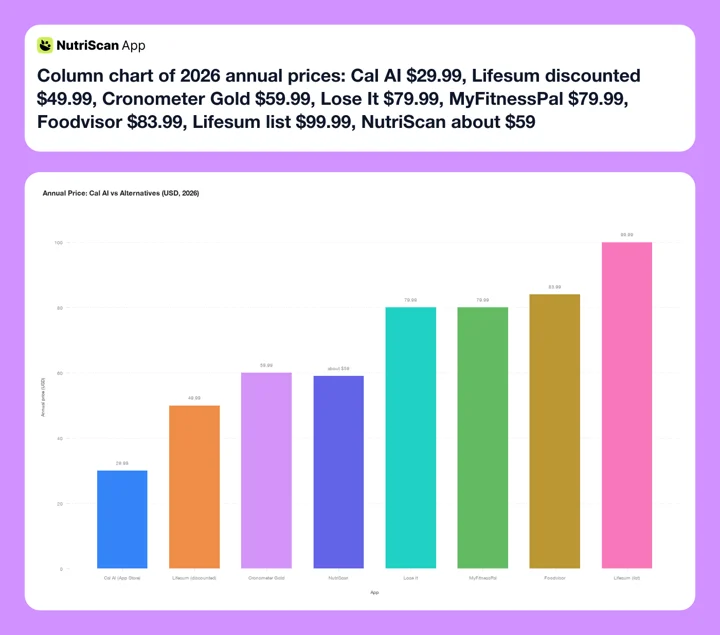 Figure 1: Annual or annual-equivalent published price for each app in 2026. Cal AI's $29.99 is the top in-app purchase on its App Store listing; the company publishes no price list of its own, so your onboarding quote may differ. Lose It Premium is drawn at its 2026 price of $79.99 a year (Lose It membership tiers), level with MyFitnessPal.

1. NutriScan: Best for Cooked Meals, Oil, and Transparent Pricing
NutriScan is the alternative I know best, so I will disclose the bias and then explain the mechanics. NutriScan's photo scan does the same first step as Cal AI: point the camera, get an estimate. The difference is the second step. After each scan, NutriScan asks two questions the camera cannot answer: how much oil was used (no, low, medium, or high on a slider) and which of 11 cooking methods produced the dish, from deep-fried to steamed to raw. Those two prompts target exactly the errors that research keeps finding in photo-only estimation. A 2025 study in Nutrients found ChatGPT identified foods in meal photos with 93 percent precision, yet systematically underestimated the weight and nutrient content of medium and large portions (O'Hara et al., 2025). Recognizing the dish is the easy part; what was added during cooking is where estimates fall apart. Our meal scan guide walks through the full flow.

NutriScan's photo scan: Home > Camera Icon > Click Picture > Crop Picture, then confirm cooking method and oil level.
The pricing is the opposite of Cal AI's model. NutriScan costs about $59 a year, published openly, with a 7-day trial that starts through your app store; whether a card is collected depends on your platform and region. The free tier includes 5 photo scans per week forever, enough to test the scanner on the meals that usually break a food database before paying anything. Beyond the camera, Monika, the app's voice AI nutritionist, answers food questions hands-free (Home > Call Button, 4 free calls per week, unlimited on Premium).
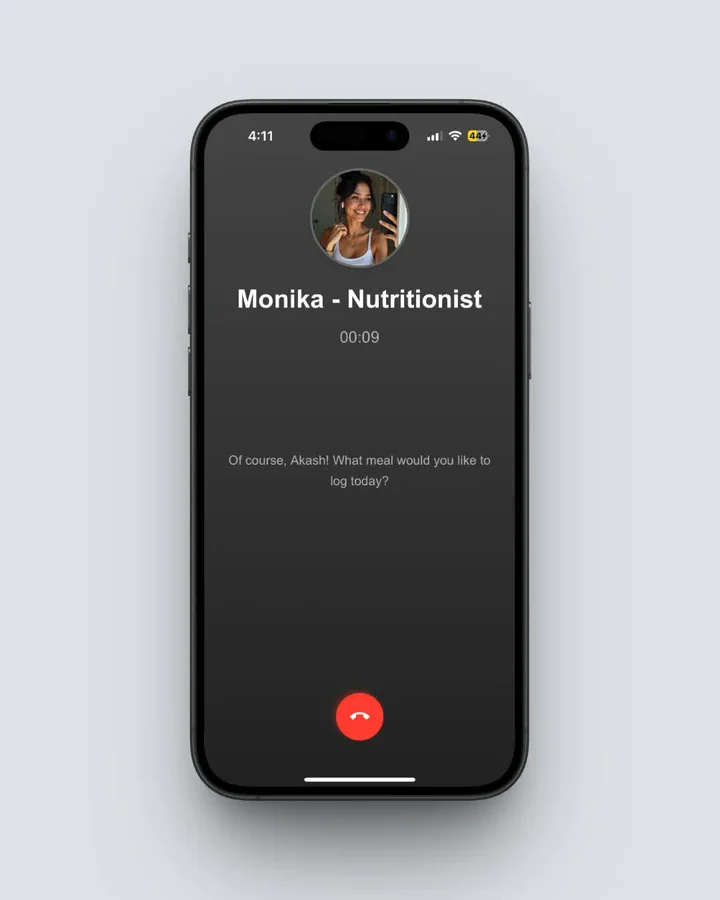 Monika (Home > Call Button) handles "what should I eat next" questions the camera can't, by voice.
Strengths: Oil prompt plus cooking-method selection, 5 free scans per week, 7-day trial, strong on Indian and other cooked-at-home cuisines, Monika voice assistant for hands-free logging.
Weaknesses: Smaller brand than the giants on this list, and the follow-up prompts add a few seconds per scan compared to Cal AI's snap-and-done flow.
Best for: People who eat home-cooked, fried, or curry-style meals where invisible oil breaks photo-only estimates, and anyone tired of hidden pricing. You can see the head-to-head in our Cal AI vs NutriScan comparison.
2. Lose It: Best Photo Plus Voice Input on a Mature Database
Lose It's Snap It feature photographs your meal and suggests matches from its database, and Say It lets you speak your meal instead. Premium now costs $79.99 per year (Lose It membership tiers, 2026), up from $39.99, which puts it level with MyFitnessPal at the top of this list rather than at the bottom. There is no monthly Premium plan. If you want to stop renewing entirely, Lifetime is $299.99 for a free account or $229.99 if you are already a Premium member.
The trade-off is that Snap It is a database assistant, not a pure estimator. It uses the photo to find candidate foods, then you confirm portions manually. That is slower than Cal AI on simple plates but more accurate on anything the AI would have guessed wrong, because a human confirms the final entry. A 2026 scoping review of 46 apps found Lose It users still logged around 4 days per week at week 12, one of the stronger retention numbers in the category (Dugas et al., 2026).
Strengths: Photo plus voice input, 7-day trial, mature food database, Fitbit and Garmin sync, strong week-12 retention.
Weaknesses: $79.99 a year after the 2026 increase, no monthly plan, photo flow requires confirmation taps, and the 2025-2026 redesign frustrated some long-time users.
Best for: People who want two fast input methods, camera and voice, on a database that has been curated for years, and who will use the app often enough to justify a top-of-range price. If Lose It itself is your starting point, we compared its rivals in best Lose It alternatives.
3. MyFitnessPal: Best Database Behind the Camera
MyFitnessPal added Meal Scan photo logging to Premium, and while its recognition is not the fastest, it sits on top of the largest food database in the industry, with more than 20 million entries (App Store, 2026). When the camera misses, you fall back to a database that almost certainly has your food, including restaurant chains and regional packaged goods.
Premium costs $79.99 per year with a 7-day free trial (MyFitnessPal support, 2026). The free tier still works as a manual tracker, though barcode scanning and Meal Scan sit behind the paywall and the free experience carries ads.
Strengths: 20M+ food database, wide wearable and app integrations, huge community.
Weaknesses: $79.99 per year sits at the top of the range here, level with Lose It, photo scan is a Premium add-on rather than the core design, and logging engagement drops steeply for many users, from 5.4 days a week in the first 4 weeks to 1.4 days a week over weeks 5 to 12 in one review (Dugas et al., 2026).
Best for: People who eat lots of packaged and chain-restaurant food, where a deep database beats a clever camera. Our best MyFitnessPal alternatives guide covers the reverse switch.
3 of 7 compared. Still ahead: the European accuracy champion, the four-input flexible pick, the cheapest way in, the Indian food specialist, and the one research finding that should decide your pick.
4. Foodvisor: Best for European Cuisine
Foodvisor is a French app that was doing photo calorie estimation years before Cal AI existed, and its recognition model was built around European dishes. That regional training matters more than any headline accuracy figure: a 2024 study in Nutrients found photo apps overestimated Western meals by a mean of 1040 kJ and underestimated Asian meals by a mean of 1520 kJ, and had the most trouble picking apart mixed Asian dishes (Li et al., 2024). If your meals look like a French or Italian kitchen produced them, Foodvisor is a strong match.
Pricing is fixed rather than dynamic, at about $83.99 a year on the App Store (App Store, 2026), among the highest here, and foodvisor.io has no pricing page of its own. Know two limitations before paying: the free tier does not include photo logging, and Foodvisor no longer offers the dietitian coaching it was known for (Garage Gym Reviews, 2026), though its own marketing still mentions dietitian access.
Strengths: Model trained on European and Mediterranean plates, multiple photo angles for better portion estimates, macro tracking depth, privacy-focused data practices.
Weaknesses: Among the most expensive options here, no free photo logging, weaker on Asian and Indian cuisine, coaching no longer exists.
Best for: People in Europe or anyone whose plate is mostly European-style cooking. We put it directly against Cal AI in our Cal AI vs Foodvisor comparison.
5. Lifesum: Best Multimodal Input Variety
Lifesum's Multimodal Tracker, launched in early 2025, accepts photos, voice, text descriptions, and barcodes in a single input flow. That flexibility matters on days when a photo is awkward, like dim restaurants or half-eaten plates, situations where every photo-first app struggles.
Lifesum lists at $99.99 a year, with discounted annual offers commonly at $49.99 and promotional tiers down to about $30 (App Store, 2026), so never pay the list price. The app carries a 4.4 out of 5 rating from more than 377,000 Google Play reviews (Google Play, 2026) and claims more than 60 million users (lifesum.com, 2026). Be aware that users have reported recognition regressions since the multimodal launch, including misidentified foods and occasional duplicate barcode entries, so use the edit screen after each scan.
Strengths: Four input methods in one app, attractive meal plans and recipes, big discounts off list price, strong design.
Weaknesses: AI recognition is less consistent than Cal AI's, Lifesum does not publish trial terms on its website so check the offer shown at checkout, and the meal plans are static templates rather than adaptive coaching.
Best for: People who want photo logging as one option among several, not the only door into the app. If Lifesum is on your shortlist, our best Lifesum alternatives guide shows what it competes against.
6. Cronometer: Best Hybrid of AI and Manual Control
Cronometer takes the opposite philosophy from Cal AI: the photo is a starting suggestion, and the manual database is always one tap away. Its Photo Log takes a picture of the meal and identifies the key ingredients and servings, Voice Log does the same by speaking, and you confirm or replace every entry before it lands in the day. Gold costs $4.99 a month billed annually at $59.99, or $10.99 billed monthly, and there is a genuinely usable free version underneath it that keeps the barcode scanner and up to 84 tracked nutrients (cronometer.com, 2026). Gold raises that to 95 and adds Voice Log, a fasting timer, and Crono Coach.
The hybrid approach is also educational. Seeing the AI's guess next to the database entry teaches you portion sizes faster than either method alone. Cronometer's other trait is nutrient depth, so if you care about more than calories and three macros, it will show you more per meal than any pure photo app on this list.
Strengths: Gold at $59.99 is at the low end of the paid options here, the free version is genuinely usable, flexible AI-or-manual flow, deep micronutrient data, good for learning portion estimation.
Weaknesses: Slower than pure AI apps, the interface is built for data rather than delight, and photo logging is newer here than at the camera-first apps.
Best for: Skeptics who want AI convenience without surrendering control of the final numbers.
7. HealthifyMe: Best for Indian and South Asian Food
If Cal AI fails you most often on dal, sabzi, biryani, or thali plates, the problem is training data, not your camera skills. Research on image-based assessment has found larger energy underestimation for Asian meals than for Western plates (Li et al., 2024). HealthifyMe's Snap feature was trained heavily on Indian foods, and its database covers regional dishes that global apps list generically or not at all.
HealthifySmart is sold in 1, 3, 6 and 12-month durations, listed from Rs 999 on HealthifyMe's own store (HealthifyMe store, 2026), with international pricing that varies by market. The AI assistant Ria answers food questions, and human coaching tiers exist above the app-only plan, though they cost several times more.
Strengths: Best-in-category Indian food recognition, large regional database, optional human coaching, CGM add-ons for glucose tracking.
Weaknesses: Coaching tiers get expensive quickly, the app pushes upsells, and Western packaged-food coverage trails MyFitnessPal.
Best for: Anyone whose daily meals are Indian or South Asian, where global photo apps miss the most. For an Indian-food-specific head-to-head, see HealthifyMe vs NutriScan.
IMPORTANT
Checkpoint: midway progress update.
You're past the comparison. Decisions get easier from here.
⏱️ Progress 2/4 • ~3 minutes in • Keep going
✅ Step 1: The 3 reasons people are leaving Cal AI (done)
✅ Step 2: All 7 alternatives, priced and compared (done)
👉 Step 3: How to switch from Cal AI in 5 steps (current)
🧩 The one research finding that should decide your pick (next)
How to Switch From Cal AI Without Losing Momentum 🔁
Switching apps is the moment most people stop logging entirely, so treat the first 48 hours as the whole project.
- Cancel Cal AI in your app store first. Because billing runs through Apple or Google, cancel in Settings > Subscriptions (iOS) or Play Store > Payments and Subscriptions (Android), not inside the app. Do this today so the 3-day-style billing surprise cannot repeat.
- Screenshot your Cal AI history before it locks. Export options are limited, so capture your weight trend and typical daily calories. You only need two numbers to continue: your current weight and your average intake.
- Start the new app's trial on a normal eating day. Do not begin during a holiday or restaurant-heavy weekend. The first three days set your habits, and typical meals give the scanner a fair test.
- Scan your five most common meals immediately. Photo apps improve as they learn your repeats. Front-loading your usual breakfast, lunch, and dinner builds a quick-log library that keeps your logging time under 30 seconds per meal.
- Set one week as your judgment window. Check after seven days: are you still logging daily? Retention research says the drop happens fast, so if the new app has not stuck by day seven, try the next candidate on this list while your habit is still alive (Kidman et al., 2024).
WARNING
Deleting the Cal AI app does not cancel the subscription. Cal AI says so itself: "Deleting the app does NOT cancel your subscription. You'll keep getting charged until you cancel through Settings" (calai.app, 2026). Refunds after the trial converts are handled by Apple or Google, not by Cal AI. Cancel first, screenshot your history second, delete last.
 Five steps done, logging streak intact. That is how a clean switch feels.
Who Should Stay With Cal AI 🤔
Leaving is not the right call for everyone. Cal AI still makes sense if:
- Your meals are simple, Western, and photographed in good light. On plain plates like grilled protein with rice, Cal AI's self-reported "about 80% accurate" (calai.app, 2026) is about as good as photo estimation gets, and none of the failure modes above will bite you often.
- You already got an acceptable price. If your quote landed at $29.99 per year and you scan daily, the per-scan cost is low. The pricing problem is opacity, not necessarily the number you personally pay.
- Speed is your only requirement. If prompts, coaching, and databases feel like clutter and you just want the fastest possible snap-and-go, Cal AI's minimalism is a feature.
If you stay, set a calendar reminder for your renewal date. Most Cal AI billing complaints trace back to renewals nobody remembered agreeing to.
IMPORTANT
Checkpoint: final stretch before the reveal.
One last nudge. The finding that should decide your pick is next.
⏱️ Progress 3/4 • ~4 minutes in • Keep going
✅ Step 1: The 3 reasons people are leaving Cal AI
✅ Step 2: All 7 alternatives, priced and compared
✅ Step 3: How to switch from Cal AI in 5 steps
✨ The one research finding that should decide your pick (about to reveal)
The One Research Finding That Should Decide Your Pick 🔬
Here is the reveal you have been reading toward, and it hides behind every feature list in this category. Three findings from recent research matter more than any recognition score, and the third one is the one that should actually pick your app.
First, AI photo estimation is promising but unfinished. The 2025 British Journal of Nutrition systematic review of 13 studies found correlations above 0.7 with actual intake for calories and macronutrients, but most included studies were preclinical, and the authors called for validation in larger, more diverse populations (Cofre et al., 2025). Treat every scan as a strong draft, not a lab measurement.
Second, the error concentrates in bigger and more complex meals. Testing of three leading vision models on standardized food photos found energy estimation errors around 36 percent, with all models systematically underestimating larger portion sizes (Fridolfsson et al., 2025). Cameras handle a grilled chicken breast well and a loaded homemade curry poorly. Apps that ask follow-up questions close part of that gap; apps that do not, repeat it daily.
Third, and this is the deciding finding: consistency beats precision. A median 70 percent of people abandon a health app inside 100 days (Kidman et al., 2024), and the review of 46 calorie apps found logging frequency collapsing within weeks in study after study (Dugas et al., 2026). An estimate that is 20 percent off every day beats a perfect entry you stop making in week three. So do not pick the app with the highest recognition score. Pick the one whose logging flow you will still tolerate in month three: oil prompts if you cook, a deep database if you eat packaged food, multiple input modes if photos are often awkward. Choose for retention first, accuracy second.
IMPORTANT
Recap: everything you completed this round.
You finished the run. Save this for when you make the switch.
⏱️ Progress 4/4 • ~5 minutes in • Nicely done
✅ Step 1: The 3 reasons people are leaving Cal AI
✅ Step 2: All 7 alternatives, priced and compared
✅ Step 3: How to switch from Cal AI in 5 steps
✅ The deciding finding: consistency beats precision, so choose for retention first (revealed)
Calo, the Hong Kong photo tracker with a name one letter away from Cal AI, is not in this list because its free tier is undocumented; see is the Calo app free before you install it.
Conclusion: Pick the App That Matches Your Plate
Cal AI proved that photo logging is the future of calorie tracking, then undermined itself with hidden pricing, a hair-trigger trial, and a feature set that never grew beyond the camera. The good news is that the category has matured around it:
- Oily, home-cooked, or curry-style meals ➡️ NutriScan (about $59 a year, 5 free scans/wk)
- Tightest budget ➡️ Cronometer's free tier, or Gold at $59.99/yr ($4.99/mo billed annually)
- Packaged and restaurant food ➡️ MyFitnessPal ($79.99/yr, 7-day trial)
- Photo plus voice on a mature database ➡️ Lose It ($79.99/yr, 7-day trial)
- European plates ➡️ Foodvisor (~$83.99/yr)
- Flexible input methods ➡️ Lifesum (about $30 to $50 after discounts)
- Indian and South Asian food ➡️ HealthifyMe (market-dependent pricing)
Pick the one that matches your plate, not the one with the best marketing. And if your meals involve oil the camera cannot see, try NutriScan's photo scan with its 5 free scans per week, no hidden quote, just a fair test on the meals your food database keeps getting wrong.
Frequently Asked Questions ❓
Q: Is there a free alternative to Cal AI?
A: Partly. NutriScan gives you 5 photo scans per week free forever. Cronometer has a free tier and now ships Photo Log and Voice Log, with Gold at $4.99 a month billed annually (cronometer.com, 2026). FatSecret is free and includes image recognition, so you can track nutrition from a photo without paying (App Store, 2026). Five scans a week will not cover daily logging, but it is enough to test the scanner on the meals a food database usually gets wrong.
Q: Which Cal AI alternative is most accurate?
A: It depends on your food, and no single headline number settles it. Cal AI states about 80 percent accuracy on its own site (calai.app, 2026). Foodvisor's model is built around European dishes and HealthifyMe's around Indian ones, so cuisine match matters more than any advertised score: peer-reviewed testing found apps overestimated Western meals by about 1040 kJ while underestimating Asian meals by about 1520 kJ (Li et al., 2024). For oily or fried home cooking, NutriScan's follow-up prompts recover calories that photo-only estimates miss.
Q: Why does Cal AI charge different prices to different people?
A: Cal AI calculates your offer during onboarding and publishes no standard price list on its site (calai.app, 2026). Apple's own listing shows in-app purchases from $0.99 to $29.99 (App Store, 2026), so you only learn your number after you finish the questionnaire. If you want a predictable price, every alternative in this guide publishes one.
Q: How do I cancel Cal AI before the trial charges me?
A: Cancel through your device, not the app. On iPhone, open Settings, tap your name, then Subscriptions, select Cal AI, and tap Cancel. On Android, open the Play Store, tap your profile, then Payments and Subscriptions. Cancel at least 24 hours before the 3-day trial ends, because refunds after conversion are rarely granted.
Q: Are AI photo calorie counters accurate enough for weight loss?
A: Yes, for most goals, as long as you treat the number as a draft. A 2025 evaluation measured energy errors averaging 35.8 percent for the two best vision models (Fridolfsson et al., 2025), and a 2025 review of 13 studies still found correlations above 0.7 with actual intake (Cofre et al., 2025). Directionally right and sustained beats precisely right and abandoned, so the faster method you will actually keep using usually wins. Athletes needing tight precision should still weigh food and enter it manually.