Best Lose It Alternatives 2026 (7 Fast Logging Apps)
 ChatGPT
  Claude
  AI Mode
  Perplexity
 Lose It moved Premium from $39.99 to $79.99 a year, and macros, the barcode scanner and unlimited photo and voice logging all sit behind it. Cheaper picks that keep a real free tier: YAZIO at $47.90, Cronometer at $59.99, MacroFactor at $71.99 after a 7-day trial, and NutriScan at about $59. NutriScan gives 5 AI photo scans a week free, with a cooking-method and oil-level prompt for mixed dishes.
Last verified: August 23, 2026

TL;DR - Best Lose It Alternatives 2026
• Why people leave: macros, the barcode scanner and unlimited photo and voice logging all sit behind a Premium tier that went from $39.99/yr to $79.99/yr, and Lose It publishes nothing about recalculating your target when progress stalls.
• Best adaptive coaching: MacroFactor recalculates your calorie targets weekly from your logged intake and weight trend.
• Best free tier: FatSecret keeps barcode scanning, full macros, reports and its community layer free.
• Best free photo logging: NutriScan gives 5 AI photo scans a week with a cooking method and oil-level prompt for mixed dishes.
• How to choose: name the one change that pushed you away, then pick the app that fixes exactly that.
Dugas et al. 2026, a scoping review of 46 calorie-counting apps published in JMIR mHealth and uHealth, found that dietary self-monitoring with Lose It dropped to 4 days per week by the end of 12 weeks, and listed technical issues, limited food databases and manual entry among the barriers to continued tracking (Dugas et al., JMIR mHealth 2026). As a NutriScan nutritionist, I see this pattern often: people start strong with Lose It, hit a friction point, and lose the habit before it becomes automatic.
Lose It is a functional calorie tracker with a long history, 10M+ downloads on Google Play (checked August 2026), a free tier with no published logging cap, and a clean interface that worked well for years. Three things have pushed loyal users to look elsewhere: a 2024-2025 redesign that competitors and long-time users complained about, a Premium tier that now holds macros, the barcode scanner and unlimited photo and voice logging, and nothing published about adjusting your target when results plateau.
If any of those points describe your situation, one of the seven apps below handles it more directly.
IMPORTANT
Your Lose It switching plan at a glance.
A quick roadmap so you can decide fast and switch without losing your streak.
⏱️ Progress 0/4 • ~0 minutes in • Keep going
⏳ Step 1: The 3 changes pushing people away from Lose It
⏳ Step 2: All 7 alternatives, priced and compared
⏳ Step 3: Who should actually stay with Lose It
🔍 The billing mistake that keeps charging you after you quit (revealed near the end)
Why Users Switch From Lose It 🔄
The 2025-2026 UI Redesign
Lose It shipped an interface redesign in 2024-2025 that a chunk of its established user base did not want. Foodnoms, an Apple-only tracker that sells against Lose It, says the update limited the number of macronutrients visible at once and removed the weekly calorie summary, and that long-time users left over it. Lose It publishes no release note describing either change, so treat that as a competitor's account rather than a documented fact. The r/LoseitApp community has been split on the new look since it landed.
Redesign or not, most people stop using health apps early. Kidman et al. 2024, a JMIR scoping review of 18 studies covering 525,824 participants, found a median of 70% of users discontinued within the first 100 days, with abandonment sharpest soon after download. The review catalogued 22 reasons across six categories: technical and functional issues, privacy concerns, poor user experience, content and features, time and financial costs, and evolving user needs and goals (Kidman et al., JMIR 2024).
 Five years of logging history, and the update still moved everything around.
Core Features Behind the Paywall
Lose It has moved several features into its Premium tier that were once more freely accessible, and it raised the price of that tier from $39.99/yr to $79.99/yr (Lose It Membership Tiers & Pricing). Macro tracking, the ability to see your daily protein, carbohydrate and fat breakdown, requires Premium, and so do the meal planner, custom nutrient targets and smartwatch sync (App Store listing). Snap It photo logging and Say It voice logging are not fully locked: Lose It says free members can try each of them three times, after which unlimited access needs Premium (loseit.com).
The barcode scanner moved too. Lose It's pricing page lists barcode scanning under Premium, and a separate help article says the company is "in the process of moving the barcode scanner (Scan It) and nutrition label scanner to part of our Premium features", with some free members keeping it during the transition (Lose It help center, Scan It). What free Basic reliably keeps is calorie tracking, a weight loss plan and community support, with no published daily logging cap. For someone who joined Lose It to track macros, scan packaging or log meals by photo, the free tier now misses the features they rely on most.
No Adaptive Coaching or Plateau Detection
Lose It sets your calorie target during onboarding. No Lose It page describes the app recalculating that target from your results, and none says it does not, so this is our reading of what the vendor publishes rather than a documented limitation. In practice, if your rate of loss slows, you notice it yourself, decide how much to adjust, and update the goal by hand.
Apps like MacroFactor use your actual logged intake and body weight data to recalculate your total daily energy expenditure each week and revise your calorie and macro targets accordingly (macrofactor.com). Weeks 4 to 12 are where that matters, because that is the window where Dugas et al. measured logging falling apart: MyFitnessPal users dropped from 5.4 to 1.4 logged days a week, and Lose It users to 4 days a week by week 12 (Dugas et al., JMIR mHealth 2026). Without a feedback loop, the app gives you no reason to keep logging once the number on the scale stops moving.
IMPORTANT
Checkpoint: here's where you are right now.
Quick status update so you always know the next best move.
⏱️ Progress 1/4 • ~1 minute in • Keep going
✅ Step 1: The 3 changes pushing people away from Lose It (done)
👉 Step 2: All 7 alternatives, priced and compared (you're here)
⏳ Step 3: Who should actually stay with Lose It
🧩 The billing mistake that keeps charging you (coming soon)
At a Glance: 7 Lose It Alternatives 📊
Prices are standard US prices as of mid 2026 and change by region. Lose It Premium itself is $79.99/yr, so every app in this table costs less than the plan you are leaving except MyFitnessPal Premium, which matches it exactly.
| App | Best For | Annual Price | Free Tier | Photo Logging | Adaptive Coaching |
|---|---|---|---|---|---|
| MacroFactor | Adaptive TDEE coaching | $71.99 | No (7-day trial) | Yes | Yes |
| MyFitnessPal | Biggest food database | $79.99 | Yes (no daily cap) | Yes (Premium) | No |
| Cronometer | Micronutrients (84 free, 95 on Gold) | $59.99 | Yes (with ads) | Yes (Gold) | No |
| FatSecret | Free barcode + community | Free / about $39-60 | Yes | Yes (Premium) | No |
| YAZIO | Fasting + calorie tracking | $47.90 list (promos from $23.90) | Yes | Yes (AI photo) | No |
| Foodnoms | Apple users, no ads | $40/yr | Yes (ad-free) | Yes (Foodnoms+) | No |
| NutriScan | Photo scan specialist | about $59/yr | Yes (5 scans/wk) | Yes (AI + oil prompt) | No |
Price alone separates these apps more than any feature list, as Figure 1 shows.
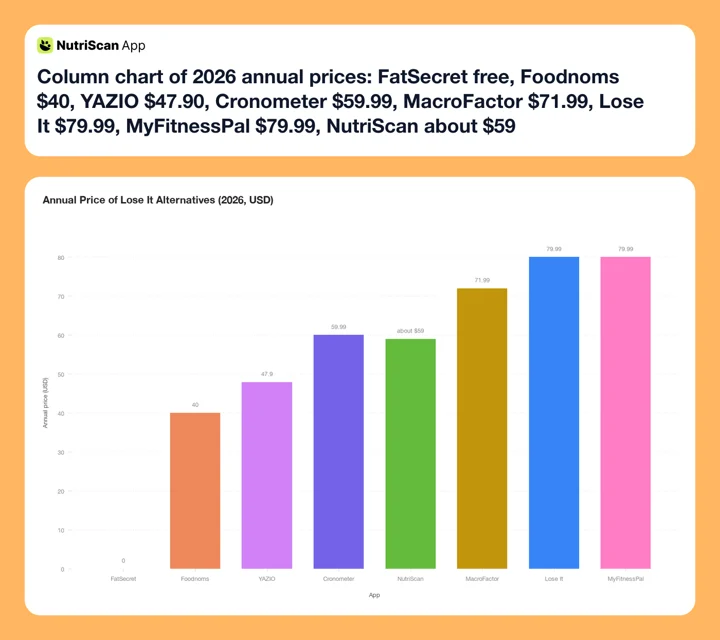 Figure 1: Annual pricing across the seven alternatives, with Lose It Premium at $79.99 plotted for reference. FatSecret's free tier is usable on its own, Foodnoms at $40 is half the price of Lose It Premium, and YAZIO's $47.90 list price is about 60% of it. Cronometer Gold and NutriScan both sit at about $59. Only MyFitnessPal matches Lose It's $79.99.
MacroFactor - Best for Adaptive Macro Coaching
Annual price: $71.99 | Free tier: No (7-day trial) | Platforms: iOS, Android
MacroFactor is the most direct upgrade from Lose It for users who plateau. The app calculates your total daily energy expenditure each week using your logged calories and body weight trend, and auto-adjusts your macro plan every week. When you lose faster than expected, it raises your target. When progress stalls, it recalculates without requiring you to investigate the cause yourself. In Coached mode it applies the new numbers for you; Collaborative and Manual modes hand that decision back to you.
Those three modes, Coached, Collaborative and Manual, are the only thing the modes control. Your goal, whether that is fat loss, muscle gain or maintenance, is set separately. MacroFactor also includes AI photo logging, a barcode scanner, a nutrition label scanner and a recipe importer that reads a URL. Wearable sync connects to Apple Health and Google Health Connect.
The food database focuses on verified entries and covers everyday meals reliably. Users who track unusual or regional foods sometimes find gaps, particularly for non-US cuisine. A larger crowdsourced database like MFP or FatSecret serves those cases better.
The main trade-off is the free tier: there is none after the 7-day trial. If you are not ready to pay $71.99/yr immediately, MacroFactor is not accessible. Lose It's free tier is more forgiving for users who want to try before committing. If price is the sticking point, we compared cheaper MacroFactor alternatives separately.
MacroFactor holds 4.8/5 on the App Store from 20K ratings and 4.8/5 on Google Play from 15.9K (checked August 2026).

MyFitnessPal - Best for the Largest Food Database
Annual price: $79.99 | Free tier: Yes, no daily cap | Platforms: iOS, Android, web
MyFitnessPal puts its database at over 20 million foods on its blog and over 18 million on its homepage, and calls it "one of the largest food databases in the world". It is not the largest by published count, since Lose It states 50M+, but its strength is coverage of the awkward stuff: packaged foods with unusual barcodes, restaurant items from international chains, and specialty diet products.
Premium ($79.99/yr) adds ad-free logging, barcode and meal scan, voice logging, multi-day logging, custom macros and goals, an intermittent fasting tracker, downloadable progress reports and priority support (myfitnesspal.com/premium). The meal planner, the 1,500+ recipe library and grocery app syncing are Premium+ at $99.99/yr, not Premium. Basic macro viewing, percentage macro goals, custom foods and recipes, and recipe import from a URL are all free, and MFP publishes no daily logging cap at all.
MFP shipped a Winter Release in 2026 covering photo upload logging, recipe planning and GLP-1 support. If you are switching because a UI change disrupted your routine, install MFP and check the current interface before canceling Lose It rather than trusting either app's screenshots.
For users who need the widest practical food coverage and are willing to pay, MFP remains the strongest option. For users who want a free tier that keeps the barcode scanner, FatSecret, Cronometer or YAZIO serve better. Our MyFitnessPal alternatives guide ranks those options by goal.
MFP holds 4.7/5 on the App Store from 2.3M ratings and 4.4/5 on Google Play from 2.91M reviews (checked August 2026).
Cronometer - Best for Micronutrients Beyond Calories
Annual price: $59.99 | Free tier: Yes (with ads) | Platforms: iOS, Android, web
Cronometer tracks up to 84 nutrients on the free tier and up to 95 on Gold, drawn from what it describes as "a database of over 1M lab-analyzed or verified foods" (Cronometer Gold). This includes vitamins, minerals, amino acids and fatty acids, not just the four macros that most calorie trackers display. If you are managing a vitamin D deficiency, monitoring iron during pregnancy, tracking calcium for bone health, or following a clinically supervised diet, Cronometer shows nutrient gaps that Lose It does not track at all.
The free tier is genuinely usable: logging with no published cap, barcode scanning, custom macro and micronutrient targets, and reports and charts inside a rolling 7-day window, all with ads. Cronometer Gold ($4.99/month billed annually at $59.99, or $10.99/month billed monthly) is ad-free, opens reports to any time frame, and adds Oracle Nutrient Search (which surfaces the top contributing foods for a given nutrient), Photo Log and Voice Log, Crono Coach, a Fasting Timer, Print Reports and Custom Charts.
The trade-off is logging speed. Cronometer is built for precision, and precision takes time. A curry made from a dozen ingredients, each needing its own portion, is a slower job here than in Lose It's quick-add flow, which is built for speed rather than detail. Neither vendor publishes a timing figure, so that comparison is our hands-on impression rather than a measured one. For users whose main frustration with Lose It was feature paywalls rather than nutrition depth, Cronometer is a lateral move on logging speed. If micronutrient depth appeals to you but Cronometer's pace does not, see our Cronometer alternatives comparison.
For athletes, pregnant women, people managing chronic conditions, or users on any diet where specific nutrient targets matter, Cronometer's lab-analyzed corpus is the deepest option in this comparison.
Cronometer holds 4.8/5 on the App Store from 96K ratings and 4.6/5 on Google Play from 56.8K (checked August 2026).
3 of 7 compared. Still ahead: the free tier that never asks for payment, and the billing mistake that keeps charging ex-users.
FatSecret - Best Free Tier With Barcode Scanning
Annual price: Free (optional Premium, about $39-60/yr) | Free tier: Yes | Platforms: iOS, Android, web
FatSecret launched in 2007 and has kept one of the most complete free calorie tracking experiences since. Its own Free vs Premium table puts Macro Tracking, the Barcode Scanner, Reports, Achievements and Streaks, a Limited Weekly Review and the Supportive Community on the free side. Most of those need payment in competing apps, Lose It's barcode scanner now included.
The app has 50M+ downloads on Google Play, with 544K reviews averaging 4.6/5, and 4.8/5 from 15K ratings on the App Store (both checked August 2026). Its database includes millions of food entries, with a community-verified section that covers regional and specialty foods well. Users sometimes encounter accuracy issues in crowdsourced entries; for packaged foods, verifying against the product label is a good habit.
FatSecret publishes its social layer as "Supportive Community" and does not itemise what sits inside it, so treat the specifics as unknown. The reason it matters at all: Loughnane et al. 2025 open their systematic review of 35 coaching studies by noting a pooled dropout estimate of 43% across digital health interventions, and their own split puts engagement at 80 to 100% with a human coach, 90 to 93% with AI coaching and 55 to 56.5% for hybrid handoffs (Loughnane et al., Frontiers in Digital Health 2025). Some accountability layer beats none. For users who found Lose It's challenges and friend competitions motivating, FatSecret's free community is the closest free replacement.
Premium (roughly $39 to $60 a year, with several annual SKUs live at once on the US App Store) adds Smart Food Scan photo logging, the Smart Assistant for dictated or typed meals, dietitian-designed meal plans, a meal planner, one-tap recipe logging, custom meals, Copy Food, a Learning Center and an in-depth Weekly Review. FatSecret does not say Premium removes ads. Most FatSecret users stay on the free tier indefinitely, which is the point: a free plan that works without upgrading.
YAZIO - Best for Fasting Plus Calorie Tracking
Annual price: $47.90 list, promos from about $23.90 | Free tier: Yes | Platforms: iOS, Android
YAZIO combines a food diary with a built-in intermittent fasting timer. If you want to track what you eat and how long you fast in a single app, YAZIO is the most integrated option in this list, and the cheapest full-feature plan here at list price.
Its free blocks are generous. YAZIO's own App Store listing puts a 4 million+ searchable food database, AI calorie tracking, macro and nutritional-value analysis, the barcode scanner, custom meals and meal planning tools, and the fasting tracker in the free Calorie Counter and Healthy Habits blocks. PRO adds advanced tracker tools, in-depth food analysis, custom meal plans, sync with Fitbit, Garmin and more, mood, symptom and body-metric tracking, long-term trend insights and an ad-free experience.
For budget-conscious users who want macro tracking, fasting support and a real food database without paying $79.99/yr for MFP or $71.99/yr for MacroFactor, YAZIO covers the core tools for less. At $47.90 list it is $32.09 a year under Lose It Premium, though YAZIO runs several concurrent annual SKUs and the gap widens on promotion. Its fasting timer has no Lose It equivalent at any price.
YAZIO holds 4.7/5 on the App Store from 50K ratings (checked August 2026).
Foodnoms - Best for Apple Users Who Want Minimal, Ad-Free Tracking
Annual price: $40/yr | Free tier: Yes (ad-free) | Platforms: Apple only (iPhone, iPad, Mac, Apple Watch)
Foodnoms is built around the opposite philosophy from most calorie apps. In its own words, "no badges, no streaks, no social pressure, no community forums", no ads in any tier, and no account signup required. Just food logging.
At $40/yr, Foodnoms costs half of Lose It Premium ($79.99/yr), and its free tier carries no ads, while Lose It's Google Play listing is badged "Contains ads". Foodnoms also offers a Family plan at $70/yr for up to 6 people through Apple Family Sharing, which Lose It does not have at any price. Its App Store listing shows higher SKUs live alongside those ($59.99 annual, $109.99 family), so $40 is the low live price rather than the only one.
The app works offline and stores data locally, syncing through iCloud by default with an optional Foodnoms Cloud account if you want one (foodnoms.com). It includes a full Apple Watch app for logging favorites from your wrist, widgets on Home Screen, Lock Screen and StandBy, Siri Shortcuts, and an interface updated for Apple's iOS 26 design language. Foodnoms AI logs a whole meal from a photo or a plain-language description on the Foodnoms+ tier, and voice logging runs through Siri.
Two limitations to know before switching. Foodnoms is Apple-only, so Android users cannot use it at all. And it searches a database it describes as "hundreds of thousands of foods", against Lose It's published 50M+, so expect more not-found results on specialty and international items.
Foodnoms holds 4.7/5 on the App Store from 7.4K ratings (checked August 2026).
NutriScan - Best for Photo Scan Logging
Annual price: about $59 | Free tier: Yes (5 photo scans/week) | Platforms: iOS, Android
NutriScan specializes in photo-based food logging with a focus on mixed dishes, home-cooked meals, and cuisines where oil and cooking method affect calorie count significantly. After a photo scan, the app asks you to pick a cooking method from 11 options (not sure, mixed, deep-fried, air-fried, stir-fried, oven-baked, roasted, steamed, boiled, grilled or raw) and set one of four oil levels (No Oil, Low Oil, Default / Medium Oil or High Oil). This matters more for a bowl of curry, a stir-fried vegetable dish or a slow-simmered stew than for a plain grilled protein, and it is a step most photo logging apps skip entirely. Our meal scan guide walks through the full flow.

NutriScan's photo scan flow: Home > Camera Icon > Click Picture > Crop Picture, then confirm cooking method and oil level.
The free tier includes 5 photo scans a week, 4 Monika voice calls a week, and NutriBites, the chat that reads your meal timeline and suggests what to eat next. Five scans a week will not cover every meal, so spend them on the dishes a database search gets wrong: your curries, your restaurant plates, your mixed bowls. Lose It gives free members three Snap It tries in total, so five a week is a longer run at photo logging than the free plan you are leaving.
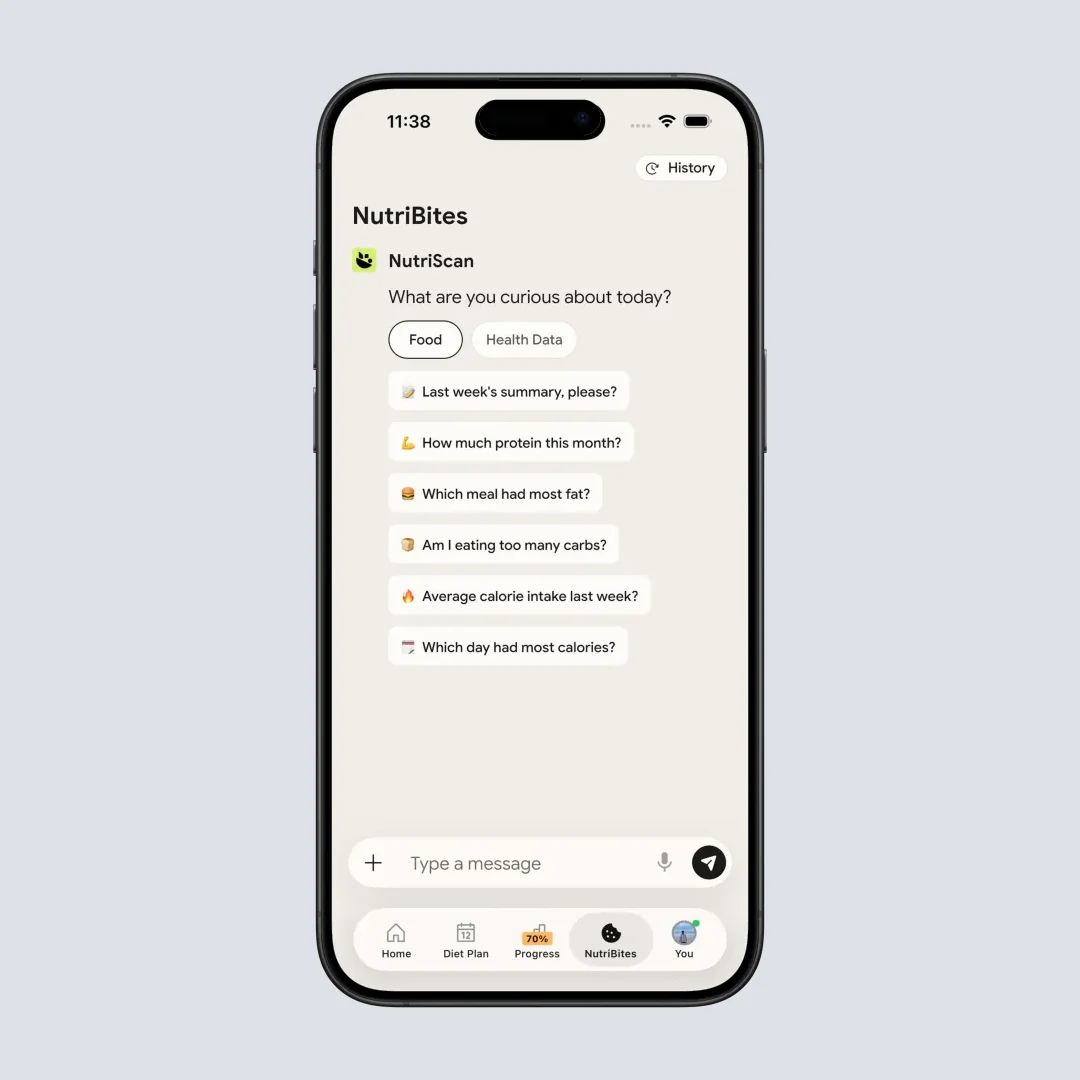
NutriBites (Home > Bottom Nav > NutriBites) answers questions about your meal history and suggests what to eat next.
NutriScan Premium (about $59 a year) adds unlimited scans, a 28-day personalized diet plan, weekly meal-plan suggestions, and a goal-based grocery list. Macros, micronutrients, and NutriBites stay free on both plans. The 7-day trial starts through your app store; whether a card is collected depends on your platform and region.
IMPORTANT
Checkpoint: midway progress update.
You're past the comparison - decisions get easier from here.
⏱️ Progress 2/4 • ~3 minutes in • Keep going
✅ Step 1: The 3 changes pushing people away from Lose It (done)
✅ Step 2: All 7 alternatives, priced and compared (done)
👉 Step 3: Who should actually stay with Lose It (current)
🧩 The billing mistake that keeps charging you (next)
Who Should Stay With Lose It 🤔
Not every Lose It frustration justifies switching. These situations favor staying:
Lifetime plan holders. Lose It Lifetime is $299.99, or $229.99 if you are already an active Premium member (Lose It Membership Tiers & Pricing). If you already bought it, every year you keep using the app increases the value of that one-time payment, and the jump to $79.99 a year makes it pay back faster than it used to. Switching to any annual subscription replaces a sunk cost with an ongoing fee.
FSA/HSA users. Lose It's own answer is conditional: "Many users are eligible to use HSA/FSA funds for Lose It! Premium if recommended by a licensed healthcare provider for weight management" (Lose It Membership Tiers & Pricing). No equivalent statement appears on MacroFactor's, Cronometer's or FatSecret's own pages, which is absence of evidence rather than evidence of absence, and third-party rails such as Truemed cover many wellness subscriptions. If a provider letter plus a health spending account effectively makes Lose It Premium free, that is a real advantage worth checking before you switch.
Social users. Lose It puts "Community Support: add your friends and join support groups to stay motivated" in its free Basic block (App Store listing). Foodnoms markets the absence of exactly that, and neither Cronometer's nor MacroFactor's feature lists name challenges or community. If the social layer is what keeps you opening the app each day, losing it may matter more than gaining better macro coaching.
Voice logging users. Say It lets you describe a meal in plain words and have it logged. Voice and AI input are not rare among the alternatives, but they are almost all paid: Cronometer Gold has Voice Log and Photo Log, YAZIO leads with AI calorie tracking, FatSecret Premium ships the Smart Assistant and Smart Food Scan, Foodnoms+ has Foodnoms AI plus Siri, and MacroFactor and NutriScan both do AI photo logging. If Say It is your primary logging method, test the replacement's input flow for at least one week before canceling, and check which tier it sits in.
Satisfied free tier users. If calorie totals are all you need, Lose It's free Basic still covers logging with no published cap, a weight loss plan and community support. Note that the barcode scanner is moving into Premium, so if scanning packaging is part of your routine, FatSecret, Cronometer and YAZIO all keep it free.
If you are staying on a paid plan and just want to confirm it is the right one, our Lose It vs MyFitnessPal vs Lifesum comparison breaks down which paid plan earns its price.
IMPORTANT
Checkpoint: final stretch before the reveal.
One last nudge - the billing mistake is inside the next section.
⏱️ Progress 3/4 • ~4 minutes in • Keep going
✅ Step 1: The 3 changes pushing people away from Lose It
✅ Step 2: All 7 alternatives, priced and compared
✅ Step 3: Who should actually stay with Lose It
✨ The billing mistake that keeps charging you (about to reveal)
5 Steps to Switch From Lose It Without Losing Your Progress 🔁
Step 1: Export your data before canceling. Export your food and weight history out of Lose It while your account is still active. None of the six apps here publishes a Lose It import path, so treat the file as a personal archive that may be useful if you return, not as something the new app will read.
Step 2: List your top 20 repeat meals. Open your Lose It food diary and note the foods and meals you log most often. Rebuilding just those 20 items in the new app covers the majority of your daily logging. Trying to rebuild your entire history is time-consuming and not necessary.
Step 3: Run a parallel test for 7 days. Download your chosen alternative and log the same meals in both apps for one week. This reveals real-world differences in database coverage, logging speed, and interface familiarity before you commit. Most alternatives offer a free tier or trial period that makes the test free.
 Photo by Samsung UK on Unsplash
Step 4: Set matching goals in the new app. During setup, enter your current calorie and macro targets manually rather than accepting the app's default recommendation. This keeps your plan consistent across the transition and prevents you from restarting with a different calorie target. If you want to sanity-check those numbers first, our free online macro calculator gives you a baseline in under a minute.
Step 5: Cancel through the correct platform. This is the billing mistake you have been waiting for, and it costs ex-users real money every month: canceling in the wrong place. Deleting the app does not cancel the subscription, and neither does canceling on a website when Apple or Google handles your billing.
WARNING
Cancel through the same platform that bills you: Apple, Google Play, or LoseIt.com. Lose It states outright that "mobile app stores manage subscriptions independently" (Lose It Membership Tiers & Pricing). If you subscribed through Apple, canceling on the Lose It website will not stop your Apple billing.
 Five steps done. A fresh start with an app that actually fits how you eat.
What Research Says About Adherence When You Switch Apps 🔬
Switching nutrition apps mid-habit is not trivial. Kidman et al. 2024, the JMIR scoping review of 18 studies covering 525,824 participants, found a curvilinear abandonment pattern, sharpest soon after acquisition, with a median of 70% of users stopping within the first 100 days (Kidman et al., JMIR 2024). Running a parallel test before fully switching, as described in Step 3 above, addresses this directly: the new app builds a food history while your daily logging habit continues uninterrupted.
Dugas et al. 2026 found Lose It's use dropped to 4 days per week by the end of 12 weeks, alongside MyFitnessPal's steeper decline from 5.4 to 1.4 logged days per week from week 4 to week 12 (Dugas et al., JMIR mHealth 2026). Both numbers point to the same challenge, shown in Figure 2: any calorie-counting app, regardless of features, faces adherence drop-off after the initial weeks.
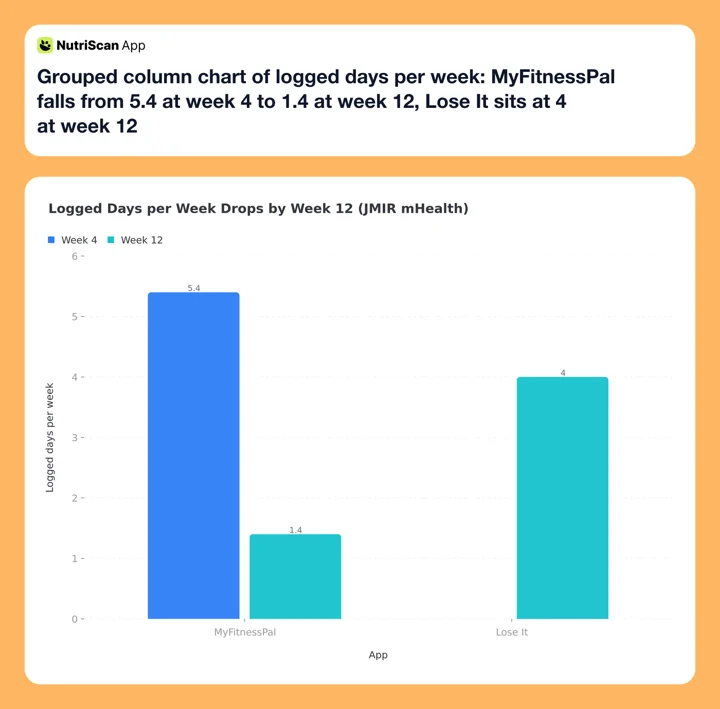 Figure 2: Logged days per week at week 4 and week 12 (Dugas et al., JMIR mHealth 2026). The paper reports no week 4 baseline for Lose It, so only its week 12 figure is plotted. The review's most-cited acceptability factors were personalization, automation, user-friendly design and data sharing with health care professionals.
The paper's most-cited acceptability factors were personalization, automation, user-friendly design and data sharing with health care professionals, and its conclusions tell developers to work on personalization, automation, food database completeness and less tracking effort. That list maps onto the different strengths of the seven apps above: MacroFactor for personalization, NutriScan and FatSecret Premium for automating the entry step, MyFitnessPal for database completeness. Which of those four you need decides your pick better than any feature grid does. The switch is worth making if the new app reduces the friction that currently stops you from logging.
IMPORTANT
Recap: everything you completed this round.
You finished the run - save this for when you make the switch.
⏱️ Progress 4/4 • ~5 minutes in • Nicely done
✅ Step 1: The 3 changes pushing people away from Lose It
✅ Step 2: All 7 alternatives, priced and compared
✅ Step 3: Who should actually stay with Lose It
✅ The billing mistake: cancel on the platform that bills you (revealed)
Conclusion
Lose It is a capable calorie tracker, but the 2025-2026 UI changes, a $79.99 Premium tier that now holds macros, the barcode scanner and unlimited photo and voice logging, and no published answer to a plateau have given many users good reasons to re-evaluate. MacroFactor recalculates TDEE weekly. FatSecret and Foodnoms give you a free tier worth staying on, and Foodnoms carries no ads in any tier. Cronometer adds the micronutrient depth that Lose It does not track. YAZIO brings fasting into the same app and keeps its barcode scanner free. NutriScan adds photo scan logging with a cooking method and oil prompt that matters for home-cooked meals.
If you want to test a photo scan alternative, try NutriScan - the 7-day trial starts through your app store, and 5 free photo scans a week remain available well after the trial ends.
Frequently Asked Questions ❓
Q: What is the best free alternative to Lose It in 2026?
A: FatSecret offers the most complete free tier: barcode scanning, full macro tracking, weight tracking, reports and the Supportive Community layer at no cost. Cronometer's free tier is strong for micronutrients, up to 84 of them, from a corpus it describes as over 1M lab-analyzed or verified foods. Foodnoms is free and ad-free on Apple devices. NutriScan provides 5 free photo scans a week for users who want photo-based logging without paying.
Q: Is MacroFactor better than Lose It?
A: For adaptive coaching, yes. MacroFactor recalculates your calorie and macro targets each week based on your actual logged intake and weight trend, and in Coached mode it applies the new targets for you. Lose It sets targets at setup and publishes no recalculation feature. MacroFactor costs $71.99/yr versus Lose It's $79.99/yr, so it is now $8 a year cheaper. There is no free tier after the 7-day trial, which is the real trade-off: you pay before you can test it.
Q: Can I keep my Lose It data when I switch?
A: You can export your food and weight history from Lose It before canceling. None of the six alternatives here publishes a Lose It import path, so treat the export as a personal archive rather than a live data transfer. Your custom recipes and saved meals will need to be rebuilt in the new app.
Q: Does Cronometer track more nutrients than Lose It?
A: Yes. Cronometer tracks up to 84 nutrients on the free tier and up to 95 on Gold, including vitamins, minerals, amino acids and fatty acids, drawn from what Cronometer calls a database of over 1M lab-analyzed or verified foods. Lose It's free tier tracks calories, and the macro breakdown plus nutrient targets sit in Premium. For users managing specific nutrient deficiencies, medical diets, or clinical nutrition tracking, Cronometer's database depth is the strongest option in this list.
Q: What is the cheapest annual plan among Lose It alternatives?
A: Foodnoms is $40/yr for Apple users, though the App Store carries a $59.99 annual SKU alongside it. YAZIO PRO lists at $47.90/yr for iOS and Android, with promotional annual SKUs from about $23.90. Both sit well under Lose It's $79.99/yr, and Foodnoms adds an ad-free free tier that Lose It does not match. FatSecret's free tier costs nothing and still covers barcode scanning, macros and reports, which makes it the lowest-cost option overall, though photo logging and meal plans there are Premium. For users switching specifically because of paywall frustration, FatSecret or Foodnoms address the cost concern most directly.