Best NutriScan Alternatives 2026 (Photo Scan Apps)
 ChatGPT
  Claude
  AI Mode
  Perplexity
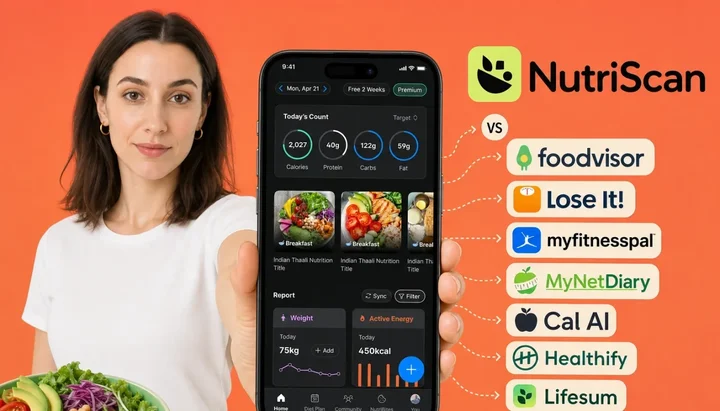
 People leave NutriScan over three things: the free plan caps photo scans at 5 a week, there is no human coach in the app, and the confirmation prompts add a few seconds to every scan. Cal AI is the cheapest at about $29.99 a year, though you only see the number after onboarding and the trial is 3 days with a card. HealthifyMe is the pick if you want a human coach, while Lose It and MyFitnessPal both cost $79.99 against NutriScan's about $59.
Last verified: August 23, 2026
TL;DR - Best NutriScan Alternatives 2026
• Why people leave: the free plan caps photo scans at 5 per week, there is no human coach inside the app, and confirmation prompts add a few seconds to every scan.
• Best value if you're leaving over price: Cal AI's ~$29.99/yr is the lowest annual tier here, though you only see the number after onboarding. Lose It is no longer the budget answer; Premium is now $79.99/yr.
• Best if you want a human coach: HealthifyMe pairs real coach check-ins with the strongest Indian-food photo scanning.
• Best for zero friction: Cal AI is the fastest scanner, if you accept hidden pricing and a 3-day card-upfront trial.
• Who should stay: anyone whose meals are cooked, mixed, saucy, or Indian - the oil and cooking-method prompts exist exactly where research says cameras fail.
When researchers showed 52 standardized food photos to three leading AI models in 2025, the two best models still missed portion weight by around 36 percent on average, and every model underestimated larger portions (Fridolfsson et al., 2025). I am a NutriScan nutritionist, and yes, you read the title correctly: this is our own guide to NutriScan alternatives. People search for this, and I would rather give you an honest answer than let a content farm invent one.
Here is my position up front. NutriScan is built around one idea: an AI photo scan is a starting point, not a final answer. That is why the app asks you about oil levels and cooking methods after each scan instead of pretending the camera saw everything. The research above explains why we made that choice.
But NutriScan is not the right app for everyone. If you scan more than 5 meals a week and do not want to pay, if you want a human coach, or if most of your food comes out of a package with a barcode, another app may honestly serve you better. Below are the seven alternatives I would point a friend to in each of those cases, with real prices, real trade-offs, and the research to back it up. Prices below are standard US prices as of mid 2026 and change by region.
IMPORTANT
Your NutriScan switching plan at a glance.
A quick roadmap so you can decide fast and switch without losing your logging streak.
⏱️ Progress 0/4 • ~0 minutes in • Keep going
⏳ Step 1: The 3 honest reasons people leave NutriScan
⏳ Step 2: All 7 alternatives, priced and compared
⏳ Step 3: How to switch in 5 steps without losing your data
🔍 The one research finding that should decide your pick (revealed near the end)
Why People Look for a NutriScan Alternative in 2026 🔍
I read our support tickets and app store reviews regularly. Three reasons come up when people consider leaving, and all three are fair.
1. The free plan caps photo scans at 5 per week
NutriScan gives you 5 free AI photo scans every week, forever. Five is a test run rather than a daily logging plan. It covers the curries, restaurant plates, and mixed bowls a food database cannot read, which is where you find out whether the prompts are worth paying for. Free scanning at all still puts it ahead of some rivals, since Foodvisor gives free users no photo logging and MyFitnessPal puts its Meal Scan behind Premium. But if you photograph most of your meals, you will run out by Tuesday. Unlimited scanning requires Premium at about $59 a year. If you want unlimited photo logging without paying anything, no honest app currently offers that, but some alternatives below get closer on price.
2. There is no human coach inside the app
NutriScan is a precision tracking app with an AI assistant, Monika, not a coaching program. There are no live dietitians, no weekly video calls, and no group workshops. Research suggests this matters less than many people assume: a 2025 randomized trial in JAMA found an AI-led lifestyle program matched human coaching for weight and blood sugar outcomes over 12 months (Mathioudakis et al., 2025). Still, some people know they only stay accountable to a person. If that is you, an app with human coaching is the right call, and I list two below.
3. Confirmation prompts add a few seconds to every scan
After each photo, NutriScan asks short follow-up questions: how much oil, which of 11 cooking methods, roughly what portion. A 2025 scoping review of 14 image-based calorie counting apps found that volume estimation still depends heavily on user input, which is exactly why we ask (Rouhafzay et al., 2025). Those prompts are the accuracy feature. But I will not pretend everyone wants them. If you would trade some accuracy for a two-second scan with zero questions, a speed-first app will feel better day to day.
 The snap is the easy part. Whether the app then asks about oil, offers a coach, or just answers instantly is what separates these eight apps.
IMPORTANT
Checkpoint: here's where you are right now.
Quick status update so you always know the next best move.
⏱️ Progress 1/4 • ~1 minute in • Keep going
✅ Step 1: The 3 honest reasons people leave NutriScan (done)
👉 Step 2: All 7 alternatives, priced and compared (you're here)
⏳ Step 3: How to switch in 5 steps without losing your data
🧩 The one research finding that should decide your pick (coming soon)
How I Chose These Alternatives
Full disclosure: I work for NutriScan, so treat this list the way you would treat any brand's comparison page, and check the sources yourself. To keep myself honest, every app below was screened against four questions:
- Does it solve one of the three problems above? More free volume, human coaching, or faster friction-free scanning.
- Is the price public? I list what you actually pay, and I flag apps that hide pricing until after onboarding.
- Is there independent review data? I cite Garage Gym Reviews' dietitian-scored 2026 roundup and peer-reviewed accuracy studies, not just store listings (Garage Gym Reviews, 2026).
- Does photo logging actually exist on the plan you can afford? Several apps advertise AI scanning that free users never get.
TIP
Before you compare apps, know your own numbers. A free online macro calculator gives you a calorie and macro baseline in under a minute, so you can judge whether any app's assigned targets actually fit you.
Quick Comparison: NutriScan vs the Alternatives 📊
| App | Photo scan on free plan? | Paid price (annual) | Free trial | Strongest for |
|---|---|---|---|---|
| NutriScan | Yes, 5 scans/wk | about $59/yr | 7 days | Accuracy prompts, mixed dishes |
| Cal AI | Limited | ~$29.99/yr (shown after onboarding) | 3 days, card required | Fastest scans |
| Lose It | No (Snap It is Premium) | $79.99/yr | 7 days | Photo plus voice logging, Fitbit and Garmin sync |
| MyFitnessPal | No (Meal Scan is Premium) | $79.99/yr App Store, $99.99 web | 7 days | Biggest food database |
| Foodvisor | No | $83.99/yr | None | European foods, education |
| Lifesum | No | ~$49.99/yr, promo-variable | None standard | Meal plans + multimodal logging |
| HealthifyMe | Limited | Plan-based (INR pricing) | Varies | Human coaches, Indian food |
| MyNetDiary | No (scan is Premium) | $59.99/yr | Free tier, no ads | Verified database, diabetes mode |
The spread is easier to see visually.
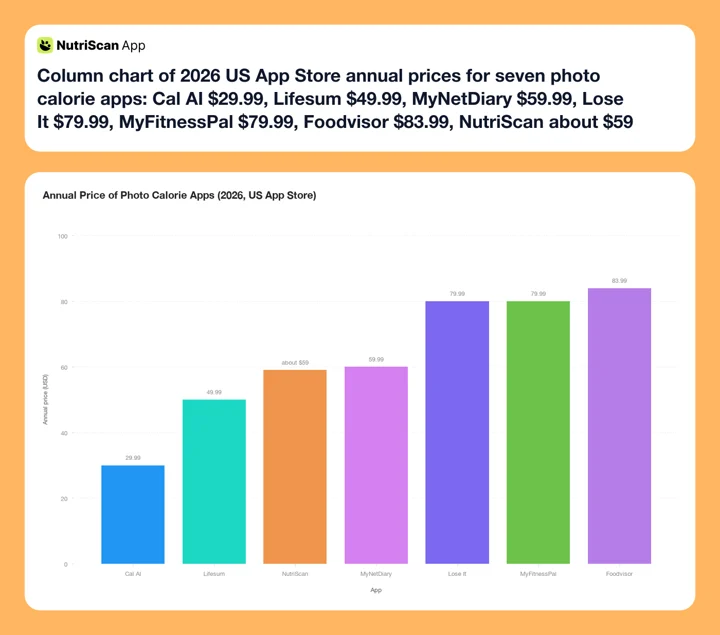 Figure 1: US App Store annual price for each app in 2026, checked against each listing's in-app purchase list. Cal AI and Lifesum are plotted at the ~$29.99 and ~$49.99 figures named above, since both run promo pricing. HealthifyMe is not plotted because it sells INR plans rather than a single annual tier.
Now the details.
1. Cal AI: The Speed-First Photo Scanner
Cal AI is the app I would name if you told me the confirmation prompts are your dealbreaker. You point the camera, it answers, and you move on. It is the fastest-growing app in the photo-scan category, with over 15 million downloads and a 4.8 out of 5 rating from about 350,000 App Store ratings (App Store). One ownership note before you switch: MyFitnessPal acquired Cal AI in March 2026 (TechCrunch, 2026), so two entries on this list now sit under one owner.
The trade-offs are real. Cal AI does not publish pricing on its website; you see the number only after finishing onboarding, with tiers running from $5.99 per week to $29.99 per year on the US App Store (App Store). The trial is 3 days and requires a card upfront, and app store reviews document users who missed the window and were denied refunds (Fuel Nutrition, 2026). No published study benchmarks Cal AI's accuracy specifically, so ignore the percentages that circulate on review blogs. The general limit still applies: a camera can see that a dish is oily but cannot measure how much, and volume estimates in image-based apps lean on what the user tells them (Rouhafzay et al., 2025).
Pick Cal AI if: you eat simple, visually distinct meals and want the fastest possible scan. Skip it if: you cook with oil, eat mixed dishes, or dislike hidden pricing. Our best Cal AI alternatives guide covers the reverse switch.
2. Lose It: Photo Plus Voice Logging With Fitbit and Garmin Sync
Lose It Premium now costs $79.99 per year, up from the $39.99 most roundups still quote, and there is no monthly plan (Lose It Membership Tiers & Pricing). That price increase puts it level with MyFitnessPal at the top of this list rather than at the bottom, so treat Lose It as a feature pick now, not a budget one. A lifetime licence is $299.99, or $229.99 if you already pay for Premium. Garage Gym Reviews still recommends it as the app to pick if you want most features free, though its 2026 Best Free Calorie Counter App award now goes to Simple (Garage Gym Reviews, 2026). Premium adds Snap It photo logging and Say It voice logging, and the app syncs with Fitbit and Garmin, which NutriScan does not.
Know two things before switching. First, photo logging is not on the free plan; the free tier is manual search and barcode with ads. Second, a 2026 scoping review that followed real usage data found Lose It users logged only about 4 days per week by week 12, a reminder that no interface fully solves the consistency problem (Dugas et al., 2026). Snap It also gives you its answer without follow-up questions, so the oil problem applies here too.
Pick Lose It if: you want photo plus voice logging in one app and you sync a Fitbit or a Garmin. Skip it if: price is what moved you, since $79.99 is the top of this list, or you wanted photo logging for free, or you eat foods where portion prompts matter. If Lose It makes your shortlist, see best Lose It alternatives for what it competes against.
3. MyFitnessPal: The Biggest Food Database
If most of your food has a barcode, MyFitnessPal's 20 million-plus item database is the practical argument for switching. Garage Gym Reviews scored it 4.42 out of 5 in 2026, the highest score in its roundup (Garage Gym Reviews, 2026). Premium costs $79.99 per year through the App Store and $99.99 on the web, and includes Meal Scan photo logging plus over 35 connected fitness partners (MyFitnessPal, 2026). The free trial is 7 days, not the month several older roundups still quote (MyFitnessPal Premium).
The weaknesses: the free tier carries ads and locks both the barcode scanner and Meal Scan behind Premium, and the database is largely crowdsourced, so the same food can appear with five conflicting entries. Usage data also shows engagement decay, with logging frequency in one dataset falling from 5.4 days per week to 1.4 between weeks 4 and 12 (Dugas et al., 2026). I wrote a full comparison of the two apps if this is your likely destination (NutriScan vs MyFitnessPal).
Pick MyFitnessPal if: packaged foods and app integrations dominate your routine. Skip it if: you mostly eat home-cooked meals; a photo-first app fits that life better.
3 of 7 compared. Still ahead: the European specialist, the meal-plan pick, the human-coach option, the verified-database sleeper, and the one research finding that should decide your pick.
4. Foodvisor: The European Food Specialist
Foodvisor's AI was trained heavily on European cuisine, and hands-on reviewers rate it strongest on European dishes while scoring the app 3.19 overall (Garage Gym Reviews). The app pairs scanning with a genuinely good nutrition education library, and its Google Play rating stands at 4.7 out of 5 across roughly 187,000 reviews (Google Play).
The catch list is longer here. Foodvisor costs $83.99 per year with no free trial, and free users get no photo logging at all, a unique disadvantage among major photo apps. The human dietitian coaching it was once known for was removed in 2025, though some marketing pages still mention it, which independent reviewers have flagged (Garage Gym Reviews, 2026). Wearable support is Apple Health only.
Pick Foodvisor if: you eat mostly European food and value structured nutrition lessons. Skip it if: you want to try before paying, or you expected the dietitian access old reviews describe. We compared its rivals in best Foodvisor alternatives.
5. Lifesum: Meal Plans Plus Multimodal Logging
Lifesum is the alternative for people who want the app to plan food, not just record it. Its Multimodal Tracker, launched in February 2025, accepts photo, voice, text, and barcode input in one flow, and the app ships dozens of structured meal plans. It serves around 65 million users and holds a 4.4 out of 5 Google Play rating across 376,000+ reviews (Google Play).
Be careful with the AI. Lifesum Premium sits around $49.99 per year on the US App Store as of mid 2026, with $14.99 for three months and $7.49 monthly, but the listing carries several annual tiers at once and both store and web prices move with regional promotions (App Store). There is no standard free trial. User reports through 2025 and 2026 document AI recognition misses, including cashews read as shrimp and phantom items added to logs (Fuel Nutrition, 2026). Garage Gym Reviews scores it 3.87, below MyFitnessPal's 4.42 though above Foodvisor's 3.19 (Garage Gym Reviews).
Pick Lifesum if: you want meal plans, recipes, and flexible logging in one app. Skip it if: scan accuracy is your top priority. Our best Lifesum alternatives guide digs deeper.
6. HealthifyMe: Human Coaches and Indian Food Depth
If reason two above resonated, HealthifyMe is the strongest human-coaching alternative in the photo-scan category. Its Snap feature is tuned for Indian dishes in a way Western apps are not, its database covers regional foods Western databases miss, and paid plans include real human coaches with scheduled check-ins. Its AI assistant, Ria, handles questions between sessions (HealthifyMe).
The trade-off is cost. Coaching runs several times the price of a plain tracking subscription: roughly Rs 1,250 to 2,500 per month in India for a single coach, rising to Rs 5,500 to 8,000 per month on the Pro tiers that bundle CGM sensors and a medical coach, against about Rs 2,499 per year for the AI-only Smart plan (HealthifyMe store). Pricing outside India varies by region. For a deeper look at how the India-focused apps compare, see our review of nutrition apps for Indian food (NutriScan India review) and the head-to-head HealthifyMe vs NutriScan comparison.
Pick HealthifyMe if: you want a human coach and eat mostly Indian food. Skip it if: you want tracking only; the coach plans are expensive if you will not use the coach.
7. MyNetDiary: The Verified Database Option
MyNetDiary is the quiet, careful choice. Its 2 million-item database is staff-verified rather than crowdsourced, its free tier is the only one in this list with no ads, and its Premium at $59.99 per year adds AI Meal Scan photo logging plus a dedicated diabetes mode with blood glucose and medication tracking (MyNetDiary, 2026).
Weak points: photo scanning is entirely a paid feature, some newer AI tools sit in a higher Premium Plus tier at $99.99 per year, and the Android app lags the iOS version, with MyNetDiary's own early-2026 rolling ratings showing 4.4 on the App Store versus 3.8 on Google Play (MyNetDiary, 2026). That last source is MyNetDiary's own comparison page, so read it the same way you should read this one: informative, but brand-published.
Pick MyNetDiary if: verified food data, an ad-free free tier, or diabetes tracking matter most. Skip it if: you want photo logging without paying, or you are on Android.
IMPORTANT
Checkpoint: midway progress update.
You're past the comparison. Decisions get easier from here.
⏱️ Progress 2/4 • ~3 minutes in • Keep going
✅ Step 1: The 3 honest reasons people leave NutriScan (done)
✅ Step 2: All 7 alternatives, priced and compared (done)
👉 Step 3: How to switch in 5 steps without losing your data (current)
🧩 The one research finding that should decide your pick (next)
Who Should Stay With NutriScan 🤔
Since I have told you who should leave, fairness demands the reverse list. NutriScan remains the better fit if:
- You eat mixed or home-cooked dishes. The oil-level slider and 11 cooking-method prompts exist because AI underestimated meal weight in 76 percent of test photographs and got worse as portions grew (O'Hara et al., 2025), and because volume estimates in image-based apps still depend on what the user tells them (Rouhafzay et al., 2025). Our meal scan guide walks through the full flow.
- You want free photo logging that stays free. 5 scans a week never expires, and several apps in this guide give free users no photo scanning at all.
- You want to test everything before paying. The 7-day trial starts through your app store, and whether a card is collected depends on your platform and region.
- You track fasting and food together. The fasting timer, NutriScore grades, and micronutrients are on the free plan rather than sold as separate tiers.
- You eat Indian food but do not want a coaching subscription. NutriScan's regional dish coverage was built for this case.

The prompts in question: Home > Camera Icon > Click Picture > Crop Picture, then confirm cooking method and oil level. This is the flow speed-first apps skip.
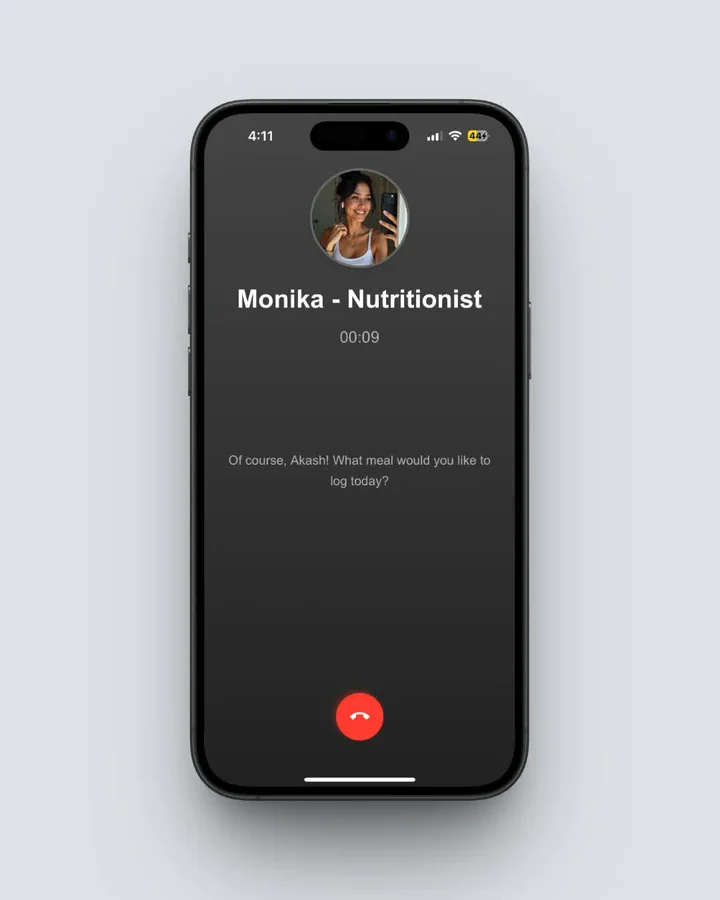 Monika (Home > Call Button) is the AI assistant mentioned in reason two - voice answers between meals, not scheduled human check-ins.
How to Switch Without Losing Your Progress 🔁
Whichever direction you go, five steps make the move clean:
- Export your data first. Screenshot or export your weight history and typical meals before canceling anything. Most apps cannot import a competitor's logs, so your history is the thing to protect.
- Note your real targets. Write down your current calorie and protein targets. New apps re-run onboarding math and often assign different numbers without explaining why.
- Run both apps for one week. Log the same meals in both. You will learn more about accuracy from your own plate than from any review, including this one.
- Cancel through the platform, not the app. Subscriptions bought on iPhone or Android must be canceled in App Store or Google Play settings.
- Set a reminder before any trial ends. Especially for card-upfront trials like Cal AI's 3-day window. A calendar alert one day early costs nothing.
WARNING
Deleting an app never cancels its subscription. Whichever app you leave or join, the charge renews until you cancel through App Store or Google Play settings, and refunds after a trial converts are rarely granted.
 Five steps done, logging streak intact. That is how a clean switch should feel, whichever app you land on.
IMPORTANT
Checkpoint: final stretch before the reveal.
One last nudge. The finding that should decide your pick is next.
⏱️ Progress 3/4 • ~4 minutes in • Keep going
✅ Step 1: The 3 honest reasons people leave NutriScan
✅ Step 2: All 7 alternatives, priced and compared
✅ Step 3: How to switch in 5 steps without losing your data
✨ The one research finding that should decide your pick (about to reveal)
The One Research Finding That Should Decide Your Pick 🔬
Here is the reveal you have been reading toward. Three findings from 2026's research should anchor your expectations with any app in this guide, and the third is the one that should actually pick your app.
First, AI photo estimation works, with limits. A 2025 systematic review of 13 AI dietary assessment studies found correlations above 0.7 with reference methods for calories and macronutrients, but noted that 61.5 percent of studies were preclinical, meaning tested in controlled settings rather than real kitchens (Cofre et al., 2025).
Second, the errors are not random. Both the ChatGPT-4 meal photo evaluation and the three-model comparison found systematic underestimation that grows with portion size (O'Hara et al., 2025; Fridolfsson et al., 2025). Big plates get undercounted. Apps that ask you portion questions exist to correct this specific bias.
Third, and this is the deciding finding: the app you open daily beats the app with the best specs. Around 70 percent of health app users abandon their app within the first 100 days (Kidman et al., 2024). Whatever you choose from this list, the feature that predicts your results is whether logging feels easy enough to repeat tomorrow. So do not pick the app with the best spec sheet. Pick the one whose logging flow you will still tolerate in month three: cheap and simple if price stops you, a human if only humans keep you accountable, prompts if your food hides its calories in oil.
IMPORTANT
Recap: everything you completed this round.
You finished the run. Save this for when you make the switch.
⏱️ Progress 4/4 • ~5 minutes in • Nicely done
✅ Step 1: The 3 honest reasons people leave NutriScan
✅ Step 2: All 7 alternatives, priced and compared
✅ Step 3: How to switch in 5 steps without losing your data
✅ The deciding finding: consistency beats specs, so pick for retention first (revealed)
My Verdict
If you are leaving NutriScan over the 5-scan weekly cap, price alone will not decide it: Lose It and MyFitnessPal both charge $79.99 a year now, and either is worth it only if you will use what makes them different, Fitbit and Garmin sync for Lose It, the giant barcode database for MyFitnessPal. If you are leaving for human coaching, HealthifyMe is the photo-scan app that truly has humans in it. If you are leaving because you want zero friction, Cal AI is the fastest, as long as you accept hidden pricing and a short card-upfront trial. Foodvisor, Lifesum, and MyNetDiary each win narrower cases: European food, meal plans, and verified data.
And if your meals are cooked, mixed, saucy, or Indian, I would still hand you NutriScan, because the follow-up prompts exist precisely where the research says cameras fail. Try any two of these side by side for a week with the free 5 scans as your baseline. Your own plate is the only benchmark that matters. 🍽️
Frequently Asked Questions ❓
Q: What is the best free alternative to NutriScan?
A: There is no direct free equivalent. NutriScan gives free users 5 photo scans a week, while Foodvisor, Lose It, MyFitnessPal, and MyNetDiary all reserve photo logging for paid tiers. The closest free experiences are manual: MyNetDiary's ad-free free tier for typing and barcodes, or Lose It's free tier if you accept ads.
Q: Is Cal AI more accurate than NutriScan?
A: No published study benchmarks the two apps head to head, so treat any single accuracy percentage you see with suspicion. Cal AI is built for speed. On cooked and mixed dishes, no camera can measure oil or hidden ingredients, and peer-reviewed testing shows underestimation grows with portion size (Fridolfsson et al., 2025). NutriScan's oil and cooking-method prompts target exactly that gap, so the answer depends on what you eat.
Q: Which alternative has real human coaches?
A: HealthifyMe includes scheduled human coach check-ins on its coach plans, and it is the only app in this list that pairs human coaching with strong photo scanning. Note that a 2025 JAMA randomized trial found AI-led coaching matched human coaching for 12-month outcomes, so pay for humans because you prefer them, not because the format guarantees better results (Mathioudakis et al., 2025).
Q: Do I lose my data if I cancel NutriScan Premium?
A: No. Canceling Premium moves you to the free plan; your logs, weight history, and streaks remain. You lose unlimited scanning and Premium features, but you keep 5 photo scans a week and manual logging. This is worth checking with any app you switch to, since several alternatives delete or lock history features on downgrade.
Q: Are AI photo calorie counters accurate enough for weight loss?
A: Yes, when used consistently. Reviews find AI estimation correlates above 0.7 with reference methods for calories and macros (Cofre et al., 2025), and consistency of logging predicts outcomes more than perfect precision. A rough log you keep beats an exact log you quit, which is why 70 percent abandonment within 100 days is the real enemy (Kidman et al., 2024).