NutriScan App Review: Honest MyFitnessPal Comparison
 ChatGPT
  Claude
  AI Mode
  Perplexity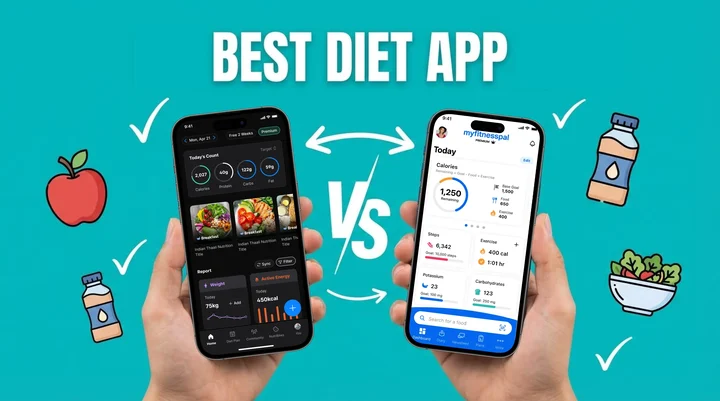
Short answer first. NutriScan is the faster app if most of what you eat is homemade, mixed, or served on a restaurant plate. MyFitnessPal is the better one if you live off packaged food with barcodes. NutriScan gives you 5 photo scans a week free, 4 Monika voice calls a week free, and full micronutrients on both plans. Premium is about $59 a year, standard US prices as of mid 2026 that change by region, and it adds unlimited scans, the 28-day diet plan and the grocery list. MyFitnessPal keeps the bigger packaged-food database, but both its barcode scanner and its Meal Scan photo logging sit behind Premium.
Last verified: August 23, 2026
| NutriScan | MyFitnessPal | |
|---|---|---|
| Price | about $59 a year | $19.99 a month or $79.99 a year |
| Free photo scans | 5 a week | None, Meal Scan is Premium |
| Free voice AI | Monika, 4 calls a week | Voice input is Premium |
| Barcode scan | Packaged Food tag by text or voice | Yes, Premium only |
| Micronutrients | Free on both plans | Premium |
| Time per meal | About 30 seconds | 15 to 20 minutes of logging a day |
TL;DR - NutriScan vs MyFitnessPal Comparison Guide
Who it is for: Anyone choosing between AI-powered meal scanning and traditional manual food logging for nutrition tracking
Main difference: NutriScan uses AI photo recognition for quick logging; MyFitnessPal relies on manual search and barcode scanning
Best for health conditions: NutriScan offers specialized diet plans for PCOS, diabetes, pregnancy; MyFitnessPal focuses on general calorie counting
Time investment: NutriScan: 30 seconds per meal; MyFitnessPal: 15-20 minutes daily for detailed logging
Verdict: NutriScan for homemade and restaurant food, MyFitnessPal for packaged food with barcodes - use our macro calculator to find your targets
I once spent 15 minutes staring at my phone, trying to work out the calories in a homemade curry that was not in any database. Anyone who has used a nutrition app knows that particular pain.
 When you are still typing food names 15 minutes later...
Research shows users spend an average of 15-23 minutes daily on food logging (PMC - Electronic Dietary Self-Monitoring). That is hours a week spent typing, searching and guessing portion sizes. Meanwhile 89% of people say they do not have a clear picture of how much protein, fiber, carbs, sugar and salt they eat daily (MyFitnessPal 2025 Survey).
So here is my honest review of both, after testing them side by side and reading the research on how accurate either approach really is.
What Makes These Apps Different?
Before we compare features, let me explain what each app actually does differently.
MyFitnessPal is the granddaddy of nutrition apps. With over 270 million users and a database of 20.5 million foods, it has been around since 2005 (MyFitnessPal Press Release). The app works primarily through manual food logging - you search for foods, scan barcodes, or add items from their massive database.
NutriScan App takes a different approach as an AI-powered calorie tracker. Instead of typing and searching, you simply click a picture of your meal. The AI food scanner instantly analyzes what is on your plate and gives you complete nutrition breakdown - calories, protein, carbs, fat, and even micronutrients like fiber, potassium, and calcium. Plus, it creates personalized diet plans based on your specific health goals like weight loss, muscle gain, diabetes management, PCOS, or pregnancy.
Think of it this way - MyFitnessPal asks you to be the data entry person. NutriScan asks you to just eat and snap. This photo-based calorie counting approach is changing how people track their nutrition.
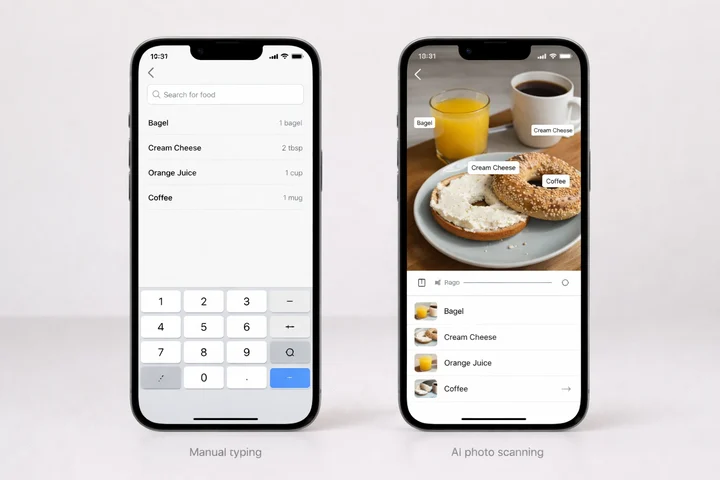 The fundamental difference: AI photo scanning vs manual food logging
The Accuracy Problem With Manual Logging
Here is something most people do not know. A validation study published in the Journal of Medical Internet Research found that MyFitnessPal users without training showed poor correlations for energy and macronutrient intake, with accuracy ranging from just 0.21 to 0.42 compared to professional dietary assessment (JMIR Validation Study).
What does this mean? Even when you think you are tracking correctly, the numbers might be way off.
Another 2024 study from the University of Sydney found that manual food-logging apps overestimated energy for Western diets by an average of 1040 kilojoules, while underestimating for Asian diets by 1520 kilojoules (University of Sydney Research). This is huge if you are seriously trying to manage your weight or health condition.
The Hidden Cost of Inaccurate Tracking
The issue is simple - most of us are terrible at estimating portions. We underestimate how much rice we ate. We forget the oil used in cooking. We skip logging that handful of chips.
Research published in Public Health Nutrition confirms that apps like MyFitnessPal were found to underestimate values for energy, carbohydrates and fat and overestimate values for protein when compared with professional food composition tables (PMC Filipino Study).
Does MyFitnessPal Have an AI Food Scanner?
Yes. It is called Meal Scan, and it sits on the paid tiers only. MyFitnessPal Premium runs $19.99 a month or $79.99 a year and turns on Meal Scan photo logging along with barcode scanning, voice logging and gram-level macros (MyFitnessPal Premium page). The free tier keeps the 20-million-plus food database and manual search, and nothing else from that list. Prices are standard US prices as of mid 2026 and change by region. NutriScan puts photo scanning on its free plan instead, 5 scans a week, then removes the cap on Premium.
What separates the two apps is what happens after the photo.
A 2024 study evaluating AI nutrition apps found MyFitnessPal hit 97% accuracy on food identification from images, the highest among the apps tested (PMC AI Evaluation Study). The catch: AI apps do well on Western foods laid out separately on a plate and struggle with mixed dishes and culturally diverse foods.
NutriScan was built for the harder case, dal and roti, sushi, a Mediterranean spread, American fast food. You tag the meal as homemade, restaurant, street food or packaged, then set cooking method and oil level before the numbers land.
Pro Tip
NutriScan lets you select from 8 food types (Home Made, Packaged Food, Restaurant/Cafe, Office, Hostel, Street Food, Supplements, Hotel/Event Buffet) and 11 cooking methods (Deep-fried, Air-fried, Stir-fried, Oven-baked, Roasted, Steamed, Boiled, Grilled, Raw, Mixed, Not Sure) for precise nutrition analysis.
Dr. Juliana Chen, lead researcher at University of Sydney, warns that image recognition makes logging easier but you still have to check the detected portion against what you actually ate (ScienceDaily). NutriScan leaves that check in your hands: edit portions with plus and minus buttons, add a missing item, delete one that does not belong.
 That moment when AI recognizes your entire meal in seconds

NutriScan's crop screen lets you specify food type (Home Made, Restaurant, Street Food, etc.) and cooking method for accurate nutrition analysis. @Path: Home > Camera Icon > Click Picture

Real-World Examples: How Both Apps Handle Common Situations
Three everyday situations show the practical difference.
Situation 1: Eating Homemade Food
Maria in Mumbai cooks traditional Indian food daily - dal, sabzi, chapati, rice. With MyFitnessPal, she has to search each item, guess cooking oil quantity, and estimate portion sizes. The Indian food database is limited, so she often picks generic items that may not match. For a detailed guide on this challenge, read our post on how to count calories in Indian food.
With NutriScan, Maria photographs the thali once. The scanner picks out dal, chapati, sabzi and rice, she sets the oil level to match how her family cooks, and 30 seconds later she has macros and micronutrients for the whole plate.
Situation 2: Dining at a Restaurant
James in Singapore eats out three times a week, and restaurant meals hide their ingredients and portions. With manual logging he either skips the entry or guesses, and guessing leads to underreporting of 20-30% of the calories he ate. With NutriScan he snaps the dish, tags it "Restaurant / Cafe", and gets the numbers plus a NutriScore that tells him whether the meal fits his goal.
Situation 3: Managing a Health Condition
Priya has PCOS, so she watches carbs, fiber and glycemic impact rather than calories alone. MyFitnessPal shows basic macros and stops there. Read more on PCOS-friendly foods to include in your diet.
NutriScan carries diet plans for PCOS, diabetes, pregnancy, weight loss and muscle gain, shows top micronutrients on every meal, and surfaces patterns through NutriBites and its insights.
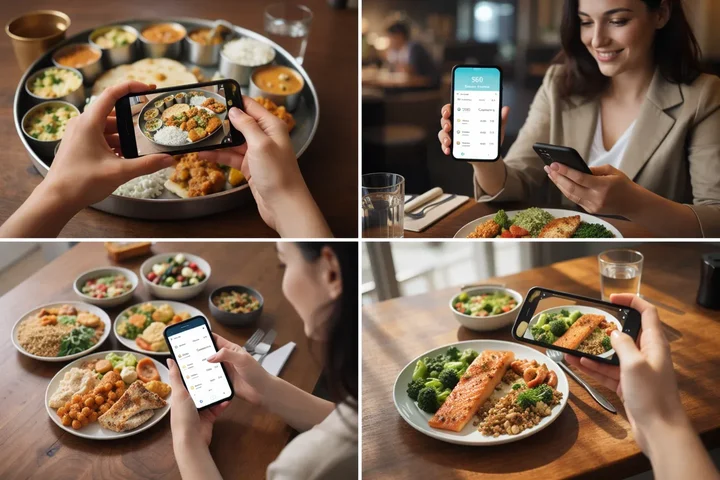 From homemade Indian thali to restaurant dining - how NutriScan handles diverse scenarios
The Time Factor: Minutes Add Up
At 20 minutes a day, manual logging costs you 140 minutes a week, 10 hours a month, about 120 hours a year. That is 5 full days spent typing food names. A systematic review on mobile app usage found engagement with nutrition apps drops off over time, partly because that burden keeps piling up (PMC Review).
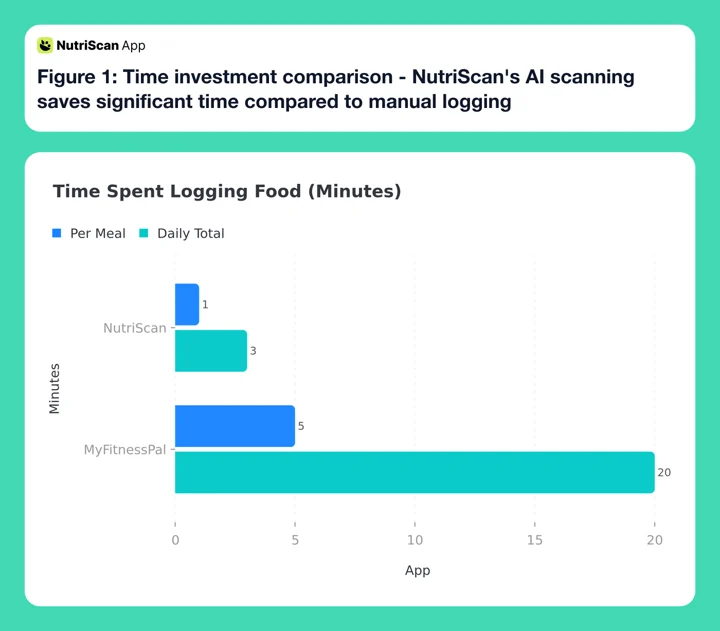 Figure 1: Time investment comparison - NutriScan's AI scanning saves significant time compared to manual logging
NutriScan dramatically cuts this time. Snap a picture, adjust if needed, done. Most meals take under a minute to log. The app also has features like "Copy Meal to Today" and "Repeat Meals" for foods you eat regularly - so yesterday's breakfast becomes today's with one tap.
Feature-by-Feature Comparison: NutriScan vs MyFitnessPal
Let me break down the specific features of these nutrition tracking apps so you can see exactly what each calorie counter offers.
Meal Logging Methods
| Feature | NutriScan | MyFitnessPal |
|---|---|---|
| AI Image Recognition | Yes - Primary method | Yes - Meal Scan, Premium only |
| Manual Search | Yes | Yes - Primary method |
| Barcode Scanning | No - packaged food goes in through the Packaged Food tag, by text or voice | Yes - Premium only |
| Voice Input | Yes | Yes - Premium only |
| Recipe Builder | Basic | Advanced |
Nutrition Tracking Depth
| Feature | NutriScan | MyFitnessPal |
|---|---|---|
| Calories | Yes | Yes |
| Macros (Protein, Carbs, Fat) | Yes | Yes |
| Micronutrients | Yes - free on every meal | Limited in free version |
| NutriScore Rating | Yes | No |
| Cooking Method Impact | Yes | No |
| Oil Level Adjustment | Yes | No |
Diet Planning
| Feature | NutriScan | MyFitnessPal |
|---|---|---|
| Personalized Diet Plans | Yes - 28-day plans | Limited |
| Goal-Based Plans (PCOS, Diabetes, etc.) | Yes | No |
| Grocery Lists | Yes - Weekly and Monthly | No |
| Regional Food Focus | Yes | Limited |
Unique Features
| Feature | NutriScan | MyFitnessPal |
|---|---|---|
| AI Chat About Meals (NutriBites) | Yes | No |
| Voice-Powered Assistant (Monika) | Yes | No |
| Meal Timeline Insights | Yes | Basic |
| Map-Based Eating Location Tracking | Yes | No |
| Community Ranking | Yes | Yes |
| Vacation Mode | Yes | No |
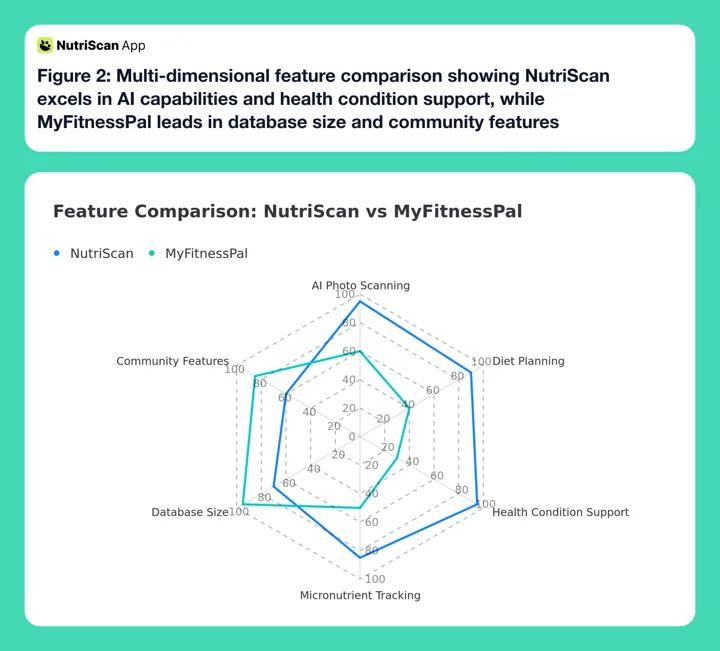 Figure 2: Multi-dimensional feature comparison showing NutriScan excels in AI capabilities and health condition support, while MyFitnessPal leads in database size and community features
Where Foodvisor Fits Next to NutriScan and MyFitnessPal
Foodvisor is the third name people bring up in this comparison, so here is the short version. Foodvisor bundles AI photo logging with a registered dietitian you can message, and it keeps the photo scans on the paid plan, so there is no free scanning at all. Pricing is the messy part: its own support pages say there is no fixed universal price, and on 7 August 2026 its US App Store listing carried ten in-app purchase tiers at once, from $23.99 to $89.99 a year.
Against NutriScan, Foodvisor's draw is the human dietitian. NutriScan answers back through Monika, the voice AI, and NutriBites, the chat over your meal timeline, and it scans 5 meals a week for free. Against MyFitnessPal, Foodvisor is photo-first while MyFitnessPal is database-first with Meal Scan bolted on to Premium. Full breakdowns live in NutriScan vs Foodvisor and Foodvisor vs MyFitnessPal.
The Diet Planning Difference
MyFitnessPal tells you what you ate. NutriScan tells you what you ate and what to eat next.
The plan builder asks about your location, eating schedule, food restrictions, activity level and health goal, then generates a 28-day diet plan with meals for each slot, quick recipes, portion sizes and a grocery list. A study on mobile-based nutrition tracking found people using an app plus dietitian input lost more weight than people tracking alone (MDPI Nutrients Study), and diet planning is how NutriScan puts that guidance in the app. It is Premium only.
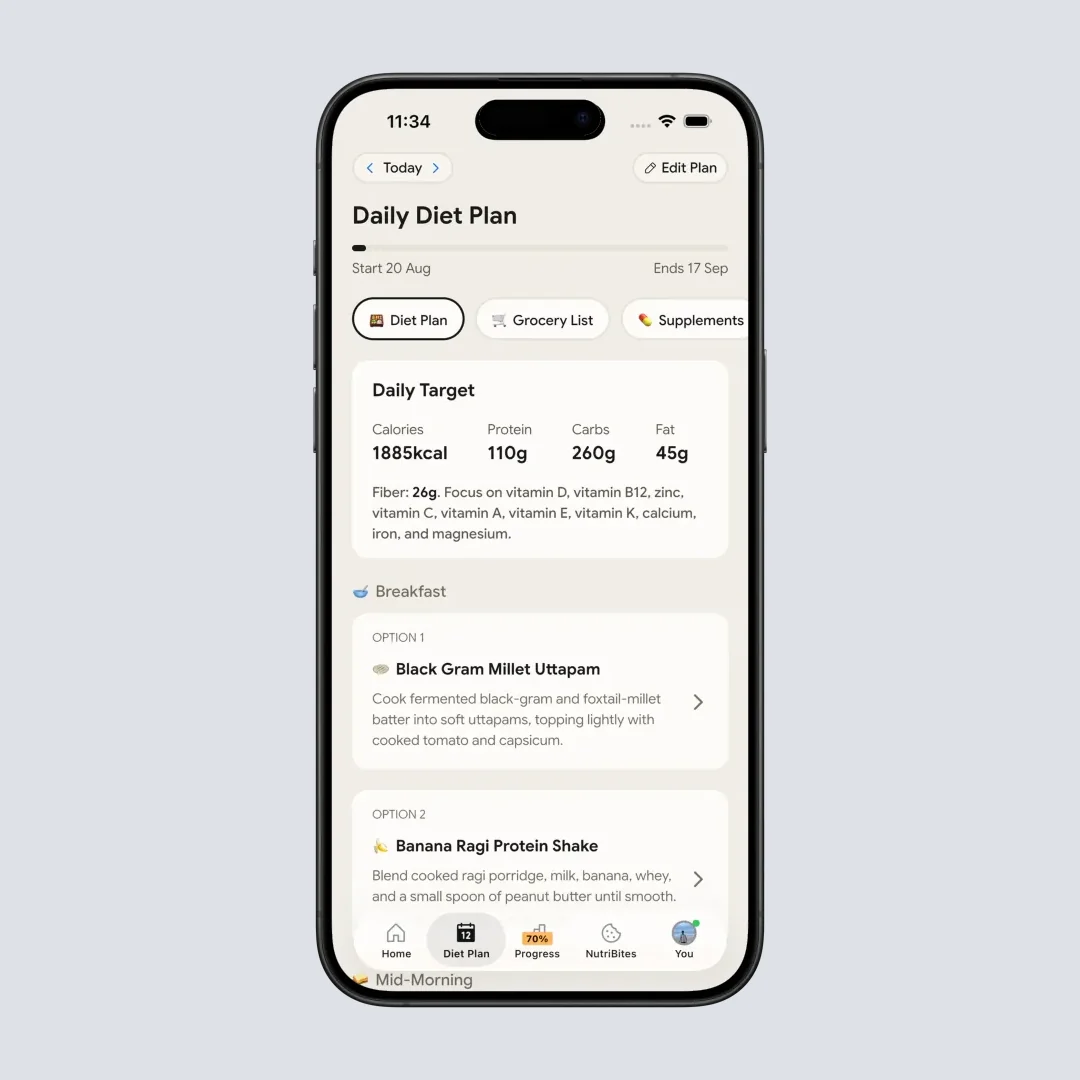
NutriScan's 28-day diet plan includes personalized meals based on your health goals, eating schedule, and food preferences. @Path: Home > Bottom Nav Diet Plan
Understanding Your Meals vs Just Counting Calories
Calorie counting on its own does not make you healthier.
A systematic review on mobile app usage found that while app-based tracking supports modest weight loss over 3-6 months, long-term sustainability of these results remains questionable without additional support structures (PMC Mobile Apps Review).
You can hit your calorie goal on pizza alone and still eat badly. NutriScore rates every meal on nutritional quality instead, in five bands, so you can tell whether breakfast was nourishing or just filling, and watch the trend over weeks. It is free on both plans.
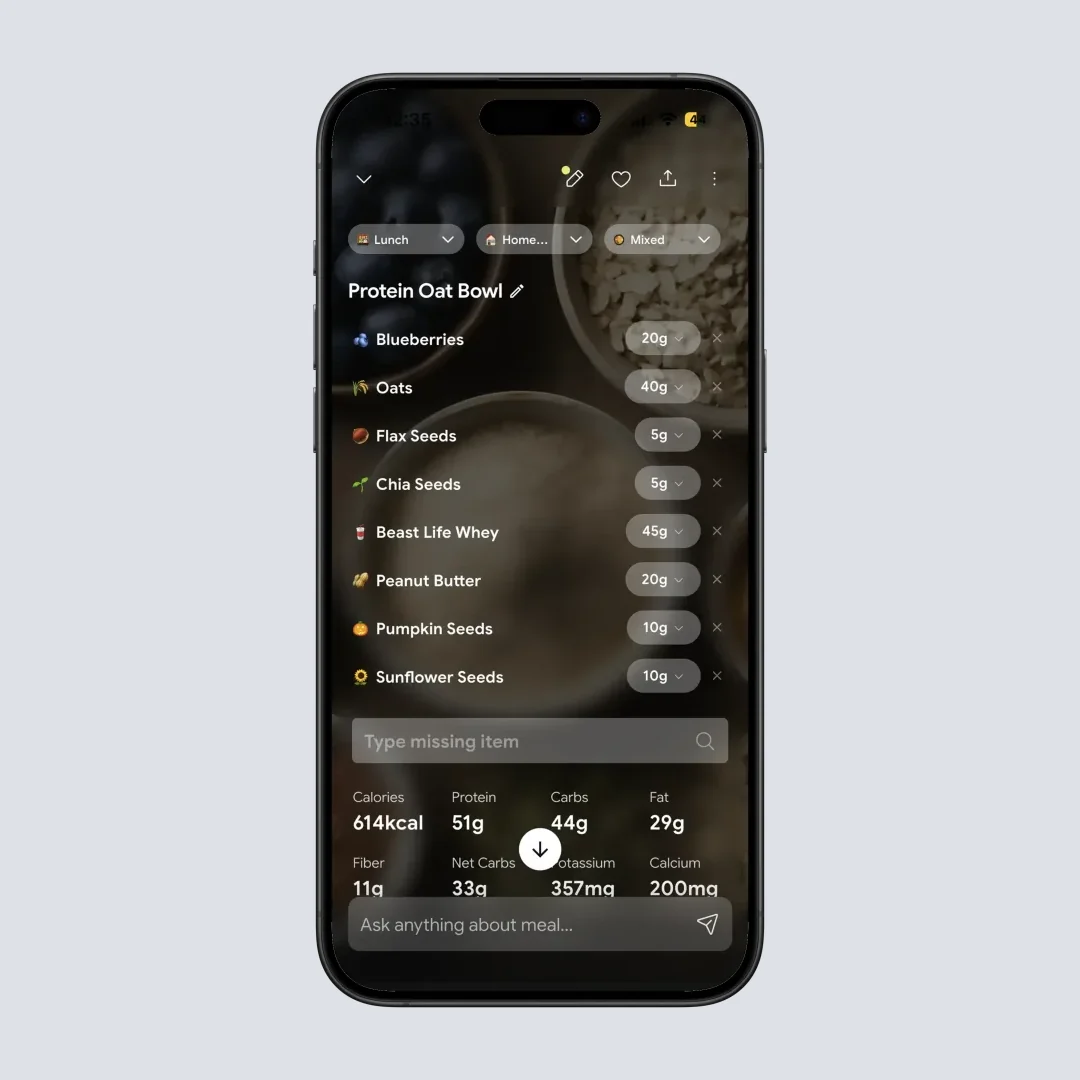
The Nutrition Details Page shows complete macro breakdown, NutriScore rating, and top micronutrients for every meal. @Path: Home > Meal Item
NutriBites lets you ask your meal timeline questions. Bloated on Tuesday, flat on Thursday, it reads back what was different about those days. Free on both plans as well.
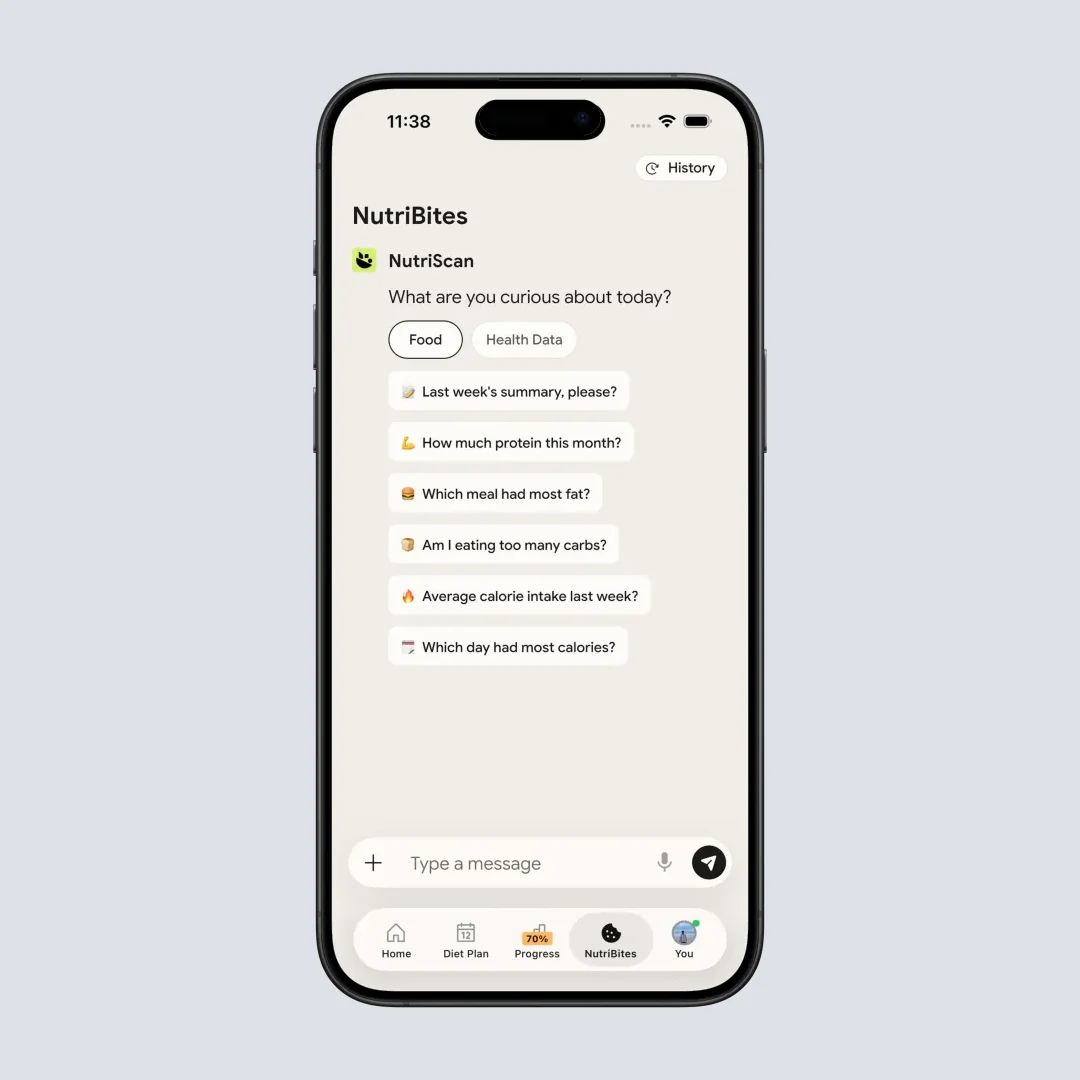
NutriBites lets you chat with your meal timeline - ask questions about eating patterns and get AI-powered insights. @Path: Home > Bottom Nav - NutriBites

What About Different Health Goals?
Different goals put weight on different features. Here is how the two apps split.
Weight Loss
Both apps build a calorie deficit, and consistency decides the result: people who track 5 or more days a week lose more weight than irregular trackers (PMC Tracking Study). MyFitnessPal brings the bigger community. NutriScan brings a weight-loss diet plan built around satiety and nutrient density.
Winner for Weight Loss: Tie - depends on whether you prefer community support or personalized meal planning.
Diabetes Management
Diabetes needs carb tracking with an eye on glycemic impact; our diabetic diet plan guide has meal ideas. MyFitnessPal counts carbs without separating their types. NutriScan carries diabetes as a core goal: set targets with the diabetes macro calculator, then let the plan build meals for blood sugar management.
Winner for Diabetes: NutriScan
PCOS Management
PCOS means working on insulin resistance, inflammation and hormone balance through food; our 7-day anti-inflammatory PCOS meal plan shows what that looks like on a plate. MyFitnessPal has no PCOS-specific features, and a 2024 study of PCOS apps found most lack evidence-based content and personalization (PMC PCOS App Study). NutriScan treats PCOS as a goal: find targets with the PCOS macro calculator, then get plans built on low-glycemic, anti-inflammatory foods.
Winner for PCOS: NutriScan
Pregnancy Nutrition
Pregnancy changes micronutrient needs by trimester and adds a list of foods to avoid; our complete pregnancy diet plan guide covers it. MyFitnessPal handles pregnancy through partner apps. NutriScan runs it as a dedicated goal, with the pregnancy macro calculator for trimester-specific targets.
Winner for Pregnancy: NutriScan
Muscle Gain
Muscle gain comes down to protein intake and timing; see our guide to high-protein snacks. MyFitnessPal has the deeper supplement and protein database plus a bigger gym community. NutriScan runs muscle gain as a goal with matching plans, and the macro calculator sets your protein target.
Winner for Muscle Gain: Slight edge to MyFitnessPal for community; NutriScan for diet planning
5 Tips to Get the Most From Either App
Whichever app you pick, these habits decide whether the tracking sticks.
Tip 1: Log Meals Right After Eating Memory fades fast. Studies show logging proximal to eating improves accuracy significantly (PMC Self-Monitoring Study). With NutriScan, just snap a photo before you start eating.
Tip 2: Use the Repeat Feature for Regular Meals If you eat the same breakfast most days, set it as a repeat meal in NutriScan. This saves time and ensures consistency.
Tip 3: Track Cooking Methods A steamed vegetable has very different nutrition than a deep-fried one. NutriScan lets you specify cooking method for accuracy.
Tip 4: Do Not Forget Liquids Drinks add up fast. That chai, coffee with sugar, juice - all need to be tracked.
Tip 5: Connect With Health Data Sync your app with Apple Health or Google Fit to see how nutrition connects with activity, sleep, and other metrics.
Step-by-Step: Making Your Decision
Step 1: Name your primary goal. Plain calorie counting, both work. PCOS, diabetes or pregnancy, NutriScan has dedicated plans for each.
Step 2: Look at what you actually eat. Homemade and mixed dishes point to NutriScan. Packaged food with barcodes points to MyFitnessPal Premium.
Step 3: Price your time. Detailed manual logging runs 15-20 minutes a day. A photo scan runs about 30 seconds.
Step 4: Test both free plans. Five free NutriScan scans a week is enough to try the scanner on the meals a food database usually gets wrong, your curries, your restaurant plates, your mixed bowls. MyFitnessPal free is manual search only. NutriScan also starts a 7-day Premium trial through your app store; whether a card is collected depends on your platform and region.
Step 5: Check what you would pay for. NutriScan Premium adds unlimited scans, the 28-day diet plan and the grocery list. NutriScore, micronutrients, NutriBites and 4 Monika calls a week are already free. MyFitnessPal Premium adds Meal Scan, barcode scanning, voice logging and detailed reports.
My Honest NutriScan App Review Verdict
After testing both food diary apps and reading the research, here is where I land.
| What you get | NutriScan Free | NutriScan Premium |
|---|---|---|
| Meal scans | 5 per week | Unlimited |
| Monika voice calls | 4 per week | Unlimited |
| NutriScore, macros, micronutrients | Yes | Yes |
| Meal history | Unlimited | Unlimited |
| 28-day diet plan, grocery list | No | Yes |
| Price | $0 | about $59 a year |
Prices are standard US prices as of mid 2026 and change by region. If you want more voices than mine, read what users say in their own NutriScan app reviews and the longer is NutriScan any good breakdown.
Choose MyFitnessPal if:
- You are in the US/UK with access to mainly Western foods
- You prefer detailed manual control over every food entry
- You want a large social community for motivation
- You primarily eat packaged foods with barcodes
- You are focused purely on calorie counting for weight loss
Choose NutriScan if:
- You eat diverse, homemade, or ethnic cuisines
- You want to spend less time logging and more time living
- You have specific health goals like PCOS, diabetes, or pregnancy
- You want AI-powered diet planning, not just tracking
- You want to understand your food patterns with smart insights
The best nutrition app is the one you will actually open in week 12. Studies consistently show that engagement is the strongest predictor of success (PMC Mobile App Review).
If manual logging feels like homework and you keep quitting, try NutriScan's photo-based approach. If you enjoy the ritual of detailed tracking, MyFitnessPal's depth might suit you better.
What matters most is finding a system that fits your life and sticking with it.
Frequently Asked Questions
Q1: Can NutriScan accurately identify Indian, Asian, and other ethnic foods?
A: Yes. NutriScan was specifically designed to handle diverse cuisines globally. The AI is trained on foods from multiple countries and cultures. You can also specify food type (homemade, restaurant, street food) and adjust cooking method and oil level for accuracy. Research shows that AI apps struggle more with mixed cultural dishes (University of Sydney Study), but NutriScan's adjustable features help address this.
Q2: Is manual logging more accurate than AI photo recognition?
A: Not necessarily. Studies show manual logging accuracy depends heavily on user knowledge and training. Without proper guidance, MyFitnessPal users showed accuracy correlations as low as 0.21-0.42 (JMIR Study). AI photo recognition with user verification can actually be more consistent, as it removes the burden of portion estimation and food identification from the user.
Q3: Which app is better for long-term weight loss maintenance?
A: Research suggests apps that combine tracking with personalized guidance and behavior change features lead to better long-term outcomes (PMC Weight Loss Review). NutriScan's diet planning and AI insights provide more guidance than pure tracking apps. However, the most important factor is consistent use - whichever app you will use regularly is the better choice.
Q4: Can I use both apps together?
A: While technically possible, this is not recommended. Using two tracking apps doubles your time investment and creates confusion. Pick one app, commit to it for at least 2-4 weeks, then evaluate if it is working for you.
Q5: Does MyFitnessPal have an AI food scanner?
A: Yes. MyFitnessPal calls it Meal Scan and keeps it on the paid tiers, next to barcode scanning and voice logging. Premium runs $19.99 a month or $79.99 a year, standard US prices as of mid 2026. The free tier gets the food database and manual search only. NutriScan puts photo scanning on the free plan, 5 scans a week, and removes the cap on Premium at about $59 a year. If you want a wider shortlist, see our MyFitnessPal alternatives roundup.
Q6: How does Foodvisor compare to NutriScan and MyFitnessPal?
A: Foodvisor pairs AI photo logging with a registered dietitian you can message, and it keeps photo scans on the paid plan, so there are no free scans. Its price shifts by country and promotion; the US App Store listing carried ten tiers at once on 7 August 2026, from $23.99 to $89.99 a year. NutriScan scans 5 meals a week free and answers questions through Monika and NutriBites instead of a human dietitian. MyFitnessPal stays database-first.
Q7: What makes NutriScan's NutriScore different from calorie counting?
A: Calorie counting only tells you quantity of food. NutriScore evaluates quality - looking at nutrient density, balance of macros, and overall health impact. Two meals with the same calories can have very different NutriScores. For example, 400 calories from grilled chicken with vegetables scores much higher than 400 calories from sugary snacks. This helps you make better food choices beyond just hitting calorie targets.
Download NutriScan and photograph your next meal. Five scans a week cost nothing.
