NutriScan vs Fooducate: Which Nutrition App Fits Your Lifestyle?
 ChatGPT
  Claude
  AI Mode
  Perplexity
 Fooducate grades barcoded products from a 350,000-item US database and explains why an ingredient scores badly; NutriScan reads a photo of the meal, which is what covers homemade and regional dishes a barcode cannot. NutriScan's free plan gives 5 AI scans a week with NutriScore and micronutrients on every meal. Premium is about $59 a year and adds 28-day plans for diabetes, PCOS and pregnancy.
Last verified: August 23, 2026
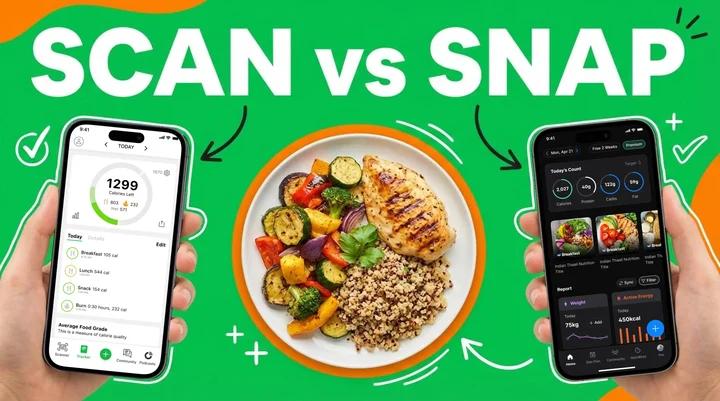
Have you ever spent 10 minutes trying to log your homemade dal and rice into a calorie counting app? I have. And it was frustrating enough to make me want to quit nutrition tracking altogether.
TL;DR - NutriScan vs Fooducate Quick Comparison
The problem: Manual food-logging apps underestimate energy intake for Asian diets by an average of 1520 kilojoules (University of Sydney, 2024)
Fooducate: Barcode-based, 350,000+ US products, education-focused grading system, limited for homemade and regional food
NutriScan: AI photo-based, works with homemade and regional meals, personalized diet plans, health condition support, voice AI assistant Monika
Key difference: One app asks you to search databases. The other asks you to take a photo.
The feature that changes everything: Revealed near the end - it is what separates tracking from transformation
The Real Problem With Traditional Food Tracking
Let me be honest with you. Most of us do not eat pre-packaged food with barcodes. We eat home-cooked meals, street food, and dishes our grandmothers taught us to make. Traditional calorie counting apps were built for a Western diet where you scan a cereal box or a protein bar. But what happens when you want to log your mom's rajma chawal or a bowl of pho from the local shop?
Research published in the Journal of Medical Internet Research in 2024 confirms this struggle. The study found that AI food recognition systems face limitations in recognizing mixed dishes or deciphering layered foods with multiple ingredients. This is where the difference between NutriScan and Fooducate becomes very clear.
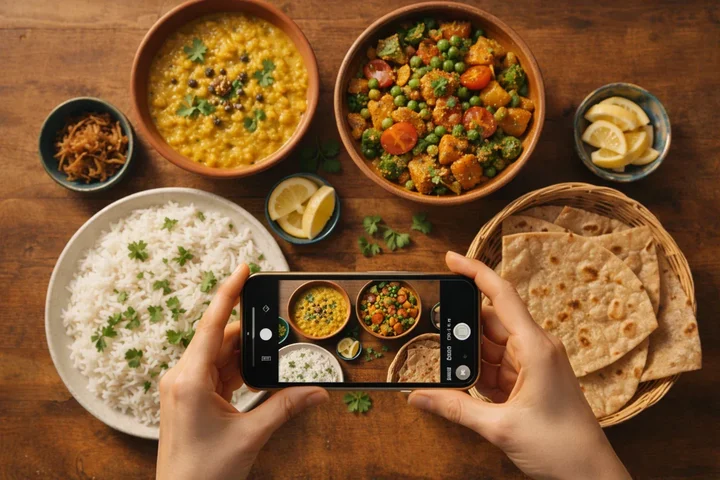 Most of us eat homemade food that no barcode scanner will ever recognize
Why This Matters for Your Health Goals
If your app cannot accurately track what you eat, your entire diet plan falls apart. You might think you are eating 1500 calories when you are actually eating 2000. Or worse, you might be missing out on important nutrients because the app does not recognize your regional food.
A systematic review published in Frontiers in Digital Health (2024) found that using nutrition apps that allow users to receive personalized expert advice encouraged the adoption of healthier eating habits. The key word here is personalized. Not generic advice meant for everyone.
 That moment when you realize your calorie app has been wrong this whole time
How Fooducate Works: The Barcode Approach
Fooducate has been around since 2010, and it built its reputation on one main feature - barcode scanning. The app has a database of over 350,000 product barcodes. When you scan a packaged food item, it gives you a grade from A to D based on the nutritional quality.
Here is what Fooducate does well:
- Education Focus: The app explains why certain ingredients are good or bad for you. About 18.5% of users in one study specifically praised its nutrition breakdowns
- Calorie Tracking: You can track your daily calorie intake and see how it matches your weight loss goals
- Community Support: There is a community feature where users share tips, recipes, and motivation
- Health Condition Support: The premium version offers filters for keto, paleo, vegan, and other diets
Where Fooducate Falls Short
But here is the thing - Fooducate was designed primarily for the American grocery store experience. User reviews repeatedly mention these issues:
Fooducate Limitations
- Limited Barcode Recognition: Many products are not in the database. Adding new items often fails or requires sharing with external services
- Homemade Food Problem: If you cook at home, you have to manually search for each ingredient. This gets tedious very quickly
- Poor Portion Flexibility: Portion sizes are limited to preset options. You cannot easily log exactly what you ate
- US-Centric Database: Indian users and others outside the US find the scanning database lacking regional foods
One Google Play reviewer said: "I home cook everything I eat. Trying to input a food or recipe of my own is somewhat challenging." This is a common complaint that points to a fundamental design limitation.
How NutriScan Works: The AI Photo Approach
NutriScan takes a completely different approach. Instead of relying on barcode scanning, you simply take a picture of your meal. The AI analyzes the image and provides detailed nutrition information including calories, protein, carbs, fat, and micronutrients.
Here is what makes NutriScan different:
- Photo-Based Tracking: Just click a picture of your food. The AI identifies the items and estimates portions. No manual searching required (Home > Camera Icon > Click Picture). See how meal scanning works in detail
- Homemade Food Friendly: Whether you are eating dal makhani, biryani, or a mixed vegetable curry, NutriScan can analyze it from the photo
- NutriScore System: Each meal gets a NutriScore that tells you how healthy it is. This gives you instant feedback on your food choices
- Personalized Diet Plans: Based on your goals - weight loss, muscle gain, diabetes management, PCOS, or pregnancy - NutriScan creates a custom diet plan for you
- Regional Food Knowledge: The app understands local and regional foods that barcode-based apps miss entirely
- Voice AI Assistant: You can talk to Monika, the AI nutritionist, and ask questions about your meals or get advice

NutriScan's scan screen: select food type (Home Made, Restaurant, Street Food), cooking method, and oil level for accurate tracking (Home > Camera Icon > Click Picture)
The AI Advantage for Mixed Dishes
This is where things get interesting. Research from the University of Sydney shows that AI-integrated apps often struggle with mixed Asian dishes. For example, calories for beef pho were overestimated by 49% in some apps.
But NutriScan addresses this by letting users select food type tags like Home Made, Restaurant/Cafe, Street Food, or Hotel/Event Buffet. You can also specify the cooking method - whether it was deep-fried, air-fried, steamed, boiled, or grilled. These details help the AI make more accurate estimations.
Additionally, NutriScan includes an oil level slider. You can indicate if your food had no oil, low oil, medium oil, or high oil. This kind of granular control is not available in barcode-scanning apps.
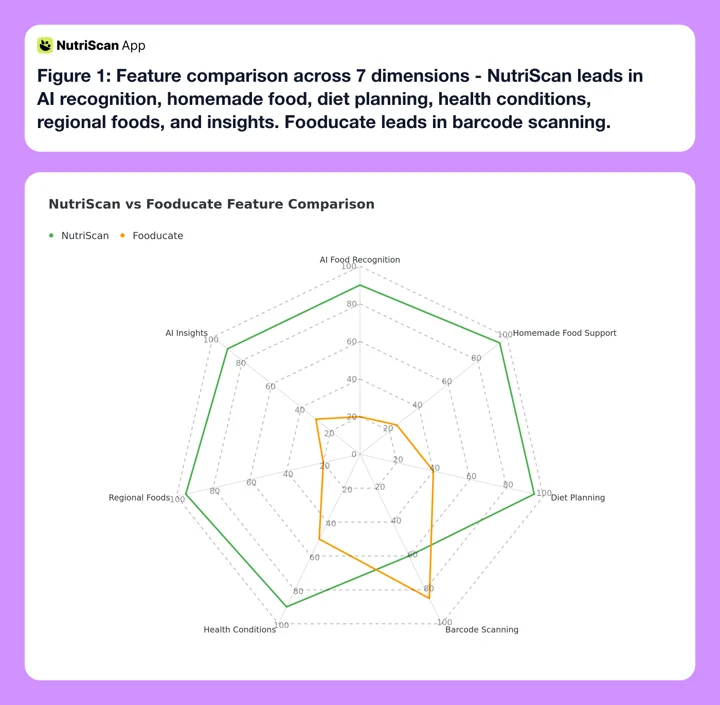 Figure 1: Feature comparison across 7 dimensions - NutriScan leads in AI recognition, homemade food, diet planning, health conditions, regional foods, and insights. Fooducate leads in barcode scanning.

Real-World Example: Tracking a Day of Eating
Let me walk you through what it would look like to track a typical Indian day of eating with both apps.
Morning Breakfast: Poha with Peanuts
| Fooducate | NutriScan | |
|---|---|---|
| Action | Search "poha" in database. Then search "peanuts" separately. Estimate portions manually. | Take one photo. AI identifies poha, estimates portion, calculates nutrition. |
| Time | 5-8 minutes | Under 1 minute |
| Accuracy | Depends on database match | AI + food type tag (Home Made) + cooking method |
Lunch: Homemade Roti with Sabzi and Dal
| Fooducate | NutriScan | |
|---|---|---|
| Action | Log each roti separately, estimate sabzi ingredients, figure out dal type. Many users give up here. | One photo captures everything. Select "Home Made" and cooking method. |
| Time | 12-15 minutes | Under 2 minutes |
| Accuracy | Multiple individual estimates stacked | Complete meal analysis with context |
Dinner: Restaurant Butter Chicken with Naan
| Fooducate | NutriScan | |
|---|---|---|
| Action | Search "butter chicken" and hope the restaurant version matches a generic entry. | Photo of meal. Select "Restaurant/Cafe" and "High Oil" on slider. |
| Time | 5-8 minutes | Under 1 minute |
| Accuracy | Generic database entry | AI factors in restaurant-style cooking with higher fat content |
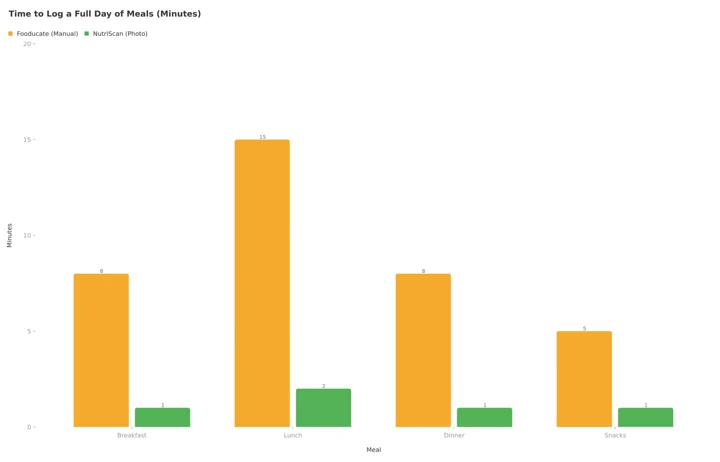 Figure 2: Time to log a full day of meals. Manual entry in Fooducate adds up to 36 minutes, NutriScan photo scanning to 5, so the photo approach saves about 31 minutes a day. Each Fooducate bar uses the top of the range in the tables above.
Diet Planning: The Biggest Difference
Here is where the two apps diverge completely.
Fooducate Diet Planning
Fooducate offers diet tips and insights. The premium version includes diet kickstart programs and personalized recommendations. But it does not create a complete meal plan for you. You are still on your own to figure out what to eat each day.
NutriScan Diet Planning
NutriScan takes your complete health profile - age, gender, height, weight, activity level, food preferences, eating schedule, and health goals - and generates a personalized diet plan. This is not just a list of foods to avoid. It is an actual meal plan with:
- Daily targets for macros and micronutrients
- Specific meal recommendations for each eating schedule (Breakfast, Mid-Morning, Lunch, Afternoon, Dinner, Bed Time)
- Two food options for each meal time so you have choices
- Quick recipes with portion sizes and benefits
- A weekly and monthly grocery list
- Lifestyle recommendations
Research from JMIR Formative Research (2023) on AI-powered meal planners found that systems which consider multiple factors - health concerns, nutritional requirements, tastes, and preferences - generated healthy and personalized meal plans that users were generally satisfied with.
This is exactly what NutriScan does. It is not just tracking what you ate. It is telling you what you should eat. Learn more about how NutriScan's diet plan feature creates personalized recommendations.
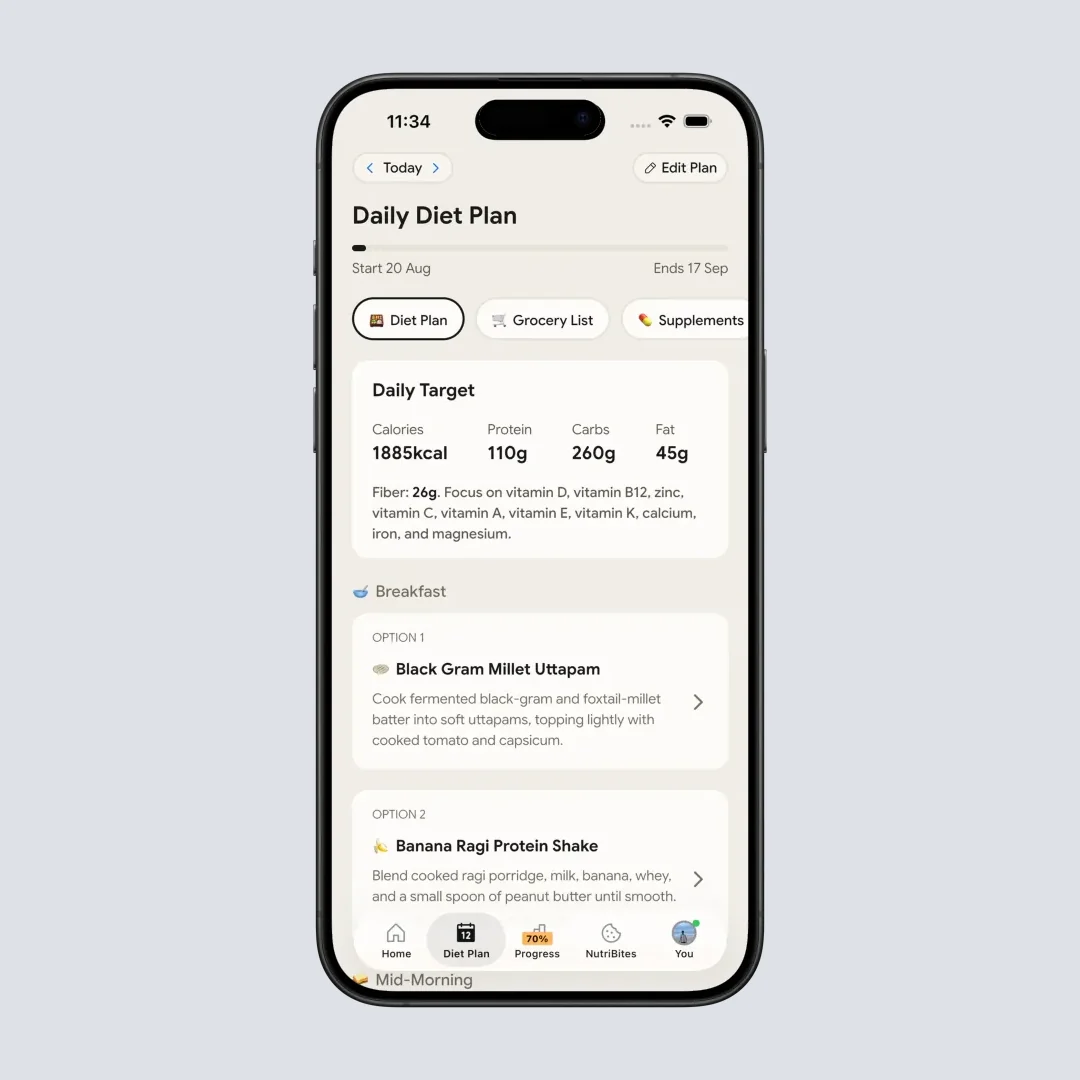
NutriScan's AI-generated diet plan with specific meal recommendations, recipes, and grocery list (Home > Diet Plan)
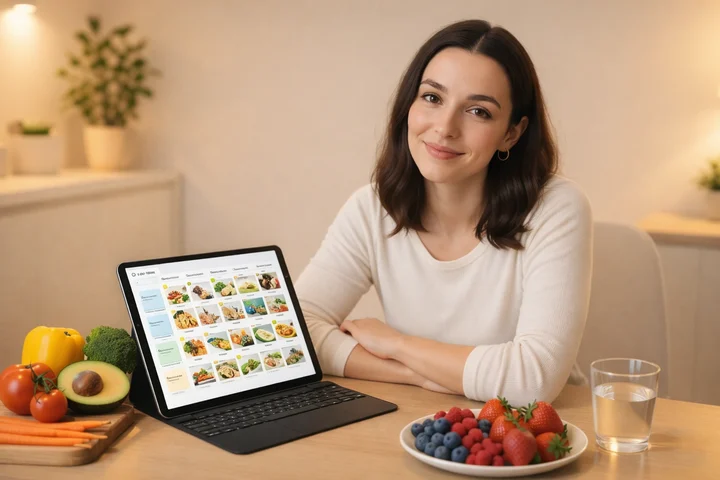 NutriScan goes beyond tracking - it creates a complete personalized nutrition plan tailored to your health goals
Understanding Your Eating Patterns
Tracking food is only useful if you learn from the data. Both apps offer some form of insights, but the depth is very different.
Fooducate Insights
Fooducate shows your daily calorie count and macro breakdown. The premium version tracks sleep, mood, and hunger levels. You can see patterns over time.
NutriScan Insights
NutriScan has a feature called NutriBites where you can ask questions about your meal timeline (Home > Bottom Nav - NutriBites). Feeling bloated? Had low energy? NutriBites checks your past meals, finds what was different, and gives you smart insights to prevent it next time.
You can ask things like:
- "Why did I feel tired yesterday afternoon?"
- "What did I eat differently on days when I had good energy?"
- "Show me my protein intake trend this week"
The app also shows a calendar view with NutriScore colors - dark green, green, yellow, orange, and red - so you can see your eating patterns at a glance. You can view metrics for today, last 7 days, or the whole month.
There is even a city map widget that shows where you have been logging meals after you have used the app for a while. This helps you identify patterns like always eating unhealthy when at a particular location. Explore how NutriScan's insights feature turns your meal data into actionable health intelligence.
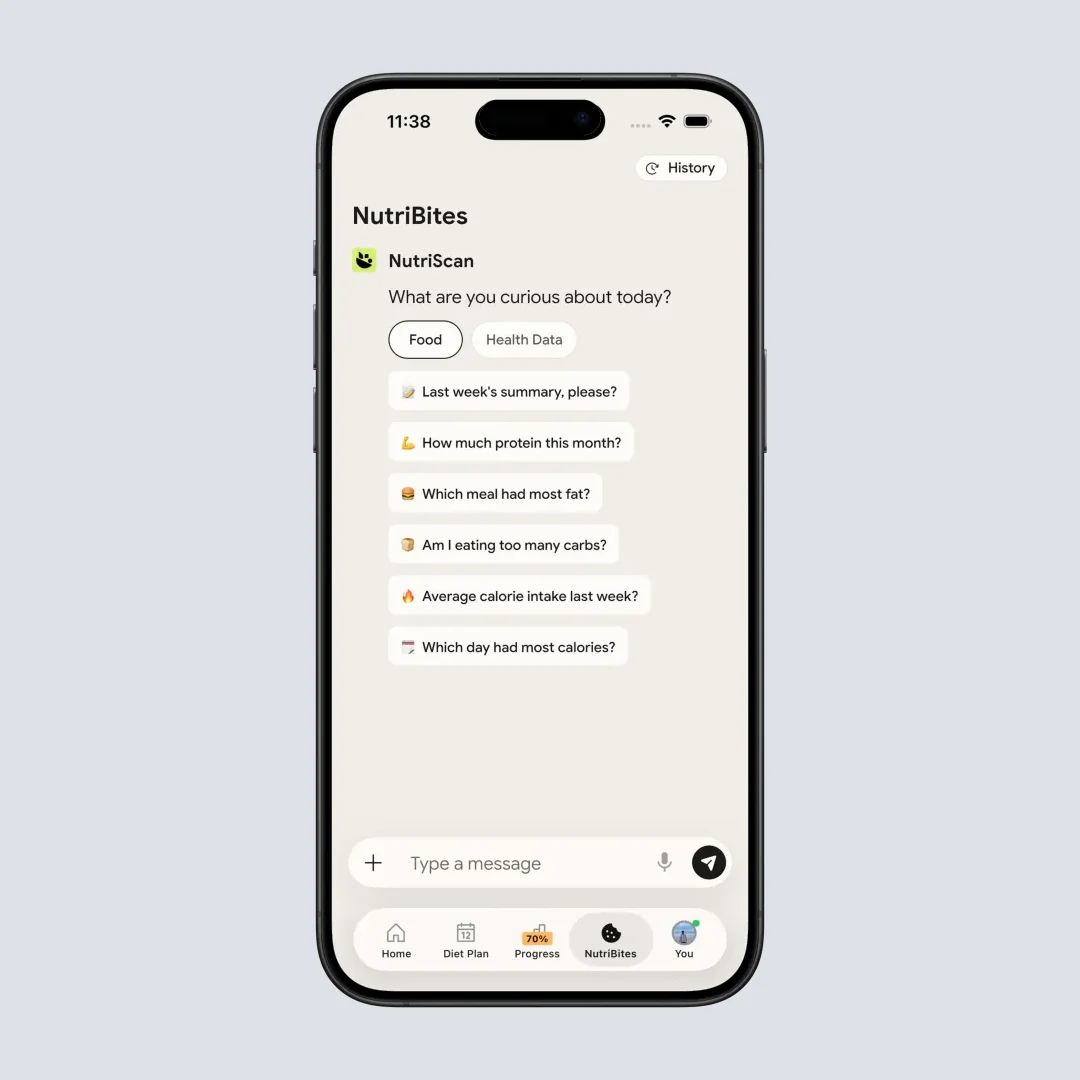
NutriBites: Ask questions about your meal timeline and get AI-powered insights into your eating patterns (Home > Bottom Nav - NutriBites)
Health Condition Support
Both apps claim to support various health conditions, but the implementation differs.
Fooducate Health Support
The premium version includes filters for low-carb and keto diets, Mediterranean diet, lower cholesterol options, heart health foods, diabetes-friendly foods, pregnancy and lactation support, and PCOS considerations. These are essentially filters on their barcode database. They help you identify packaged foods that fit your needs.
NutriScan Health Support
NutriScan was specifically designed for health conditions from day one. During onboarding, you select your primary goal:
- Weight Loss
- Muscle Gain
- Diabetes Management
- Pregnancy Nutrition
- PCOS Support
- Viral/Flu Recovery
The entire app experience - from diet planning to meal recommendations to insights - is customized based on your selected condition. The AI factors in your condition when analyzing meals and suggesting alternatives.
For example, if you have diabetes, the app will pay special attention to carbohydrate content and glycemic impact. If you are pregnant, it will highlight micronutrients important for fetal development like folate and iron. For your specific condition, our PCOS macro calculator or diabetes macro calculator can help you understand your nutritional targets. You can also explore NutriScan for PCOS to see dedicated PCOS features.
Key Insight
NutriScan builds the health condition into every feature. Fooducate adds it as a filter layer on top. The difference shows up in every interaction with the app.
Pricing and Value Comparison
Let me break down what each app costs and what you get.
Fooducate's own price list is harder to read than most, so the full breakdown lives in is Fooducate free? Fooducate Pro pricing explained.
| Feature | Fooducate Free | Fooducate Premium | NutriScan Track | NutriScan Premium |
|---|---|---|---|---|
| Calorie Tracking | Yes | Yes | Yes | Yes |
| Barcode Scanning | Yes | Yes | - | - |
| AI Photo Scanning | - | - | Yes | Yes |
| Food Grades | Yes | Yes | NutriScore | NutriScore |
| Diet Filters | Basic | Full | - | - |
| Personalized Diet Plan | - | - | - | Yes |
| Grocery List | - | - | - | Yes |
| Recipes | - | - | - | Yes |
| AI Insights (NutriBites) | - | - | Yes | Yes |
| Voice AI (Monika) | - | - | Yes | Yes |
| Health Condition Support | - | Filters only | Basic | Full |
| Community | Yes | Yes | Community | Community |
NutriScan also has a referral program where you and your friend both get 1 week of premium free when they sign up. Getting 5 referrals gives you 1 month free, and 10 referrals gives you 3 months free.
The Feature That Separates Tracking From Transformation
This is the difference-maker that turns passive calorie counting into an active health transformation.
It is NutriScan's personalized diet plan combined with real-time meal feedback.
Here is why this matters: Most nutrition apps just tell you what you ate. NutriScan tells you what you ate, how it compares to what you should eat, and exactly what to eat next to stay on track.
Think about it this way:
- Morning: You scan your breakfast. NutriScan shows you are short on protein
- AI suggests: Your lunch recommendation adjusts to include a protein-rich option
- Evening: You ask Monika, "Did I hit my protein target today?"
- Monika responds: With your exact numbers and a suggestion for dinner
This closed loop of scan ➡️ analyze ➡️ recommend ➡️ adjust is what separates a food diary from a nutrition coach. Fooducate gives you a grade. NutriScan gives you a game plan.
Research from JMIR (2024) confirms that AI-powered nutrition apps with personalized feedback loops show significantly better adherence rates than passive tracking tools. The loop keeps you engaged because every meal becomes a data point that improves your next recommendation.
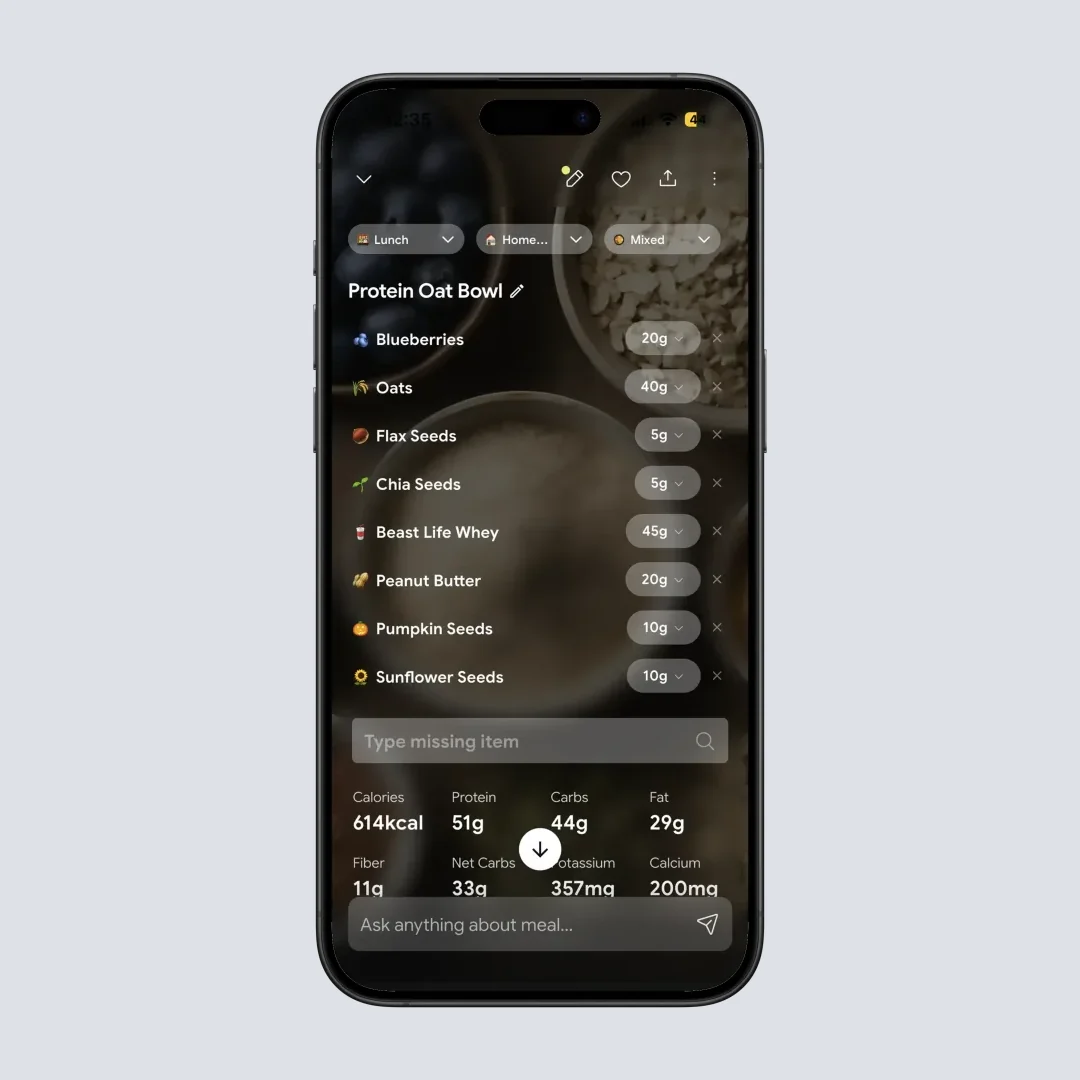
NutriScan's nutrition details: macros, micro nutrients, NutriScore, portion adjustment, and 3 meal-related questions - all from one photo (Home > Camera Icon > Click Picture > Crop Picture)
 When your nutrition app actually understands your homemade cooking

Who Should Use Which App?
Based on everything I have learned, here is my honest recommendation.
Choose Fooducate If:
- You primarily eat packaged foods from US grocery stores
- You want to learn about food ingredients and why some are unhealthy
- You prefer a community-based motivation approach
- You are okay with manual logging and searching
- Your diet is mostly Western-style with clear individual items
Choose NutriScan If:
- You cook most meals at home
- You eat regional or cultural foods not found in Western databases
- You want a complete personalized diet plan, not just tracking
- You prefer photo-based logging over manual entry
- You have specific health goals like diabetes management, PCOS, or pregnancy nutrition
- You want AI-powered insights about your eating patterns
- You appreciate the ability to talk to an AI nutritionist when you have questions
Tips for Getting the Most Out of Your Nutrition App
Whichever app you choose, here are some ways to maximize your results.
Tip 1: Be Consistent
A 2024 study on mobile weight loss apps found that greater engagement with the app was associated with significantly greater weight loss. Log every meal, even the unhealthy ones. Consistency is more important than perfection.
Tip 2: Double-Check Portions
Research emphasizes the importance of verifying that the app's portion estimates match what you actually ate. In NutriScan, use the plus/minus buttons to adjust portion size for accuracy.
Tip 3: Track Context, Not Just Food
If you are using NutriScan, take advantage of the food type tags and cooking method options. This context makes AI estimations much more accurate.
Tip 4: Use the Insights
Do not just log and forget. Review your weekly patterns. Look for trends. Ask yourself why your NutriScore was lower on certain days.
Tip 5: Combine With Other Health Data
NutriScan syncs with Apple Health. This gives you a more complete picture when you combine nutrition data with steps, sleep, and other metrics.
Tip 6: Set Realistic Goals
Apps work best when your goals are achievable. Do not try to lose 10 kg in a month. Research shows sustainable weight loss comes from gradual changes supported by consistent tracking. Our macro calculator can help set realistic daily targets.
Tip 7: Use Voice Features
NutriScan's voice AI assistant Monika can answer questions and help you log meals through conversation. This is faster than typing and more natural.
My Verdict After Using Both
Fooducate is a solid app that was ahead of its time when it launched. The educational approach - teaching you about ingredients rather than just counting calories - is genuinely helpful. If you are just starting your health journey and want to understand food labels better, it is a good starting point.
But the world has moved on. Most of us do not eat primarily from packages. We cook. We order local food. We have cultural dishes that no barcode scanner will ever recognize.
NutriScan feels like it was built for the real way people eat in 2026. The photo-based approach removes the biggest friction point in food tracking - the tedious manual logging. The personalized diet planning goes beyond tracking to actually guide you. And the focus on regional foods and health conditions shows an understanding of diverse user needs.
Is either app perfect? No. AI food recognition still has room to improve, especially for mixed dishes. But NutriScan's approach of letting you add context - food type, cooking method, oil level - helps bridge that gap.
If you are serious about using technology to improve your nutrition, I would recommend trying NutriScan and seeing how photo-based logging works for your lifestyle. For more context on how AI is transforming nutrition tracking, check out our comprehensive guide to calorie tracking and explore the NutriScore guide to understand how meal scoring works.
Related: NutriScan vs MyFitnessPal, NutriScan vs Lose It, NutriScan vs Yazio.
Frequently Asked Questions
Q1: Can Fooducate recognize homemade Indian food?
Fooducate relies on a barcode database primarily focused on US packaged products. For homemade Indian food, you would need to manually search and log each ingredient separately. Many regional dishes may not be in the database at all, requiring you to create custom entries - a process users describe as time-consuming and challenging.
Q2: How accurate is NutriScan's AI food recognition?
NutriScan's AI analyzes your food photos and provides nutritional estimates. While AI food recognition technology continues improving, NutriScan addresses accuracy concerns by letting you select food type tags (Home Made, Restaurant/Cafe, Street Food), cooking methods (fried, steamed, grilled), and oil levels. These contextual inputs help the AI make better estimations than image analysis alone.
Q3: Do I need a premium subscription to create diet plans?
In Fooducate, premium unlocks diet filters and personalized insights, but you still create your own meal plans. In NutriScan, the Premium Plan includes AI-generated personalized diet plans based on your health profile, goals, and preferences - complete with specific meal recommendations, recipes, and grocery lists.
Q4: Which app is better for diabetes management?
NutriScan was specifically designed to support health conditions including diabetes. You select "Diabetes" as your goal during onboarding, and the entire app experience - from tracking to diet planning to insights - is customized accordingly. The app pays attention to carbohydrate content and provides appropriate meal recommendations. Fooducate offers diabetes-friendly food filters in premium, but this is essentially a database filter rather than a condition-specific experience.
Q5: Can I use either app offline?
Both apps require internet connectivity for core features - Fooducate to access its barcode database and NutriScan to process AI image recognition. However, NutriScan allows you to browse your meal history and diet plan while offline. For logging new meals, you will need to be connected.
