NutriScan vs Lifesum Compared: Accuracy, Price, Verdict
 ChatGPT
  Claude
  AI Mode
  Perplexity
Short version. Lifesum is the better pick if you eat mostly Western packaged food, want a barcode scan and like a calm pastel interface. NutriScan is the better pick if you eat mixed dishes, curries or restaurant plates, because its photo scanner reads the whole plate and asks how the food was cooked. Lifesum Premium lists at $99.99 a year and drops to roughly $30.99 to $45 on promotion. NutriScan Premium is about $59 a year, and the free plan gives you 5 scans a week. Those are standard US prices as of August 2026 and they change by region.
Last verified: August 23, 2026
I used Lifesum for four weeks, then NutriScan for four weeks, logging the same Indian and Southeast Asian meals in both. Here is what actually differed.
TL;DR, NutriScan and Lifesum compared
- Best for global cuisines: NutriScan (AI trained on 2M+ dish combinations worldwide)
- Best for Western packaged food: Lifesum (strong European and American database, plus a barcode scanner)
- Best for health conditions: NutriScan (28-day plans for diabetes, PCOS, pregnancy)
- Best interface design: Lifesum (pastel graphics and the Life Score)
- Cheaper per year: NutriScan at about $59 against Lifesum at $99.99 list
- Cooking method recognition: NutriScan only (11 methods tracked)
A 2024 study in Obesity Science & Practice found that higher app engagement was directly linked to greater weight loss (Obesity Science & Practice). That is the real test between these two. The app you keep opening beats the app that photographs better.
NutriScan vs Lifesum: What Actually Differs
Research shows that dietary mobile apps are effective self-monitoring tools that result in positive effects on nutritional outcomes, especially for people managing chronic conditions like diabetes (Journal of the Academy of Nutrition and Dietetics).
The two apps split on three things: how food gets into the log, how much the database knows about non-Western dishes, and whether the app plans meals for a health condition or only counts them. Everything below sits under one of those three.
For the scan-by-scan version of the same test, I wrote it up in NutriScan vs Lifesum: the photo scan showdown.
 The struggle of choosing the right app is real
Let me break down how NutriScan and Lifesum compare across what matters most.
Is Lifesum Accurate? What the Number Depends On
Lifesum's calorie numbers are accurate for the entries somebody verified, and shaky for the ones nobody did. Three things decide which one you get.
The database entry. Lifesum mixes verified brand data with user-submitted entries. Scan a barcode on a packaged product and the numbers are right, because they come off the pack. Search for "chicken curry" and you get somebody else's guess about somebody else's recipe.
Portion estimation. Every tracker inherits this one. Lifesum asks you to pick a serving size, and most people pick low. Rice logged as one cup when the plate held two puts your day out by roughly 200 calories before anything else goes wrong.
Mixed dishes. A study in Nutrients found that food-recognition systems struggle most with mixed dishes and culturally varied foods (Nutrients Journal). A University of Sydney review reached the same conclusion about cultural coverage in food tracking apps (ScienceDaily). My idli with sambar took four separate searches in Lifesum, and the sambar entry I settled on was a guess.
For a barcoded protein bar, Lifesum is as accurate as the label. For a hawker plate or a home-cooked curry, it is as accurate as whoever typed that entry in.
NutriScan claims 95% accuracy for the foods our database covers. That is our own figure, not an independent benchmark, and it covers identifying the food and its nutrition rather than guessing the weight on your plate. No app can see grams through a lens, which is why NutriScan asks about cooking method and oil level instead of pretending it already knows.
If you want the subscription question answered rather than the accuracy one, I costed the plan in Is Lifesum Premium worth it?.
Real-World Example 1: Maria's Weight Loss Journey
Maria, a 32-year-old marketing professional from Singapore, tried both apps. With Lifesum, she found the pastel interface beautiful but struggled to log her local hawker food. The database did not recognize dishes like laksa or chicken rice accurately.
When she switched to NutriScan, the AI photo scanning identified her meals instantly. She lost 8 kg in 3 months because she could actually track what she was eating without spending 10 minutes searching for each item.
Key Insight
If you eat diverse Asian cuisines, NutriScan's AI-powered recognition saves hours of manual logging time each week.

Real-World Example 2: Raj's Diabetes Management
Raj, a 45-year-old from Mumbai with Type 2 diabetes, needed more than calorie counting. Lifesum offered general diet templates, but Raj needed something specific for his condition.
NutriScan's personalized 28-day diet plan for diabetes gave him exact meal recommendations. A randomized controlled trial in Nature Medicine confirmed that personalized dietary programs lead to significantly better health outcomes than general advice (Nature Medicine).
Raj saw his blood sugar stabilize within 6 weeks of following the NutriScan plan. For more information on diabetes-friendly meal planning, check out our diabetes macro calculator.
Real-World Example 3: Priya's PCOS Struggle
Priya, 28, has PCOS and needed an app that understood it. Research shows that 5-18% of women worldwide have PCOS, and nutritious dietary choices can significantly improve symptom management (BMC Women's Health).
Lifesum had no specific PCOS diet option. NutriScan had a dedicated PCOS diet plan built around hormone-supporting meals. Learn more about NutriScan for PCOS.
The Stories Behind Both Apps
The Lifesum Story
Lifesum was founded in Stockholm in 2013 and now serves over 65 million users across 250 countries. It has partnered with Amazon Halo and was featured at Apple's WWDC20.
Lifesum focuses on making healthy eating look beautiful with its pastel graphics and clean interface. They have diet templates for keto, paleo, Mediterranean, and other popular eating styles.
The NutriScan Story
NutriScan started from a different problem. Outside Europe and North America, most nutrition apps could not recognize local dishes, and manual logging took too long for anyone with a job.
So NutriScan built an AI that recognizes over 2 million dish combinations from cuisines worldwide. The app focuses on understanding how food was actually prepared - whether it was deep-fried, air-fried, steamed, or grilled. This matters because cooking methods significantly change nutritional values.
A Research Fact That Surprised Me
A systematic review of food-image AI found that relative errors for volume and calorie estimation put these systems level with human estimates, and sometimes ahead of them (Shonkoff et al., 2023). That is the case for photo scanning over hunting through a search box.
Feature-by-Feature Comparison
| Feature | NutriScan | Lifesum |
|---|---|---|
| AI Photo Scanning | Yes - trained on global cuisines | Yes - added recently |
| Cooking Method Recognition | 11 methods (deep-fried, air-fried, steamed, etc.) | No |
| Personalized Diet Plans | 28-day plans for specific conditions | 7-21 day general templates |
| Condition-Specific Plans | Diabetes, PCOS, Pregnancy, Weight Loss, Muscle Gain | General diet templates |
| Voice Input | Yes | Yes |
| AI Nutritionist | Monika, 4 calls a week free, unlimited on Premium | Limited chatbot |
| Micronutrient Tracking | All micronutrients, free on both plans | 24 micronutrients |
| Barcode Scanning | No, packaged food goes in through the Packaged Food tag by voice or text | Yes |
| Community Features | Ranking system with NutriScore | Social features and challenges |
| Grocery List Generation | Yes - weekly and monthly | Limited |
| Languages | 5 languages | 11 languages |
| Free Version | 5 scans a week, 4 Monika calls, NutriScore, all micronutrients, unlimited history | Basic tracking only |
| Premium Price | about $59/yr | $7.49/month or $30.99-$99.99/year |
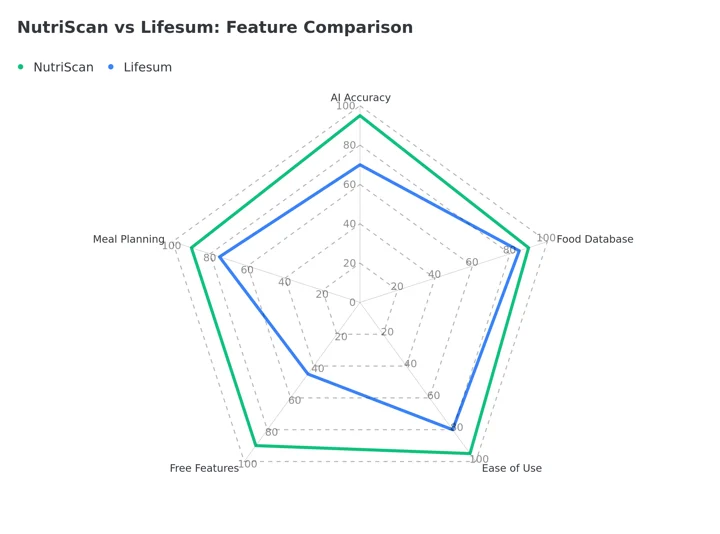 Figure 1: Feature comparison between NutriScan and Lifesum across key categories. Meal planning follows the table above: 28-day condition-specific plans plus weekly and monthly grocery lists for NutriScan, against 7-21 day general templates and limited grocery lists for Lifesum.
7 Tips for Choosing the Right Nutrition App
Tip 1: Check Database Diversity
If you eat diverse cuisines, your app needs a diverse database. Lifesum has a strong database for Western foods but struggles with Asian, African, and Middle Eastern dishes. NutriScan was specifically trained on global cuisines.
The University of Sydney review cited above found that food tracking apps still need work on cultural coverage, which leaves a lot of people logging their own food inaccurately every day.
Tip 2: Look for Photo Scanning Accuracy
Manual food logging takes time. Research shows that people abandon food tracking apps when logging becomes burdensome. NYU Tandon researchers developed AI that can calculate nutritional content from a pizza photo with high accuracy (NYU Tandon).
NutriScan uses similar AI technology. Lifesum recently added AI photo features, but user reviews suggest accuracy varies significantly.
Tip 3: Consider Your Health Condition
If you have a specific health goal like diabetes management, PCOS, or pregnancy nutrition, generic calorie counting is not enough. You need personalized planning.
Lifesum offers diet templates like keto or clean eating. NutriScan offers condition-specific 28-day diet plans with exact meal recommendations, grocery lists, and portion guidance.
Tip 4: Evaluate Voice and Multi-Modal Logging
Both apps offer several ways to log food. Lifesum lets you snap a photo, speak, type, or scan a barcode. NutriScan gives you a photo scan with crop, manual text entry, voice input, and a one-tap copy of an earlier meal, plus an AI nutritionist named Monika you can call for advice. NutriScan has no barcode scanner yet, so packaged food goes in through the Packaged Food tag by voice or text.
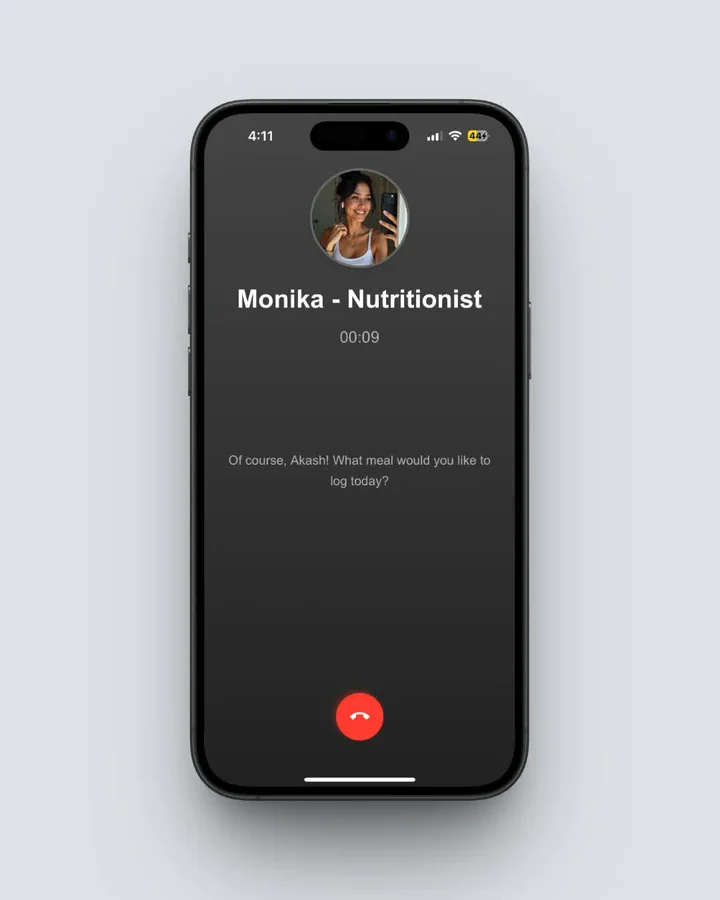 Monika: NutriScan's AI nutritionist available 24/7 for personalized nutrition advice
Tip 5: Check for Cooking Method Recognition
NutriScan recognizes 11 cooking methods, from deep-fried to steamed to air-fried, and four oil levels on top of that. A deep-fried samosa and an air-fried one are different foods nutritionally, and only one of these two apps asks which you ate.

NutriScan's meal scanning shows cooking method options: Deep-fried, Air-fried, Steamed, Grilled, and more
Lifesum does not have this feature.
Tip 6: Look at Long-Term Planning Features
Lifesum offers 7-21 day meal plans with pre-planned recipes. NutriScan offers 28-day personalized diet plans that adapt based on your progress and include weekly grocery lists.
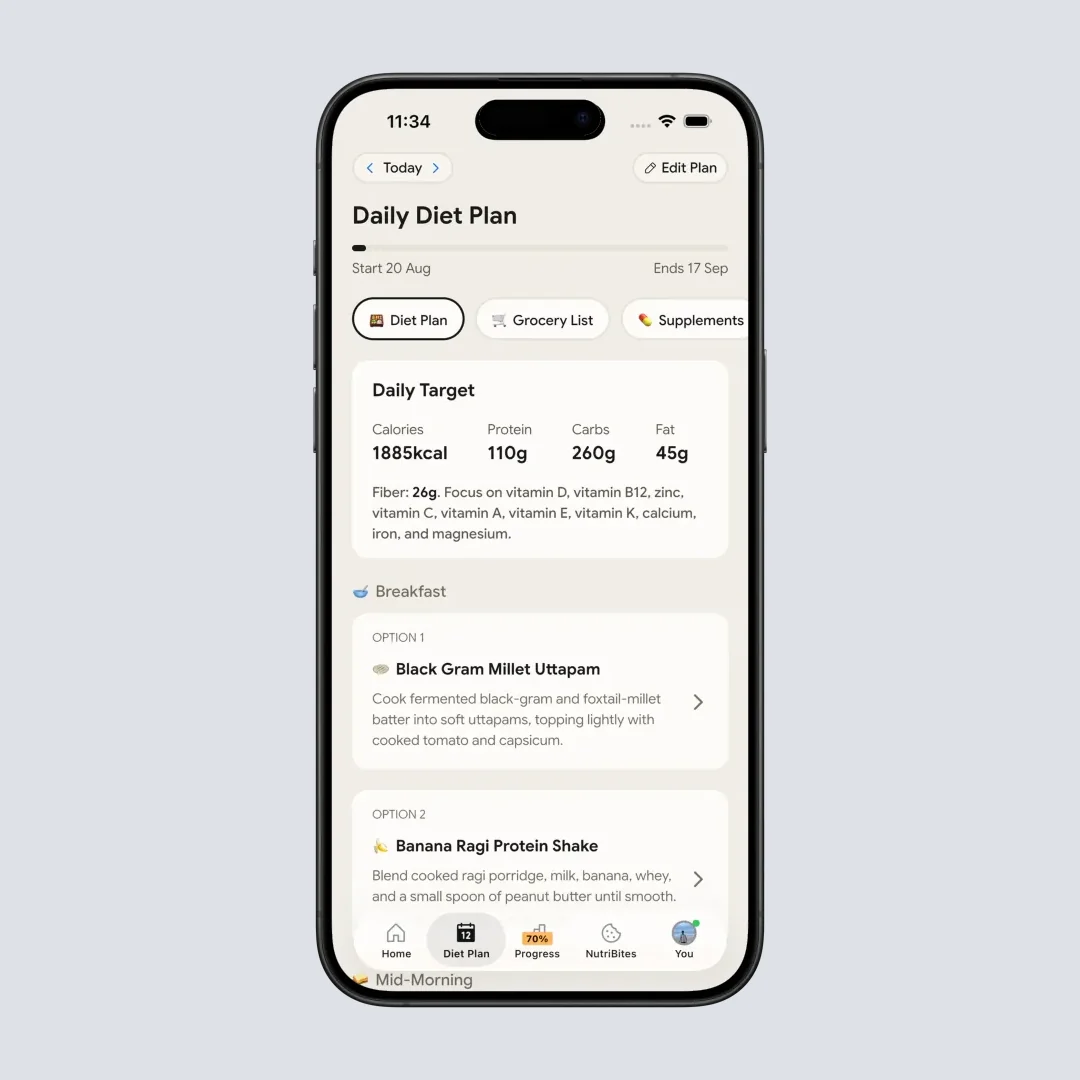
NutriScan's 28-day personalized diet plan with daily meal recommendations
Tip 7: Compare Pricing for Value
Lifesum Premium lists at $99.99 a year and drops to roughly $30.99 to $45 on promotion. NutriScan Premium is about $59 a year, and it includes the personalized 28-day diet plans and unlimited Monika calls. Those are standard US prices as of August 2026 and they change by region.
 When you finally find the app that works for you
Step-by-Step Guide: How to Choose Between NutriScan and Lifesum
Step 1: Define Your Primary Goal
Choose Lifesum if:
- You mainly eat Western food
- You want beautiful interface design
- You follow popular diets like keto or Mediterranean
- You want barcode scanning for packaged foods
Choose NutriScan if:
- You eat diverse global cuisines
- You have a specific health condition (diabetes, PCOS, pregnancy)
- You want AI-powered photo scanning
- You want personalized diet plans, not just tracking
Step 2: Test the Photo Recognition
Download both apps and try scanning 5 different meals you commonly eat. Pay attention to:
- How quickly the app recognizes your food
- How accurate the portion estimation is
- Whether it recognizes all the components of mixed dishes
A study found that AI apps struggle with mixed dishes and culturally varied foods (Nutrients Journal). The app that handles your food better deserves your commitment.
Step 3: Try the Free Version First
Lifesum has a free version with limited features. NutriScan gives you 5 scans a week on the free plan. Use them to:
- Log at least 10 meals
- Check report accuracy
- Explore diet planning options
- Test customer support
Step 4: Evaluate the Insights You Get
Good nutrition tracking is not just about numbers. It is about understanding patterns. Research from the Journal of Medical Internet Research shows that motivating users to use an app over time helps them achieve nutrition goals (Zečević et al., 2021).
Lifesum offers a "Life Score" based on eating habits, hydration, and activity. NutriScan offers a NutriScore for each meal plus pattern recognition that tells you which foods give you energy, cause bloating, or affect sleep.
Step 5: Check Integration with Other Apps
Lifesum syncs with Apple Health, Fitbit, Runkeeper, and Withings. NutriScan syncs with Apple Health and Google Fit. Check your own device against those lists before committing.
Step 6: Consider the Community Features
Lifesum has social features and challenges. NutriScan has Club, a top-50 leaderboard ranked on logging consistency and NutriScore. Pick whichever kind of nudge keeps you logging.
Step 7: Make Your Decision Based on Actual Usage
After a week on each, check which one you opened without being reminded, which one read your food correctly, and which one told you something you could act on. The best app is the one you will actually use.
What Science Says About Nutrition Apps
App Engagement Equals Better Results
The 2024 Obesity Science & Practice analysis found it at every level of use: the more people logged weight, food, fasting or activity, the more weight they lost (Obesity Science & Practice). Frustrating apps get abandoned, and abandoned apps do nothing.
Personalized Programs Beat General Advice
A randomized clinical trial published in Nature Medicine compared personalized dietary programs to standard government dietary guidelines. The personalized approach led to significant improvements in:
- Serum cholesterol levels
- Triglyceride concentrations
- Body weight
- Gut health markers
The researchers found that personalized food scores based on individual responses to foods produced better outcomes than one-size-fits-all recommendations (Nature Medicine).
This is why NutriScan's personalized diet planning approach aligns better with current nutrition science than Lifesum's template-based approach.
AI Food Recognition is Improving Rapidly
NYU Tandon researchers built AI that reads multi-component dishes like idli sambhar and calculates the nutrition from a photo (NYU Tandon). That is the same class of model NutriScan runs on.

Time Comparison: Logging a Meal
How long does it take to log a typical Indian thali meal with both apps?
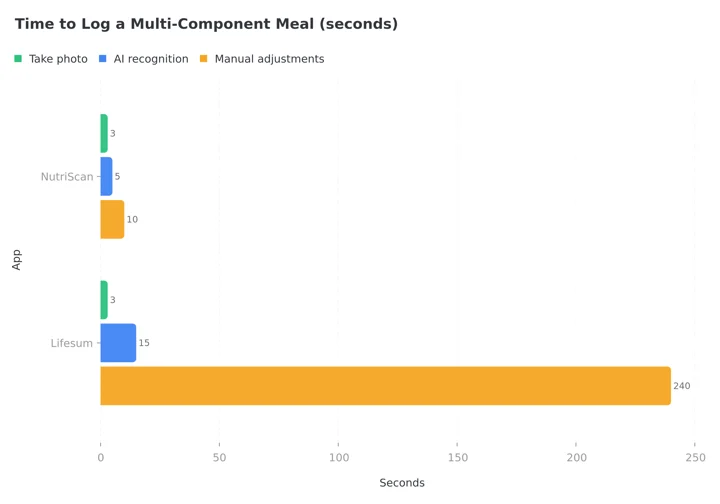 Figure 2: Time to log a multi-component meal, broken out by step from the table below. NutriScan totals about 20 seconds; Lifesum totals about 4 minutes, nearly all of it manual adjustment. The Lifesum adjustment bar plots 240 seconds, the 4-minute midpoint of the 3 to 5 minute range the table gives.
| Action | NutriScan | Lifesum |
|---|---|---|
| Take photo | 3 seconds | 3 seconds |
| AI recognition | 5 seconds | 15 seconds |
| Manual adjustments | 10 seconds | 3-5 minutes |
| Total time | ~20 seconds | ~4 minutes |
The difference adds up. If you log 3 meals per day, that is potentially 12 minutes saved daily with NutriScan.
My Personal Experience Testing Both Apps
The 4-week-each test, in detail:
Week 1-4 with Lifesum
The onboarding was smooth. I picked a "Clean Eating" diet template and started logging meals. The interface looked beautiful, and I enjoyed the Life Score feature that gave me daily ratings.
Challenges I faced:
- Logging my morning idli with sambar took 5 minutes because I had to search for each component separately
- The app did not understand cooking methods, so my air-fried snacks were logged the same as deep-fried versions
- After two weeks, I started skipping meals because logging was tedious
Week 5-8 with NutriScan
The photo scanning changed everything. I took a picture of my breakfast, and within 10 seconds, the app identified all components including the exact cooking method.
What worked well:
- Average logging time dropped from 5 minutes to under 30 seconds
- The app asked me about cooking method (steamed, fried, etc.) which made calorie counts more accurate
- I talked to Monika (the AI nutritionist) when I had questions about portion sizes
- The 28-day diet plan gave me exact meal suggestions for my weight loss goal
The result? I logged meals consistently for the entire 4 weeks. With Lifesum, I had stopped logging by week 3.
Important Note
Your experience may vary based on the cuisines you eat and your specific health goals. Both apps work well for their target audiences.
Pricing Breakdown
Prices below are standard US prices as of August 2026 and change by region.
Lifesum Pricing
- Free version: Basic tracking with limited features
- Premium: $7.49 a month where a monthly plan exists, $29.99 for 3 months, $99.99 a year at list price
- On promotion the year falls to roughly $30.99 to $45
The plan-by-plan breakdown lives in Lifesum pricing: free plan and Premium monthly vs yearly cost.
What you get: Access to all diet templates, full macro tracking, recipe library, barcode scanning, and integration with fitness devices.
NutriScan Pricing
- Free version: 5 meal scans a week, 4 Monika calls a week, NutriScore and all micronutrients on every meal, unlimited meal history
- Premium: about $59 a year
What Premium adds: unlimited AI photo scanning, unlimited Monika calls, personalized 28-day diet plans, weekly meal-plan suggestions, goal-based grocery lists, and supplement recommendations.
Which Offers Better Value?
For Western calorie counting, Lifesum at a promotional $30.99 is hard to beat on price alone. For condition-specific planning or non-Western food, NutriScan at about $59 does more per dollar.
Conclusion: Which App Should You Choose?
After spending considerable time with both apps, here is my honest recommendation:
Choose Lifesum if you are based in Europe or North America, primarily eat Western food, want a beautiful app interface, and follow popular diet trends like keto or Mediterranean.
Choose NutriScan if you eat diverse global cuisines, have specific health conditions like diabetes or PCOS, want truly personalized diet plans, and prefer AI-powered features that reduce manual logging.
A study of over 2,000 participants found that programs combining wearables, mobile apps and personalized recommendations improved both weight loss and glucose control (Taylor & Francis Online).
Both apps have their strengths. If you want an app that reads your food correctly and plans around a specific health goal, NutriScan is the better choice for most people. If neither fits, I rounded up the rest in the best Lifesum alternatives.
To try NutriScan, download the app, or set your targets first with our online macro calculator.
Frequently Asked Questions
Q1: Is NutriScan more accurate than Lifesum for calorie counting?
Both apps can provide accurate calorie counts for foods in their database. However, NutriScan's AI photo scanning tends to be more accurate for complex, multi-ingredient dishes and non-Western cuisines. Research shows that AI methods can match or exceed human accuracy for food image recognition when properly trained (Shonkoff et al., 2023). For packaged Western foods Lifesum has the edge, because its barcode scanner pulls the label directly and NutriScan has no barcode scanner yet.
Q2: Is Lifesum accurate?
For barcoded packaged food, yes. Those numbers come straight off the label. For home-cooked and mixed dishes, Lifesum leans on user-submitted database entries and on your own portion estimate, so a few hundred calories a day of drift is normal. A Nutrients study found that food-recognition systems struggle most with mixed dishes and culturally varied foods (Nutrients Journal). NutriScan claims 95% accuracy for the foods our database covers, which is our own figure rather than an independent benchmark, and it applies to identifying the food, not to guessing the weight on your plate.
Q3: Can Lifesum help with diabetes management like NutriScan?
Lifesum offers general diet tracking and some diet templates, but it does not have specific diabetes management features. NutriScan offers dedicated 28-day diet plans specifically designed for diabetes management, including meal recommendations that help stabilize blood sugar. A Nature Medicine study showed that personalized nutrition programs produce significantly better outcomes for metabolic health than general dietary advice (Nature Medicine).
Q4: Which app is better for PCOS?
NutriScan is significantly better for PCOS management. The app offers a dedicated PCOS diet plan that focuses on hormone-supporting meals and foods that help manage symptoms. Research shows that 5-18% of women worldwide have PCOS, and proper nutrition plays a key role in symptom management (BMC Women's Health). Lifesum does not have PCOS-specific features.
Q5: Is the free version of either app worth using?
Both free versions have limitations. Lifesum's free version allows basic food tracking but locks most useful features behind the premium subscription. NutriScan gives you 5 scans a week on the free plan, with NutriScore and every micronutrient still included on each one. Five scans a week is enough to test the scanner on the meals that usually break a food database, your curries, your restaurant plates, your mixed bowls, before you decide whether to pay. Research shows that consistent app engagement leads to better outcomes (Obesity Science & Practice).
Q6: Which app works better for Indian, Asian, or Middle Eastern food?
NutriScan works significantly better for these cuisines. The AI was specifically trained to recognize dishes from diverse global cuisines, including Indian curries, Southeast Asian dishes, and Middle Eastern foods. A University of Sydney study found that most nutrition apps struggle with culturally diverse foods because their databases are Western-centric (ScienceDaily). Lifesum has improved their database but user reviews still report difficulties with non-Western foods.

Disclaimer: This comparison is based on publicly available information, user reviews, and personal testing. Individual results may vary. Always consult with a healthcare professional before starting any new diet plan, especially if you have existing health conditions.