Is Fitia Free? Pricing, Reviews, and How NutriScan Compares
 ChatGPT
  Claude
  AI Mode
  Perplexity
 Fitia is free to start and stays free for calorie tracking, barcode scanning, food search and the weight log; Premium is $19.99 a month or $59.99 a year, with an $89.99 family year and a 3-day trial. NutriScan runs one free plan and one Premium at about $59 a year. NutriScan's free plan includes 5 photo scans a week, 4 Monika voice calls a week and NutriScore on every meal.
Last verified: August 23, 2026
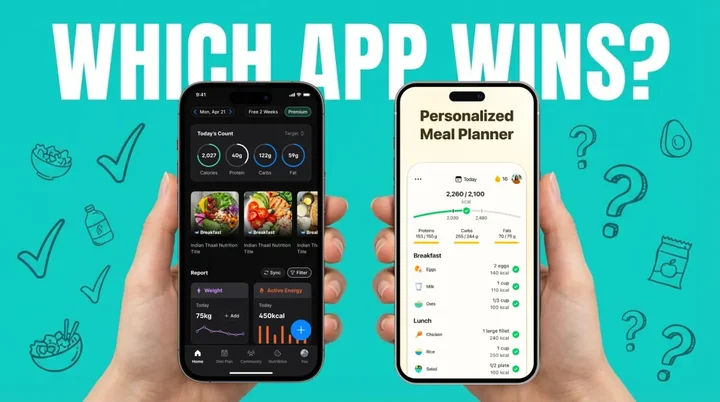
Is Fitia free? Yes. Fitia's free plan logs calories and macros, scans barcodes and searches its food database, with no expiry date. Paying buys the meal plans, recipes and AI coach, nothing more.
TL;DR - Is Fitia Free, and Is It Worth Paying For?
• Free plan: calorie and macro logging, barcode scanning, food search, weight and measurement tracking. No trial clock, no scan cap.
• Premium price: $19.99 a month or $59.99 a year, with an $89.99 family year. Standard US prices as of August 2026, and they change by region.
• Fitia reviews: 10 million-plus downloads and a 4.9-star store rating. Testers praise the nutritionist-checked database and dock it for AI-only coaching and a steep monthly rate.
• Weak spot: food without a barcode. In Mumbai, or any home kitchen, a thali means typing every item in by hand.
• NutriScan side: 5 free photo scans a week, unlimited on Premium, plus diet plans built around diabetes, PCOS or pregnancy rather than a calorie number.
Fitia is free to start and free to stay. The calorie and macro tracker, the barcode scanner, the food search and the weight log cost nothing and never time out. What costs money is Fitia Premium: $19.99 a month or $59.99 a year, opening with a 3-day trial. Those are standard US prices as of August 2026 and they change by region. Premium adds the generated meal plans, the recipe library, the automatic shopping list and the Fitia Coach chat.
So the honest answer to "does Fitia cost money" is: only if you want it planned for you. Tracking is free.
I have spent a long stretch with both Fitia and NutriScan App, and the rest of this post covers what the free tier actually holds up under, what reviewers say, how Fitia handles Indian food, and where NutriScan takes a different route.

The moment of truth: which app handles your meal photos better?
Is Fitia Free? What the Free Plan Gives You
Fitia's free tier runs forever, with no trial clock on it. It is a working calorie counter, and it includes:
- Calorie and macro logging across breakfast, lunch, dinner and snacks
- Barcode scanning for packaged products, pulled from the nutritionist-reviewed database
- Manual food search by name, plus voice entry
- Body weight, body fat and measurement tracking
- Progress photos and basic trend charts
- The intermittent fasting timer
What the free plan does not include: the generated meal plans, the recipe library, the automatic shopping list, and Fitia Coach, the text AI. Those sit behind Premium.
Does Fitia Cost Money? Fitia Premium Pricing
Premium is the only paid thing in the app. As of August 2026 the US App Store lists these tiers, and prices change by region:
| Fitia Premium plan | Price (US, August 2026) |
|---|---|
| 1 month | $19.99 |
| 3 months | $23.99 |
| 6 months | $35.99 |
| 12 months | $59.99 |
| 12 months, family | $89.99 |
The annual plan works out near $5 a month, so the monthly tier is the expensive way to buy it. Fitia opens Premium with a 3-day free trial. The trial only exists on the annual plan and converts automatically; the full rules, the 48-hour web refund window and the referral program are in my Fitia pricing and trial guide.
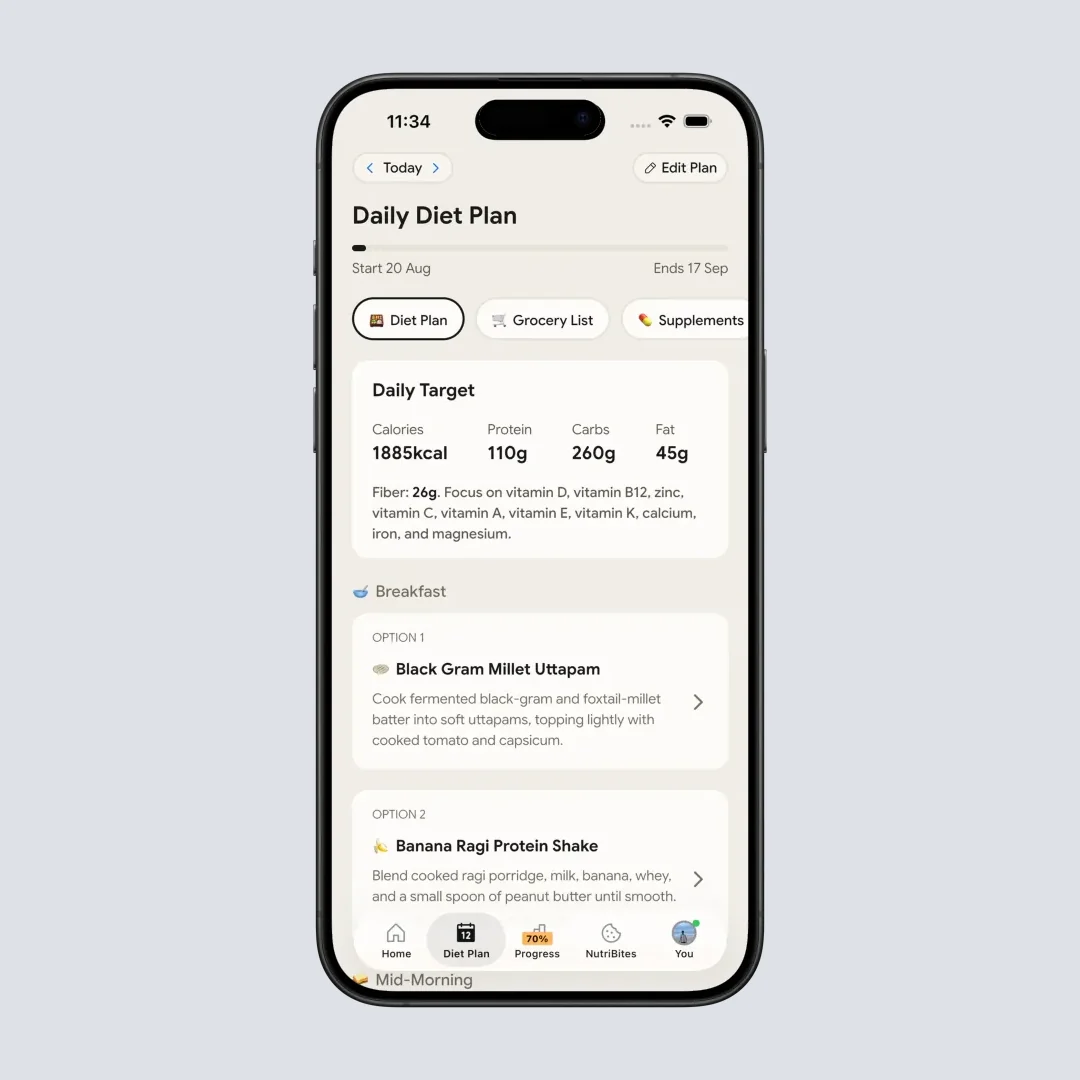
For comparison, NutriScan runs a free plan and a Premium plan, no third tier. Free gives you 5 photo scans a week, 4 Monika voice calls a week, NutriScore on every meal, full micronutrients and unlimited meal history. Premium lifts the scan and call caps and adds the 28-day personalized diet plan, weekly meal-plan suggestions, a goal-based grocery list and supplement recommendations. NutriScan Premium is about $59 a year, standard pricing as of August 2026 that changes by region.
Five free scans a week is enough to test the scanner on the meals that usually break a food database, your curries, your restaurant plates, your mixed bowls, before you decide whether the prompts are worth paying for.
The Real Problem With Nutrition Tracking
Diet-related issues contribute to roughly 1 in 5 deaths globally. Research published in The Lancet puts poor dietary habits among the leading preventable causes of death worldwide, which is why so many people install a tracking app in the first place.
Most people fail at nutrition tracking because it is boring and time-consuming. A study published in JMIR mHealth and uHealth found that low adherence in diet tracking apps is largely due to the considerable effort required to log every food item manually.
The usual arc: you download an app, use it for a week, then forget about it.
The real question isn't just "which app is better?" but "which app will I actually USE consistently?"
Research from Obesity Science & Practice shows that consistent app usage directly correlates with weight loss success. The study found that users who actively tracked their food lost significantly more weight than irregular users. In fact, 42.20% of active app users lost 5% or more of their body weight over 52 weeks.
Key Insight
The best nutrition app is the one that fits YOUR lifestyle and keeps you engaged long-term. Not the one with the most features, but the one you'll actually use every day.
Is Fitia a Good App? What It Does Well and Where It Falls Short
Fitia is a calorie counter and meal planning app that grew up in Spanish-speaking markets, Latin America and Spain first, then the US. Fitia's US App Store listing claims 10 million-plus users and shows a 4.9 out of 5 rating from about 20,000 ratings. The app focuses primarily on weight loss and muscle gain through precise calorie tracking and macro management.
Fitia's Main Features:
- Barcode scanning for packaged foods
- Manual food logging by typing or voice
- Photo-based food recognition
- Verified food database with nutritionist review
- AI coach called "Fitia Coach"
- Meal planning with recipes
- Automatic shopping list generation
- Intermittent fasting tracker
- Team challenges and community features
- Body weight and measurements tracking
- Progress photos and visualization
Fitia works particularly well for people who eat a lot of packaged foods and want strict calorie counting. The barcode scanner is quite accurate because their database is nutritionist-verified, meaning each entry goes through human review before being published.
The app's strength lies in its structured approach. If you want to know exactly how many calories you're eating and follow a calorie-based diet plan, Fitia delivers that precision.
Where it falls short is anything without a barcode. A nutritionist-reviewed database is only useful for foods someone has already entered, and nobody has entered your mother's kadhi. Photo recognition is in the app, but it leans on the same Western-weighted catalog underneath. The coaching is text AI, with no human dietitian behind it, and there is no condition-specific planning for diabetes, PCOS or pregnancy.
Fitia Reviews: What Testers and Users Keep Saying
The store numbers are strong: 10 million-plus downloads, 4.9 stars. Independent reviews land in roughly the same place, positive on tracking, cooler on price and coaching.
Fortune rated the app well on logging and AI meal plans, then flagged value as the thing they would change, calling out $19.99 a month with AI coaching only and no human oversight. Garage Gym Reviews reached the same conclusion on pricing: the monthly tier is expensive, the $59.99 annual plan is the one that makes sense.
The recurring themes across user reviews:
- Barcode scanning is fast and reliable. This is the feature people mention first and most.
- Meal plans and shopping lists save real time, if you eat what the plan generates.
- The database thins out fast outside Western and Latin American products. Regional home cooking is the common complaint.
- The monthly price stings. Almost every reviewer points people at the annual plan.
- Coaching is AI text only. Fine for macro questions, thin if you wanted a person.
So, is Fitia a good app? For someone in the US or Spain living on supermarket food and chasing a calorie target, yes, comfortably. For someone eating home-cooked food that has never had a barcode on it, the free tier will feel great for two days and tedious by the second week.

What is NutriScan App?
NutriScan App takes a fundamentally different approach to nutrition tracking. Instead of focusing only on calories, it helps you understand the complete nutritional picture of your meals - including micro-nutrients that most apps ignore.
NutriScan's Main Features:
- Photo-based meal scanning with AI recognition (learn more in our meal scanning guide)
- Detailed macro and micro-nutrient breakdown (including fiber, potassium, calcium, omega-3, and more)
- NutriScore rating system for each meal
- Goal-based diet planning for specific health conditions (🏃 Weight Loss, 💪 Muscle Gain, 💊 Diabetes, 🤰 Pregnancy, 🙆♀️🌸 PCOS, 🤒 Viral/Flu)
- Voice-powered AI nutritionist (Monika) for conversations about your diet
- NutriBites chat to ask questions about eating patterns
- Strong support for regional and local foods (especially Indian cuisine)
- Meal timeline insights with pattern detection
- Community ranking based on healthy eating quality
- Vacation mode for flexible tracking during travel
- Calendar view showing eating patterns by color codes
- Meal repeat feature for daily similar meals
- Favorite meals management
What makes NutriScan different is its focus on understanding your food beyond just calories. The app asks important questions during meal logging like: What's the cooking method? What type of oil was used? Is this home-cooked or restaurant food? These factors significantly affect the actual nutritional value of your meal.
NutriScan is built for people who want deeper nutritional understanding. It's especially strong for those managing health conditions like diabetes, PCOS, pregnancy, or even recovering from viral illnesses.

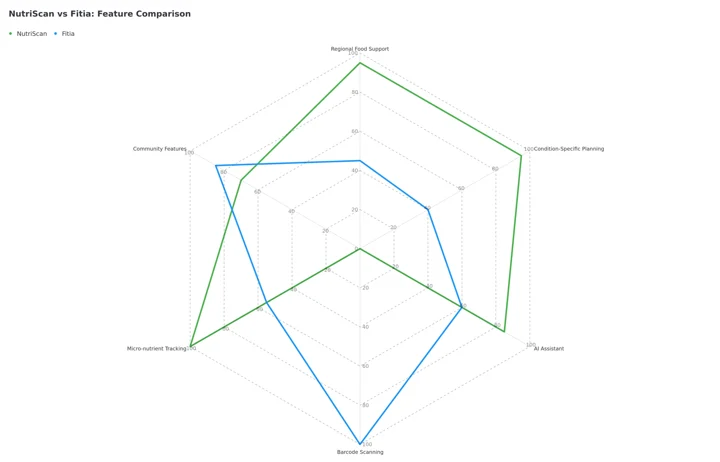 Figure 1: Feature comparison showing how NutriScan and Fitia excel in different areas. Barcode scanning is a Fitia-only feature, so NutriScan sits at zero on that axis.
Fitia in Mumbai and the Rest of India
Fitia downloads and runs anywhere in India. There is no regional block, the app works, and the barcode scanner will read a Maggi packet or an imported protein bar without complaint. The gap is the database, not the app.
Fitia's catalog was built in Latin America, Spain and the US. That is where the nutritionist-verified entries came from, and it shows the moment you eat like most of Mumbai eats. Dal, sabzi, kadhi, poha, vada pav, a Sunday biryani, a plate of idli from the stall near the station: none of these carry a barcode, and most are missing from the database entirely. Every one of them becomes a manual search, then a manual portion estimate, then a second manual entry for the oil.
A composite example: the Mumbai home-cooked food eater
Take a typical weekday plate in Mumbai: dal, sabzi, roti and rice, all cooked at home. In Fitia, that plate is four manual searches, because bhindi masala and kadhi carry no barcode and usually have no database entry either. Then a portion guess, then a separate line for the oil.
In NutriScan, the same thali is one photo, and the AI labels each item, the dal, the vegetable, the roti, with values tuned to Indian cooking. The app asks about cooking method and oil level, which is where a lot of the calories in Indian food actually live. NutriScan also runs in Hindi, with Premium at about $59 a year as of August 2026.
If you live in Mumbai, Delhi, Bengaluru or anywhere else in India and your food mostly comes out of your own kitchen or a local stall, test the photo scanner before you commit to a barcode-first app. Our Indian food calorie calculator is a quick way to see how the numbers land on dishes you actually eat.
Two Composite Examples: Who Uses What?
Two made-up examples, not real users, to show when each app fits.
Example 1: the packaged food shopper in Spain
Picture someone who buys most of their food at a supermarket and scans barcodes several times a day: breakfast cereal, yogurt, protein bars, frozen meals.
Fitia suits that pattern, because European packaged goods are the part of its database nutritionists have already reviewed. Scan the barcode, the panel comes back from a checked entry. Premium meal planning writes the shopping list on top of it. For a cart like that, Fitia is the clear winner.
Example 2: the PCOS diet seeker
Now picture someone recently diagnosed with PCOS who wants a plan built around hormonal balance rather than a calorie number. Fitia's meal plans are calorie-deficit plans, and it does not offer condition-specific planning for PCOS.
NutriScan builds the plan around the condition instead, weighting anti-inflammatory foods and steadier-carbohydrate choices rather than hitting a calorie target alone. What that does for any one person is a question for her doctor, not an app. Learn more about NutriScan for PCOS management.
Important
These examples show that there's no universal "better" app - only a better fit for YOUR specific situation.
The Science Behind Smart Nutrition Tracking
A systematic review in the Journal of Medical Internet Research analyzed 25 studies on AI-powered nutrition apps. The findings showed that food detection accuracy using AI ranges from 74% to 99.85%, with nutrient estimation errors varying between 10% and 15%.
What does this mean for you? AI-powered food recognition has become remarkably accurate. Both Fitia and NutriScan use this technology, but they apply it in different ways and for different purposes.
Research published in Nutrients journal found that mobile nutrition apps combined with professional guidance produce better weight loss results than using apps alone. The study noted that structured dietary guidance with daily assessments led to notable improvements in weight loss percentage and BMI reduction. This is why NutriScan includes a voice AI nutritionist named Monika, while Fitia offers an AI coach for text-based guidance.
Another important finding from a PMC study on diet apps showed that app users with chronic conditions like obesity saw positive changes in more than 75% of cases when using dietary monitoring apps consistently. The key word there is "consistently" - which brings us back to the importance of choosing an app you'll actually use.
7 Tips for Choosing the Right Nutrition App

Choosing the right nutrition app doesn't have to be this hard...
Here are my honest recommendations based on different situations. Consider each carefully based on your specific needs.
Tip 1: Consider Your Food Type
If you eat mostly packaged foods with barcodes, Fitia's scanner will save you significant time. The barcode simply pulls verified nutritional data instantly. However, if you eat fresh, home-cooked, or regional cuisine, NutriScan's photo recognition handles these much better. The AI is trained to recognize diverse foods that might not exist in Western databases.
Tip 2: Think About Your Health Goal
For simple calorie counting focused on weight loss or muscle gain, both apps work well. But for specific conditions like diabetes management, PCOS diet, pregnancy nutrition, or recovery from illness, NutriScan offers specialized diet planning that Fitia simply doesn't provide. Ask yourself: Do I need general calorie tracking or condition-specific guidance?
Calculate Your Personal Macros
Not sure what your macro targets should be? Try our free calculators:
- General Macro Calculator - For weight loss and muscle gain
- PCOS Macro Calculator - Optimized for hormonal balance
- Diabetes Macro Calculator - Blood sugar friendly targets
Tip 3: Check Language Support
Fitia is primarily available in English and Spanish with strong support in those languages. NutriScan supports English, German, Spanish, French, and Hindi, making it more accessible for diverse users. If you're more comfortable in Hindi or need an app that understands Indian dietary context, NutriScan has the advantage.
Tip 4: Evaluate the Learning and Insights Feature
Fitia focuses on tracking what you eat. NutriScan focuses on helping you understand why you might be experiencing certain issues. The NutriBites feature lets you ask questions like "Why do I feel bloated after lunch?" and it analyzes your recent meal patterns to find answers. If you want insights beyond just numbers, this matters.
Tip 5: Consider Your Budget
Fitia Premium is $19.99 a month or $59.99 a year, with an $89.99 family year. NutriScan Premium is about $59 a year. Standard prices as of August 2026, and they change by region. Both apps price the annual plan far below twelve monthly charges, so if you already know you will track for a year, buy the year. We broke that math down in our roundup of the best annual plans for calorie tracking apps. Both also let you test first: Fitia opens Premium with a 3-day trial, NutriScan with 7 days.
Tip 6: Test the Interface
Both apps have different design philosophies. Fitia feels more like a traditional calorie counter with numbers front and center. NutriScan feels more like a nutrition coach with visual insights, meal timelines, and color-coded calendars. Try both free versions to see which interface feels more natural for your daily use.
Tip 7: Check Integration Options
Both apps sync with Apple Health and Google Fit for activity data. If you use fitness wearables like Apple Watch or Fitbit, make sure your device connects properly with your chosen app. This integration can help provide more accurate calorie recommendations based on your actual activity level.
How to Choose Between Them in One Week
Seven steps, one week, no regrets.
- Write the goal down in numbers. Not "lose weight" but "lose 10 kg in 4 months" or "keep my fasting glucose under 100". A vague goal is the most common reason an app gets deleted in week two.
- Audit what you actually eat for 7 days. Packaged products, fresh vegetables, home-cooked meals, restaurant food, street food, regional dishes. This honest list decides which database serves you.
- Name your tracking style. If you enjoy logging every gram to an exact number, Fitia matches you. If you want a photo and an estimate you can move on from, NutriScan matches you.
- Test both free versions with your real meals. Three or four days each, breakfast through dinner, not sample entries. Watch which app finds your foods and which one makes you type.
- Check the support you would actually use. Fitia Coach is text AI. NutriScan gives you Monika on a voice call, 4 calls a week free, plus NutriBites chat over your meal history.
- Think about month six. If you need to lose weight once and maintain, plain calorie tracking is enough. If you have an ongoing condition, condition-specific planning and pattern analysis keep earning their price.
- Pick the one that felt lighter. After a week of testing, the app you did not dread opening is the one you will still be using in March. Consistency beats precision.
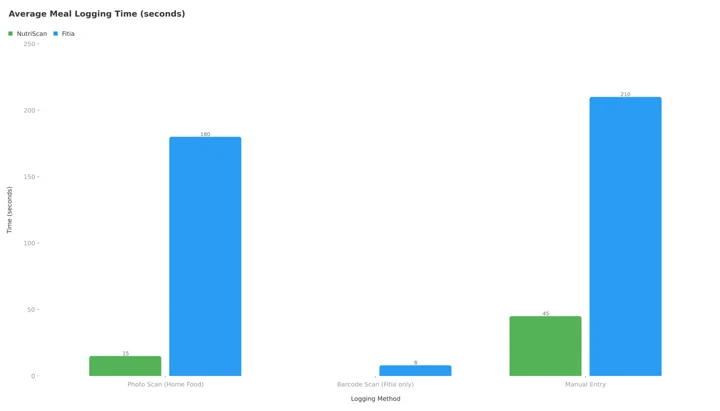 Figure 2: Average meal logging time. Barcode scanning is Fitia only, so no NutriScan bar is drawn there. The Fitia manual entry bar plots 210 seconds, the midpoint of the 2 to 5 minutes a regional food search takes.
Feature-by-Feature Comparison
Let me break down the key differences in detail so you can compare exactly what you're getting with each app.
Food Database and Recognition
Fitia claims to have the largest verified food database with over 1 million foods and 50,000+ recipes. Every entry is validated by nutritionists. This makes it excellent for standardized foods.
NutriScan uses AI to recognize foods including regional dishes that might not be in traditional databases. For global packaged products, Fitia has an edge. For local cuisines like Indian, Middle Eastern, or Asian home-cooked meals, NutriScan performs significantly better.
Meal Scanning Approach
Both apps offer photo-based food recognition. Fitia also offers voice input and barcode scanning. NutriScan focuses on photo scanning with additional context questions like cooking method (deep-fried, steamed, grilled, air-fried) and oil level (no oil, low oil, medium oil, high oil). These factors affect nutritional values significantly - a steamed vegetable has very different calories than the same vegetable deep-fried.
Diet Planning Philosophy
Fitia creates calorie-based meal plans optimized for weight loss or muscle gain. It calculates your caloric needs and builds meals to hit those numbers.
NutriScan creates goal-specific plans for multiple conditions including weight loss, muscle gain, diabetes, PCOS, pregnancy, and viral recovery. The approach is fundamentally different - it considers your health condition, regional food preferences, eating schedule, and lifestyle before creating recommendations. For more on personalized nutrition, see our guide on why diet plans fail and personalization wins.
Health Insights and Pattern Detection
Fitia tracks weight, body fat percentage, measurements, and basic nutrition trends. It shows you what you ate and the numbers behind it.
NutriScan adds the NutriScore system that rates each meal's overall healthiness on a color scale. It provides calendar insights showing eating patterns over weeks and months, identifies what might be causing issues like bloating or low energy, and even shows map views of where you eat frequently. These insights help identify WHY you might be experiencing certain health issues.
Voice and Conversation Features
Fitia allows voice input for logging food items more quickly.
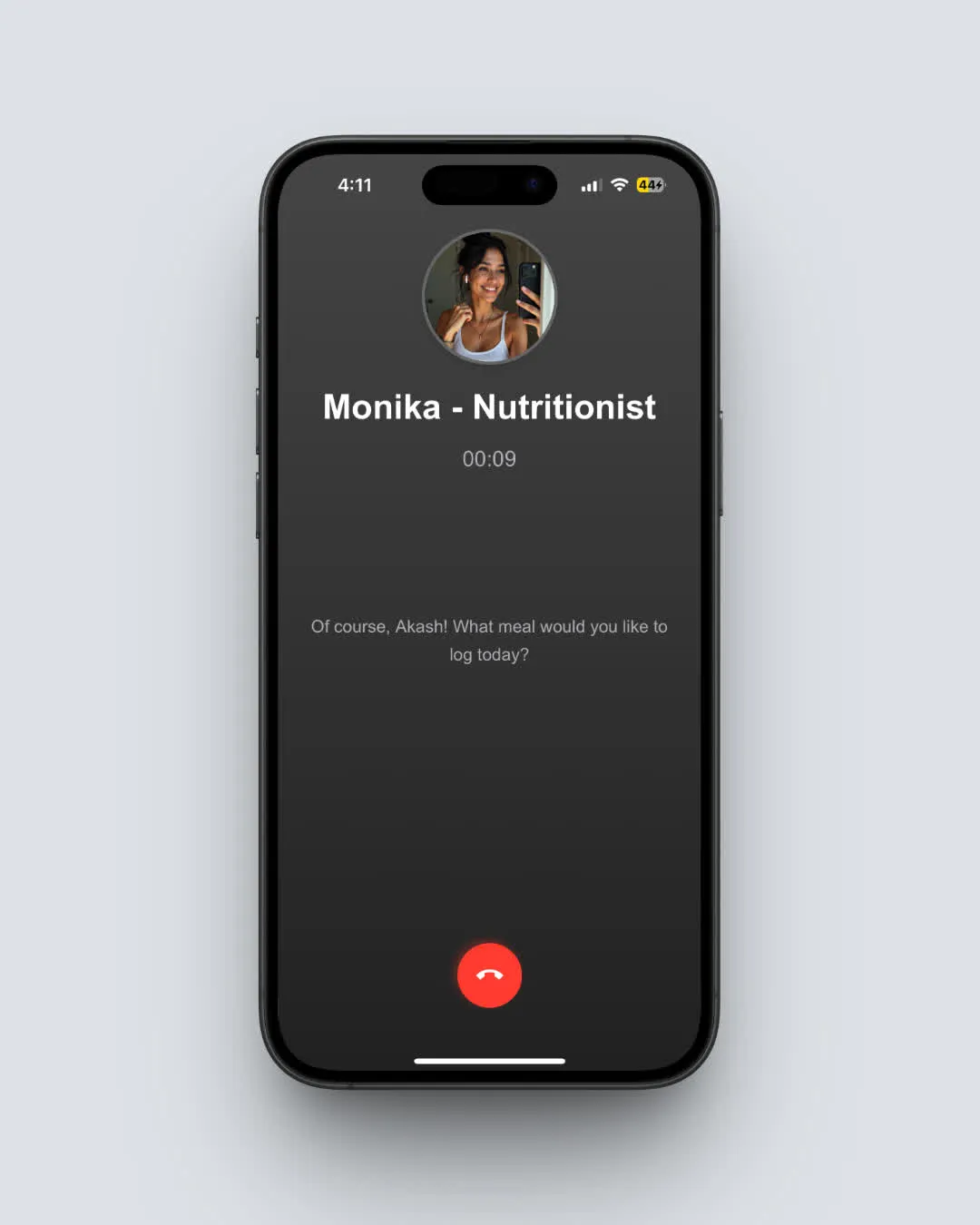
NutriScan offers full voice conversations with AI nutritionist Monika, where you can ask questions, discuss nutrition concerns, and even log meals by describing them naturally in conversation. This feels more like talking to a dietitian than using an app.
Community and Motivation
Fitia has team challenges, group features, and shared accountability options. You can join teams and compete.
NutriScan has a community ranking system based on NutriScore - your healthy eating quality - not just activity. This encourages quality of nutrition rather than just tracking quantity. Users are ranked by how nutritiously they eat, creating positive competition.
| Feature | NutriScan | Fitia |
|---|---|---|
| Food Recognition | AI photo + context questions | Barcode + photo + voice |
| Regional Food Support | Excellent (Indian, Asian, etc.) | Limited (Western focus) |
| Diet Planning | Condition-specific (6 goals) | Calorie-based (weight/muscle) |
| AI Assistant | Voice AI (Monika) + NutriBites chat | Text-based Fitia Coach |
| Micro-nutrient Tracking | Comprehensive | Basic |
| Cooking Method Context | Yes (11 methods) | No |
| Community | NutriScore rankings | Team challenges |
| Languages | EN, DE, ES, FR, HI | EN, ES |
What Research Says About Personalized Diet Plans
A randomized controlled trial published in Nature Medicine compared personalized dietary programs with standard USDA guidelines. The study found that personalized nutrition led to significant improvements in cardiometabolic health, gut health, and weight reduction compared to following general dietary advice.
This finding is crucial. It tells us that one-size-fits-all calorie counting may not be as effective as personalized approaches that consider your individual biology, preferences, and health conditions.
This is exactly where apps like NutriScan shine. By creating diet plans based on your specific health conditions, goals, lifestyle, eating schedule, and preferences, the plans become more likely to produce actual results you can sustain.
Another study in the British Medical Journal noted that personalized nutrition uses information on individual characteristics to develop targeted advice that helps people achieve lasting dietary changes. The key insight here is "lasting" - personalization helps with long-term adherence, not just short-term motivation.
Research Insight
The Food4Me European study found that personalized nutrition recommendations improved dietary behaviors more effectively than generic advice, especially for reducing salt intake and improving dietary fat quality. This supports the approach of condition-specific planning over generic calorie counting.

Interesting Facts About Nutrition Apps
Two numbers worth knowing before you pick, plus one thing you can see in both apps:
Market researcher Market.us projects the global fitness app market at $25.9 billion by 2033, up from $4.9 billion in 2023, an 18% compound annual growth rate. Tracking apps are settling in as a permanent part of how people manage health.
Weight loss usually peaks around 6 months, then flattens. StatPearls cites the American College of Cardiology and American Heart Association position that people generally reach maximal weight loss at 6 months, followed by maintenance or slow regain. So the app you pick has to still be worth opening after the early motivation is gone.
Reminders, streaks and rewards show up in both Fitia and NutriScan. Engagement design is doing as much work in these apps as the tracking itself.
The Deciding Factor Most People Miss
Here's the insight that actually determines whether you'll succeed with either app.
Friction decides it, not the feature list.
The deciding factor is this: How many seconds does it take to log your typical meal?
Here's what I found after testing both apps extensively:
- Packaged food with barcode (Fitia): 5-8 seconds per item
- Home-cooked meal photo (NutriScan): 10-15 seconds for entire plate
- Regional food manual search (Fitia): 2-5 minutes per meal
- Regional food photo scan (NutriScan): 15-20 seconds with context questions
The math is simple. If logging takes more than 30 seconds, you'll skip meals. Skip enough meals, and you'll abandon the app within 2 weeks.
Ask yourself: What do I eat 80% of the time?
- If it's packaged foods ➡️ Fitia's barcode scanning wins
- If it's fresh/home-cooked ➡️ NutriScan's photo AI wins
This one factor - logging friction for YOUR typical meals - matters more than every other feature combined. Because the best app is worthless if you stop using it.
The Verdict: My Honest Recommendation
After analyzing both apps thoroughly, here's my honest conclusion:
Choose Fitia if you:
- Eat primarily packaged foods with barcodes
- Want strict calorie counting for weight loss or muscle gain
- Prefer typing or scanning over photo logging
- Don't need specialized diet plans for health conditions
- Are comfortable with Spanish or English interface
- Want team challenges and social accountability
- Like a traditional calorie counter interface
Choose NutriScan if you:
- Eat regional, home-cooked, or diverse cuisines
- Need diet planning for diabetes, PCOS, pregnancy, or other conditions
- Want to understand micro-nutrients, not just calories
- Prefer quick photo-based logging
- Want insights into eating patterns and health correlations
- Need voice-based AI nutritionist support
- Prefer multilingual support including Hindi
- Want the NutriScore quality rating for meals
- Care about cooking method and preparation style affecting nutrition
On the money question, both apps let you track for free forever, so nobody has to pay to start. Fitia charges for planning, NutriScan charges for volume and for condition-specific plans. Neither app is "better" in an absolute sense. The question is which one is better for you, given what you eat and what you are managing.
For more comparisons, see NutriScan vs MyFitnessPal, NutriScan vs HealthifyMe, and Foodvisor reviews and whether it is free. If barcode scanning is the feature you care most about, our best barcode scanning apps roundup ranks them head to head.
What to Do This Week
Install both free versions tonight. Neither one asks for money to log a meal, so this costs you nothing but a week.
Log your three most awkward meals in each app. Not a banana, not a protein bar. The plate that has four things on it, the restaurant order you guessed at, the leftovers. Time yourself. Research from Obesity Science & Practice found 42.20% of active app users achieved weight loss of 5% or more over 52 weeks, and "active" is the operative word. The app that logs your real food in under 30 seconds is the one you will still be opening in six months.
If barcode scans cover most of what you eat, buy the Fitia annual plan and stop reading. If your plate is home-cooked, regional or mixed, start with NutriScan's 5 free scans a week and see what the photo scanner does with it.
Frequently Asked Questions
Q1: Is Fitia free?
A: Yes. Fitia has a permanent free plan, not a trial. It covers calorie and macro logging, barcode scanning for packaged foods, manual and voice food entry, weight and measurement tracking, progress photos and the fasting timer. There is no scan cap and no expiry date on any of it.
What you cannot get for free are the generated meal plans, the recipe library, the automatic shopping list and Fitia Coach, the text AI. Those need Premium, which is $19.99 a month or $59.99 a year as of August 2026 and opens with a 3-day trial.
Q2: Does Fitia cost money?
A: Only if you want Premium. As of August 2026 the US App Store lists Fitia Premium at $19.99 for one month, $23.99 for three months, $35.99 for six months and $59.99 for twelve months, plus an $89.99 family year. These are standard US prices and they change by region.
The annual plan lands near $5 a month, which is why almost every reviewer tells people to skip the monthly tier. Basic tracking stays free whichever way you go, so you can log for months without paying anything.
Q3: Is Fitia a good app?
A: For packaged and supermarket food, yes. Fitia has more than 10 million downloads and a 4.9-star store rating, and its food database is reviewed by nutritionists before entries go live, so a barcode scan returns numbers you can trust. Meal planning and shopping lists are genuinely useful if you eat what the plan suggests.
The criticisms are consistent. Fortune flagged value, pointing at $19.99 a month for AI-only coaching with no human oversight. Garage Gym Reviews said the same about the monthly price. And the database thins out fast on home-cooked and regional dishes, which is a problem no rating fixes.
Q4: Does Fitia work in Mumbai and other Indian cities?
A: The app runs fine anywhere in India. The database is the issue. Fitia grew in Latin America, Spain and the US, so imported packaged goods scan cleanly while dal, sabzi, kadhi, poha, vada pav and a home thali usually need manual entry, item by item, portion by portion.
If most of your food comes out of your own kitchen or a local stall, a photo scanner trained on Indian cooking saves far more time than a barcode reader. NutriScan also runs in Hindi, with Premium at about $59 a year as of August 2026.
Q5: Is NutriScan App more accurate than Fitia for calorie counting?
A: Accuracy depends on what you're tracking. For packaged foods with barcodes, Fitia's nutritionist-verified database is highly accurate because humans have reviewed each entry. For home-cooked and regional foods, NutriScan's AI photo recognition provides better estimates because it's trained on diverse cuisines including Indian, Asian, and Middle Eastern foods.
A study published in Nutrients found that AI-powered food recognition apps can achieve good accuracy when properly trained on relevant food types. The key is matching the app to your food type. If you eat mostly packaged food, Fitia's barcode scanning gives verified precision. If you eat diverse home-cooked meals, NutriScan's AI recognition handles variety better.
Q6: Can Fitia create diet plans for diabetes like NutriScan?
A: Fitia focuses primarily on calorie-based meal planning for weight loss and muscle gain. It calculates your caloric needs and builds meal suggestions to hit those calorie and macro targets. However, it doesn't offer condition-specific diet planning for diabetes, PCOS, pregnancy, or other health conditions.
NutriScan creates personalized diet plans based on your specific health condition, taking into account medical requirements, food restrictions, regional preferences, and eating schedule. If you have a specific health condition requiring specialized dietary management, NutriScan's approach provides more relevant guidance than general calorie counting.
Q7: Which app is better for Indian food tracking?
A: NutriScan is specifically designed to recognize Indian and regional cuisines that Western databases often lack. Foods like dal, roti, sabzi, paneer dishes, regional specialties like dhokla or idli, and complex dishes like biryani are accurately identified through photo scanning.
Fitia's database, while extensive with over 1 million foods, focuses more on Western and packaged foods. Indian home-cooked meals often require manual entry because they're not in the barcode database. If Indian food is your primary diet, NutriScan will provide a smoother, faster experience with better accuracy.
Q8: Do I need premium subscriptions for both apps to be useful?
A: Both apps offer free versions with real tracking. Fitia Free includes food logging, barcode scanning, and calorie counting with no cap. NutriScan Free gives you 5 photo scans a week, 4 Monika voice calls a week, NutriScore on every meal, full micronutrients and unlimited meal history.
Premium features in both apps unlock diet planning, advanced insights, recipes, and additional support features. For serious health goals requiring meal planning or condition-specific guidance, premium versions provide significantly more value. However, if you just want basic tracking to stay aware of your calories, free versions of both apps can serve that purpose.
Q9: How do the AI features compare between NutriScan and Fitia?
A: Fitia Coach provides text-based AI guidance for nutrition questions. You can type questions and get helpful responses about your diet, macro targets, and meal suggestions.
NutriScan offers Monika, a voice-powered AI nutritionist you can actually talk to like having a phone call with a dietitian. Additionally, NutriBites lets you ask questions about your meal history to find patterns - like asking "why am I feeling tired in the afternoon?" and getting analysis based on your recent meals.
If you prefer typing and reading, Fitia works well. If you want a conversational experience, need to log meals hands-free while cooking, or want pattern analysis from your meal history, NutriScan's voice and chat features are more advanced. Research in the Journal of Medical Internet Research shows AI dietary assessment tools are rapidly improving, making these features increasingly valuable.
Disclaimer: This article is for informational purposes only. Always consult a healthcare professional before making significant dietary changes, especially if you have existing health conditions.
