Oasis App for Food: Is the Oasis Health App Legit and Accurate?
 ChatGPT
  Claude
  AI Mode
  Perplexity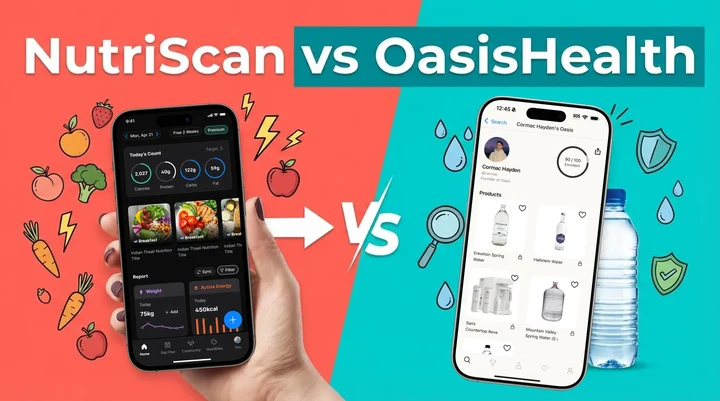
If you searched for an Oasis app for food, here is the short version. OasisHealth.app does not track food. It is a product safety scanner that publishes independent lab results for bottled water brands, water filters, air purifiers and skincare, and Pro costs $47 a year (US price as of August 2026, and prices change by region). No calorie count, no meal log, no food database. It is a real app running real lab panels, so the "is this a scam" question gets a clear no.
Last verified: August 23, 2026
I get emails most months from people who installed it expecting a calorie tracker. So below: what Oasis actually does, how far to trust its ratings, and what to use for the food half.
TL;DR, the Oasis app for food question in four lines
- Is it a food app? No. OasisHealth rates products you buy: bottled water, filters, air purifiers, skincare
- Is it legit? Yes. Real App Store listing, real lab panels, $47 a year for Pro as of August 2026
- Is it accurate? As accurate as the batch and the date it tested, so check the test date on any rating you act on
- Want to log meals? That is a nutrition app's job. NutriScan reads a meal photo and returns calories, macros, micronutrients and a NutriScore
Confusing the two is easy. Over 325,000 mobile health apps are on the stores, plenty of them share vocabulary, and app store search does not care whether "health" means your dinner or your tap water (Journal of Medical Internet Research).
Is the Oasis App for Food Tracking?
No, and that mix-up is behind most searches that land here. "Oasis app for food" and "Oasis food app" both point at OasisHealth.app, and OasisHealth scans products, not plates. Open it and you get searchable safety ratings for bottled water brands, water filters, air purifiers and skincare, built from lab tests it commissions. There is no photo-to-calories flow, no macro lookup, no daily food log.
Food shows up on the shelf, not on the plate. If you want to know which bottled water or which packaged product carries the fewest contaminants, that is Oasis territory. If you want to know what your lunch cost you in calories, protein and fiber, you need a nutrition tracker. NutriScan does that from a photo, and the food scanner page shows the flow end to end. Two more posts if you are sorting scanner apps: NutriScan vs Olive, another safety scanner people mistake for a food tracker, and the roundup of the best AI photo calorie counter apps.
Is the Oasis Health App Legit?
Yes, on the question people usually mean by it. OasisHealth is a published App Store app, its ratings come from lab panels it pays for rather than from crowd-sourced opinion, and its listing says the $47 a year Pro fee funds that testing and keeps it independent of the brands it rates. Nothing in that pattern reads as a scam.
Two caveats before you treat a rating as a verdict. The score is OasisHealth's own scoring of its own results, so the line between a good grade and a bad one is an editorial choice, not a regulatory limit. And any independent tester that sells subscriptions carries an incentive to surface alarming numbers, the tension every consumer-testing outfit lives with. Read the methodology page, check which contaminants a panel actually covered, then treat the rating as one input rather than the answer.
That checklist applies to any health app, ours included. We put NutriScan through the same questions in the NutriScan trust guide.
Is the Oasis App Accurate?
Accurate at what it measures, with limits worth knowing. A lab result describes the units that went to the lab on one date. Bottling plants switch source water, brands reformulate, and a filter's performance depends on how long you have been running it. A rating from an old panel can describe a product that no longer exists in that form, so the test date matters as much as the score.
Detection limits matter too. "Not detected" means not detected at the sensitivity of that method, which is not the same as zero, and two labs using different methods can disagree about the same bottle without either being wrong.
If your accuracy question was really about food, Oasis has nothing for you, because it never measures food. That one belongs to a nutrition app. NutriScan puts its own accuracy at about 95 percent for foods our database covers. That is our figure, not a third-party study, and portion size is where any photo estimate gets shakier. The honest test is your own meals: five free scans a week is enough to try the scanner on the dishes that usually break a food database, your curries, your restaurant plates, your mixed bowls.

Oasis Health App Review: What $47 a Year Buys
Here is the straight comparison, so you are not paying twice for two different jobs.
| OasisHealth Pro | NutriScan Premium | |
|---|---|---|
| What it rates | Bottled water, filters, air purifiers, skincare | The meals you eat |
| Where data comes from | Lab panels it commissions | AI meal recognition plus a nutrition database |
| Price | $47 a year | about $59 a year in the US |
| Free tier | Limited rankings, per its App Store listing | 5 meal scans and 4 Monika voice calls a week, all micronutrients, full meal history |
Prices are US prices as of August 2026 and change by region. The NutriScan plan breakdown sits in the NutriScan pricing guide.
Is Pro worth $47? If you buy bottled water by the case, or you are picking a filter for a house with known water problems, one good rating pays for itself. If you drink tap water and came here looking for a calorie counter, it will sit unopened on your second home screen.
Understanding What Each App Actually Does
These two are not in the same app category, so here is what each one actually does.
 When you're trying to choose between health apps and realize they do completely different things
NutriScan App: Your Food and Nutrition Partner
NutriScan is an AI-powered nutrition tracking and diet planning application. You click a picture of your meal, and within seconds, you get:
- Detailed calorie breakdown
- Protein, carbs, and fat content
- Micronutrient analysis (fiber, potassium, calcium, omega-3)
- NutriScore rating for meal quality
- Personalized diet plans based on your health goals
The app supports specific health conditions like weight loss, muscle gain, diabetes management, PCOS, pregnancy nutrition, and even recovery from viral illness. What makes it special is the AI-powered meal recognition that works with local and regional foods from around the world.
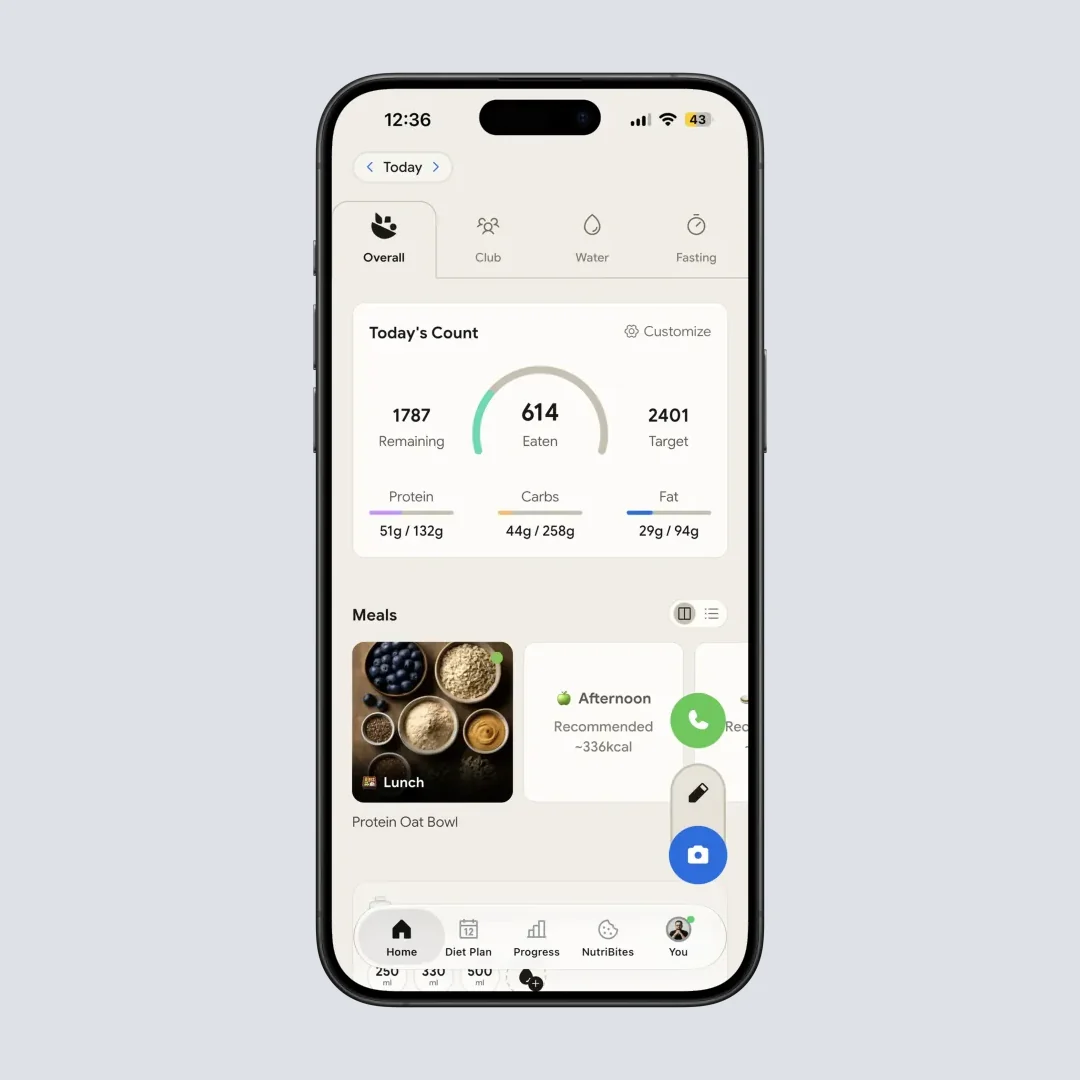
NutriScan home screen: Track your daily calories, protein, carbs, and fat at a glance (@Path: Home)
NutriScan Key Features
NutriScan also offers features like NutriBites - where you can ask questions about your eating patterns, a voice-powered AI assistant named Monika for nutritionist advice, community features for motivation, and the ability to sync with Apple Health and Google Fit for complete health tracking.
OasisHealth.app: Your Product Safety Scanner
OasisHealth.app is a completely different animal. It's a product scanner focused on testing the safety and contamination levels of:
- Bottled water brands
- Water filters
- Air purifiers
- Skincare products
They conduct independent lab testing and provide ratings based on contaminant data. Their focus is on product purity and environmental safety - not your daily food intake or meal nutrition. According to their App Store description, they charge $47 per year for their Pro version to fund expensive lab testing and remain independent.
The Real Question: Which Problem Are You Trying to Solve?
This comparison is like asking whether a car is better than a bicycle. Both are transport - but they solve different problems!
Understanding your primary health concern will instantly tell you which app you need.
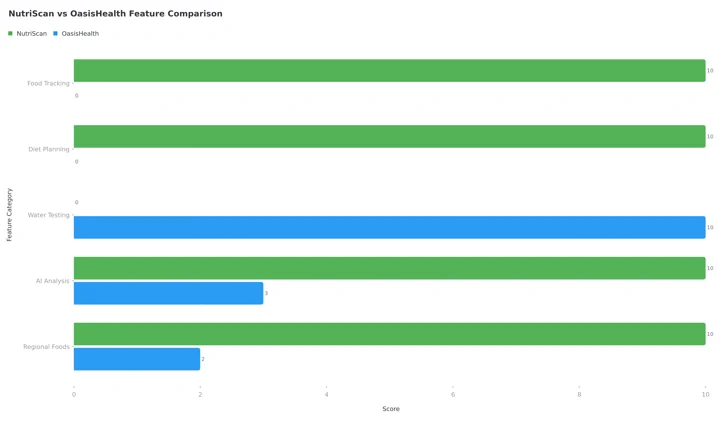 Figure 1: Feature comparison between NutriScan and OasisHealth - different strengths for different needs
Choose NutriScan If You Want To:
1. Track What You Eat Daily
Studies from Stanford Medicine show that people who use digital tools to track food intake more frequently lose more weight than those who don't monitor regularly (Stanford Medicine). The research found that tracking leads to awareness about eating habits, which helps people make better daily choices. NutriScan makes this easy with AI-powered meal scanning - just snap a photo and you're done!

Snap a photo and select food type for accurate tracking (@Path: Home > Camera Icon > Click Picture)
2. Get Personalized Diet Plans
Whether you're managing PCOS, diabetes, or trying to lose weight, NutriScan creates customized diet plans based on your location, lifestyle, food preferences, and health goals. You can also use our PCOS Macro Calculator or Diabetes Macro Calculator to get personalized targets. A 12-week trial published in Life in 2023 found that overweight women with PCOS who used a condition-specific app lost 3.19 kg, against 0.79 kg in a control group that received only an education leaflet (Life 2023).
3. Understand Your Eating Patterns
NutriScan works as your health detective. Feeling bloated? Low energy? The app checks your past meals, finds what was different, and gives smart insights. This pattern recognition is something traditional food trackers don't offer. With the calendar view and insights widgets, you can see exactly how your eating affects your energy and health over time.
4. Get Answers About Your Meals
With NutriBites feature, you can ask questions about your meal timeline. "Why did I feel tired after lunch?" or "Am I getting enough protein this week?" - the AI analyzes your data and provides answers. This is powered by conversational AI that understands context from your complete eating history.
5. Work with Diverse, Cultural Cuisines
Here's a major advantage - NutriScan recognizes local and regional foods from around the world. University of Sydney research found that many food tracking apps struggle badly with culturally diverse foods - they overestimate Western diet calories by about 1040 kilojoules while underestimating Asian diet calories by 1520 kilojoules (University of Sydney). NutriScan is built to understand diverse cuisines accurately.
Choose OasisHealth.app If You Want To:
1. Know If Your Drinking Water Is Safe
OasisHealth focuses on testing bottled water brands for contaminants. If you're concerned about water quality and want lab-tested ratings, this is their specialty.
2. Find Safe Air Purifiers and Filters
They provide independent testing of air purifiers and water filters, helping you choose products that actually work for removing contaminants.
3. Check Product Safety
Their approach is about product transparency - revealing what's really inside everyday products like skincare items and supplements.
Why People Confuse These Two Apps
I think the confusion comes from both apps having "health" in their focus. But here's how I explain it to everyone:
- NutriScan = What goes INTO your body (food and nutrition)
- OasisHealth = What's IN the products you use (water, air, skincare)
Both matter for health. But they address completely different aspects of your wellness journey. One helps you eat better, the other helps you choose safer products.
The Science Behind Food Tracking (What NutriScan Does)
Let me share why food tracking actually works. A 2024 study published in Nutrients evaluated AI-enabled food recognition apps and found that apps with better AI integration demonstrated improved functionality for dietary assessment (Nutrients Journal). The researchers noted that AI features like food image recognition could make dietary tracking much easier for everyone.
Here's what research tells us about food tracking benefits:
Weight Management Success
People who consistently track their meals understand their eating patterns better and make smarter food choices. The Stanford Medicine review cited above points the same way: three-quarters of the time, people who used digital tools to monitor themselves more often lost more weight than those who did it less often (Stanford Medicine).
Managing Chronic Conditions
For people with diabetes, PCOS, or other metabolic conditions, knowing exactly what you eat matters. The personalized approach helps users understand how specific foods affect their unique health situation.
Important Note on Cultural Food Accuracy
Here's where NutriScan really shines. The University of Sydney research found that AI-integrated food apps often had difficulty accurately identifying energy content for mixed Asian dishes - for example, the calories for beef pho were overestimated by 49 percent, while pearl milk tea had calorie underestimations of up to 76 percent (University of Sydney). NutriScan is built specifically to understand local and regional dishes that other apps miss.
Step-by-Step Guide: How to Track Your Nutrition with NutriScan
Let me walk you through how NutriScan works:
Step 1: Download and Set Your Goals
Start by selecting your health goal - weight loss, muscle gain, diabetes management, PCOS, pregnancy nutrition, or viral recovery. The app personalizes everything based on this selection. You'll also select your food preference (vegan, vegetarian, eggitarian, or non-veg).
Step 2: Set Up Your Profile
Enter your age, gender, height, weight, and activity level. This helps calculate your daily calorie and macro targets using proper formulas. Use our Online Macro Calculator to preview your targets. The app uses the 4-4-9 rule: Calories = (Protein g times 4) + (Carbs g times 4) + (Fat g times 9).
Step 3: Snap Your First Meal
Open the camera, click a picture of your meal, and let AI do the work. Select the food type (home-made, restaurant, packaged, street food, etc.) and cooking method (deep-fried, air-fried, steamed, grilled, etc.) for better accuracy. You can also adjust oil levels with a slider.
Step 4: Review Your Nutrition Breakdown
See instant analysis of calories, protein, carbs, fat, and top micronutrients. The NutriScore tells you how healthy your meal choice was with a simple rating system. You can also view 3 meal-related questions to learn more about what you ate.
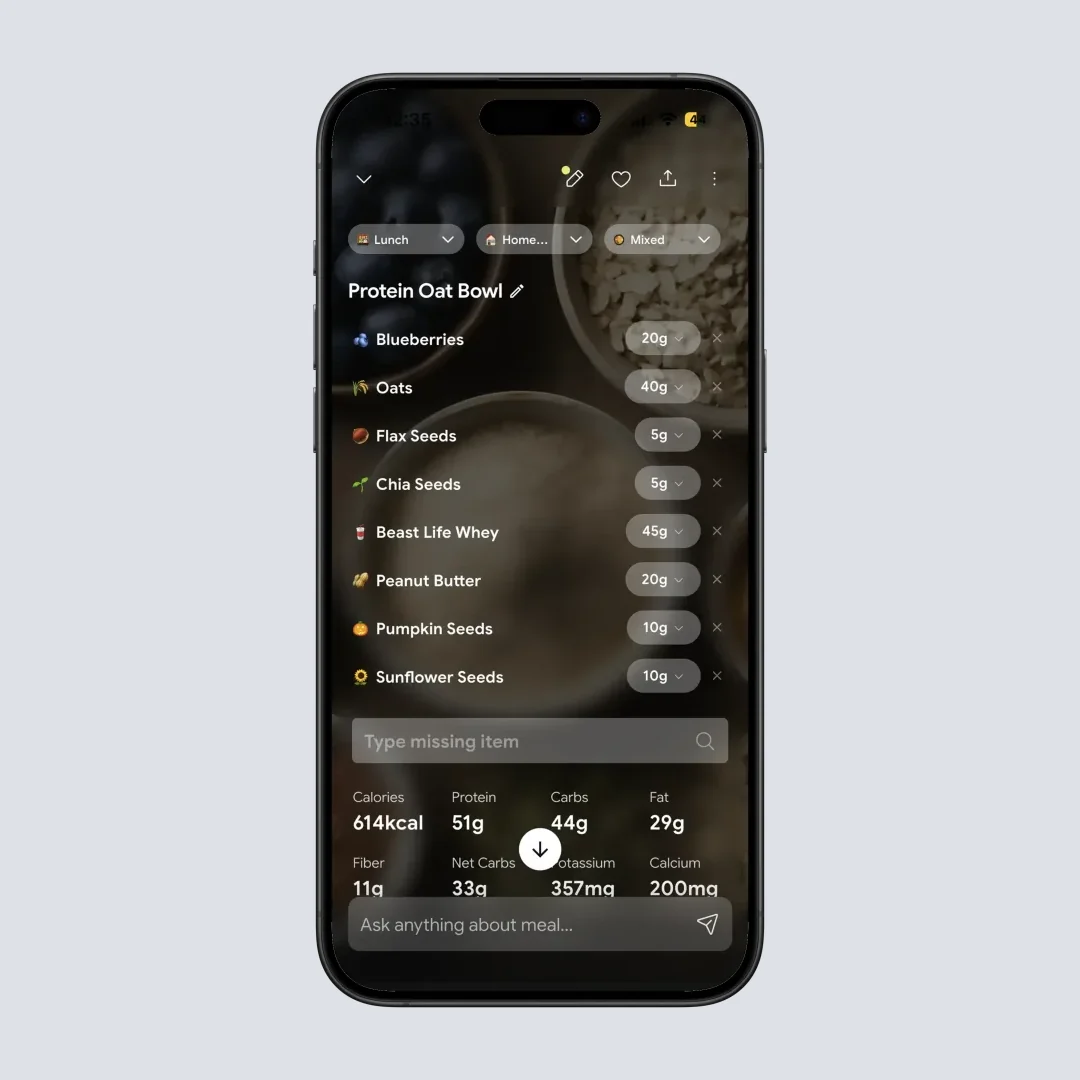
Complete nutrition breakdown with NutriScore rating (@Path: Home > Meal Item > Nutrition Details)
Step 5: Ask Questions and Get Insights
Use NutriBites to ask questions about your eating patterns. "What's my protein trend this week?" or "Which meals gave me the most fiber?" - get answers from your own data. The AI analyzes your complete meal history to provide personalized insights.
Step 6: Follow Your Personalized Diet Plan
Premium users get customized diet plans based on their goals, location, and food preferences. The plan includes detailed recipes, grocery lists, nutritional targets, and even supplement recommendations. Each meal time has 2 options to choose from.
Step 7: Track Progress Over Time
View your calendar to see NutriScore trends (color-coded from dark green to red), check your reports and insights for weekly insights, and sync with Apple Health or Google Fit for complete picture. You can also enable vacation mode when traveling.
 When you realize how different these two apps actually are
Example Scenarios: Who Benefits from Each App?
These are worked examples built from the patterns described above, not individual users.
Example 1: Managing PCOS on an Indian Diet
Someone managing PCOS who needs to track food intake, reduce carbs, and follow an anti-inflammatory diet is looking at NutriScan because it:
- Tracks daily macros and micros accurately
- Creates PCOS-specific diet plans with local Indian foods
- Understands Indian cuisine like dal, roti, and biryani
- Shows how eating patterns line up with symptoms
- Provides voice assistant support in multiple languages
OasisHealth would not help with food tracking here - it's designed for product safety testing, not nutritional analysis.
Example 2: Worried About Tap Water and Buying Bottled
Someone living with questionable tap water who wants to know which bottled water brand is safest is looking at OasisHealth because it:
- Provides lab-tested water safety ratings
- Compares contamination levels across brands
- Helps pick the right water filter
- Shows independent testing results
NutriScan would not help test that water - it's designed for food nutrition tracking, not product safety analysis.
Example 3: Tracking Nutrition Through a Pregnancy
Someone pregnant and watching iron, folic acid and calcium intake is looking at NutriScan because it:
- Tracks pregnancy-specific micronutrients
- Creates safe meal plans for pregnancy
- Monitors daily nutrient intake against targets
- Provides insights on eating patterns
- Offers community support from other users

The NutriScan Advantage: What Makes It Different
Here's what sets NutriScan apart from typical food trackers:
1. Health Detective Feature
Unlike basic calorie counters, NutriScan analyzes your meal history to find patterns. If you feel bloated or tired, it can identify which meals might be causing issues. This is pattern recognition at work - connecting your symptoms to your eating habits.
2. Voice-Powered AI Assistant (Monika)
Talk to Monika, your AI nutritionist, to ask questions, log meals by voice, or get advice. This makes tracking easier when you're busy cooking or on the go. Free users get 4 calls per week, while premium users get unlimited access.
3. Regional Food Understanding
Built for diverse cuisines - from Indian dal to Japanese ramen to Mexican tacos to Italian pasta. The AI recognizes local dishes that other apps miss because it's trained on food images from around the world.
4. Goal-Based Diet Planning
Not just tracking, but actually planning. Get customized weekly meal plans based on your specific health condition and food preferences. Plans include breakfast, mid-morning, lunch, afternoon, dinner, and bedtime meals.
5. Community and Motivation
Join the community to see rankings (based on total meals times average NutriScore plus consistency bonus), compete with others on the leaderboard, and stay motivated.
6. Repeat Meal Feature
Skip scanning if you eat the same meal daily. Just copy the old meal to today or set it to repeat on specific weekdays. This saves time while maintaining accurate tracking.
What Research Says About App-Based Nutrition Interventions
A systematic review published in the Journal of Medical Internet Research analyzed over 72,000 user reviews of diet-tracking apps. The study found that users rated usability and functionality highly, but faced challenges with adding new foods and technical issues (JMIR Study). This highlights why a broad food database with diverse foods matters.
Another comprehensive analysis of AI applications in nutrition found that deep learning and mobile AI technologies are becoming more reliable for dietary assessment, particularly when they can estimate calories from food images (PMC Review). The research emphasized that wearable and mobile devices are integrating with daily human activities for real-time and accurate data collection.
A 2024 study on weight loss app effectiveness found that 42.20% of active users lost at least 5% of their body weight at 52 weeks follow-up when using a mobile app consistently (PMC Study). For those living with obesity, achieving 5% or more weight loss can help improve various related conditions, such as reducing the risk of Type 2 diabetes and improving glycemic control.
The Verdict: Which App Should You Choose?
Here's my honest recommendation after this complete analysis:
| Your Need | Best Choice | Why |
|---|---|---|
| Track daily food intake | NutriScan | AI-powered meal recognition with instant nutritional analysis |
| Get personalized diet plans | NutriScan | Customized plans for weight loss, PCOS, diabetes, pregnancy |
| Understand eating patterns | NutriScan | Pattern recognition and insights from your meal history |
| Test water safety | OasisHealth | Lab-tested contamination ratings for bottled water |
| Check air purifier quality | OasisHealth | Independent testing of filters and purifiers |
| Track diverse cultural foods | NutriScan | Built for global cuisines including Indian, Asian, Mexican |
Choose NutriScan If:
- You want to track daily food and nutrition
- You need personalized diet plans
- You're managing weight loss, diabetes, PCOS, or pregnancy nutrition
- You want to understand your eating patterns
- You eat diverse, cultural cuisines
- You want AI-powered meal recognition
Choose OasisHealth If:
- You want to test water and product safety
- You're concerned about contamination in everyday products
- You need lab-tested ratings for filters and purifiers
- Product purity is your main concern
The Surprising Case Where You Need BOTH Apps
A small group genuinely benefits from running both. You need both apps if you are:
A new parent or expecting mother - You track pregnancy nutrition in NutriScan and check the water and formula products you buy in OasisHealth. Two different worries, two different tools.
Someone with environmental sensitivities - If you react to certain foods AND certain chemicals, you need both types of tracking. NutriScan identifies food triggers through pattern recognition, while OasisHealth identifies product contaminants.
Living in areas with water quality concerns - You need to know your water is safe (OasisHealth) AND track adequate hydration with proper nutrition (NutriScan).
A biohacker or optimization enthusiast - If you're tracking every input to your body for maximum performance, both food quality AND product purity matter.
For everyone else? Pick the app that matches your primary concern. Most people only need one.
Conclusion
Comparing NutriScan and OasisHealth is like comparing a gym membership with a home security system. Both are valuable, but they serve completely different purposes!
If your goal is to eat better, lose weight, manage a health condition, or understand your nutrition - NutriScan is your answer. It's designed specifically for food tracking and diet planning with AI that understands diverse cuisines from around the world.
If your concern is product safety, water quality, or air purifier effectiveness - OasisHealth has you covered with their lab testing approach.
The best choice is the one that matches YOUR specific health goal. And now you know exactly what each app offers!
Remember - the most effective health app is the one you'll actually use consistently. So pick the app that fits your needs, and stick with it!
Frequently Asked Questions
Q1: Is the Oasis app a food app?
A: No. OasisHealth.app rates the safety of products you buy, bottled water brands, water filters, air purifiers and skincare, using independent lab testing. It has no food database, no calorie counter and no meal log. If you searched for an Oasis food app because you want to track what you eat, you want a nutrition tracker such as NutriScan instead.
Q2: Is the Oasis health app legit?
A: It is a real app on the App Store, and the ratings come from lab panels it pays for rather than from user reviews, which answers the scam question. That does not make every rating gospel. The scores are OasisHealth's own scoring of its own test results, so read the methodology page and check the test date before you switch brands on the strength of one grade.
Q3: Is the Oasis app accurate?
A: Its numbers are as accurate as the batch it tested. A lab result covers the units that went to the lab on one date, and bottling plants change source water while brands change formulas. Check the test date on any rating you act on. For food accuracy, Oasis does not measure food at all, so a calorie question needs a nutrition app.
Q4: How much does the Oasis health app cost?
A: OasisHealth charges $47 per year for Pro according to its App Store description, a US price as of August 2026 that changes by region. NutriScan is free for 5 AI meal scans and 4 Monika voice calls a week, with Premium at about $59 a year in the US on the same date.
Q5: Can NutriScan track water intake like OasisHealth tests water?
A: NutriScan tracks your daily water intake as part of nutrition monitoring, so it tells you whether you are drinking enough for your body weight and activity level. It does not test water quality or contamination the way OasisHealth does. NutriScan tells you how much water to drink, OasisHealth tells you which water is clean.
Q6: Is NutriScan accurate for Indian, Asian, and regional foods?
A: NutriScan is built to understand diverse cuisines, and its AI is trained on local and regional dishes, from dal-chawal to biryani to sushi to tacos. We put our own accuracy at about 95 percent for foods our database covers. University of Sydney research found that food tracking apps underestimated the energy in an Asian diet by an average of 1,520 kilojoules (University of Sydney), which is the gap NutriScan was built to close. You can also add a missing item through voice or text input.
Q7: Do I need both apps for complete health management?
A: It depends on your priorities. If you are mainly focused on nutrition and diet, NutriScan alone covers your needs. If you are also concerned about product safety and water quality, adding OasisHealth gives you that extra layer. Most people only need one.
Q8: Can NutriScan help with specific conditions like PCOS or diabetes?
A: Yes. NutriScan offers specialized diet plans for weight loss, muscle gain, diabetes management, PCOS, pregnancy, and viral recovery on Premium. In a 12-week trial published in Life in 2023, overweight women with PCOS who used a condition-specific app lost 3.19 kg, against 0.79 kg in a control group that received only an education leaflet (Life 2023). The diet planner asks detailed questions about your condition and builds meal plans around the answers.
Ready to start your nutrition tracking journey? Download NutriScan App today and take the first step toward understanding what you eat!
