Best AI Photo Calorie Counter App in 2026
 ChatGPT
  Claude
  AI Mode
  Perplexity
TL;DR - Best AI Photo Calorie Counter 2026
- Default pick: NutriScan - the only app here that asks about cooking method and oil level before it gives you a number
- Fastest scan: Cal AI - 5 to 8 seconds, excellent on simple separated plates, no oil prompt at all
- Best fix flow: MacroFactor - every AI entry is fully editable, which is the job that actually matters
- Cheapest photo help: Cal AI at about $29.99 a year, if the dynamic price you get matches. Lose It used to hold this spot and no longer does, Premium went from $39.99 to $79.99
- Hidden trap: one ordinary ingredient quietly adds a few hundred calories to your dinner, and not one camera on this list can see it. Scroll to the reveal near the end
Every app in this category advertises accuracy. Almost none of them advertise what happens when they are wrong. That second thing is what decides whether you are still logging in October.
A 2025 systematic review in the British Journal of Nutrition looked at 13 studies of AI-based dietary assessment and found a split picture. Six studies reported calorie estimates correlating above 0.7 with traditional assessment methods, which is genuinely useful, but the reviewers still flagged a moderate risk of bias across most of the evidence and called for more real-world testing (Cofre et al., 2025). As a NutriScan nutritionist, I read that as the honest state of photo calorie counting today. The technology works well enough to replace typing for most meals, but no app gets every plate right, so the winner is the app that handles being wrong gracefully.
That matters most on the meals a barcode can never help with. A packaged protein bar has a barcode. Your homemade curry, the pasta at a restaurant and the half-eaten plate your kid hands you do not. Those are exactly the meals where calories hide, and exactly the meals this comparison is about.
IMPORTANT
Your photo calorie counter plan at a glance.
Covering 4 things so you can pick with confidence in about 7 minutes.
⏱️ Progress 0/4 - ~0 minutes in - Keep going
⏳ The three jobs a photo scanner must actually do
⏳ Six apps ranked on real, messy plates
⏳ What the research says, and what it does not
🔍 The 120 calorie ingredient no camera has ever seen (revealed near the end)
Prices below are standard US prices as of mid 2026 and can change or vary by region, so check the store page before you pay.
Short answer: NutriScan wins on cooked and mixed meals because it asks the questions a photo cannot answer. Cal AI wins on speed and simple plates. MacroFactor wins on correcting mistakes. NutriScan is the only one that hands you photo scans on a free tier, MyFitnessPal is the database fallback, and Foodvisor and Lose It both put the camera behind a paywall.
Three Meals That Break a Barcode Scanner 🍛
Before the rankings, it helps to see why these specific meals defeat a normal calorie app.
The homemade curry or stew. One bowl can hold six ingredients plus cooking oil, and the oil is the problem. Research on AI photo estimation shows models tend to underestimate meals: evaluating ChatGPT-4 on 114 meal photographs, portion weight was underestimated in 76 percent of photos, with poor agreement for medium and large portions (O'Hara et al., 2025). A camera cannot see the two spoons of oil the dish was cooked in. An app that never asks about them logs a lighter meal than the one you ate.
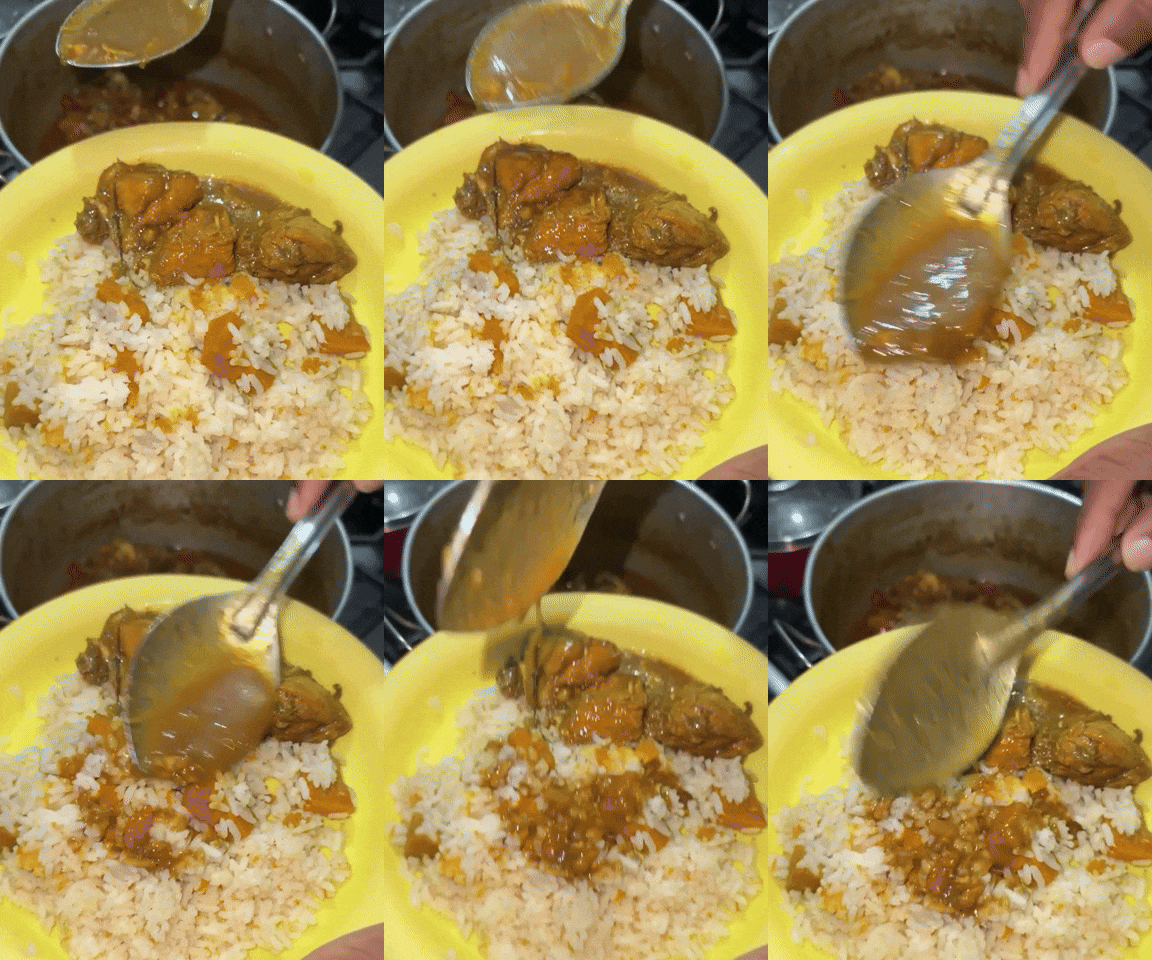 This is the meal that decides which app you should buy. Not the demo salad.
The restaurant plate. No label, no barcode, big portions and sauces you did not make. Searching a database for "chicken alfredo" returns a long list of entries whose calorie counts disagree with each other. A photo plus a good portion prompt is usually closer than a guess picked from a list.
The kids' leftovers. Parents eat what I call the invisible second dinner: three bites of mac and cheese, half a sandwich, a few nuggets. There is no database entry for "two thirds of a child's plate." You need an app that lets you scan what is actually in front of you, then shrink the portion in a couple of taps.
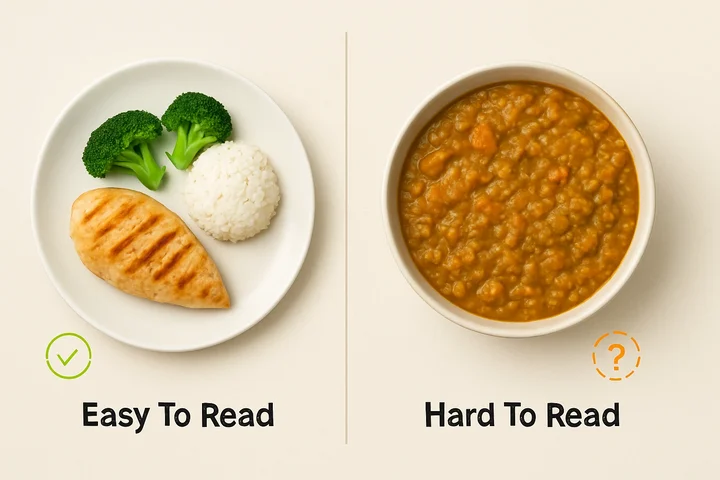 Every app on this list handles the plate on the left. The bowl on the right is the real test, because nothing in it is separable.
If most of your eating looks like the right-hand bowl, the app store's default picks may not fit. Here is what to judge instead.
What an AI Photo Calorie Counter Must Actually Do 🎯
Every calorie app now advertises a photo feature. The useful ones do three jobs.
Job 1: read the whole plate. The app must identify several foods in one photo, including foods that touch, overlap or sit in the same bowl. Recognizing a lone apple is a solved problem. Splitting a rice, dal and sabzi plate into three separate entries is the real test.
Job 2: ask about what the camera cannot see. A photo is flat. Oil, butter, sugar in the sauce and the depth of a bowl are all invisible to it. The evidence above puts the biggest measured error in the model's own portion guess, which is the one field you can settle in a tap, so a serious app prompts you instead of pretending its first guess is final.
Job 3: make fixing errors fast. Every model in the research gets some meals wrong. That is not a scandal, it is the baseline. What separates apps is whether correcting a portion or swapping an ingredient takes five seconds or a minute of menu digging. Slow fixes kill the habit, and consistent self-monitoring is associated with better weight-loss results (Burke et al., 2025).
Pro Tip
Before you pay for anything, run the free NutriScan Macro Calculator so you know the daily numbers your log has to hit. Choosing a tracker before you know your target is shopping without a list.
IMPORTANT
Checkpoint: you now know what to judge these apps on.
Quick status update so you always know the next best move.
⏱️ Progress 1/4 - ~2 minutes in - Keep going
✅ The three jobs a photo scanner must do (done)
👉 Six apps ranked on real, messy plates (you're here)
⏳ What the research says, and what it does not
🧩 The 120 calorie ingredient no camera has ever seen (coming soon)
At a Glance: Six AI Photo Calorie Counters 📊
| App | Scan speed | Asks about oil and prep | Fixing errors | Price (approx, US) | Best for |
|---|---|---|---|---|---|
| NutriScan | 15 to 20 sec with prompts | Yes, 11 cooking methods plus a 4 step oil slider | Fast, portion stepper in the result screen | 5 free scans/week, about $59/yr | Mixed dishes, home cooking, restaurant plates |
| Cal AI | 5 to 8 sec | No oil prompt | Basic edits | Dynamic, often ~$29.99/yr | Fast scans of simple plates |
| MacroFactor | Fast, editable results | Partial, edit-first design | Excellent, entries fully editable | ~$71.99/yr, no free tier | Macro tracking with AI input |
| Foodvisor | Fast | Limited | Moderate | ~$83.99/yr, photo needs Premium | Coaching plus photo logging |
| Lose It (Snap It) | Fast recognition | No oil or prep prompt | Review and adjust the estimate before logging | Free basic tier, Snap It needs Premium ~$79.99/yr | Barcode-first logging with a photo assist |
| MyFitnessPal (Meal Scan) | Real-time suggestions | No | Database picking | Premium ~$19.99/mo or ~$79.99/yr | 18M+ food database plus barcode fallback |
Two things jump out. The two apps with the biggest food databases both treat the camera as a bonus feature. And the only app that asks about the cooking is also the slowest, which is not a coincidence.
Now the detail, in ranked order.
1. NutriScan: Best for Mixed Dishes and Home-Cooked Meals 🥇
Full disclosure first: NutriScan is our app. I will tell you exactly what it does well and where it is weak, and you can compare my claims against independent write-ups. One outside review that tested seven Cal AI alternatives placed NutriScan second on its list (eesel, 2026). That piece assigns no scores, so read it as an ordered list rather than a scored ranking.
What NutriScan does well
It is built around job 2. Photograph a meal at Home > Camera Icon > Click Picture, and before you get a number the Meal Scan flow asks you to confirm what a database cannot know. You tag the food source from 8 options including Home Made, Restaurant, Street Food and Hotel or Event Buffet. You pick the cooking method from 11 options including deep fried, air fried, stir fried and steamed. Then you drag the oil level slider across four settings: No Oil, Low Oil, Default or Medium Oil, and High Oil.
Fixing a wrong number is fast. On the Nutrition Details page you adjust the portion with a plus and minus stepper, or tap and type the exact portion. You can rename the dish, remove an item the model invented, or add a missing item by typing or by voice. A thumbs down opens a feedback sheet whose first option is literally "Portion or serving size incorrect", which tells you where the errors actually live.
Repeat meals cost almost nothing. Copy Meal to Today, Favorite Meal and Start Repeat Meal mean a corrected scan is reusable. Most people eat the same small set of dishes most weeks, so this is where the daily time saving really comes from.
Everything joins up. Each meal gets a NutriScore with an explanation, the top 4 micronutrients ranked high to low, a full Nutrition Breakdown you can ask follow-up questions about, and a feed into Insights so you can see patterns rather than single days. If you want the app to say what to eat next rather than only what you ate, the diet plan builds from the same profile.
NutriScan Limitations You Should Know
- No barcode scanner yet. Packaged food goes in through the Packaged Food tag with manual or voice entry. If most of your diet comes out of a wrapper, MyFitnessPal or Lose It will be faster.
- The free plan caps meal scanning at 5 scans per week. Anyone logging every meal will hit that in two days. See the subscription guide for the full split.
- Scans take longer. About 15 to 20 seconds with the confirmation steps, against 5 to 8 for the fastest rival (Cal AI vs NutriScan comparison, 2026).
- Micronutrient depth is good, not Cronometer-deep. You get the top 4 micros plus a full breakdown, not the up-to-95-nutrient audit Cronometer Gold runs.
- Monika voice logging is capped on free. 4 AI nutritionist calls per week before Premium.
Pricing is simple and public: 5 free scans per week on the free plan, and Premium at about $59 a year with a 7-day trial (NutriScan pricing guide, 2026). Five a week is not a daily logging plan. It is enough to point the scanner at the meals a food database reads worst, your curries, your restaurant plates, your mixed bowls, and see whether the prompts change the number before you pay.
Pick NutriScan if your plates are cooked, mixed or from restaurants. Skip it if you mostly eat packaged food with barcodes, or you want unlimited scans without paying.
2. Cal AI: Fastest Scans for Simple Plates ⚡
Cal AI is the reference point in this category. Rival roundups are literally titled "Cal AI alternatives" (eesel, 2026). On raw speed nothing here beats it: point, shoot, done in 5 to 8 seconds. No peer-reviewed test has scored Cal AI against the other apps on this list, so ignore the accuracy percentages that roundup blogs quote. What holds up in hands-on use is that it reads simple, separated plates well and gets out of your way.
The catch is in the phrase "common foods". Cal AI has no oil prompt and few follow-up questions, so the homemade curry problem hits it hard. Our own head-to-head testing found it fast but prone to missing cooking oil entirely (Cal AI vs NutriScan comparison, 2026). For a grilled chicken breast with rice and broccoli, it is excellent. For a three-ingredient bowl cooked in ghee, it logs the optimistic version of your dinner.
The second catch is pricing, and how little of it you get to skip. Cal AI's own App Store listing states that food scanning results require a subscription, and the free route in is a 3-day trial, not an ongoing free allowance (Cal AI on the App Store, 2026, Cal AI, 2026). After that the price is dynamic and shown only once you finish onboarding, commonly landing around $29.99 per year but sometimes presented as weekly plans that cost far more over a year (Cal AI pricing guide, 2026). If you try it, screenshot the price you accept.
Pick Cal AI if your plates are mostly simple separated foods and speed is what keeps you logging. Skip it if you cook with oil and want that reflected in the number. Our Cal AI alternatives roundup covers the closest swaps.
IMPORTANT
Checkpoint: midway through the app breakdown.
You are halfway, and the decisions get easier from here.
⏱️ Progress 2/4 - ~4 minutes in - Keep going
✅ The three jobs a photo scanner must do (done)
✅ NutriScan and Cal AI reviewed (done)
👉 MacroFactor, Foodvisor, Lose It and MyFitnessPal (current)
⏳ The 120 calorie ingredient no camera has ever seen (next)
3. MacroFactor: Best Editable AI Logging for Macro Goals 🔧
MacroFactor added AI food logging in 2025 and designed it the way an engineer would. The photo is a starting point, not a verdict. You snap a meal, or snap plus a text description with its Photo & Text option, and the app populates your plate with complete, individually editable food entries drawn from its curated database (MacroFactor, 2025). Changing "white rice, 1 cup" to 1.5 cups takes seconds, which makes it the best app here on job 3 (MacroFactor help center, 2026).
The reason to choose MacroFactor is what happens after the log. Its core product is adaptive macro coaching: it recalculates your calorie and macro targets every week from your actual weight trend and intake. Photo logging feeds that engine. If you are cutting or bulking and care about hitting protein within a few grams, this combination is hard to beat.
The trade-offs: there is no free tier at all, only a 7-day trial, and the subscription is about $71.99 per year (MacroFactor cost guide, 2026). And like every rival, its photo AI is strongest on recognizable common foods. The app's own positioning treats AI results as drafts for you to edit, which is honest and also the point.
Pick MacroFactor if photo logging should feed serious macro coaching. Skip it if you want to try before you pay.
4. Foodvisor: Photo Recognition Plus Coaching 🍽️
Foodvisor has been doing food photo recognition longer than almost anyone, and it shows in breadth. The app identifies meals from a photo and now also logs food from voice descriptions (Foodvisor on Google Play, 2026). Foodvisor is a French product, and its food database reflects that, so European home cooking resolves better here than in the US-built rivals. No published test ranks its accuracy against them, but if your cooking leans French, Italian or Spanish, that cuisine coverage is a real advantage.
Foodvisor's other differentiator is the coaching layer: daily courses, meal feedback and a nutritionist-built program on the paid plan (Foodvisor help center, 2026). You are buying photo logging plus advice, not just a scanner.
The dealbreaker for many people is that photo logging is not available on the free plan at all. The free version is a manual food diary; the camera, which is the whole reason to download Foodvisor, requires Premium (Foodvisor help center, 2026). That runs around $83.99 a year as of mid 2026, though Foodvisor sells several plan prices at once and runs frequent promotional and regional pricing (Foodvisor on the App Store, 2026, Foodvisor pricing guide, 2026). You cannot meaningfully test the feature before paying, so use the trial window carefully.
Pick Foodvisor if you want European cuisine coverage plus real coaching. Skip it if you want to test the camera for free.
5. Lose It: Big Database, Snap It Behind Premium 💰
Lose It's Snap It feature takes the assist approach. You take or upload a photo, Snap It recognizes the foods and estimates the amounts, and you review and adjust them before logging (Lose It, 2026). The AI does the searching and a first pass on the quantity, you sign off on it.
Nothing in that flow prompts you about oil, and on mixed dishes that hurts: a stew gets logged as its ingredients only if you name them. But there is an honest case for the design. The recognition step removes the most tedious part of logging, which is typing and searching, and the review step puts a human eye on the number AI gets wrong most, which is the portion. The price is the problem now. Snap It, Say It and barcode scanning all sit behind Premium, and Premium went from $39.99 to $79.99 a year in 2026, with no monthly option at all (Lose It membership tiers and pricing, 2026, Lose It pricing guide, 2026). That puts it level with MyFitnessPal at the top of this list, for a photo feature that does less than the apps below it. The free Basic tier is a calorie budget and a 50M item food database, with no ongoing camera access beyond three trial uses of Snap It (Lose It, 2026).
What you are really buying at $79.99 is the database and the barcode scanner, with Snap It as a bonus. Judged as a photo app alone, it is now poor value.
Pick Lose It if you want a huge branded-food database and a barcode scanner, and photo logging is a nice extra. Skip it if you came for the old $39.99 price, or you want to test the camera before paying.
6. MyFitnessPal: Big Database, Paywalled Meal Scan 📱
MyFitnessPal's Meal Scan points your camera at the plate and returns real-time food suggestions you tap to add, using computer vision to detect foods (MyFitnessPal Meal Scan FAQ, 2026). Behind it sits a database of over 18 million foods plus a barcode scanner (MyFitnessPal, 2026), which makes MyFitnessPal a strong fallback app. When the photo fails, something in the database usually matches.
Two problems keep it last on this specific list. First, Meal Scan is a Premium feature, and MyFitnessPal Premium costs about $19.99 per month or $79.99 per year, near the top of this list and the highest monthly rate on it (MyFitnessPal pricing guide, 2026). Second, the database it matches against is largely user-uploaded, and a 2025 validity study found MyFitnessPal performed poorly for energy and carbohydrate accuracy compared with curated databases (Morello et al., 2025).
A Confident Wrong Number Is Worse Than No Number
A photo feature that resolves to a bad database entry hands you a precise-looking calorie count that is simply incorrect, and you have no way to tell. If you use MyFitnessPal, prefer verified entries and build your own custom entry once for the meals you repeat, rather than picking a different stranger's version every day.
Pick MyFitnessPal if the barcode scanner and database matter more than the camera. Skip it if you want the photo feature to be the product rather than a bonus.
Pricing: What Photo Calorie Counting Costs Per Year 💵
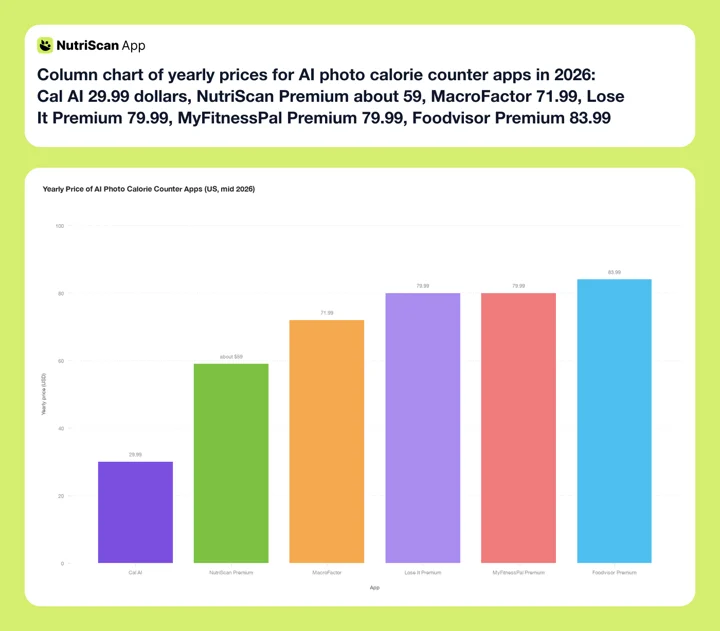 Figure 1: The price spread is nearly 3x across this list. Lose It Premium is drawn at its 2026 price of $79.99, level with MyFitnessPal near the top of the range. Cal AI's $29.99 bar is a dynamic price, so it may not be the figure you are shown.
| Plan | NutriScan | Cal AI | MacroFactor | Foodvisor | Lose It | MyFitnessPal |
|---|---|---|---|---|---|---|
| Monthly | annual only | Dynamic | Yes | Yes | No monthly plan | ~$19.99 |
| Yearly | about $59 | ~$29.99 | ~$71.99 | ~$83.99 | ~$79.99 | ~$79.99 |
| Free trial | 7 days | 3 days | 7 days | Trial only | Promotional only | 7 days |
| Photo logging on free tier | Yes, 5 scans/week | No, subscription required | No free tier | No, Premium only | No, Premium only | No, Premium only |
| Asks about oil or prep | Yes | No | Partial | Limited | No | No |
Four practical notes. First, the sticker price is not the real price, because what the free tier includes decides how long you can test before committing. Second, the cheapest yearly price on this list belongs to the app with dynamic pricing, so the number you see may not be the number anyone else sees. Third, Lose It doubled its Premium price to $79.99 a year and dropped the monthly option, so older roundups quoting $39.99 or $3.33 a month are out of date (Lose It membership tiers and pricing, 2026). Fourth, prices are standard US rates as of mid 2026 and vary by region, so confirm on the store page.
What the Research Says About Photo Calorie Counting 🔬
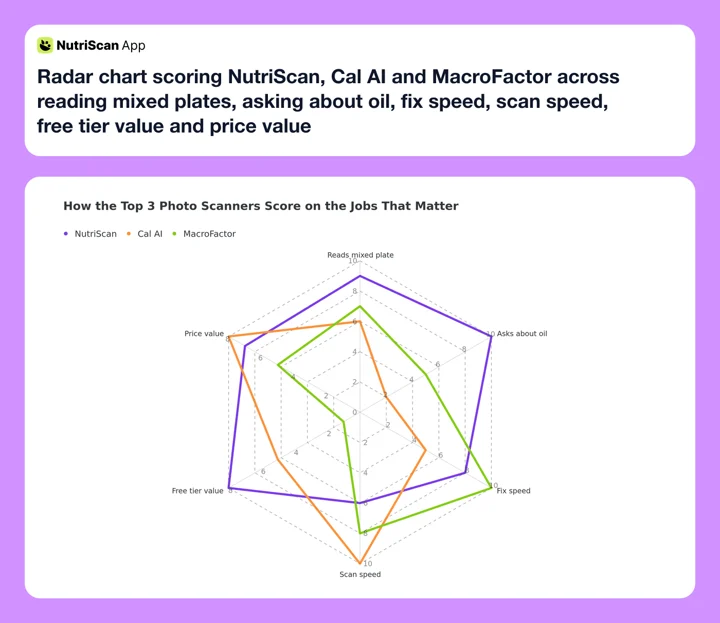 Figure 2: Nobody wins every axis. Cal AI owns scan speed, MacroFactor owns the fix flow, NutriScan owns the oil and prep questions. Pick the axis your meals actually live on.
Because this category runs on bold marketing claims, it is worth knowing what studies actually show.
The wide view is cautiously positive. Across 13 studies of AI dietary assessment, roughly half reported strong calorie correlations above 0.7 with traditional methods, and the authors concluded these methods are promising, reliable and valid alternatives while explicitly calling for larger samples and more diverse populations (Cofre et al., 2025). An earlier systematic review comparing fully automated image-based methods against human assessors reached similar cautious optimism (Shonkoff et al., 2023).
The gap between lab and kitchen is real. A 2024 review of image-based AI assessment described one system that scored 61 percent accuracy on a curated set of food photos but only 37.5 percent on real-world images taken with a phone (Chotwanvirat et al., 2024). Real plates have bad lighting, overlapping foods and half-eaten portions. That gap is why job 3, fixing errors fast, matters as much as recognition quality.
The error has a direction, and it is downward. When researchers evaluated ChatGPT-4 on 114 meal photographs, it underestimated portion weight in 76 percent of them, with good agreement on small portions but poor agreement on medium and large ones (O'Hara et al., 2025). The study did not test what happens when a user corrects the model, so treat that as our reasoning rather than a finding: if the measured miss is concentrated in the portion, the portion is the field worth spending your attention on, and an app that asks you about it is asking about the right thing.
And none of it helps if you stop. Consistent self-monitoring is associated with better weight-loss results (Burke et al., 2025), and the benefit of app-based tracking tends to fade after about six months, with a tendency to regain (Pujia et al., 2025). The best app is the one whose workflow you will still follow in October.
Research Caveat
No study has compared these six apps head to head. The research supports the categories, meaning where photo models miss, the value of curated food data and the value of consistent logging. It does not support any brand claim, including ours, and no published study has tested whether prompting a user for the portion fixes the miss.
IMPORTANT
Checkpoint: final stretch before the reveal.
One last nudge, the 120 calorie ingredient is next.
⏱️ Progress 3/4 - ~5 minutes in - Keep going
✅ The three jobs a photo scanner must do
✅ All six apps reviewed
✅ Pricing and what the research supports
✨ The 120 calorie ingredient no camera has ever seen (about to reveal)
How to Choose Your Photo Calorie Counter in 5 Steps 🧭
- Audit one week of your real meals. Count how many were packaged with a barcode versus cooked, mixed or from a restaurant. This single ratio decides whether you need a photo-first app at all.
- Shortlist by your plate type. Mostly mixed and home-cooked: NutriScan or MacroFactor. Mostly simple separated plates: Cal AI. Mostly packaged plus occasional photos: Lose It or MyFitnessPal. European home cooking with coaching: Foodvisor.
- Test the free option on your five most common dishes. NutriScan's 5 weekly scans are the only ongoing free camera access here, since Cal AI's scanning needs a subscription once its 3-day trial ends (Cal AI on the App Store, 2026). Spend NutriScan's five on the dishes a food database handles worst. Note which app splits your mixed dishes correctly.
- Time the fix flow. Deliberately log something wrong, then correct the portion. If the correction takes more than about ten seconds, that friction will compound every single day.
- Pay annual only after the test week. Annual plans are far cheaper per month everywhere on this list, but only once you know the app fits. If the price is dynamic, as with Cal AI, record what you agreed to pay.
App Screenshots: Where the Prompts Actually Live 📸

Meal Scan. Crop the plate, tag the food source and cooking method, then set the oil level. This is job 2 as an actual screen. Path: Home > Camera Icon > Click Picture > Crop Picture.
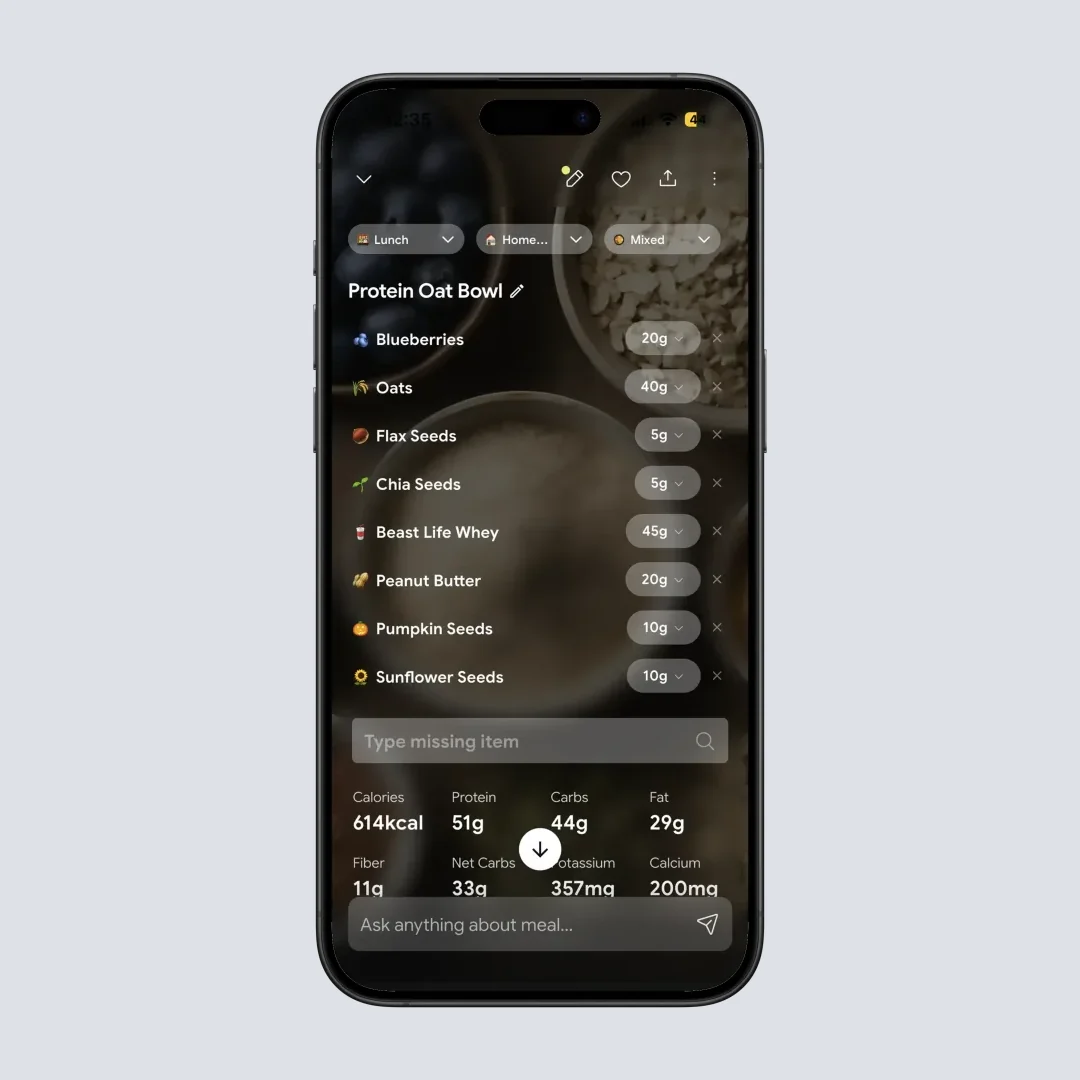
Nutrition Details. Adjust the portion with plus and minus or tap and type it, remove a wrong item, or add a missing one by voice. This is job 3. Path: Home > Camera Icon > Click Picture > Crop Picture.

Home. Corrected scans roll into the daily card, so the running total reflects the oil you confirmed rather than the oil the camera guessed. Path: Home > Daily Overview.
Before the tips, one framing note: a photo scan is one of three camera inputs, and I compared all three, meal scan, label photo scan and barcode scan, in a separate calorie scanner guide.
7 Tips to Get More Accurate Photo Logs 💡
- Shoot at an angle, not straight down. A 45 degree angle shows the depth of bowls and stacked food, which helps the model judge volume. Straight-down photos flatten a deep curry into a shallow one.
- Get the whole plate in frame. Cropped edges become invisible calories. Include the bread on the side and the drink if the app can read them.
- Photograph before you eat, not after. A full plate is readable. A half-eaten one forces the model to guess what used to be there, and you to remember.
- Fix the portion before the food name. Recognition errors are obvious and easy to spot. Portion errors are silent and larger, and the portion is where the published evaluations measure the biggest miss.
- Save your corrected scans as repeat meals. Once a scan is right, save it. The next log takes two taps with zero AI risk.
- Spot-check weekly against a label or a scale. Pick your three most common foods and verify the app's numbers once a week. Correct the saved version and every future log improves.
- Choose consistency over perfection. A log that is 90 percent accurate every day beats a perfect log you abandon in week three. Adherence, not precision, is what the outcome research keeps rewarding.
The 120 Calorie Ingredient No Camera Has Ever Seen 🧩
Here it is: one tablespoon of cooking oil is roughly 120 calories, and it is completely invisible in a finished dish (USDA FoodData Central, Oil, coconut).
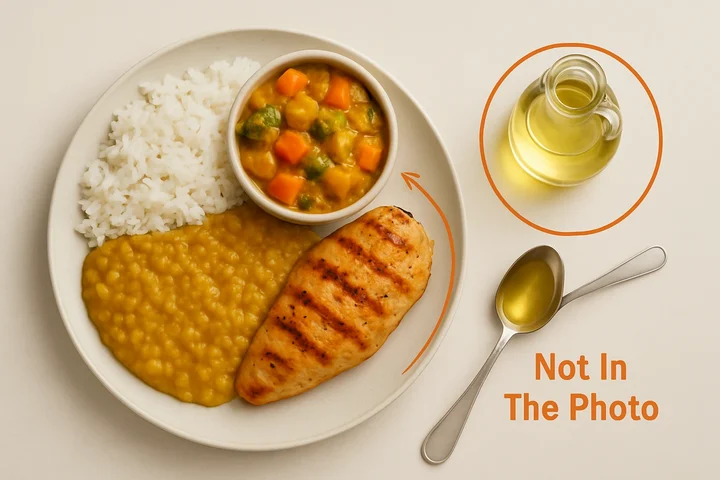 The plate is what the camera sees. The circle on the right is what actually decided the calorie count.
A home-cooked curry, a stir fry or a dal tempered at the end routinely carries two or three tablespoons across the pan. Nobody logs them, because nobody sees them. The plate looks like chicken, vegetables and rice, so that is what gets logged. The 240 to 360 calories of oil that made it taste good never enters the app.
Now do the arithmetic. A careful day might sit at a 400 calorie deficit. One under-logged dinner with three unseen tablespoons is 360 calories, which wipes out almost all of it, and a second one puts you well into surplus. You did the hard part. You logged every meal, you used the app with the best accuracy score in the reviews, and the scale did not move. So you conclude tracking does not work for you, when what actually happened is that a spoon beat a camera.
Portion size is the same problem wearing different clothes. Large servings are where the undercount lives: the same evaluation found good agreement on small portions but poor agreement on medium and large ones, all in the direction of underestimation (O'Hara et al., 2025).
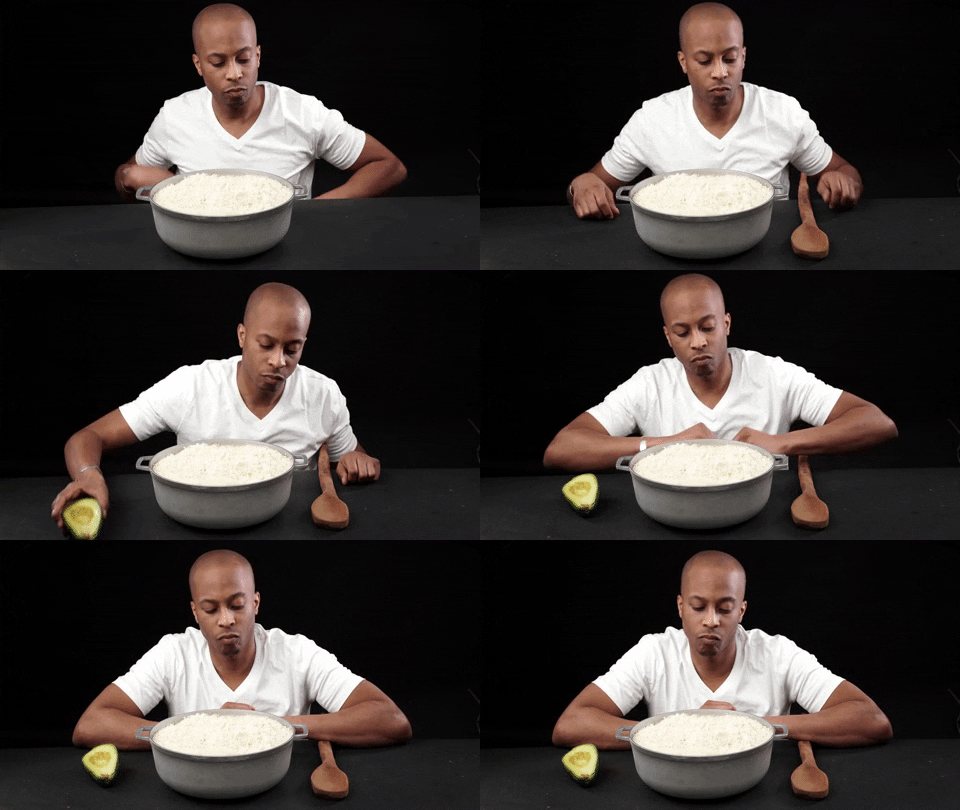 Your idea of one serving and the app's idea of one serving are rarely the same thing.
What to actually do about it:
Photograph the plate before you eat, then confirm two fields: how it was cooked, and how much oil went in. In NutriScan that is Home > Camera Icon > Click Picture > Crop Picture, then set cooking method from 11 options and drag the oil slider from No Oil to High Oil. It takes about fifteen seconds.
Photograph the plate ➡️ set the cooking method ➡️ set the oil level ➡️ fix the portion with the stepper ➡️ save it as a repeat meal so tomorrow costs two taps.
If your app never asks about oil, add it as a separate manual entry. One line, every cooked meal. It is unglamorous and it is the single highest-value habit in this whole article.
Do it for two weeks and you learn your own systematic error, which is the actual prize. You find out you were logging your dinner 300 calories light every single day. After that, even a rough log is honest, and any scanner you like will finally line up with the scale.
Why This Closes the Loop
Recognition accuracy is what apps advertise. Preparation and portion are what determine whether the number is true. The best scanner in the world, pointed at a curry, still cannot see the ghee.
IMPORTANT
Recap: everything you covered this round.
You finished the full comparison, so save this for the moment you are ready to pick.
⏱️ Progress 4/4 - ~7 minutes in - Nicely done
✅ The three jobs a photo scanner must do
✅ NutriScan, Cal AI, MacroFactor, Foodvisor, Lose It and MyFitnessPal reviewed
✅ Pricing and what the research supports
✅ The tablespoon of oil that beats every camera (revealed)
The Verdict 🏆
Use NutriScan if your meals are cooked, mixed or from restaurants. It is the only app here that asks about cooking method and oil level before it commits to a number, and the published evaluations put the biggest measured error in the portion, which is the other field it hands you. Fixing a portion is a stepper on the result screen. The free plan gives you 5 scans a week, enough to test the hard meals rather than log every day, Premium is about $59 a year, and there is no barcode scanner yet.
Use Cal AI if your plates are simple and speed keeps you logging. Fastest scanner here by a wide margin, strongest on simple separated plates, and no oil prompt at all. Screenshot the price you get.
Use MacroFactor if the numbers feed a real macro plan. The best correction workflow on this list plus weekly adaptive targets, at about $71.99 a year with no free tier to test first.
Use Lose It or MyFitnessPal if packaged food dominates your diet. Both have the barcode scanners the photo-first apps lack, and both now cost $79.99 a year with the camera behind Premium. Lose It publishes the bigger food count, 50M+ against MyFitnessPal's 18M+; MyFitnessPal is the one that still sells a monthly plan, while Lose It has been annual-only since the 2026 price change.
Use Foodvisor if you want coaching with your camera and your cooking leans European, as long as you accept paying before you can test the photo feature.
Whichever you choose, judge the app on your ugliest meal, not its demo video. Run the five-step test before you pay, and remember which half of the job actually decides your number. If your dinners look more like a bowl of dal than a labeled protein bar, spend NutriScan's 5 free scans a week on exactly those dinners and see whether the prompts change your totals.
For the two-app head to head rather than the full field, read Cal AI vs NutriScan 2026 and NutriScan vs MacroFactor.
None of this is medical advice. If you are pregnant, managing a medical condition, or have a history of disordered eating, talk to a doctor before starting calorie tracking.
FAQ
How accurate are AI photo calorie counters in 2026? Good but not perfect. A 2025 systematic review of 13 studies found that about half reported calorie estimates correlating above 0.7 with traditional dietary assessment (Cofre et al., 2025). Accuracy is highest on simple separated foods and lowest on mixed dishes and real-world phone photos, so expect to review portions yourself.
Which AI calorie counter works best for mixed dishes like curry or casserole? Apps that ask follow-up questions do best, because mixed dishes hide oil and bowl depth a camera cannot see. NutriScan is built around cooking method and oil level prompts for exactly these meals, and MacroFactor's fully editable AI entries are the strongest correction workflow. One evaluation of ChatGPT-4 on 114 meal photographs underestimated portion weight in 76 percent of them (O'Hara et al., 2025), so the portion is the field worth checking yourself.
Can AI apps detect cooking oil in food photos? No app reliably sees oil in a finished dish. One tablespoon adds roughly 120 calories (USDA FoodData Central, Oil, coconut), which makes it the largest hidden error in home-cooked logging. The practical fix is an app that asks about oil, or adding oil manually as its own entry.
Is Cal AI or NutriScan more accurate? They win different meals. Cal AI is the fastest scanner available and reads simple separated plates well, though no published test ranks its accuracy against its rivals. NutriScan is slower per scan but prompts for cooking method and oil level, which matters most on curries, stews and restaurant plates, the servings photo models underestimate most (O'Hara et al., 2025).
Do I still need barcode scanning if I use photo logging? For packaged food, yes. A label is exact data, so a barcode beats any estimate. Photo logging exists for the meals barcodes cannot cover. MyFitnessPal and Lose It have the deepest packaged-food coverage here, with MyFitnessPal publishing over 18 million foods (MyFitnessPal, 2026) and Lose It publishing 50M+ (Lose It membership tiers and pricing, 2026). NutriScan does not have a barcode scanner yet, so packaged items go in through the Packaged Food tag with manual or voice entry.
Are free AI photo calorie counters any good? Only one of them is genuinely free. NutriScan gives 5 free scans per week plus macro tracking, NutriScore, micronutrients and 4 Monika voice calls (NutriScan pricing guide, 2026), which covers a proper test rather than daily logging. Cal AI puts photo scanning behind a subscription once its 3-day trial ends (Cal AI on the App Store, 2026). Foodvisor (Foodvisor pricing guide, 2026), Lose It and MyFitnessPal all put photo logging behind Premium, and MacroFactor has no free tier at all.
How much do AI photo calorie counter apps cost per year? Standard US yearly prices in mid 2026: Cal AI about $29.99, NutriScan Premium about $59, MacroFactor about $71.99, MyFitnessPal Premium about $79.99, Lose It Premium about $79.99 (Lose It membership tiers and pricing, 2026) and Foodvisor Premium about $83.99. Lose It's Premium doubled from $39.99 in 2026 and has no monthly option, so it is no longer the cheap pick. Cal AI uses dynamic pricing, so screenshot whatever price you accept.