Is Foodvisor Free? Cost, Plans and What Premium Adds
 ChatGPT
  Claude
  AI Mode
  Perplexity
 Yes, Foodvisor is free to download and it has a free tier you can keep forever. That free tier gives you manual food search, calorie and macro totals, weight and water logging, and Apple Health or Google Fit sync. What it does not give you is the thing most people install Foodvisor for: the AI photo scan. Snapping a picture of your plate is Premium, and so are the daily coaching lessons and the recipe library. Premium costs $14.99 a month or $83.99 a year, about $6.99 a month. Those are US App Store prices as of August 2026 and they change by region.
As a NutriScan nutritionist, I have tested dozens of nutrition apps and tracked their pricing models over the years. Below I break down what the free tier actually covers, what every paid tier costs, and how the price reads for searchers looking up Foodvisor gratis, Foodvisor pris, or Foodvisor é pago.
TL;DR - Is Foodvisor free?
- Free tier: Yes, permanent. Manual food logging, calories, macros, weight, water. No photo AI, no coaching
- Monthly: $14.99/month - full Premium, cancel anytime
- Annual: $83.99/year (~$6.99/month) - 53% cheaper than monthly
- Free trial: None. The monthly plan is the cheapest way to test Premium
- Prices are standard US prices as of August 2026 and change by region
 Foodvisor's AI photo logging lets you snap a picture of your meal to get instant nutrition data
What Does Foodvisor Cost in 2026? 💰
Foodvisor uses a tiered subscription model. Here is a quick summary of current pricing:
| Plan | Price | Effective Monthly Cost | Key Features |
|---|---|---|---|
| Free | $0 | $0 | Manual food logging, basic diary |
| Monthly | $14.99/month | $14.99 | Full Premium features |
| Annual | $83.99/year | ~$6.99/month | 53% savings vs monthly |
| 3-Month | $29.99-$89.99 | Varies | Regional pricing applies |
The annual plan offers the best value at approximately $6.99 per month - competitive with apps like MacroFactor ($71.99/year) and significantly cheaper than Noom (starting at $17/month).
TIP
The annual plan saves you about $96 per year compared to paying monthly. That is a 53% discount for committing upfront.
Is Foodvisor Free? What the Free Plan Includes
The free version of Foodvisor is more limited than competitors like MyFitnessPal or FatSecret. Here is exactly what the free tier includes:
Included in Free:
- Manual food logging into the diary
- Basic calorie and macro tracking
- Weight logging
- Water intake tracking
- Access to the food database
- Apple Health and Google Fit sync
Not Included in Free:
- AI photo meal analysis
- Daily nutrition lessons and courses
- Expert articles with meal plans
- Recipe library (hundreds of recipes)
- Customizable macronutrient targets
- Daily food recommendations and summaries
- Workout video programs
The critical difference: free users cannot snap a photo to log meals. The AI-powered photo recognition - Foodvisor's main feature - requires Premium. This is a major contrast to apps like Lifesum and Lose It, which offer some photo logging in their free tiers.
According to a Reddit discussion on nutrition apps, many users feel "none of the apps actually have a functional free version" - and Foodvisor's free tier supports this sentiment. It is really a demo mode for testing the interface before committing to Premium.
What You Get with Foodvisor Premium 🌟
Foodvisor Premium transforms the app from a basic food diary into a comprehensive nutrition coaching program. Here is the complete feature breakdown:
1. Custom Diet Program and Meal Plan
When you subscribe, you answer an 8-minute questionnaire about your profile, goals, environment, and habits. Foodvisor then generates a personalized nutrition program created by their team of nutritionists. This includes:
- Personalized calorie and macro targets
- Daily recommendations tailored to your progress
- Behavioral science-based approach for sustainable results
2. Daily Personalized Classes
Every day, Premium users receive short educational lessons about nutrition and habit building. Topics include:
- What to eat for weight loss
- How to avoid snacking
- Making smart restaurant choices
- Building activity habits
- Drinking enough water
- Managing portions
- Maintaining motivation
There are over 500 daily lessons in the app. You receive 2-3 each day, with more available in the articles section.
3. AI Photo Meal Analysis
This is the feature most people want. Simply snap a picture of your meal and Foodvisor reveals the nutritional content - calories, macros, and micronutrients. According to Garage Gym Reviews, the company recently updated this feature with a new AI algorithm and expanded U.S. database for better accuracy.
The photo logging also supports:
- Barcode scanning for packaged foods
- Voice logging (AI-powered)
- Quick-add typing (log entire meals at once)
- Custom recipes and favorites
4. Recipe Library
Premium includes hundreds of recipes tailored to your goals. You can browse by:
- Diet type (keto, vegetarian, high-protein)
- Prep time
- Calorie range
- Personal favorites
5. Custom Workout Plan
Based on your initial survey responses, Foodvisor can generate a personalized workout plan with at-home video exercises. No equipment required. This pack is optional and only shown to users who express interest in exercise.
6. Advanced Tracking Tools
Premium includes enhanced tracking for:
- Weight trends with goal projections
- Activity and steps (synced from wearables)
- Water consumption
- Fiber intake (a standout feature most apps skip)
Foodvisor Cost Breakdown: Monthly, Annual, 3-Month
Monthly Plan: $14.99/month
Best for: Trying Premium before committing long-term.
The monthly plan gives full access to all Premium features with no commitment. This is the most expensive option per month but offers flexibility to cancel anytime.
Annual Plan: $83.99/year (~$6.99/month)
Best for: Users committed to long-term habit change.
The annual plan saves you approximately 53% compared to paying monthly ($180/year vs $84/year). At $6.99 per month, this puts Foodvisor among the more affordable coaching apps.
 That feeling when you realize the annual plan saves you $96 per year
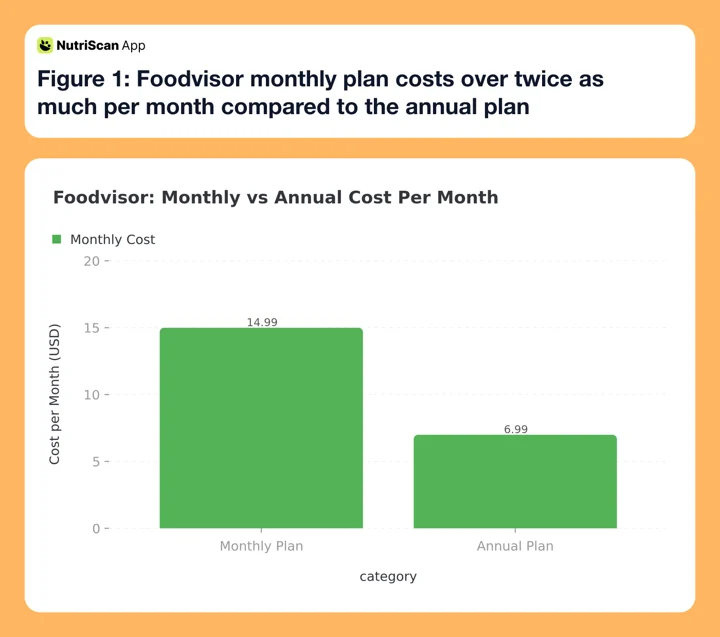 Figure 1: Foodvisor monthly plan costs over twice as much per month compared to the annual plan
3-Month Plan: Variable Pricing
Foodvisor offers 3-month subscriptions, but pricing varies significantly by region. App Store listings show prices ranging from $29.99 to $89.99 depending on your location and whether the "coaching" tier is included.
Sport and Meal Plan Bundle (One-Time Purchase)
Foodvisor offers a separate bundle that is not a subscription - you pay once and keep it forever. This includes:
- Video-based workout programs
- 28 days of example meal menus
This bundle is priced separately from Premium and does not renew. It is designed for users who want exercise guidance without committing to ongoing subscription costs.
How Does Foodvisor Compare to Other Nutrition Apps? 📈
Understanding Foodvisor's value requires comparing it to competitors. Here is how the annual pricing stacks up:
| App | Annual Price | Monthly Equivalent | Key Differentiator |
|---|---|---|---|
| Foodvisor | $83.99 | $6.99 | 500+ daily coaching lessons |
| MacroFactor | $71.99 | $6.00 | Adaptive algorithm |
| MyFitnessPal Premium | $79.99 | $6.67 | Largest food database |
| Carbon Diet Coach | $99.99 | $8.33 | Competition prep focus |
| Noom | $199-$299 | $16.58-$24.92 | Human coaching |
| Lifesum | $30.99-$99.99 | $2.58-$8.33 | Diet plan variety |
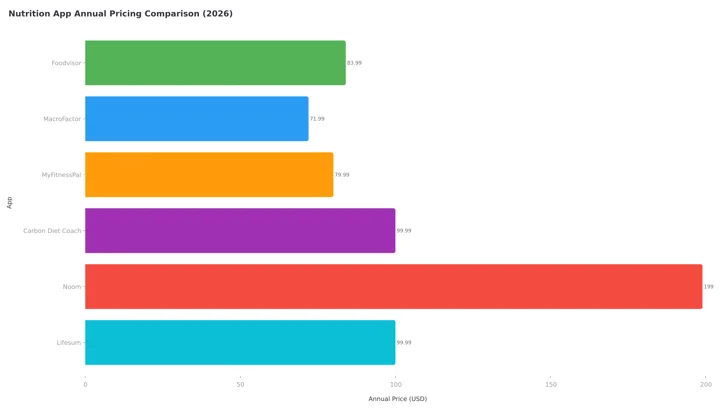 Figure 2: Annual pricing comparison across popular nutrition apps in 2026. Noom is plotted at $199 and Lifesum at $99.99, the ends of the ranges listed in the table above.
Foodvisor delivers strong value in the coaching lessons category. If you compare purely on logging features, MacroFactor offers better value. If you want human support, Noom justifies its premium price.
INFO
Foodvisor sits in the middle of the pricing range at $83.99/year. It costs less than Noom and Carbon Diet Coach but more than MacroFactor and Lose It.
Foodvisor vs Noom: Pricing and Approach Compared
Foodvisor and Noom share a similar philosophy: behavioral coaching plus calorie tracking. But the price difference is substantial.
| Feature | Foodvisor | Noom |
|---|---|---|
| Annual Price | $83.99 | $199-$299 |
| Monthly Price | $14.99 | $17-$70 |
| Photo Logging | Yes (AI-powered) | Limited |
| Macro Tracking | Yes | No |
| Daily Lessons | Yes (500+) | Yes |
| Human Coaches | No (removed) | Yes (paid tiers) |
| Color-Coded Foods | Yes | Yes |
| Custom Meal Plans | No | Yes (extra fee) |
Key difference: Noom offers access to human health coaches, while Foodvisor relies entirely on in-app automation. If you want personalized human support, Noom justifies its higher price. If you prefer self-guided learning with AI tools, Foodvisor delivers similar content at one-third the cost.
WARNING
Foodvisor previously offered access to nutrition coaches via chat, but this feature is no longer available. If human coaching is important to you, consider Noom or HealthifyMe instead.
Is Foodvisor Free Good Enough for Daily Logging?
For most users, no. The free version is essentially a demo that lets you try the interface before subscribing.
The free tier works if you:
- Only want manual text-based food logging
- Already know nutrition values and do not need guidance
- Just want to test the app's design
The free tier does NOT work if you:
- Want to log meals by photo (requires Premium)
- Need personalized coaching and daily lessons
- Want access to recipes and meal plans
- Plan to use the custom workout programs
Here is how Foodvisor's free tier compares:
| App | Free Photo Logging | Free Barcode Scan | Free Coaching |
|---|---|---|---|
| Foodvisor | No | Limited | No |
| Lifesum | Yes (limited) | Yes | No |
| Lose It | Yes (Snap It) | Yes | No |
| MyFitnessPal | Yes (limited) | Yes | No |
| FatSecret | No | Yes | No |
If you primarily value photo-based meal logging, Foodvisor's free tier is not competitive. You need Premium to access the AI scanner that defines the app. Apps with a more generous free plan are covered in our best Foodvisor alternatives roundup.
Real User Results with Foodvisor ⭐
Foodvisor has strong user ratings. Trustpilot shows 4.8 out of 5 stars from over 1,700 reviews. The App Store rates it 4.6 stars, and Google Play shows 4.7 stars.
What makes these ratings notable: nutrition apps often struggle with user satisfaction because results depend heavily on individual commitment. Foodvisor's high scores suggest the coaching approach helps people stay engaged longer than pure tracking apps.
Common themes from user reviews:
Positive feedback:
- "Lost 6kg in 6 weeks" - users consistently report measurable weight loss
- Reviewers single out the AI image recognition as the biggest step up over an ordinary food diary
- "Lost 10kg in less than 100 days" - long-term tracking helps accountability
- "No feeling of missing out" - approach feels sustainable, not restrictive
- "The daily coaching keeps me engaged and always coming back"
Constructive criticism:
- Photo recognition still needs improvement for complex meals
- Daily lessons can feel repetitive after several months
- Limited integration with fitness wearables (mainly Apple Health)
- Color-coding approach (red/orange/yellow/green foods) may not suit everyone
- Some users report difficulty getting refunds after accidental subscription renewals
One certified nutrition coach's review noted that the color-coding system - similar to Noom - labels foods as "good" or "bad" with emoticons, which some nutrition professionals consider psychologically problematic. For users with a history of restrictive eating patterns, this visual judgment system may not be ideal.
Regional Pricing Differences 🌍
Like many apps, Foodvisor pricing varies by country and app store. The Apple App Store listing shows multiple tiers:
- 1 month: three SKUs run side by side, $14.99, $29.99 and $39.99, all named "1 month of Foodvisor"
- 3 months: $59.99-$89.99
- Annual: $83.99, with $23.99 also listed in some markets
European users may see prices in Euros, and the exchange rate plus regional pricing adjustments mean the effective cost can vary by 10-20%. Always check your local App Store or Google Play for current prices.
Is Foodvisor Gratis? Foodvisor Pris and É Pago Answered
Foodvisor ships in 20 languages, so the same question arrives in a dozen spellings. The answer is the same everywhere, because the tier split does not change by market.
Is Foodvisor gratis? Yes, in part. Every store has a gratis tier with manual food search, calories, macros, weight and water. The AI photo scan and the daily lessons are Premium. So the gratis version is a working food diary, not a working photo scanner.
Foodvisor pris? Foodvisor does not publish one price. Its US App Store listing runs three monthly SKUs at once, $14.99, $29.99 and $39.99, plus an $83.99 annual tier, as of August 2026. $14.99 is the cheapest monthly SKU, not a guaranteed one. Danish, Norwegian and Swedish stores bill the same two tiers in local currency. Foodvisor's own listings move by roughly 10 to 20 percent between markets, so the pris on your store page is the one that counts.
Foodvisor é pago? The download is free and the manual logging tier is free. Premium is pago from $14.99 a month, the cheapest of three concurrent monthly SKUs, or $83.99 a year in US pricing, charged in euros, reais or your local currency through the store you bought it from. Photo logging only works once you pay.
One practical note for anyone who came here hoping for free photo scanning: Foodvisor gives you zero photo scans on the free tier. NutriScan gives you 5 free photo scans a week, plus NutriScore, full macros and micronutrients on every meal at no cost. If the scanner is the whole reason you are shopping, see how the two compare in NutriScan vs Foodvisor, or read what a free food scanner app is supposed to do before you pay for one.
How to Get the Best Foodvisor Deal 💡
Based on my research, here are strategies to pay less:
1. Start with Monthly, Switch to Annual
Use the $14.99 monthly plan for one month to test if Foodvisor's coaching style works for you. If you like it, switch to annual and save 53% going forward.
2. Watch for Promotional Pricing
Foodvisor occasionally offers discounts during the signup flow. New users may see lower prices during:
- New Year (January health resolution season)
- Summer (May-June fitness push)
- Black Friday/Cyber Monday (November)
3. Compare App Store vs Website
Prices sometimes differ between iOS App Store, Google Play Store, and the Foodvisor website. Check all three before committing.
4. Consider the Sport Bundle Separately
If you only want workout videos and meal menus, the one-time Sport and Meal Plan bundle may be cheaper than a full Premium subscription.

Step-by-Step: Getting Started with Foodvisor 🚀
If you decide to try Foodvisor, here is how to set it up:
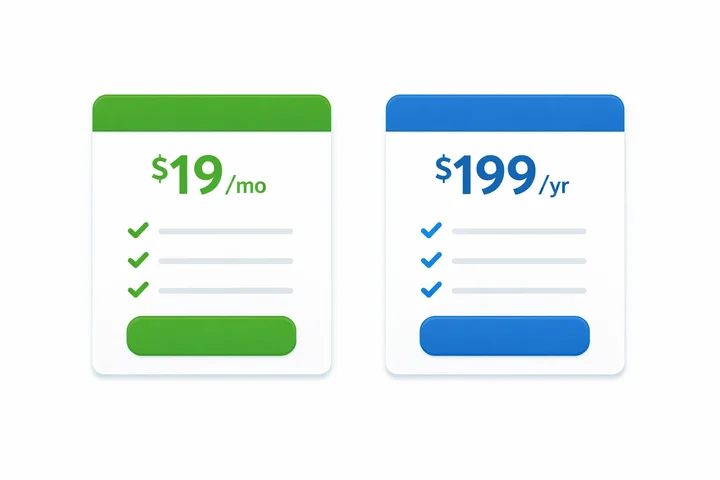 Choosing between monthly flexibility and annual savings is the biggest decision for most Foodvisor users
Step 1: Download the App Get Foodvisor from the App Store or Google Play Store.
Step 2: Complete the Onboarding Quiz (8-10 minutes) Answer questions about your goals, body metrics, lifestyle factors, past diet attempts, and current eating habits.
Step 3: Choose Free or Premium You can start with the free version to test the interface, or subscribe to Premium immediately for full features.
Step 4: Set Up Health App Sync Connect Foodvisor to Apple Health or Google Fit to automatically import activity and steps.
Step 5: Start Logging Meals
- Free users: Search and manually log foods
- Premium users: Snap a photo, scan a barcode, or use voice logging
Step 6: Complete Daily Lessons Each day, check the "Coach" tab for 2-3 personalized lessons. These 2-5 minute classes build your nutrition knowledge over time.
Step 7: Track Progress Weekly Review your weight trends, calorie averages, and coaching insights at the end of each week to stay accountable.
How to Cancel Foodvisor Premium
If you subscribe and decide Foodvisor is not right for you, here is how to cancel. There is a longer walkthrough with screenshots in our Foodvisor cancellation guide.
On iPhone (iOS):
- Open Settings
- Tap your Apple ID at the top
- Select "Subscriptions"
- Find Foodvisor
- Tap "Cancel Subscription"
On Android:
- Open Google Play Store
- Tap your profile icon
- Select "Payments & subscriptions" then "Subscriptions"
- Find Foodvisor
- Tap "Cancel subscription"
WARNING
Canceling stops future charges but does not provide automatic refunds for time already paid. Foodvisor's refund policy follows standard App Store and Google Play rules - you may request a refund through Apple or Google if you are within their refund window (typically 48 hours for accidental purchases).
Who Should Pay for Foodvisor Premium?
Foodvisor Premium is worth it if you:
- Want photo-based meal logging with AI analysis
- Need structured daily lessons to build nutrition habits
- Prefer a "coaching program" feel over basic calorie counting
- Value macro tracking alongside calories
- Like having recipes integrated into your tracker
- Are committed to at least 3-6 months of consistent use
Our longer Foodvisor review walks through the coaching content week by week if you want to see what those lessons look like before paying.
Foodvisor Premium may NOT be worth it if you:
- Only need basic calorie logging (use MyFitnessPal free)
- Want human coaching (consider Noom or HealthifyMe)
- Need detailed micronutrient tracking (try Cronometer)
- Want extensive fitness integration (MacroFactor may suit you better)
- Have a history of disordered eating (color-coding may be triggering)
Frequently Asked Questions
Is Foodvisor free?
Partly. Foodvisor has a free tier you can keep forever, and it covers manual food search, calorie and macro totals, weight and water logging, and Apple Health or Google Fit sync. The AI photo scan, the daily coaching lessons and the recipe library are Premium only, at $14.99 a month or $83.99 a year, US App Store prices as of August 2026.
Is Foodvisor gratis?
Yes, there is a gratis tier in every country Foodvisor sells in, with manual logging and basic calorie and macro totals. Photo scanning and coaching sit behind Premium, so the gratis version works as a trial of the interface rather than a full version of the app.
What is the Foodvisor pris?
The US list pris is $14.99 a month or $83.99 a year as of August 2026. Danish, Norwegian and Swedish stores bill the same tiers in local currency, and Foodvisor's own listings vary by roughly 10 to 20 percent between markets, so check the price shown in your App Store or Google Play before you subscribe.
Foodvisor é pago?
The app itself is a free download and the manual logging tier costs nothing. Premium is pago: $14.99 a month or $83.99 a year in US pricing as of August 2026, billed in euros or reais through your local store. The AI photo scan only works on Premium.
Does Foodvisor have a free trial?
No free trial exists for Premium. You can use the free version indefinitely, but it does not include photo logging or coaching features. If you want to test Premium, the monthly plan ($14.99) is your lowest-risk option.
Can I get a Foodvisor discount?
Foodvisor occasionally offers promotional pricing, especially for new users during the signup flow. The annual plan already includes a 53% discount versus monthly pricing. No public coupon codes are consistently available.
Is Foodvisor cheaper than MyFitnessPal?
Foodvisor Premium annual ($83.99/year) costs slightly more than MyFitnessPal Premium ($79.99/year). However, Foodvisor includes daily coaching lessons and more structured programming, while MyFitnessPal focuses primarily on logging tools. The better value depends on whether you want coaching or just tracking.
Can I share Foodvisor Premium with family?
No family sharing option exists. Each user needs their own subscription.
Does Foodvisor work offline?
Basic logging works offline, but photo analysis requires an internet connection to process images through the AI.
What happens when my subscription ends?
You retain access to your logged data but lose Premium features. Photo logging, daily lessons, recipes, and custom recommendations become unavailable. You can continue using the free manual logging tier.
How accurate is Foodvisor's photo logging?
According to user reviews and third-party testing, Foodvisor's AI photo recognition works well for simple, clearly visible meals. Accuracy decreases with mixed dishes, sauces, and foods that are partially hidden. The app improved significantly after adding a U.S. food database in late 2025. For best results, take photos in good lighting with food clearly separated on the plate.
Does Foodvisor support languages other than English?
Yes. Foodvisor is available in 20 languages including French, Spanish, German, Italian, Portuguese, Dutch, Polish, Swedish, Danish, Finnish, Norwegian, Czech, Hungarian, Greek, Russian, Turkish, Japanese, Korean, and Simplified Chinese. The app originated in France, so European food databases are particularly strong.
Conclusion: Is Foodvisor Worth the Price in 2026?
Foodvisor occupies a unique middle ground between basic calorie trackers and full coaching programs like Noom. At $6.99 per month (annual), it delivers:
- AI-powered photo logging that actually works
- 500+ daily coaching lessons for habit building
- Macro tracking with fiber (uncommon)
- Recipes tailored to your goals
- A warm, encouraging app interface
The main weaknesses are the limited free tier and the removal of human coach access. If you need personalized human support, look elsewhere.
For users who want structured nutrition education with modern AI logging tools - and do not want to pay Noom prices - Foodvisor is a solid choice. Start with the monthly plan to test if the coaching style suits you, then switch to annual if you commit.
Track your nutrition journey with NutriScan's AI meal scanner to compare your eating habits across different tracking approaches and find what works best for your health goals. You can also use our free macro calculator to set your daily targets before choosing any paid app.
Last updated: August 2026. Prices quoted are standard US prices as of August 2026, vary by region and are subject to change. Always verify current pricing in your local App Store or Google Play.
