How to Cancel Foodvisor Premium (2026 Step-by-Step Guide)
 ChatGPT
  Claude
  AI Mode
  Perplexity
TL;DR
Cancel through the platform where you bought Foodvisor (App Store, Google Play, or foodvisor.io). Deleting the app does NOT cancel billing. You keep Premium access until the current period ends. EU users get a 14-day withdrawal right for a full refund.
Foodvisor is a popular AI-powered nutrition app with a 4.6/5 rating on the App Store and 4.7/5 on Google Play. But popularity does not make cancelling easy. The app has 3 separate payment platforms, which means 3 different cancel paths. Pick the wrong one and your subscription keeps running.
As a NutriScan nutritionist, I have seen people reach out confused about why they are still being charged after removing the app. A 2024 study on mHealth app barriers found that usability problems and unclear processes remain top frustrations for health app users. Subscription cancellation is no exception, and Foodvisor's 3-platform setup makes it worse.
This guide walks you through every cancel path Foodvisor offers, plus the refund options most users miss.
 Trying to cancel Foodvisor without knowing your purchase platform? We have all been there.
Step 1: Find Where You Purchased 🔍
This is the most important step. Foodvisor has three possible purchase channels, and you must cancel through the same one you used to subscribe.
Check your bank or credit card statement. Here is how each transaction appears:
| Purchase Channel | Statement Description |
|---|---|
| Apple App Store | APPLE.COM/BILL or ITUNES.COM/BILL |
| Google Play | GOOGLE*FOODVISOR |
| Foodvisor Website (Stripe) | FOODVISOR |
CHECK YOUR STATEMENT FIRST
If you signed up through an Instagram ad or email link, your payment likely went through Stripe on the Foodvisor website, not Apple or Google. This is the most common source of confusion.
Key rule: Foodvisor cannot cancel Apple or Google Play purchases on your behalf. You must go through the platform where you bought it.
Foodvisor Premium Pricing Quick Reference 💰
Before you cancel, here is what you are currently paying (see our full Foodvisor pricing breakdown for details):
| Plan | Price | Per Month |
|---|---|---|
| Monthly | $14.99/mo | $14.99 |
| Annual | $83.99/yr | ~$6.99 |
The App Store also shows several other IAP tiers ranging from $23.99 to $89.99, which may appear during promotions or A/B pricing tests.
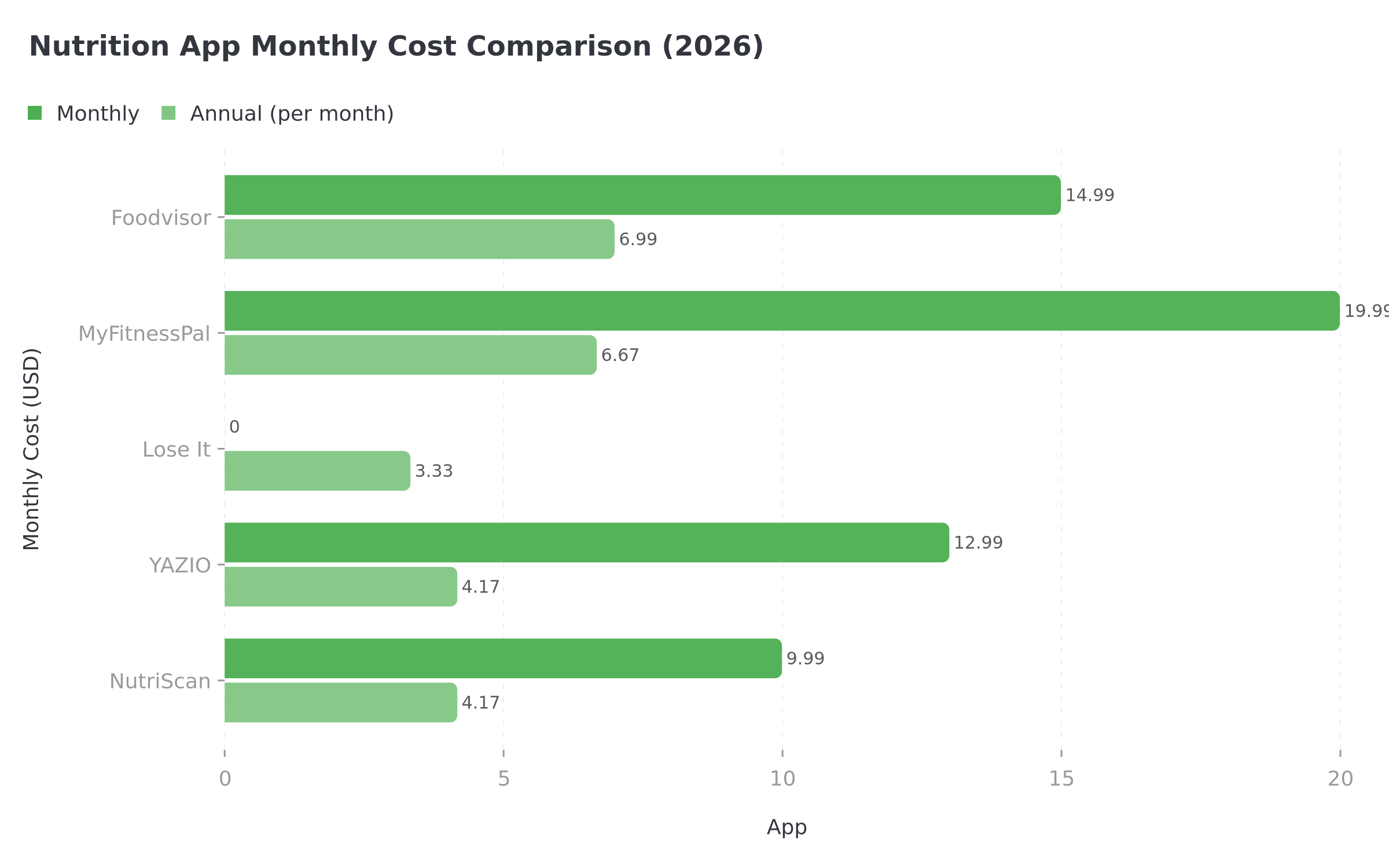
Figure 1: Foodvisor's monthly cost compared to other popular nutrition apps. Annual plans offer significant savings across all apps.
Step 2: Cancel on iPhone (Apple App Store) 📱
If your bank statement shows APPLE.COM/BILL, Apple handles your billing. Foodvisor cannot cancel it for you.
 Follow these steps carefully to ensure your Foodvisor subscription is fully canceled.
Steps:
- Open Settings on your iPhone or iPad.
- Tap your name at the top of the screen (your Apple ID).
- Tap Subscriptions.
- Find Foodvisor in the list and tap it.
- Tap Cancel Subscription.
- Tap Confirm in the pop-up.
If you do not see Foodvisor in your Apple subscriptions list, your subscription was not purchased through Apple. Check Google Play or the Foodvisor website instead.
ON iPAD OR MAC
On iPad, go to Settings > your name > Subscriptions. On Mac, open the App Store, click your name in the bottom left, then click Account Settings > Subscriptions > Manage. For the full walkthrough, see the official Apple guide.
Step 3: Cancel on Android (Google Play) 🤖
If your bank statement shows GOOGLE*FOODVISOR, Google handles your billing.
Steps:
- Open the Google Play Store app.
- Tap your profile icon (top right).
- Tap Payments & subscriptions.
- Tap Subscriptions.
- Find Foodvisor and tap it.
- Tap Cancel subscription.
- Follow the on-screen prompts to confirm.
You can also cancel through play.google.com/store/account/subscriptions on a web browser.
MULTIPLE GOOGLE ACCOUNTS
If you have multiple Google accounts on your phone, make sure you are signed into the same one that made the purchase. This is the most common reason the subscription does not appear in the list.
Step 4: Cancel on the Website (Stripe) 💻
If your bank statement shows FOODVISOR as the merchant, you subscribed through the Foodvisor website. This is common if you signed up via an Instagram ad or email link.
Steps:
- Go to foodvisor.io and log in.
- Click your email address in the upper right corner.
- Click Manage my account.
- Find the Subscription Status box.
- Click Manage next to it.
- Click Disable Auto Renew.
If you have trouble, email [email protected] for help.
DO NOT CONFUSE DELETING WITH CANCELLING
Foodvisor's help center explicitly states: "Deleting your account in Foodvisor settings does not automatically cancel your trial or Premium subscription" (Foodvisor Help Center). You must cancel through the purchase platform.
Three Ways a Cancellation Goes Wrong 📖
These are worked examples built from the payment paths and policies described above, not individual users.
The accidental website subscriber. You download Foodvisor from the App Store, then sign up for Premium through a link in an Instagram ad. That payment runs through Stripe, not Apple. Open Settings > your name > Subscriptions on your iPhone and Foodvisor is not in the list, which reads as "already cancelled" right up until the next charge lands. Fix: check the merchant name on your statement, then cancel at foodvisor.io.
The delete-and-forget trap. You delete Foodvisor from your Android phone and assume billing stops with it. It does not. The $14.99 monthly charge keeps appearing on the Google Play line of your statement for as long as you leave it. Fix: cancel in Google Play first, then use Report a problem in Budget & history for the unused months; after 48 hours that request goes to Foodvisor rather than Google.
The EU withdrawal window. You subscribe, change your mind a few days later, and are still inside 14 days. Foodvisor is a French company (FOODVISOR SAS, registered in Paris), so EU consumer protection law gives you a 14-day withdrawal right from the date of purchase. Email [email protected] inside that window and the refund is due within 14 days of the request (Foodvisor Terms of Service).
Step 5: How to Get a Refund 💸
Refund options depend entirely on where you purchased:
Apple App Store Refund
- Go to reportaproblem.apple.com.
- Sign in with your Apple ID.
- Find the Foodvisor charge and tap Report a Problem.
- Select Request a refund and explain your reason.
- Apple typically responds within 48 hours.
Google Play Refund
- Open Google Play > tap your profile > Payments & subscriptions > Budget & history.
- Find the Foodvisor transaction and tap Report a problem.
- Google has a 48-hour window for automatic refunds on most subscriptions.
- After 48 hours, the refund request goes to Foodvisor directly.
Website (Stripe) Refund
- Email [email protected] with your User ID, receipt, and reason for requesting a refund.
- Foodvisor's terms state: "In the event of early termination of the Subscription before its expiry date, no refund will be issued" except for the withdrawal right and the Satisfied or Refunded guarantee.
- EU users have a 14-day withdrawal right from the date of purchase.
The Satisfied or Refunded Guarantee 🎯
This is the refund path most Foodvisor users never discover. You can get a full refund if ALL of these conditions are met:
- You completed all classes up to Level 4 in the Coach section
- You experienced no measurable weight loss since starting Premium
- You request the refund within 30 days of your Premium start date
Send your request to [email protected]. If conditions are met, Foodvisor will refund you within 14 days (Foodvisor Terms of Service).
STRICT CONDITIONS
The Satisfied or Refunded guarantee sounds generous, but the conditions are strict. You must have completed all coaching classes to Level 4 AND show no weight loss AND request within 30 days. Most users will not meet all three requirements.
Common Mistakes When Cancelling Foodvisor ⚠️
These are the mistakes that lead to unexpected charges:
Deleting the app instead of cancelling. Removing the app from your phone does nothing to your subscription billing. Foodvisor warns about this directly in their help center.
Cancelling on the wrong platform. If you subscribed through an Instagram ad, your payment went through Stripe, not Apple or Google. Checking Apple Settings and not finding Foodvisor does not mean you are unsubscribed.
Assuming account deletion cancels billing. Deleting your Foodvisor account removes your data but does not stop the subscription. You must cancel separately through the purchase platform.
Missing the 24-hour window. Both Apple and Google require cancellation at least 24 hours before the next renewal date.
Not checking for multiple subscriptions. Some users accidentally subscribe through both the App Store and the website. Check all three platforms to make sure you do not have duplicate subscriptions.
Competitor Comparison: Cancel Policies 📊
| App | Cancel Paths | Free Trial | Refund Window | Unique Policy |
|---|---|---|---|---|
| Foodvisor | Apple, Google, Website | No (free version instead) | 14 days (EU withdrawal) | Satisfied or Refunded (30 days) |
| MyFitnessPal | Apple, Google, Web | 7-day trial | Platform-dependent | FSA/HSA eligible |
| Lose It | Apple, Google, Web | 7-day trial | Platform-dependent | Lifetime plan available |
| YAZIO | Apple, Google, Web | 7-day trial (web only) | 14 days (EU) | Student discount |
| Lifesum | Apple, Google, Web, Paddle, Galaxy | No trial | 14 days (EU) | 5 cancel paths |
| NutriScan | Apple, Google | Free plan | Platform-dependent | Refer and Earn free Premium |
Foodvisor's 3 cancel paths are standard for the industry. What sets it apart is the Satisfied or Refunded guarantee, which is rare among nutrition apps.
What You Keep After Cancelling 📋
When you cancel Foodvisor Premium:
- You keep: All Premium features until the end of your current billing period. Your food logs, profile data, and history are retained.
- You lose: 500+ daily coaching lessons, full recipe access, custom macronutrient ratios, detailed food breakdowns, and meal summaries with personalized advice.
- Data retention: Foodvisor stores personal data for up to 3 years after your last activity, per their privacy policy.
There is no reason to wait until the last day to cancel. Cancel now and keep using Premium until it runs out.
What you lose with Foodvisor, and what NutriScan gives you free
The Premium features you are giving up cost nothing on NutriScan, with one exception.
| Foodvisor Premium paid feature | NutriScan |
|---|---|
| Detailed food breakdowns from a photo | Photo food scan, 5 a week on the free plan, unlimited on Premium |
| 500+ daily coaching lessons | Monika, a voice AI nutritionist you talk to out loud, 4 calls a week free |
| Custom macronutrient ratios | Your own calorie and macro targets, free, with micronutrients on every logged meal |
| Full recipe access and meal summaries with advice | 28-day diet plans with macros, a grocery list and swaps. This one is Premium in NutriScan too |
Foodvisor Premium is $14.99 a month or $83.99 a year. NutriScan Premium is about $59 a year, and the free plan has no time limit.
Why Users Cancel Nutrition Apps 🔬
A 2022 literature review on mHealth engagement found that participant retention is one of the biggest challenges in the mobile health industry. Many users download health apps with good intentions but disengage within the first few weeks.
A 2025 study on factors driving mHealth app use found that "unobtrusiveness," how well an app fits into daily life without being annoying, had the strongest positive correlation with intention to keep using the app. If Foodvisor's color-coded food judgments (red, orange, yellow, green with emoji faces) feel intrusive, that may explain why you are ready to cancel.
A certified nutrition coach at Garage Gym Reviews tested Foodvisor and rated it 3.71 out of 5, noting that while the interface is "fun, warm, and welcoming," the color-coded system can be psychologically harmful for users with disordered eating history (Garage Gym Reviews).
Cancelling one nutrition app does not mean giving up on tracking. It often means finding a better fit. If you want to understand how different diet plans work with tracking apps, that is a great place to start.
 That feeling when you finally cancel the subscription you have been meaning to deal with for months.
Looking for a Better Fit? 🍎
If you are leaving Foodvisor because of the rigid food scoring, limited customization, or confusing subscription management, NutriScan might be worth trying.
NutriScan offers:
- AI-powered food scanning with photo recognition and detailed meal analysis
- 7-day free trial so you can test everything before paying
- Simple cancellation through Apple or Google Play only (no third platform confusion)
- Personalized macro calculator tailored to your goals
- Refer and Earn free Premium by inviting friends
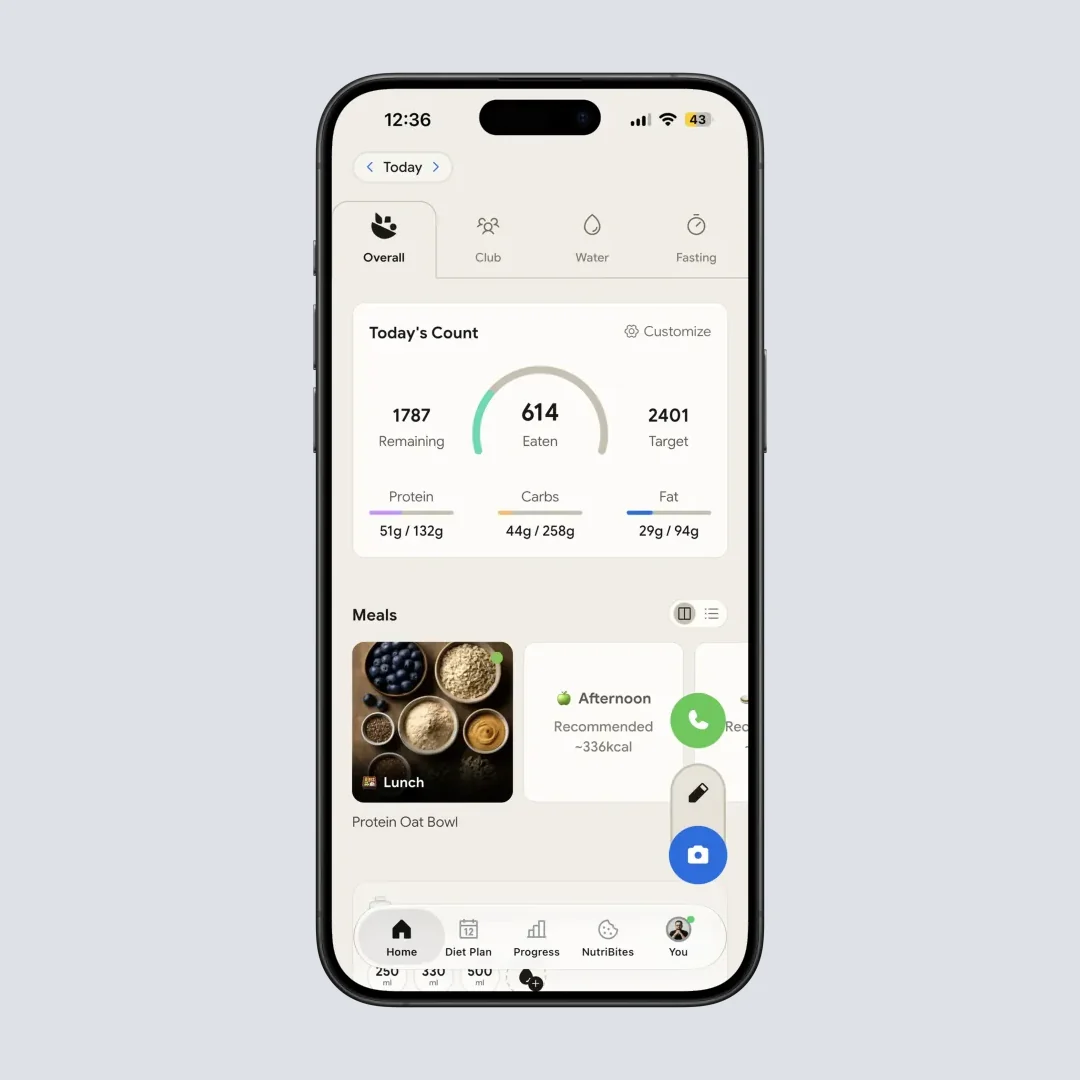
NutriScan's clean home screen shows your daily calories, protein, carbs, and fat at a glance. Path: Home
Conclusion
Cancelling Foodvisor Premium is straightforward once you know which platform processed your payment. Check your bank statement, identify the charge source (Apple, Google, or Foodvisor/Stripe), and follow the matching steps above.
If you are in the EU, you have a 14-day withdrawal right for a no-questions-asked refund. And if you completed the coaching program without results, the Satisfied or Refunded guarantee is worth exploring.
Remember: deleting the app does not cancel your subscription. Always cancel through the purchase platform, and screenshot your confirmation for your records.
FAQ
Does deleting the Foodvisor app cancel my subscription?
No. Foodvisor's help center explicitly states that "deleting your account in Foodvisor settings does not automatically cancel your trial or Premium subscription." You must cancel through the platform you used to subscribe: Apple Settings, Google Play, or the Foodvisor website.
How do I know if I subscribed through Apple, Google, or the website?
Check your bank or credit card statement. Apple charges appear as "APPLE.COM/BILL." Google charges appear as "GOOGLE*FOODVISOR" or similar. Website (Stripe) charges appear directly as "FOODVISOR." You can also check your Apple or Google subscription settings. If Foodvisor is not listed, your subscription is on the website.
Can I get a refund after cancelling Foodvisor?
It depends on your situation. EU users have a 14-day withdrawal right from purchase. Apple and Google have their own refund processes (reportaproblem.apple.com for Apple). Foodvisor also offers a Satisfied or Refunded guarantee if you completed all coaching classes to Level 4, experienced no weight loss, and request within 30 days.
What happens to my data after I cancel Foodvisor Premium?
You keep access to Premium features until the end of your current billing period. After that, your account reverts to the free version. Your food logs and profile data are retained. Foodvisor stores personal data for up to 3 years after your last activity, per their privacy policy.
How much does Foodvisor Premium cost?
Foodvisor Premium costs $14.99 per month or $83.99 per year (about $6.99 per month). The App Store listing also shows promotional tiers ranging from $23.99 to $89.99. Pricing may vary by region. See our full Foodvisor pricing guide for a detailed breakdown.
Is there a free version of Foodvisor?
Yes. Foodvisor offers a free version with basic features including barcode scanning, manual food logging, goal setting, and a limited selection of recipes. Premium adds 500+ daily coaching lessons, full recipe access, custom macronutrient ratios, detailed food breakdowns, and meal summaries with personalized advice.
How do I contact Foodvisor support?
Email [email protected]. You can also reach them by mail at: Customer Service FOODVISOR, 21 rue du Faubourg Saint-Antoine, 75011 Paris, France. For EU disputes, Foodvisor uses the CM2C consumer mediation service.