MyFitnessPal Free Trial: Cancel Before You Get Charged
 ChatGPT
  Claude
  AI Mode
  Perplexity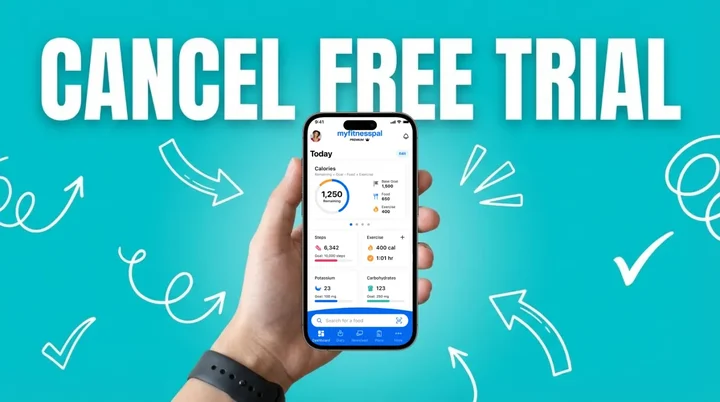
The MyFitnessPal free trial runs 7 days and then charges you automatically. It signs you up for Premium+, the top tier, at $24.99 a month or $99.99 a year. Standard Premium is $19.99 a month or $79.99 a year. Prices here are standard US prices as of mid 2026 and change by region. To pay nothing, cancel at least 24 hours before day 8, on the same platform where you signed up: Apple Settings for App Store sign-ups, Google Play for Android, myfitnesspal.com for web. Canceling early does not cut your access short. You keep Premium+ until the trial expires either way.
TL;DR - MyFitnessPal Free Trial and Cancellation
- Trial: 7 days of full Premium+ access, auto-renews at $24.99/mo or $99.99/yr unless you cancel
- iPhone: Settings > Your Name > Subscriptions > MyFitnessPal > Cancel Subscription
- Android: Google Play Store > Profile > Payments & subscriptions > Subscriptions > MyFitnessPal > Cancel
- Web: myfitnesspal.com > My Home > Premium > Subscription Settings > Turn off Auto-Renewal
- Key rule: Cancel at least 24 hours before the trial ends, on the same platform you signed up
- After cancel: You keep Premium+ features until the trial expires. Your food diary data stays safe.
As a NutriScan nutritionist, I get the same question almost every week: "Will MyFitnessPal charge me after the free trial?" RevenueCat's State of Subscription Apps report shows nearly 30% of annual app subscriptions get canceled within the first month, most of them right before the trial ends. A 2022 survey of over 1,000 mHealth users found the same pattern: people stop opening a health app within weeks and only notice the subscription when the charge lands (Mustafa et al., 2022).

That face when you check your bank statement after forgetting to cancel a free trial
What the MyFitnessPal Free Trial Gives You
The 7-day trial opens up full Premium+ access. Everything you can test in those seven days:
| Feature | Free Plan | Premium+ (Trial) |
|---|---|---|
| Manual food logging | Yes | Yes |
| Basic calorie tracking | Yes | Yes |
| Community food database | Yes | Yes |
| Weight tracking | Yes | Yes |
| Barcode scanner | No | Yes |
| Meal Scan (photo logging) | No | Yes |
| Voice logging | No | Yes |
| Custom weekly meal planner | No | Yes |
| 1,500+ goal-friendly recipes | No | Yes |
| Grocery app syncing (Instacart, Walmart, Kroger) | No | Yes (iOS) |
| Custom macro and calorie goals | No | Yes |
| Intermittent fasting tracker | No | Yes |
| Downloadable progress reports | No | Yes |
| Ad-free experience | No | Yes |
| Priority customer support | No | Yes |
Who qualifies? Anyone who has never redeemed a trial on their account. Returning users who already used one cannot start another, as stated on the MyFitnessPal Premium page.
How MyFitnessPal Trial Billing Works
The billing rules in full:
| Detail | What Happens |
|---|---|
| Trial length | 7 days from signup |
| Payment method | Required at signup |
| First charge | Day 8 if you do not cancel |
| Default tier | Premium+, the most expensive one |
| Cancel deadline | At least 24 hours before trial ends |
| After canceling | Premium+ features stay active until trial expiry |
| Auto-renewal | Yes, charges repeat monthly or annually |
| Refund policy | Generally non-refundable per MyFitnessPal terms |
The 24-hour rule matters. MyFitnessPal's support page states: "Your membership or subscription might renew if you don't cancel your membership or subscription more than 24 hours before your renewal date."
One more rule decides everything: cancel on the same platform where you signed up. Apple, Google Play, and MyFitnessPal web are three separate billing systems, and canceling in the wrong one does nothing to stop the charge.
Platform Rule
For an App Store sign-up, cancel in Apple Settings, not inside the MyFitnessPal app and not on the website. For a Google Play sign-up, cancel in Google Play. This is the number one reason people get charged by mistake. To check which one you used, search your email for the original receipt or look for "APPLE.COM/BILL," "GOOGLE*MYFITNESSPAL," or a direct MyFitnessPal charge on your statement.
How Much Does MyFitnessPal Cost After the Trial
If you do not cancel before the trial ends, here is what your card gets charged. Prices are standard US prices as of mid 2026 and change by region.
| Plan | Monthly | Annual | Annual per month | What you get |
|---|---|---|---|---|
| Free | $0 | $0 | $0 | Food diary, basic calorie tracking, community database |
| Premium | $19.99/mo | $79.99/yr | $6.67/mo | Barcode scanner, Meal Scan, voice log, ad-free, custom goals |
| Premium+ | $24.99/mo | $99.99/yr | $8.34/mo | Everything in Premium plus Meal Planner, grocery lists, recipe sharing |
The trial defaults to Premium+. To get the cheaper Premium plan instead, select it from the Premium legacy page. Premium+ arrived in early 2025 built around the Meal Planner: 1,500+ recipes, automated logging from your plan, and grocery lists (MyFitnessPal Help). Our pricing guide breaks down every tier and the Premium vs Premium+ comparison covers who needs the higher one.
Billing frequency moves the number more than the tier does. Premium costs $239.88 a year on monthly billing against $79.99 annually, a 67% gap for identical features (FitBudd). Premium+ runs $299.88 against $99.99.
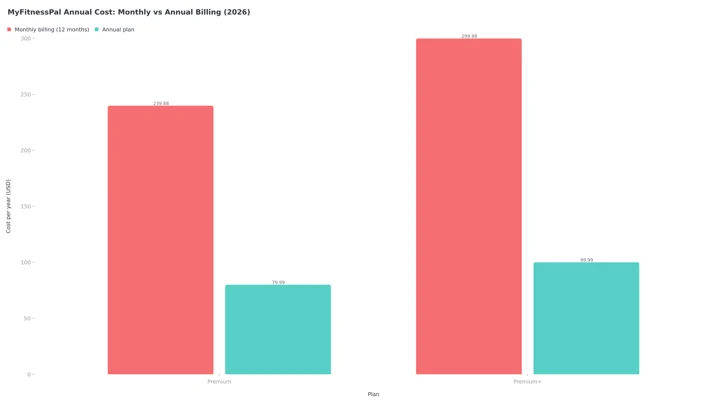
Figure 1: Paying month to month costs about 3x the annual plan for identical features.
One lever people miss: both paid tiers are FSA/HSA eligible in the US (MyFitnessPal Help), so pre-tax health funds cut the real cost by roughly 20% to 35% depending on your bracket.
Industry data shows 46% of users cancel app subscriptions within the first billing cycle, usually over insufficient usage (37%) or cost (35%) (RevenueCat 2025). If you are unsure you will log consistently, canceling during the trial is the safest move.
Is There a MyFitnessPal Premium 3 Months Free Offer?
Not from MyFitnessPal directly. The offer on the Premium page is 7 days, and that is the only trial length MyFitnessPal publishes. The "3 months free" and "30-day trial" claims you see on coupon aggregator sites are usually recycled from old partner promotions or point at nothing more than the standard annual plan.
Longer free stretches do exist, but they arrive through a specific door rather than a public code:
- Partner and employer bundles. MyFitnessPal has run multi-month giveaways with fitness brands over the years. Those show up in the partner's app or benefits portal, not on myfitnesspal.com.
- Win-back emails. Use the free app for a few weeks, then stop logging. MyFitnessPal often emails lapsed users an extended or discounted offer.
- In-app conversion offers. Open the app on day 6 or 7 of the trial. Users report seeing a discounted first year on the paywall then.
Whatever a coupon site promises, the app store checkout sheet is the contract. If it says 7 days and $99.99 after, that is what you agreed to.
MyFitnessPal Discount Options If You Decide to Keep It
The MyFitnessPal discount runs on a calendar rather than a code:
- Black Friday and Cyber Monday: the deepest cut, historically 40% to 50% off annual plans, putting Premium near $40 to $50 for the year.
- January: second best, roughly 30% to 40% off.
- Annual over monthly: 67% off with no code at all.
- No student discount, unlike YAZIO's Student Beans offer.
- FSA/HSA funds, as above.
Codes apply on myfitnesspal.com only, never inside an App Store or Google Play purchase. Our MyFitnessPal discount guide tracks which windows repeat and which codes do nothing.
How to Cancel MyFitnessPal on iPhone (iOS)
Apple manages every subscription bought through the App Store, so you cannot cancel inside the MyFitnessPal app:
Step 1: Open the Settings app on your iPhone, the grey gear icon on your home screen.
Step 2: Tap your name at the very top of the Settings screen. This opens your Apple ID settings.
Step 3: Tap Subscriptions. You will see a list of all active and expired subscriptions tied to your Apple ID.
Step 4: Find MyFitnessPal in the Active subscriptions list and tap it.
Step 5: Tap Cancel Subscription (shown in red text). Confirm when prompted.
Step 6: Check the expiration date shown. You will keep Premium+ features until this date even after canceling.
Alternative path: App Store > profile picture > Subscriptions, same steps from there. If MyFitnessPal shows in neither list, you signed up elsewhere (Apple guidance).
How to Confirm You Signed Up Through Apple
Apple purchases appear as APPLE.COM/BILL or ITUNES.COM/BILL on your card statement, and Apple emails a receipt.
Refund note: Request refunds from Apple, not MyFitnessPal. Go to reportaproblem.apple.com, select "Request a refund," and pick the MyFitnessPal charge. Apple processes most within 48 hours, or call Apple Support at 800-692-7753.
How to Cancel MyFitnessPal on Android
Google Play handles Android subscriptions, and uninstalling the app does not cancel the billing:
Step 1: Open the Google Play Store app on your Android phone.
Step 2: Tap your profile picture in the top right corner of the screen.
Step 3: Tap Payments & subscriptions from the menu.
Step 4: Tap Subscriptions to see your active list.
Step 5: Find MyFitnessPal and tap it.
Step 6: Tap Cancel subscription and follow the on-screen confirmation prompts.
Google sends a confirmation email, and you keep Premium+ features until the trial period ends.
Refund note: Play Store > Profile > Help & feedback > "Request a refund." Google typically responds in 1 to 4 business days and usually grants requests made within 48 hours of the charge (Google Play Help).
Android-Specific Tip
Some users report that the "Cancel" button does not appear if you have an ad blocker or VPN active on your device. Try turning them off temporarily if the button is missing. Google Play purchases show as GOOGLE*MYFITNESSPAL on your statement.
How to Cancel MyFitnessPal on Desktop (Web)
If you signed up directly on myfitnesspal.com, cancel there:
Step 1: Go to https://www.myfitnesspal.com and log in with your account.
Step 2: Click My Home in the navigation bar at the top.
Step 3: Click Premium to open your subscription details.
Step 4: Click Subscription Settings in the upper right corner.
Step 5: Change Auto-Renewal from "On" to "Off."
Step 6: You may see a few confirmation screens. Click through them to complete the cancellation.
Premium+ stays active until your trial period ends. For a refund on a web purchase, contact MyFitnessPal through the Help Center. Web purchases are handled by MyFitnessPal, not Apple or Google, and its terms state payments are generally non-refundable.
Not Seeing a Subscription on the Website?
No active subscription on the website means you subscribed through Apple or Google. Your purchase receipt email confirms which one.
How to Confirm the Cancellation Actually Went Through
Tapping cancel is not proof. Check the status where you canceled it:
- iOS: Settings > Subscriptions should show "Expires [date]" next to MyFitnessPal instead of a renewal date.
- Android: Play Store > Subscriptions should show a "Canceled" label.
- Web: the Premium page should show Auto-Renewal set to "Off."
A confirmation email should follow from Apple, Google, or MyFitnessPal. If no signal appears, the cancellation did not register, so run the steps again. Screenshot the confirmation when it lands; it settles any billing dispute later.

You after successfully canceling before the charge hits
What Happens After You Cancel
Canceling the trial does two things:
- You keep Premium+ features until the end of your trial period. Cancel on day 3 and you still have Premium+ access for the remaining 4 days.
- Your account reverts to the free plan after the trial ends. Your food diary, weight history, custom foods, and recipes stay in the account. You lose access to paid features only.
What you keep on the free plan:
- Manual food logging with search
- Basic calorie and nutrient tracking
- Community food database and friend connections
- Weight tracking and basic reports
What you lose when the trial expires: everything in the Premium+ column of the table above. Barcode scanner, Meal Scan, voice logging, the weekly meal planner and its recipes, grocery syncing, custom macro goals by day, the fasting tracker, ad-free browsing, and priority support all switch off.
Saved meal plans and recipes are not deleted when Premium+ ends. They go dormant and come back if you resubscribe, so screenshot the ones you cook often. You can also export the diary: Settings > Diary Settings > Export Data gives you a CSV of your logs, which makes moving to another tracker painless.
Deleting the App Does NOT Cancel Your Subscription
Removing the MyFitnessPal app from your phone does not cancel the billing. The subscription lives in your Apple ID or Google Play account, completely separate from the app. Billing continues until you cancel through your device settings or app store account.
What you lose with MyFitnessPal, and what NutriScan gives you free
The trial features that switch off on day 8 have free equivalents on NutriScan.
| MyFitnessPal Premium paid feature | NutriScan |
|---|---|
| Meal Scan photo logging | Photo food scan, 5 a week on the free plan, unlimited on Premium |
| Barcode scanner | Barcode scanning on the free plan |
| Custom macro and calorie goals | Your own targets, with macros and micronutrients on every logged meal, free |
| Intermittent fasting tracker | Fasting timer with 14:10, 16:8, 18:6, 20:4 and custom schedules, history and streaks, free |
| Custom weekly meal planner and 1,500+ recipes | 28-day diet plans with macros, a grocery list and swaps. This one is Premium in NutriScan too |
MyFitnessPal Premium is $79.99 a year and Premium+ is $99.99. NutriScan Premium is about $59 a year, and the free plan has no time limit.
7 Mistakes That Lead to Surprise Charges
1. Canceling on the wrong platform. MyFitnessPal's support page states it plainly: "You must process a request for cancellation of your renewal using the same platform on which you originally paid."
2. Uninstalling instead of canceling. The billing is managed by Apple or Google, not by the app.
3. Cutting it too close. Cancel 23 hours before renewal and the charge may already be queued. Set the reminder for day 5.
4. Confusing cancel with delete. Canceling stops billing and keeps your data. Deleting wipes the food diary permanently.
5. Missing that the trial converts to Premium+. It defaults to $24.99/mo, not the $19.99/mo tier. Check which plan your charge is for before requesting a refund.
6. Holding two subscriptions. Some people sign up on Apple and again on the web. Double charges mean checking both.
7. Never checking afterward. 44% of subscription cancellations happen within the first 90 days, mostly from users who forgot during a trial (Churnkey State of Retention 2025). Check your statement a few days after canceling.
Subscription fatigue is real: 41% of consumers say they have too many active subscriptions (RevenueCat 2025). A monthly audit of Settings > Subscriptions (iOS) or Play Store > Subscriptions (Android) takes 30 seconds and usually turns up something else.
If you get charged by mistake: Apple refunds go through reportaproblem.apple.com (about 48 hours), Google Play through Play support (1 to 4 business days), and web purchases through [email protected]. Our refund rules comparison covers what each store will and will not return (Mohd et al., 2025 found transparent billing and easy cancellation drive most of the trust users place in health apps).
Should You Downgrade Instead of Canceling?
Canceling outright is not the only exit:
- Premium+ to Premium saves $60 a year on monthly billing or $20 on annual. Switch in Settings > Subscriptions (iOS), Play Store > Subscriptions (Android), or Subscription Settings (web).
- Monthly to annual saves 67% if you know you will stay.
- Premium to free still tracks calories and macros. You lose the barcode scanner, which stings most if you eat a lot of packaged food.
A 2022 review of mHealth engagement found losing personalized features was the top reason canceled users resubscribed, 40% of them within 90 days (Amagai et al., 2022). Give the free tier 2 to 3 weeks before deciding.
How Other Calorie Trackers Handle Free Trials
How the trial and refund terms compare, so you know which tracker deserves your card details:
| App | Trial | Monthly | Annual | Refund path |
|---|---|---|---|---|
| MyFitnessPal Premium+ | 7 days | $24.99/mo | $99.99/yr | Apple, Google, or MFP support |
| MyFitnessPal Premium | 7 days | $19.99/mo | $79.99/yr | Apple, Google, or MFP support |
| MacroFactor | 7 days | $14.99/mo | $71.99/yr | 60-day refund policy |
| Lose It | 7 days | no monthly plan | $79.99/yr | Apple, Google, or Lose It support |
| YAZIO | 7 days (web) | varies | $47.90/yr | EU 14-day withdrawal on web |
| Fastic | pay then refund | varies | varies | 14-day Feel Good Guarantee |
| Cronometer | none | $10.99/mo | $59.99/yr | Apple, Google, or Cronometer support |
| Cal AI | 3 days | varies | varies | No refund per its terms |
| NutriScan | 7 days | annual only | about $59/yr | Apple or Google standard |
Prices are standard US prices as of mid 2026 and change by region. Lose It raised Premium to $79.99 a year and retired its monthly plan (Lose It Membership Tiers & Pricing), and Cronometer Gold is $4.99 a month billed annually at $59.99 (Cronometer Gold).
MyFitnessPal sits at the higher end of that list, especially for Premium+, though its three-platform cancel path is standard for the industry. To set calorie and macro targets before committing to any app, our free macro calculator gives you a baseline in a minute, and the calorie counter app guide covers what to look for in a tracker.
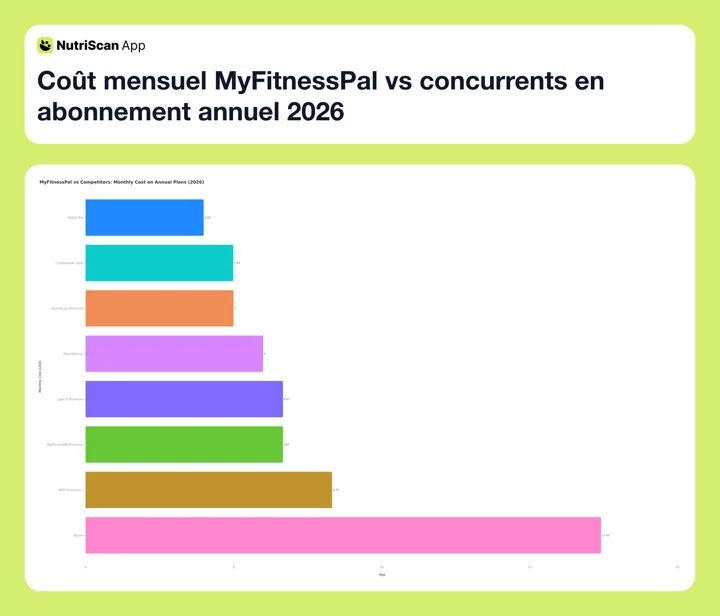
Figure 2: Monthly cost when you pay for a year up front. YAZIO is cheapest at $3.99, NutriScan and Cronometer Gold sit near $5, MyFitnessPal Premium ties with Lose It at $6.67, and Premium+ is $8.33. Standard US prices as of mid 2026.
NutriScan also runs a 7-day Premium trial you cancel through Apple or Google. After it ends, the free plan keeps 5 AI meal scans a week, so photo logging does not vanish when you stop paying. See our meal scan feature guide for how it compares with manual logging, or the MyFitnessPal alternatives roundup for the closest options.

NutriScan's meal scan screen: snap a photo, select food type and cooking method, and get instant nutrition data. Path: Home > Camera Icon > Click Picture
Frequently Asked Questions
Does MyFitnessPal charge you after the free trial?
Yes. It auto-renews after 7 days and charges the plan you selected: Premium at $19.99/month or $79.99/year, Premium+ at $24.99/month or $99.99/year. Cancel at least 24 hours before the trial ends to avoid it.
How long is the MyFitnessPal free trial?
Seven days. That is the only trial length MyFitnessPal publishes on its Premium page. Searches for "my fitness pal free trial" turn up 30-day claims on deal sites, but the app store checkout sheet is what binds you, and it says 7 days.
Is there a MyFitnessPal Premium 3 months free deal?
Not as a public offer. MyFitnessPal's own trial is 7 days. Multi-month free access has shown up through partner and employer bundles and through win-back emails to lapsed users, and those reach you directly rather than through a coupon code. Codes listed on aggregator sites usually just link to the standard annual plan.
Can I get a refund if I forgot to cancel the MyFitnessPal trial?
It depends on where you subscribed. Apple users request at reportaproblem.apple.com. Google Play users request through the Play Store, ideally within 48 hours of the charge. MyFitnessPal's terms state payments are generally non-refundable, so web refunds are rare. The sooner you ask, the better your chances.
Do I lose my food diary data if I cancel?
No. Your food diary, weight history, custom foods, and recipes stay on the account. You revert to the free plan and lose Premium features like barcode scanning and ad-free logging, but the logged data remains. Resubscribe later and it is all still there.
What happens to my Meal Planner recipes if I cancel Premium+?
They become inaccessible when Premium+ expires. They are not deleted, and they return if you resubscribe, but you cannot view or use them on the free plan. Screenshot the ones you cook regularly before your access ends.
Can I switch from Premium+ to Premium without canceling?
Yes. On iOS, go to Settings > Subscriptions > MyFitnessPal and pick the Premium plan. On Android, Play Store > Subscriptions > MyFitnessPal and change the plan. On the web, use Subscription Settings. That drops you from $24.99/mo to $19.99/mo.
Can I use the free trial more than once?
No. MyFitnessPal allows one free trial per account. Your Apple ID or Google account is linked to the trial redemption, so creating a new MyFitnessPal login on the same device may not bypass this restriction.
Is MyFitnessPal FSA/HSA eligible?
Yes. Premium and Premium+ are both FSA/HSA eligible purchases in the US (MyFitnessPal Help). If cost is the reason you are canceling, pre-tax health funds are worth checking first.
What is the difference between canceling and deleting my account?
Canceling stops the renewal and leaves your account active on the free plan. Deleting removes all your data permanently. To stop paying, cancel only. The delete option sits under Settings > Account.
Is the free plan still useful after canceling Premium+?
Yes. It still logs foods manually, tracks calories and basic nutrients, sets a calorie goal, and records weight. You lose barcode scanning, meal plans, voice logging, photo scanning, and the ad-free experience. For photo logging without a subscription, NutriScan includes 5 AI meal scans a week free. For condition-specific targets, see our NutriScan for PCOS guide.
What to Do Next
Canceling takes about 30 seconds once you know where to look. Use the same platform where you signed up, do it at least 24 hours before day 8, then confirm the status reads "Expires" or "Canceled." You keep Premium+ until expiry and your diary stays put.
If tracking suits you but MyFitnessPal does not, our diet plan guide covers matching a tracking style to your goals. If photo scanning was the feature you liked most in the trial, NutriScan gives you 5 AI scans a week free, no trial clock.
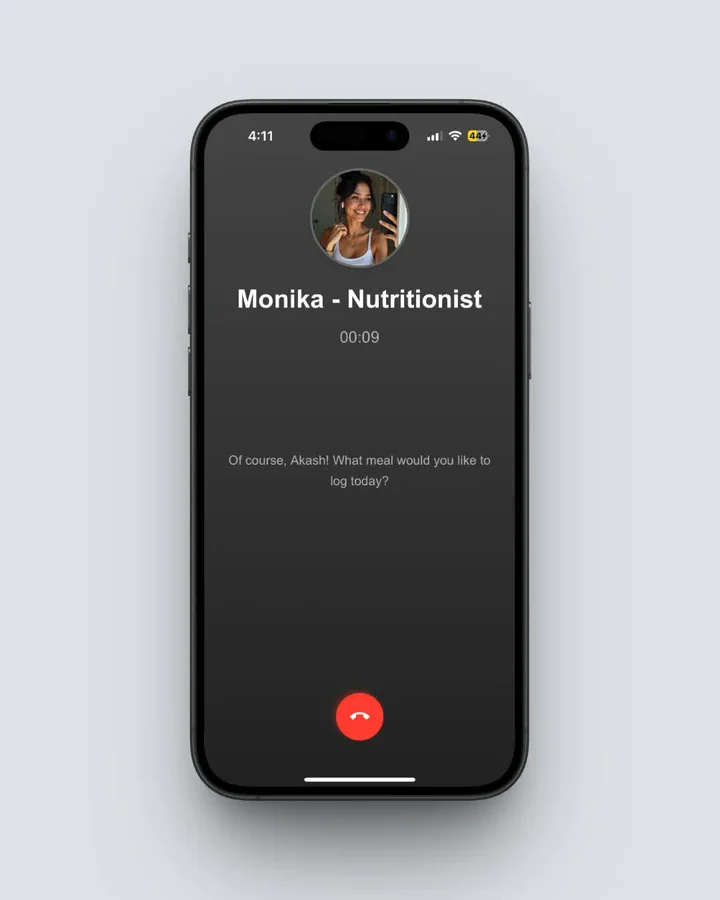
Monika, NutriScan's voice-powered AI nutritionist. Ask questions or log meals hands-free. Path: Home > Call Button
Try NutriScan as an Alternative
Looking for a calorie tracker with AI photo scanning on the free plan? NutriScan gives you 5 scans a week free, 4 Monika voice calls a week, and micronutrients on every meal. Download it from the App Store or Google Play.
