MacroFactor Free Trial: 7 Days, Then $11.99, No Free Version
 ChatGPT
  Claude
  AI Mode
  Perplexity
The MacroFactor free trial gives you 7 days of the complete app, then bills you. MacroFactor has no free version, so when day 7 passes you either subscribe or lose access. Standard US App Store prices as of August 2026, which change by region: $11.99 a month, $47.99 for six months, or $71.99 a year. Cancel at least 24 hours before day 7 and you pay nothing.
TL;DR - MacroFactor Free Trial Guide
Trial length: 7 days with full access to every feature, no restrictions
Cost after trial: $11.99/month, $47.99/6 months, or $71.99/year
Free version: none. MacroFactor locks when the 7 days end, so there is no free plan to fall back on
Key features: Verified food database, expenditure algorithm, AI photo logging, coached macro programs, micronutrient tracking
Cancel deadline: At least 24 hours before trial ends, through your app store settings
Data after cancel: All food logs, weight entries, and recipes stay saved in your account
MacroFactor is one of the most talked-about macro tracking apps in the fitness community, and the 7-day free trial is how most people meet it. Three details trip users up: cancellation runs through Apple or Google rather than the app, there is no free plan waiting on the other side, and switching plans after the trial takes an extra step.
A 2025 systematic review published in JMIR mHealth found that smartphone-based food tracking apps produce a modest but statistically significant effect on weight loss and BMI reduction over 4 to 6 months. That means picking the right app and actually sticking with it matters. This guide covers everything you need to know before you start, during the trial, and after it ends.
What Is the MacroFactor Free Trial? 📱
MacroFactor offers a 7-day free trial that gives you full access to every feature in the app. There is no limited version and no locked screens. You get the same experience that paying subscribers get.
Here is what that includes:
- Verified food database with barcode scanner
- Expenditure algorithm that calculates your real-time calorie burn based on your intake and body weight
- AI-powered coaching with weekly check-ins that adjust your macro targets
- AI photo logging to log meals by snapping a picture
- Custom macro programs with coached, collaborative, or fully custom modes
- Micronutrient tracking for detailed vitamin and mineral data
- Period tracker, habit tracker, and weight trend insights
- Apple Watch support for quick logging on your wrist
- Recipe import from URLs and custom food creation
The trial starts the moment you download the app and pick a plan. On both the App Store and Google Play you choose a subscription before the trial begins, so the payment method already on your Apple or Google account is the one that gets billed. Nothing is charged until the 7 days are up.
If you want to understand how MacroFactor's pricing stacks up against competitors, check our detailed MacroFactor cost breakdown.
Is MacroFactor Free? Does It Have a Free Version? 🆓
No. MacroFactor has no free tier, no ad-supported mode, and no reduced free plan. The 7-day trial is the only way to use the app without paying, and once it ends the app locks until you subscribe.
That puts MacroFactor in a smaller group than the trackers people usually compare it to. MyFitnessPal, Cronometer, and Lose It all keep a free plan running after their premium trials expire. So does NutriScan: 5 AI photo scans a week on the free plan, with macros, micronutrients, and a NutriScore on every meal you log.
MacroFactor is free during those 7 days and at no other point. There is no student rate, no permanently free tier, and no downgrade path to a lighter version. If you cancel, you keep everything until your trial date runs out, and after that the app stops working for you.
Worth Knowing Before You Start
Canceling MacroFactor is not a "pause". Once the trial or subscription lapses, your logs stay in your account but you cannot open them without paying again.
If you already know you want out, our step-by-step MacroFactor cancellation guide covers both app stores in detail.
 When the barcode scanner actually finds your food on the first try
What the MacroFactor App Does That Free Trackers Do Not 🔬
MacroFactor is built by Stronger By Science, a team known for evidence-based fitness content. Most trackers guess your metabolism once and stick with the guess. MacroFactor keeps re-measuring it.
Most apps estimate your calorie needs using a formula based on height, weight, age, and activity level. MacroFactor goes further. It uses your daily food logs and body weight entries to calculate your real energy expenditure. After about 2 to 3 weeks of consistent logging, the algorithm becomes highly personalized.
During the 7-day trial, you will not see this algorithm reach full accuracy. But you will see it start adjusting, and you will get a coached check-in that shows how the system works.
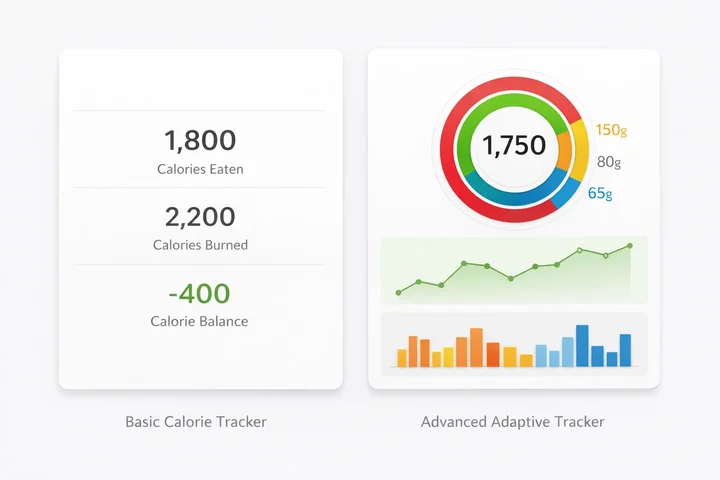 Basic calorie counting vs adaptive expenditure tracking: the key difference in MacroFactor's approach
Key Insight
A 2025 study found that higher adherence to dietary self-monitoring and calorie goals was associated with greater odds of achieving 5% or more weight loss. That is exactly what MacroFactor is designed to support: consistent, low-friction logging that adapts to how you actually eat.
Real-World Examples: How People Use the Trial 💬
Example 1: The switcher from MyFitnessPal. One App Store reviewer, a registered dietitian, wrote: "I was going to continue using MFP and MF side by side for the free trial periods, but after a day, I stopped MFP because this app is so much better." She noted that the verified food database eliminated the problem of scrolling through dozens of unverified entries.
Example 2: The Carb Manager user. Another reviewer tried the 7-day trial and "within a couple of days I knew I had hit the jackpot and subscribed." He had 6 months left on a Carb Manager subscription but switched anyway because the coaching algorithm gave him confidence in transitioning from weight loss to maintenance.
Example 3: The spreadsheet tracker. A user who had been manually tracking food in a spreadsheet for over a year said MacroFactor "obviated the need for ALL OF THAT." She described the app as making food tracking second nature within just a few days.
The common thread: 7 days was enough for users to decide whether the app fit their workflow.
If you are curious about how NutriScan compares to MacroFactor's approach, see our NutriScan vs MacroFactor comparison.
Tips and Tricks for Getting the Most Out of Your 7 Days 💡
The trial is short. Here is how to make every day count:
Log your body weight every morning. The expenditure algorithm needs weight data to work. Weigh yourself first thing, before eating or drinking, and enter it in the app.
Use the barcode scanner for packaged foods. MacroFactor's scanner is one of the fastest in the market. If a barcode is not in the database, you can scan the nutrition label directly.
Try the AI photo logging. Snap a photo of your meal and let the AI identify the foods. It is still in its early stages, but it saves time on complex dishes.
Set up a coached program from day one. Go to More > Programs and select "Coached." Choose your goal (lose, maintain, or gain weight), and the app will set your initial macro targets.
Test the recipe import feature. Paste a recipe URL into the app's recipe importer. It pulls the ingredients and calculates the macros per serving automatically.
Explore the insights tab. MacroFactor shows trends in weight, expenditure, and nutrient intake that you will not find in most other apps.
Set a calendar reminder for day 5. This gives you 2 full days to decide whether to keep the subscription or cancel before the charge hits.
Pro Tip
If you already track your food with another app, NutriScan's AI photo scanning can log meals in 15 seconds with a single photo, no barcode needed. Try both approaches during your trial period to see which fits your workflow.

How to Start the MacroFactor Free Trial (Step by Step) 📋
Starting the trial takes about 3 minutes. Here is the process:
Step 1: Download the app
MacroFactor is available on iOS and Android. It also works on iPad and Apple Watch.
Step 2: Create an account
You can sign up with your email, Apple ID, or Google account. The app will ask for basic info: your age, height, weight, and goal.
Step 3: Choose a subscription plan
The app will show you three options:
| Plan | Price | Per Month |
|---|---|---|
| Monthly | $11.99/month | $11.99 |
| Semiannual | $47.99/6 months | $8.00 |
| Annual | $71.99/year | $5.99 |
All three start with a 7-day free trial. You will not be charged until the trial period ends.
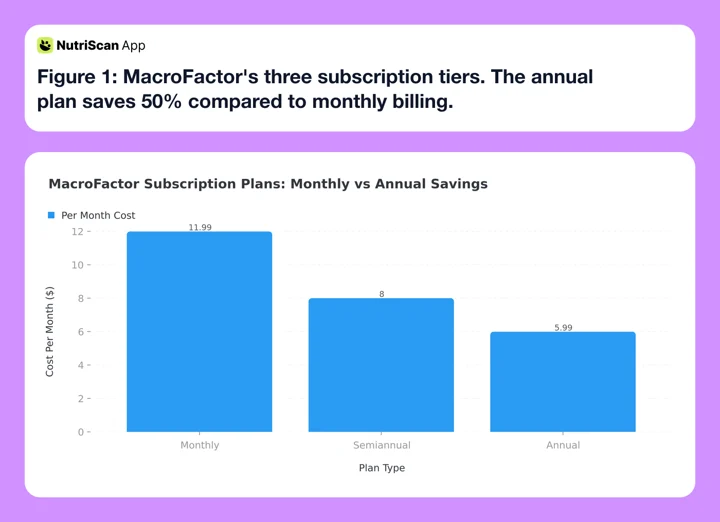 Figure 1: MacroFactor's three subscription tiers. The annual plan saves 50% compared to monthly billing.
Step 4: Confirm through your app store
Apple or Google will process the subscription. You can verify it in your phone's subscription settings.
Step 5: Complete the onboarding quiz
MacroFactor will ask about your diet preferences, activity level, and coaching style (coached, collaborative, or custom). This takes about 2 minutes.
Step 6: Start logging
Your trial is now active. Begin logging food, entering your weight, and exploring the features.
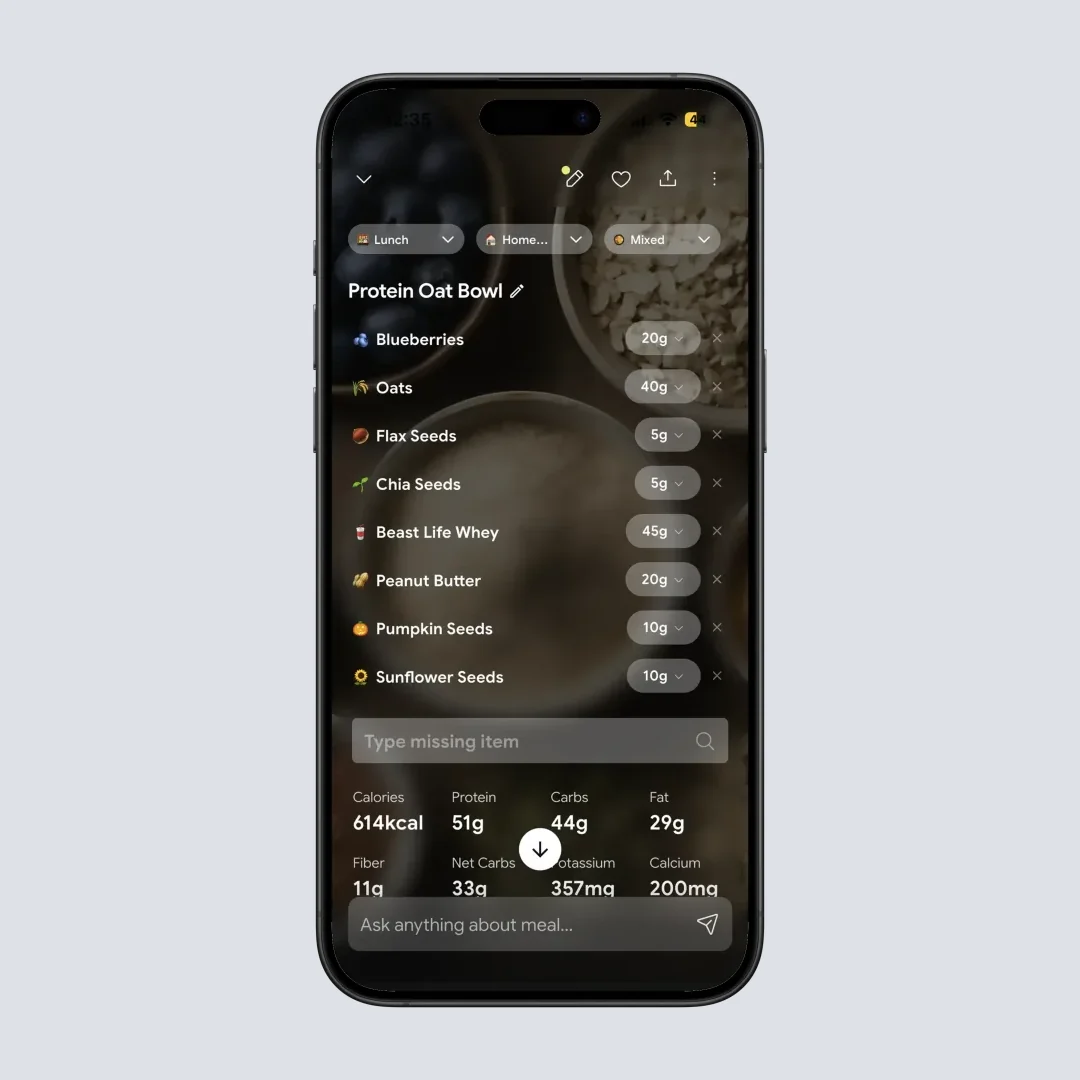
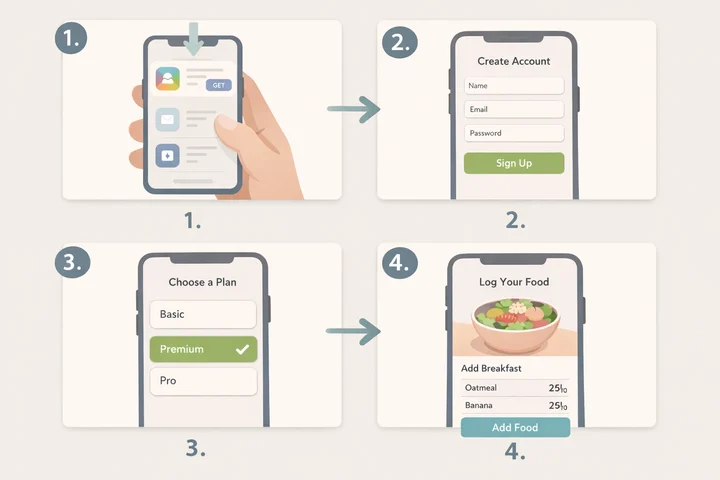 The MacroFactor trial signup flow from download to first meal log
Plan Selection Tip
If you select the monthly plan during the trial and later want to switch to the annual plan, you will need to cancel your current subscription first. Wait for it to expire, then the app will prompt you with the other payment options.
How to Cancel the MacroFactor Free Trial Before You Get Charged 🚫
This is the most important section. If you decide MacroFactor is not for you, you must cancel at least 24 hours before the trial ends. Here is how:
Cancel on iPhone or iPad
- Open the Settings app on your device
- Tap your name at the top (your Apple ID)
- Tap Subscriptions
- Find MacroFactor in the list
- Tap Cancel Subscription and confirm
You can also cancel through the App Store app: open the App Store, tap your profile icon, tap Subscriptions, find MacroFactor, and cancel.
Cancel on Android
- Open the Google Play Store app
- Tap your profile icon in the top right
- Tap Payments & subscriptions > Subscriptions
- Find MacroFactor and tap it
- Tap Cancel subscription and follow the prompts
Cancel from Within MacroFactor
You can view your subscription status inside the app. Go to More > Subscriptions. This page shows your active plan and renewal date. However, actual cancellation must go through Apple or Google.
Critical Reminder
The MacroFactor app itself cannot process cancellations. You must cancel through your phone's app store settings. Set a reminder for day 5 of your trial to avoid surprise charges.
What Happens After You Cancel
- You keep full access until the end of your trial period
- Your data (food logs, weight entries, recipes) is saved in your account
- If you resubscribe later, your data will still be there
- You will not be charged after cancellation
 That feeling when you cancel before the charge hits
What you lose with MacroFactor, and what NutriScan gives you free
When the 7 days end, MacroFactor stops opening. NutriScan keeps most of that list running on the free plan.
| MacroFactor paid feature | NutriScan |
|---|---|
| Any access after day 7, since there is no free tier | Free plan with no time limit |
| AI photo logging | Photo food scan, 5 a week free, unlimited on Premium |
| Micronutrient tracking | Micronutrients on every meal you log, free, with a NutriScore per meal |
| Coached check-ins that adjust your macros | Monika, a voice AI nutritionist you talk to out loud, 4 calls a week free |
| Custom macro programs | 28-day diet plans with macros, a grocery list and swaps. This one is Premium in NutriScan too |
MacroFactor is $11.99 a month or $71.99 a year once the trial converts. NutriScan Premium is about $59 a year, and the free plan has no time limit.
What the Research Says About App-Based Food Tracking 📊
The habit itself has evidence behind it, separate from which app you pick.
A 2025 meta-analysis of mobile health apps for obesity management found that smartphone apps produce a statistically significant reduction in body weight and BMI when used consistently over 4 to 6 months. The effect was modest but reliable, meaning the simple act of logging your food gives you an edge.
Another 2025 study published in the journal Obesity examined the relationship between self-monitoring adherence and weight outcomes. Participants who consistently tracked their diet, physical activity, and weight had significantly greater odds of achieving clinically meaningful weight loss of 5% or more. The study specifically noted that meeting calorie goals was one of the strongest predictors of success.
MacroFactor leans into this research. The app removes barriers to consistent logging: the barcode scanner is fast, the food database is verified, and the coaching algorithm rewards consistent logging with better recommendations. The app never shows red warning numbers or shaming messages when you go over your targets, which aligns with newer research on sustainable behavior change.
For more on the evidence behind consistent logging, read our guide to building a calorie tracking habit.
MacroFactor Trial vs Other Free Trials: How It Compares 🏆
Not every nutrition app trial is the same. Here is how MacroFactor stacks up:
| App | Trial Length | What You Get | Free Tier After Trial? |
|---|---|---|---|
| MacroFactor | 7 days | Full access to all features | No |
| MyFitnessPal | 7 days (Premium) | Premium features; free tier exists | Yes (limited) |
| Cronometer | 30 days (Gold) | Gold features; free tier exists | Yes (with ads) |
| Lose It | 7 days (Premium) | Premium features; free tier exists | Yes (limited) |
| Carbon Diet Coach | None | Paid from day one | No |
| NutriScan | 7 days | Full Premium access | Yes (5 photo scans a week) |
Trial lengths verified against each vendor's own pages in August 2026, including MyFitnessPal Premium, which states 7 days. Seven days is the category norm now, so MacroFactor is not an outlier on length, and it gives you the full experience with no locked features. The key difference is what happens after the trial: with MacroFactor, you either pay or lose access completely. Apps like MyFitnessPal, Cronometer, and NutriScan let you continue with a free plan.
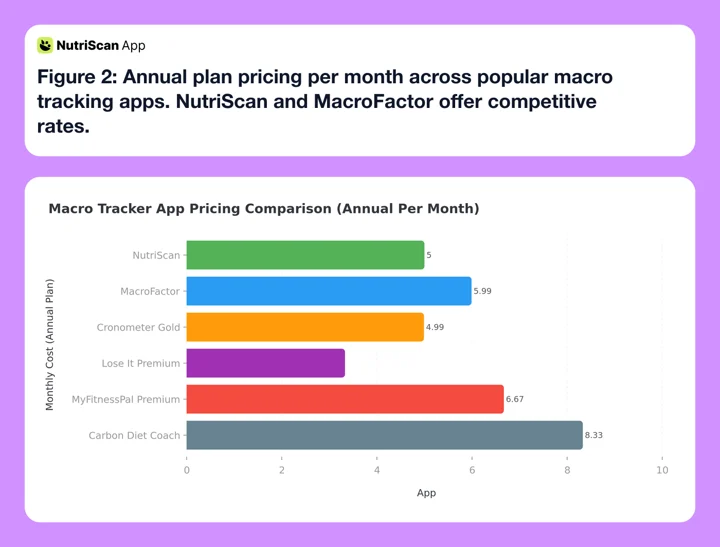 Figure 2: Annual plan pricing per month across popular macro tracking apps. NutriScan and MacroFactor offer competitive rates.
For detailed pricing breakdowns of these competitors, see our guides on MyFitnessPal pricing, Cronometer pricing, and Lose It pricing.

What Happens If You Forget to Cancel 😬
If you miss the cancellation window, your selected subscription plan will activate and you will be charged. Here is what you can do:
Request a refund from Apple or Google. Both app stores have refund policies for accidental subscription charges. Apple typically processes refund requests through reportaproblem.apple.com. Google handles refunds through the Play Store.
Contact MacroFactor support. According to discussions in the MacroFactor subreddit, the company offers a full refund within 60 days of purchase. After 60 days, partial refunds are not available. You can reach support at [email protected].
Cancel immediately after being charged. Even if you have been charged, canceling right away prevents the next renewal. You will keep access until the end of the current billing period.
The Day-5 Automation Trick That Prevents Surprise Charges ⏰
Here is the simple system that makes it impossible to get charged by accident:
Day 1: Set two calendar reminders. Create a reminder for day 5 ("Decide on MacroFactor") and day 6 ("Last chance to cancel MacroFactor"). Put them at times you check your phone.
Day 1: Screenshot your subscription settings. Open Settings > Subscriptions on your phone and screenshot the MacroFactor entry. This proves when the trial ends and makes canceling a 30-second task.
Day 3: Rate each feature 1-5. Open a note and score: barcode scanner, AI photo logging, expenditure algorithm, coaching check-in, food database. If the total is under 15 out of 25, canceling is the right call.
Day 5: Make the call. Check your feature scores. If you are not sold, cancel right then using the screenshot path you saved. You still keep full access until day 7.
Day 6: Verify cancellation. Go back to Settings > Subscriptions and confirm it says "Expires on [date]" instead of "Renews on [date]."
Why this works: most people forget because the decision stays vague. This system turns "I should probably cancel" into a concrete 5-step process with built-in checkpoints. The screenshot on day 1 removes the friction of finding the cancel path later.
Prevention Strategy
The best approach is prevention. Set a reminder on day 5 of your trial. That gives you a full 2 days to make your decision without pressure.
Should You Start the MacroFactor Free Trial? 🧭
Start it if you weigh yourself most mornings and log most of what you eat. The expenditure algorithm is the reason to pay for this app, and it only earns its keep on consistent data. Seven days will not get you a finished metabolic estimate, but it will show you whether the daily logging habit sticks.
Skip it if you mostly want a fast way to log dinner. At $11.99 a month or $71.99 a year (standard US prices as of August 2026), MacroFactor sits mid-range: cheaper than MyFitnessPal Premium at $19.99 a month, dearer than Cronometer Gold at $10.99 a month or $59.99 a year. MacroFactor also costs more than NutriScan Premium. None of that money buys you a fallback plan the way the others do.
Whichever way you go, set the day-5 reminder before you close the app store. That single step is what separates a free trial from an $11.99 surprise.
You can run NutriScan alongside it for the week and compare logging speed head to head. NutriScan gives you 5 AI photo scans a week on the free plan, plus macros, micronutrients, and a NutriScore on every meal, and it keeps working after the trial ends. See how the AI food tracker handles a mixed plate, use our online macro calculator to set targets first, or read the meal scanning guide.
If you are starting the trial as a MyFitnessPal switcher, export your MyFitnessPal history first and set up MacroFactor the right way so the trial week counts toward calibration.
Frequently Asked Questions 💬
Is MacroFactor free?
No. MacroFactor is free only for the 7 days of the trial. After that it costs $11.99 a month, $47.99 for six months, or $71.99 a year (standard US prices as of August 2026, which vary by region). There is no ad-supported version and no permanently free plan.
Does MacroFactor have a free version?
No. MacroFactor does not have a free tier. The only way to use the app without paying is during the 7-day free trial. After the trial ends, you must subscribe to continue using any features. Apps like MyFitnessPal, Cronometer, Lose It, and NutriScan all keep a free plan after their trials end.
Is the MacroFactor app worth downloading just for the trial?
Yes, if you plan to log every day for those 7 days. You get the complete app, including the verified food database, the barcode scanner, AI photo logging, micronutrient tracking, and one coached check-in. Cancel at least 24 hours before day 7 and you pay nothing for the week.
Can I switch my subscription plan after the trial?
Yes, but not directly. You need to cancel your current subscription first. Once it expires, the app will show you all available plan options (monthly, semiannual, annual). You can then select the plan you prefer. Go to More > Subscriptions inside the app to view your options.
What happens to my data if I cancel?
Your food logs, weight entries, custom foods, and recipes are saved in your MacroFactor account. If you resubscribe weeks or months later, all your data will still be there. You do not lose anything by canceling.
Is MacroFactor worth the price compared to free apps?
It depends on your goals. If you need adaptive macro coaching, a verified food database, and energy expenditure tracking, MacroFactor offers features that free apps do not. But if basic calorie tracking is enough, a free plan may cover it. FatSecret is free for core tracking, and NutriScan's free plan gives you 5 AI photo scans a week, enough to test the scanner on the mixed dishes a food database usually gets wrong. Personalized diet plans come with NutriScan Premium, while the NutriScore rates every meal on both plans.
Can you get the MacroFactor free trial twice?
Usually not. Apple and Google grant an introductory offer once per Apple ID or Google account for a given subscription group, so a second download on the same account normally starts billing straight away. Deleting the app does not reset it. Check the price shown on the plan screen before you confirm: if it does not say 7 days free, you are being charged from day one.
Does the MacroFactor free trial need a credit card?
You need a payment method already attached to your Apple ID or Google account, because you select a paid plan before the trial starts. MacroFactor never sees your card details. Cancel at least 24 hours before day 7 and nothing is taken. NutriScan's 7-day trial starts through your app store the same way; whether a card is collected depends on your platform and region.
Can I use MacroFactor on Apple Watch?
Yes. MacroFactor added Apple Watch support in September 2025. You can log food, view your daily macros, and check your targets from your wrist. This feature is available during the trial period as well.
How does MacroFactor's expenditure algorithm work?
The algorithm tracks your daily calorie intake (from food logs) and body weight changes over time. It calculates your true total daily energy expenditure (TDEE) rather than estimating it from a formula. After 2-3 weeks of consistent logging, the estimate becomes highly accurate and personalized.
Is the MacroFactor food database accurate?
MacroFactor uses a verified food database, meaning entries are checked for accuracy before being added. This is different from user-submitted databases (like MyFitnessPal) where anyone can add entries, leading to duplicates and incorrect data.
