Lose It Pricing 2026: Free vs Premium and What Premium Adds
 ChatGPT
  Claude
  AI Mode
  Perplexity
Lose It has helped 50 million users lose over 120 million pounds collectively. But should you pay for Premium or stick with the free version? 🤔
TL;DR - Lose It Pricing 2026
Free Basic: $0 forever - calorie budget, 47M+ food database, basic macros, weight tracking
Premium Annual: $39.99/year ($3.33/month) - photo logging, voice logging, barcode scanner, weekly calorie cycling, advanced macros, fasting timer, insights, ad-free
Lifetime: $299.99 one-time (or $249.99 for existing subscribers) - all Premium features forever, breaks even at 6-7 years
Best deal: Watch for Black Friday or New Year sales when Lifetime drops to $149.99 or lower
Lose It has been helping people track calories since 2008. With three tiers in 2026 - Free Basic, Premium Annual, and Lifetime - the real question is whether paying $3.33 a month makes daily logging faster and smarter. This guide breaks down every tier, explains what Premium unlocks, and helps you decide if the upgrade makes sense for your goals.
Lose It Pricing at a Glance 💰
Lose It offers three membership levels in 2026:
| Plan | Cost | Billing | Effective Monthly Cost |
|---|---|---|---|
| Free Basic | $0 | Never | $0 |
| Premium Annual | $39.99 | Yearly | $3.33/month |
| Lifetime | $299.99 | One-time | Varies by years used |
If you already have a Premium subscription, Lifetime drops to $249.99. During seasonal promotions, existing Premium subscribers often see deeper discounts on the Lifetime upgrade.
Regional Pricing
Prices may vary outside the United States. Canadian users on Reddit have reported annual Premium prices around CAD $107.99 at full price, with sale prices dropping to CAD $27.99 during promotions.
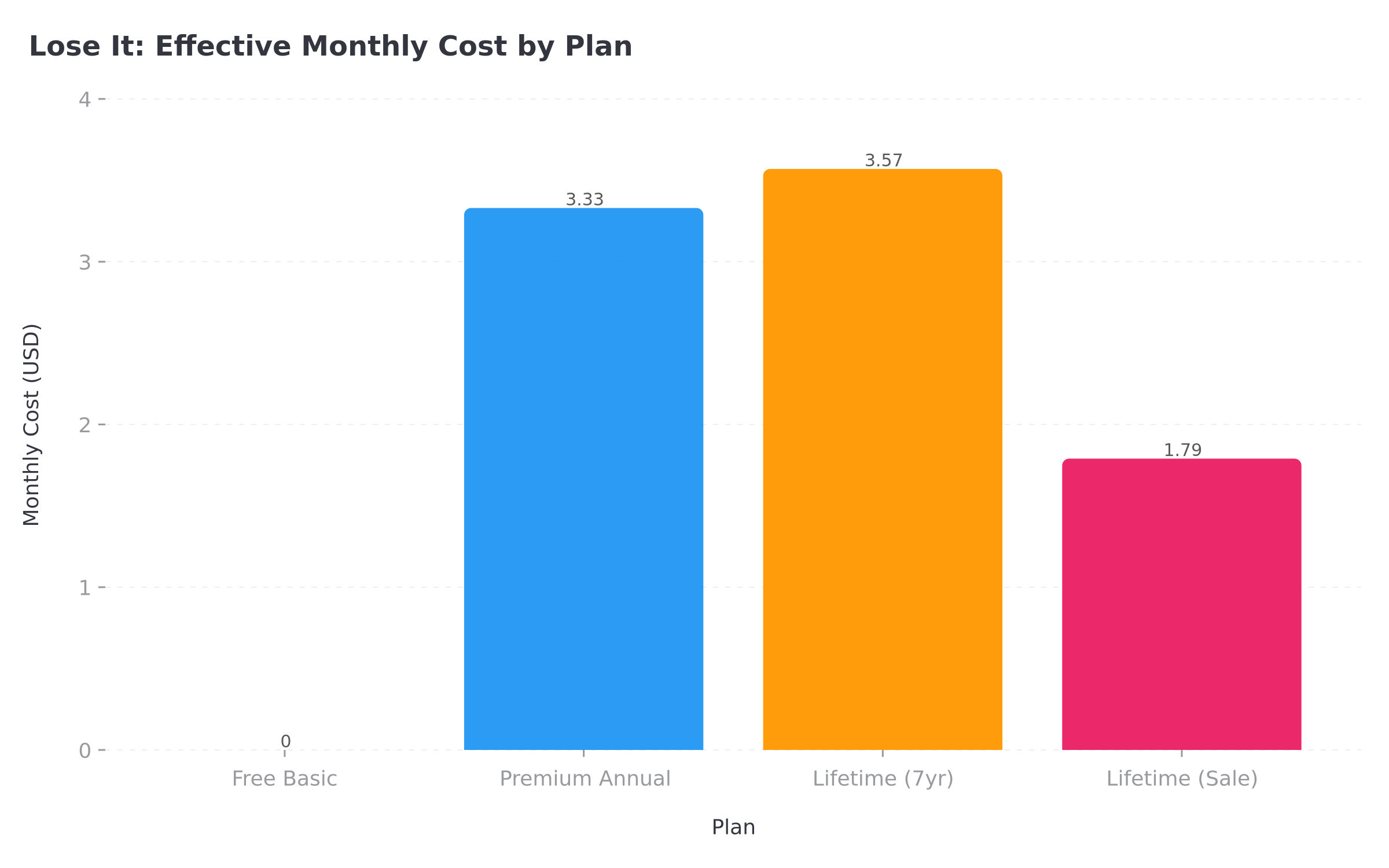 Figure 1: Effective monthly cost across Lose It plans - Lifetime at sale price offers the best long-term value
What the Free Version Includes 🆓
The free tier of Lose It is genuinely usable for basic calorie tracking. Here is what you get without paying anything:
Core tracking features:
- Personalized daily calorie budget based on your weight loss goals
- Food logging through manual search
- Access to 47+ million food items in the database
- Basic macronutrient tracking (carbs, protein, fat)
- Exercise logging with manual entry
- Weight tracking and simple progress charts
- Goal setting for weight loss pace (0.5 to 2 pounds per week)
Community features:
- Public challenges and competitions
- Basic community support forums
What free users deal with:
- Advertisements throughout the app
- Limited tracking customization
- No advanced insights or pattern analysis
- Basic sync with some fitness devices
The free version works for people who just want to count calories and nothing more. You can absolutely lose weight using only the free tier. Many users stick with it for months or years without upgrading.
According to research published in Obesity Science and Practice, mobile app usage for calorie tracking correlates with successful weight loss outcomes regardless of whether users pay for premium features. The key factor is consistent logging, which the free tier supports fully.
 Trying to decide if Premium is worth it? Let's break down every feature so you know exactly what you get
What Premium Unlocks 🔓
Premium removes the limitations of the free tier and adds features that make logging faster and more insightful. Here is the complete breakdown:
Photo Meal Logging (Snap It) 📸
Premium includes Snap It, which lets you log meals by taking a photo. Point your camera at your plate, snap a picture, and the app identifies foods and estimates portions.
This feature works best with clearly visible foods like a salad, a sandwich, or a plate of chicken and vegetables. Mixed dishes like casseroles or curries require more manual editing.
For users who hate typing food names or scrolling through search results, Snap It can cut logging time significantly. It is especially helpful when eating out or at someone else's house where you cannot measure portions precisely.
AI Voice Logging (Say It) 🎤
The Say It feature lets you speak your meals instead of typing. Say something like "I had two scrambled eggs, a slice of toast with butter, and black coffee" and the app logs each item.
Voice logging works well for simple meals with common foods. It struggles with brand-specific items or regional dishes. For everyday foods, it saves real time.
Barcode Scanner Access 📱
Here is an important change: Lose It has been moving the barcode scanner behind the Premium paywall. New free accounts may not have access to Scan It. Some long-time free users still have it, but new signups often find it locked.
For packaged foods with barcodes, this scanner pulls exact nutrition data instantly. If you eat a lot of packaged snacks, protein bars, or ready meals, losing barcode access would make free tracking much slower.
Barcode Scanner Changes
New free accounts may not have access to Scan It. If you rely on barcode scanning for packaged foods, this alone might justify Premium.
Flexible Calorie Budgets 📅
Premium lets you schedule higher and lower calorie days throughout your week. If you want more calories on weekends for social eating and fewer on weekdays, you can set that up.
This weekly calorie cycling approach matches how many people actually live. Instead of feeling like you "failed" on Saturday, you plan for it. Your weekly total still hits your target even if individual days vary.
Advanced Macronutrient Tracking 🥗
Free users see basic macros. Premium users can customize macro targets as percentages or gram amounts. You can track:
- Protein, carbs, and fat in detail
- Saturated fat separately
- Sugar intake
- Sodium
- Fiber
- Cholesterol
For people following keto, high-protein, or low-sodium diets, this customization matters. A registered dietitian nutritionist quoted in the Everyday Health review notes that tracking specific macros can help individuals with chronic conditions understand their intake patterns better than calorie counting alone.
If you are curious about your ideal macro targets, try the NutriScan macro calculator to get personalized numbers based on your goals and activity level.
Water and Sleep Tracking 💧
Premium includes dedicated tracking for water intake and sleep hours. These integrate with your daily log so you can spot patterns. Maybe you eat more when you sleep less. Maybe dehydration triggers snacking. The data helps you connect dots.
Intermittent Fasting Timer ⏰
Premium members can set fasting windows and track their fasts within the same app. Choose common protocols like 16:8 or 18:6, or create custom schedules.
The fasting timer shows your eating window and counts down until your next fast ends. For people combining calorie counting with intermittent fasting, having both in one app simplifies the routine. If intermittent fasting interests you, read our 36-hour water fast experience guide for a deep dive into extended fasting.
Personal Insights and Patterns 🔍
The Insights feature analyzes your food log and identifies patterns. It might notice:
- You eat more on certain days of the week
- Specific foods correlate with staying under budget
- Your protein intake drops on weekends
- Certain meals consistently lead to overeating later
These insights arrive as push notifications and in-app summaries. They turn raw logging data into actionable observations without you having to analyze spreadsheets.
Other Premium Features
- Meal Planning and Targets: Suggested meal targets to help hit nutrition goals
- Body Measurements Tracking: Waist, chest, hip, body fat percentage
- Expanded Device Syncing: Fitbit, Garmin, Withings, Apple HealthKit, Google Fit
- Ad-Free Experience: No banner ads interrupting your logging flow
- Verified Food Priority: Filter for verified-only entries to avoid inaccurate crowdsourced data
 Free gets the job done for basics. Premium makes every logging session faster and more insightful.

The Lifetime Option Explained 🏆
Lifetime membership costs $299.99 for non-Premium users or $249.99 if you already subscribe. It includes all Premium features forever with no recurring charges.
Lifetime makes financial sense if:
You plan to use Lose It for more than 6-7 years at the $39.99 annual rate. At that point, Lifetime pays for itself. At $249.99 (discounted for current subscribers), breakeven happens around 6.25 years.
Seasonal discounts change the math:
Reddit users report Lifetime prices dropping to $149.99 or lower during Black Friday or New Year promotions. At $149.99, breakeven happens in under 4 years. If you spot a deep discount, Lifetime becomes a much easier decision.
Timing Tip
Lose It does not refund unused Premium time when you switch to Lifetime. Time your purchase at the end of your current subscription cycle.
The 7-Day Free Trial 🎁
New users who have never tried Premium can access a 7-day free trial with full Premium features.
How the trial works:
- Download the app and create an account
- Start the trial when prompted
- Use all Premium features for 7 days
- Cancel before day 7 ends to avoid charges
- If you do not cancel, your payment method is charged for annual Premium
Cancellation depends on where you subscribed:
- iOS: Cancel through Apple App Store subscriptions, not within the app
- Android: Cancel through Google Play Store subscriptions
- Web (loseit.com): Cancel directly in your account settings
DANGER
Set a reminder for day 6 if you want to evaluate without committing. Charges can process before the trial technically ends, so do not wait until the last hour.
How Lose It Compares to Competitors 📊
Lose It sits in the middle of the calorie tracking market on price. Here is how it stacks up:
| App | Annual Cost | Free Tier? | Key Strength |
|---|---|---|---|
| NutriScan Premium | $35.88 | Yes | Photo logging, Indian food database |
| Lose It Premium | $39.99 | Yes | Photo + voice logging, flexible budgets |
| Cronometer Gold | $49.99 | Yes | Micronutrient tracking depth |
| MacroFactor | $71.99 | No | Dynamic calorie adjustment |
| Lifesum Premium | $74.99 | Yes | Meal plan variety |
| MyFitnessPal Premium | $79.99 | Yes | Largest food database |
Lose It costs half what MyFitnessPal Premium charges. It undercuts Cronometer Gold and Lifesum by meaningful amounts. Only NutriScan comes in cheaper at $2.99/month billed annually.
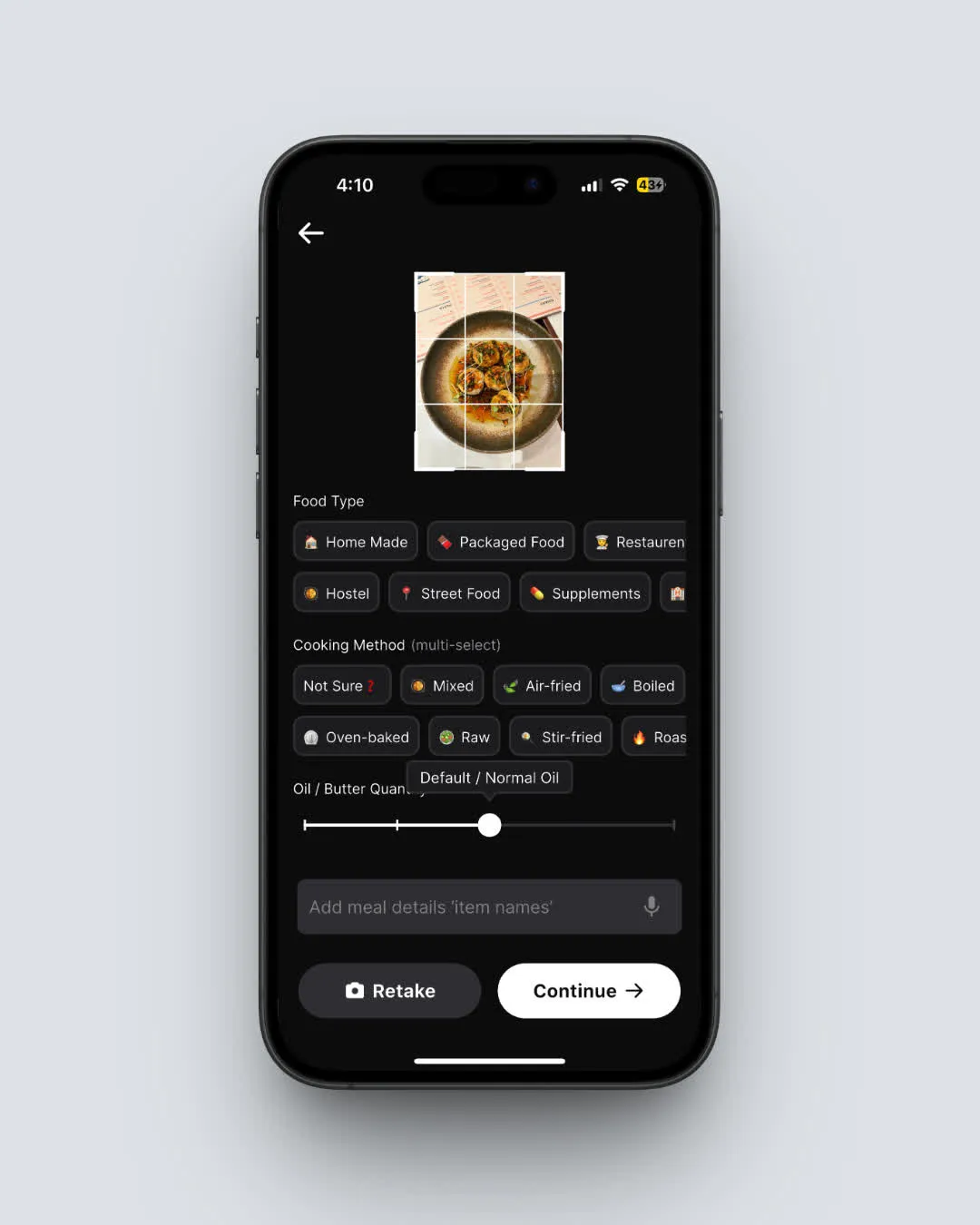 NutriScan's meal scanning at $2.99/month includes food type tagging and cooking method detection - features Lose It Premium doesn't offer (Home ➡️ Camera Icon ➡️ Crop Picture)
For a detailed look at other app pricing, check our guides on Cronometer Gold pricing and Carbon Diet Coach pricing.
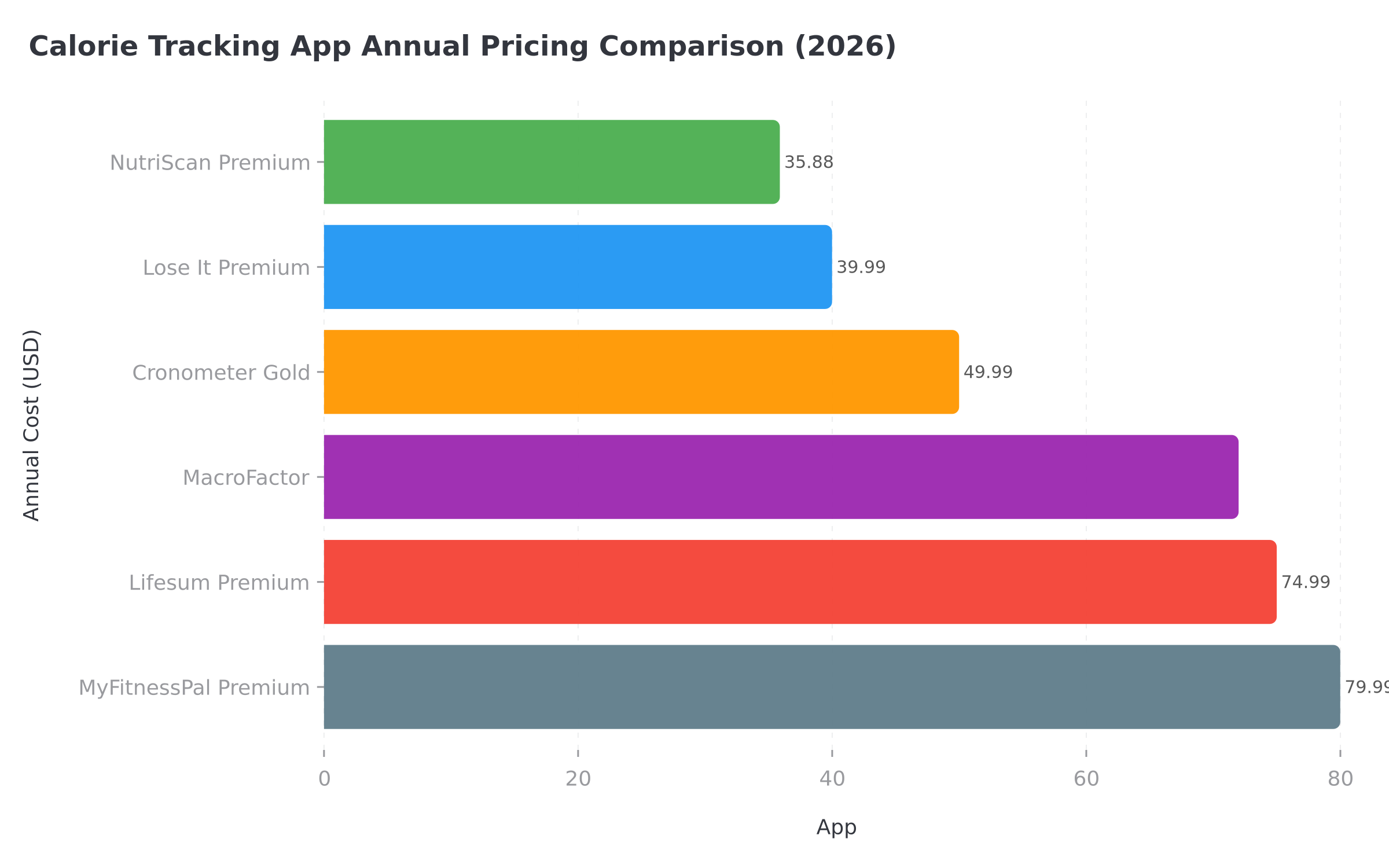 Figure 2: Annual pricing across major calorie tracking apps - Lose It offers strong value in the middle of the pack
Is Lose It Premium Worth It? 🤔
Premium makes sense for some users and wastes money for others. Here is how to decide:
Premium is worth it if:
- You hate ads and want a cleaner experience
- You eat packaged foods often and need barcode scanning
- You want photo or voice logging to speed up entries
- You follow a specific diet requiring macro customization
- You practice intermittent fasting and want one app for both
- You want weekly calorie cycling for social eating flexibility
- You care about body measurements beyond just weight
Premium is probably not worth it if:
- You only track calories, not detailed macros
- You mostly eat home-cooked meals you already know the calories for
- You do not mind ads
- You rarely eat packaged foods with barcodes
- You are comfortable with manual text search for logging
- Budget is tight and $40/year matters
Who Uses Lose It Successfully 👥
Lose It works particularly well for certain user types:
Busy professionals who need fast logging during hectic days benefit from Snap It and Say It. Speaking your breakfast while commuting or snapping your lunch before a meeting keeps tracking from falling behind.
Weekend social eaters who struggle with all-or-nothing thinking appreciate the flexible calorie budget feature. Planning for higher Saturday calories removes guilt and keeps the weekly deficit intact. For more on breaking the weekend diet cycle, read our guide on why weekends kill diet progress.
Data-driven dieters who want to understand their patterns find the Insights feature reveals blind spots. Knowing exactly which foods or days derail progress enables targeted behavior change.
Long-term trackers committed to years of logging find Lifetime pricing attractive. At $149.99 during sales, the cost per year drops to reasonable levels for dedicated users.
FSA and HSA Eligibility 💳
Lose It Premium qualifies for FSA (Flexible Spending Account) and HSA (Health Savings Account) purchases. If you have pre-tax health dollars to spend, you can use them on your subscription.
Check your specific plan rules, but weight management apps generally qualify when used for a health goal. This effectively makes Premium even cheaper since you pay with pre-tax money.
The Premium Trick That Saves the Most Time
Here is the combination that makes Premium logging absurdly fast:
Stack Snap It + Say It + Scan It in one sitting.
Most Premium users pick one logging method and ignore the rest. The real speed unlock is switching between all three based on the meal type:
- Packaged food? Scan the barcode with Scan It. Two seconds, exact data. No searching.
- Home-cooked plate? Snap a photo with Snap It. The app identifies most items. Quick edits only.
- Complex meal or leftovers? Say It. Describe what you ate conversationally: "Two cups of chicken stir fry with rice and broccoli." Done.
The average Premium user logs a meal in 15-20 seconds using the right method for each situation. Free users typing and scrolling spend 45-60 seconds per meal. Across three meals and two snacks daily, that is 3-4 minutes saved per day - about 20 hours per year.
That time savings alone is worth $39.99. But most people never combine all three methods.
 When you realize stacking all three logging methods saves you 20 hours a year

How to Get the Best Deal on Premium 🛒
If you decide to upgrade, timing matters:
- Watch for New Year promotions: January brings weight loss app discounts
- Check Black Friday: Historically strong deals on annual and Lifetime
- Use the in-app offer link: Lose It often shows existing free users a discount
- Consider Lifetime during sales: At 50%+ off, the math changes significantly
- Use FSA/HSA if available: Pre-tax dollars stretch further
TIP
The worst time to buy is at full price right after a sale ends. Patience can save 25-50%.
Cross-Platform Access Note 🖥️
If you buy Premium through Apple App Store, you can only access Premium features on iOS devices and the web (loseit.com). Same for Google Play: Android and web only.
If you want Premium on both iOS and Android, buy through loseit.com directly. Web purchases work everywhere.
Cancellation and Refund Policies 📋
Canceling Premium returns you to the free tier. You keep your food log history and saved recipes. You just lose access to Premium features.
Cancellation process:
- Apple: Settings ➡️ Your Name ➡️ Subscriptions ➡️ Lose It ➡️ Cancel
- Google: Play Store ➡️ Menu ➡️ Subscriptions ➡️ Lose It ➡️ Cancel
- Web: Lose It account settings ➡️ Subscription ➡️ Cancel
Refunds follow standard App Store and Play Store policies. For Lifetime purchases, refunds are handled case-by-case through their support team.
Frequently Asked Questions ❓
Does Lose It work without Premium?
Yes. The free tier includes everything needed for basic calorie counting: a personalized budget, food search, the 47-million-item database, basic macro tracking, and weight logging. Premium adds convenience features and deeper insights but is not required for weight loss success.
Is there a monthly Lose It Premium option?
Lose It primarily offers annual subscriptions at $39.99/year. The app occasionally shows monthly pricing options during promotional periods, but these are not consistently available. Most users see only annual and Lifetime options.
Can I share Lose It Premium with my family?
Apple Family Sharing supports Lose It Premium for iOS subscriptions purchased through the App Store. Up to six family members can share one Premium subscription. Google Play does not offer equivalent family sharing for Lose It at this time.
What happens to my data if I cancel Premium?
Your food log history, saved recipes, custom foods, and weight data remain intact. You simply lose access to Premium features like photo logging, voice logging, and advanced insights. You can continue using the free tier with all your historical data preserved.
Does Lose It Premium qualify for FSA or HSA?
Yes. Lose It Premium qualifies for FSA and HSA purchases. Weight management apps generally qualify when used for a health goal, effectively making Premium cheaper since you pay with pre-tax money. Check your specific plan rules for confirmation.
How do I know if my barcode scanner is locked?
Open the app, tap Add Food under any meal, and look for the Scan It option. If it appears but prompts you to upgrade when tapped, barcode scanning is behind the paywall for your account.
The Bottom Line 📝
Lose It Free works fine for basic calorie counting. Millions of people lose weight with it.
Premium makes daily logging faster and provides insights that motivate behavior change. At $3.33 per month, the cost is lower than a single fancy coffee. If you use the app daily and value convenience, Premium pays for itself in time saved. The combination of Snap It photo logging, Say It voice logging, and flexible weekly calorie budgets creates a noticeably smoother experience for long-term trackers.
Lifetime makes sense only if you know you will use Lose It for 6+ years or catch a significant sale. Wait for Black Friday or New Year promotions when prices historically drop to $149.99 or lower.
Start with the 7-day trial if you have never tried Premium. See if photo logging, voice logging, and insights actually change how you use the app. If they do, $39.99/year is reasonable. If they do not, you have lost nothing.
For a comprehensive guide to tracking your nutrition with any app, check out our detailed breakdown of effective calorie tracking strategies.
Sources:
- Lose It Official Help Center - What is Lose It Premium?
- Lose It Official Help Center - What is Lose It Lifetime?
- Everyday Health - Registered Nurse Tested the Lose It App
- Garage Gym Reviews - Lose It Product Page
- Google Play Store - Calorie Counter by Lose It
- SnapCalorie - Lose It Free vs Premium Differences