How to Switch From MyFitnessPal to Lose It: What You Rebuild
 ChatGPT
  Claude
  AI Mode
  Perplexity
Lose It does not import a MyFitnessPal diary. There is no import button and no file it accepts. Your history comes out of MyFitnessPal as three CSV files you keep yourself, your custom foods and recipes get rebuilt by hand, and your calorie budget gets retyped in two minutes. Done in the right order, the move takes one week of slightly slower logging and never breaks your streak of logged days.
TL;DR - Switching From MyFitnessPal to Lose It
Transfers as a file: Your logged history, exported from MyFitnessPal by email. Export is Premium-only, so do it before you cancel.
Lose It imports: Nothing from MyFitnessPal. Independent testing of the major trackers finds no competitor import anywhere.
You rebuild: Your calorie budget, your top 10 foods, your 2 most-cooked recipes and one weigh-in per month.
The plan: Export on day 1, match the budget the same day, rebuild on days 3 to 5, cancel MyFitnessPal on day 7.
The trap: A feature long-time Lose It users remember as free is locked on many new accounts. It changes how you should plan day 2, and it is revealed near the end.
NutriScan publishes this post, and we make a competing app. In a 12-month trial of 502 adults, higher adherence to food-diary self-monitoring meant greater odds of losing at least 5% of body weight, with an adjusted odds ratio of 1.25 (Burke et al., 2025). The danger in a switch is not the new app. It is the gap week, the seven days where your old app is abandoned and your new app is still empty.
So this guide is built to close that gap. You will not find an import button anywhere in it, because there is none. What you will find is a short export checklist, the math behind your new calorie budget, and a 7-day rebuild plan that keeps you logging the whole way through.
IMPORTANT
Your switching plan at a glance.
A quick roadmap so you know what to do tonight and what to leave for day 7.
⏱️ Progress 0/4 • ~0 minutes in • Keep going
⏳ Step 1: Get your data out of MyFitnessPal before you cancel
⏳ Step 2: Rebuild your calorie budget, then your foods and recipes, in Lose It
⏳ Step 3: Run the 7-day plan and cancel on day 7
🔍 The free feature many new Lose It accounts do not get (revealed near the end)
Why People Move From MyFitnessPal to Lose It 🔄
The two apps now cost the same. Both charge $79.99 per year for their paid tier in the US, and our Lose It pricing guide breaks down what each dollar buys. So nobody switches to save money anymore. People switch for the feel of the app.
Lose It is smaller in scope and quicker to learn. The home screen is a single calorie budget with a green or red number, and most logging actions sit one tap from the diary. MyFitnessPal has grown into a platform with meal plans, courses, recipes, and a paywall prompt on many of the old free features. If you only want a budget and a food log, that growth works against you.
Speed is the other reason, covered in our Lose It vs MyFitnessPal comparison, so we will not repeat the numbers here. The short version: for repeat meals and saved foods, both are fast. For new packaged foods, the scanner situation matters, and that is the surprise I cover near the end.
The Hard Truth: Your Diary Does Not Transfer 🚫
There is no migration path in either direction. A 2026 three-way comparison that looked at exactly this question put it plainly: none of the apps offer direct data import from competitors (Amy Food Journal, 2026). MyFitnessPal's own team says the same thing about the reverse trip. When a returning user asked to mass-import their Lose It history, staff replied that importing data from other sources is not a current possibility (r/Myfitnesspal).
The reason is structural. Food databases are proprietary, and entries do not map to each other. Your MyFitnessPal row for "homemade chicken curry, 1 serving" has no matching ID in Lose It's database, so even a perfect file transfer would produce a diary full of empty or wrong nutrition data.
Accept the rebuild and the job shrinks fast. You do not need three years of dinners. You need your last 30 foods, your two or three real recipes, your weigh-in trend, and one number: the calorie budget that was working.
 Write down the 25 foods you log most. That list is the whole migration.
Step 1: Export Your MyFitnessPal Data While You Still Can 📤
Do this before you cancel anything. MyFitnessPal's file export is available only to Premium and Premium+ subscribers, so the button disappears when your subscription lapses (MyFitnessPal Support).
On the website, open Reports, click Export, pick a date range, and confirm. In the iOS app, go to More, tap Nutrition, then tap Export in the top right. On Android, open More, go to Progress or Nutrition, and tap the export icon. MyFitnessPal emails you a zip with three CSV files: Your Nutrition, Your Progress, and Your Exercise.
Run two exports. One for your full history as an archive, and one for the last 90 days. The 90-day file is the one you will actually open, because it shows what you eat now, not what you ate in 2023.
On the Free Plan? Use Your Privacy Rights
Free accounts do not get the export button, but you still have two routes. The formal one is the MyFitnessPal Privacy Request Center, where you select your region and request a copy of your personal data. Depending on where you live, that request covers the right to receive your information in a portable format (MyFitnessPal Privacy Rights). It is slower than the Premium export and the file is not formatted for nutrition analysis, but it is free and it works.
The practical route is faster. Open your diary, screenshot your five most common days, and write down the 25 foods you log most often. That list covers most of what you eat. Nobody needs their full history to keep losing weight next week.
Which apps let you leave with your data
If you are weighing other destinations too, we ranked every major tracker on export and import in Nutrition App Data Export: Which Apps Let You Leave?. The other switching routes have their own guides: MyFitnessPal to Cronometer for micronutrients, MyFitnessPal to MacroFactor for adaptive targets, and MyFitnessPal to Lifesum for meal plans. And if you ever make the return trip, Lose It to MyFitnessPal covers the reverse route.

What Moves and What You Rebuild 📦
Here is the honest inventory before you start.
| Your MyFitnessPal data | Does it move? | What to do in Lose It |
|---|---|---|
| Daily food diary history | No | Keep the CSV as an archive, do not retype it |
| Calorie goal | By hand | Set a custom budget to match, 2 minutes |
| Weight history | Partly | Re-enter one weigh-in per month by hand |
| Custom foods | No | Rebuild the 10 you actually use |
| Recipes | No | Rebuild your top 2 or 3 |
| Streaks and badges | No | They reset, plan for it |
| Packaged foods | Not needed | Search or scan them fresh |
The pattern holds across these switches: history and social features stay behind, while the numbers that drive tomorrow's log move in minutes.
IMPORTANT
Checkpoint: here's where you are right now.
Quick status update so you always know the next best move.
⏱️ Progress 1/4 • ~3 minutes in • Keep going
✅ Step 1: Export done, 25-food list written (done)
👉 Step 2: Rebuild your calorie budget, then your foods and recipes (you're here)
⏳ Step 3: Run the 7-day plan and cancel on day 7
🧩 The free feature many new Lose It accounts do not get (coming soon)
Rebuild Your Calorie Budget First, Not Your Food List 🎯
This is the step most switchers skip, and it is the most important one for your goals. The two apps calculate your daily number differently, so your Lose It budget will usually not equal your MyFitnessPal goal even with identical inputs.
MyFitnessPal asks for age, height, weight, sex, and daily activity, estimates your maintenance calories, then subtracts based on your chosen weekly rate. Your goal weight does not change the math at all, and the app warns against goals below 1,200 calories for women or 1,500 for men (MyFitnessPal Support).
Lose It multiplies your BMR by one of four activity levels, from Not Active to Extremely Active, then subtracts a deficit tied to your weekly rate: 250 calories per day for half a pound, 500 for one pound, 750 for a pound and a half, and 1,000 for two pounds. Their worked example: burn 2,500 calories a day, aim for one pound per week, and your budget is 2,000 (Lose It Support).
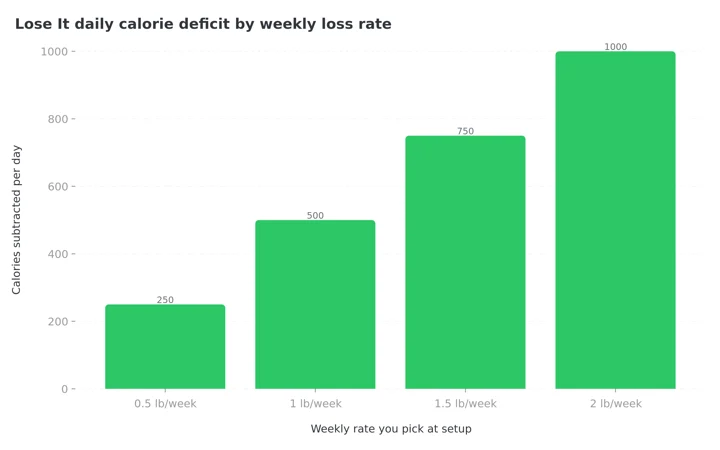 Figure 1: The deficit Lose It subtracts from your maintenance calories at each weekly rate. Pick 2 pounds and the app takes 1,000 calories off the top (Lose It Support).
Same logic, different activity models, different defaults. The fix takes two minutes: open your MyFitnessPal goal before you leave, write the number down, and if Lose It's suggestion lands more than about 100 calories away from a budget that was already producing results, use the custom budget option to match your old number. A working deficit is data. Do not let a new onboarding screen erase it.
If you never trusted the MyFitnessPal number in the first place, our macro calculator gives you a clean starting point that does not depend on either app's activity model.
Pick Your Weekly Rate Honestly ⚖️
Both apps let you choose a loss rate up to 2 pounds per week, and both will hand you a very low budget if you pick the maximum. The CDC recommends the gradual end of that range, about 1 to 2 pounds per week, and notes that people who lose weight gradually are more likely to keep it off (CDC).
 Keep the rate you were already losing at. The app change is enough new variables for one week.
A switch is the worst possible moment to tighten the target. Everything about logging is briefly harder: new search engine, new portion formats, new buttons. If you were losing steadily at 1 pound per week in MyFitnessPal, set 1 pound per week in Lose It. You can always increase the rate in a month, once the new habit is stable. Changing the app and the deficit in the same week doubles the ways the plan can fail.
If you also changed your activity level answer during setup, check it against reality. Lose It's Physical Activity Level setting shifts your entire budget, and the app lets you change it any time (Lose It Support). Most desk workers who commute and walk a little belong in the lower two levels, with exercise logged separately on top.
The 7-Day Switch Plan 📅
Do not run both apps for a month. Double logging doubles the workload and usually kills both diaries. This sequence keeps one continuous logging streak.
- Day 1: Export and set up. Run the MyFitnessPal export while you still have access. Create your Lose It account, enter your stats, and set the weekly rate you were already using. Match your old calorie budget if the suggestion differs by more than 100 calories. Do not cancel MyFitnessPal yet.
- Day 2: Log one normal day, badly. Log everything in Lose It without chasing precision. The goal is to learn the search box, the serving-size picker, and the My Foods tab. Expect 15 minutes instead of 3.
- Day 3: Save your top 10 foods. Work from your 90-day export or your screenshot list. Search each food, pick the closest verified entry, and log it once so it lands in your recent foods.
- Day 4: Rebuild 2 recipes. Only the ones you cook weekly. Enter ingredients once, name the recipe, and set your usual portion.
- Day 5: Re-enter your weight trend. One weigh-in per month from the Progress CSV gives you a 12-point trend line without typing hundreds of rows.
- Day 6: Review the budget against real hunger. After four logged days you will know if the new number is workable. Adjust the activity level or custom budget now, not in week three. If you end most days too hungry to sleep well, raise the budget a little instead of quitting.
- Day 7: Cancel MyFitnessPal. Follow our MyFitnessPal cancellation guide so the renewal does not charge you by surprise. If you cancel on Day 1 instead, the first friction moment on Day 3 will pull you straight back.
IMPORTANT
Checkpoint: midway progress update.
You're halfway, and the fiddly part is behind you.
⏱️ Progress 2/4 • ~6 minutes in • Keep going
✅ Step 1: Export done, 25-food list written (done)
✅ Step 2: Budget matched, top 10 foods and 2 recipes rebuilt (done)
👉 Step 3: Run the 7-day plan and cancel on day 7 (current)
⏳ The free feature many new Lose It accounts do not get (next)
What Gets Worse After You Switch 📉
Most switching guides skip this section. The surprises below are what send people back.
Your history charts disappear. The CSV archive is readable, but no chart in Lose It will ever show your 2024 progress. If long trend lines motivate you, that loss is real.
There is no monthly plan. Lose It Premium bills once per year. If you like paying month to month while you test an app, that option does not exist, so test thoroughly on the free tier first.
The website is thinner than it was. Lose It has been consolidating features into the phone app, and its web experience keeps shrinking. Data export, for example, now lives in the app profile rather than the Insights tab that used to sit on loseit.com. Plan to do your logging on the phone.
Streaks reset to zero. If a 400-day MyFitnessPal streak was part of your motivation, expect the empty counter to bother you for a week or two. The habit is what you are keeping. The counter only measured it.
Some paid conveniences stay paid. Custom macro targets in grams or percentages, weekly calorie cycling, the fasting timer, and device sync such as Garmin are all Premium features in Lose It (Lose It Support). The free tier covers the core loop: budget, food log, weight log, basic macros.
Protect the Habit, Not the History 📚
Two findings should shape how hard you push for accuracy during the switch. An 8-week study of 90 adults found that logging consistency and frequency predicted weight loss, while completeness did not. People who logged something every day beat people who logged perfectly but less often (Payne et al., 2022). During your first Lose It week, a rough diary entered daily is a win. A perfect diary abandoned by Thursday is not.
Feedback matters too. A 2024 systematic review and meta-analysis found that self-monitoring interventions that returned feedback to users outperformed those that did not, with a pooled effect of d = 0.29 on physical activity outcomes (Krukowski et al., 2024). In practice: open the app at the end of each day and actually look at the budget bar. The loop of log, see the number, adjust tomorrow is what the whole tool exists to run.
So set a floor for the transition week: log at least one meal a day, every day, no matter how messy. That single rule carries the adherence effect from the Burke trial through the riskiest seven days of the move.
IMPORTANT
Checkpoint: final stretch before the reveal.
One last nudge. The reveal is next, and it decides whether you plan around text search or pay on day one.
⏱️ Progress 3/4 • ~9 minutes in • Keep going
✅ Step 1: Export done, 25-food list written
✅ Step 2: Budget matched, top 10 foods and 2 recipes rebuilt
✅ Step 3: 7-day plan run, MyFitnessPal cancelled on day 7
✨ The free feature many new Lose It accounts do not get (about to reveal)
The Barcode Surprise on Free Lose It Accounts 📱
Long-time Lose It users remember the barcode scanner as a free feature. New accounts often find it locked. Lose It has been moving the scanner behind the Premium paywall for new signups, while many older free accounts keep access. I flagged this in my pricing guide, and it is the single most common complaint I hear from fresh switchers.
Plan around it before Day 2 of the switch. If most of your diary is packaged food with barcodes, either budget for Premium at $79.99 per year, or lean on text search, which stays free. If most of your diary is home cooking, the scanner matters much less than the recipe builder, which free accounts keep.
Your own 90-day export settles it. Count how many of your top 25 foods are packaged items with a barcode. Above half, and the Premium decision is really being made for you. Below a quarter, and the free tier will carry you for months.
When Lose It Is Not the Right Landing Spot 🧭
A quick reality check before you commit. Lose It is a strong pick if you want a simple budget, fast repeat logging, and a lower-clutter interface. It is a weak pick in three cases.
If you switched because manually searching for foods bores you, a photo-first logger fits better, since Lose It keeps photo logging behind Premium. If you want deep micronutrient detail, neither MyFitnessPal nor Lose It is built for that, and the Cronometer route serves you better. And if your diary is mostly home-cooked meals from a non-Western cuisine, test the food search with your ten most common dishes during the free week before paying for anything. A database built around packaged US foods does not guarantee a good match for your dal or your congee.
The 7-day plan above works for any destination app, not just Lose It. Export first, rebuild the budget, rebuild the top 10 foods, keep one unbroken logging streak. If Lose It fails the free-week test, our best Lose It alternatives roundup covers the other candidates.
Where NutriScan Fits in This Decision 📸
If you are moving to Lose It because you want the simplest possible calorie budget and you are happy to search a database for every meal, Lose It is the right destination and this guide is the whole answer. NutriScan will not import your MyFitnessPal history either. No app in this category will.
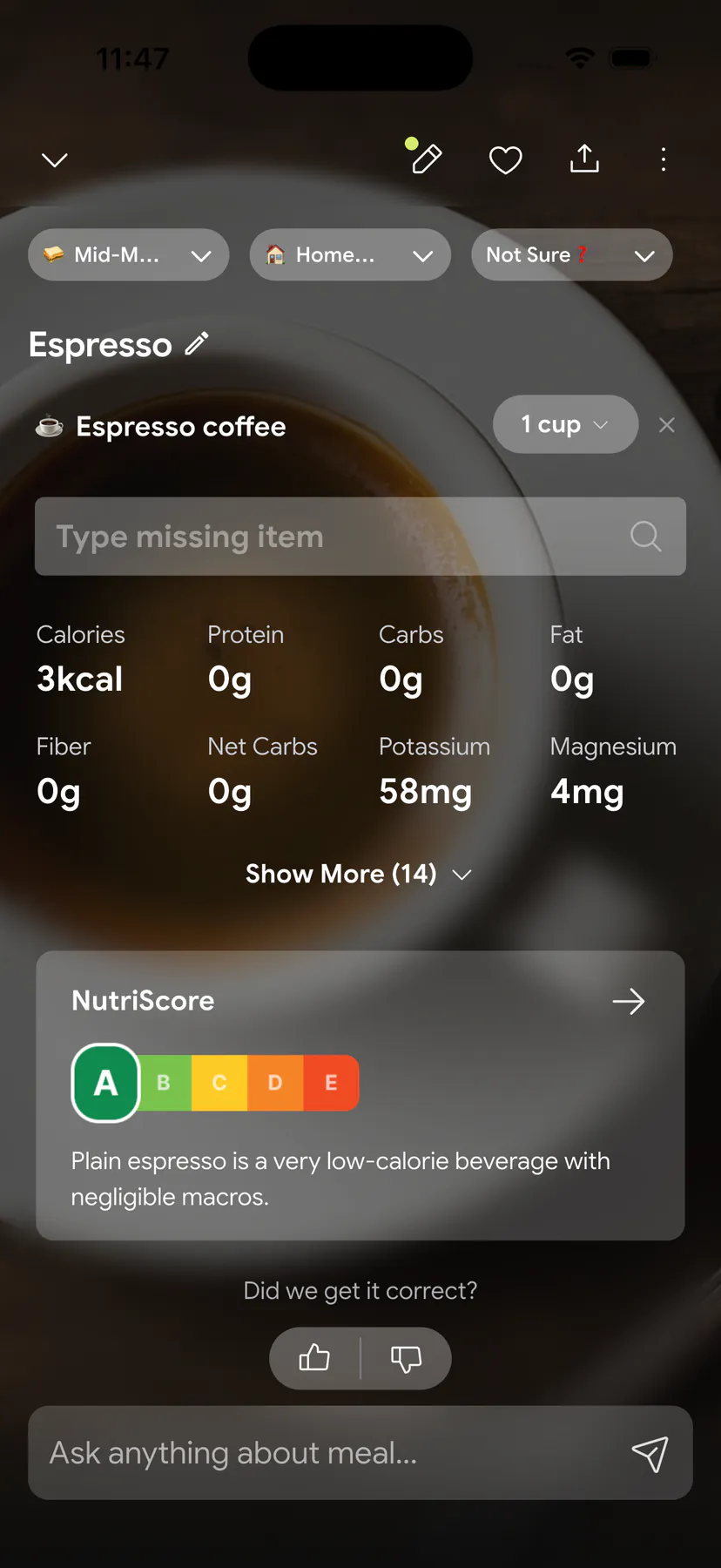
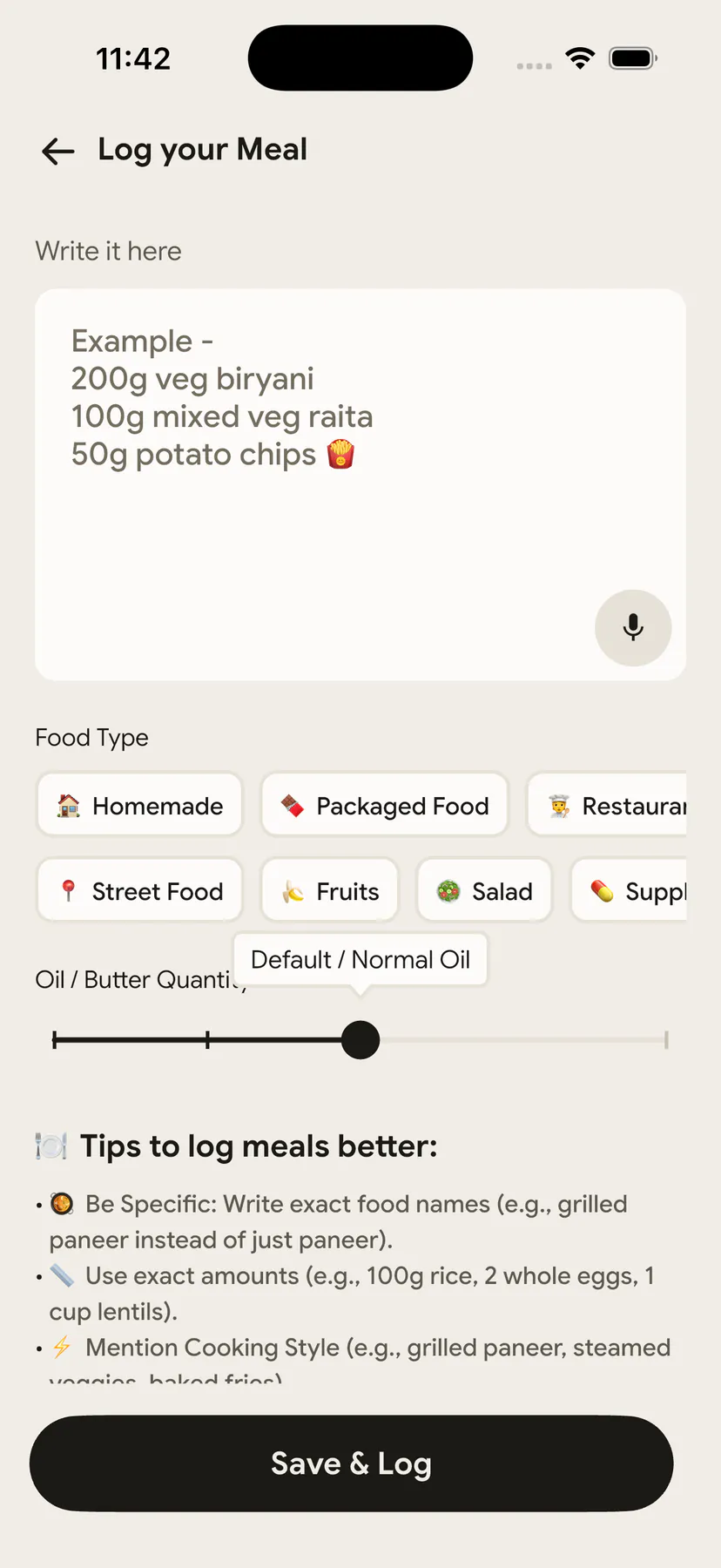
If the reason you are leaving MyFitnessPal is the searching itself, the destination question is still open. NutriScan logs a meal from a photo: point the camera at the plate, confirm the portions, and calories and macros land in your log in a few seconds. There is no barcode scanner, so packaged-food heavy eaters are better served by Lose It Premium, and we said so in NutriScan vs Lose It. For home cooks and restaurant eaters, the "log something every day" rule gets much easier to keep when logging is a photo instead of a search.
On data, we hold ourselves to what we ask of others. A full copy of your data is available on request in JSON or CSV under our privacy policy.
IMPORTANT
Recap: everything you completed this round.
You finished the run. Save this for the evening you actually make the move.
⏱️ Progress 4/4 • ~11 minutes in • Nicely done
✅ Step 1: Export from MyFitnessPal while Premium is active ➡️ write down your 25 most-logged foods ➡️ screenshot 5 typical days
✅ Step 2: Lose It account ➡️ same weekly rate ➡️ custom budget if the suggestion is 100+ calories off ➡️ top 10 foods ➡️ 2 recipes ➡️ monthly weigh-ins
✅ Step 3: Log daily through the messy week, cancel MyFitnessPal on day 7, decide on Premium with your own packaged-food count
✅ The barcode scanner: locked on many new free accounts, so count your barcoded foods before day 2 (revealed)
Conclusion: Move the Numbers That Matter
The whole switch comes down to five numbers and one habit: your calorie budget, your weekly rate, your top foods, your recipes, your monthly weigh-ins, and a daily log entry that never pauses. Export before you cancel, match the budget that was already working, and give the new app one honest week before you judge it.
If part of your reason for leaving is that typing food names feels slow, try scanning your next meal with NutriScan. Point the camera at the plate, confirm the portions, and the calories and macros land in your log in a few seconds, which makes that "log something every day" rule much easier to keep.
Frequently Asked Questions
Can I import my MyFitnessPal data into Lose It? No. Lose It has no import tool for MyFitnessPal exports, and independent 2026 testing confirms none of the major trackers import competitor data (Amy Food Journal, 2026). Export your CSVs as an archive, then rebuild your top foods and budget by hand. The useful part takes under an hour.
Will my calorie budget be the same in Lose It? Usually not. Lose It multiplies BMR by one of four activity levels and subtracts 250 to 1,000 calories per day based on your weekly rate (Lose It Support). MyFitnessPal uses its own activity model and floors of 1,200 or 1,500 calories. If your old budget was working, set a custom budget in Lose It to match it.
Do I need Lose It Premium on day one? No. The free tier includes the calorie budget, food search, recipe builder, weight logging, and basic macros. Upgrade later only if you need the barcode scanner on a new account, custom macro targets, calorie cycling, or device sync, which are Premium features at $79.99 per year.
Can I get my data out of Lose It later? Yes. The app profile has an Export Data section that sends daily or weekly CSV reports you can open in any spreadsheet (Nutrola, 2026). You will not be trapped, though the same no-import rule applies at the next app too.
What happens to my MyFitnessPal streak and badges? They stay behind and cannot transfer. Your streak in Lose It starts at zero. An 8-week study found that daily logging consistency, not perfect or complete entries, predicted weight loss (Payne et al., 2022), so focus on restarting the daily habit and let the counter rebuild itself.
This article is for general information and is not medical advice. Speak with a qualified healthcare professional before making significant changes to your diet, particularly if you have an existing health condition.