How to Switch From Lose It to MyFitnessPal: What Transfers
 ChatGPT
  Claude
  AI Mode
  Perplexity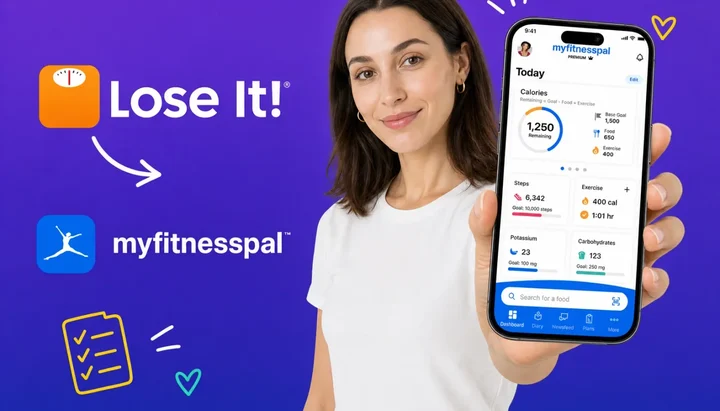
NutriScan publishes this post, and we make a competing app.
The tool matters less than the habit. A 2025 meta-analysis of 11 randomized controlled trials with 1,717 participants found that smartphone app interventions produced a significant reduction in body weight at 4 to 6 months, across many different apps (Pujia et al., 2025). The apps in those trials were not all the same app. The common factor was that people kept logging.
So if you are moving from Lose It to MyFitnessPal, the goal is to make sure the move does not break your logging habit. This guide is the reverse trip of the usual story. We even wrote the other direction ourselves. This one is for the people going the opposite way, and 2026 gave them a concrete reason: Lose It raised its Premium price from $39.99 to $79.99 per year, which is the exact price of MyFitnessPal Premium. The discount that kept many people on Lose It is gone.
IMPORTANT
Your switch plan at a glance.
A quick roadmap so you can act fast.
⏱️ Progress 0/4 • ~0 minutes in • Keep going
⏳ Step 1: Export your Lose It history
⏳ Step 2: Move what actually transfers
⏳ Step 3: The 7-day rebuild plan
🔍 The two-minute goal fix that protects your deficit (revealed near the end)
Why People Are Switching Back in 2026
For years, the trade was simple. Lose It was the cheaper, simpler app. MyFitnessPal was the bigger, busier app. You picked your side and stayed.
The 2026 price change removed that trade. Lose It Premium now costs $79.99 per year, up from $39.99, and it only sells as an annual plan. MyFitnessPal Premium costs the same $79.99 per year, and it also offers a $19.99 monthly option for people who do not want a 12-month commitment. When both apps cost the same, the comparison shifts from price to features, and MyFitnessPal's device network and restaurant coverage start to matter more.
To be clear, users move in both directions between these two apps. In one thread, a member of the 1200isplenty community described going from Lose It to MyFitnessPal and then considering the return trip, because their current app kept removing foods they relied on (r/1200isplenty). The lesson is the same in either direction: people switch when the daily friction of their current app grows larger than the pain of moving. This guide is for the moment when you have decided the move toward MyFitnessPal is worth it.
 Moving apps is like moving house: pack the essentials, leave the clutter
The First Rule: Your Food Log Does Not Transfer
No calorie app imports a competitor's food diary. MyFitnessPal staff have confirmed this on their own subreddit, replying that importing history from another tracker is not a current possibility (r/Myfitnesspal). Our data export comparison of five major trackers reached the same conclusion from the other side: every app lets some data out, none of them lets a competitor's data in.
That means your years of Lose It meals, your custom foods, and your saved recipes stay behind. You will rebuild the useful part of them, which is smaller than you think. Most people eat a small set of foods on repeat. The rebuild plan later in this guide covers exactly that.
Two things do move, though, and they are the two things that matter most for long-term progress: your weight history and your workouts.
Step 1: Export Your Lose It History Before You Cancel 📦
Even though MyFitnessPal cannot import it, export your Lose It history anyway. It is your record of what worked. If you ever want to check what you weighed in March or what a successful week of eating looked like, the file answers the question.
Lose It's export is the least documented of the major trackers. The reliable route is the website: log in at loseit.com on a computer and look for the spreadsheet downloads in the web Reports area. Users also report a data export page that sends CSV copies of the food log, weight history, and exercise log to your account email (r/LoseitApp). If you cannot find what you need on the site, Lose It's privacy policy lets you request a copy of your personal information in writing.
Do this before you cancel or delete anything. A canceled Premium plan keeps your account alive, but a deleted account takes the history with it.
Two contrasts with the app you are joining are worth knowing now. First, MyFitnessPal's own data export is a Premium feature (MyFitnessPal support), so on the free tier your future exit path is the slower privacy request route. Lose It's downloads are available from the website without that gate. Second, keep the CSV as an archive rather than a project. Re-typing three years of old meals into a new app has no effect on next month's results.
IMPORTANT
Checkpoint: here's where you are right now.
Quick status update so you always know the next best move.
⏱️ Progress 1/4 • ~2 minutes in • Keep going
✅ Step 1: Export your Lose It history (done)
👉 Step 2: Move what actually transfers (you're here)
⏳ Step 3: The 7-day rebuild plan
🧩 The two-minute goal fix (coming soon)

Step 2: What Actually Moves Through the Phone Health Bridge 🔁
Both apps talk to your phone's health platform, and that platform becomes the bridge.
| Your Lose It data | Moves to MyFitnessPal? | How |
|---|---|---|
| Weight history | Yes | Apple Health or Health Connect |
| Workouts and exercise | Yes | Apple Health or Health Connect |
| Steps | Yes | Apple Health or Health Connect |
| Food diary and calories | No | Rebuild by logging (export a copy first) |
| Custom foods and recipes | No | Re-create your top 10 to 15 |
| Streak and badges | No | Starts at day one |
On iPhone, Lose It writes weigh-ins and exercise to Apple Health on its free tier, and MyFitnessPal connects to Apple Health to sync food, exercise, weight, and sleep data automatically (MyFitnessPal support). If Lose It has been writing your weigh-ins to Apple Health all along, MyFitnessPal can read that history the day you connect it. Your weight chart survives the move.
On Android, the same bridge is called Health Connect. MyFitnessPal connects through the Apps and Devices menu (MyFitnessPal support), and Lose It reaches Health Connect as well.
TIP
Give each app one clear job. Let your scale app or Lose It's final export be the source of weight history, then make MyFitnessPal the only app writing new food data. Two apps writing the same data type creates duplicates, so check the write permissions once during setup.
What You Will Miss After the Switch
An honest ledger has two columns. Here is the first one.
The simpler calorie budget. Lose It asks a few questions and gives you one clean number, built from your body data and a weekly loss rate of half a pound to 2 pounds, which maps to a daily deficit of roughly 250 to 1,000 calories. MyFitnessPal's screen shows more numbers: net calories, exercise adjustments, and a dashboard with more modules. Some people like the extra data. Nobody calls it simpler.
The interface speed. Our side-by-side logging comparison found Lose It faster for repeat logging, with fewer taps to copy meals and a cleaner layout. Expect your first MyFitnessPal week to feel slower while your frequent foods list is empty.
Snap It and Say It, if you were Premium. Lose It Premium includes photo logging and voice logging. On MyFitnessPal, the equivalent tools sit behind Premium as well, so free-tier switchers do not lose anything here, but Premium switchers need to pay again to keep the camera workflow.
Your streak. Lose It counts your consecutive days, and the counter does not travel. If the streak number itself motivates you, take a screenshot, then let it go. The research below explains why the habit matters more than the number.
What You Will Gain
Now the second column.
Deeper restaurant and branded coverage. MyFitnessPal advertises over 20 million foods, with deep coverage of restaurant chains and regional packaged foods, as covered in our three-way paid plan comparison. Raw database size should not decide the switch, since Lose It advertises an even larger 50-million-item catalog, but users who eat out often report finding more exact menu matches on MyFitnessPal.
The device network. MyFitnessPal connects to more than 35 fitness partners, from Garmin to Fitbit to gym equipment. If your watch or scale sits outside Lose It's shorter integration list, this is the practical reason to move.
A living community. MyFitnessPal's forums remain active in 2026, with motivation threads, food discussions, and friend feeds (MyFitnessPal Community). Lose It's social features are thinner. For people who lose weight better with company, this is a real feature, not a bonus.
Monthly billing. Lose It Premium sells only as a $79.99 annual plan. MyFitnessPal sells the same annual price but adds a $19.99 monthly option and a free trial. You can test Premium for one month for $19.99 instead of committing $79.99 for a year, a flexibility Lose It does not offer.
Intermittent fasting and macro tools. MyFitnessPal Premium includes an intermittent fasting tracker, gram-level macro targets, and different calorie goals by day. Lose It Premium covers some of this ground, but the macro tools go deeper on MyFitnessPal.
IMPORTANT
Checkpoint: midway progress update.
You're halfway - decisions get easier here.
⏱️ Progress 2/4 • ~4 minutes in • Keep going
✅ Step 1: Export your Lose It history (done)
✅ Step 2: Move what actually transfers (done)
👉 Step 3: The 7-day rebuild plan (current)
🧩 The two-minute goal fix (almost there)
The Barcode Scanner Reality Check
Switchers from years past remember MyFitnessPal's scanner going behind the paywall. That memory is accurate: MyFitnessPal moved barcode scanning to Premium in late 2022, and free users still ask about it on the forums (MyFitnessPal Community).
The part the old memory misses: Lose It has moved its own barcode scanner behind Premium as well for most new accounts. In 2026, a free-to-free switch between these two apps is no longer a scanner downgrade for most people, because neither free tier reliably includes one. If you scan packaged foods daily, you will be paying one of these companies $79.99 a year either way. Make the decision on database quality and devices, not on the scanner, because the scanner is a paid feature on both sides.
Step 3: The 7-Day Switch Plan 🗓️
Spread the move over a week. Every step is small, and your logging never stops.
Day 1: Export your Lose It data. Log in at loseit.com, download your history from the web Reports area, and save the files somewhere safe. Screenshot your current budget, your goal settings, and your streak.
Day 2: Set up MyFitnessPal and the health bridge. Create the account, then connect Apple Health or Health Connect before anything else. Check that your historical weigh-ins appear. Set your calorie goal to your proven Lose It number using the custom goal setting. More on that number in a moment, because it is the step most switchers get wrong.
Day 3: Rebuild your top 10 foods. Open your Lose It export or your memory of a normal week. Create or find your 10 most-repeated foods and log them once so they enter your frequent foods list. This single hour removes most of the "new app is slow" pain.
Day 4: Rebuild 2 or 3 recipes. Only the ones you actually cook weekly. Enter ingredients once, save, done. Skip the historical archive project.
Day 5: Log a full normal day in both apps. Compare the totals. Totals can differ between databases. You are checking for big surprises, not perfection.
Day 6: Decide the money question. If you needed the scanner, photo logging, or fasting tools, start the MyFitnessPal free trial or the $19.99 monthly plan instead of the annual, and put a reminder in your calendar for the renewal date.
Day 7: Retire Lose It deliberately. If you have Lose It Premium, cancel the subscription so it does not renew at $79.99, but keep the free account and your exported files. Turn off Lose It's notifications so one app owns your attention.
Run Both Apps for One Week Before You Pay
The smartest version of this switch costs nothing to test. Both apps have free tiers, and nothing about creating a MyFitnessPal account requires canceling Lose It on the same day.
Use the overlap week to answer three questions with your own food, not with reviews. Does MyFitnessPal's database find your regular meals faster or slower than Lose It did? Does the net calorie model make sense to you, or does it tempt you to eat back every workout? And is the free tier enough, or do you genuinely miss a paid feature? The answer to the third question is worth exactly $79.99 per year, so it deserves a real test instead of a guess. If the overlap week shows you that Lose It still fits better, staying is a fine outcome. The worst result is not picking the "wrong" app. The worst result is spending three weeks half-logging in two apps.
What the Research Says About Protecting the Habit
Three findings should shape your switch week, and none of them are about app features.
First, adherence drives results. In a 2025 randomized trial of 502 adults, higher adherence to digital dietary self-monitoring was associated with clinically meaningful weight loss, with an adjusted odds ratio of 1.25 for achieving at least 5 percent weight loss as diet logging adherence rose (Burke et al., 2025).
Second, showing up beats getting it perfect. An 8-week study of 90 adults found that consistency and frequency of self-monitoring predicted weight loss, while completeness of each entry did not (Payne et al., 2022). During your switch week, a fast, imperfect log in the new app protects your progress better than a perfect log you abandon by Thursday.
Third, look at the feedback. A 2024 systematic review and meta-analysis found that physical activity interventions that returned self-monitoring feedback to users outperformed those without feedback, with a pooled effect of d = 0.73 (Krukowski et al., 2024). Whichever app you land in, actually read the daily summary. The budget bar only works on people who look at it.
 The weigh-ins keep flowing through the health bridge even while you rebuild your food log
IMPORTANT
Checkpoint: final stretch before the reveal.
One last nudge - the reveal is next.
⏱️ Progress 3/4 • ~6 minutes in • Keep going
✅ Step 1: Export your Lose It history
✅ Step 2: Move what actually transfers
✅ Step 3: The 7-day rebuild plan
✨ The two-minute goal fix (about to reveal)

The Two-Minute Fix: Your Calorie Budget Will Not Match
This is the step that quietly ruins switches, and it works in both directions. The two apps calculate your daily number differently, so expect MyFitnessPal to greet you with a different budget than the one you have been eating to.
Lose It builds your budget from your estimated metabolism and activity level, then subtracts a deficit tied to your chosen weekly rate: roughly 250 calories per day for half a pound per week, up to 1,000 for 2 pounds. MyFitnessPal runs its own formula, applies safety floors of 1,200 calories for women and 1,500 for men, and notably does not use your goal weight in the calculation at all (MyFitnessPal support). MyFitnessPal also works on net calories by default, meaning logged exercise increases how much the app tells you to eat that day. Lose It handles exercise similarly, but the adjustment sizes differ because the underlying numbers differ.
Here is the fix, and it takes two minutes. If your Lose It budget was working, meaning your weight trended the way you wanted for several weeks, carry that exact number across. In MyFitnessPal, open Goals, select the calorie goal, and set a custom value equal to your old Lose It budget. Your body does not know you changed apps. Do not let a new formula overwrite a number you already tested, and decide up front how you will handle exercise calories, because eating back the full adjustment is the most common way switchers accidentally erase their deficit.
When You Should Not Switch
Some situations argue for staying put, and they are worth stating plainly.
If you own Lose It Lifetime, you paid $299.99 once and the new $79.99 annual price does not touch you. Switching means giving up paid-forever features to start paying again. Stay unless a specific MyFitnessPal feature has a name and a job.
If you are mid-way through a paid Lose It year, run the overlap test now but time the real move for your renewal date. You lose nothing by waiting, and refunds for app subscriptions are limited once a term has started.
If your streak and simple interface are the reasons you log at all, be careful. The research above says consistency is what actually produces results, and Lose It's design is genuinely good at protecting consistency. A bigger database does not help someone who stops opening the app.
WARNING
If calorie tracking has ever pushed you toward obsessive patterns, treat any switch as a checkpoint. MyFitnessPal surfaces more numbers by default. Talk to a professional about whether more data helps or harms you before you migrate anything.
Where NutriScan Fits in This Decision 📱
If the thing pushing you out of Lose It is the price, MyFitnessPal at the same $79.99 solves nothing on its own, and this guide's feature questions decide it. But if the thing wearing you down is manual logging itself, the search-type-select loop, then neither of these apps fixes that. Photo-first apps address the friction directly.
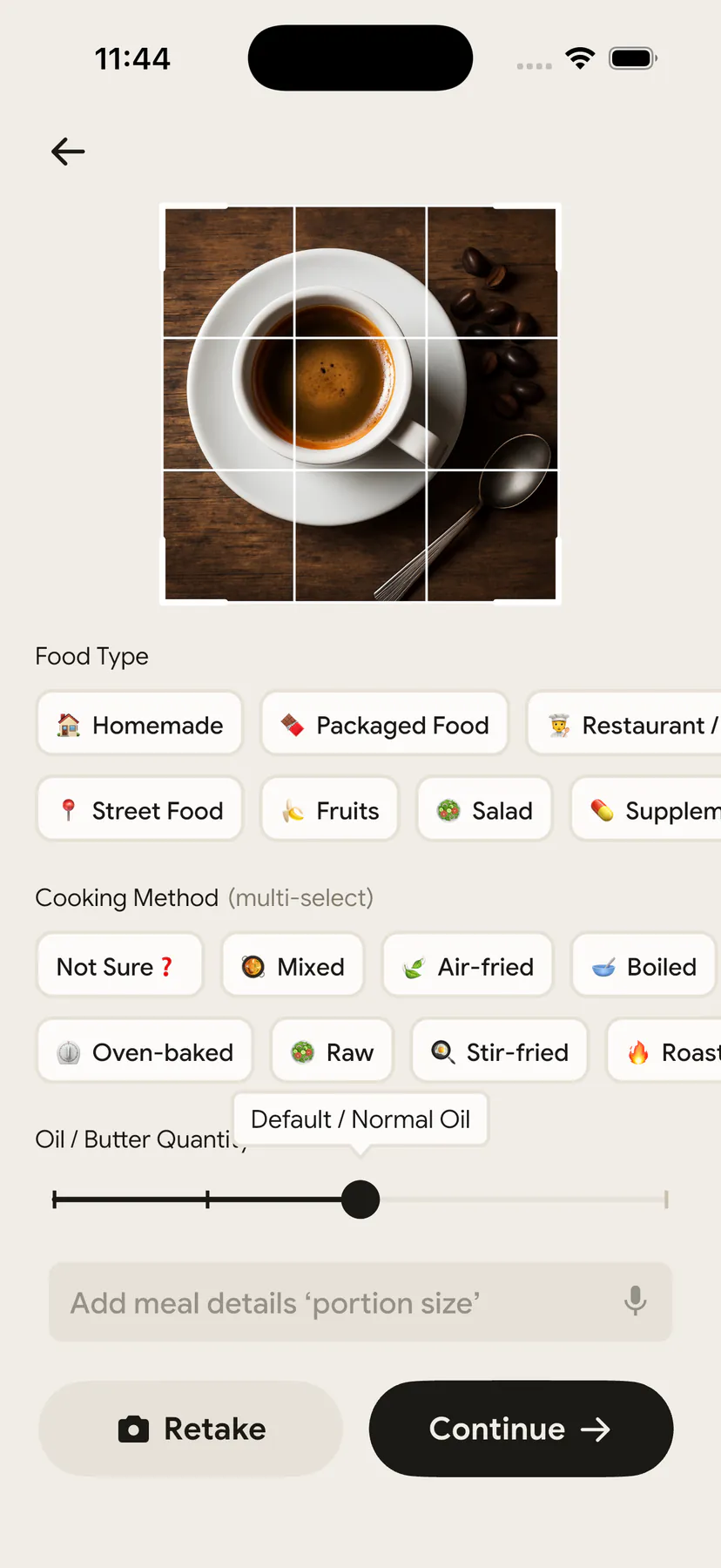
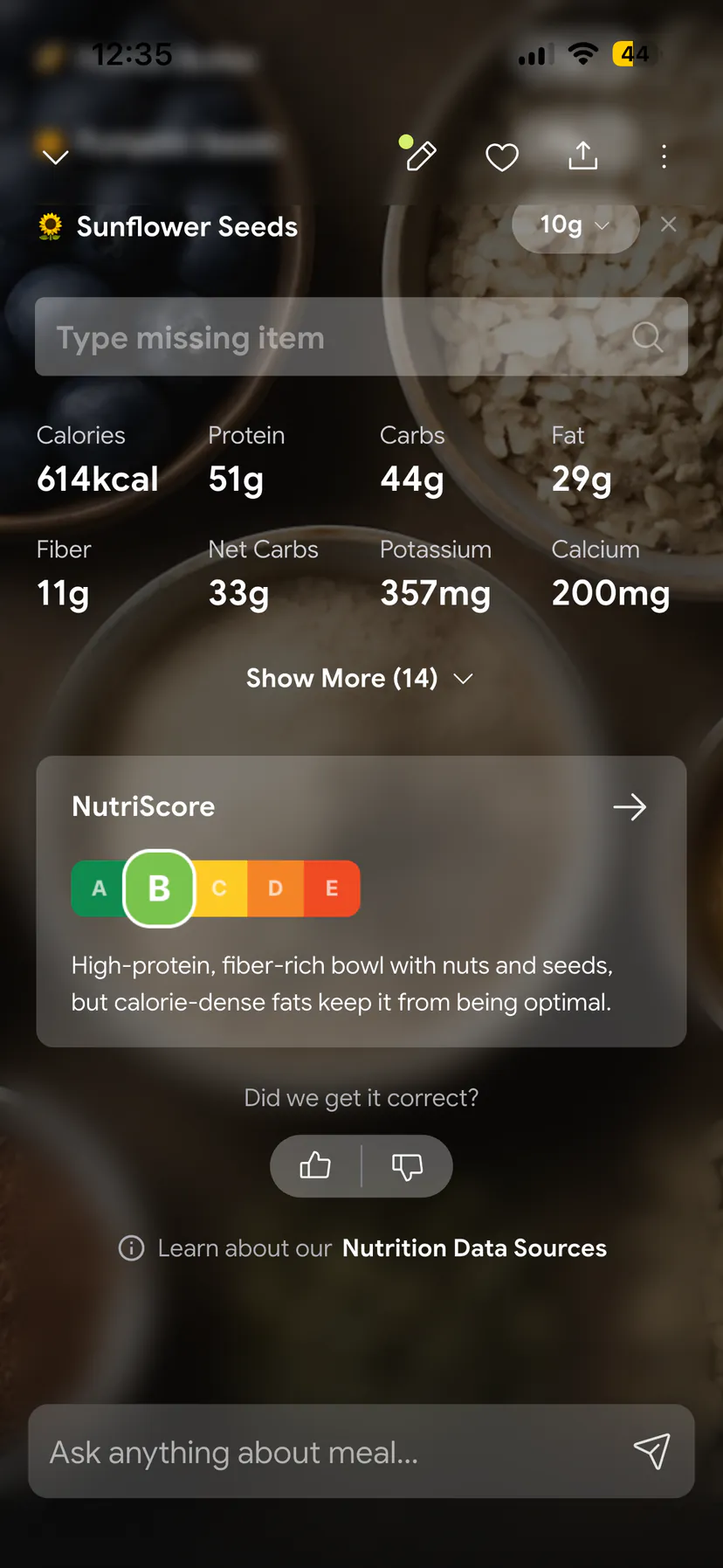
NutriScan builds the log from a photo of your plate: take the picture, confirm the food type and cooking method, and the macros land in your day. It pairs that with a NutriScore for food quality, voice input for adding missed items, and diet plans. NutriScan has no barcode scanner, so packaged-food heavy eaters are better served by MyFitnessPal or Lose It Premium. Some people who think they need a new database actually need a different input method.
Our Take
The 2026 price parity changes the calculus. When Lose It cost half as much, switching was harder to justify. Now that both Premiums cost $79.99, the decision rests on three honest questions. Do you need MyFitnessPal's device network? Do you want the deeper restaurant database? Will you actually use the community? Two yes answers make the switch sensible. Zero yes answers means you are switching for novelty, and novelty wears off before the annual plan does.
Whatever you choose, choose fast and log today. The meta-analysis at the top of this guide says it in one line: the apps work when people keep using them (Pujia et al., 2025).
IMPORTANT
Recap: everything you completed this round.
You finished the run - save this for next time.
⏱️ Progress 4/4 • ~8 minutes in • Nicely done
✅ Step 1: Export your Lose It history
✅ Step 2: Move what actually transfers
✅ Step 3: The 7-day rebuild plan
✅ The two-minute goal fix (revealed: carry your proven budget as a custom goal)
Frequently Asked Questions ❓
Can I import my Lose It food log into MyFitnessPal?
No. MyFitnessPal has no import tool for competitor data, and its staff have confirmed on Reddit that importing history from another tracker is not currently possible (r/Myfitnesspal). Export your Lose It history for your own records, then rebuild your 10 to 15 most-used foods manually in MyFitnessPal. Most people finish that rebuild in about an hour.
Will my weight history transfer to MyFitnessPal?
Yes, if the data flows through your phone's health platform. Lose It can write weigh-ins to Apple Health on iPhone, and MyFitnessPal syncs weight with Apple Health once connected (MyFitnessPal support). Android users get the same bridge through Health Connect. Connect the health platform on day one and check your weight chart before you retire Lose It.
Will my calorie budget be the same in MyFitnessPal?
Usually not. The apps use different formulas. Lose It subtracts a deficit of roughly 250 to 1,000 calories from your estimated burn based on your weekly goal, while MyFitnessPal uses its own calculation with floors of 1,200 calories for women and 1,500 for men (MyFitnessPal support). If your old budget was producing results, set it as a custom goal in MyFitnessPal rather than accepting the new formula.
Do I lose the barcode scanner if I switch?
The scanner is a paid feature on both sides in 2026. MyFitnessPal moved barcode scanning to Premium in late 2022, and Lose It gates its scanner behind Premium for most new accounts. If you scan daily, budget $79.99 per year for either app, or test whether photo logging or search covers your packaged foods first.
Is MyFitnessPal Premium worth paying for right after switching?
Not immediately. Run the free tier for at least a week while your frequent foods list fills up, since the free plan covers calorie tracking, custom foods, and macro percentages. Upgrade when a specific missing feature slows you down, such as the scanner, photo logging, or gram-level macros. The $19.99 monthly plan lets you test Premium without committing to the $79.99 annual price.
This article is for general information and is not medical advice. Speak with a qualified healthcare professional before making significant changes to your diet, particularly if you have an existing health condition.