How to Switch From FatSecret to MyFitnessPal (and Keep the Habit)
 ChatGPT
  Claude
  AI Mode
  Perplexity
MyFitnessPal does not import a FatSecret diary, and its free plan drops three things FatSecret gives away. The barcode scanner, gram macro targets and CSV export all sit behind Premium at $79.99 a year. Your weight history can bridge through Apple Health or Health Connect. Everything else is rebuilt by hand, and the plan below keeps you logging while you do it.
TL;DR - Switching From FatSecret to MyFitnessPal
Price first: FatSecret Free ➡️ MyFitnessPal Free is a downgrade. The honest comparison is FatSecret Free vs MyFitnessPal Premium at $79.99 a year.
Moves by itself: Weight history, through Apple Health or Health Connect, if FatSecret was already writing to it.
Moves as a file: Your food diary, as CSV or PDF from FatSecret. MyFitnessPal will not read it.
You rebuild: Your top 20 foods and top 5 recipes, on day 1 and day 2, not at mealtime.
Keep the target: Enter the calorie goal you were actually using on FatSecret, hold it 14 days, and decide on Premium on day 5.
How to Switch From FatSecret to MyFitnessPal in 2026
NutriScan publishes this post, and we make a competing app.
Start with one number. A 2026 scoping review of 68 studies in JMIR mHealth and uHealth found that people in one MyFitnessPal trial logged 5.4 days per week during the first 4 weeks, then 1.4 days per week in weeks 5 to 12, then 0 days per week after the program ended (Dugas et al., 2026). The app did not change. The habit did. That is the real risk when you switch from FatSecret to MyFitnessPal, and it is the thing this guide protects.
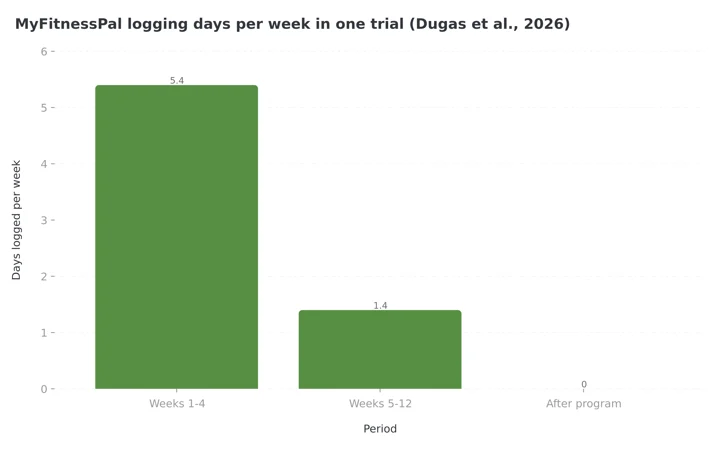 Figure 1: Logging days per week in one MyFitnessPal trial from the Dugas et al. review. The drop from month one to month two is the pattern a switch makes more likely.
Most people leave FatSecret because they want the bigger packaged-food database, a coach uses MyFitnessPal, or a fitness device pushes them there. All three are fair. But FatSecret is the most generous free tracker in the category, and MyFitnessPal is one of the least. The barcode scanner, gram-level macro targets, and data export you use without thinking on FatSecret sit behind a $79.99 per year paywall on MyFitnessPal. Plan for that, or your logging habit breaks in week one, and a broken habit costs more than any subscription.
Here is what moves, what does not, what you will pay for, and a 7-day plan that keeps you logging through the switch.
IMPORTANT
Your switching plan at a glance.
A quick roadmap so you know what to do tonight and what to leave for day 5.
⏱️ Progress 0/4 • ~0 minutes in • Keep going
⏳ Step 1: Map the paywall you are walking into
⏳ Step 2: Export, connect, and sort your five habits
⏳ Step 3: Set the target and run the 7-day plan
🔍 The one-week move that sends 1 in 4 switchers back to FatSecret, and why that counts as a win (revealed near the end)
Why People Leave FatSecret for MyFitnessPal 🔁
The reasons cluster tightly.
- Database depth for packaged food. MyFitnessPal's database is the largest in the category, and it is strongest on branded, packaged products and restaurant chains. FatSecret's database is large and well verified, but if you eat a lot of new packaged products, you will hit more "not found" results on FatSecret than on MyFitnessPal.
- Social gravity. MyFitnessPal has been the default tracker since 2005. Coaches, gyms, and online challenges often ask for a MyFitnessPal diary link. FatSecret has a community and a Professional sharing tool, but few coaches use it.
- Device ecosystems. Both apps sync with Apple Health, Google Health, Fitbit, Garmin, and Samsung Health. FatSecret lists all five on its help page (FatSecret Help). But some third-party coaching platforms and meal-plan services only integrate with MyFitnessPal.
 Packaged snacks are where MyFitnessPal's database pulls ahead. Home-cooked meals are where the gap closes.
If none apply to you, pause before switching. The next section explains why.
The First Rule: You Are Moving From a Free App to a Paid One
FatSecret's own pricing FAQ says the core app is "completely free," and it lists the barcode scanner, calorie and macro tracking, weight logging, and community access as part of that free tier (FatSecret). Its Premium upgrade adds meal plans, a water tracker, the Smart Assistant, and Smart Food Scan, at $14.99 per month or $59.99 per year in the US and as low as $6.99 per month or $38.99 per year in other regions. I covered the regional breakdown in FatSecret Premium pricing for 2026.
MyFitnessPal moved the barcode scanner to Premium in 2022 and has not moved it back. MyFitnessPal Premium costs $19.99 per month or $79.99 per year, and Premium+ (which adds meal planning and grocery lists) costs $24.99 per month or $99.99 per year. We broke down the full tier list in the MyFitnessPal pricing guide for 2026.
Here is the feature map for the things a FatSecret user touches every day:
| Feature you use on FatSecret | FatSecret Free | MyFitnessPal Free | MyFitnessPal Premium ($79.99/yr) |
|---|---|---|---|
| Barcode scanner | Yes | No | Yes |
| Macro targets in grams | Yes | Percentages only | Yes |
| Export food diary (CSV or PDF) | Yes | Print a web report only | Yes (emailed CSV) |
| Ad-free | No | No | Yes |
| Community and groups | Yes | Yes (limited) | Yes |
| Weight logging and charts | Yes | Yes | Yes |
| Custom foods and recipes | Yes | Yes | Yes |
| Photo meal logging | Premium only | No | Yes |
Read that table honestly. If you scan barcodes, track grams of protein, and want your data out at year end, MyFitnessPal Free is a downgrade from FatSecret Free. The real comparison is FatSecret Free versus MyFitnessPal Premium, a $79.99 per year decision.
What Actually Transfers (and What Does Not) 📦
Neither app imports the other's food diary. There is no "import from FatSecret" button inside MyFitnessPal, and there is no "import from MyFitnessPal" button inside FatSecret. The MyFitnessPal export help page describes getting data out, not in, and it is for Premium users (MyFitnessPal Help). So plan for three buckets.
Bucket 1: Moves automatically through your phone's health app. Your weight history is the one thing that can bridge. If FatSecret has been writing your weigh-ins to Apple Health or Google Health, MyFitnessPal can read that history when you connect it. MyFitnessPal's Apple Health article confirms the connection syncs "food, exercise, weight, and sleep data" (MyFitnessPal Help). Steps and workouts from a watch also flow through the same bridge.
Bucket 2: Exports to a file, but stays a file. Your FatSecret food diary exports as a PDF or CSV. On iOS you open the Food Diary, scroll to the Export icon, set the period and report type, choose the format, and tap Share. On Android the same flow uses a calendar icon, a graph icon, and a document icon (FatSecret Help). You can set the period to cover your whole history. Keep that CSV. It is your record of what worked, and your source list for rebuilding favorites. But MyFitnessPal will not read it.
Bucket 3: Rebuilt by hand. Custom foods, recipes, saved meals, targets, and your streak. None move. The rebuild is smaller than it looks, and the 7-day plan shows the fast version.
One gap to flag: FatSecret's help center states that the app "does not support exporting reports from your exercise diary" (FatSecret Help). If you logged workouts by hand in FatSecret rather than syncing them from a watch, that exercise history has no export path. Screenshot the monthly views if you want a record.
IMPORTANT
Checkpoint: here's where you are right now.
You know the price and you know what moves. Now the part that decides whether you keep logging.
⏱️ Progress 1/4 • ~3 minutes in • Keep going
✅ Step 1: Map the paywall (done)
👉 Step 2: Export, connect, and sort your five habits (you're here)
⏳ Step 3: Set the target and run the 7-day plan
🧩 The one-week move that sends 1 in 4 switchers back (coming soon)
The Habits You Built on FatSecret, and What Happens to Each
A habit in a tracking app is a chain of small frictions you stopped noticing, and switching makes every one of them visible again. Here are the habits FatSecret users bring, and what happens to each.
Habit 1: Scan first, search second. On FatSecret Free you scan a barcode without thinking. On MyFitnessPal Free the scanner button opens a Premium prompt. If you stay on Free, your new habit is search-first, which takes 15 to 30 seconds longer per packaged item. Over 4 to 6 packaged items per day, that is 1 to 3 extra minutes, which sounds tiny and is exactly the kind of friction that ends logging streaks.
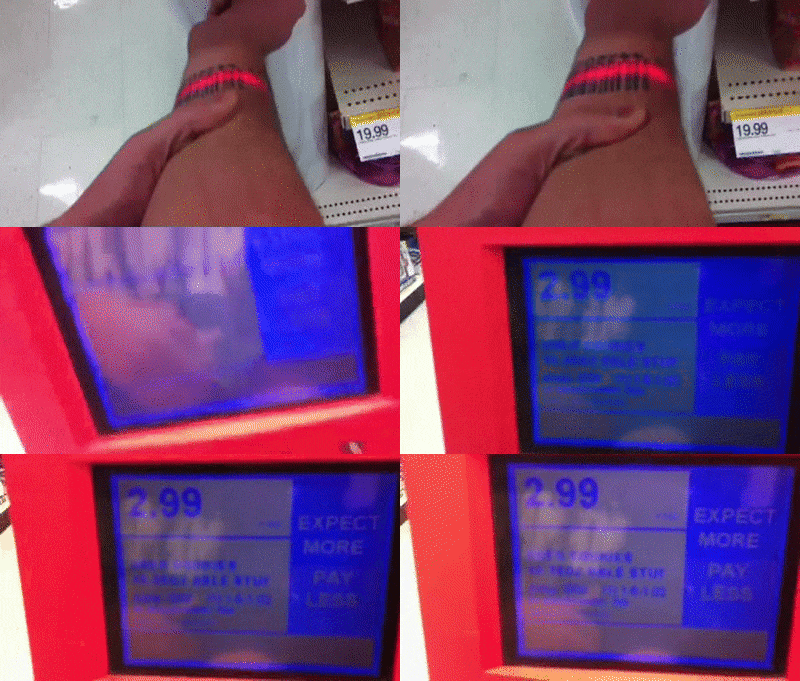 Scan-first is a two-second habit on FatSecret Free. On MyFitnessPal Free the same tap opens a Premium prompt.
Habit 2: Check the macro bar, not the calorie number. FatSecret Free shows grams of protein, carbs, and fat against your target. MyFitnessPal Free shows percentages of calories. If you think in "140 g protein," you convert in your head or pay for Premium. Many people find this more irritating than the scanner.
Habit 3: Log at the table, not after. This is the habit that matters most and it is app-independent. (Copying yesterday's meal works in both apps and moves cleanly. Your weekly review screen is the fifth habit: FatSecret Free has one, MyFitnessPal Free does not, so schedule it yourself on day 7.) The 2026 JMIR review noted that strong early engagement predicted better long-term adherence and greater weight loss (Dugas et al., 2026). Protect the timing of your logging, not the app.
What You Will Gain
This is not a warning against switching. MyFitnessPal has real advantages for specific people.
- Packaged food and restaurant coverage. If your "not found" rate on FatSecret is high, MyFitnessPal will lower it. This is the most common legitimate reason to switch.
- Shared diaries. If a coach asks for your MyFitnessPal diary, that alone can justify the move. Consistency with your support system beats any feature list.
- Premium tooling, if you pay. Meal Scan, voice logging, different calorie goals by day of the week, and an intermittent fasting tracker all come with Premium. Goals by day matter if you train hard three days a week and rest four.
A 2025 meta-analysis of 8 studies with 1,466 participants found that app interventions lasting 4 to 6 months reduced body weight, with better results from apps that gave personalized feedback (Pujia et al., 2025). If Premium's feedback tools make you engage more, the subscription pays for itself in adherence. If not, it is a $79.99 habit tax.
Your Calorie Target Will Not Match. Here Is Why.
Expect MyFitnessPal to hand you a different daily calorie number than FatSecret did. Both apps start from an energy-expenditure formula, but they ask different onboarding questions, use different activity multipliers, and apply different default deficits. A 250 to 400 calorie gap between the two is normal.
Treat the new number as a new guess, not a correction. A simple rule for switchers:
- Write down the FatSecret target you were actually using (not the one it originally suggested, the one you settled on).
- Set MyFitnessPal's goal to that exact number, using a custom goal. On Free you can set calories; on Premium you can also set macro grams.
- Hold it for 14 days and compare your weight trend in the health app, which now holds both apps' weigh-ins.
- Adjust by 100 to 150 calories only after 14 days, never after 3. The target that worked on FatSecret will work on MyFitnessPal if you enter the same foods the same way.
IMPORTANT
Checkpoint: midway progress update.
Your target is set. Everything from here is about the first seven days.
⏱️ Progress 2/4 • ~6 minutes in • Keep going
✅ Step 1: Map the paywall (done)
✅ Step 2: Export, connect, and sort your five habits (done)
👉 Step 3: Set the target and run the 7-day plan (current)
🧩 The one-week move that sends 1 in 4 switchers back (next)
Tips That Save Switchers Hours 💡
Here are shortcuts to set up before you open the new app.
- Export your FatSecret CSV for the last 90 days before anything else. Open it in a spreadsheet and sort by food name. The 20 names that appear most often are your rebuild list. For most people 20 foods cover 70 to 80 percent of daily logs.
- Rebuild those 20 foods on day one, not as you go. Find each one in MyFitnessPal, verify the values against the label or your FatSecret export, and tap the star to save it to favorites. Doing this once takes 40 minutes. Doing it at mealtime across two weeks takes longer and breaks the at-the-table habit.
- Connect Apple Health or Health Connect before you log your first weigh-in. Otherwise MyFitnessPal starts a fresh weight chart and your trend line resets to a single dot.
- Decide the scanner question before day one. Either start the Premium trial on day one so you keep scan-first, or commit to search-first and accept the slower logging. The worst option is hitting the paywall at breakfast and deciding under frustration.
Step-by-Step: The 7-Day Switch Plan 🗓️
This plan is built around one goal: you log every day through the switch. The rebuild happens in the margins.
Day 1 (Saturday works best): Export and connect. Export your full FatSecret food diary as CSV. Export the last 90 days separately as PDF for easy reading. Install MyFitnessPal, create the account, and connect Apple Health or Health Connect first. Then set a custom calorie goal that matches your working FatSecret target. Log today's meals in both apps.
Day 2: Rebuild the top 20. Sort your CSV by frequency. Search, verify, and favorite the 20 most-logged foods. If you track gram-level macros and you are staying on Free, write your gram targets on paper and keep it near where you eat. Log in both apps.
Day 3: Rebuild the top 5 recipes. Enter your five most-used recipes with the same serving sizes you used on FatSecret. Check that a serving gives the same calories, within about 5 percent. Log in both apps.
Day 4: Test the database on your hardest meals. Log a restaurant meal, a homemade dish, and an unusual packaged item, and note where each app wins. This is the day you will know. Log in both apps.
Day 5: Decide on Premium. You have now hit the scanner paywall several times. Decide with a clear head: pay $79.99 per year, stay on Free with search-first logging, or go back to FatSecret. Any of the three is a fine answer. Log in both apps.
Day 6: Drop to one app. Stop logging in FatSecret. Keep it installed. Log only in MyFitnessPal and notice where you hesitate. Those hesitations are the remaining foods to favorite.
Day 7: Set the weekly review. Put a weekly check of weight trend and average calories in your calendar. On MyFitnessPal Free it is a habit you schedule, not a screen.
IMPORTANT
Checkpoint: final stretch before the reveal.
The plan is in your calendar. One idea inside it does most of the work.
⏱️ Progress 3/4 • ~9 minutes in • Keep going
✅ Step 1: Map the paywall
✅ Step 2: Export, connect, and sort your five habits
✅ Step 3: Set the target and run the 7-day plan
✨ The one-week move that sends 1 in 4 switchers back (about to reveal)
The Two-App Week: Why 1 in 4 Switchers Go Back, and Why That Is a Win 🔍
The two-app week is the most important idea in this guide, and it is the one people most want to skip. Logging twice is tedious. But it does three things nothing else can.
First, it keeps your streak unbroken in the app where it already exists, so a bad day on the new app is not a zero day overall. Second, it compares the same meals in both databases, the only honest way to judge which app serves your actual diet. Third, it turns the Premium decision into one made on day 5 with evidence, not at a paywall.
Staying on FatSecret after the two-app week is not a failed switch. It is a switch that cost a week instead of a year.
What the Research Says About Protecting the Habit 🔬
The science here is consistent, and it points the same direction as the plan above.
Every logged day counts. A 2024 observational study of 53,482 real-world app users found that active users were far more likely to reach a clinically significant 5 percent weight loss than inactive users (those with in-app activity on fewer than a third of days), and that every additional 10 percent of in-app activity, roughly 3 more logging days per month, added 0.43 kg of weight loss at 12 weeks (Huntriss et al., 2024). The relationship was dose-dependent: more in-app activity, more weight lost. A switch that costs you two weeks of low activity is a switch that costs you results.
Simpler logging is more durable. The 2026 JMIR scoping review reported a trial comparing detailed calorie counting with a simplified version; the simplified group self-monitored on a median of 97 percent of days versus 49 percent for the detailed group (Dugas et al., 2026). This is the argument for rebuilding only your top 20 foods and top 5 recipes. Every extra step you add to the new app in week one lowers the odds you are still using it in week twelve.
Feedback and support sustain adherence. A 2025 study of a 21-day digital weight loss program found mean self-monitoring adherence of 0.55 with self-management, 0.72 with tailored feedback, and 0.83 with intensive support, and the habit mechanism faded in the later days while goal pursuit stayed dominant (Lin et al., 2025). A new app does not run on autopilot. If your coach is on MyFitnessPal, that is a real adherence advantage. If you logged alone on FatSecret and will log alone on MyFitnessPal, the switch adds friction without adding support.
Adherence declines in every app. The same review found adherence to every calorie-counting app declined over time (Dugas et al., 2026). The ones that held up paired the app with structure: a program, a group, or a simplified logging rule. Build that in on day 7, not "later."
When You Should Not Switch
Stay on FatSecret if any of these describe you:
- You will not pay for MyFitnessPal Premium and you scan more than three barcodes a day. Search-first logging on MyFitnessPal Free is slower than scan-first on FatSecret Free, and you will feel it every day.
- You track macros in grams and will not pay. MyFitnessPal Free only shows percentages.
- You mostly eat home-cooked meals and whole foods. The database-size advantage is largely about packaged and restaurant items. For oats, eggs, rice, and chicken breast, both apps are fine, and FatSecret's verified entries are often cleaner.
- You are in a good logging streak right now. The research above is clear that consistency beats features. If it is working, the best time to switch is never, or at least not this month.
If your real complaint is something FatSecret and MyFitnessPal share, like neither handling your home-cooked regional dishes well, the answer may be a third app rather than a trade between these two. We compared the options in the best FatSecret alternatives for 2026.
Our Take
This switch runs against the price gradient: from the most generous free tier in the category to one of the strictest. That is fine if you know what you are buying, which is database depth and social reach, paid for in dollars or in friction.
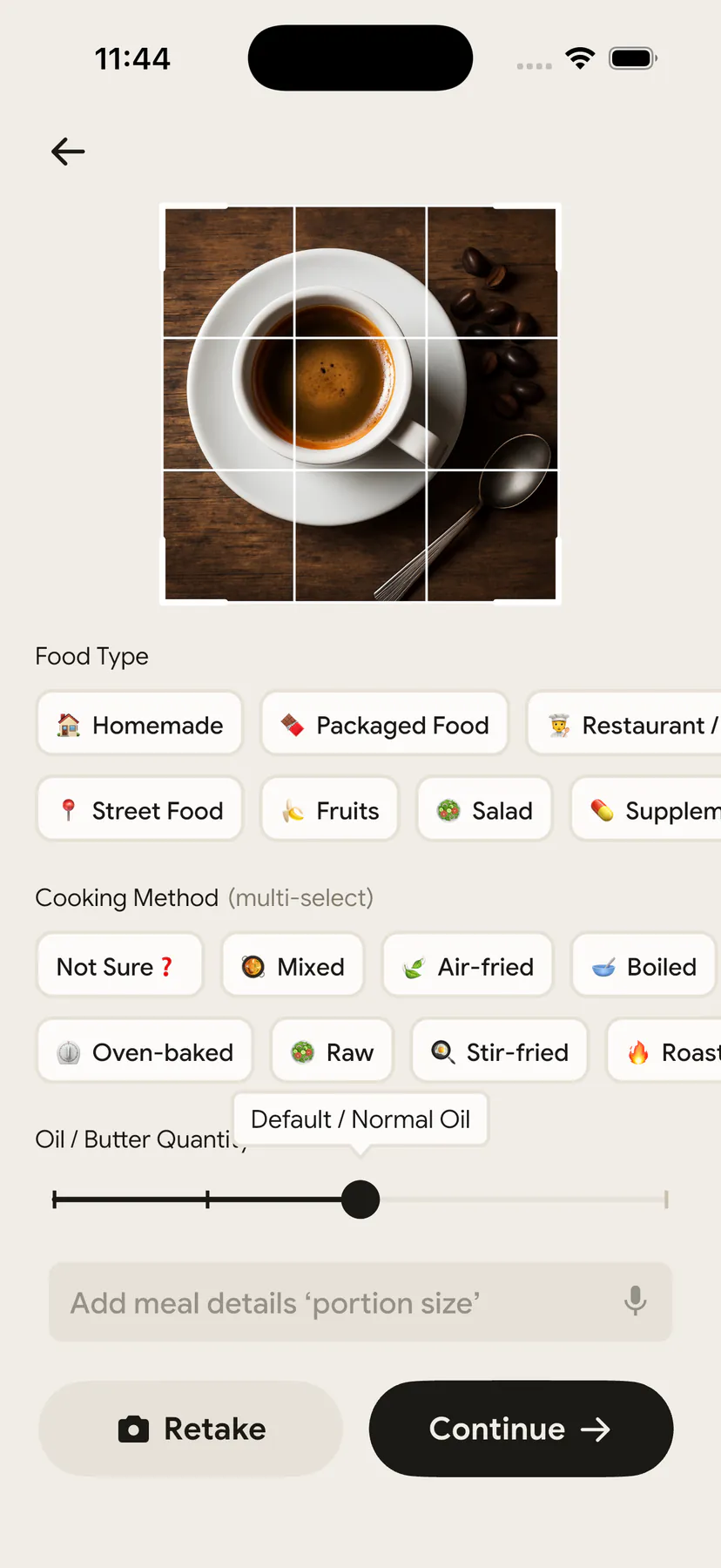
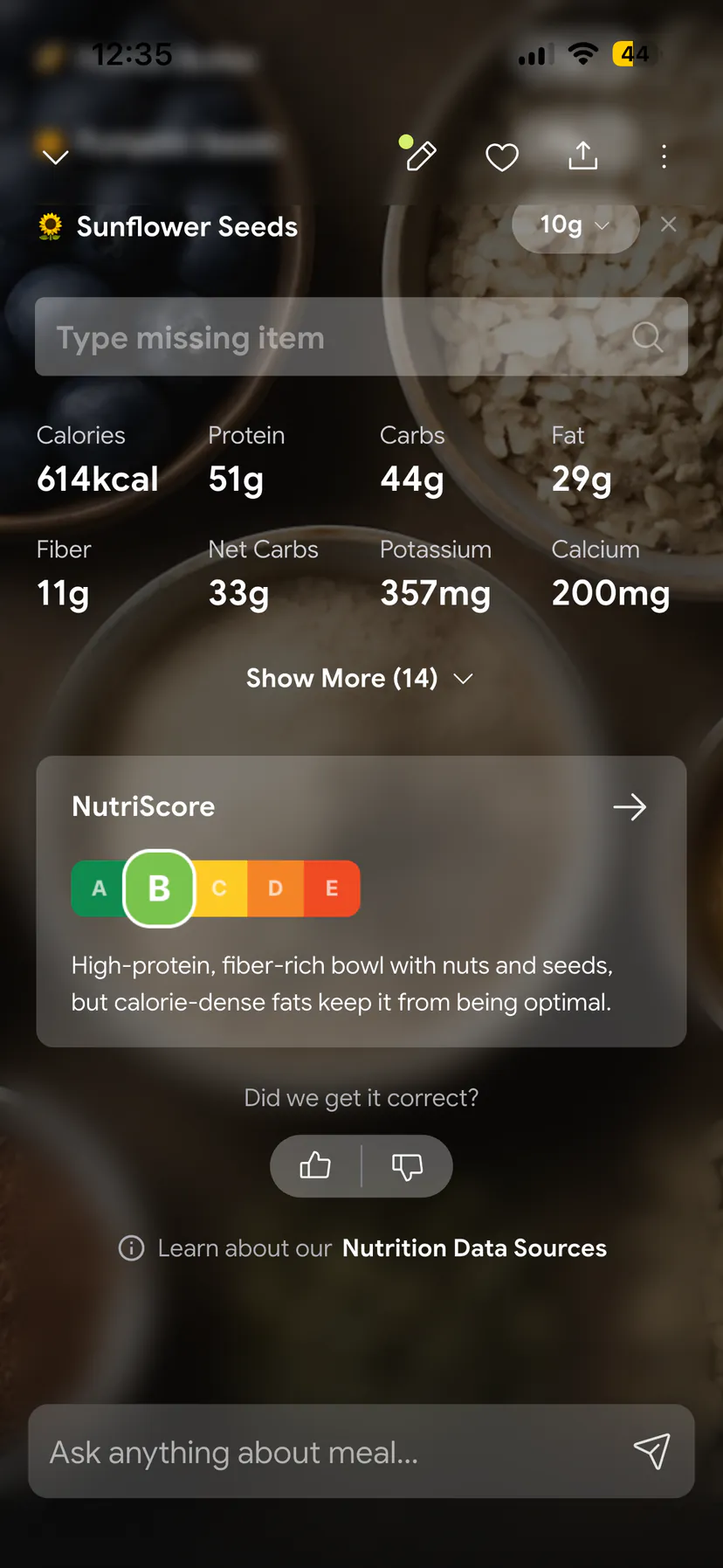
If you want a tracker that keeps photo logging on the free tier and handles home-cooked and oily meals well, NutriScan gives you 5 free meal scans a week, gram-level macro targets on the free plan (Profile > Modify Macros), and a cooking-method and oil-level tag on every scan. It has no barcode scanner, so packaged-food heavy eaters are better served by one of the two apps above. It works alongside either app during a switch. Whatever you pick, pick it with a full week of evidence, and log tonight's dinner before you decide anything else.
IMPORTANT
Recap: everything you completed this round.
You finished the run. Save this for the Saturday you actually make the move.
⏱️ Progress 4/4 • ~12 minutes in • Nicely done
✅ Step 1: FatSecret Free ➡️ MyFitnessPal Free is a downgrade on scanner, gram macros and export; the real comparison is $79.99 a year
✅ Step 2: Weight moves through Apple Health or Health Connect, the diary exports as a file, custom foods and recipes are rebuilt from your top 20
✅ Step 3: Same calorie target, 14-day hold, Premium decision on day 5 with evidence
✅ The two-app week: log in both for seven days, and let 1 in 4 go back without calling it a failure (revealed)
If you are coming the other direction, MyFitnessPal to Lose It and Lose It to MyFitnessPal follow the same export-first sequence. For the head-to-head before you commit, read MyFitnessPal vs FatSecret: free and paid plans compared, and for the full export picture across trackers, which nutrition apps let you leave.
Frequently Asked Questions ❓
Q: Can I import my FatSecret food diary into MyFitnessPal?
No. MyFitnessPal has no import tool for another app's diary. You can export your FatSecret diary as a CSV or PDF from the Food Diary screen (FatSecret Help), but it stays a file for your own reference. Weight history can move through Apple Health or Health Connect if both apps are connected.
Q: Is the barcode scanner free on MyFitnessPal in 2026?
No. MyFitnessPal moved the barcode scanner to Premium in 2022. Premium costs $19.99 per month or $79.99 per year. On FatSecret the barcode scanner is part of the free plan, which is the biggest practical difference for someone switching.
Q: Will my weight history transfer from FatSecret to MyFitnessPal?
Yes, if FatSecret has been writing weigh-ins to Apple Health or Google Health. FatSecret syncs with Apple Health, Google Health, Samsung Health, Fitbit, and Garmin (FatSecret Help). Connect MyFitnessPal to the same health app and grant weight permission before your first weigh-in.
Q: How much does it cost to switch from FatSecret to MyFitnessPal?
The app itself is free to download. But to keep the barcode scanner, gram macro targets, and CSV export you had on FatSecret Free, you need MyFitnessPal Premium at $79.99 per year. FatSecret Premium, by comparison, costs $59.99 per year in the US and from $38.99 per year in other regions, and it adds features rather than restoring them.