How to Switch From MyFitnessPal to MyNetDiary (No Ads)
 ChatGPT
  Claude
  AI Mode
  Perplexity
This switch has a partial bridge. Your weight, workouts, and steps move from MyFitnessPal to MyNetDiary through Apple Health or Health Connect, but your food diary, custom foods, and recipes do not. Export your archive while Premium is active, open the bridge, and rebuild your top foods during a one-week overlap on MyNetDiary's ad-free free tier.
TL;DR - Switching From MyFitnessPal to MyNetDiary
Moves across: Weight history, workouts, and steps, via Apple Health (iPhone) or Health Connect (Android).
Does not move: Food diary, custom foods, favorites, recipes, streaks. Export a CSV copy first, then rebuild.
What you gain: No ads on any tier, a free barcode scanner, free gram-level macro targets, and 108 tracked nutrients.
What you lose: A database roughly ten times smaller, a shorter direct-integration list, English only.
The rule that matters: Run both apps for one week, and keep your old working calorie number instead of accepting the new formula.
NutriScan publishes this post, and we make a competing app. In a 2022 interview study of adults over 45 using health apps and smart speakers, the most frequently stated privacy risk was not the misuse of their health data. It was the fear of receiving more personalized advertisements (Schroeder et al., 2022). People notice the ads. The ads are often the reason people finally leave.
That is why "MyFitnessPal to MyNetDiary" is a common switch. MyNetDiary's free tier has no ads, keeps the barcode scanner free, and does not even require an account to start, while MyFitnessPal shows ads on its free tier and holds the scanner behind Premium at $79.99 per year (MyNetDiary).
This switch has one feature the other popular switches do not have: a partial bridge. Your weight history and your workouts can actually move across, because both apps talk to Apple Health on iPhone and Health Connect on Android. Your food diary cannot. This guide covers both halves: how to carry what can be carried, and how to rebuild what cannot.
IMPORTANT
Your switching plan at a glance.
A quick roadmap so you know what to do tonight and what can wait a week.
⏱️ Progress 0/4 • ~0 minutes in • Keep going
⏳ Step 1: Export your MyFitnessPal archive before you cancel
⏳ Step 2: Open the Apple Health or Health Connect bridge
⏳ Step 3: Rebuild your foods during a one-week overlap
🔍 The one thing that gets worse after you switch (revealed near the end)
Why People Leave MyFitnessPal for MyNetDiary 🚪
The complaints about MyFitnessPal's free tier follow a pattern, and they match what both companies publish. On MyFitnessPal's free tier you watch ads, you must register with an email before logging a single meal, and the barcode scanner sits behind Premium at $79.99 per year or $19.99 per month.
MyNetDiary made the opposite choices. The scanner, voice logging, gram-level macro targets, and full nutrient tracking are free, there are no ads at any tier, and you can start logging without creating an account (MyNetDiary switching guide).
 The face of someone watching a 30-second ad before logging breakfast.
The 2026 timing matters too. MyFitnessPal shipped a major redesign in March 2026, and long-time users filled review pages with complaints about the new layout and broken progress graphs. MyNetDiary's own monthly "Diet App Scorecard" recorded a sharp ratings drop for MyFitnessPal after that redesign. Treat that specific scorecard as marketing, since a competitor runs it, but the redesign frustration is easy to confirm in the app store reviews yourself.
One more difference drives the serious trackers: data depth. MyNetDiary tracks up to 108 nutrients per food entry against roughly 20 in MyFitnessPal, and its database is staff-verified from USDA FoodData Central and the University of Minnesota Nutrition Coordinating Center rather than crowdsourced.
What Moves and What Does Not: The Partial Bridge 🌉
Every switching guide in this series starts with the same warning: your data does not transfer. This is the first pair of apps where that warning needs a footnote. Here is the honest map.
| Your MyFitnessPal data | Does it move to MyNetDiary? | How |
|---|---|---|
| Weight history | Yes | Apple Health or Health Connect sync |
| Workouts and exercise | Yes | Apple Health or Health Connect sync |
| Steps | Yes | Apple Health or Health Connect sync |
| Food diary and calories | No | Rebuild by logging (export a copy first) |
| Custom foods and favorites | No | Rebuild in about a week of normal logging |
| Custom recipes | No | Re-enter by hand |
| Streaks and reports | No | Start from zero |
The recipe line deserves a sentence. MyNetDiary states plainly that custom recipes cannot come across because MyFitnessPal does not share them with any outside app (MyNetDiary switching guide). No tool can work around that. MyNetDiary also says a fuller import tool for meal calories, weigh-ins, and exercise is in development, but as of August 2026 it has not shipped, so plan around what exists today.
Step 1: Export Your MyFitnessPal Data Before You Cancel 📤
Do this first, before any cancellation, because the order matters. MyFitnessPal's data export button is a Premium feature. Go to the website, open your account settings, and use the export tool to email yourself CSV files of your nutrition, progress, and exercise history (MyFitnessPal support). If you cancel Premium first, the button disappears with it.
On the free tier, you still have a path. MyFitnessPal's privacy request center lets any user request a portable copy of their personal data (MyFitnessPal privacy support). It is slower than the export button, so start the request early.
You will not import these files into MyNetDiary. They are your archive: proof of your averages, your weight curve, and the foods you actually eat. You will use that food list in Step 5. If you want to see how every major tracker handles this, we compared the export options across nutrition apps.
IMPORTANT
Checkpoint: here's where you are right now.
Your archive is safe. Now the part that makes this switch special.
⏱️ Progress 1/4 • ~3 minutes in • Keep going
✅ Step 1: Export your MyFitnessPal archive (done)
👉 Step 2: Open the Apple Health or Health Connect bridge (you're here)
⏳ Step 3: Rebuild your foods during a one-week overlap
🧩 The one thing that gets worse after you switch (coming soon)

Step 2: Turn On the Bridge on Your iPhone 🍎
Here is the part that surprises people, straight from MyNetDiary's own support article (Migrating Your Data from the MyFitnessPal App).
- Open MyFitnessPal and go to the More menu in the bottom-right corner.
- Tap Apps and Devices, then select Apple Health.
- Allow MyFitnessPal to write data to Apple Health. Turn on weight and workouts.
- Leave the read permission off. MyNetDiary recommends this, since two-way sync can create duplicate entries.
- Open Apple Health and confirm your MyFitnessPal weight entries are visible there.
Your history now sits in Apple Health, which belongs to you, not to either app. That is the key idea. The two trackers never talk to each other directly. They both talk to the health platform in the middle.
Step 3: Install MyNetDiary and Let It Import 📲
Download MyNetDiary and go through the short setup, where the app builds your calorie plan from your target weight, weekly rate, and activity level. You do not need to create an account or hand over an email to start, though I suggest adding an account within a few days, because without one there is no backup if you lose your phone.
Then link the app to Apple Health. If MyNetDiary is connected, the weight and workout data that MyFitnessPal exported flows in automatically (MyNetDiary support). Your weight chart arrives with its history instead of starting at a single lonely dot, which matters more than it sounds. A trend line you trust is half the reason to track at all.
On Android, the same play runs through Health Connect: MyFitnessPal writes to Health Connect, MyNetDiary reads from it, and MyNetDiary documents the exact steps in a separate Android article.
Step 4: Expect a Different Calorie Budget 🧮
Your daily calorie number will probably not match your old one, and that is normal. The two apps do different math. MyNetDiary offers four calculation methods, including Mifflin-St Jeor and a BMR formula based on body-fat percentage, while MyFitnessPal uses one. MyNetDiary also handles exercise calories differently: on the free tier you can credit back 0% or 50% of exercise burn, and Premium allows any percentage, while MyFitnessPal adds back all of it or nothing (MyNetDiary switching guide).
My advice is the same one I give for every switch. If your old number was working, keep it. Open My Weight Goal & Plan in MyNetDiary and adjust the plan until the daily budget matches the number you were losing or maintaining on. The app that changed is not a reason to change a target your body already answered.
While you are in that screen, set your macros. This is a free-tier upgrade over MyFitnessPal, which only sets macros in 5% steps unless you pay. MyNetDiary takes exact gram targets on the free plan.
IMPORTANT
Checkpoint: midway progress update.
The bridge is open and your budget is pinned. Now the rebuild week.
⏱️ Progress 2/4 • ~6 minutes in • Keep going
✅ Step 1: Export your MyFitnessPal archive (done)
✅ Step 2: Open the Apple Health or Health Connect bridge (done)
👉 Step 3: Rebuild your foods during a one-week overlap (current)
🧩 The one thing that gets worse after you switch (next)
Step 5: Rebuild Your Foods, Meals, and Recipes 🧱
Now open the CSV from Step 1 and list your 10 to 15 most-logged foods. Log them once each in MyNetDiary, scanning barcodes where you can, and save your standard combinations with Save as My Meal. Favorites and custom foods live under Manage My Foods. Recipes must be re-entered by hand, and if you cook from the same five recipes most weeks, that is a 30-minute job, not a weekend.
Two findings from the research make this week less stressful. First, consistency beats completeness. In an 8-week study of 90 adults, logging consistently and frequently predicted weight loss, while how complete each entry was did not (Payne et al., 2022). A rough entry logged today helps more than a perfect entry you never make. Second, keep looking at the numbers you log. A 2024 meta-analysis found that receiving feedback on your self-monitoring meaningfully improved weight outcomes (Krukowski et al., 2024). Check the daily budget bar while you rebuild. That habit carries the whole system.
Run Both Apps for a Week Before You Cancel 📆
Here is the advantage of switching to an app whose free tier does the whole job: the overlap costs nothing. Everything you are switching for, the ad-free logging, the free scanner, the gram macros, sits on MyNetDiary's free plan. So there is no reason to cancel MyFitnessPal on day one.
Log in MyNetDiary as your main app for a full week while your MyFitnessPal subscription runs out its billing period. If the verified database is missing some regional brand you rely on, you will find out while your old diary still exists. When the week convinces you, cancel by the steps in my MyFitnessPal cancellation guide, and remember to use the export button before the Premium features switch off.
 The rebuild week, survived. Your top 15 foods are in and the ads are gone.
Where Your MyFitnessPal Features Live in MyNetDiary 🗺️
The vocabulary is the real learning curve, so here is a short translation table for the features people ask about most, drawn from MyNetDiary's feature map (switching guide).
| In MyFitnessPal | In MyNetDiary |
|---|---|
| Complete Diary | Complete Day, on the All Meals screen |
| Quick Add | Calories, in the Dashboard plus panel (accepts macros too) |
| Copy to Date | Recent tab in food search, or Copy, Move, Delete on any day |
| Reports | Diet Tools tab: Charts, Weekly Averages, Nutrient Analysis |
| Goals | My Weight Goal & Plan |
| My Foods and Favorites | Manage My Foods, Favorites, Save as My Meal |
| Newsfeed and friends | Community tab, plus a Friends tab inside food search |
Complete Day matters to long-time trackers because MyFitnessPal removed its end-of-day projection feature, and MyNetDiary kept its version. Copy functions are actually stronger here: the Recent tab pulls foods from earlier days, and any day's menu can copy or move whole meals.
What Stays Free After You Switch 🆓
This is the list that makes the no-ads switch different from paying for quiet. On MyNetDiary's free tier you keep the barcode scanner, voice logging, macro targets by grams or percentages, water tracking, a shopping list, community access, and logging from the web app with a real keyboard (MyNetDiary). There are no ads on any tier, free included.
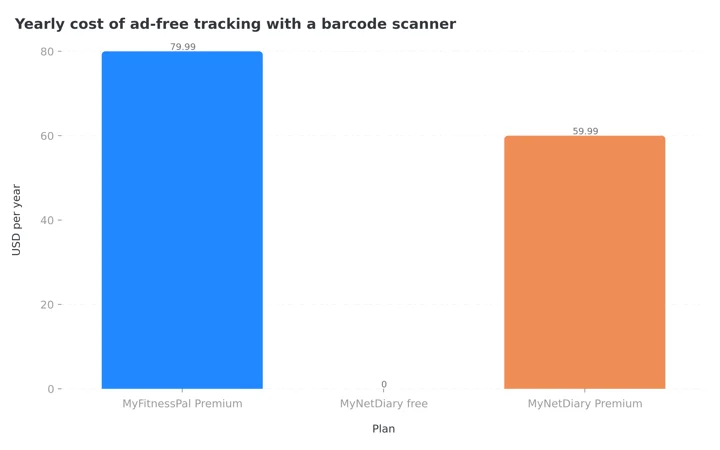 Figure 1: What each plan charges per year for ad-free logging with a barcode scanner. MyFitnessPal's free tier is absent because it has ads and no scanner.
Premium, at $59.99 per year or $8.99 per month, adds Meal Scan photo logging, recipe import, a library of over 600 dietitian-built recipes, day-of-week calorie cycling, and the adaptive AutoPilot calorie adjustment. There is also a $179.99 lifetime plan. I priced all of it against the competition in my MyNetDiary pricing guide. The short version, and Figure 1 makes it plain: the free tier alone replaces what most MyFitnessPal Premium subscribers were paying $79.99 for.
IMPORTANT
Checkpoint: final stretch before the reveal.
You know what moves, what rebuilds, and what stays free. One honest catch left.
⏱️ Progress 3/4 • ~9 minutes in • Keep going
✅ Step 1: Export your MyFitnessPal archive
✅ Step 2: Open the Apple Health or Health Connect bridge
✅ Step 3: Rebuild your foods during a one-week overlap
✨ The one thing that gets worse after you switch (about to reveal)
What Gets Worse After You Switch 🚨
Every honest switching guide needs this section, so here is mine. The thing that gets worse is the database.
MyNetDiary's 2M+ staff-verified entries cover most of what real people log, but MyFitnessPal's crowdsourced catalog is roughly ten times the size (MyNetDiary), so an obscure regional restaurant dish is more likely to already exist there. In MyNetDiary you will occasionally build a custom food that MyFitnessPal would have autocompleted. That is the price of verified data: fewer junk duplicates, but also fewer long-tail entries.
The integration list is shorter too. MyNetDiary connects directly with Fitbit, Garmin, and Withings and reaches most other devices through Apple Health and Health Connect, but MyFitnessPal's direct-partner list is the broadest in the category. The app is also English-only, against MyFitnessPal's 20 languages, and there is no grocery-delivery meal planner like the one in MyFitnessPal Premium+.
One more honesty note about sources. The most detailed switching documentation on the internet is written by MyNetDiary itself, and its comparison guide is signed by the company's co-founder. The screenshots and feature locations in it check out, and I have cited them for exactly those mechanical facts. Read its scorecards, speed tests, and superlatives the way you would read any company's claims about itself.
For balance: getting data out of MyNetDiary later is easier than most. The web app has a data export tool under the Analysis tab that produces CSV files, a path confirmed by users (r/mynetdiary). You are not locked in.

What the Research Says About Switching Without Losing the Habit 🔬
The real risk of any app switch is not lost data. It is the two or three low-friction weeks where logging quietly stops. The evidence says protecting the habit matters more than protecting the archive.
In the 2025 SMARTER trial of 502 adults, higher adherence to dietary self-monitoring was associated with greater odds of achieving at least 5% weight loss (Burke et al., 2025). Adherence, not app choice, carried the result. Combine that with the Payne finding above, that consistency and frequency predicted outcomes while completeness did not, and the switching strategy writes itself: log something every day of the transition, even if the entries are rough while you learn the new screens.
This is also the argument for moving your weight history across the bridge in Steps 2 and 3. Seeing your own trend line on day one keeps the feedback loop alive, and feedback is the part the meta-analysis says drives results.
7 Tips That Make the First Month Stick 💡
- Export before you cancel. The MyFitnessPal export button is Premium-only and vanishes with your subscription. Archive first, decide later.
- Keep the read permission off. When you connect MyFitnessPal to Apple Health, write-only is the clean setup. Two-way sync invites duplicate weights.
- Carry your working calorie number. Do not let a new formula reset a target your last six months already validated. Adjust the plan until the budget matches.
- Rebuild from your export, not from memory. Your CSV knows your real top 15 foods better than you do. Log those first and the Recent tab does the rest.
- Set gram macros on day one. It is free in MyNetDiary and paywalled in MyFitnessPal, so claim the upgrade you switched for.
- Add an account within the first week. No-signup logging is great for trying the app, but until you register, your new diary has no backup.
- Watch the budget bar daily. Feedback on your own log is the mechanism the research keeps rewarding. The prettiest report means nothing unread.
Where NutriScan Fits in This Decision 📱
If ad-free logging with a verified database is the whole reason you are switching, MyNetDiary is the right destination and this guide is the whole answer. NutriScan does not sell your attention to advertisers either, but it solves a different problem.
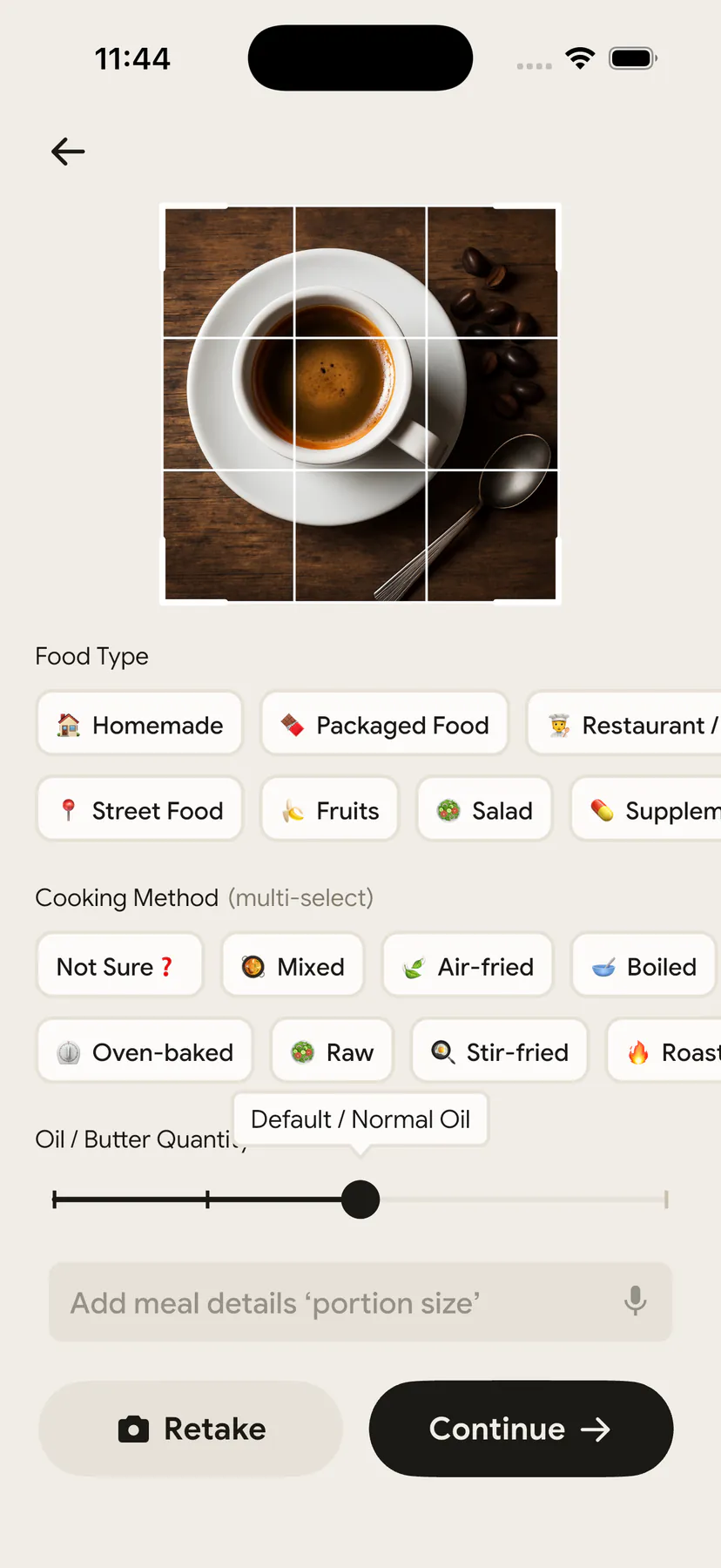
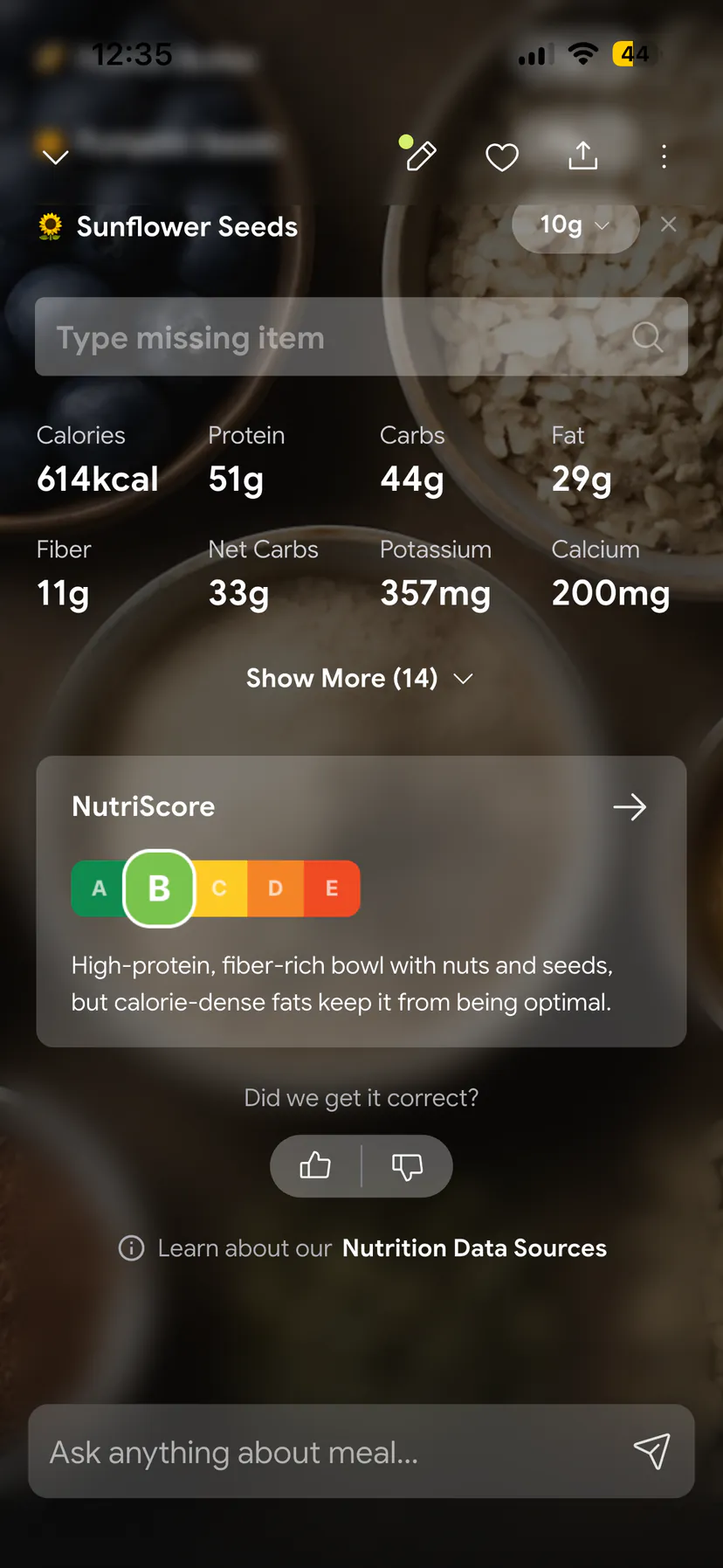
Some people discover during the rebuild week that what they actually hated was typing searches, not any one app. If home-cooked plates are where your logging breaks down, a photo-first tracker is the third option: NutriScan scans your meal from a photo, asks about the cooking method so home cooking is not undercounted, and keeps portions editable. It has no barcode scanner, so packaged-food heavy eaters are better served by MyNetDiary. We put the two side by side in NutriScan vs MyNetDiary.
IMPORTANT
Recap: everything you completed this round.
You finished the run. Save this for the evening you actually make the move.
⏱️ Progress 4/4 • ~12 minutes in • Nicely done
✅ Step 1: Export from MyFitnessPal while Premium is active ➡️ free users use the privacy request center
✅ Step 2: Bridge open, write-only ➡️ weight and workouts flow through Apple Health or Health Connect
✅ Step 3: One-week overlap ➡️ top 15 foods from the CSV, gram macros set, budget pinned to your old number
✅ The catch: a smaller database and shorter integration list, the price of verified entries (revealed)
If a different destination fits you better, the same export-first sequence works everywhere. Micronutrient obsessives should read the MyFitnessPal to Cronometer switch, macro coaching fans the MyFitnessPal to MacroFactor switch, and simplicity seekers the MyFitnessPal to Lose It switch.
Conclusion: Carry the Trend, Rebuild the Diary
The MyFitnessPal to MyNetDiary switch is the gentlest one I cover, because the free tier removes the deadline and Apple Health or Health Connect carries your weight and workout history across. The plan fits in an afternoon: export your archive, open the bridge, let the history flow in, pin your calorie budget to the number that already worked, and rebuild your top foods from the export during a one-week overlap. What you get for it is logging with no ads, a free scanner, and verified food data.
And if the week of rebuilding teaches you anything about yourself, listen to it. Whichever tool you land on, the study findings above hold: the tracker that wins is the one you still open in week four.
Frequently Asked Questions
Can I import my MyFitnessPal food diary into MyNetDiary? No. Food logs, custom foods, and recipes do not transfer, and MyFitnessPal does not share recipes with any outside app. Only weight, workouts, and steps can move, through Apple Health on iPhone or Health Connect on Android. MyNetDiary says a fuller import tool is in development, but it has not shipped as of August 2026.
Do I need to pay for MyNetDiary to lose the ads? No. MyNetDiary has no ads on any tier, including the free one. The barcode scanner, voice logging, and gram-level macro targets are also free. Premium at $59.99 per year adds Meal Scan photo logging, recipe import, and adaptive calorie adjustment.
Will my calorie budget be the same in both apps? Probably not. MyNetDiary offers four calculation methods and lets you credit back only part of your exercise burn, while MyFitnessPal uses one formula and an all-or-nothing exercise credit. If your old target was working, adjust MyNetDiary's plan until the daily budget matches it.
What happens to my MyFitnessPal data if I cancel before exporting? The export button is a Premium feature, so it disappears when your subscription ends. You can still request a copy of your personal data through MyFitnessPal's privacy request center, which is available to free users, but it is slower. Export first, cancel second.
Can I get my data out of MyNetDiary later? Yes. The MyNetDiary web app includes a data export tool under the Analysis tab that produces CSV files of your logs. Weight and workouts you sync to Apple Health or Health Connect stay in your health platform either way, no matter which app you use next.
This article is for general information and is not medical advice. Talk to a doctor or registered dietitian before starting a weight loss plan, especially if you have a medical condition or a history of disordered eating.