Is NutriScan App Better Than MyNetDiary? Honest Comparison 2026
 ChatGPT
  Claude
  AI Mode
  Perplexity
 MyNetDiary searches a 1.7 million item database and tracks up to 107 nutrients; NutriScan reads the meal from a photo in one step, where manual search needs a lookup per item. NutriScan's free plan gives 5 AI scans a week, 4 Monika voice calls a week and a fasting timer, with Premium at about $59 a year. Pick MyNetDiary for packaged food with barcodes, NutriScan for homemade and restaurant meals.
Last verified: August 23, 2026
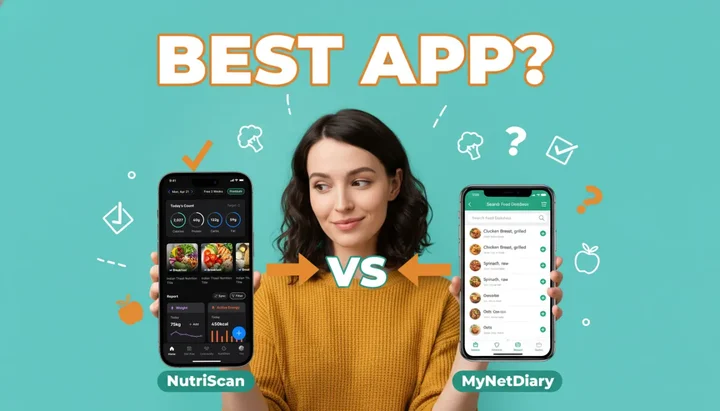
Did you know people who consistently track their food lose nearly 3 times more weight than those who don't? A 2024 study in Nutrients journal found participants using nutrition apps achieved 4.78% weight loss vs just 1.54% in the control group.
TL;DR - NutriScan vs MyNetDiary Quick Summary
• Speed Winner: NutriScan (one photo per meal) vs MyNetDiary (manual search per item)
• Database Champion: MyNetDiary with 1.7 million foods vs NutriScan's AI photo recognition, which needs no database search
• Health Conditions: NutriScan supports PCOS, pregnancy, diabetes diet plans. MyNetDiary has separate diabetes app.
• Regional Food: NutriScan excels at Indian, Asian, local cuisines. MyNetDiary has Western-focused database.
• Best For: NutriScan = homemade/restaurant meals. MyNetDiary = packaged foods with barcodes.
Not all food tracking apps work the same way. Some make tracking feel like homework. Others feel like having a smart friend who understands your food.
I've been exploring nutrition apps for years. Recently, I compared two apps that many people ask about - NutriScan App and MyNetDiary. Both promise to help you eat better. But which one actually works for your life?
Let me share my honest comparison. No fluff. Just real talk about what each app does well and where they struggle.
What Makes These Two Apps Different?
Before we jump into features, let me tell you the basic difference.
MyNetDiary is like a digital food diary. You search for foods, log them manually, and it counts your calories. It has been around since 2007 and has built a massive food database of over 1.7 million items.
NutriScan App takes a different approach. Instead of searching and typing, you just click a picture of your meal. The AI looks at your food and tells you what's in it - calories, protein, carbs, fats, and even micronutrients. It's like having a nutritionist look at your plate.
Both have their strengths. But the real question is - which fits YOUR eating style?
 Choosing the right nutrition app can feel overwhelming - but it doesn't have to be
Real-World Examples: When Each App Shines
Example 1: The Busy Mom Scenario
Imagine you're a working mom. You made dal-rice with sabzi for lunch. Your kids left some food on their plate, and you finished it.
With MyNetDiary: You need to search "dal," then "rice," then "mixed vegetables." You estimate portions. Maybe you add "leftover chicken nuggets" that your kid didn't finish. Each item is its own lookup.
With NutriScan: You click one picture of your plate. The AI identifies dal, rice, sabzi. It even asks about cooking method - did you use less oil? More oil? You adjust the slider. Done in one step.

NutriScan's crop screen lets you select food type and adjust cooking method for accurate nutrition estimates - Home > Camera > Crop
For homemade Indian, Asian, or mixed dishes, picture-based tracking saves time. Research from University of Sydney found that AI food recognition apps work better for separated foods but can struggle with mixed Asian dishes (Nutrients 2024). NutriScan addresses this by letting users adjust portions and ingredients after the AI scan.
Example 2: The Packaged Food Lover
You're eating a protein bar while rushing to work.
With MyNetDiary: Scan the barcode. Instant nutrition info from their 1.7 million item database. Super quick and accurate.
With NutriScan: Take a picture or scan. The app reads the label and extracts nutrition info. Works well for most packaged foods.
For packaged foods with barcodes, both apps work well. MyNetDiary has a slight edge here with their larger database.
Example 3: The Restaurant Dinner
You're at a local restaurant. The menu doesn't have calorie counts.
With MyNetDiary: You search "butter chicken restaurant" and hope someone has logged something similar. Estimates can vary wildly.
With NutriScan: Click a picture of your actual plate. The AI analyzes what it sees - the gravy color, portion size, visible ingredients. You can also tell it the restaurant type (fine dining vs street food) which affects oil estimates.
For restaurant meals, especially local and regional cuisines, photo-based analysis often beats database searches.
The Science Behind Food Tracking: Why It Works
Here's something that might surprise you. The act of tracking your food - just paying attention to what you eat - is what creates change.
A systematic review of 22 studies found that dietary self-monitoring is consistently related to both short-term and long-term weight loss (PMC Article). The key finding? People who tracked their food more frequently lost more weight.
But here's the catch - adherence drops over time.
Another study showed that by month 6, about 34.5% of participants had stopped tracking altogether (Harvey et al., 2019). The reason? Manual food logging feels like a chore.
Why Tracking Speed Matters
If logging takes several minutes per meal, the daily time on food entry adds up. If it takes one photo, you're more likely to stick with it long-term.
Research on mobile app effectiveness found that higher app engagement leads to better weight outcomes. Users who were active on weight loss apps for 66-100% of days showed significantly better results than those with lower engagement (Huntriss et al., 2024).

Feature-by-Feature Comparison
Let me break down what each app offers:
| Feature | NutriScan App | MyNetDiary |
|---|---|---|
| Primary Input Method | Photo-based AI scan | Manual search + barcode |
| Food Database Size | AI photo recognition (no database search) | 1.7 million items |
| Macro Tracking | Calories, Protein, Carbs, Fat | Calories, Protein, Carbs, Fat |
| Micro Nutrients | Fiber, Potassium, Calcium, Omega-3, etc | Up to 107 nutrients |
| Regional Food Support | Strong (Indian, Asian, local dishes) | Good (Western focus) |
| Diet Plans | Personalized by goal + location | Pre-made diet templates |
| Health Conditions | Diabetes, PCOS, Pregnancy, Weight Loss | Weight Loss, Diabetes tracking |
| Voice Input | Yes (Monika voice-powered AI assistant) | No |
| Barcode Scanner | No, packaged food goes in through the Packaged Food tag or a photo of the label | Yes (large database) |
| Intermittent Fasting | Yes, free fasting timer | Yes (with timer) |
| Apple Watch Support | Basic | Full integration |
| Community Feature | NutriScore leaderboard | Discussion forums |
| Pricing Model | Free + Premium | Free + Premium |
7 Tips to Get the Most from Any Nutrition App
Based on research and real user experiences, here's how to actually succeed with food tracking:
Tip 1: Track Immediately After Eating
Studies show that delayed food logging leads to forgotten items and underestimation. A PMC study found that consistent, frequent self-monitoring produces better results than sporadic detailed tracking (Peterson et al., 2014). Log your meal right after eating - or even while eating with photo apps.
Tip 2: Don't Aim for Perfection
You don't need to track every single gram. Research from NIH found that even partial dietary self-monitoring supports weight loss. One study showed 7.9% average weight loss with a program that allowed over 200 foods to be eaten without tracking (Tate et al., 2020). Progress beats perfection.
Tip 3: Use the Method That Fits Your Life
If you eat mostly packaged foods, barcode scanning (MyNetDiary's strength) saves time. If you eat mostly homemade or restaurant food, photo scanning (NutriScan's strength) works better. Match the tool to your eating style.
Tip 4: Focus on Patterns, Not Single Meals
One bad meal doesn't ruin your progress. Look at weekly trends. Both apps offer reports - use them. A PMC review found that understanding patterns helps with long-term weight maintenance (Carpenter et al., 2022).
Tip 5: Track Consistently, Even on "Bad" Days
The days you don't want to track are the most important to track. Research shows that consistent self-monitoring - tracking on more days per week - produces better results than occasional detailed tracking. Aim for at least 3+ days per week of tracking.
Tip 6: Set Realistic Calorie Targets
Both apps help calculate your targets, but be honest about your activity level. Overestimating activity leads to calorie targets that are too high. Start conservative and adjust based on actual results.
Tip 7: Use the App's Full Features
Many people only use basic calorie counting. But features like meal insights (NutriScan's NutriBites), nutrient breakdowns, and progress reports help you understand WHY you're eating certain ways - not just WHAT you're eating.
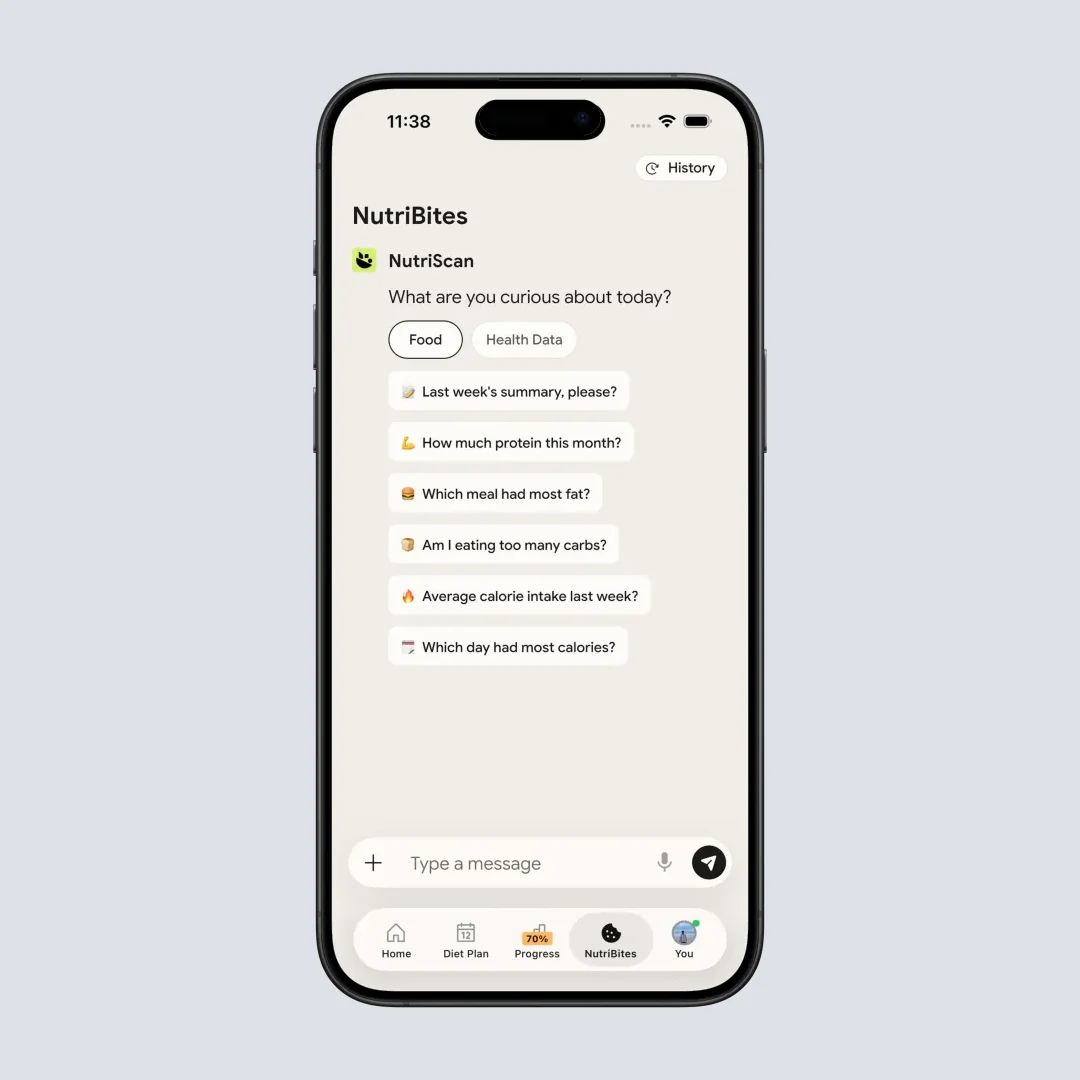
NutriScan's NutriBites feature lets you chat with your meal timeline and get personalized insights - Home > NutriBites
 When food tracking finally clicks and becomes a habit
Step-by-Step Guide: Choosing the Right App for Your Goals
Follow this process to pick the best app for YOUR situation:
Step 1: Identify Your Primary Goal
- Weight Loss: Both apps work. NutriScan offers goal-based diet plans. Use our macro calculator to find your ideal targets. MyNetDiary offers calorie budgeting with autopilot adjustment.
- Diabetes Management: NutriScan has specific diabetes goal tracking and diet plans. Try our diabetes macro calculator for personalized targets. MyNetDiary has a dedicated Diabetes Tracker app with blood glucose logging.
- PCOS or Pregnancy: NutriScan specifically supports these health conditions with personalized diet plans. See our PCOS macro calculator for recommended ranges. MyNetDiary doesn't have specialized features for these.
- General Fitness: Both work well. Choose based on your eating habits.
Step 2: Assess Your Eating Habits
Ask yourself:
- Do I eat mostly homemade food? → Photo-based tracking (NutriScan) saves time
- Do I eat mostly packaged/branded food? → Barcode scanning (MyNetDiary) is faster
- Do I eat lots of regional/local cuisine? → AI recognition trained on diverse foods (NutriScan) helps
- Do I eat standard Western dishes? → Large databases (MyNetDiary) have these covered
Step 3: Consider Your Tech Comfort Level
- Prefer typing and searching? → MyNetDiary's manual entry is refined and quick
- Prefer visual/photo-based input? → NutriScan's snap-and-scan is simpler
- Want voice assistance? → NutriScan has Monika, a voice-powered AI nutritionist
- Use Apple Watch heavily? → MyNetDiary has better watch integration
Step 4: Check Your Budget
- NutriScan: Free plan with 5 AI scans a week, Premium for unlimited scanning and diet planning
- MyNetDiary: Generous free features, Premium for advanced diet plans and fasting tracker
Step 5: Try Both for a Week
Most nutrition apps offer a free version. Spend a week with each. See which one you actually OPEN daily. The best app is the one you'll actually use.
The Hidden Challenge Most People Miss: Cultural Food Recognition
Here's something most app comparisons don't talk about - cultural food diversity.
If you eat mostly Western meals (grilled chicken, pasta, sandwiches), most nutrition apps work fine. But what about:
- Homemade dal fry with tadka?
- Street-style pani puri?
- Mom's special biryani?
- Regional dishes like poha, upma, or dosa?
This is where the real difference shows up.
MyNetDiary has a large database, but it relies heavily on user-submitted entries for non-Western foods. The accuracy depends on who entered that food and how they measured it.
NutriScan's AI approach is different. Instead of matching to database entries, it analyzes what it sees - the color, texture, portion size, visible ingredients. For a plate of chole bhature, it identifies the chole (chickpea curry) separately from the bhature (fried bread) and estimates based on visual cues.
Neither approach is perfect. But if your diet includes diverse regional foods, AI recognition often handles variety better than database matching.
Regional Food Accuracy
When tracking regional cuisines, always verify AI estimates - especially for mixed dishes. NutriScan lets you adjust portions and cooking methods after the initial scan for better accuracy.
Understanding NutriScore: A Feature That Changes How You See Food
One thing that sets NutriScan apart is its NutriScore system. This isn't just about calories - it's about food quality.
Every meal you scan gets a NutriScore based on:
- Nutrient density (vitamins, minerals, fiber)
- Balance of macros (protein, carbs, fat ratio)
- Processing level
- Cooking method impact
The NutriScore helps answer questions like:
- "I ate within my calories, but why do I still feel tired?"
- "Both meals are 500 calories - which one is actually better for me?"
MyNetDiary focuses more on hitting your nutrient targets. It shows if you're over or under on specific nutrients. This is useful but doesn't give you an overall "meal quality" picture.
For people who want to understand their eating patterns (not just count calories), NutriScore adds a layer of insight that simple tracking misses. Learn more about how NutriScore works.
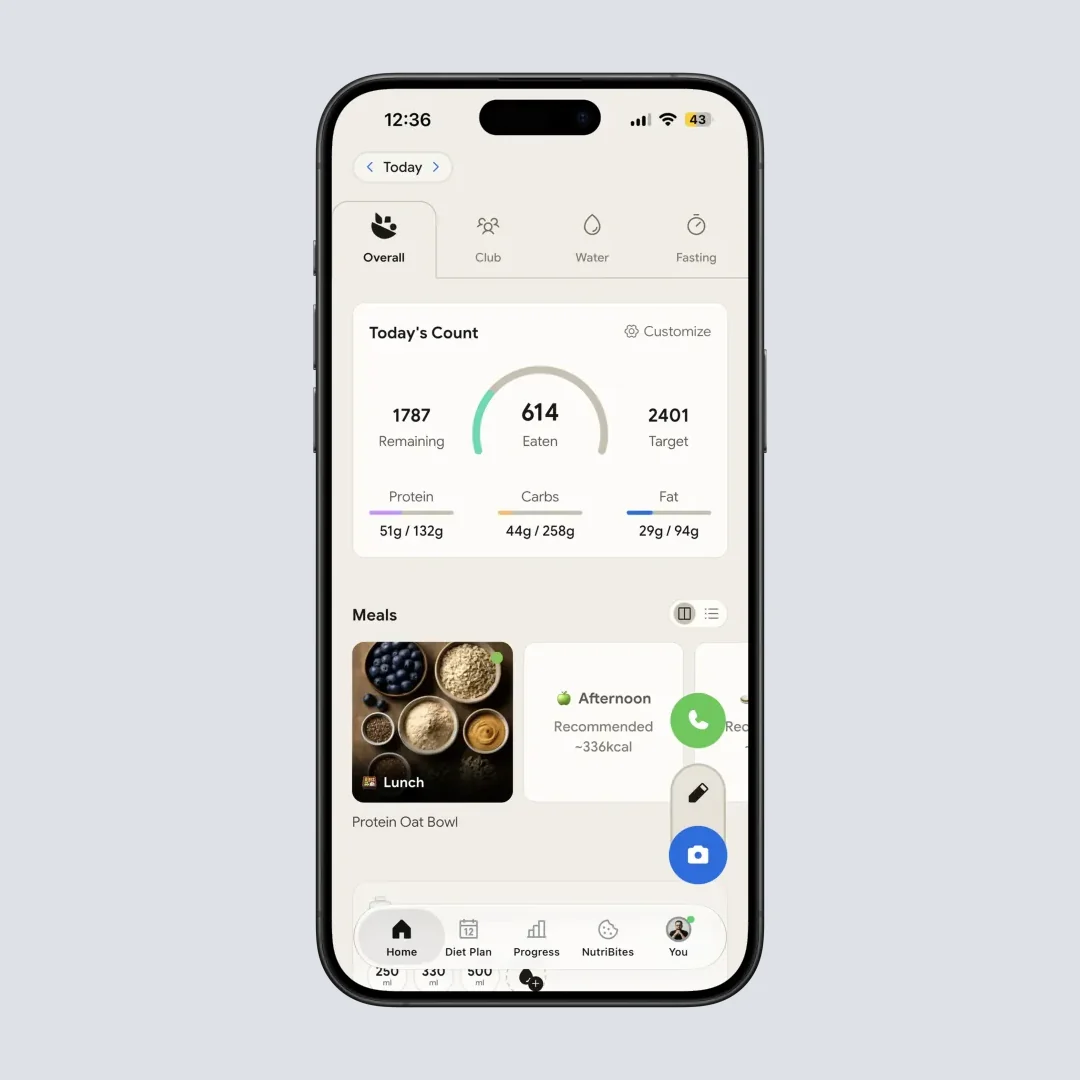
NutriScan's home screen showing daily nutrition breakdown with NutriScore - Home > View Daily Progress
What Research Says About AI Food Recognition
AI-powered food tracking is still evolving. Here's what recent research tells us:
A 2024 review in the Journal of Medical Internet Research found that AI dietary assessment tools show promise but need improvement, particularly for mixed dishes and culturally diverse foods (JMIR 2024).
University of Sydney researchers found that manual food-logging apps overestimated energy intake for Western diets by about 1040 kilojoules, while underestimating Asian diets by about 1520 kilojoules. AI apps had difficulty with mixed Asian dishes, with some calorie estimates off by 49-76% (Nutrients 2024).
The recommendation? Always verify AI estimates, especially for mixed dishes. NutriScan addresses this by letting users adjust portions and cooking methods after the initial scan.
The Voice Assistant Difference: Monika vs Traditional Input
NutriScan has something unique - a voice-powered AI assistant called Monika. Instead of typing or tapping, you can talk to your app.
How does this work in real life?
Imagine you're cooking dinner. Your hands are busy. With NutriScan, you can say "Monika, log my lunch - I had rice with chicken curry and some salad." The AI processes your voice and logs the meal.
You can also ask questions like:
- "What should I avoid eating today based on my macros?"
- "Why am I feeling bloated this week?"
- "What was my protein intake yesterday?"
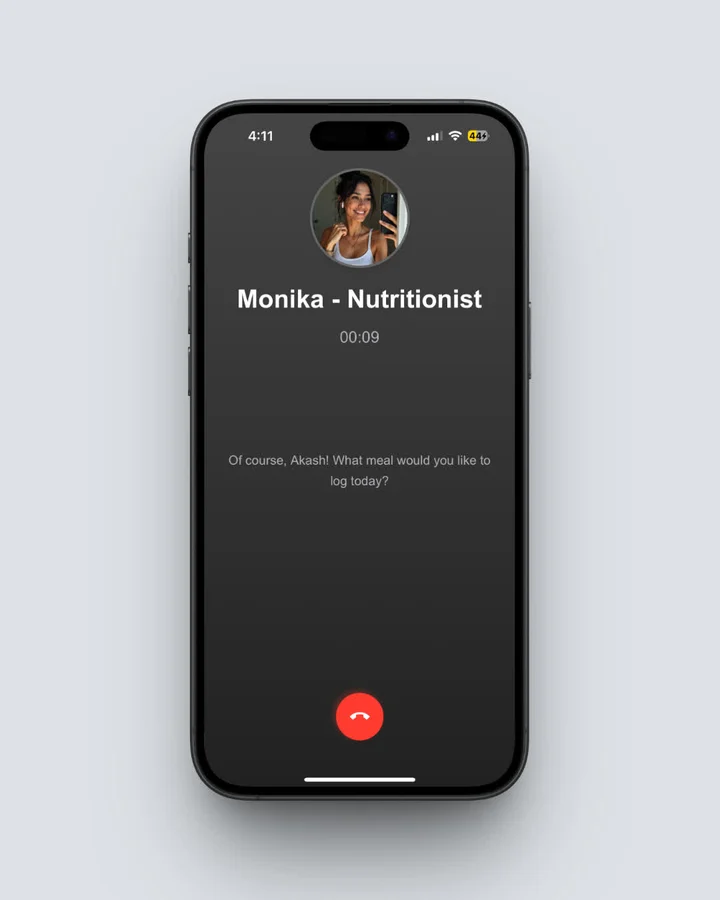 NutriScan's Monika voice assistant lets you log meals hands-free - Home > Call Button > Speak to Log
MyNetDiary doesn't have a dedicated voice assistant. It supports basic Siri integration on iOS for logging, but not conversational interactions.
For people who find typing tedious (especially older users or busy professionals), voice input removes friction from the tracking process.
Managing Specific Health Conditions: Who Does It Better?
Let's get specific about health condition support:
Diabetes Management
NutriScan: Offers diabetes-specific diet plans created based on your profile. The plans consider your location (for locally available foods), lifestyle, and eating schedule. The NutriScore helps identify high-glycemic meals that might spike blood sugar.
MyNetDiary: Has a separate "MyNetDiary Diabetes" app with blood glucose tracking, medication logging, and carb counting. More clinical features for diabetes monitoring.
Verdict: If you want clinical diabetes tracking with glucose logging, MyNetDiary's dedicated app is stronger. If you want a meal plan designed for diabetes management, NutriScan's personalized approach works well.
PCOS Management
NutriScan: Specifically includes PCOS as a goal option. Diet plans are created considering hormonal balance, inflammation reduction, and insulin resistance - key factors in PCOS management.
MyNetDiary: No PCOS-specific features. You can manually set macro targets based on PCOS recommendations, but there's no built-in guidance.
Verdict: NutriScan has clear advantage for PCOS support. Check out our PCOS meal tracking guide for more details.
Pregnancy Nutrition
NutriScan: Includes pregnancy as a health goal. Diet plans adjust for increased nutrient needs during pregnancy - more protein, folate, iron, and calcium considerations.
MyNetDiary: Basic nutrient tracking works, but no pregnancy-specific features or recommendations.
Verdict: NutriScan better supports pregnancy nutrition tracking. See our pregnancy diet guide for complete guidance.
Weight Loss
NutriScan: Goal-based diet plans with personalized calorie and macro targets. Progress tracking through NutriScore trends.
MyNetDiary: Strong calorie budgeting with "Autopilot" feature that automatically adjusts your daily calories based on progress. Multiple pre-made diet templates (keto, low-carb, Mediterranean).
Verdict: Both work well. MyNetDiary has more pre-made templates. NutriScan has more personalized plans.

The Real Cost of Free: Understanding App Business Models
Here's something many comparison articles skip - why the pricing matters for features.
Free apps need to make money somehow. Usually this means:
- Ads (annoying and distracting)
- Selling data (privacy concerns)
- Aggressive upselling (constant premium popups)
MyNetDiary's approach: Generous free tier with no ads. Premium adds advanced features like intermittent fasting tracker, meal plans, and additional diet templates. Pricing is reasonable.
NutriScan's approach: Free plan with 5 AI meal scans a week. Premium adds unlimited scanning and personalized diet planning with recipes and guidance.
Both apps take the "freemium" approach without ads, which is healthier for user experience. Neither sells user data for advertising.
The question is - which premium features do you actually need?
If you just want to track meals and count calories, both free tiers work. If you want personalized diet planning based on health conditions, NutriScan's Premium is more focused on this. If you want intermittent fasting support and nutrient deep-dives, MyNetDiary Premium delivers.
The Single Feature That Predicts If You'll Stick With Tracking
Here's what I promised to reveal - the one thing that matters most for long-term success.
It's not accuracy. It's not database size. It's not even price.
The single best predictor of whether you'll stick with a food tracking app is how long it takes to log a meal.
Research backs this up. A 2019 study found that participants who used simpler logging methods tracked for longer periods (Harvey et al., 2019). Another study showed that app engagement - measured by frequency of use - directly correlated with weight loss success (Huntriss et al., 2024).
Manual logging in MyNetDiary means a search for every item. Photo logging in NutriScan is one step per meal. Time is the currency of habit formation.
If logging feels like a chore, you'll skip days. Skipped days become skipped weeks. And eventually, you stop entirely.
Both apps can count calories. But only one makes logging so fast that you'll actually do it consistently. That's the real differentiator.
My Honest Verdict
After comparing features, research, and real-world use cases, here's my honest take:
Choose NutriScan App if:
- You eat mostly homemade or restaurant food
- You want quick photo-based logging (one photo instead of a search per item)
- You have specific health goals like PCOS, pregnancy, or diabetes
- You prefer regional/local cuisine tracking
- You want personalized diet plans based on your location and lifestyle
- You value NutriScore insights that explain what went wrong in your eating pattern
- You want voice-powered assistance for questions
Choose MyNetDiary if:
- You eat mostly packaged foods with barcodes
- You want detailed nutrient tracking (up to 107 nutrients)
- You practice intermittent fasting and want a built-in timer
- You use Apple Watch extensively
- You prefer manual control over food entries
- You want established community forums
- You like pre-made diet plan templates
The honest truth? Both apps can help you eat better. The research is clear - dietary self-monitoring works (Burke et al., 2011). What matters most is finding the app you'll actually use consistently.
NutriScan's advantage is speed and simplicity - especially for diverse cuisines and homemade meals. MyNetDiary's advantage is depth and database coverage - especially for packaged foods and detailed nutrient tracking.
FAQ: Your Questions Answered
Q1: Is NutriScan App accurate for calorie counting?
A: NutriScan uses AI to analyze your food photos and estimate nutrition values. Like all AI food recognition systems, accuracy improves when you provide clear photos and adjust portion sizes after scanning. Research shows that AI food tracking apps generally perform well for individual foods but may need user adjustment for mixed dishes (Nutrients 2024). NutriScan lets you edit portions, add missing items, and adjust cooking methods to improve accuracy.
Q2: Does MyNetDiary have AI food recognition?
A: Yes, MyNetDiary added AI Meal Scan feature. However, based on user reviews on Google Play Store, some users report it can be inaccurate. MyNetDiary's strength remains its massive food database and manual search function. Their barcode scanner is particularly well-regarded.
Q3: Which app is better for Indian food and regional cuisines?
A: NutriScan App was built with regional and local food recognition in mind. Its AI is trained on diverse cuisines including Indian, Asian, and local dishes. You can select food type (homemade, restaurant, street food, hotel buffet) and cooking method (deep-fried, air-fried, steamed, etc.) which affects nutrition calculations. MyNetDiary has a large database but relies more on user-submitted entries for regional foods.
Q4: Can I use these apps for managing diabetes or PCOS?
A: NutriScan offers specific goal-based diet plans for diabetes, PCOS, and pregnancy. You fill in your details, and the app creates a personalized diet plan based on your condition, location, and lifestyle. MyNetDiary has a separate Diabetes Tracker app with blood glucose logging and medication tracking, but doesn't have specific PCOS or pregnancy diet planning.
Q5: Which app helps with understanding eating patterns, not just counting calories?
A: NutriScan's NutriBites feature lets you ask questions about your meal timeline and get insights. Questions like "Why am I feeling bloated?" can analyze your recent meals and identify potential causes. The app also calculates a NutriScore for each meal and day, helping you understand food quality - not just quantity. MyNetDiary focuses more on nutrient tracking and goal adherence with its Virtual Coach providing tips.
Ready to Start Your Health Journey?
The best nutrition app is the one you'll actually use. Both NutriScan and MyNetDiary can help you reach your health goals - but they work differently.
If you want to try photo-based tracking with personalized diet plans, download NutriScan App. Click a picture of your next meal and see how it works for your food.
Download NutriScan App: https://refer.nutriscan.app/8Jgz/nov9jd5k
Remember - tracking your food is just the first step. Understanding your patterns and making small, consistent changes is what creates lasting results.
Your health journey starts with knowing what you eat. Choose the tool that makes that easy for YOU.
