How to Switch From MyFitnessPal to Cronometer: What You Rebuild
 ChatGPT
  Claude
  AI Mode
  Perplexity
Cronometer does not import a MyFitnessPal diary. There is no import button and no file format it accepts. Your history comes out of MyFitnessPal as three CSV files you keep yourself, your custom foods and recipes get rebuilt by hand, and your targets get retyped in two minutes. Done in the right order, the whole move takes one week of slightly slower logging.
TL;DR - Switching From MyFitnessPal to Cronometer
Transfers as a file: Your logged history, exported from MyFitnessPal by email. Export is Premium-only, so do it before you cancel.
Cronometer imports: Nothing from MyFitnessPal. Its support team confirms this on r/cronometer, and its transition guide is a settings walkthrough.
You rebuild: Your top 10 foods, your 2 most-cooked recipes, your calorie target and one weigh-in per month.
The plan: Export on day 1, rebuild on days 3 to 5, read the nutrient report on day 6, cancel MyFitnessPal on day 7.
The trap: Your first nutrient report will show red bars. Some are real shortfalls, some are blank database fields. This guide shows you how to tell them apart.
NutriScan publishes this post, and we make a competing app. A common question when switching: "I want to see my vitamins and minerals, not just calories. How do I move my MyFitnessPal history over?" The short answer is that you do not move it. You rebuild it, and the rebuild takes about a week.
The reason people want the switch is usually a number they never saw. A 2024 modelling study in The Lancet Global Health estimated that more than 5 billion people do not consume enough iodine (68% of the world), vitamin E (67%) or calcium (66%), and more than 4 billion fall short on iron (65%), riboflavin (55%), folate (54%) and vitamin C (53%) (Passarelli et al., 2024). Most calorie apps will never tell you which of those applies to you, because they only show you four numbers.
Cronometer will tell you. But the first week is bumpy, and most guides skip the part that frustrates people. This is the whole move, including what you lose.
IMPORTANT
Your switching plan at a glance.
A quick roadmap so you know what to do tonight and what to leave for day 7.
⏱️ Progress 0/4 • ~0 minutes in • Keep going
⏳ Step 1: Get your data out of MyFitnessPal before you cancel
⏳ Step 2: Rebuild your top foods, recipes and targets in Cronometer
⏳ Step 3: Cancel on day 7 and decide on Gold with real data
🔍 Why your first nutrient report is full of red bars that are not deficiencies (revealed near the end)
Why People Move to Cronometer for Micronutrients 🔬
The gap is not small. MyFitnessPal is built around calories and macros, with a handful of extra nutrients on Premium. Cronometer is built around a full nutrient profile, and it shows that profile on the free plan.
The database design is the reason. Cronometer pulls from lab-analyzed sources: the Nutrition Coordinating Center database curated by the University of Minnesota, which holds over 17,000 food entries with data on 70 nutrients, plus USDA SR28 with over 8,000 entries, the Canadian Nutrient File, and national databases from the Netherlands, the UK, Ireland and Australia (Cronometer Data Sources).
That design shows up in testing. A 2025 study in the Journal of Human Nutrition and Dietetics had two trained raters independently enter the same 43 three-day food records into both apps. Cronometer's inter-rater reliability was 0.966 for energy and 0.977 for carbohydrates. MyFitnessPal dropped to 0.419 for sodium and 0.348 for sugar (Morello et al., 2025). Two people logging identical meals in MyFitnessPal can walk away with very different totals, because they picked different user-submitted entries.
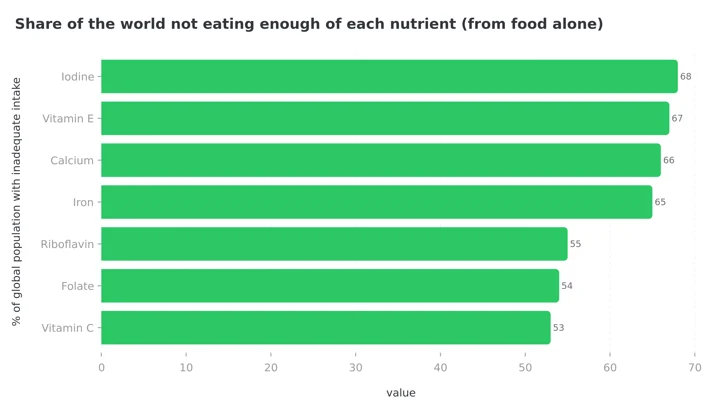 Figure 1: Global inadequate-intake estimates from Passarelli et al., 2024. A calorie-only diary cannot tell you which of these bars is yours.
You are not alone in making this move, either. Cronometer's own user survey found that as much as 64% of its users tried MyFitnessPal before coming over (Cronometer, 2025).
The Hard Truth: Your Diary Does Not Transfer 🚫
There is no import button. Cronometer does not accept a MyFitnessPal export, and its support team says so directly when users ask on r/cronometer. Their official transition guide is a settings walkthrough, not a migration tool.
This is not laziness on their part. Food databases are proprietary and the entries do not line up. A MyFitnessPal row called "Homemade Chicken Curry, 1 serving" has no matching ID in the NCCDB, and its nutrient columns would be mostly empty, which would poison the reports you switched for.
So plan for a rebuild, not a transfer. Once you accept that, the job gets much smaller, because you do not actually need three years of history. You need your last 30 foods, your recipes and your targets.
 Pack the ten foods you actually use. Leave the other three years behind.
Step 1: Export Your MyFitnessPal Data While You Still Pay 📤
Do this before you cancel anything. Data Export is available only to Premium and Premium+ subscribers, so if your subscription lapses first, the button disappears (MyFitnessPal Support).
On the website, log in, click Reports, click Export on the right, pick your date range, and click Export. On iOS, open the More menu, tap Nutrition, tap Export in the top right, choose a date range, then tap Export My Information. On Android, open More, go to Progress or Nutrition, and tap the export icon in the top right corner.
MyFitnessPal emails the files as a zip, so open it on a computer. Inside you get three CSV files: Your Nutrition, Your Progress and Your Exercise. Run one export for everything and a second one for the last 90 days only. The 90-day file is the one you will actually read.
What to Do If You Are on the Free MyFitnessPal Plan
Free accounts do not get the export feature, which is a strange place to put a paywall on your own food diary. You still have two routes.
The first is your legal right to a copy of your personal information. MyFitnessPal runs a Privacy Request Center where you pick your region and request access to your data. It is slower than the Premium button and the file is not formatted for nutrition analysis, but it is free and it works.
The second route is the practical one. Screenshot your five most common days and write down the 25 foods you log most. That list is 90% of what you need.
Which apps let you leave with your data
If you are weighing other destinations too, we ranked every major tracker on export and import in Nutrition App Data Export: Which Apps Let You Leave?. The other routes have their own guides: How to Switch From MyFitnessPal to MacroFactor, How to Switch From MyFitnessPal to Lose It, and How to Switch From MyFitnessPal to Lifesum.

What Actually Moves, and What You Rebuild 📦
Here is the honest inventory before you start.
| Your MyFitnessPal data | Does it move? | What to do |
|---|---|---|
| Daily food diary history | No | Keep the CSV as an archive, do not retype it |
| Weight and measurement history | Partly | Re-enter monthly weigh-ins by hand, 12 to 20 rows |
| Custom foods | No | Rebuild the 10 you use, ignore the rest |
| Recipes | No | Rebuild in Cronometer, ingredient search is better |
| Calorie and macro targets | Yes, by hand | Copy the numbers over in 2 minutes |
| Barcode-scanned packaged foods | Not needed | Cronometer's scanner is free and covers them |
| Streak and community | No | This is the real loss, plan for it |
The pattern is clear. What you lose is history and social. What you keep is the part that drives tomorrow's log.
IMPORTANT
Checkpoint: here's where you are right now.
Quick status update so you always know the next best move.
⏱️ Progress 1/4 • ~3 minutes in • Keep going
✅ Step 1: Export done, favorites list written (done)
👉 Step 2: Rebuild your top foods, recipes and targets in Cronometer (you're here)
⏳ Step 3: Cancel on day 7 and decide on Gold
🧩 The red bars that are not deficiencies (coming soon)
Step-by-Step: The 7-Day Switch Plan 📅
Do not run both apps for a month. That is how people quit both.
- Day 1: Export and set up. Run the MyFitnessPal export while Premium is still active. Create a free Cronometer account. Set your energy target manually rather than accepting the default, so your calorie number matches what you were already using. Do not cancel MyFitnessPal yet.
- Day 2: Log one normal day, badly. Log everything in Cronometer without trying to be accurate. The goal is to find the search box, the filter button and the multi-add toggle. Expect this day to take 15 minutes instead of 3.
- Day 3: Build your top 10 foods. Search each one, pick a lab-analyzed entry, and save it to favorites. Ten foods usually covers 60% to 70% of what a person eats in a week.
- Day 4: Rebuild two recipes. Pick the two you cook most. Cronometer uses the same food search inside recipe building that it uses in the diary, so this is faster than it was in MyFitnessPal.
- Day 5: Re-enter your weigh-ins. Open the Progress CSV, take one weight per month, and enter those. You get a trend line without typing 400 rows.
- Day 6: Read your first nutrient report. Do not act on it yet. Just look at which vitamins and minerals sit under 50%.
- Day 7: Cancel MyFitnessPal. Only now. If you cancel on Day 1, you will hit a friction moment on Day 3 and go back.
Rebuilding Your Top 20 Foods Without Losing a Day 🧱
Cronometer's food search behaves differently and this trips up most switchers. Entries are marked by source, and you want the lab-analyzed ones for generic foods.
On mobile, the filter button sits in the top right corner of the search screen. It sorts by most recent, most frequent or alphabetically, and filters results by database. Turn on multi-add while you are there, because adding six ingredients one at a time is the most annoying part of the first week.
For whole foods, pick NCCDB or USDA entries. Those carry a full nutrient profile, so spinach will report folate and vitamin K rather than leaving the fields blank. For packaged foods, use the barcode scanner, which is free on Cronometer's Basic plan. If the product is missing, photograph the nutrition label and the app builds a custom food from it.
One habit change is worth naming. In MyFitnessPal you searched, picked the top result and moved on. In Cronometer, spending three extra seconds picking a lab-analyzed row over a label-transcribed one is what makes the micronutrient report mean anything.
Setting Targets So Your Numbers Do Not Jump 🎯
Cronometer's signup asks similar questions to MyFitnessPal's and generates its own calorie target. If you accept it blindly, your deficit changes on the day you switch apps, and you will not know whether a stalled week came from the diet or the app.
Set a custom energy target that matches the one you were using, then set macros by ratio or by fixed grams. If you never trusted the MyFitnessPal number, our macro calculator gives you a clean starting point. Cronometer shows kcal instead of calories in places. Same unit.
Micronutrient targets default to standard reference intakes. Leave them alone for the first month, before you know your baseline.
IMPORTANT
Checkpoint: midway progress update.
You're halfway, and the fiddly part is behind you.
⏱️ Progress 2/4 • ~6 minutes in • Keep going
✅ Step 1: Export done, favorites list written (done)
✅ Step 2: Top 10 foods, 2 recipes and matching targets rebuilt (done)
👉 Step 3: Cancel on day 7 and decide on Gold with real data (current)
⏳ The red bars that are not deficiencies (next)
Free Cronometer vs Gold: What the Switch Really Costs 💳
You can run Cronometer free forever, and the free plan is unusually generous. It includes the barcode scanner, custom foods and recipes, device sync, custom macro and micronutrient targets, and access to a database of over 1 million lab-analyzed or verified foods.
The catch is the reporting window. On the free plan, reports and charts are limited to a 7-day window (Cronometer Gold). That matters here, because micronutrient patterns are a monthly story, not a weekly one. Iron intake that looks fine across seven days can look very different across ninety.
Gold costs $4.99 per month billed annually at $59.99 per year, or $10.99 billed monthly. It removes ads, opens up the full history, and adds Photo Log, Voice Log, the Recipe Importer, the fasting timer, custom biometrics, Nutrition Scores and the Oracle nutrient search that suggests foods for a nutrient you are short on. Our full Cronometer pricing breakdown covers the Pro tier for coaches.
One honest note on the marketing numbers. Cronometer's own pages say "up to 84 nutrients" in one place, "up to 95" in another and 92 in a product update. The practical figure is 80-plus on either plan, against the four MyFitnessPal shows a free user.
My advice: switch on the free plan, log for three weeks, then decide. If you find yourself wanting to see last month's magnesium trend, that is your signal to upgrade.
What Gets Worse After You Switch 📉
An honest guide has to include this part, because the surprises are what send people back.
Restaurant and regional foods. Cronometer's database is cleaner but smaller and mostly North American. Chain restaurant meals and non-US packaged goods are easier to find in MyFitnessPal.
Logging speed on day 3. More database choices means more decisions per entry. It evens out once your favorites fill up, usually inside two weeks.
The community. MyFitnessPal has forums and friends. Cronometer has an active Reddit and Facebook group, but it is not the same daily social loop. If your streak was your motivation, replace it deliberately with something else, like a Sunday weigh-in.
Your streak resets. This one is worth taking seriously. In an 8-week study of 90 adults using app-based food logging, the number of weeks of consistent logging predicted percent weight loss, and so did logging frequency (Payne et al., 2022). The completeness of each day's log was not a significant predictor. Showing up beat getting it perfect. Protect the habit through the switch, even if week one is sloppy.
Seven Tips From People Who Made the Switch 💡
- Rebuild favorites before you cancel. Ten foods and two recipes, that is the whole prep list.
- Use multi-add for cooked meals. Adding seven ingredients individually is where people give up.
- Try "Quick Add" when you are rushed. Type "Quick Add, Calories" in the search bar to log a number without details. A rough entry beats a skipped day.
- Learn "Explode Recipe" early. It expands a saved recipe into its ingredients inside the diary, so you can swap one item.
- Do not log both apps in parallel past a week. Double logging is the most common reason a switch fails.
- Set weekly reminders, not daily nagging. Check the nutrient report once a week, on the same day.
- Keep the MyFitnessPal CSV somewhere safe. You will not retype it, but it is useful if a doctor asks about the past year.
IMPORTANT
Checkpoint: final stretch before the reveal.
One last nudge. The reveal is next, and it is the reason people buy supplements they do not need.
⏱️ Progress 3/4 • ~9 minutes in • Keep going
✅ Step 1: Export done, favorites list written
✅ Step 2: Top 10 foods, 2 recipes and matching targets rebuilt
✅ Step 3: MyFitnessPal cancelled on day 7, Gold decision parked for three weeks
✨ The red bars that are not deficiencies (about to reveal)
Reading Your First Nutrient Report Without Panicking 🔴
You will open the report and see red bars. Nearly everyone does, and it does not mean you are ill.
 A red bar on day 6 is a question, not a diagnosis.
Two things explain most of it. First, real shortfalls are common. In the US population, 94.3% do not meet the requirement for vitamin D, 88.5% for vitamin E, 52.2% for magnesium and 44.1% for calcium (Linus Pauling Institute). Second, and this is the part nobody warns you about, blank data looks identical to a deficiency. A label-transcribed packaged food has no potassium value, so the app shows zero. Three packaged lunches in a week and your potassium bar turns red no matter what you ate.
Use a simple rule for the first month. Look at a 7-day average, not one day. Ignore any nutrient where more than half your entries came from label-based foods. Then pick the two lowest real numbers and fix them with food first: lentils and pumpkin seeds for iron and magnesium, salmon for vitamin D and omega-3s.
Seeing your own gaps on screen is confronting the first time (Harvard Chan, 2024 has the global picture). It is also the entire reason you switched.
What the Research Says About Changing Apps Mid-Habit 📚
Switching trackers has a real cost, and it is behavioral rather than technical. Adherence to self-monitoring keeps showing up in outcomes research, and it drops when friction rises.
In a 12-month randomized trial of 502 adults, higher adherence to diet, activity and weight self-monitoring was associated with greater odds of losing 5% or more of body weight (Burke et al., 2025). The same trial found adherence declining over time in every group, which is the normal shape of this behavior.
Read with the 8-week consistency finding above, the conclusion is simple. A switch is worth it if the new app answers a question the old one could not. Micronutrient visibility is a real reason. A new interface is not.
If you want the fuller feature-by-feature view before committing, we compared both apps in MyFitnessPal vs Cronometer.
Common Mistakes During the Move ⚠️
Cancelling Premium on day one. You lose the export, and the export takes 2 minutes.
Trying to recreate your history. A retyped archive changes nothing about tomorrow.
Accepting the default calorie target. Two variables changed at once, and now you cannot read your own results.
Upgrading to Gold on day one. Use the free plan first. The 7-day report limit will tell you when you need more.
Treating every red bar as a deficiency. Check the food source before you buy a supplement.
Where NutriScan Fits in This Decision 📱
If you are moving to Cronometer because you want the deepest nutrient table on the market and you are happy to search a database for every meal, Cronometer is the right destination and this guide is the whole answer. NutriScan will not import your MyFitnessPal history either. No app in this category will.
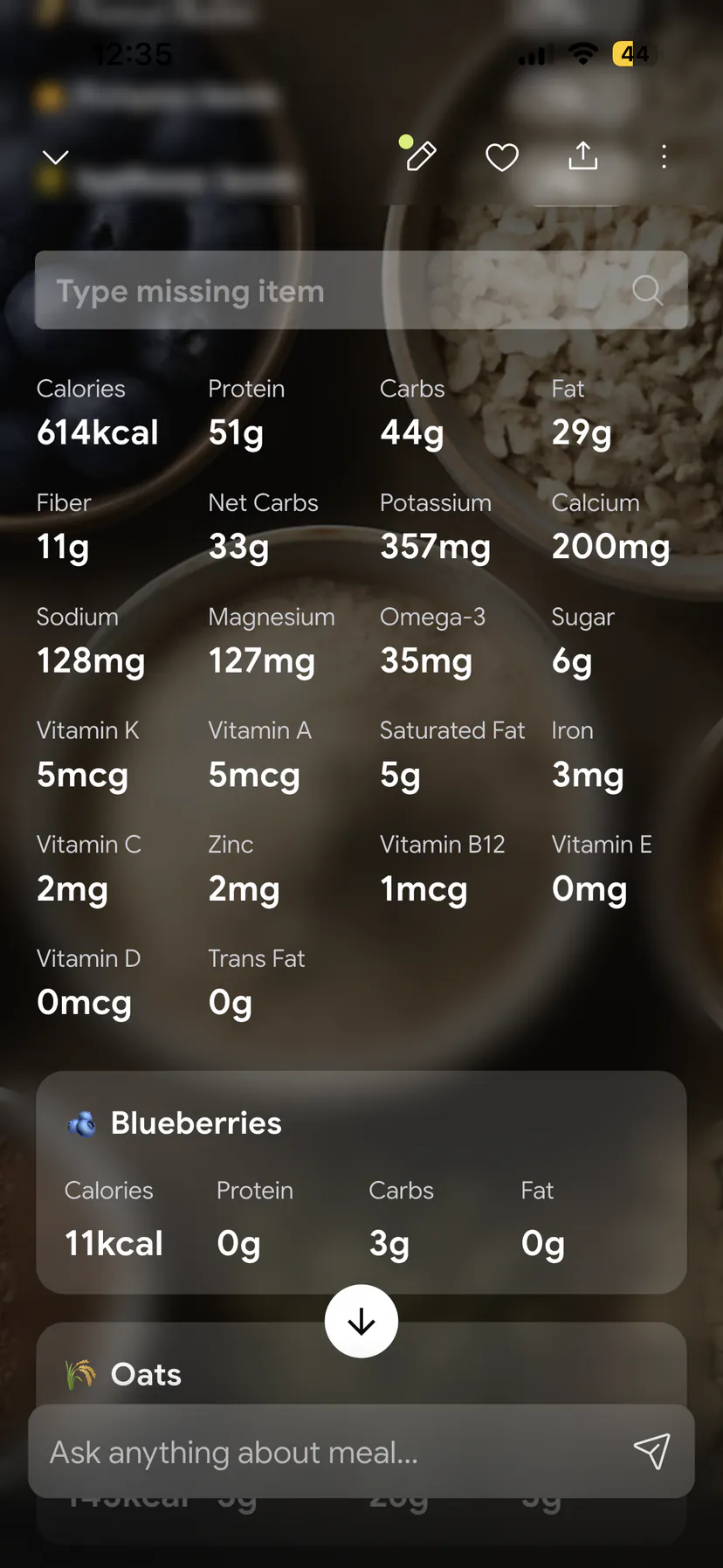
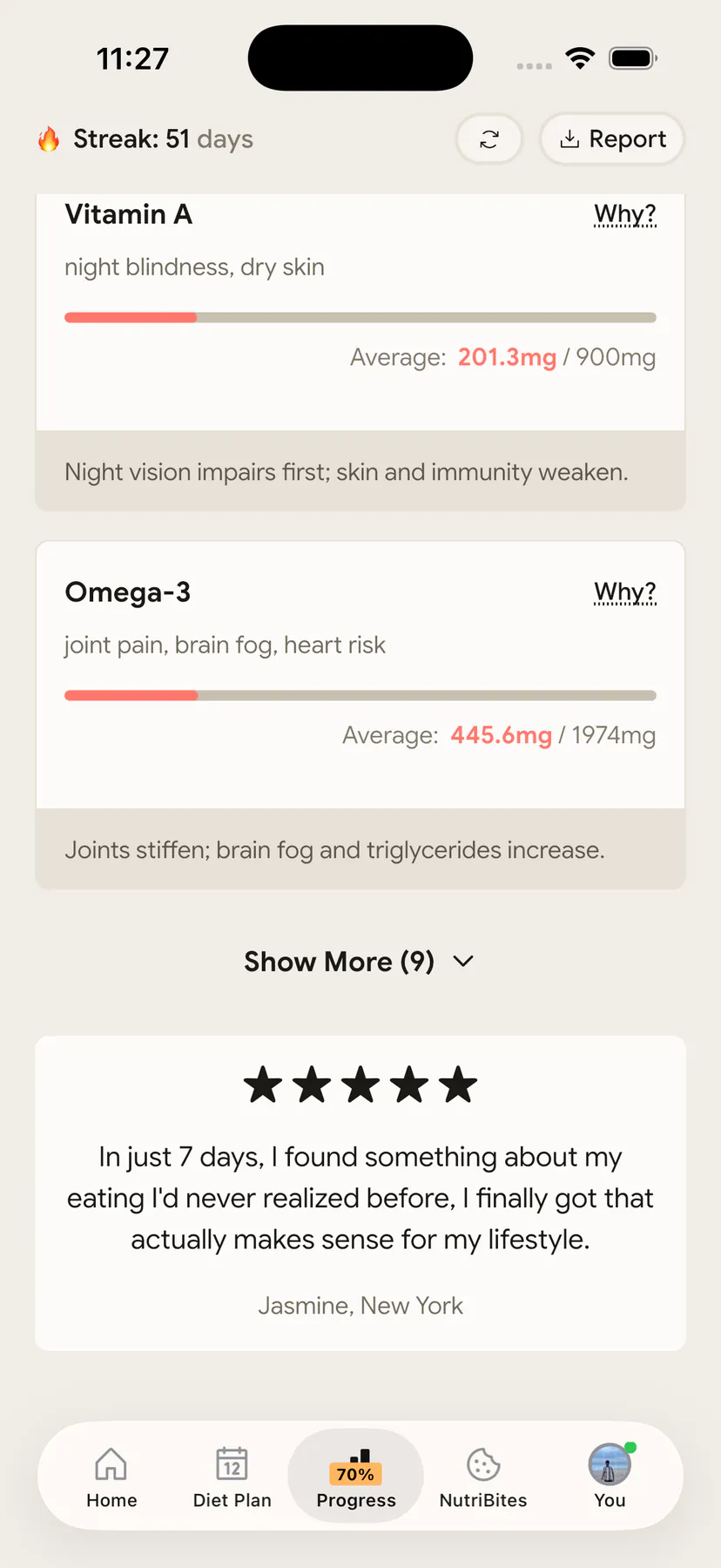
If the reason you are leaving MyFitnessPal is the searching itself, the destination question is still open. NutriScan logs a meal from a photo, then shows macros, a NutriScore for food quality and a micronutrient breakdown for that meal. The Progress tab's Week view tracks your vitamin and mineral targets (vitamin D, calcium, B12, vitamin E, zinc, magnesium, vitamin C, omega-3, iron, vitamins A and K) on Premium. It is a shorter list than Cronometer's 80-plus, and there is no barcode scanner, so packaged-food heavy eaters are better served by Cronometer. We put the two side by side in NutriScan vs Cronometer.
On data, we hold ourselves to what we ask of others. A full copy of your data is available on request in JSON or CSV under our privacy policy.
IMPORTANT
Recap: everything you completed this round.
You finished the run. Save this for the evening you actually make the move.
⏱️ Progress 4/4 • ~11 minutes in • Nicely done
✅ Step 1: Export from MyFitnessPal while Premium is active ➡️ write down your 25 most-logged foods ➡️ screenshot 5 typical days
✅ Step 2: Free Cronometer account ➡️ matching calorie target ➡️ top 10 foods from NCCDB or USDA ➡️ 2 recipes ➡️ monthly weigh-ins
✅ Step 3: Cancel MyFitnessPal on day 7, run free for three weeks, upgrade to Gold only if you miss the monthly trend
✅ The red bars: half are real shortfalls, half are blank label-based entries. Judge a 7-day average and check the food source first (revealed)
Conclusion
Moving from MyFitnessPal to Cronometer is not a data migration, because no such path exists. It is a one-week rebuild of ten foods, two recipes and one set of targets, and the payoff is seeing the 80-plus nutrients your old diary never showed you.
Do it in this order: export while you are still paying, set up Cronometer free, rebuild favorites, re-enter monthly weights, then cancel on day 7. Keep logging through the messy middle, because consistency is what the research keeps rewarding.
If you would rather not rebuild a food list by hand at all, that is a fair reason to look at photo-based logging instead. Track your meals and your nutrient gaps with NutriScan, and skip the search box entirely.
Frequently Asked Questions
Can I import my MyFitnessPal data into Cronometer? No. Cronometer has no MyFitnessPal import, and its support team confirms this when users ask. The food databases use different entry IDs and different nutrient fields, so a CSV would not map cleanly even if the app accepted it. Export your MyFitnessPal data as an archive, then rebuild your favorites and recipes in Cronometer.
Do I need MyFitnessPal Premium to export my food diary? Yes, for the built-in export. Data Export is available only to Premium and Premium+ subscribers (MyFitnessPal Support). Free users can submit a privacy request through the MyFitnessPal Privacy Request Center to obtain a copy of their personal information, or screenshot their most common days.
Is Cronometer's free plan enough after switching? For daily logging, yes. The free plan includes the barcode scanner, custom foods and recipes, device sync, custom nutrient targets and full nutrient tracking. The limit is reporting: free accounts see charts and reports within a 7-day window only. If you want monthly micronutrient trends, Gold is $4.99 per month billed annually at $59.99 per year.
How long does the switch actually take? About a week of slightly slower logging. Day 1 is setup and export, days 2 to 5 are rebuilding your top foods and recipes, and by day 7 most people are back to their normal logging speed. Rebuilding ten foods and two recipes covers the majority of a typical week's eating.
Will my micronutrient report look bad at first? Probably, and it usually means two things at once. Real shortfalls are widespread, with 94.3% of the US population below the requirement for vitamin D and 52.2% below for magnesium (Linus Pauling Institute). But missing database values also display as zero. Judge a 7-day average, and check whether the low nutrient came from label-based entries before you change anything.
This article is for general information and is not medical advice. Speak with a qualified healthcare professional before making significant changes to your diet, particularly if you have an existing health condition.