MyFitnessPal vs Cronometer 2026: Macros vs Micronutrients
 ChatGPT
  Claude
  AI Mode
  Perplexity
One tracks 14 million foods. The other tracks up to 95 nutrients. Which one actually helps you eat better? 🤔
TL;DR - MyFitnessPal vs Cronometer 2026
- Free pick: Cronometer (free includes barcode scanner + up to 84 nutrients)
- Cheapest paid: Cronometer Gold $59.99/yr vs MyFitnessPal Premium $79.99/yr
- Best for macros only: MyFitnessPal (larger database, social features)
- Best for micronutrients: Cronometer (lab-verified, up to 95 nutrients on Gold)
- Accuracy winner: Cronometer (ICC 0.96+ vs MyFitnessPal 0.35-0.73)
- Restaurant meals: MyFitnessPal wins on database coverage
As a NutriScan nutritionist, I have used both MyFitnessPal and Cronometer for years. A 2025 study in the Journal of Human Nutrition and Dietetics tested both apps on 43 endurance athletes and found that Cronometer had excellent inter-rater reliability (ICC 0.966 for energy, 0.977 for carbs), while MyFitnessPal scored low on reliability for most nutrients (Morello et al., 2025). That single finding captures the core difference between these two apps: one prioritizes database size, the other prioritizes database accuracy. But accuracy is not the only thing that matters. Let me walk you through every difference so you can pick the right one.
Quick Comparison Table 📊
Before the details, here is a side-by-side summary of what each app offers in 2026.
| Feature | MyFitnessPal | Cronometer |
|---|---|---|
| Free plan | Yes (limited) | Yes (generous) |
| Premium price | $79.99/yr or $19.99/mo | $59.99/yr or $10.99/mo |
| Food database size | 14+ million entries | 1.1 million entries |
| Database source | Mostly user-submitted | 7 lab-analyzed sources |
| Nutrients tracked | Macros + limited micros | Up to 84 free, up to 95 on Gold |
| Barcode scanner | Premium only (new accounts) | Free |
| AI photo logging | Premium+ only | Gold (Photo Log) |
| Voice logging | Premium only | Gold (Voice Log) |
| Fasting timer | Not built-in | Gold only |
| Social features | Community, friends, feed | Forum only |
| Desktop web access | Yes | Yes |
| App Store rating | 4.7/5 (2.4M ratings) | 4.8/5 (97K ratings) |
| Best for | Calorie and macro tracking | Full nutrient tracking |
Prices are standard US prices as of mid 2026 and change by region. Cronometer Gold costs $20 less per year than MyFitnessPal Premium, a narrower gap than it used to be. And Cronometer's free plan includes barcode scanning, which MyFitnessPal now locks behind its paywall for new users.
 Picking between MyFitnessPal and Cronometer feels like this until you know the difference.
Food Database: Size vs Accuracy 🥗
This is where the two apps take completely different approaches.
MyFitnessPal has over 14 million food entries. That sounds impressive, but most of these entries are submitted by users. Anyone can add a food item, and nobody verifies the numbers. The result is duplicates, errors, and inconsistent serving sizes. Search for "chicken breast" and you might find 50 different entries with calorie counts ranging from 120 to 200 per serving. You have to check each entry yourself to see which one looks correct.
Cronometer uses a verified database of about 1.1 million entries. The data comes from seven lab-analyzed sources: USDA, NCCDB (Nutrition Coordinating Center Food and Nutrient Database), CNF (Canadian Nutrient File), NUTTAB (Australia), CoFID (UK), NEVO (Netherlands), and IFCDB (International Food Composition Database). Every entry is linked to its original lab source. When you search for chicken breast in Cronometer, you get one USDA-verified entry with accurate values across the tracked nutrient panel.
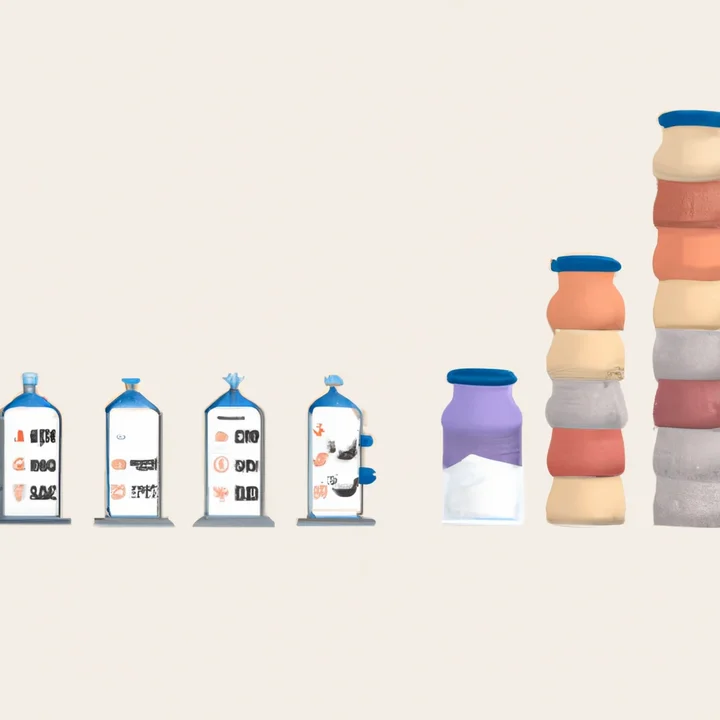 Two ways to build a food database: volume vs verified science.
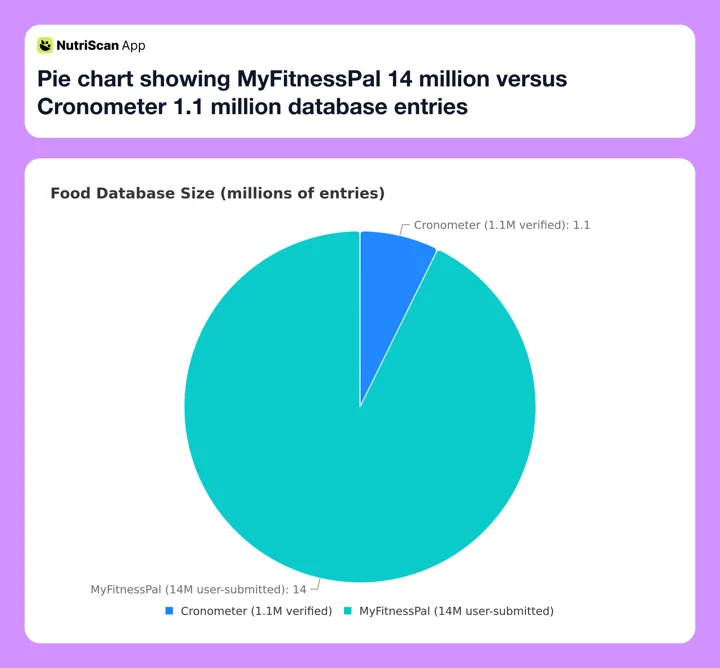 Figure 1: Database size in millions of entries - MyFitnessPal wins on volume, but volume is not accuracy.
The Morello et al. 2025 study confirmed this difference in practice. Two trained raters independently entered the same 43 three-day food records into both apps. In Cronometer, the two raters got nearly identical results - the ICC for total energy was 0.966 and for carbohydrates was 0.977. In MyFitnessPal, the numbers varied much more - the ICC for sodium dropped to 0.419 and for sugar to 0.348 (Morello et al., 2025).
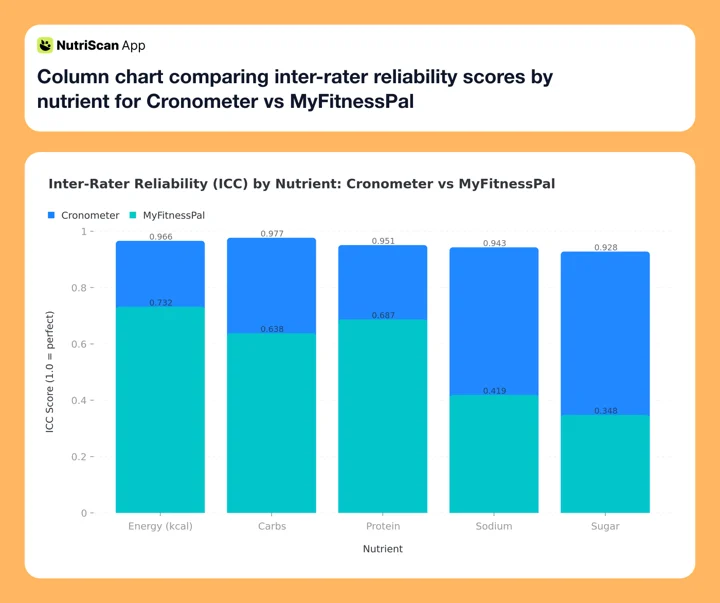 Figure 2: Inter-rater reliability (ICC) by nutrient - Cronometer scores near 1.0 across the board, MyFitnessPal drops below 0.5 for sodium and sugar.
That means two different people logging the exact same meals in MyFitnessPal could end up with very different nutrient totals, simply because they picked different entries from the database.
The tradeoff is coverage. MyFitnessPal is more likely to have that obscure restaurant meal, local snack brand, or international food item. Cronometer's smaller database means you may need to create custom entries more often, especially for restaurant foods and regional items.
Macronutrient Tracking: Both Apps Cover the Basics 🥩
If you only care about calories, protein, carbs, and fat, both apps get the job done.
MyFitnessPal shows your macro breakdown on the main diary screen. You can set custom macro targets as percentages or gram amounts. The daily view gives you a pie chart and remaining targets for each macro. Premium adds a more detailed nutrient report with charts over time.
Cronometer also displays macros prominently. The daily view shows a horizontal bar for each macro with your target and current intake. You can set targets in grams, percentages, or use one of Cronometer's built-in plans (keto, paleo, high protein, and others). The macro display updates in real time as you log.
For pure macro tracking, the experience is similar. The real difference shows up when you want to go deeper. If you want to map out your numbers before logging, our free macro calculator is a quick way to set a sensible daily target.
Micronutrient Tracking: Where Cronometer Pulls Ahead 💊
This is Cronometer's strongest advantage.
Cronometer tracks up to 84 individual nutrients on the free plan and up to 95 on Gold. That includes all 13 vitamins, major and trace minerals (calcium, iron, zinc, selenium, manganese, and more), individual amino acids, fatty acids (omega-3, omega-6), and other compounds like caffeine and alcohol. Each nutrient shows a progress bar against your daily target, color-coded from red (low) to green (met).
 Cronometer's micronutrient view shows you exactly where your diet has gaps.
MyFitnessPal tracks macros reliably, but its micronutrient data is limited. The free plan shows calories and macros. Premium adds some additional nutrients like sodium, potassium, iron, calcium, and a few vitamins. But the data depends on what each user-submitted entry includes - and many entries only have calories and macros filled in, leaving micronutrient fields blank.
This matters more than many people realize. A 2025 analysis in Frontiers in Nutrition estimated that approximately 2 billion adults globally experience at least one form of micronutrient deficiency, with significant disparities across regions and age groups (Zhang et al., 2025). Common gaps include iron, vitamin A, iodine, and zinc. If your app cannot track these nutrients accurately, you cannot identify gaps in your diet.
Cronometer also has two Gold features that help with micronutrients: Oracle Food Suggestions, which recommends foods to fill your nutrient gaps, and Nutrition Scores, which rate your daily intake quality. Neither feature exists in MyFitnessPal. Gold also raises the nutrient count from 84 to 95 and adds Photo Log, Voice Log, and Crono Coach, so the old line about Cronometer being manual-entry only no longer holds.
Real-World Examples: Who Picks Which App 👥
 Different goals call for different trackers.
Example 1: The Macro Counter Take a lifter cutting weight for a powerlifting meet: protein on a 180g target, carbs and fat tracked daily, the same 15 to 20 foods on rotation, and no interest in vitamins or minerals right now. MyFitnessPal fits that job. The large database makes every food fast to find, and the social feed adds accountability with training partners.
Example 2: The Micronutrient Optimizer Take someone who gets a blood panel every 6 months and whose last one came back low on vitamin D and borderline on iron. The goal is to see how much of each vitamin and mineral the food is actually delivering before deciding on supplements. Cronometer is the clear choice here: daily iron and vitamin D intake, progress over weeks, and Oracle to find foods that fill the gaps.
Example 3: The Busy Parent Take a parent logging meals between meetings: barcodes for packaged food, frequent searches for restaurant meals, and no patience for a slow search. MyFitnessPal wins here because it has 14 million entries including many restaurant chains and regional brands. Cronometer's 1.1 million entries cover most whole foods well, but restaurant meals often need manual entry.
Pricing Breakdown: What You Actually Pay 💰
Here is a detailed pricing comparison for 2026.
| Plan | MyFitnessPal | Cronometer |
|---|---|---|
| Free | Calorie + macro, limited features, ads, no barcode scanner (new users) | Calorie + macro + micronutrient (up to 84), barcode scanner, ads |
| Monthly paid | $19.99/mo (Premium) or $24.99/mo (Premium+) | $10.99/mo (Gold) |
| Annual paid | $79.99/yr (Premium) or $99.99/yr (Premium+) | $59.99/yr (Gold) |
| Daily cost (annual) | $0.22/day (Premium) or $0.27/day (Premium+) | $0.16/day (Gold) |
| Professional tier | Not available | $39.99/mo (Pro) |
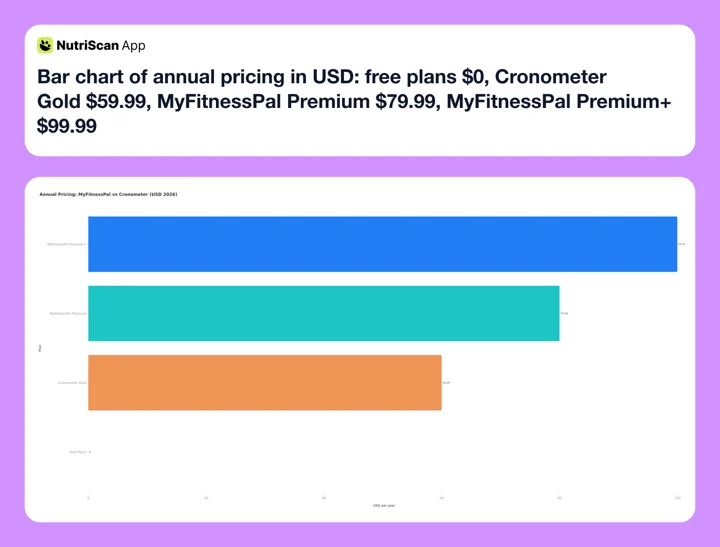 Figure 3: Annual pricing in USD. Cronometer Gold at $59.99 is the cheapest paid tier here, $20 under MyFitnessPal Premium and $40 under Premium+.
Cronometer is cheaper at every tier. Gold at $59.99 a year runs $20 under MyFitnessPal Premium and $40 under Premium+. And Cronometer's free plan includes barcode scanning, which MyFitnessPal now charges for.
The one area where MyFitnessPal offers something Cronometer does not is the Premium+ tier. Premium+ adds a Meal Planner with 1,500+ recipes, grocery lists, Instacart and Walmart+ integration, and diet preference filters. If meal planning is a priority, MyFitnessPal Premium+ is worth considering despite the higher price.
For a side-by-side breakdown, read our full guides to MyFitnessPal pricing 2026 and Cronometer pricing 2026.
Tips for Getting the Most Out of Each App 💡
If you choose MyFitnessPal:
- Always verify entries before logging. Look for the green checkmark icon, which marks verified entries. Entries without verification may have incorrect data.
- Use the barcode scanner whenever possible. Scanned entries pull data from the manufacturer label, which is more accurate than user-submitted searches.
- Create your own entries for foods you eat regularly. This avoids the problem of picking different entries each time and getting inconsistent numbers.
- Set custom macro targets in grams rather than percentages. Gram targets give you a fixed daily goal that does not shift when your calorie target changes.
- Check the serving size before you log. Many MFP entries use unusual serving sizes (like 100g instead of 1 cup), which can throw off your totals if you log the wrong amount.
Pro tip
Different entries for the same food can carry very different calorie counts. Building a small personal library of custom foods (10-15 staples) makes your weekly numbers far more consistent.
If you choose Cronometer:
- Start with the macro view and expand to micros gradually. Tracking 84 or more nutrients at once can feel overwhelming. Focus on your top priorities first, then add more nutrients to your dashboard as you get comfortable.
- Use the Oracle feature (Gold) to identify your biggest nutrient gaps. Oracle analyzes your recent intake and suggests specific foods to fill deficiencies.
- Connect a fitness tracker for more accurate calorie burn estimates. Cronometer syncs with Fitbit, Garmin, Apple Watch, and other devices.
- Use the copy meal feature for repeated meals. If you eat the same breakfast daily, copy it instead of searching and logging each item again.
- Enable the fasting timer (Gold) if you practice intermittent fasting. The timer integrates with your food log so you can see eating windows alongside your nutrient data.
 The best tracker is the one you actually keep using - and the meals you cook with it.
Step-by-Step: How to Decide Between the Two 📋
Follow these five steps to pick the right app for your goals.
Step 1: Define what you need to track. If your answer is "calories and macros" - both apps work. If your answer includes vitamins, minerals, or amino acids - Cronometer is the better choice.
Step 2: Check your budget. Cronometer Gold costs $59.99/yr. MyFitnessPal Premium costs $79.99/yr. If you want the paid features and budget matters, Cronometer saves you $20 per year. If you need AI photo logging or the Meal Planner, only MyFitnessPal Premium+ ($99.99/yr) offers those.
Step 3: Test the free plan of each app for one week. Download both. Log the same meals in each. Compare how easy it is to find your foods, how accurate the data feels, and which interface you prefer. Cronometer's free plan is more generous (barcode scanning included), but MyFitnessPal's database will have more matches for restaurant and packaged foods.
Step 4: Look at your food habits. If you eat mostly whole foods and cook at home, Cronometer's verified database will cover nearly everything. If you eat out frequently, order delivery, or buy many packaged snacks, MyFitnessPal's larger database will save you time.
Step 5: Check for deal-breakers. Do you need social features and a friend feed? Only MyFitnessPal has that. Do you want a fasting timer built into your tracker? Only Cronometer Gold offers that. Do you need to share data with a dietitian or coach? Cronometer Pro has a dedicated professional portal.
What the Research Says About Tracking Apps 🔬
The accuracy difference between these apps is not just a marketing claim. The Morello et al. study is one of the first to directly compare MyFitnessPal and Cronometer with the same food records in a controlled setting. The finding that MyFitnessPal had poor validity for energy, carbohydrates, protein, cholesterol, sugar, and fiber is significant for anyone relying on the app for precise nutrition targets (Morello et al., 2025).
A 2025 systematic review and meta-analysis of 21 studies found that mobile app-based dietary interventions led to meaningful behavior changes, including an increase of 0.48 portions of fruit and vegetables per day (Curtin et al., 2025). The key takeaway: using any tracking app consistently helps more than not tracking at all. But the accuracy of the data you get back affects how well you can identify patterns and make corrections.
A separate 2025 study on adherence to self-monitoring found that higher adherence to dietary tracking was associated with greater odds of achieving 5% or more weight loss (Burke et al., 2025). This reinforces that consistency matters more than which app you pick - but if you are going to track, accurate data makes the effort more useful.
Garage Gym Reviews tested Cronometer in 2026 and gave it a 4.4 out of 5 rating. Reviewer Chelsea Rae Bourgeois, MS, RDN, LD, highlighted the depth of the nutrient tracking as the standout feature, noting that Cronometer is one of the few apps that pulls data from lab-analyzed sources rather than user submissions (Garage Gym Reviews, 2026).

Common Mistakes When Switching Between These Apps ⚠️
If you are moving from one app to the other, watch out for these issues.
Mistake 1: Assuming your old macros transfer directly. MyFitnessPal and Cronometer may calculate slightly different calorie and macro totals for the same food because they use different database sources. Expect small differences in your daily totals for the first week.
Mistake 2: Not re-setting your targets. Both apps use your weight, height, activity level, and goal to calculate targets. Make sure you enter the same values in both apps before comparing results.
Mistake 3: Ignoring the free trial. If you want to try Cronometer Gold, you may need to email their support team to request a trial - there is no standard free trial button in the app. MyFitnessPal offers a 7-day Premium trial, not the longer one older write-ups mention.
Mistake 4: Deleting the old app too soon. Keep both apps installed for at least two weeks. This gives you time to rebuild your favorite foods, custom entries, and meal templates in the new app.
Mistake 5: Neither app exports to the other. There is no direct data transfer between MyFitnessPal and Cronometer. You cannot move your food log history, custom foods, or recipes. You start fresh in the new app. Our 7-day switching plan covers what to export first and what to rebuild.
Heads up
If you take medication, are pregnant, or manage a chronic condition like diabetes or PCOS, do not use any tracker (or its targets) as medical guidance. Loop in a clinician or RD before setting strict calorie or macro limits.
The Tie-Breaker: Why Logging Friction Beats Database Size 🧩
Here is the single feature that, in my testing, made the bigger difference than database size or micronutrient depth: how long it takes to log a meal you actually ate.
Both apps lose to the same enemy - time-to-log. MyFitnessPal's larger database helps here because the first search result is usually close enough. Cronometer's smaller database is more accurate but slower for restaurant and brand items, which is where most logging fatigue happens.
This is why I started recommending AI photo logging to friends and family who wanted to track. Snapping a photo of a plate and getting an estimate back beats a search-and-pick cycle, even when the photo estimate is the rougher number. Consistency beats precision when neither app's precision is perfect anyway. NutriScan was built around this principle - photo first, search second, manual last. The accuracy gap between Cronometer and a good AI photo log is smaller than the accuracy gap between Cronometer and "I gave up logging."
So if you are still on the fence: pick MyFitnessPal if you log mostly packaged or restaurant food, pick Cronometer if you cook at home and care about micronutrient gaps, and pick a photo-first tracker if logging time is the reason you keep quitting.
How NutriScan Compares 📸
NutriScan takes a different approach from both MyFitnessPal and Cronometer. Instead of manual search and log, NutriScan uses AI photo scanning as the primary logging method. You take a photo of your meal, and the app identifies the foods and estimates calories and macros. The free plan includes 5 AI scans per week, enough to test the scanner on the meals a food database cannot read, your curries, restaurant plates, and mixed bowls. Premium adds unlimited scans and a "what to eat next" feature that suggests meals based on your remaining daily targets.
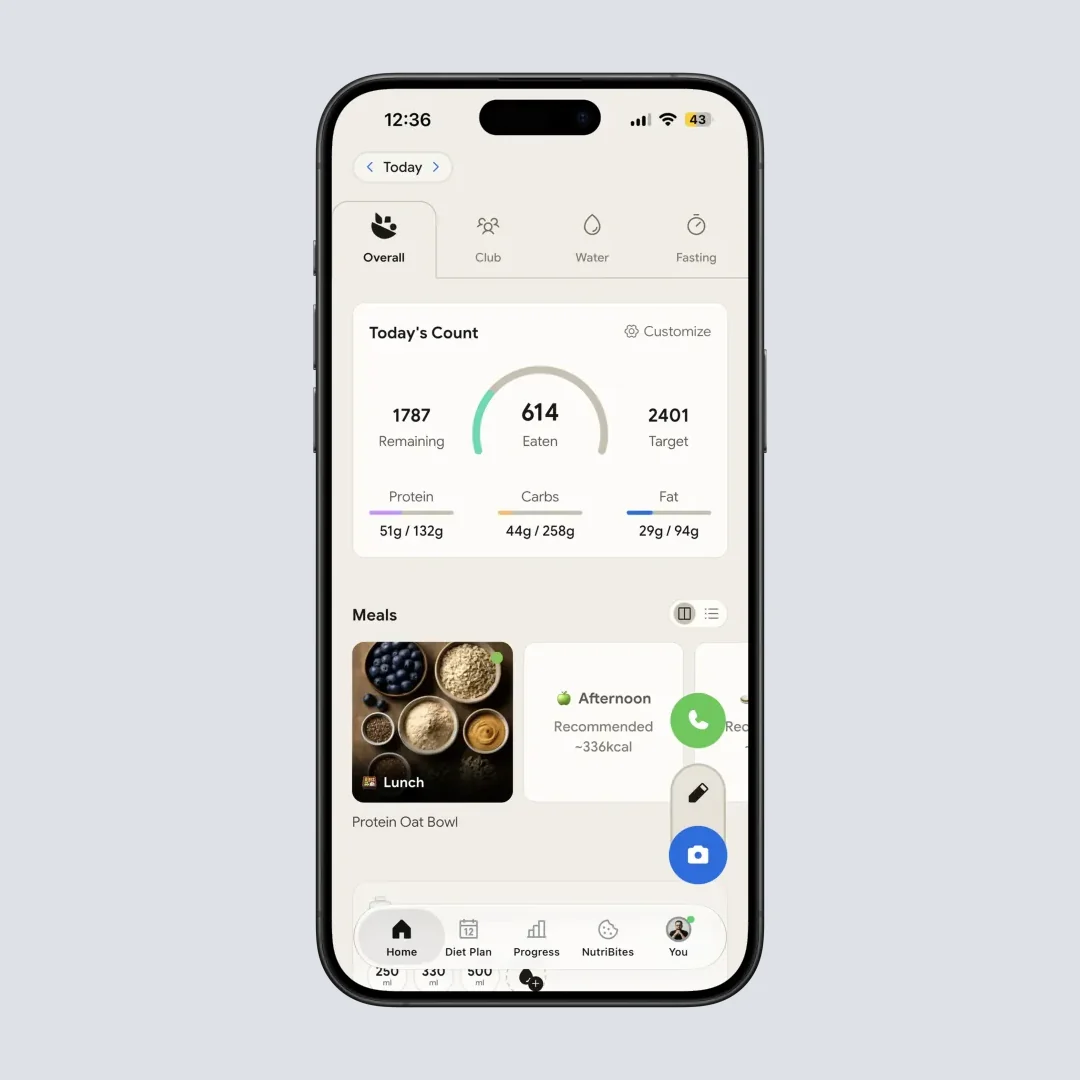
NutriScan home screen with macro and calorie summary at a glance.

Home > Camera Icon > Crop Picture - tap, snap, and the AI handles the rest.
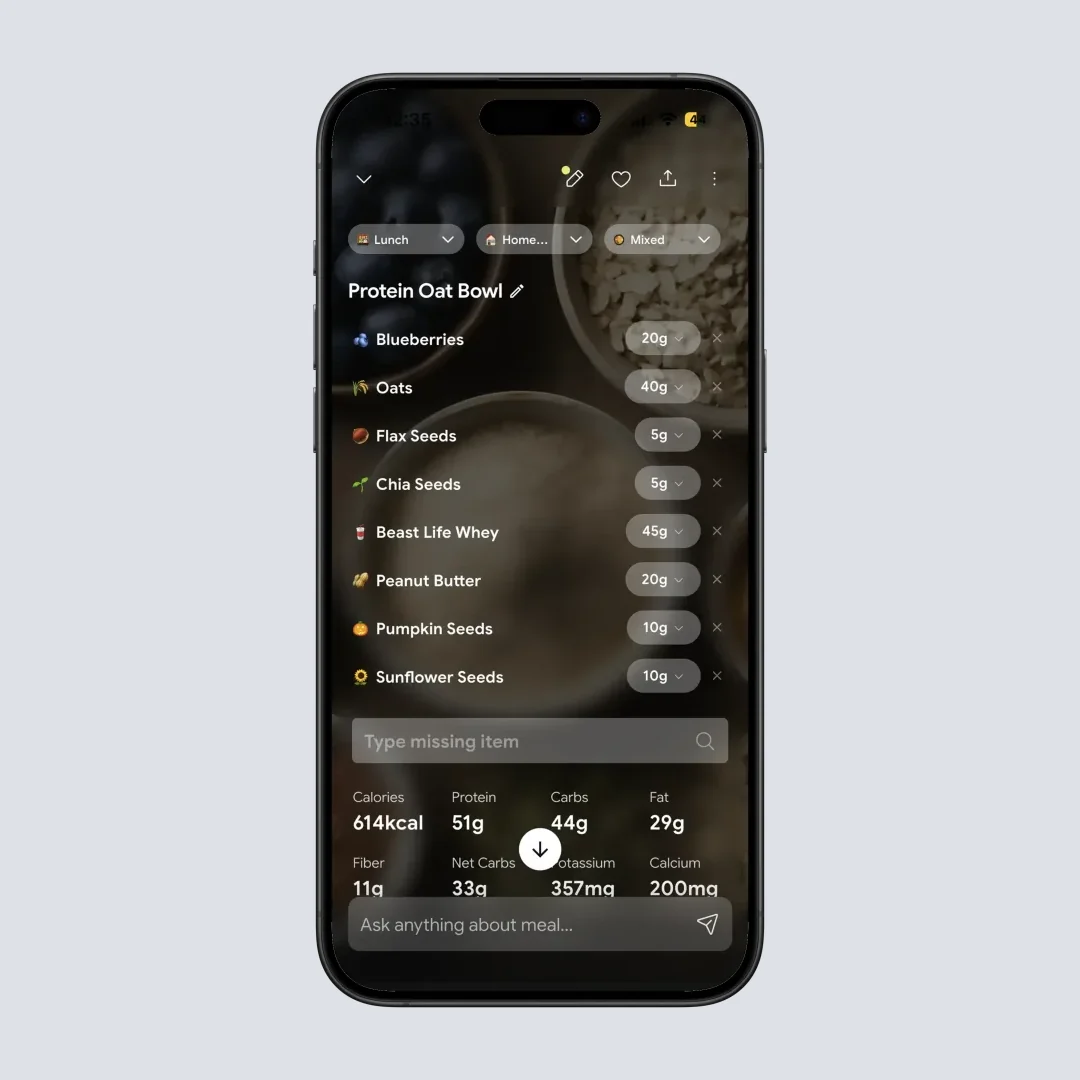
Tap any meal to see the full nutrition details and adjust portions.
If you want a deeper comparison, our breakdowns of MyFitnessPal vs FatSecret and NutriScan vs Cronometer cover the other matchups in detail.
Conclusion 📝
MyFitnessPal and Cronometer answer two different questions. MyFitnessPal asks: "What did you eat?" - and tries to match it from the biggest food library on Earth. Cronometer asks: "What nutrients did you actually get?" - and gives you a verified, lab-sourced answer.
If you eat mostly cooked-at-home whole foods and care about iron, vitamin D, or omega-3 gaps, Cronometer is the smarter pick - and the cheaper one. If you eat out a lot, scan barcodes constantly, and want the social side of tracking, MyFitnessPal still wins on convenience.
Whichever you pick, the most important factor is showing up daily. Use the free macro calculator to set a sensible target, log consistently for two weeks, then re-evaluate. The best tracker is the one you don't quit. 🌟
Frequently Asked Questions ❓
Q: Is Cronometer more accurate than MyFitnessPal?
A: Yes, based on current evidence. A 2025 study tested both apps with the same food records and found Cronometer had excellent inter-rater reliability (ICC above 0.94 for most nutrients), while MyFitnessPal had low reliability for sodium (0.419) and sugar (0.348) (Morello et al., 2025). The difference comes from Cronometer using lab-verified database entries versus MyFitnessPal's user-submitted entries.
Q: Can I track micronutrients in MyFitnessPal?
A: Only partially. MyFitnessPal Premium shows some additional nutrients like sodium, potassium, iron, and calcium. But the data depends on what users entered for each food item - many entries only include calories and macros, leaving micronutrient fields empty. Cronometer tracks up to 84 nutrients free and up to 95 on Gold, all from verified sources, which gives you complete data for every logged food.
Q: Which app is better for weight loss?
A: Both work for weight loss. The most important factor is consistent logging, not which app you use. A 2025 study found that higher adherence to dietary self-monitoring was associated with greater odds of losing 5% or more body weight (Burke et al., 2025). If you only need calorie and macro tracking, either app works. If you also want to monitor nutrient quality during your cut, Cronometer gives you more data.
Q: Is MyFitnessPal free in 2026?
A: MyFitnessPal has a free plan, but it is more limited than before. New users no longer get free barcode scanning - that feature moved to Premium. The free plan still includes calorie and macro tracking, food search, and basic reporting. Premium costs $79.99/yr or $19.99/mo. Premium+ costs $99.99/yr or $24.99/mo and adds a Meal Planner.
Q: Is Cronometer free in 2026?
A: Yes. Cronometer's free plan includes calorie, macro, and micronutrient tracking for up to 84 nutrients, plus barcode scanning. The free plan shows ads. Gold ($59.99/yr) raises the count to 95, removes ads, and adds a fasting timer, Photo Log, Voice Log, Oracle food suggestions, custom charts, and Nutrition Scores. The free plan is one of the most generous among all nutrition tracking apps.
Q: Can I use both apps at the same time?
A: You can, but it creates extra work. Some people log in one app for daily tracking and check the other occasionally for a specific purpose (like reviewing micronutrient data in Cronometer while using MyFitnessPal for daily macros). If you do this, pick one as your primary tracker to avoid logging fatigue.
Q: Does Cronometer have a social feature like MyFitnessPal?
A: No. Cronometer does not have a friend feed, community challenges, or social sharing within the app. It has an online forum and Facebook community group, but no in-app social features. If accountability through friends or a social feed is important to you, MyFitnessPal is the better choice.
Q: Can I track caffeine or alcohol in either app?
A: Cronometer tracks both natively as part of its nutrient panel. MyFitnessPal does not have a built-in tracker for caffeine; alcohol shows up if the food entry includes it but is not separately tallied.
