How to Switch From MyFitnessPal to Lifesum for Meal Plans
 ChatGPT
  Claude
  AI Mode
  Perplexity
Lifesum will not show you a weight loss meal plan unless your calorie goal sits between 1200 and 2100 kcal, and most plans also require zero allergies and zero food preferences. Your MyFitnessPal diary does not transfer at all. The switch that works is a settings job: export your history while Premium is active, set a qualifying calorie goal, clear blocking preferences, rebuild three recipes and 20 foods, then start one plan on a shopping day.
TL;DR - Switching From MyFitnessPal to Lifesum
The gate: All six Lifesum weight loss plans require a calorie goal of 1200 to 2100 kcal. Outside the band, they vanish from the Programs tab.
The second gate: Nine of eleven plans accept no allergies and no food preferences. Vegan for a Week and Paleo are the exceptions.
What transfers: Nothing. No import tool exists in either direction. Export your MyFitnessPal CSVs before you cancel, because export is Premium-only.
You rebuild: About 20 favorite foods and 3 recipes, by hand. Budget 20 minutes.
The price gap: MyFitnessPal's Meal Planner needs Premium+ at $99.99 per year. Lifesum's plans sit in one Premium tier around $30 to $45 per year.
NutriScan publishes this post, and we make a competing app. A 2025 review in Nutrients found that strategies that reduce the number of daily food decisions, like a stable meal structure, were among the ones people found easier to maintain (Żurawski and Bartosiewicz, 2025). That is the honest reason people leave MyFitnessPal for Lifesum. They are tired of staring at an empty diary and deciding dinner at 7pm.
The catch shows up after payment. Lifesum's meal plans are not always visible. Every weight loss plan only appears in the app if your calorie goal falls inside a specific range, and most of them appear only if you have not set any allergies or food preferences. Bring the wrong numbers over from MyFitnessPal and you will open the Programs tab, look for the plan you switched for, and find it missing.
So this guide is built around the settings, not the download. Get the calorie goal and the preferences right first, and the plans show up on day one.
IMPORTANT
Your switching plan at a glance.
A quick roadmap so you know what to do tonight and what can wait for the weekend.
⏱️ Progress 0/4 • ~0 minutes in • Keep going
⏳ Step 1: Get your data out of MyFitnessPal before you cancel
⏳ Step 2: Set a calorie goal that actually qualifies you for the plans
⏳ Step 3: Rebuild your recipes and pick one plan
🔍 The one tap inside Lifesum that quietly rewrites your whole three-week menu (revealed near the end)
Why People Move From MyFitnessPal to Lifesum for Meal Plans 💸
Price is the loud reason. MyFitnessPal's Meal Planner sits on the Premium+ tier at $99.99 per year, not on standard Premium at $79.99 (MyFitnessPal Blog). Lifesum puts meal plans inside its single Premium tier, which runs roughly $30 to $45 a year depending on region and promotion. I broke down every tier in my Lifesum pricing guide.
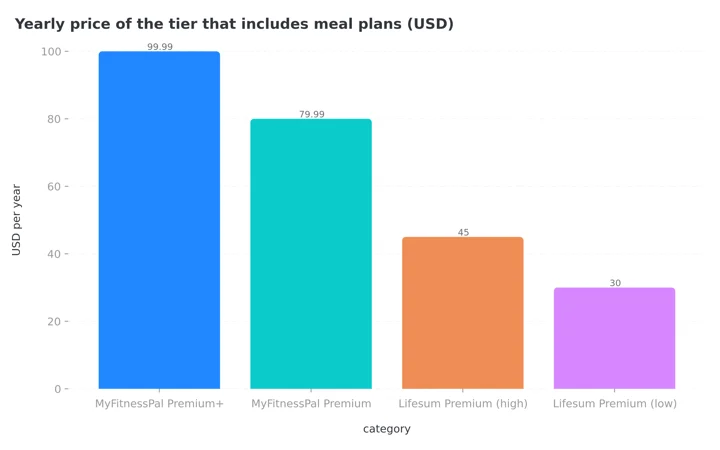 Figure 1: The tier you need for meal planning. The cheapest route to a meal plan costs two to three times more on MyFitnessPal than on Lifesum.
The quieter reason is the shape of the help. MyFitnessPal's planner builds a week around your calorie target and your restrictions. Lifesum hands you a named plan with a start date, a finish date, four recipes a day, and a shopping list. One gives you a number. The other gives you a menu.
The two apps are compared feature by feature in our MyFitnessPal vs Lifesum breakdown, so we will not repeat that here. This post assumes you have already decided. Now you have to actually move.
The Gate at the Door: 1200 to 2100 Calories 🚪
Lifesum publishes the entry requirements for every meal plan, and the numbers are strict. All six of its weight loss plans, which are 3 Weeks Weight Loss, Keto Burn, High Protein Weight Loss, Paleo, Sugar Detox, and Vegan for a Week, only support a calorie goal between 1200 and 2100 kcal. If your goal sits outside that band, the company says plainly that the plan will not show up under the Programs tab (Lifesum Helpdesk).
This is where switchers get stuck. MyFitnessPal calculates your goal from your stats and your chosen rate of loss, and it will happily hand a taller or more active person a target of 2,300 or 2,500 calories (MyFitnessPal Support). Carry a 2,400 goal into Lifesum and every weight loss meal plan disappears. Nothing is broken. You just do not qualify.
The other five plans carry no calorie limit at all: Keto Maintain, both 16:8 fasting plans, Hormonal Balance, and Eat Like Denise. If your number is high and you do not want to lower it, those five are your options. Note that Eat Like Denise only runs in English and Swedish.
| Plan | Goal required | Length | Calorie range |
|---|---|---|---|
| 3 Weeks Weight Loss | Lose weight | 21 days | 1200-2100 kcal |
| Keto Burn | Lose weight | 21 days | 1200-2100 kcal |
| High Protein Weight Loss | Lose weight | 21 days | 1200-2100 kcal |
| Paleo | Lose weight | 21 days | 1200-2100 kcal |
| Sugar Detox | Lose weight | 21 days | 1200-2100 kcal |
| Vegan for a Week | Lose weight | 7 days | 1200-2100 kcal |
| Keto Maintain | Maintain weight | 21 days | Any |
| 16:8 Morning or Evening | Any goal | 21 days | Any |
| Hormonal Balance | Any goal | 21 days | Any |
| Eat Like Denise | Any goal | 7 days | Any |
Source: Lifesum Helpdesk, requirements page updated March 2026.
One more detail worth knowing before you commit. The 3 Weeks Weight Loss plan is written around roughly 1600 calories a day, adjusted for your body type (Lifesum). If your working MyFitnessPal number was 1,900, the plan will feel light. That is not a bug either. The plans are built to a general recipe, not to you.
Your Allergies and Food Preferences Can Hide the Plan Too 🥜
The same requirements page lists a second filter, and it is stricter than the calorie one. For most plans, the allowed food preferences are "None" and the allowed allergies are "None."
Vegan for a Week is the only plan that accepts vegan, vegetarian, or pescatarian settings, and it accepts five allergy types: fish, shellfish, milk, egg, and lactose. Paleo accepts wheat and gluten. Every other weight loss plan accepts nothing at all.
So if you moved over as a vegetarian who avoids nuts, your visible plan list shrinks to a seven day vegan menu and the plans with no calorie or preference limits. That is a real constraint, and it is the single biggest reason a switcher asks for a refund in week one. Check it before you pay, not after.
This is also the one place where the app you are leaving is stronger. MyFitnessPal's Meal Planner asks for your allergies, restrictions, and cuisine preferences during setup, and offers ten dietary approaches to choose from (MyFitnessPal Blog, 2025). It builds a plan around your restrictions. Lifesum picks a plan that already exists and checks whether you fit it. If allergies are central to how you eat, that difference matters more than the price gap.
Your Diary Does Not Transfer, So Plan the Rebuild 📦
There is no import button. Lifesum has no tool for reading a MyFitnessPal export, and MyFitnessPal does not accept data from other trackers either. When a user asked the MyFitnessPal team about bulk importing a competitor's history, staff replied that importing data from other sources is not a current possibility (r/Myfitnesspal).
Lifesum's own data tools point the same direction. The help center describes exporting your nutrition data out of Lifesum and syncing weight in from Apple Health, and nothing about pulling a diary in from a rival app (Lifesum Helpdesk). The pattern holds across the whole category, and we mapped it app by app in our nutrition app data export guide.
The cause is structural. Food databases are proprietary and their entries have no shared IDs, so even a perfect file transfer would land in your new diary as rows with no nutrition attached.
Accept the rebuild and the job gets small fast. You do not need four years of breakfasts. You need your last 20 foods, your two or three real recipes, your current weight, and one calorie number.

Step 1: Export Your MyFitnessPal Data Before You Cancel 📤
Do this first, while your subscription is still alive. MyFitnessPal's file export is a Premium and Premium+ feature, so the button vanishes the moment your plan lapses (MyFitnessPal Support).
On the website, open Reports, click Export, choose a date range, and confirm. On iOS, go to More, then Nutrition, then Export. On Android, open More, go to Progress or Nutrition, and tap the export icon. You get an email with a zip containing three CSV files: nutrition, progress, and exercise.
Free account? You still have a route. The MyFitnessPal Privacy Request Center lets you request a copy of your personal data, and depending on your region that covers a portable format (MyFitnessPal Privacy Rights). Slower, and not laid out for nutrition analysis, but free.
Only cancel once the file is in your inbox. Our guide to canceling MyFitnessPal before you are charged covers the store side.
IMPORTANT
Checkpoint: here's where you are right now.
Your history is safe in your inbox. Next comes the setting that decides whether the plans appear at all.
⏱️ Progress 1/4 • ~3 minutes in • Keep going
✅ Step 1: Get your data out of MyFitnessPal (done)
👉 Step 2: Set a calorie goal that qualifies you for the plans (you're here)
⏳ Step 3: Rebuild your recipes and pick one plan
🧩 The tap that rewrites your three-week menu (coming soon)
Step 2: Set Your Calorie Goal Before You Shop for a Plan 🎯
Open the CSV, look at the last 30 days, and find the calorie number you actually hit on the days that were working. Not the target. The average.
Now set that number in Lifesum, with one adjustment: if it sits above 2100, decide what you want more. A weight loss meal plan means dropping your goal into the band. Keeping a 2,400 goal means using Keto Maintain, a fasting plan, or Hormonal Balance instead, since those carry no calorie limit.
Do not fake a low number just to make a plan appear. Aggressive targets fall apart in week two, and a plan you abandon is worth less than a diary you keep. If your honest maintenance intake is high, the fasting plans are the better door.
Step 3: Rebuild Your Recipes by Hand 🧱
This is the part that stings, and it is worth saying clearly: Lifesum has no recipe URL importer. MyFitnessPal Premium does, and it is the feature switchers miss most. In Lifesum you build each recipe by adding ingredients one at a time.
 Rebuild the recipes you actually cook. The rest were never coming with you anyway.
Two rules make it survivable. First, only rebuild what you eat weekly. Most people have four or five real repeat meals and a long tail they will never cook again. Second, save each one under Favorites in the Progress tab, which is also where you go to edit them later. Lifesum's own recipes cannot be edited at all, only yours (Lifesum Helpdesk).
Budget 20 minutes. Three recipes and 20 favorite foods will cover most of your week, and you can add the rest as they come up.
Step 4: Pick One Plan and a Start Date 📅
Lifesum currently offers eleven meal plans, each with a shopping list and recommended meals for every day (Lifesum Helpdesk). Pick one. Not two, not a plan you will start "soon."
Start on a shopping day, because the plan hands you a list and expects you to have the food. Starting on a Wednesday with an empty fridge is how a 21 day plan dies on day 3.
 Day one of a Lifesum plan starts in the store, not in the app.
A quick note on names. Lifesum's own pages spell the same plans differently, so "Protein Weight Loss" is "High Protein Weight Loss" and "Eat like Denice" is "Eat Like Denise." Search loosely.
IMPORTANT
Checkpoint: midway progress update.
Goal set, recipes rebuilt, plan picked. Two buttons inside the plan remain, and one of them is the trap.
⏱️ Progress 2/4 • ~6 minutes in • Keep going
✅ Step 1: Get your data out of MyFitnessPal (done)
✅ Step 2: Set a calorie goal that qualifies you for the plans (done)
✅ Step 3: Rebuild your recipes and pick one plan (done)
👉 The tap that rewrites your three-week menu (next section)
The Two Buttons That Trip Up Every Switcher 🚨
"Eat this every day." This is the tap teased above. Hitting it on a meal tells the planner to repeat that meal for every remaining day of the plan, and undoing it is not one tap. You have to open each future day and swap the meal back individually (Lifesum Helpdesk). One tap on day 2 can rewrite nineteen dinners. Use it for breakfast, where repetition helps. Think twice for dinner.
"Restart Plan." On iOS it is in the top right of the Programs or Diet tab. On Android, tap the active plan, or use the three dots in the meal planner inside your diary. Restarting is the right move after a holiday or a sick week, and better than quitting.
One structural thing to expect: Lifesum requires a program to be active at all times. There is no "no program" state. Everyone starts on Lifesum Standard, the balanced default, and returns to it after leaving a plan. Coming from MyFitnessPal, this feels strange for about a day.
What Happens on Day 22 🗓️
Your plan ends. Most Lifesum plans run 21 days, and two run 7. On the day after, the menu stops arriving and you are back on Lifesum Standard, choosing your own meals again.
That transition is the whole ballgame, and the research is blunt about it. In the 2025 Nutrients review, adherence reached around 90% during months of intensive dietitian support and then fell to 49% once contact became limited (Żurawski and Bartosiewicz, 2025). Structure works while the structure is there. Take it away and half of it goes.
Plan for day 22 before you reach it. Two options work well. Restart the same plan for another 21 days if you liked the food. Or keep logging on Lifesum Standard using the favorites and recipes you built in Step 3, which is why that step matters more than it looks.
What Gets Worse After You Switch ⚠️
I would rather you read this here than discover it in month two.
Limitations to plan around
Getting your data back out is limited. Lifesum's self serve export covers only the past 7 days and is labeled a beta feature. For your full history, including recipes, weight, and body measurements, you have to email support from your registered address and ask (Lifesum Helpdesk). MyFitnessPal's Premium export was a button. This is a request.
The plans are generic. Lifesum says so directly: the meal plans are based on general recommendations and are not tailored to your specific goals, so daily macros will not match your targets exactly (Lifesum Helpdesk). Treat them as guidelines rather than prescriptions.
Some trackers switch off. While a meal plan is running, the vegetable, fruit, and fish trackers disappear from your diary view. They come back when the plan finishes.
No recipe URL import. Covered above, and it does not get better with time.
7 Tips That Make the First Month Stick 💡
- Check the requirements page before you pay. Two minutes there saves a refund request later.
- Log the plan meals, do not just eat them. Following without logging leaves you with no record when you want to know why a week went well.
- Look at the daily bar, not only the log. Feedback on your own numbers appears to matter: a 2024 meta-analysis found that interventions adding feedback to self-monitoring outperformed self-monitoring alone on physical activity outcomes, with a standardized effect of 0.29 (95% CI 0.16 to 0.43) (Krukowski et al., 2024). The evidence for diet is thinner, but the mechanism is the same: a number you see is a number you react to.
- Use the shopping list as written for week one. Customize in week two, once you know which recipes you actually like.
- Do not chase perfect entries. In an 8 week study of 90 adults, logging consistency and frequency predicted weight loss while completeness did not (Payne et al., 2022).
- Keep weighing in on the same day. Your MyFitnessPal weight history does not move over, so a fresh trend line needs a few weeks of steady points.
- Give it three weeks before judging. One full plan cycle is the smallest fair test.

The 7-Day Switch Plan 🗺️
| Day | Task | Time |
|---|---|---|
| 1 | Export MyFitnessPal data, both full history and last 90 days | 10 min |
| 2 | Find your real average calorie intake in the CSV | 15 min |
| 3 | Install Lifesum, set goal, weight, and preferences | 10 min |
| 4 | Open Programs, confirm the plan you want is visible | 5 min |
| 5 | Rebuild 20 favorite foods and 3 recipes | 20 min |
| 6 | Choose your plan, set the start date, run the shopping list | 20 min |
| 7 | Start the plan, log every meal, cancel MyFitnessPal | 10 min |
Ninety minutes total, spread across a week. The order matters more than the speed, because day 4 is the checkpoint that saves the whole switch.
What the Research Says About Switching Without Falling Off 🔬
The risk in any app change is the quiet week where the old app is abandoned and the new one is still empty. That week costs more than the features you gained.
In a 2025 trial of 502 adults, each step up in food logging adherence raised the odds of losing at least 5% of body weight by 25%, with an adjusted odds ratio of 1.25 (95% CI 1.19 to 1.31) (Burke et al., 2025). Adherence, not app choice, carried the result.
The Nutrients review points the same way. Regular monitoring of weight and dietary intake was one of the factors linked to maintaining weight loss, alongside personalized strategies and social support (Żurawski and Bartosiewicz, 2025).
So keep logging in MyFitnessPal until the day your Lifesum plan begins. Overlap is cheap. A gap is not.
Where NutriScan Fits in This Decision 📱
If a fixed 21-day menu from a named plan is exactly what you want, Lifesum is the right destination and this guide is the whole answer.
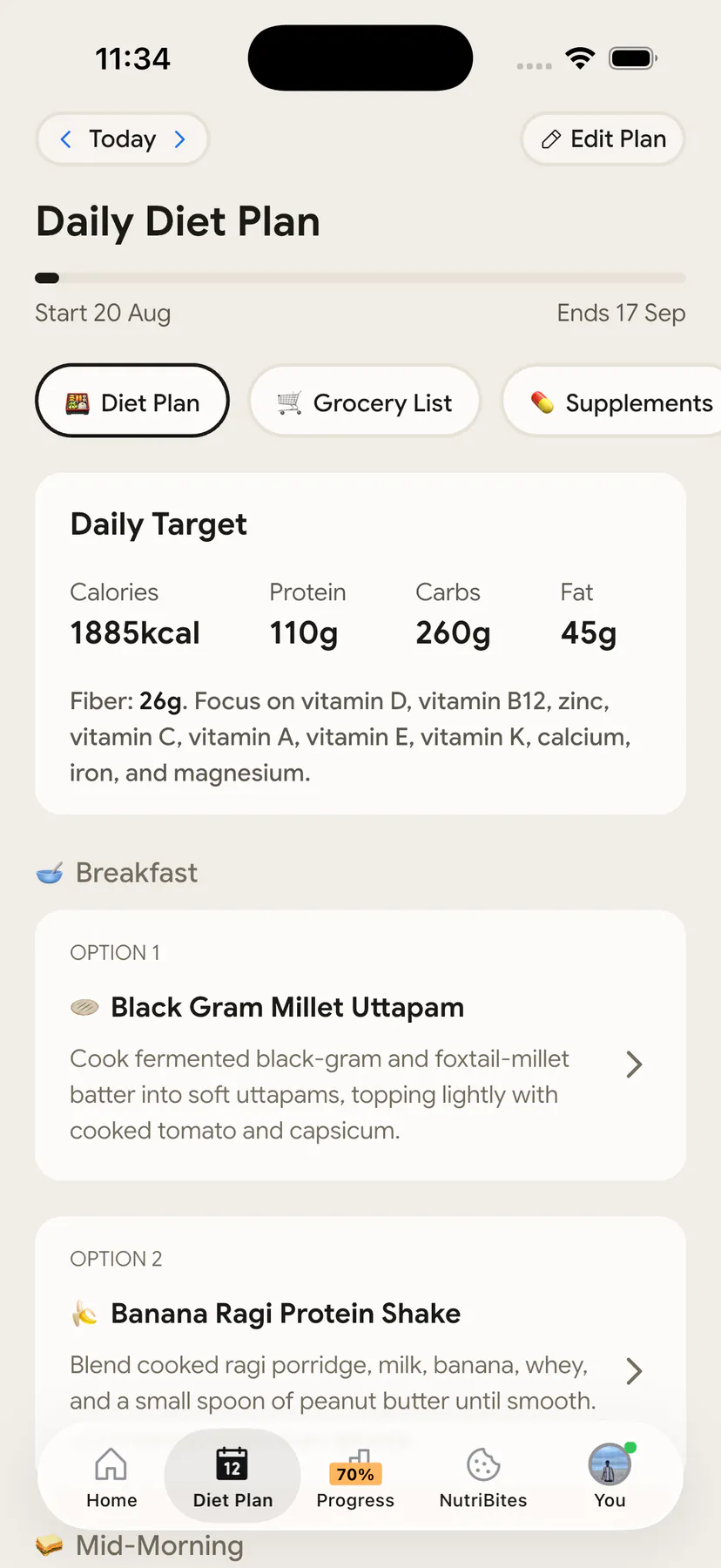
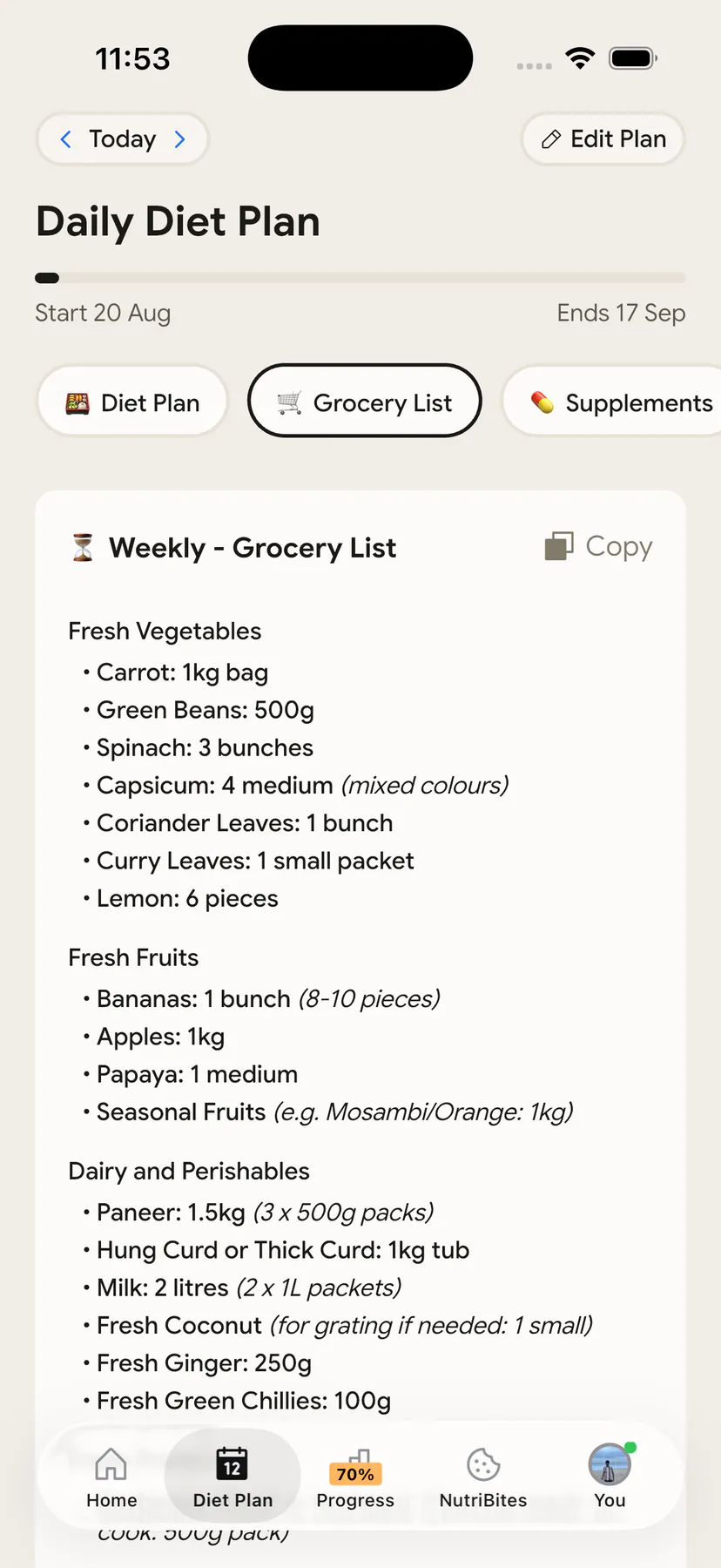
If what you actually want is a meal plan built around you rather than a plan you have to qualify for, that is the job NutriScan's Diet Plan does differently. It asks for your cuisine preferences and goals, generates a plan with a start date, daily macro and micronutrient targets, and a weekly or monthly grocery list, and it renews or updates after 28 days (Home > Bottom Nav Diet Plan). There is no calorie band to fit into, because the plan is generated from your numbers instead of checking whether your numbers fit a pre-written menu. Meals you eat off-plan, like a restaurant plate or a shared dish, get logged by photo instead of search. We put the two apps side by side in NutriScan vs Lifesum.
IMPORTANT
Recap: everything you completed this round.
You finished the run. Save this for the evening you actually make the move.
⏱️ Progress 4/4 • ~10 minutes in • Nicely done
✅ Step 1: Export from MyFitnessPal while Premium is active ➡️ find your real 30-day average
✅ Step 2: Set a goal inside 1200 to 2100 kcal, or pick a no-limit plan ➡️ clear blocking preferences
✅ Step 3: Rebuild 3 recipes and 20 foods ➡️ pick one plan, start on a shopping day
✅ The trap: "Eat this every day" repeats a meal across every remaining day, and undoing it is day-by-day (revealed)
If a different destination fits you better, the same export-first sequence works for the MyFitnessPal to Cronometer switch, the MyFitnessPal to Lose It switch, and the MyFitnessPal to MacroFactor switch.
Conclusion: Make the Settings Match Before You Move
The move from MyFitnessPal to Lifesum is not a data migration. There is nothing to migrate. It is a settings negotiation, and the negotiation happens before you pay.
Set a calorie goal inside 1200 to 2100 if you want the weight loss plans. Understand that allergy and preference settings can hide plans entirely. Export your MyFitnessPal file before you cancel. Rebuild three recipes and 20 foods. Then start one plan on a shopping day and log it for 21 days.
If you would rather have a plan generated around your own targets, with photo logging for the meals that never fit a menu, try NutriScan and its Diet Plan for a few weeks instead. Whatever you choose, the app that wins is the one still open in week six.
Frequently Asked Questions
Can I import my MyFitnessPal diary into Lifesum? No. Lifesum has no import tool for MyFitnessPal data, and MyFitnessPal staff have said importing data from other sources is not currently possible in the other direction either. Plan for a manual rebuild of your favorite foods and recipes.
Why can I not see the meal plan I signed up for? Almost always the calorie goal or the preference settings. All six of Lifesum's weight loss plans require a calorie goal between 1200 and 2100 kcal, and nine of its eleven plans accept no allergies or food preferences at all. Plans that fail the requirements do not appear in the Programs tab.
How long do Lifesum meal plans last? Most run 21 days. Vegan for a Week and Eat Like Denise run 7 days. When a plan ends you return to Lifesum Standard, and you can restart the same plan from the Programs tab if you want another cycle.
Is Lifesum cheaper than MyFitnessPal for meal planning? Yes, by a wide margin. MyFitnessPal keeps the Meal Planner on Premium+ at $99.99 per year. Lifesum includes meal plans in its single Premium tier at roughly $30 to $45 per year depending on region and promotion.
Can I get my data out of Lifesum later? Partly, and not in one click. The website export covers only the past 7 days and is still a beta feature. For your full history, including recipes and weight, you have to email Lifesum support from the address on your account and request it.
This article is for general information and is not medical advice. Talk to a doctor or registered dietitian before starting a restrictive eating plan, especially a very low calorie one. If you have or think you may be at risk of an eating disorder, please seek professional support.