Is Lifesum Premium Worth It? Real Cost, Meal Plans, Free vs Paid
 ChatGPT
  Claude
  AI Mode
  Perplexity
 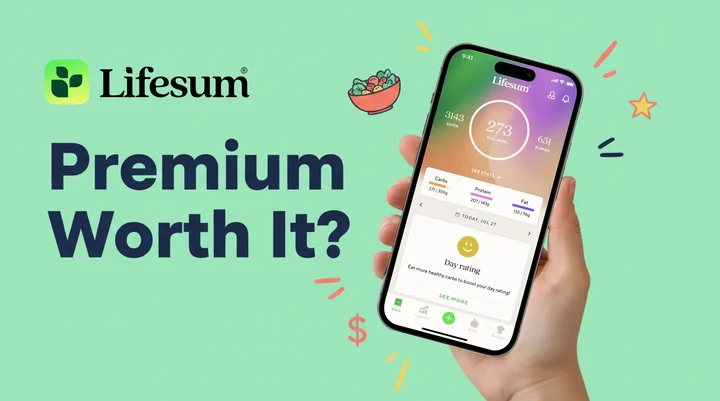 Photo by
 As a NutriScan nutritionist, I get asked about Lifesum Premium at least twice a week. Lifesum Premium is worth it if you want the nutritionist-built meal plans and custom macro targets, and it is money wasted if you only count calories, because Lifesum's free plan already does that. Prices below are standard US prices as of mid 2026 and change by region. The annual plan runs $44.99 to $99.99 depending on which pricing test you land in, and the quarterly plan runs $21.99 to $29.99. The rest of this review covers what Premium adds, what stays free, and the five-minute check I run before anyone pays.
A 2025 review in Nutrition Reviews found that digital diet-tracking apps can improve health outcomes by making self-monitoring easier, but accuracy and feature depth vary widely between apps (Abeltino et al., 2025). That matters here because Lifesum Premium promises better tracking, meal plans, and macro control, all behind a paywall. Let me walk you through what you actually get, what it costs, and whether the upgrade makes sense for your goals.
TL;DR - Lifesum Premium 2026 Review
- Best price: $44.99/year ($3.75/month) when available; some regions see $99.99
- Strongest feature: Nutritionist-built meal plans (3-Week Weight Loss, Sugar Detox, High Protein)
- Skip if: You only need basic calorie counting (free version covers it)
- Upgrade if: You want guided meal plans, custom macros, ad-free logging
- Best alternative: MacroFactor for auto-adjusting macros, Cronometer Gold for micronutrients
Is Lifesum Free? The Free Plan vs Lifesum Premium 🔓
Yes, Lifesum is free to use, and the free plan is a real tracker rather than a demo. It lets you log food, scan barcodes, track calories, and see basic daily summaries. It works, but you hit walls quickly. Premium removes those walls. Here is what each plan gives you:
| Feature | Free | Premium |
|---|---|---|
| Calorie tracking | Yes | Yes |
| Custom calorie goal | No | Yes |
| Custom macro targets (carbs, protein, fat) | No | Yes |
| Meal plans and programs | No | Yes |
| Custom recipes and favorites | No | Yes |
| Detailed nutrients (sodium, fiber, cholesterol) | No | Yes |
| Ad-free experience | No | Yes |
| Fitness app sync (Fitbit, Runkeeper, Withings) | Limited | Full |
| Barcode scanner | Yes | Yes |
The biggest upgrades are custom macro targets and meal plans. If you are just counting calories with no specific macro split, the free version might be enough. But if you want to hit a protein target or follow a structured plan like intermittent fasting or sugar detox, you need Premium.
 Lifesum Premium meal plans build the menu so you do not have to decide every meal
How Much Lifesum Premium Costs in 2026 💰
Lifesum uses a tiered pricing model. The longer you commit, the less you pay per month. Here are the current prices based on App Store data and user reports:
| Plan | Total Cost | Monthly Cost |
|---|---|---|
| Quarterly (3 months) | $21.99 - $29.99 | $7.33 - $10.00 |
| 6 months | $29.99 - $49.99 | $5.00 - $8.33 |
| Annual (12 months) | $44.99 - $99.99 | $3.75 - $8.33 |
Why the price ranges? Lifesum runs different pricing experiments based on your region, device, and signup timing. Some users see a $44.99 annual plan; others see $99.99 for the same features. This is common with subscription apps in 2026 and frustrating for shoppers. Our full Lifesum pricing breakdown lists every tier we have seen.
The best deal is the annual plan at $44.99 if you can find it: $3.75 per month, cheaper than most competitors. The quarterly plan at $21.99 ($7.33/month) is a reasonable middle ground if you want to test Premium without a full-year commitment.
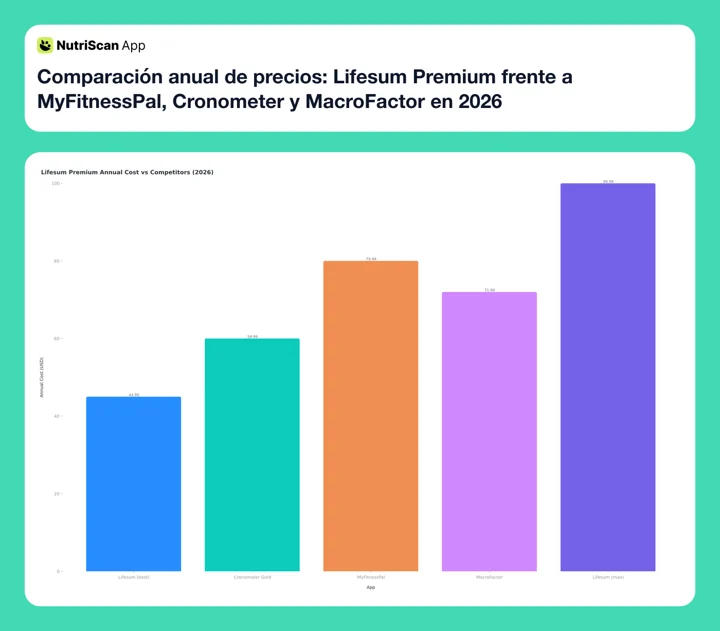 Figure 1: Lifesum's best promo price of $44.99 and its $99.99 list price, against Cronometer Gold at $59.99, MyFitnessPal at $79.99 and MacroFactor at $71.99. At $44.99 Lifesum is the cheapest app here on a promo and the most expensive at list.

The Meal Plans: Lifesum's Biggest Selling Point 🍽️
Lifesum Premium includes several nutritionist-developed meal plans. These are pre-built weekly menus with recipes, grocery lists, and calorie targets already calculated. The current plans include:
- 3-Week Weight Loss - structured calorie deficit with daily meals
- Intermittent Fasting - pairs 16:8 or 14:10 fasting windows with meal suggestions
- Sugar Detox - reduces added sugar over 2-3 weeks
- Vegan for a Week - plant-based meals with complete protein coverage
- High Protein - designed for muscle building or satiety-focused weight loss
- Classic Diet - balanced macros for general health maintenance
A 2024 randomized trial in Nature Medicine found that people following personalized dietary programs showed significant improvements in triglycerides, body weight, waist circumference, and diet quality compared to those following general advice (Bermingham et al., 2024). Structured meal plans, like those in Lifesum, work on the same principle: reducing decision fatigue and keeping you on track.
The catch
These meal plans are templates. They do not adapt in real time based on what you ate yesterday or your current weight trend. You pick a plan, follow the recipes, and track your intake. If you need a plan that adjusts weekly based on your weigh-ins, apps like MacroFactor or Carbon Diet Coach handle that better.
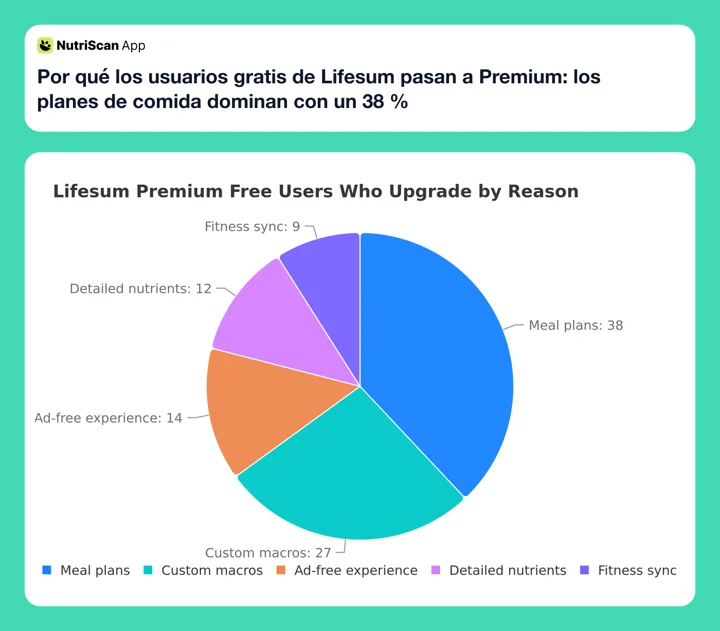 Figure 2: Meal plans drive most upgrades - if they do not appeal to you, the case for Premium weakens
Real-World Examples: Who Benefits Most 🎯
Not everyone needs Lifesum Premium. Here are three situations where the upgrade makes clear sense, and one where it does not.
Example 1: The Meal Prep Beginner
Sarah is 28 and wants to lose 10 pounds. She has never tracked food and does not know how to build balanced meals. The free version lets her log food, but she does not know what to eat in the first place. The 3-Week Weight Loss meal plan gives her a daily menu. She follows it, logs the meals with the barcode scanner, and loses 6 pounds in 3 weeks. For her, $3.75-$7.33/month is worth more than a single meal out.
Example 2: The Macro-Conscious Lifter
Jake is 34 and trains 4 days a week. He needs 180g of protein daily. The free version only tracks total calories. Premium lets him set a custom macro split (40% protein, 30% carbs, 30% fat) and see exactly where he stands after each meal. The detailed nutrient breakdown shows his sodium and fiber intake too, which matters for recovery and digestion.
Example 3: The Busy Parent
Maria is 41 with two kids. She tried MyFitnessPal but found the food database overwhelming. Lifesum's cleaner interface and curated recipes help her plan family-friendly meals. The Sugar Detox plan helped her cut added sugar while keeping meals the kids would eat. The ad-free experience matters when she is logging meals quickly between work calls.
When Premium is NOT Worth It
If you only need a basic calorie counter and you already know what to eat, the free version works fine. The barcode scanner, basic food diary, and daily calorie target are all free. Paying for Premium just to remove ads is hard to justify at $99.99/year.
 The "free vs paid" decision feels confusing because the free tier is genuinely usable
What the Research Says About Diet Tracking Apps 🔬
Does using a tracking app actually help? The evidence is mixed but improving.
A 2024 Cochrane systematic review of mobile health apps for weight management found current evidence is limited and does not demonstrate a clear benefit of smartphone apps alone (Metzendorf et al., 2024). The review noted high variability in app features, making firm conclusions hard to draw.
However, a 2024 study in the Journal of Medical Internet Research showed AI-assisted nutrition apps led to significant improvements in eating behaviors, self-regulation, and depression scores over 12 weeks (Chew et al., 2024). The key factor was consistent use: people who logged meals daily saw the most improvement.
A 2022 umbrella review of systematic reviews confirmed that activity and health trackers do increase physical activity levels, especially when combined with goal-setting features (Ferguson et al., 2022). Lifesum combines both food tracking and goal-setting, which aligns with what the research says works.
The takeaway
No app magically causes weight loss. But the structure, reminders, and accountability a paid app provides can help, if you use it consistently. Premium features like meal plans and macro targets give you more structure than a basic free tracker.
Lifesum Review: What Long-Term Users Say 🗣️
Long-term Lifesum users tend to fall into two camps.
The fans praise the app's design and simplicity. One user who tracked for nearly 4 years gave it 4 out of 5 stars, highlighting the barcode scanner, progress charts, and curated meal plans as standout features (CSID Recipes, 2025). She noted that data visualizations helped her stay motivated and that favorites saved time on repeat meals.
The critics point to bugs and the AI features introduced in recent updates. Some Trustpilot reviewers say that after paying for Premium, the app launched an AI-driven interface that calculated values incorrectly (Trustpilot, 2025). Others noted that the food database, while large, still misses region-specific items, especially outside North America and Western Europe.
Reddit users report similar mixed feelings. The tracking itself works for most people. The frustration comes from inconsistent pricing (different users see different annual costs) and occasional bugs after updates.
How NutriScan Compares Side by Side 📲
If you have read this far, you probably also want to know how a different approach feels in practice. NutriScan focuses on AI-first food capture instead of meal plan templates.
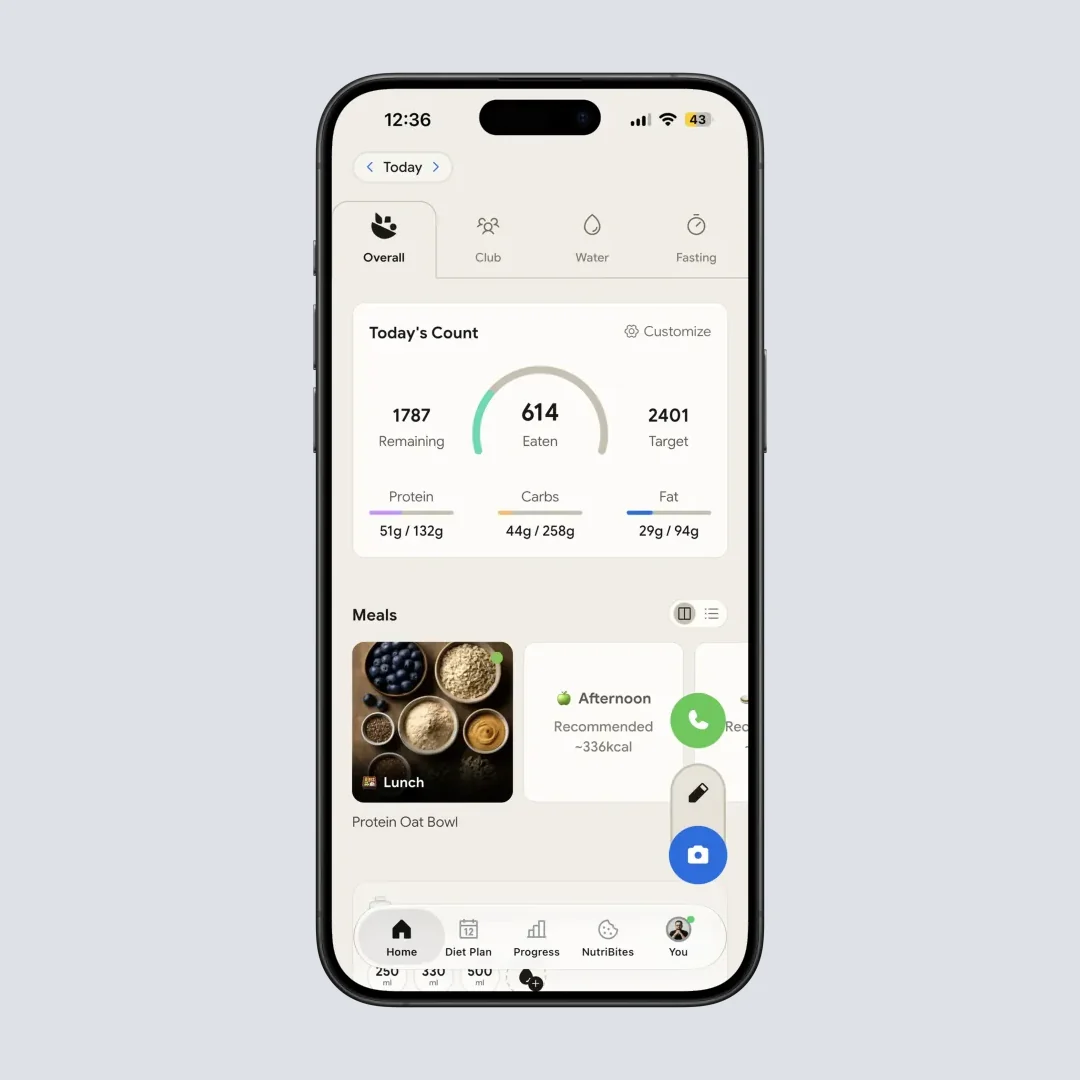
NutriScan home: macros, calories and progress in one glance (Home > Daily Breakdown)

Snap a photo, crop the plate, and the AI estimates portions automatically (Home > Camera Icon > Crop Picture)
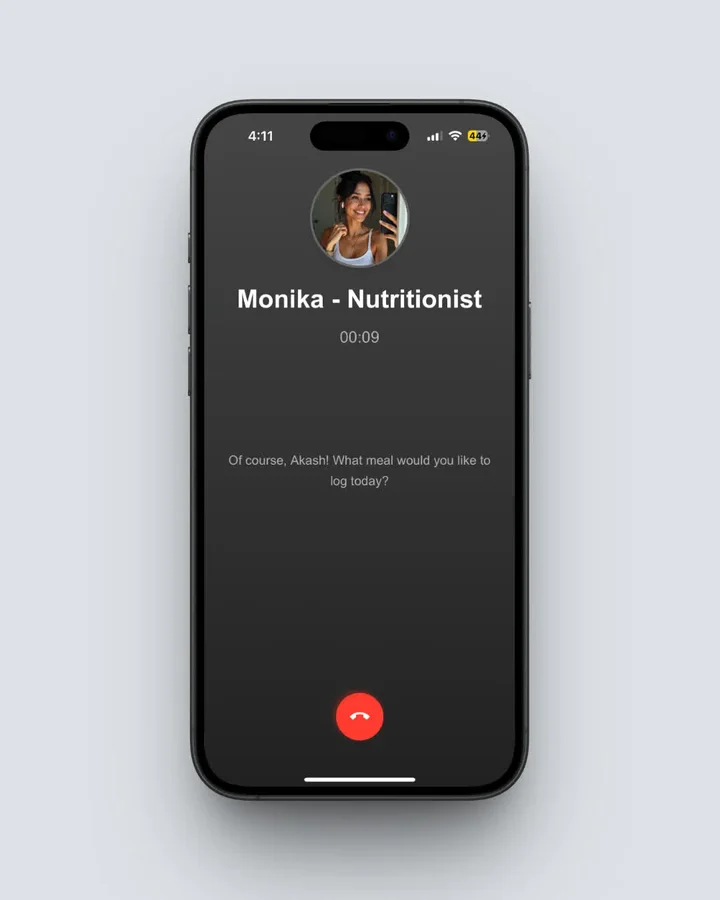 Voice logging with Monika cuts logging time to seconds (Home > Mic Icon > Speak Meal)
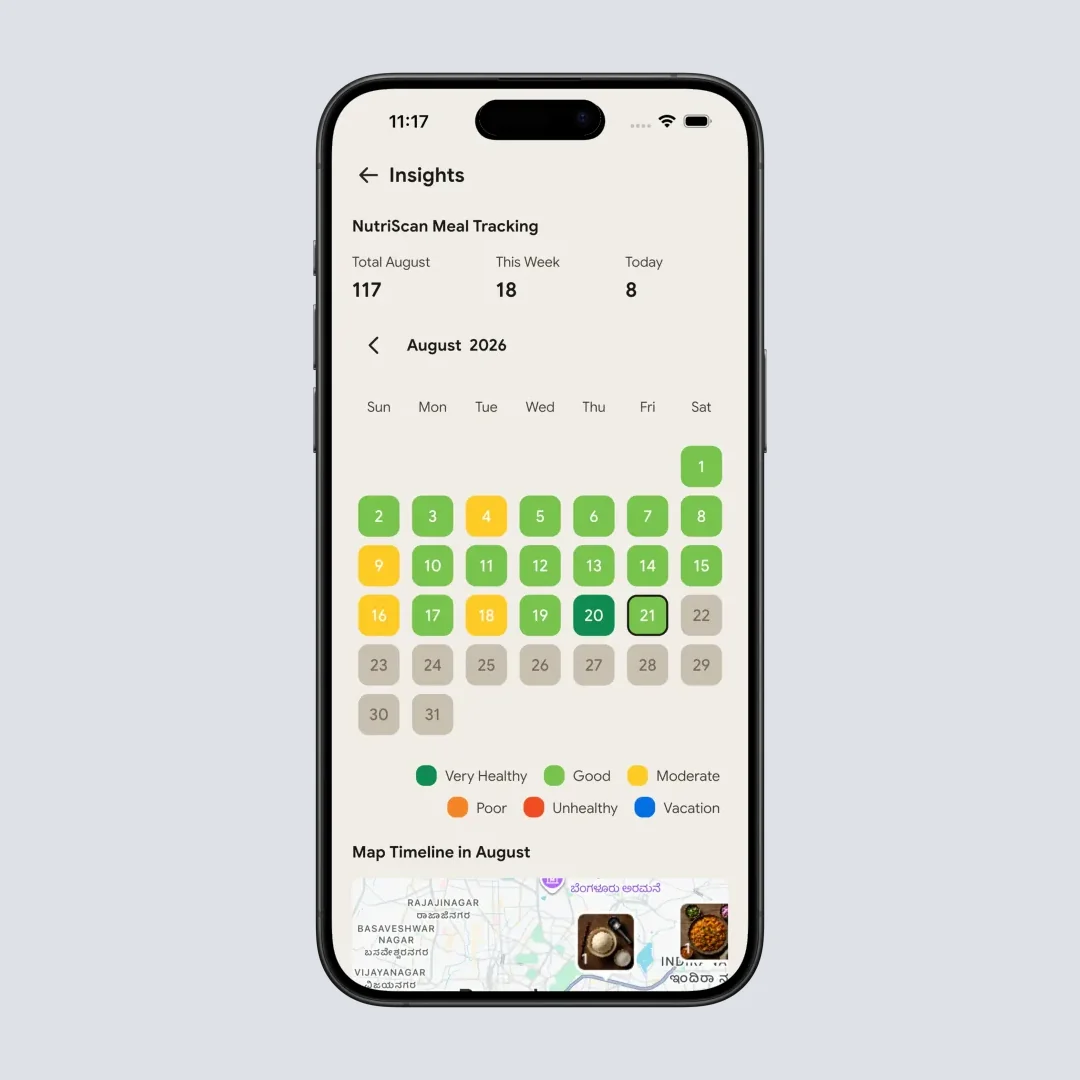
Insights view: streaks, weekly trends and pattern recognition for accountability
The trade-off: Lifesum Premium hands you a structured menu. NutriScan removes the friction of logging the meals you already eat. If you want to compare numbers fast, plug your goals into our macro calculator before paying for any app.
7 Tips for Getting the Most Out of Lifesum Premium
If you decide to upgrade, these habits help you get your money's worth:
Start with a meal plan. Do not just pay for Premium and keep doing what you did on the free version. Pick the 3-Week Weight Loss or High Protein plan and follow it for the full duration. The structure is what you are paying for.
Set custom macros on day one. Go to Settings and enter your protein, carb, and fat targets. If you do not know your targets, use a free macro calculator (like the one on NutriScan) and plug those numbers in.
Use the barcode scanner for packaged foods. It saves 30-60 seconds per item compared to manual search. For fresh foods, use text search.
Save frequent meals as favorites. If you eat the same breakfast 4 days a week, save it once and log with one tap afterward.
Check the detailed nutrient view weekly. Premium shows sodium, fiber, cholesterol, and other micronutrients. Look for patterns like consistently low fiber or high sodium.
Connect your fitness tracker. Sync Fitbit, Garmin (through Runkeeper), or Samsung Health to log exercise calories automatically.
Review your weekly charts every Sunday. Check your weight trend, calorie average, and macro split. Adjust if you have been consistently over or under your targets.

How Lifesum Premium Compares to Competitors ⚖️
| Feature | Lifesum Premium | MyFitnessPal Premium | Cronometer Gold | MacroFactor |
|---|---|---|---|---|
| Monthly price | $3.75 - $10.00 | $19.99 | $10.99 | $11.99 |
| Annual price | $44.99 - $99.99 | $79.99 | $59.99 | $71.99 |
| Custom macros | Yes | Yes | Yes | Yes (auto-adjusting) |
| Meal plans | Yes (template) | Yes (AI-generated) | No | No |
| Food database size | Large | Largest | Verified (smaller) | Verified (smaller) |
| Micronutrient tracking | Premium only | Premium only | Free (basic) | No |
| AI features | Text search | AI meal scan | No | Algorithm-based |
| Barcode scanner | Free | Free | Free | Free |
| Best for | Meal plan followers | Large database users | Micronutrient trackers | Macro-focused athletes |
Prices are standard US prices as of mid 2026 and change by region. MyFitnessPal Premium is $79.99 a year (MyFitnessPal Premium) and Cronometer Gold is $59.99 billed annually, which works out to $4.99 a month (Cronometer Gold).
Lifesum's advantage is its meal plans combined with a clean interface. Its disadvantage is inconsistent pricing and a smaller (though still large) food database compared to MyFitnessPal.
If you want auto-adjusting macros that change weekly with your weight trend, MacroFactor is better. If you care about micronutrients (vitamins, minerals), Cronometer Gold is more detailed. If you want the biggest food database and community, MyFitnessPal Premium wins. Lifesum Premium fits best if you want guided meal plans, a visually clean app, and you value simplicity over raw data depth. For a wider list, see our best Lifesum alternatives roundup.
The 5-Minute Decision Checklist That Saved Me $99
This is the simple framework I now recommend to anyone asking me about Lifesum Premium. It runs in five minutes and almost always saves a yearly subscription that would have gone unused.
Step 1: Try the free version for 2 weeks. Log every meal for 14 days. If the free tier covers what you need, stop here.
Step 2: List your must-have features. Write them on paper. If "remove ads" is the only entry, do not pay $99 to skip ads.
Step 3: Check for a trial or promotion. Lifesum runs 7 to 14 day free trials and partner deals (Oscar Health gives 3 months free). January and September often bring price drops. We track the live offers in Lifesum free trial deals.
Step 4: Pick the right billing cycle. If a trial sold you, go annual at $44.99 if visible. If unsure, start quarterly at $21.99-$29.99 to avoid being locked in.
Step 5: Set a 30-day review reminder. After one month, ask: am I using meal plans? Am I tracking macros? Am I using it daily? If all three are no, cancel before the next billing cycle and switch to a free tracker, or test NutriScan which logs meals from a single photo.
Why it works: most people upgrade emotionally (FOMO, sale pressure) and forget. The 30-day reminder makes the decision rational. The trial-first rule makes sure your money is funding habits you actually use.
Is Lifesum Premium Worth It? The Verdict 📝
Lifesum Premium is worth the upgrade if you:
- Want structured meal plans (the strongest feature)
- Need custom macro targets for a specific diet
- Value a clean, simple interface over data density
- Will commit to at least a quarterly plan
It is NOT worth it if you:
- Only need a basic calorie counter (free version works)
- Want auto-adjusting macros (choose MacroFactor instead)
- Need deep micronutrient data (choose Cronometer Gold)
- Are bothered by inconsistent pricing across regions
The best strategy: use the free version for 2 weeks, check if a trial is available, then go annual if you find value. At $3.75/month on the best annual deal, Lifesum Premium costs less than a single coffee.
If you want to skip the meal-plan-vs-macros debate entirely, scan a few meals with NutriScan to see how AI-powered food logging compares to manual tracking. The right app is the one that fits your daily routine, not the one with the longest feature list. For your next read, see our take on FatSecret Premium worth it 2026 or our breakdown of Lose It Premium 2026.
Frequently Asked Questions ❓
Q: Is Lifesum Premium worth the money in 2026?
A: It depends on your needs. If you want meal plans, custom macro targets, and detailed nutrient breakdowns, Premium adds clear value starting at $3.75/month on the annual plan. A 2024 study in Nature Medicine showed personalized dietary programs lead to better health outcomes than general advice (Bermingham et al., 2024). Lifesum's meal plans provide that structure. If you only need basic calorie counting, the free version is enough.
Q: What is the cheapest way to get Lifesum Premium?
A: The cheapest is the annual plan at $44.99/year ($3.75/month), though not all users see this price. Some regions show $99.99/year. Check for partner deals (Oscar Health offers 3 months free) or wait for January and September promotions.
Q: Is Lifesum free to use?
A: Yes. The free version includes calorie tracking, a barcode scanner, basic food logging, and daily summaries. You cannot set custom macro targets, access meal plans, or see detailed micronutrient data on the free plan. Many users find the free version sufficient for simple calorie counting.
Q: Is Lifesum better than MyFitnessPal?
A: Each app has strengths. Lifesum has better meal plans and a cleaner interface. MyFitnessPal has a larger food database and more community features. For meal planning and guided programs, Lifesum Premium is stronger. For raw database size and third-party integrations, MyFitnessPal Premium is stronger. Both cost roughly the same on annual plans.
Q: How do I cancel Lifesum Premium if I do not like it?
A: Cancel through your device's subscription settings, not the Lifesum app itself. On iPhone: Settings > your name > Subscriptions > Lifesum > Cancel. On Android: Google Play Store > profile icon > Payments and Subscriptions > Subscriptions > Lifesum > Cancel. You keep Premium access until the end of your current billing period. Screenshots for both routes are in our step-by-step Lifesum cancellation guide.
Q: Does Lifesum Premium support intermittent fasting?
A: Yes. Premium includes an Intermittent Fasting plan that pairs 16:8 or 14:10 fasting windows with meal suggestions. The free version does not include the structured fasting timer or meal pairing.
Q: Is Lifesum's food database accurate?
A: It is large but mixed. Branded packaged foods are reliable. Region-specific items outside North America and Western Europe are often missing or inconsistent. Always cross-check unusual entries against the package label.
