NutriScan vs Lifesum 2026: Photo Scan Tracking Showdown
 ChatGPT
  Claude
  AI Mode
  Perplexity
 NutriScan and Lifesum both scan a meal from a photo, but NutriScan asks for oil level and one of 11 cooking methods first, which can move an estimate by 100 to 300 calories on a dish like dal or biryani. NutriScan is a flat rate of about $59 a year with 5 free scans a week. Lifesum keeps photo scanning on Premium and lists three one-year tiers at once, $49.99, $99.99 and $119.99, so there is no single Lifesum price.
Last verified: August 23, 2026
| NutriScan | Lifesum | |
|---|---|---|
| Annual price | about $59/yr | 1-year tiers of $49.99, $99.99 and $119.99 |
| Free photo scans | 5 a week | None, photo scan is Premium |
| Oil-level prompt | 4 levels | Not offered |
| Cooking-method prompt | 11 methods | Not offered |
| Barcode scan | No | Yes |
| Free trial | 7 days | Offered, length not published |
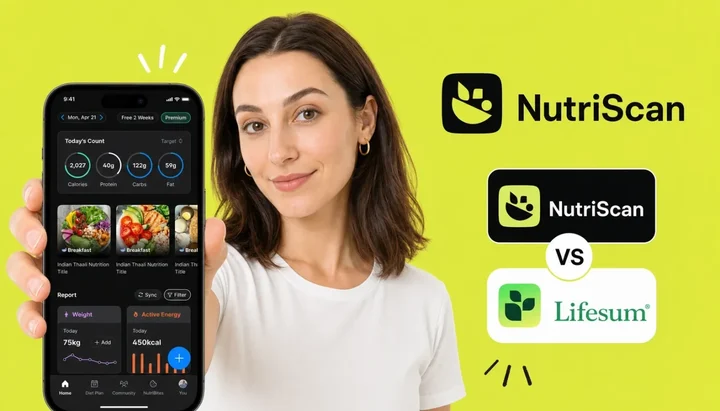
Both apps scan food photos. But what happens after the shutter clicks is where everything changes. 📱
TL;DR - NutriScan vs Lifesum 2026
- Photo scan: Both apps identify food from photos, but NutriScan adds oil level + cooking method prompts that can shift estimates by 100-300 calories per meal
- Indian food accuracy: on oil-heavy dishes (dal, curry, biryani) NutriScan asks about the fat and Lifesum never does
- Pricing: NutriScan is about $59 a year. Lifesum runs promo-variable pricing, with App Store 1-year tiers from about $49.99 to $119.99, plus shorter 6-month, 3-month and monthly SKUs, so read the duration next to the number before you compare
- Free trial: NutriScan offers 7 days through your app store; Lifesum runs an App Store trial on its Premium subscriptions but does not publish the length
- Best for: NutriScan if you eat Indian or high-oil Asian food regularly; Lifesum if you want barcode scanning, Life Score, Apple Watch, and a user base Lifesum puts at 65 million
I work with the NutriScan team, so full disclosure upfront. But this question comes up every week from users who are genuinely confused: both apps take a photo of your food, both estimate calories, both track macros. So what is actually different?
The answer lives in a gap most apps ignore. I ran four tests on both apps, and the result that changed which app I recommend comes from a 2024 university study, not from marketing copy.
Here is what I covered:
IMPORTANT
Your comparison plan at a glance.
Four real tests on NutriScan vs Lifesum - one result is genuinely surprising.
⏱️ Progress 0/4 - ~0 minutes in - Keep going
⏳ Test 1: Photo scan on simple and Western meals
⏳ Test 2: The oil and cooking method gap
⏳ Test 3: Indian and Asian food accuracy at home
⏳ Test 4: Pricing, free plan, and trial terms
🔍 The 363-calorie gap a university study found (revealed near the end)
 That is your next lunch, about to get scanned. Let us see which app handles what is on your plate better.
Test 1: Photo Scan Accuracy on Simple and Western Meals 🍗
A 2025 study in Nutrients put ChatGPT in front of 114 meal photographs and measured a mean absolute percentage difference of 26.9% against the real nutrient content (O'Hara et al. 2025, PMC11858203). On a 500-calorie meal that is plus or minus 134 calories, the baseline error for any photo scan app under ideal conditions.
For grilled proteins, boiled eggs, salads, and simple Western plates, both apps perform comparably:
- Grilled or steamed proteins: A grilled chicken breast or poached salmon reads cleanly from photos. Differences stay within 10-15% on calories. This is the best-case scenario for any photo scanner, and both apps handle it well.
- Packaged food with barcode: Lifesum scans barcodes and folds them into the same logging session via AI Tracking, the flow it launched in February 2025 as the Multimodal Tracker and renamed since. NutriScan has no barcode scanner, so packaged items go in under the Packaged Food tag with manual or voice entry. For labeled packaged items, a barcode beats a photo for precision every time.
- Restaurant plates with visible components: Lifesum's AI identifies the dish and pulls from its global database. Photo scanners read individual Western foods well when they sit separately on the plate. Mixed dishes are harder, and that includes Western ones: the Sydney researchers name spaghetti bolognese and hamburgers (University of Sydney, 2024). NutriScan asks for cooking method after the photo (not sure, mixed, deep-fried, air-fried, stir-fried, oven-baked, roasted, steamed, boiled, grilled, or raw), which adds 8-12 seconds but adds meaningful context on anything oil-cooked.
For simple meals, the apps are close. The gap opens on everything more complex.
IMPORTANT
Checkpoint: Test 1 done.
Simple meals are where both apps are equal - the real differences come next.
⏱️ Progress 1/4 - ~1 minute in - Keep going
✅ Test 1: Simple meals (both apps comparable)
👉 Test 2: The oil and cooking method gap (you are here)
⏳ Test 3: Indian and Asian food accuracy
⏳ Test 4: Pricing and trial terms
🧩 The 363-calorie gap (coming soon)
Test 2: The Oil and Cooking Method Gap 🫙
This is the single biggest source of calorie underestimation in photo-based food tracking apps, and most comparisons skip it entirely.
Oil is invisible in photos. A stir-fry with two tablespoons of oil and a stir-fry with a teaspoon of oil look identical in a photograph. The calorie difference is around 200 calories in the pan, enough to erase a weekly deficit.
Lifesum's AI Tracking identifies food from the photo and pulls database nutrition values. What it does not do is ask about oil. Lifesum's own step-by-step description of the scan flow never asks, and it concedes the gap instead: nutritional values "may vary depending on brand, recipe, cooking method" (Lifesum Help Center). Users can add oil manually as a separate food entry after scanning, but in practice most users skip this step - and the calorie count on oil-heavy meals ends up systematically low.
NutriScan adds one step after every photo: it prompts for oil level (no oil, low oil, medium oil, or high oil) and cooking method. For a plain grilled chicken breast, this changes little. For a dal tadka with a generous ghee tempering, or a restaurant-style paneer curry with three tablespoons of oil, the prompt shifts the calorie estimate by 100-300 calories per serving. That is the difference between logging a 380-calorie meal and a 620-calorie meal.
Why the oil prompt changes the math so much
Every culinary oil in the USDA database sits at 884 kcal per 100 g, so a tablespoon adds about 120 calories (USDA FoodData Central). Ghee is near-pure fat, so it lands in the same place. A home-cooked dal with two tablespoons of ghee tadka versus a low-oil version differs by about 230 calories per pot, which is 80 to 120 calories a bowl if the pot serves two or three. NutriScan surfaces this control; Lifesum leaves it invisible.

NutriScan's meal scan flow: photograph your plate, crop to focus, then select cooking method and oil level for accurate calorie estimation. Home > Camera Icon > Take Picture > Crop
Lifesum's limitation on oil-heavy cooking
Lifesum's photo scan flow has no oil level prompt. If you eat Indian, East Asian, or Middle Eastern food regularly, where cooking fat swings hard between home and restaurant versions, that gap compounds daily.
IMPORTANT
Checkpoint: midway progress update.
Oil handling is where NutriScan pulls ahead for variable-fat cuisines.
⏱️ Progress 2/4 - ~2 minutes in - Keep going
✅ Test 1: Simple meals (equal)
✅ Test 2: Oil gap (NutriScan asks; Lifesum does not)
👉 Test 3: Indian and Asian food (current)
⏳ The 363-calorie gap (next)
Test 3: Indian and Asian Food Accuracy at Home 🍛
Dal, sabzi, roti, biryani, and thali-style plates are where the two apps diverge most clearly.
How Lifesum handles Indian food: The database includes Indian cuisine items. The photo scanner identifies common dishes. For plain dal with minimal oil, estimates are reasonable. For a butter-heavy preparation, a deep ghee tadka, or a restaurant-style curry, the estimate may not reflect actual calories because oil is never prompted. Users cooking with variable ghee amounts see the largest tracking gap.
How NutriScan handles Indian food: After photographing dal, you select the oil level to capture the ghee-heavy tempering step. Ghee runs the same as cooking oil, about 110 to 120 calories a tablespoon, so the tadka math from Test 2 applies directly. NutriScan surfaces that control in the scan flow rather than requiring users to remember a manual food entry.
For mixed dishes and thali-style plates - rice, two sabzis, dal, roti, raita - both apps struggle to separate individual components from above. NutriScan lets you accept the AI estimate and adjust items one by one, with the cooking method and oil prompts adding context for the sauteed and curried parts.
What about Chinese, Korean, Thai, or Middle Eastern home cooking?
The oil problem extends beyond Indian food to all high-oil Asian and Middle Eastern cuisines. Wok-fried dishes, Korean jjigae with sesame oil, Thai curries with coconut cream and oil, and lamb preparations with rendered fat all use cooking fat that does not appear in photos. If stir-fries, curries, or sauteed vegetables are regular meals in your diet, the oil prompt adds accuracy whatever the cuisine.
You can try NutriScan's meal scan feature for free with 5 weekly scans on the free plan. The NutriBites AI assistant also answers questions about specific dishes if you want estimates before logging. For users building a specific diet, NutriScan's goal-based meal plans incorporate the logged scan data into daily targets.
IMPORTANT
Checkpoint: final stretch before the reveal.
One more test - then the university finding that changes the recommendation entirely.
⏱️ Progress 3/4 - ~3 minutes in - Keep going
✅ Test 1: Simple meals (equal)
✅ Test 2: Oil gap (NutriScan wins)
✅ Test 3: Indian and Asian food (NutriScan closes the accuracy gap)
✨ The 363-calorie gap (about to reveal)
Test 4: Pricing, Free Plan, and Trial Terms 💰
Both apps offer free tiers, but they differ sharply on photo logging.
NutriScan free plan: 5 photo scans a week, NutriBites AI for food questions, macros and micronutrients on every meal, and meal history with no cap. Five scans is enough to point the camera at the dishes a database reads worst, the curries and mixed plates, before deciding whether to pay. Premium adds unlimited scans and goal-based meal plans. The 7-day Premium trial starts through your app store, and whether a card is collected depends on your platform and region.
Lifesum free plan: Classic Food Tracking, which is database search, barcode, Quick Track, recents and favorites. Photo scan is not limited on the free plan, it is absent: the camera lives inside AI Tracking, and "AI Tracking is a Premium feature". Lifesum does run a free trial through the App Store on its 1-year, 3-month and 1-month Premium subscriptions (App Store listing, checked 7 August 2026), though it does not publish the trial length.
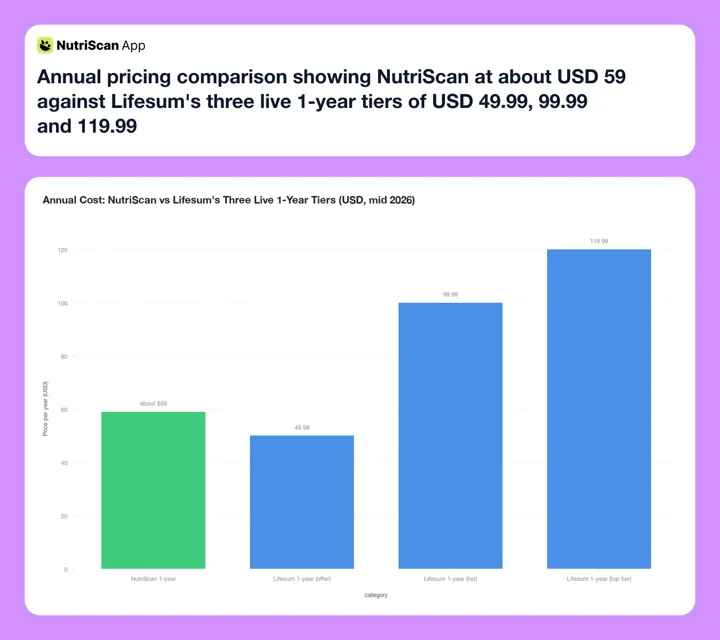 Annual subscription cost: NutriScan is a flat about $59. Lifesum lists three 1-year tiers at once, $49.99, $99.99 and $119.99, so none of them is "the" Lifesum price. Source: Lifesum's US App Store listing, checked 7 August 2026.
| Feature | NutriScan | Lifesum |
|---|---|---|
| Photo scan | Yes, photo-first logging | Yes (AI Tracking, launched Feb 2025) |
| Oil level prompt | 4 levels (none/low/medium/high) | No |
| Cooking method prompt | 11 methods | No |
| Voice logging | Yes, voice entry on any meal | Yes, inside AI Tracking |
| Barcode scan | No | Yes |
| Free photo scans | 5 scans per week | None, photo scan is Premium only |
| Free trial | 7 days | Yes, length not published |
| Annual pricing | about $59/yr | Promo-variable 1-year tiers, $49.99 to $119.99 |
| Monthly plan | annual only | $7.49/mo |
| Annual price / 12 | about $5/mo | ~$4.17 to ~$10.00/mo |
| App Store rating | 4.6 star rating, checked 7 Aug 2026 | 4.6/5, 150K ratings, checked 7 Aug 2026 |
| User base | 150k+ downloads | 65 million, Lifesum's own figure |
| Life Score (nutrition, water, exercise) | No | Yes, scored 0 to 150 |
| Positive psychology framing | No | Yes |
| Meal plans | Yes, goal-based (Premium) | Yes (Premium) |
| India-focused food database | Strong | Present, global-first |
| Apple Watch integration | No | Yes |
| Micronutrient tracking | Yes, free on every meal | Yes (Premium) |
On cost, only one of these two prices is stable. NutriScan is about $59 a year, which works out to about $5 a month. Lifesum sells more than ten SKUs at once, and the durations are easy to misread. Its App Store listing carries $119.99 and $99.99 as 1-year tiers, with a $49.99 1-year offer showing in the subscriptions block, while $69.99 buys six months and $39.99 or $29.99 buys three. Read the duration next to the number. On a real annual basis Lifesum runs roughly $49.99 to $119.99, so it can land under NutriScan on the offer tier and at double on the top one. Prices are standard US prices as of mid 2026 and change by region.
On trial risk, NutriScan gives you 7 days of Premium and 5 free scans a week, so you can keep testing on real meals. If you already pay for Lifesum and want out before the renewal, see how to cancel Lifesum Premium step by step.
The 363-Calorie Gap Nobody Talks About ✨
This is the finding that changed how I recommend these apps.
A 2024 University of Sydney team screened 800 nutrition apps and evaluated 18 of them against sample diet plans. Manual food-logging apps underestimated the Asian diet plan by an average of 1,520 kilojoules, about 363 calories, a day, while overestimating the Western plan by 1,040 kJ (University of Sydney, 2024). The AI-integrated apps in the same study missed differently: beef pho came out 49% too high, pearl milk tea up to 76% too low.
363 calories a day is 2,541 calories a week. A full day's worth of food, and it lands on the diets these apps read worst.
The cause the researchers name is not oil. Dr Juliana Chen attributes the AI errors to mixed dishes that "contain a variety of mixed components that may not be found in the respective apps database". Oil is a second, separate problem, and its arithmetic is in Test 2: two tablespoons is about 240 calories no photo can see. Both problems land on the same plate.
This explains the plateau. Users eating Indian food carefully, tracking every meal, wondering why results do not match logged calories, are often sitting inside this gap. The calories are there. No prompt ever asks about them.
A 2023 systematic review by Shonkoff and colleagues in Annals of Medicine (Shonkoff et al., 2023) found AI estimates align with, and can beat, human ones, but relative errors ran from 0.10% to 38.3% on calories and were lowest when the image held a single simple food. Mixed dishes such as curries, and plates with overlapping foods of varying heights, carry the higher risk of classification and segmentation error.
NutriScan's oil level slider answers the fat half of that problem, not the database half. It cannot verify exactly how much oil the chef used, but it gives users the control that photo-only analysis cannot provide. Selecting "high oil" for a restaurant curry adds an oil estimate to the count, and "medium oil" for a home-cooked stir-fry adjusts upward from the baseline photo estimate. It is an honest acknowledgment of what a camera cannot see.
 The feeling when your calorie tracking finally accounts for that ghee tadka.
What a 363-calorie shortfall compounds into
Sydney measured that 363-calorie shortfall on manual logging apps against an Asian diet plan. Run it out: 2,541 calories a week, about 10,900 a month, roughly 3 pounds of fat at 3,500 calories a pound. A gap that size never feels dramatic on any one day, which is why it stalls a deficit for months.
IMPORTANT
Recap: all four tests completed.
Save this for when someone asks which app to pick for their diet.
⏱️ Progress 4/4 - ~4 minutes in - Nicely done
✅ Test 1: Simple meals - both apps comparable
✅ Test 2: Oil gap - NutriScan prompts; Lifesum skips this
✅ Test 3: Indian and Asian food - NutriScan closes the accuracy gap
✅ The 363-calorie gap - Sydney's figure for manual logging on Asian diets; AI apps miss on mixed dishes
Five Tips to Get Better Results from Any Photo Scanner 💡
These apply to both apps and make a measurable difference whichever you choose.
Step 1: Photograph before you mix. Shoot a thali or a rice-and-curry bowl before you stir it together. Recognition is more accurate when components are visually distinct on the plate.
Step 2: Use natural light. Low light forces the AI to guess on food type and portion size. Poor lighting is the most common cause of misidentified foods in photo scanner tests. Shoot near a window, or turn the kitchen light on.
Step 3: Show the whole plate, not a close-up. Hold the phone 30-40 cm above the plate. A full plate view gives the AI more context for relative serving sizes than a tight close-up of one corner.
Step 4: Use the oil prompt honestly in NutriScan. Resist selecting "no oil" for a dish that was clearly stir-fried or sauteed. Restaurant curries and takeout almost always use more oil than home cooking. When uncertain, select one level higher than your first instinct.
Step 5: Review the result immediately. Both apps let you adjust portions and remove wrong items, and ten seconds of checking catches most errors before they compound across the week. Use NutriScan's nutrition details view to spot any obvious macro outliers in the breakdown.
Who Each App Suits
Related: best Lifesum alternatives in 2026 and Cal AI vs NutriScan photo scanner comparison.
Choose NutriScan if:
Your diet includes Indian, South Asian, or regularly oil-heavy home-cooked food. The oil level and cooking method prompts address the fat side of the gap the Sydney research measured on Asian diet plans. NutriScan is about $59 a year, above Lifesum's $49.99 offer tier and well under its $119.99 one, so price is a wash until you see which tier Lifesum shows you. The 7-day trial starts through your app store, and the free plan's 5 scans a week let you keep testing accuracy on your actual meals before committing. Your main goal is accurate calorie estimates on complex dishes, not features like Life Score, barcode scanning, or Apple Watch integration.
Choose Lifesum if:
You eat mostly Western or globally-common meals where database accuracy is reliable and oil variability is low. Barcode scanning matters to you, and Lifesum folds it into the same logging session as the photo. Voice is a wash, both apps take it. You value a large established community, 65 million users by Lifesum's own count, and strong store ratings on both iOS and Android. Life Score appeals as a single weekly metric: a 50-to-150 score built from 16 nutrition and exercise measures covering what you ate, how much water you logged, and the variety of your exercise (Lifesum Help Center). You track with an Apple Watch and want native watch integration. Lifesum's positive-psychology approach - pastel colors, encouraging indicators rather than red warnings - matches how you want to engage with your food log.
Frequently Asked Questions
Does Lifesum's photo scan work for Indian food?
Lifesum's database includes Indian food items, and the photo scanner can identify common dishes like biryani, roti, and dal. The limitation is that it does not prompt for oil or cooking method, so it may underestimate calories in oil-heavy preparations. Users can add oil manually as a separate food entry afterward, but that requires remembering to do it. In practice, most users skip this step.
Does NutriScan work for non-Indian meals?
Yes. NutriScan's photo scan works for any cuisine and any food type, and the prompts help on any meal where cooking fat varies. Grilled chicken, stir-fried vegetables, pasta with cream sauce, and restaurant burgers all benefit from the cooking method context. The 5-scans-a-week free plan is available in all markets where the app is distributed.
Which app has a better free plan for photo logging?
NutriScan's free plan is clearer about photo scanning: 5 scans a week, plus NutriBites AI for meal questions, micronutrients on every meal and meal history with no cap. Lifesum's free plan has no photo logging at all. The camera lives inside AI Tracking, which is Premium; free accounts get Classic Food Tracking, meaning database search, barcode and quick entry. For basic calorie tracking by search, both free plans are functional.
Can I try both apps before deciding?
Yes. Both apps are free to download. NutriScan offers a 7-day Premium trial that starts through your app store, and whether a card is collected depends on your platform and region. Lifesum's free version is available indefinitely, but photo scan requires Premium. Lifesum runs an App Store trial on its 1-year, 3-month and 1-month Premium subscriptions without publishing how long it lasts, so check the length on the paywall before you subscribe. Running the same meal through both apps for a few days is the most practical way to compare estimate differences on your specific diet.
Which app is better for tracking protein alongside photo logging?
Both apps display protein alongside calories and other macros from photo scan results. Lifesum Premium adds detailed nutrients such as sodium, fiber and cholesterol per meal, plus its full recipe library. NutriScan shows macros and micronutrients on every meal on both plans, and Premium adds goal-based meal plans. NutriScan holds a flat rate of about $59 a year. Lifesum's 1-year price moves with its promotions, from roughly $49.99 to $119.99 on the US App Store, so check what you are quoted rather than assuming either app is the cheaper one.
Conclusion
NutriScan and Lifesum are both capable photo-logging apps built for different users and different problems.
Lifesum is a mature, well-designed app with 65 million users by its own count, voice logging, Life Score, and a positive-psychology tracking philosophy. Its AI Tracking flow puts photo, voice, text and barcode in one session. It suits users who eat globally-common foods and want a feature-rich experience with a large, established community.
NutriScan is a photo-first tracker built around one underserved problem: the calorie gap in oil-heavy and culturally diverse meals. Its oil level slider and 11 cooking method prompts go after the fat a camera cannot see, which sits next to the 363-calorie-a-day shortfall the 2024 University of Sydney study measured on Asian diet plans. It suits users who cook Indian, South Asian, or other oil-variable meals regularly and want scan estimates that reflect real cooking conditions.
If you want to test whether photo logging fits your actual routine, NutriScan's 7-day Premium trial starts through your app store. Scan a week of real meals, use the oil prompts, and check whether the estimates match what you expected. That is the most honest way to compare any two photo-logging apps.