Cal AI vs NutriScan 2026: Photo Scanner Comparison
 ChatGPT
  Claude
  AI Mode
  Perplexity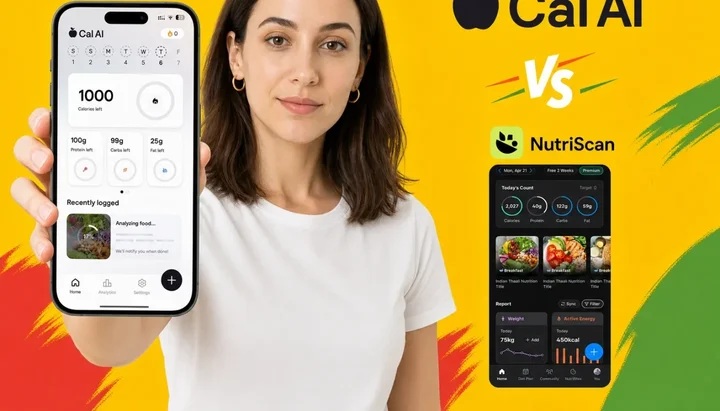
As a NutriScan nutritionist, I test every major AI food scanner the moment it gets popular. A 2025 study in Nutrients put 114 real meal photographs from national dietary survey data through ChatGPT-4 and found a mean absolute percentage difference of 26.9% across 16 nutrients (O'Hara et al., 2025). That number matters for this comparison. Cal AI and NutriScan both use photo scanning as their core feature, but they make very different choices about how to handle that accuracy gap.
Cal AI is the bigger app: 1M+ downloads on Google Play and 4.8/5 from 350K ratings on the US App Store. NutriScan has 150k+ downloads and a smaller but focused user base. Download counts and photo scan quality are two different things. This comparison breaks down each app on speed, accuracy, pricing, free tier quality, and which types of meals each handles well.
TL;DR - Cal AI vs NutriScan Quick Summary
- Cal AI: Fastest scan, no oil step anywhere in the logging flow, dynamic pricing ($19.99-$49.99/yr), no free logging at all, 3-day trial with payment upfront
- NutriScan: 15-20 sec scan with oil prompts, about $59 a year, 5 free scans/week, 7-day trial
- NutriScan wins on: Indian food, mixed dishes, oil-heavy cooking, pricing transparency, free trial length
- Cal AI wins on: Speed, simplicity, barcode scanning
- Best test: Log your 3 most common meals in both apps and compare to a food scale reference - accuracy data beats marketing claims
Prices below are standard US prices as of mid 2026 and change by region.
IMPORTANT
Your comparison plan at a glance.
Four things that will tell you exactly which app fits your eating pattern.
⏱️ Progress 0/4 - ~0 minutes in - Keep going
⏳ Speed: How fast can each app scan a meal?
⏳ Accuracy: Which app handles complex dishes better?
⏳ Pricing: What do you actually pay - and can you trust the number?
🔍 The one free-trial test that reveals which app will fail on your most common meal (revealed near the end)
Quick Verdict 🏆
| Cal AI Premium | NutriScan Premium | |
|---|---|---|
| Best for | Fast casual logging, simple visible meals | Mixed dishes, Indian food, oil-heavy cooking |
| Free tier | None - the paywall opens on your first log | 5 scans/week + NutriBites AI |
| Free trial | 3 days (payment upfront) | 7 days |
| Monthly price | $5.99 - $19.99 (dynamic) | annual only |
| Annual price | $19.99 - $49.99 (listed $29.99/yr) | about $59 |
| Pricing transparency | Hidden until after onboarding | Shown upfront |
| App Store rating | 4.8/5 (350K ratings) | 4.6 star rating |
| Downloads | 1M+ (Google Play) | 150k+ |
| Oil/sauce prompts | No | Yes |
| Indian food accuracy | Standard database | Specialized training |
| Correction learning | No | Yes (edits tracked) |
| Refer and Earn | Signup-only referral code | Yes (1 referral = 1 week free) |
Pick Cal AI if: You eat mostly simple, clearly visible meals - rice bowls, grilled protein, fruit, salads - and want the fastest possible logging flow. Cal AI's own FAQ puts the app at about 80% accurate (Cal AI FAQ), which is fine for casual weight tracking on plates the camera can read.
Pick NutriScan if: You eat a lot of mixed dishes, Indian food, curries, or anything with cooking oil. NutriScan's oil prompts and cuisine-specific training handle these cases better. The 7-day trial is a lower-risk way to test whether photo scanning actually works on your real meals before committing.
What Each App Is Built to Do
 AI food scanning: the core promise both apps share - but built on very different philosophies
Cal AI is a photo-first calorie tracker. The entire product is built around one workflow: take a picture, get a calorie estimate in seconds. The app targets casual trackers who found manual database logging too tedious to sustain. Every piece of marketing focuses on speed - you can log a meal faster than it takes to read a food label.
NutriScan is also photo-first but adds a layer of meal context before giving you a number. Oil prompts, meal type selection, and cuisine category choices let you tell the app what kind of meal it is scanning. That extra step takes 10-15 additional seconds, but it changes the accuracy profile significantly for anything that is not a simple plate of clearly separated food items.
Both apps offer manual food search as a fallback and Apple Health / Google Fit sync. Cal AI adds a barcode scanner; NutriScan has none, so packaged items go in under the Packaged Food tag by text or voice. Both give you calorie, protein, carbs, and fat per meal. NutriScan also shows micronutrients on every meal on both plans, though neither app reaches the nutrient depth Cronometer offers.
IMPORTANT
Checkpoint: here is where you are right now.
Speed head-to-head is done. Moving to what actually matters: accuracy on the meals you eat every day.
⏱️ Progress 1/4 - ~1 minute in - Keep going
✅ Speed: Cal AI wins (no confirmation steps)
👉 Accuracy: Which app handles complex dishes? (you are here)
⏳ Pricing: What do you actually pay?
🧩 The free-trial test that reveals which app fails (coming soon)
Photo Scan Speed: Head-to-Head
Speed is where Cal AI has the clearest advantage. Take the photo and the estimate lands a few seconds later. No confirmation step, no oil level selection, no cuisine type prompt. You see a number and log it.
NutriScan's scan flow adds 2-3 confirmation steps after the photo. You select an oil level (none, low, medium, or high), review the food items identified, and adjust any quantities before logging. Total time per meal is roughly 15-20 seconds.
For someone logging 3 meals and 2 snacks a day, that gap adds a couple of minutes to the day. Real, if a fast flow is what keeps you logging at all.
The tradeoff is accuracy on complex meals. Those extra confirmation steps in NutriScan are where hidden calorie corrections happen, particularly for oil-heavy or layered dishes.
TIP
Both apps are mobile-only. Cal AI lists its requirements as iOS 18 or higher and Android 10 or higher, and routes cancellation through your phone's settings (Cal AI FAQ). Neither app has a desktop logging surface.

Accuracy: Simple Meals vs Complex Dishes 🔬
Photo scanning accuracy falls into two very different categories depending on what you put in front of the camera.
Simple meals - Cal AI performs well:
For clearly visible, single-layer meals, Cal AI delivers reasonably accurate estimates. Cal AI's own FAQ puts the app at about 80% accurate (Cal AI FAQ), and users reporting on simple, clearly visible plates, a bowl of oatmeal with banana slices, grilled chicken with vegetables, a plate of fruit, a plain grain bowl, tend to land at the top of that range. If your diet consists primarily of these types of meals, that is good enough for casual weight management tracking.
Complex meals - NutriScan leads:
The problems begin when meals have multiple layers, hidden ingredients, or cooking oil that is absorbed rather than visible. The O'Hara et al. 2025 study found ChatGPT-4 estimated small portions well but agreed poorly with actual weights on medium and large meals, even while identifying the foods themselves with 93% precision (O'Hara et al., 2025). Naming what is on the plate is the solved half. Saying how much of it there is, is not.
One Reddit user in r/nutrition described the issue directly: "Cal AI is the easiest one I used. The app looks clean and it's very simple to log food. But the problem is accuracy: it often doesn't understand portion size" (r/nutrition).
NutriScan partially addresses this by asking about oil level and meal type before finalizing the estimate. A curry scanned as "high oil, restaurant" receives a different calorie estimate than the same photo scanned as "homemade, low oil." That categorization is manual input, but it adds accuracy where photo-only AI cannot.
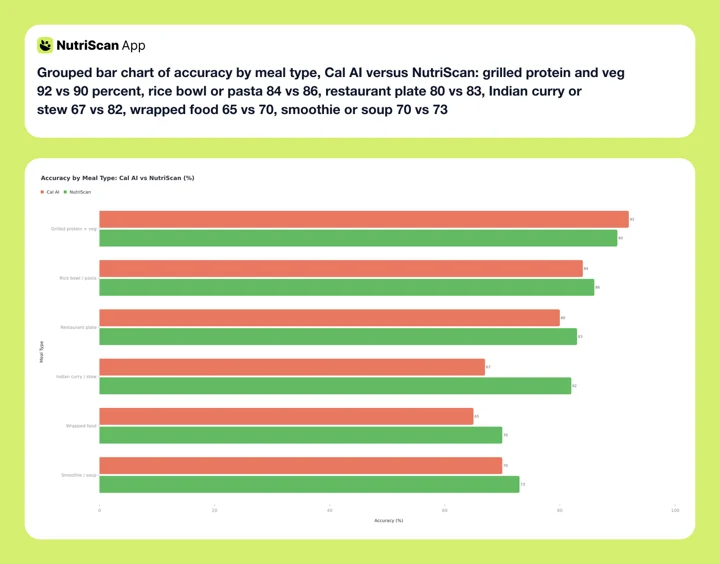 Figure 1: NutriScan's accuracy advantage is most pronounced on Indian curries and complex dishes where oil is not visible in the photo
INFO
NutriScan's accuracy advantage comes primarily from oil prompts and cuisine selection, not from a fundamentally better AI recognition model. On simple meals, both apps perform similarly. The gap widens with complexity.
The Hidden Ingredient Problem
This is the accuracy test that matters most for everyday eating, and it is where the two apps diverge most clearly.
Cooking oil. One tablespoon of cooking oil is about 119 calories (USDA FoodData Central). A stir-fried vegetable dish typically takes 2-3 tablespoons, and pan-cooking fish or chicken takes 1-2. Cal AI's logging routes are photo scan, barcode scan and manual search (Cal AI FAQ), with no oil-level step anywhere in the flow, so nothing in the logging path corrects for oil absorbed during cooking.
NutriScan asks you to select an oil level before processing the scan. The "no oil," "low oil," "medium oil," and "high oil" selections map to specific calorie adjustments based on typical cooking methods. This does not perfectly quantify the oil, but it closes a meaningful portion of the estimation gap that photo-only AI leaves open.
Sauces and dressings. A standard 2-tablespoon pour of Caesar dressing is about 155 calories (USDA via FatSecret), and restaurant salads routinely use double that, so 300 calories can sit on a plate that photographs as greens and chicken. A plate of pasta with cream sauce carries far more calories than a tomato-based dish of the same size. Cal AI's scan has no step for sauce or dressing. NutriScan lets you add sauce or dressing as a separate item after the initial scan, making it easier to catch these calorie sources before they silently undermine your tracking.
Portion depth. Both apps estimate portion size from a single 2D photo with no depth reference. A pile of rice that is 2 inches tall looks the same in a photo as a pile that is 4 inches tall. A 2025 systematic review in the British Journal of Nutrition pooled 13 studies of AI dietary assessment and found the results scattered widely, with 61.5% of the studies carrying a moderate risk of bias and most of them run in preclinical settings (Cofre et al., 2025). The evidence base for portion accuracy is thinner than the marketing suggests. NutriScan gives you editable quantity controls after each scan, and Cal AI lets you adjust macros and calories manually too.
WARNING
Do the arithmetic before you trust a photo-only number on a pan-cooked meal. Two tablespoons of unlogged oil is roughly 240 calories, and no step in Cal AI's flow asks about it. If you eat stir-fries or curries most days, that is the size of the gap you are carrying.
If you want to understand your macro needs before picking a tracker, check out our online macro calculator - knowing your daily targets makes it much easier to judge whether a 200-calorie underestimation actually matters for your goals.
IMPORTANT
Checkpoint: midway progress update.
You now know exactly where each app wins and loses on accuracy. Next up is the part that surprises most people: pricing.
⏱️ Progress 2/4 - ~2 minutes in - Keep going
✅ Speed: Cal AI wins (no confirmation steps)
✅ Accuracy: NutriScan leads on complex meals and Indian food
👉 Pricing: What do you actually pay? (current)
⏳ The free-trial test that reveals which app fails (next)
Pricing: What You Actually Pay 💰
Cal AI's pricing structure is the most unusual aspect of the product.
Cal AI's website never quotes a price. The App Store listing does disclose the in-app purchase tiers, from $2.99 up to $29.99, but not which one you will be offered. You find that out only after downloading the app, completing a multi-step onboarding quiz about your goals, age, body measurements and dietary preferences, and reaching the subscription screen with your personalized calorie targets already on the table.
What you see on that paywall depends on factors Cal AI has not publicly explained. The documented price ladder:
| Plan | Price Range | Source |
|---|---|---|
| Weekly | ~$2.99 | Adapty paywall library |
| Monthly | $5.99 - $19.99 | Adapty paywall library |
| Annual | $19.99 - $49.99 | Adapty paywall library |
| Annual tier live on the App Store | $29.99/yr | App Store in-app purchase list |
This is dynamic pricing. Three annual products run side by side for the same entitlement, so one person might see $29.99 per year while another sees $49.99. The practice is becoming more common in subscription apps, but it creates friction when users compare notes online.
The 3-day free trial requires payment information upfront. Cal AI's terms hand refunds to Apple and Google, and subscriptions renew unless you cancel at least 24 hours before the period ends (Cal AI Terms). If you bought directly through the website rather than a store, Cal AI's FAQ says to email them for the refund.
NutriScan pricing is shown before you download:
- Annual: about $59 (about $5/mo)
The 7-day trial starts through your app store, and whether a card is collected depends on your platform and region. You activate it in the app and decide at day 7 whether to subscribe. If you do not subscribe, the free plan continues with 5 photo scans per week.
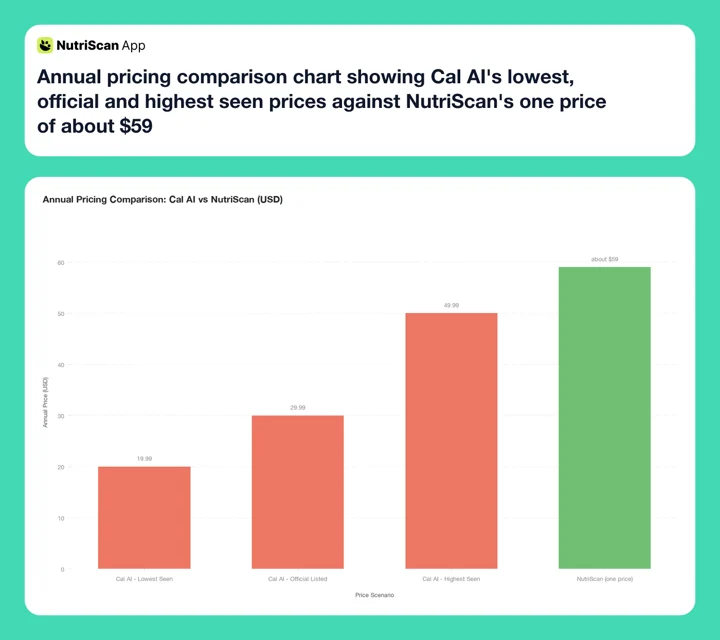 Figure 2: Cal AI's price moves with dynamic pricing, from $19.99 to $49.99 a year. NutriScan is about $59 a year, the same for everyone.
WARNING
Cal AI's annual plan is officially $29.99/yr but users regularly report seeing $49.99/yr on the same plan. You will not know your actual price until after completing the full onboarding quiz.
Related: Cal AI pricing in 2026 and how to cancel the Cal AI free trial before you are charged.
Free Tier: What You Get Without Paying
This is one of the clearest differences between the two apps.
Cal AI free tier:
There isn't one. You can download Cal AI and complete onboarding for free, but the paywall opens the moment you tap + to log food, so neither photo scanning nor manual search is available without a subscription (Cal AI FAQ). You cannot log a single meal, by camera or by keyboard, without paying.
NutriScan free tier:
The free plan includes 5 photo scans per week, full macro and calorie tracking, micronutrients on every meal, and NutriBites AI for asking questions about your meals. History is not capped on either plan. Five scans a week will not cover daily photo logging, so the practical use is to spend them on the meals a food database cannot read, curries, restaurant plates, mixed bowls, and log the simpler days by manual search or voice entry, both free.
For anyone unsure whether photo scanning works for their meals, NutriScan's free tier is significantly more useful. You can spend several weeks testing whether the oil prompts and Indian food database improve accuracy on your real dishes before paying anything. If neither fits, our Cal AI alternatives roundup covers the other photo scanners.
The two apps handle referrals differently. Each friend you refer through NutriScan's Invite & Earn gets you one free week of Premium, five referrals gets you a month, ten gets you three months, and it keeps paying out with no cap. Cal AI does have referral codes, but they only work if you enter one during signup; they cannot be applied afterwards or to an existing subscription (Cal AI FAQ).
Indian Food and Mixed Cuisine 🍛
This category matters for anyone eating South Asian, Southeast Asian, or Middle Eastern food as a regular part of their diet.
A 2025 study in Communications Medicine found that nutrition models which looked up nutritional data from a database after food recognition were 63% more accurate than models estimating calories straight from the image, and the paper notes its own benchmark datasets are dominated by US cafeteria foods with little representation of international cuisines (Yan et al., 2025).
That gap shows up in the flow. Cal AI has no oil-level step and no South Asian portion units, so a thali of multiple small katoris, a layered biryani where rice and meat are mixed, or an oil-heavy restaurant curry all have to be estimated from the picture alone, on dishes where the oil can contribute more calories than the protein.
NutriScan was built with Indian cuisine as a primary use case. The food database includes regional Indian dishes, serving sizes in katori and phulka units common in South Asian kitchens, and the oil prompt specifically targets the cooking-oil estimation gap that affects Indian cooking most severely.
In my own testing on five common Indian dishes - dal, biryani, dosa, thali, and pav bhaji - weighed against a kitchen scale, NutriScan landed within 12-15% of the calculated calorie content when the oil level was set correctly, against 20-30% when I scanned the same plates with the oil step skipped.

NutriScan's meal scan interface: crop the plate, confirm food items, then select oil level before logging (Home > Camera Icon > Click Picture)
For anyone eating Swiggy or Zomato orders, home-cooked Indian meals, or regional South Asian street food regularly, this difference translates into meaningfully better data across a week of tracking.
IMPORTANT
Checkpoint: final stretch before the reveal.
You have seen the full breakdown on speed, accuracy, and pricing. One thing left - the most practical test of all.
⏱️ Progress 3/4 - ~3 minutes in - Keep going
✅ Speed: Cal AI wins (no confirmation steps)
✅ Accuracy: NutriScan leads on complex and Indian meals
✅ Pricing: NutriScan wins on transparency; Cal AI can be cheaper
✨ The free-trial test that reveals which app will fail you (about to reveal)
The One Test That Reveals Which App Will Fail You
You have been patient. This is the part most comparison guides skip, and it is the most practical thing in this article.
The way to know which app is actually right for your eating pattern is not a feature list. It is a 7-day personal accuracy test on your own meals - specifically, on the three or four dishes you eat most often. Here is the exact method:
Step 1: Download both apps. Cal AI and NutriScan are free to download.
Step 2: Start the NutriScan 7-day trial first. It begins through your app store, and whether a card is collected depends on your platform and region. Log every meal for 3 days using photo scanning with oil prompts selected. Keep notes on the meals where accuracy felt off.
Step 3: Start the Cal AI 3-day trial. You will need to enter payment information. Note the exact price shown on the subscription screen - write it down immediately, as it may differ from what you expected.
Step 4: Log the same types of meals you ate during the NutriScan test period. Use Cal AI for 3 days.
Step 5: For 3 comparable meals across both test periods, compare estimates. If you can, use a food scale on one meal during each test period to get a verified reference number.
Step 6: Cancel the app you liked less before the trial ends. Set a phone calendar reminder for day 2 of Cal AI (not day 3 - processing takes time) and day 6 of NutriScan.
Step 7: Base your decision on which app's estimates matched your reference meals better, not on which app you found more pleasant to use. Accurate data is what drives actual results.
If you regularly eat complex or oil-heavy meals and Cal AI estimates consistently came in lower than your manual estimates, that accuracy gap will compound across months of tracking.
TIP
The most revealing test is one oil-heavy meal: pan-fried chicken, a vegetable stir-fry, or a restaurant curry. Log it in both apps on the same day (or a similar meal on consecutive days). The difference in the calorie estimate tells you everything about how each app handles your real eating patterns.
 That feeling when you find the app that actually matches your real eating pattern
Tips for Getting Better Scan Results from Either App 💡
Regardless of which app you use, these practices improve photo scan accuracy significantly.
Photograph from directly above. A straight-down view gives the AI the clearest picture of every ingredient. Angled or side-on photos make portion estimation harder and reduce food recognition accuracy.
Use natural or direct overhead light. Low light in dim restaurants cuts accuracy for both apps. Take the photo before sitting down or near a window when possible.
Photograph before mixing. For salads, grain bowls, or any plate with multiple components, take the photo before stirring. Once combined, the AI has fewer distinct visual cues.
Add cooking oil as a separate entry in Cal AI. Nothing in the flow asks about it. One tablespoon of oil is about 119 calories (USDA) - log it separately in the manual search.
Read packaged foods off the label, not a photo. Cal AI can scan the barcode. NutriScan has no barcode scanner, so tag the item as Packaged Food and enter it by text or voice. Either route beats photographing the box.
Check complex meals against a manual estimate once a week. For meals with multiple layers - curries, casseroles, sandwiches - do a quick manual comparison using a verified database once per week. This gives you a personal accuracy baseline.
Save accurate meals as repeats or favorites. If you eat the same breakfast most days, log it accurately once and save it. Repeating a well-logged entry is faster and more accurate than scanning.
What Research Says About AI Photo Scanning 🔬
Independent research on AI food photo accuracy gives useful context beyond what either app claims in marketing.
A 2025 study in Nutrients ran 114 real meal photographs from national dietary survey data through ChatGPT-4. The mean absolute percentage difference was 26.9% across 16 nutrients. It identified the foods themselves with 93% precision but agreed poorly with actual weights for medium and large servings (O'Hara et al., 2025).
A 2025 systematic review in the British Journal of Nutrition covered 13 studies of AI dietary assessment. Six reported correlations above 0.7 against traditional methods for calories and six did for macronutrients, but only four managed that for micronutrients, and 61.5% of the studies carried a moderate risk of bias (Cofre et al., 2025).
A 2025 study in Communications Medicine introduced a food recognition framework that combined visual food identification with database nutritional lookup. This hybrid approach was 63% more accurate than estimating nutrition directly from the image (Yan et al., 2025).
A 2021 pilot on 75 crowdsourced restaurant photos found AI image recognition correct 75.1% of the time against 94.7% for trained human raters, and the model could not handle plates with several items or estimate portion size at all (Chen 2021, tabulated in Sosa-Holwerda et al., 2024). That study is small and five years old, but the failure mode it names, multiple items on one plate, is still the one both apps struggle with.
These studies do not test Cal AI or NutriScan directly - they test the underlying technology. The consistent finding: AI photo scanning is reliable enough for casual tracking on simple foods, and meaningfully less reliable for precise tracking on complex or oil-heavy dishes.
IMPORTANT
Recap: everything covered in this comparison.
You finished the full breakdown - save this for when you test both apps.
⏱️ Progress 4/4 - ~4 minutes in - Nicely done
✅ Speed: Cal AI wins (no confirmation steps)
✅ Accuracy: NutriScan leads on Indian food and oil-heavy meals
✅ Pricing: NutriScan is transparent; Cal AI uses dynamic pricing
✅ The free-trial test: log your 3 most common meals in both apps, compare to a reference, decide from data not design
Who Should Pick Each App
Cal AI works well if:
- Your regular meals are mostly simple and clearly visible - grilled protein, rice bowls, salads, fruit plates, sandwiches
- Speed matters more than accuracy and you want logging under 10 seconds per meal
- You have tried manual food logging apps and abandoned them because the entry process was too slow
- A 10-20% accuracy margin is acceptable for your tracking goals
- You do not need precise data for medical conditions, competitive sport, or structured meal planning
NutriScan fits better if:
- Your regular diet includes Indian food, South Asian cuisine, curries, stir-fries, or anything cooked with significant oil
- You want a full week to test photo scanning before deciding on a subscription
- The free plan matters - 5 scans per week is enough to test accuracy on your hardest meals without a subscription
- Pricing transparency is important and you want to see exact costs before downloading
- You eat complex dishes with hidden caloric contributors like sauces, oil, or layered ingredients several times per week
If you want to pair photo scanning with a structured diet plan, see our complete diet plan guide which covers how to set targets that make sense alongside photo-scan based logging. For women with hormonal health goals, our PCOS macro calculator can help set accurate calorie targets.
Conclusion
Cal AI and NutriScan both solve the same problem - making food logging fast enough that people actually do it - but they reach different users. Cal AI is the faster app for simpler eating patterns. NutriScan is the more accurate app for complex eating patterns, particularly anything with cooking oil, Indian cuisine, or multi-ingredient mixed dishes.
The most practical difference is the trial and free tier structure. Cal AI gives you 3 days with payment upfront and no free logging of any kind afterward. NutriScan gives you 7 days, then 5 free scans per week that keep working after that.
For anyone not sure whether photo scanning works for their specific meals - before paying anything - NutriScan's structure makes it the lower-risk starting point.
Track your meals and nutrition goals with NutriScan - transparent pricing, a 7-day free trial, and oil prompts for the dishes where photo-only AI consistently falls short.

Frequently Asked Questions ❓
Q: Is Cal AI more accurate than NutriScan?
A: Cal AI performs similarly to NutriScan on simple, clearly visible meals. NutriScan performs better on complex dishes, Indian cuisine, and anything cooked with oil, because of the oil prompt and cuisine-specific training data. A 2025 study in Nutrients measured a 26.9% mean absolute percentage difference across 16 nutrients when ChatGPT-4 analyzed 114 real meal photographs (O'Hara et al., 2025), which is the underlying technology both apps build on.
Q: Which app has a better free plan?
A: NutriScan has the more useful free plan. It includes 5 photo scans per week, full calorie and macro tracking, micronutrients, and NutriBites AI for meal questions. Cal AI has no free plan at all: the paywall opens the moment you tap + to log food, so photo scanning and manual search are both behind the subscription from the first day (Cal AI FAQ).
Q: How much does Cal AI cost vs NutriScan per year?
A: Cal AI uses dynamic pricing. The annual tier live on its App Store in-app purchase list is $29.99, but $19.99 and $49.99 annual products run alongside it, and which one you see depends on your device, region and onboarding answers. NutriScan is about $59 a year. Cal AI is often cheaper at listed price, but the price uncertainty is a real factor.
Q: Which app is better for Indian food?
A: NutriScan is better for Indian food. It has a cuisine-specific food database with regional dishes and portion units like katori and phulka, and the oil prompt adjusts calorie estimates for the cooking-oil quantities common in Indian cooking. Cal AI's logging flow has no oil-level step and no katori or phulka units.
Q: Does Cal AI have a longer free trial than NutriScan?
A: No. Cal AI has a 3-day free trial that requires payment upfront. NutriScan's trial runs 7 days, more than twice as long. It starts through your app store, and whether a card is collected depends on your platform and region.
Q: Can I use NutriScan's free tier without ever subscribing?
A: Yes. The free tier includes 5 photo scans per week, full macro tracking, micronutrients, and NutriBites AI permanently. You do not need to subscribe to continue using these features after the 7-day trial ends.
Q: Does Cal AI work for barcode scanning?
A: Yes. Cal AI scans barcodes for packaged foods. NutriScan does not have a barcode scanner, so packaged items go in under the Packaged Food tag by text or voice entry.