How Much Is Cal AI? Price, Free Trial, and Is It Worth It
 ChatGPT
  Claude
  AI Mode
  Perplexity
As a NutriScan nutritionist, I get asked how much Cal AI costs more often than any other pricing question. Here is the number. Cal AI lists its annual plan at $29.99 a year, about $2.50 a month, and monthly plans have been reported between $5.99 and $20.00. Prices here are standard US prices as of mid 2026 and change by region. The catch is that Cal AI hides the price until you finish onboarding, and different people get shown different amounts, so real annual charges have been reported from $19.99 up to $49.99. Whether that is worth paying comes down to what your plate usually looks like.
That last part matters more than the price tag. A 2025 study published in Nutrients found that AI-based calorie estimation from meal photos had a mean absolute percentage error of 26.9% across 16 nutrients when tested on 114 real meal images (O'Hara et al., 2025). That number surprised me. Cal AI claims to be the "most accurate AI calorie tracker," but real-world results tell a different story. Let me break down what you actually get for your money, what works, and what does not.
TL;DR - How much is Cal AI, and is it worth it
- What you pay: Listed at $29.99/year, but reported prices range from $19.99 to $49.99 due to dynamic pricing.
- Photo scan accuracy: Closest on simple, clearly visible meals. Drifts most on mixed dishes and wrapped foods.
- Best for: Casual trackers eating mostly visible, single-ingredient meals.
- Skip if: You need accurate numbers for a medical diet, restaurant-heavy eating, or transparent pricing.
- Free trial trap: 3 days, payment required upfront, several users report refund difficulty.
What the Cal AI Price Actually Buys You
Cal AI is a calorie tracking app built around one main idea: take a photo of your food, and the AI estimates calories, protein, carbs, and fat. The free version is very limited. You can download the app and answer onboarding questions, but the core photo scanning feature is locked behind a paywall.
A Cal AI Premium subscription gives you:
- AI food scanning - photograph your plate and get a nutritional breakdown
- Barcode scanner - scan packaged food for instant logging
- Full food database access - search and log foods manually
- Progress tracking - weight, measurements, and nutrition history over time
- Apple Health and Google Fit sync - connect activity data to calorie targets
Without Premium, the app works as a basic manual food logger. That means you lose the main reason most people download Cal AI in the first place.
 That moment you finish onboarding and finally see the price.
How Much Is Cal AI? Price and Cost by Plan
This is where things get confusing. Cal AI does not show its price on the website or app store listing. You have to download the app, complete the full onboarding quiz, and only then do you see the subscription cost.
Even more unusual, the price changes from person to person. Cal AI appears to use dynamic pricing, meaning what you pay may depend on your location, device, or even how you answered the setup questions.
Here is what users have reported paying in 2026:
| Plan | Price Range | Notes |
|---|---|---|
| Weekly | ~$2.99 | Reported on Adapty.io |
| Monthly | $5.99 - $20.00 | Wide range across Reddit, app analytics |
| Annual | $19.99 - $49.99 (App Store list tops out at $29.99, checked August 23, 2026) | App Store, Play Store, user reports |
| Listed annual | $29.99/year | Official Cal AI pricing page |
The official listed price is $29.99 per year, but many users report seeing different amounts. We tracked every reported tier in our Cal AI pricing breakdown. A Reddit user in r/Myfitnesspal described being shown a "fake discount page" before the actual price appeared. Several others reported billing confusion and difficulty getting refunds.
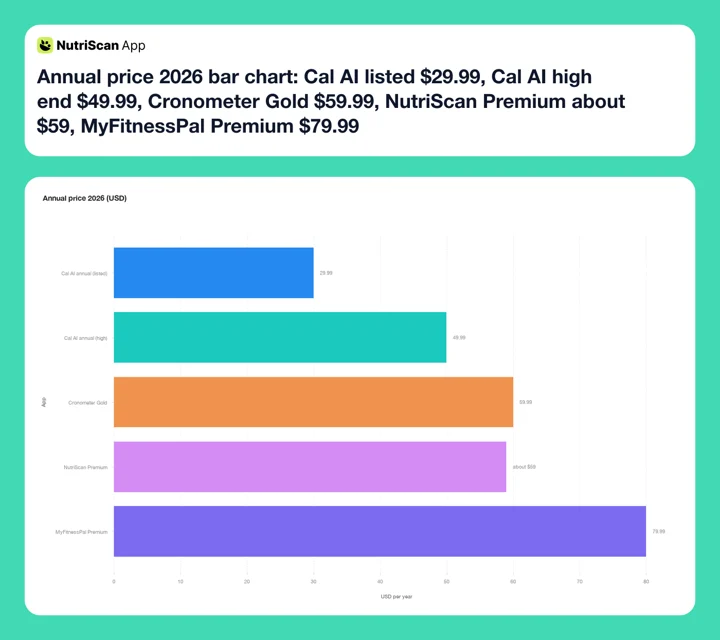 Figure 1: Annual price 2026. Cal AI's listed $29.99 is the cheapest here, but dynamic pricing pushes real charges up to $49.99, close to Cronometer Gold at $59.99 and NutriScan Premium at about $59.
The 3-Day Trial Catch
Cal AI's 3-day trial unlocks all features but requires payment details upfront. If you do not cancel before the trial ends, you are automatically charged. The app says it sends a reminder, but users report it sometimes arrives too late. Our step-by-step guide to canceling the Cal AI trial before you are charged covers both stores.
Photo Scanning Accuracy: What Users Actually Experience
The photo scanning is the entire reason Cal AI exists. So how well does it work?
The claim: Cal AI markets itself as "the most accurate AI calorie tracking app."
What users report: Feedback from Reddit, app store reviews, and independent testing paints a mixed picture. On the positive side, the app is fast. You snap a photo, and results appear within seconds. For simple, clearly visible meals like a bowl of fruit or a grilled chicken breast, estimates are often within 10% of the actual values.
But the problems show up quickly with anything more complex:
- Hidden ingredients - The AI cannot detect cooking oil, butter, dressings, or sauces that are not visible. A salad dressed in olive oil could be off by 200+ calories.
- Portion sizes - The AI guesses portion size from a single photo with no depth reference. A 2025 study in Nutrients found that AI models performed poorly on medium and large portion sizes, with accuracy dropping sharply as serving size increased (O'Hara et al., 2025).
- Complex dishes - Mixed meals, casseroles, sandwiches, and soups are especially difficult. A user on r/Healthy_Recipes noted: "It has some impressive features including a decent ability to recognize specific foods and guess simple sizes. However it has major flaws."
- No correction learning - When the AI makes a mistake, you cannot teach it. You can only manually edit the entry afterward. The AI does not improve based on your corrections.
A Reddit user in r/nutrition summarized it well: "Cal AI is the easiest one I used. The app looks clean and it's very simple to log food. But the problem is accuracy: it often doesn't understand portion size."
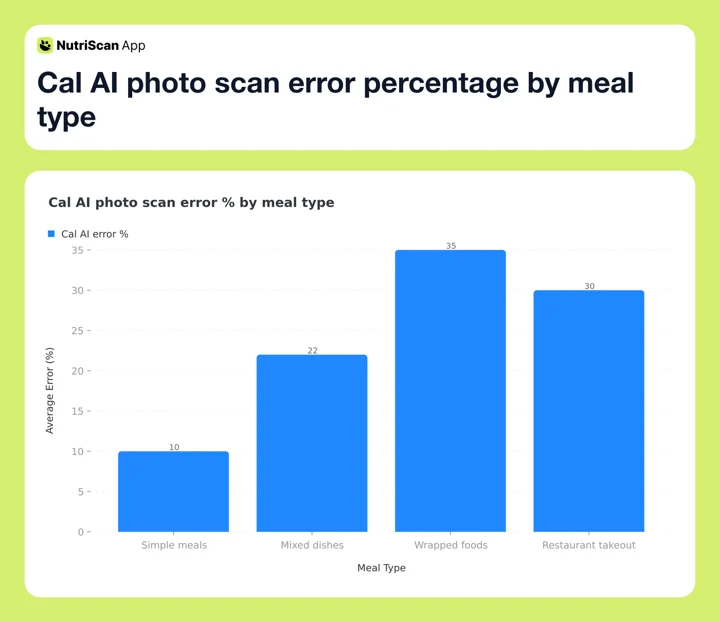 Figure 2: Reported Cal AI scan error rates rise sharply for wrapped foods and restaurant takeout - the worst case for any photo-only AI.

Real-World Examples: Where Cal AI Gets It Right and Wrong
To give you a clearer picture, here are common scenarios and how Cal AI typically performs:
Scenario 1: A bowl of oatmeal with banana slices and blueberries. This is a best-case scenario for Cal AI. Each item is clearly visible, and portions are easy to estimate from a photo. Users report accuracy within 5-10%. If the actual meal is 350 calories, the app might estimate 320-380. Good enough for casual tracking.
Scenario 2: A plate of pasta with meat sauce. The AI can see pasta and sauce, but not the cooking oil, hidden cheese, or exact ground meat amount. Users report 15-30% errors here. On a 600-calorie plate, that is a 90-180 calorie miss.
Scenario 3: A takeout burrito from a restaurant. The AI cannot see what is inside a wrapped item. It guesses from size and shape, but rice, beans, cheese, sour cream, and guacamole vary wildly between restaurants. Errors of 30-40% are common for wrapped or layered foods.
The pattern is clear: the simpler and more visible the food, the better Cal AI performs. The more complex the meal, the less reliable the estimates.
Where AI scans break down
Anything wrapped, layered, mixed, or sauce-heavy is where every photo-only AI struggles, not just Cal AI. If half your week is takeout, sandwiches, or curries, you'll fight the app daily.
Why the Cal AI Price Is Hidden Until You Finish Onboarding
Cal AI's pricing model is one of the most common complaints in reviews and Reddit threads. Three specific issues come up repeatedly:
1. No upfront pricing. You cannot see the cost until you download the app, complete a multi-step onboarding quiz, and reach the paywall. This deliberate strategy gets users invested before showing the price. It works for conversion, but it damages trust.
2. Dynamic pricing. Different users see different prices for the same product. One person might see $29.99 per year while another sees $49.99. This A/B price testing is becoming common in subscription apps, but it feels unfair when users compare notes online. An eesel AI review documented these variations using Adapty.io and user reports.
3. Difficult refund process. Several Reddit users reported trouble getting refunds after the free trial ended. One described getting the "run around" when trying to cancel. This is common with subscription apps that rely heavily on trial-to-paid conversion.
For comparison, MyFitnessPal shows plans on the app store. Cronometer lists prices on its website. Lose It displays pricing before the trial. Cal AI's approach stands out for the wrong reasons.
Tips for Getting the Most Out of Cal AI (If You Pay)
If you decide Cal AI Premium is worth trying, here are practical tips:
- Always double-check complex meals. For anything with hidden oils or sauces, manually adjust calories upward by 10-20%. The AI consistently underestimates these.
- Use the barcode scanner for packaged foods. It is more accurate than photo scanning because it pulls from a database rather than guessing.
- Set a calendar reminder for day 2 of the trial. Do not rely on the app's reminder. Some users report it arriving too late.
- Photograph meals from directly above. Top-down photos give the AI the best view of portion sizes.
- Log cooking fats separately. Add butter or oil as a separate entry. The AI will almost never detect cooking fats from a photo.
- Compare with manual logging for the first week. This gives you a personal accuracy baseline.
- Check your subscription price against others. You might save money by trying again from a different device or location.

NutriScan's scan-and-crop flow. Path: Home > Camera Icon > Click Picture > Crop > Confirm.
Step-by-Step: How to Try Cal AI Premium Without Getting Charged
If you want to test Cal AI without accidentally paying, follow these steps:
Step 1: Download Cal AI from the App Store or Google Play Store. Free to download.
Step 2: Complete the onboarding quiz. Answer about goals, activity level, dietary preferences. This builds your calorie target.
Step 3: When you reach the paywall, note the exact price shown. Check if it matches the $29.99 listed on their website.
Step 4: Start the 3-day free trial. You will need to enter a payment method.
Step 5: Immediately set a reminder on your phone for 48 hours from now. Title it "Cancel Cal AI if not worth it."
Step 6: Test photo scanning with at least 5-10 different meals over the next two days. Include simple, complex, and packaged foods. Compare AI estimates with what you know each meal contained.
Step 7: On day 2, decide. If accuracy is not good enough, cancel through your App Store or Google Play settings. Do not wait until day 3 - processing takes time.
How to cancel on iPhone: Settings ➡️ Apple ID ➡️ Subscriptions ➡️ Cal AI ➡️ Cancel Subscription. How to cancel on Android: Google Play Store ➡️ Profile icon ➡️ Payments & subscriptions ➡️ Subscriptions ➡️ Cal AI ➡️ Cancel.
Set a real reminder
Do not trust the in-app notification alone. Use your phone's calendar at the 48-hour mark.
What Research Says About AI Food Photo Accuracy
The promise of "snap a photo, get your calories" is appealing, but the science shows important limits.
A 2025 study in Nutrients tested ChatGPT-4's ability to estimate nutritional content from 114 meal photographs taken from national dietary survey data. Mean absolute percentage difference between AI estimates and actual nutrient values was 26.9%. The AI performed well at identifying individual foods but struggled with portion weights, especially for medium and large servings (O'Hara et al., 2025).
A separate 2025 systematic review in The British Journal of Nutrition examined AI-based dietary intake assessment apps and found accuracy varied widely depending on meal complexity and model. Food recognition has improved, but portion size estimation remains the weakest link (Cofre et al., 2025).
A 2025 study in Communications Medicine introduced the DietAI24 framework and found that looking up nutritional values from databases after food recognition was 63% more accurate than estimating values directly from images (Yan et al., 2025). This matters because Cal AI uses direct estimation rather than database lookup for photo scanning.
These studies do not test Cal AI specifically, but they test the same underlying approach: AI estimation from photos. The technology is promising for simple meals but is not reliable enough to replace careful tracking for anyone with specific nutrition goals. If you want to translate calories into a daily plan, our online macro calculator helps you set realistic targets first.
Is Cal AI Worth It? Who Should Pay and Who Should Skip
Cal AI Premium makes sense if you:
- Track casually and do not need exact numbers
- Eat mostly simple, clearly visible meals (salads, grilled protein, fruit, rice bowls)
- Value speed over precision and want to log meals in under 5 seconds
- Have tried and disliked manual food logging apps
- Are comfortable with a 10-20% error margin on most meals
Cal AI Premium is not worth it if you:
- Need accurate tracking for a medical diet or competitive sport
- Eat lots of mixed dishes, restaurant food, or meals with hidden ingredients
- Want full control over how your food is logged and categorized
- Are uncomfortable with hidden pricing and dynamic costs
- Prefer apps with large verified food databases over AI estimation
For PCOS or diabetes-aware tracking, the PCOS macro calculator and diabetes macro calculator give you a verified baseline before trusting any photo scan.
Cal AI Cost vs Other Calorie Tracking Apps
Prices are standard US prices as of mid 2026 and change by region.
| Feature | Cal AI | MyFitnessPal | Cronometer | NutriScan |
|---|---|---|---|---|
| Photo scanning | Yes (Premium) | Yes (Premium+) | Yes (Gold Photo Log) | Yes (Premium) |
| Barcode scanner | Yes | Yes | Yes (free tier too) | No, use the Packaged Food tag |
| Food database size | Smaller | 14M+ foods | 1M+ verified | Growing |
| Manual logging | Limited free | Yes (free) | Yes (free) | Yes (free) |
| Pricing transparency | Hidden | Shown upfront | Shown upfront | Shown upfront |
| Annual cost | $29.99 (variable) | $79.99 | $59.99 | $59.99 |
| Free trial | 3 days | 7 days | None on web | 7 days |
| Micronutrient tracking | Limited | Basic | Detailed (up to 95 on Gold) | Every meal, free |
Sources: MyFitnessPal Premium, Cronometer Gold.
Cal AI is the cheapest of the four for photo scanning, but the hidden pricing and accuracy limitations are real tradeoffs. Cronometer offers far more nutritional detail and now has its own Photo Log on Gold. MyFitnessPal gives the largest food database for manual logging. NutriScan shows its price before you sign up and gives you 7 days instead of Cal AI's 3. If you want the wider field, we ranked it in best Cal AI alternatives, and the head-to-head sits in Cal AI vs NutriScan.
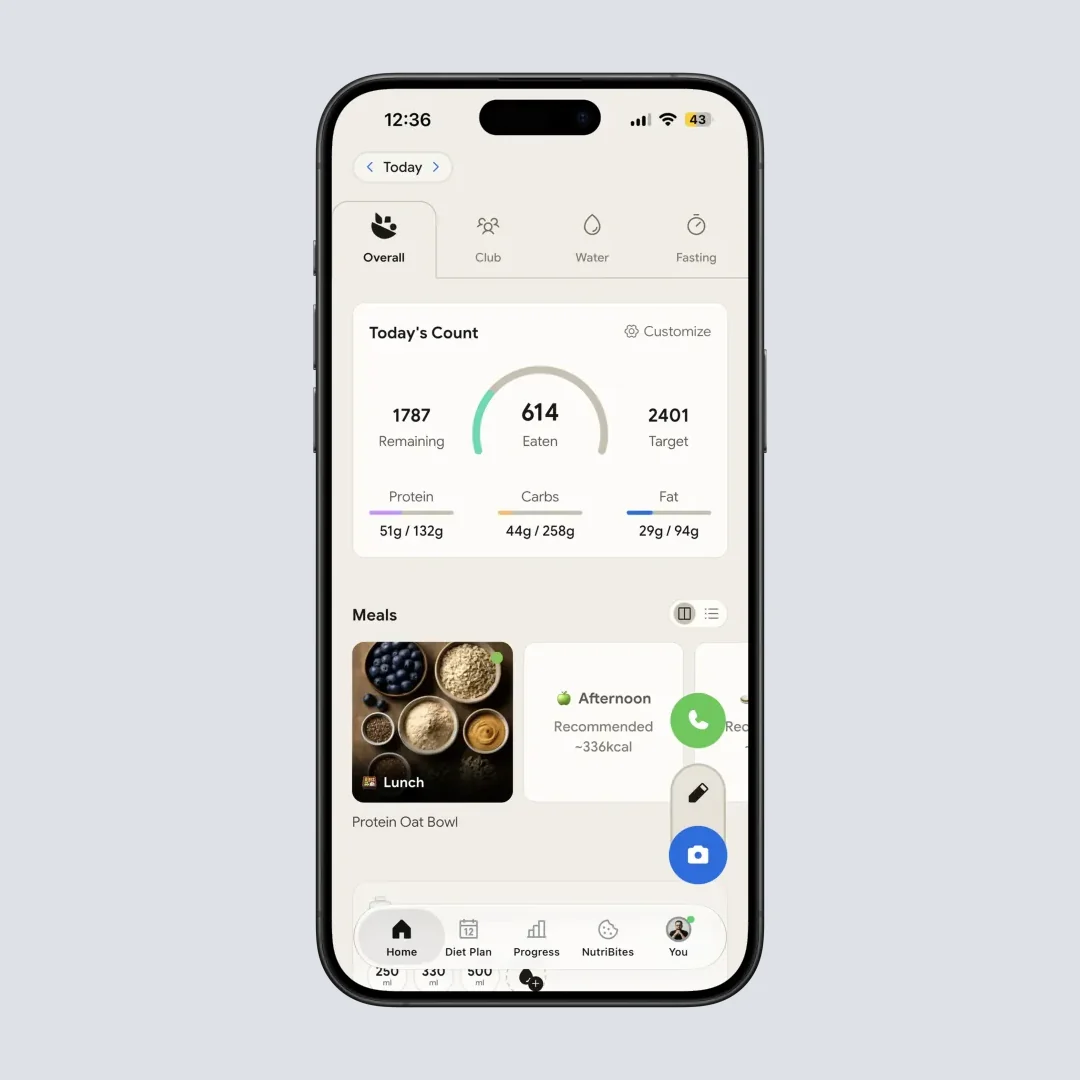
NutriScan home dashboard. Path: Home > Daily Breakdown - your full day at a glance, no paywall surprise.
The 60-Second Test That Decides Pay vs Skip
This last one is the actual test I run on every photo-AI app before recommending it.
Take a photo of your most chaotic real meal of the week. The kind with sauce, hidden oil, mixed protein, maybe a side of something layered. Let Cal AI estimate it.
Then do this: write down what you actually put in the bowl - oil tablespoons, cheese grams, whatever you remember. Plug those into a verified database lookup (Cronometer's free tier or NutriScan's food scanner app both work). Compare totals.
If the gap is under 15%, Cal AI works for your eating style. Pay confidently. If the gap is 20% or more, you will fight the app every day for a year. Skip it. The dynamic pricing and refund headaches are not worth a tool you cannot trust on your real food.
That is the whole test. 60 seconds. One meal. One number. It saves you $29.99 (or $49.99) and 12 months of bad data.
 The relief of knowing - before you commit - whether an app actually fits your meals.
Conclusion
Cal AI Premium delivers on its core promise of fast, easy photo logging. For simple meals, it works well enough to save time. At $29.99 per year (if that is the price you see), it is affordable compared to most premium calorie trackers.
But "fast" and "accurate" are not the same. The photo scanning struggles with complex foods, hidden ingredients, and portion sizes. Research shows AI calorie estimation from photos can be off by 25% or more on average. And the hidden pricing model erodes trust before you even start.
If you value speed for casual tracking, Cal AI is worth a trial. Set a cancel reminder for day 2, run the 60-second chaos-meal test, and decide on your own data. If you need reliable numbers for health goals, you will likely want an app with a verified food database and transparent pricing.
Track your meals and nutrition goals with NutriScan - clear pricing, a 7-day free trial, and photo scanning you can trust. For deeper context, our meal scan guide, NutriScore guide, and insights guide walk you through every step.
FAQ
Is Cal AI worth it?
Cal AI is worth it if you eat mostly simple, clearly visible meals and value logging speed over precise numbers, at a listed $29.99 a year (standard US price as of mid 2026). It is not worth it if much of your week is takeout, sandwiches, curries or anything sauce-heavy, because reported photo-scan errors run 25 to 40% on wrapped and mixed dishes. Test one chaotic real meal during the 3-day trial and compare the estimate against a verified database lookup before you pay.
Is Cal AI Premium accurate enough for weight loss?
For casual weight loss tracking, Cal AI is often within 10% on simple meals like grilled chicken, rice, and salads. But for complex foods with hidden oils, sauces, and mixed ingredients, errors can reach 25-30%. A 2025 study in Nutrients found that AI meal photo analysis had a 26.9% mean absolute percentage error across nutrients (O'Hara et al., 2025). If you need precise tracking for a structured diet, a manual logging app with a verified database may be more reliable.
How much is the Cal AI app per month?
Cal AI uses dynamic pricing, so the exact cost varies. Monthly plans have been reported between $5.99 and $20.00. The official annual plan is listed at $29.99 per year (about $2.50 per month). Weekly plans start around $2.99. You cannot see the price until you download the app and complete the onboarding quiz, which is a common frustration among users (eesel AI, 2025).
Can I use Cal AI without paying?
The free version is very limited. You can download the app and manually log foods by searching the database, but the AI photo scanning, the main feature, requires a Premium subscription. There is a 3-day free trial, but you must enter payment information to activate it.
How does Cal AI compare to MyFitnessPal for calorie tracking?
MyFitnessPal has a much larger food database (14 million+ foods) and free manual logging. Cal AI is simpler and faster for photo logging but has a smaller database and less nutritional detail. MyFitnessPal Premium+ includes AI photo scanning at $99.99 per year, significantly more than Cal AI's listed $29.99 annual plan.
What happens if I forget to cancel the Cal AI free trial?
You will be automatically charged for the subscription plan shown during signup. The charge goes through your App Store or Google Play account. To cancel, go to your device's subscription settings, not the app. iOS: Settings > Apple ID > Subscriptions. Android: Google Play > Payments & subscriptions. Some users have reported difficulty getting refunds, so canceling before the trial ends is the safest approach.