Is Cal AI Free? How Much Cal AI Costs Monthly and Yearly
 ChatGPT
  Claude
  AI Mode
  Perplexity
 Cal AI is free to download and free to use as a manual food logger, but the AI photo scanning it is known for sits behind a paid subscription. Cal AI costs roughly $2.99 a week, $5.99 to $19.99 a month, or $19.99 to $29.99 a year. Those are standard US prices as of mid 2026 and they change by region. A 3-day free trial unlocks everything, and it asks for a payment method before it starts. NutriScan publishes this post, and we make a competing app.
Cal AI publishes none of this. You cannot see what it costs until you download the app, finish the onboarding quiz, and reach the paywall, and the price you land on may not be the price your friend gets. The app has passed 30 million downloads and its parent company, Viral Development LLC, makes roughly $1.4 million in gross profit a month according to CNBC.
This guide breaks down every Cal AI plan, what the free version actually does, what Premium unlocks, how the 3-day trial works, and whether the subscription is worth paying for.
 Trying to find Cal AI's pricing before downloading the app
Is Cal AI Free? What the Free Version Actually Does
Cal AI is free to download on both the App Store and Google Play, and it stays free if all you want is a manual food log. Search a food, pick a serving, save it to your day. No charge, no trial clock.
What is not free is the AI photo scan, the feature every Cal AI ad shows. Point the camera at a plate without a subscription and the app routes you to the paywall. Detailed macro breakdowns, full progress charts, rollover calories, progress photos, food log export and the Apple Watch app sit on the paid side too.
Plenty of people type this as "is CalAI free" rather than "is Cal AI free". Same app, same answer: free download, paid scanner.
The only way to run the scanner without paying is the 3-day trial, and that asks for a payment method up front. If you want photo scanning on a permanent free tier instead, NutriScan's free plan gives 5 photo scans a week with full macros, micronutrients and a NutriScore on every one of them.
What Is Cal AI, and Does Cal AI Cost Money to Use?
Cal AI is an AI-powered calorie tracking app built by Viral Development LLC. The app uses your phone camera to estimate calories, protein, carbs, and fat from a photo of your meal. It also includes a barcode scanner, a manual food database, progress tracking, and Apple Health integration.
The app is free to download from the Apple App Store and Google Play Store. However, the core feature - AI food scanning analysis - requires a paid subscription. Without paying, Cal AI works only as a basic manual food logger.
WARNING
Cal AI does not display its pricing on its website, App Store listing, or anywhere public. You only see the price after completing a detailed onboarding process inside the app. This has been a common complaint from users on Reddit and in App Store reviews.
How Much Is Cal AI? Every Plan and Price
Cal AI uses a variable pricing model. The price you see may differ from what another user sees. Based on data from the Apple App Store listing, user reports on Reddit, and third-party reviews, here are the known Cal AI pricing tiers:
| Plan | Price | Effective Monthly Cost |
|---|---|---|
| Weekly | ~$2.99/week | ~$12.96/month |
| Monthly | $5.99 - $19.99/month | $5.99 - $19.99/month |
| Annual (standard) | $29.99/year | $2.50/month |
| Annual (discounted) | $19.99/year | $1.67/month |
| Family Plan | $59.99/year | $5.00/month |
The Apple App Store shows multiple in-app purchase entries, including:
- Unlimited (Annual): $29.99
- Unlimited Plan (Annual): $19.99
- Unlimited (Monthly): $9.99
- Unlimited: $5.99
- Unlimited: $2.99
- Streak Restore: $0.99
- Cal AI Family Plan: $59.99
CNBC reported a price of $2.49 per month or $29.99 per year in its September 2025 coverage. Some users have reported seeing monthly prices as high as $19.99, and annual charges as high as $49.99 on the same plan. The App Store in-app purchase list tops out at $29.99 a year, checked August 23, 2026, so anything above that comes from a price test rather than the listing.
TIP
If you see the $19.99 or $29.99 annual plan, that is a solid deal at under $2.50 per month. If you only see monthly options at $9.99+, the annual cost could reach $120-$240 per year. Always check for the annual plan first.

Why Cal AI Cost Changes From Person to Person
Cal AI does not publish a fixed price list. The price you see depends on factors the company does not disclose. According to analysis from eesel AI's pricing review, this is likely due to:
- A/B testing: Cal AI may show different prices to different groups of users to find the price that converts best
- Geographic pricing: Users in different countries or regions may see different prices. App Store and Play Store allow developers to set different price tiers by country
- Device-based pricing: Some developers adjust pricing based on the device you use (iPhone vs Android, newer vs older models)
- Onboarding responses: The quiz you complete before seeing the price may influence which price tier you are shown
This practice is not unique to Cal AI. Many subscription apps use dynamic pricing. But the complete lack of any publicly visible price makes it harder to compare Cal AI against other calorie tracking apps before committing.
The 3-Day Free Trial: How It Works
Cal AI offers a 3-day free trial to new users. Here is the step-by-step process:
Step 1: Download and set up. Download Cal AI from the App Store or Play Store. Open the app and answer the onboarding questions about your goals, activity level, weight, and diet preferences.
Step 2: Hit the paywall. After completing the quiz, you reach the subscription screen. You must enter a payment method to start the free trial.
Step 3: Start the trial. Once you enter payment details, the 3-day trial begins. You get full access to all Premium features, including AI food scanning.
Step 4: Set a cancel reminder. Cal AI says it will send a reminder before the trial ends. However, many users recommend setting your own reminder. If you do not cancel before the 3 days end, your payment method will be charged for the plan you selected.
Step 5: Cancel if needed. To cancel, go to your phone's subscription settings (Settings ➡️ Apple ID ➡️ Subscriptions on iPhone, or Google Play ➡️ Subscriptions on Android). You must cancel through the app store, not inside the Cal AI app itself. Our Cal AI free trial cancellation guide walks through both platforms screen by screen.
DANGER
Some users have reported being charged immediately with no trial period. The trial availability may depend on your region or account history. Always check your subscription settings right after signing up to confirm the trial is active.
What Cal AI Premium Unlocks
Without a subscription, Cal AI is a basic manual food logger. The subscription unlocks the features that set the app apart:
| Feature | Free | Premium |
|---|---|---|
| AI food photo scanning | No | Yes |
| Barcode scanner | Limited | Full access |
| Manual food search | Yes | Yes |
| Detailed macro breakdown | No | Yes |
| Progress charts and history | Limited | Full access |
| Apple Health sync | Yes | Yes |
| Custom calorie and macro goals | Basic | Full |
| Rollover calories | No | Yes |
| Groups and accountability | No | Yes |
| Progress photos | No | Yes |
| Food log export | No | Yes |
| Apple Watch app | No | Yes |
| Meal categories and relog | No | Yes |
The AI food scanning is the main Premium feature. You take a photo of your meal, and the app estimates calories, protein, carbs, and fat. Recent updates in late 2025 and early 2026 added Public Groups for social accountability, Progress Photos for visual body tracking, an Apple Watch app, and meal categories with a relog feature.
How Accurate Is Cal AI Photo Scanning
Accuracy is a critical factor when deciding whether to pay for Cal AI. A detailed hands-on test by Lifehacker found significant issues:
- Simple foods: Cal AI identified a Pink Lady apple as tikka masala on the first attempt. On a second attempt with the apple next to a scale, the app estimated 80 calories when the actual count was closer to 120 - a 33% underestimation
- Complex meals: A mixed salad with tofu, chickpeas, feta, and olive oil dressing was estimated at 450 calories. The realistic count was closer to 800-900 calories
- Portion math: A smaller serving (less than 25% of the original meal) was estimated at 250 calories, which is more than 55% of the full meal's estimate
INFO
A 2024 study from the University of Sydney found that AI-integrated food apps overestimated calories for mixed Asian dishes by up to 49% and underestimated others by up to 76%. These tools work better with individual Western foods separated on a plate than with mixed dishes.
One App Store reviewer noted that Cal AI's calorie estimates are "accurate usually to within 10 percent" for simpler foods, while others report occasional extreme errors - one user saw a candy bar estimated at 27 million calories.
Cal AI Cost vs Other Calorie Trackers
Here is how Cal AI's annual pricing compares to other popular calorie tracking apps in 2026:
| App | Annual Price | Monthly Price | Free Tier |
|---|---|---|---|
| Cal AI | $19.99 - $29.99/year | $5.99 - $19.99/month | Manual logging only |
| CalNote | $39.99 - $69.99/year, four offers on one listing | $7.99 - $12.99/month | No free tier, 3-day trial |
| MyFitnessPal Premium | $79.99/year | $19.99/month | Yes, with ads |
| MacroFactor | $71.99/year | $11.99/month | No free tier |
| Foodvisor | $83.99/year | $14.99/month | Very limited |
| Cronometer Gold | $59.99/year | $10.99/month | Yes, basic |
| SnapCalorie Premium | $149/year list, steep in-app offers | $19.99/month | Yes, 3 AI logs a day |
| YAZIO PRO | $47.90/year | N/A | Yes, basic |
| Fitia Premium | $59.99/year | $19.99/month | Yes, text and barcode, 4 meals a day |
| Lose It Premium | $79.99/year | N/A | Yes, generous |
| NutriScan | about $59/year | Yearly (weekly in some regions) | Yes, 5 scans a week |
Prices are standard US prices as of mid 2026 and change by region. Cronometer Gold is $4.99 per month billed annually at $59.99 (Cronometer Gold), and Lose It Premium moved from $39.99 to $79.99 per year with no monthly option (Lose It membership tiers and pricing).
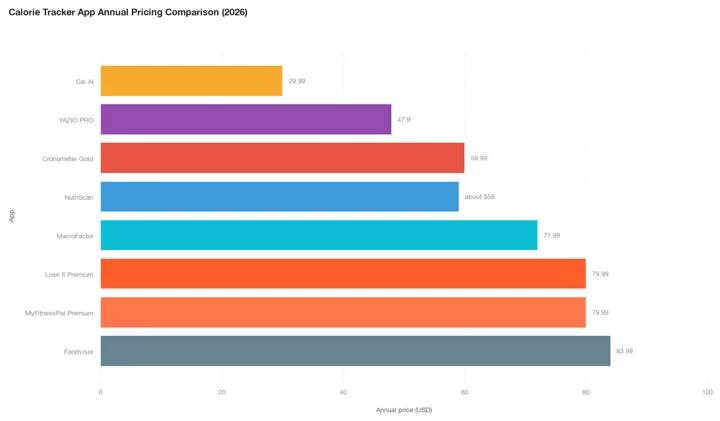 Figure 1: Annual pricing across major calorie tracking apps in 2026. Cal AI is plotted at $29.99, the top of its $19.99 to $29.99 range. Lose It Premium is now $79.99, level with MyFitnessPal, after moving up from $39.99 with no monthly option. Every app here except MacroFactor has some free tier underneath.
At $19.99-$29.99 per year, Cal AI is one of the cheapest annual plans among mainstream calorie trackers. However, the value depends heavily on which price you are shown. If you see the $19.99 annual price, Cal AI is a strong deal. If you see higher monthly prices ($9.99 or $19.99/month), the cost adds up fast - $119.88 to $239.88 per year if you pay monthly.
 When you find the $19.99 annual plan instead of the $19.99 monthly one
Real User Experiences With Cal AI
User reviews on the Apple App Store (274K ratings, 4.8/5 average as of February 2026) show a mix of strong positives and recurring complaints:
What users like:
- Fast photo logging saves time compared to manual entry. One reviewer wrote: "Point and click and it logs it. If there's a barcode even better."
- Several users report meaningful weight loss. One user lost 8 pounds in the first week, another lost 9 pounds in 3 weeks
- Apple Health integration automatically adds workouts to your daily calorie budget
- The rollover calories feature gives flexibility for users who prefer a weekly calorie range
What users dislike:
- Hidden pricing is the most common complaint. You cannot see the cost until after completing the full onboarding process
- Refund difficulties. One reviewer described multiple failed attempts to get a refund, ultimately requiring a credit card chargeback
- Starting weight cannot be edited after initial setup, which frustrates users who entered an estimate
- Photo logging sometimes fails silently. One user reported that "50% of the time, it fails to log the food I just finished" after taking a photo
- 3-day trial too short. Multiple reviewers say 3 days is not enough to properly evaluate a calorie tracking app
INFO
Cal AI was founded by Zach Yadegari, who built the app as a teenager. The company now has around 30 employees and spends nearly $770,000 per month on advertising and marketing alone, according to CNBC. That heavy ad spend explains why Cal AI shows up so frequently in social media feeds.

Who Should Pay for Cal AI (and Who Should Not)
Cal AI is a good fit if you:
- Want the fastest possible food logging (point phone, take photo, done)
- Are comfortable with estimates that may be off by 10-30% for complex meals
- Can get the $19.99 or $29.99 annual plan
- Prefer photo-based logging over typing or searching a database
- Want a simple app without advanced features like micronutrient tracking
Cal AI is not a good fit if you:
- Need precise calorie counts for medical reasons (diabetes, eating disorder recovery)
- Want detailed micronutrient tracking (vitamins, minerals)
- Cook complex multi-ingredient meals that are hard for AI to parse
- Are on a tight budget and see the higher monthly price tier ($9.99-$19.99/month)
- Want a large food database with verified restaurant and packaged food entries
- Prefer transparent pricing before committing
We weighed the subscription against what the scanner delivers in Is Cal AI Premium worth it, if you want the longer verdict. Cal AI is also often confused with Macro AI, a separate photo scanner whose ten unlabeled prices we break down in Is Macro AI free.
For users who want to try AI photo scanning before paying, NutriScan gives 5 photo scans a week on the free plan, with full macros, micronutrients and a NutriScore on every one of them. That is enough to test the scanner on the meals a food database usually mangles. Personalized diet plans for goals like weight loss, diabetes management and PCOS sit on Premium, at about $59 a year.

NutriScan's meal scanning screen (Home ➡️ Camera Icon ➡️ Crop Picture) lets you add food type, cooking method, and oil level for more accurate calorie estimates, on the free plan as well as Premium.
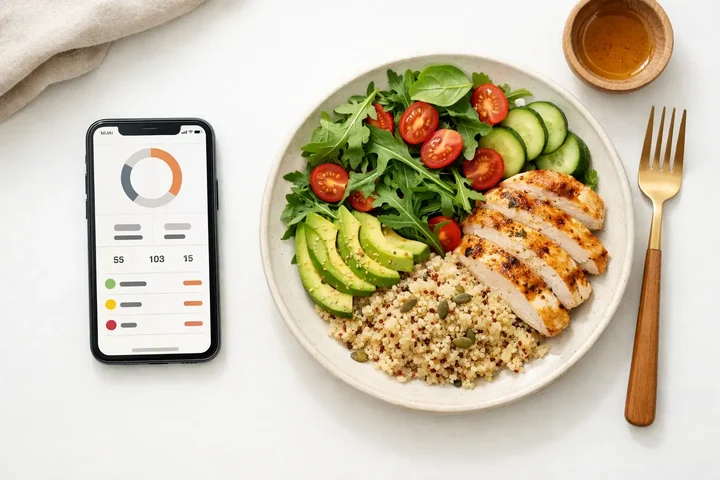 Testing Cal AI's photo scanning accuracy with your actual meals during the trial is the smartest way to decide if it is worth paying for.
Tips to Get the Best Deal on Cal AI
If you decide Cal AI is worth trying, follow these practical steps to get the best price:
Always start with the free trial. Do not skip the 3-day trial. Use it to test photo accuracy with your typical meals before paying.
Set a cancel reminder immediately. As soon as the trial starts, set a phone alarm for day 2. This gives you a full day to decide before the charge hits.
Check the annual price first. If the annual plan shows $19.99 or $29.99, that is a reasonable deal. If you only see monthly options at $9.99+, consider waiting.
Try a different device or account. Because Cal AI uses dynamic pricing, you may see a different price on a different device or with a new account.
Watch for promotions. Some users report seeing a $20 "special offer" when they initially decline the full price. Cal AI may show a lower price if you hesitate at the paywall.
Cancel through your app store, not the app. Go to your phone's subscription settings. The app itself cannot process cancellations or refunds.
Keep your own food log for comparison. During the trial, compare Cal AI's photo estimates to a manual calculation for at least 3-5 meals. This will tell you how accurate the app is for your specific diet.
TIP
Skip the pricing guesswork. Use NutriScan's free macro calculator to find your daily targets, then test the AI food tracker on the 5 free scans you get each week before deciding anything.
If you landed here from a search for the similarly named Calo app, that is a different company with a different price list. Our Calo pricing breakdown covers it. Nutri AI is a third name that gets mixed up with Cal AI, and seven developers use it; the Nutri AI pricing breakdown prices each one. Welling is another chat and photo tracker with no free plan; is Welling AI free lists its prices in four countries.
Frequently Asked Questions
Is Cal AI free?
Cal AI is free to download on the App Store and Google Play, and manual food search and basic logging stay free with no time limit. The AI photo scanning needs a paid subscription. A 3-day free trial unlocks everything, but it asks for a payment method before it starts. Searching "is CalAI free" gets you the same answer: free app, paid scanner.
Does Cal AI cost money?
Yes, if you want the photo scanner. Cal AI costs roughly $2.99 a week, $5.99 to $19.99 a month, or $19.99 to $29.99 a year, standard US prices as of mid 2026 that change by region. Downloading the app and logging your food by hand costs nothing.
How much is Cal AI per month?
Cal AI monthly pricing varies by user. Reported prices range from $5.99/month to $19.99/month. The most commonly reported monthly price on the App Store is $9.99. The annual plan ($19.99-$29.99/year) works out to $1.67-$2.50/month, which is much cheaper than paying monthly.
Can I get a refund if Cal AI does not work for me?
Refunds are handled by Apple (App Store) or Google (Play Store), not by Cal AI directly. You can request a refund through reportaproblem.apple.com for iOS or the Google Play refund page for Android. Some users have reported difficulty getting refunds, so cancelling before the trial ends is the safest approach.
Why do different people see different Cal AI prices?
Cal AI likely uses dynamic pricing or A/B testing. The price you see may depend on your location, device, account history, or how you answered the onboarding quiz. This is a common practice among subscription apps, but Cal AI's complete lack of public pricing makes it more noticeable.
Is Cal AI accurate enough for weight loss?
Cal AI can give reasonable estimates for simple, single-item foods. For complex meals with multiple ingredients, sauces, or oils, the accuracy drops significantly. A Lifehacker test found underestimation errors of 30-50% on mixed dishes. If you are using Cal AI for general awareness of your intake, it can be helpful. If you need precise tracking for a medical condition, consider apps with verified food databases like Cronometer or MyFitnessPal.
How does Cal AI compare to NutriScan for photo logging?
Both apps use AI to estimate calories from food photos. Cal AI requires a paid subscription for photo scanning, while NutriScan gives 5 photo scans a week on its free plan and unlimited scans on Premium at about $59 a year. Cal AI has a larger user base (30M+ downloads, 274K App Store ratings) while NutriScan focuses on accuracy for a wider range of cuisines including Indian, Asian, and mixed dishes. Every scan on either NutriScan plan carries a full macro and micronutrient breakdown plus a NutriScore; personalized diet plans are a Premium feature.
Conclusion
Cal AI offers one of the cheapest annual plans among AI calorie trackers at $19.99-$29.99 per year. The app's photo-based logging is fast and works well for simple, separated foods. However, the hidden pricing, variable costs, short trial period, and accuracy concerns for complex meals are real drawbacks.
If you are considering Cal AI, always start with the free trial and test accuracy with your own meals before committing. Set a cancel reminder on day 2 to avoid unexpected charges.
If you want to see the price before you see the paywall, download NutriScan and use your 5 free scans this week on the meals you care most about getting right.
