Is Carb Manager Free? Carb Manager Premium Pricing Explained
 ChatGPT
  Claude
  AI Mode
  Perplexity
The US App Store listing for Carb Manager shows seven in-app purchases, all called "Carb Manager Premium." Five of them are one-year plans, and they come at four different prices: $29.99, $39.99 (listed twice), $59.99, plus an entry at $49.99 with no period on it. The company's own website answers the price question in three words, "Just $39.99/year," on its free vs Premium page. Both are current, both are official, and the gap between them is the most useful thing to understand before you tap a paywall button.
The short version: Carb Manager is free to use, and its free tier is one of the more complete ones in the category. The paid tier, Carb Manager Premium, is published at $8.49 a month or $39.99 a year. This post covers what the free version includes, what the store prices mean, where the company's own pages disagree with each other, and how cancelling and refunds work on each platform.
Is Carb Manager free? Yes. Net carb tracking, macro and calorie goals, barcode scanning, the 1M+ food database and ketone and glucose logging cost nothing. Premium is optional: $8.49 a month, $16.49 for three months, or $39.99 a year.
TL;DR - Carb Manager Pricing
Free forever: Net carbs, calorie goal, barcode scanner, 1M+ foods, ketone and glucose logging, exercise, water, weight, community
Premium: $8.49 a month, $16.49 for 3 months, $39.99 a year ($3.33 a month)
Price tests: The App Store also lists yearly plans at $29.99 and $59.99, so your paywall may not show $39.99
Refunds: 7 days, fully honored, for Google Play and website purchases; Apple decides for iOS
Here is the route through the post:
- The free tier, and what the seven store prices mean
- Where Carb Manager's own pages contradict each other
- How to cancel, and the refund rule that depends on where you paid
- The buying order that beats the annual discount (saved for near the end)
Prices in this post are US App Store and carbmanager.com prices, checked on September 13, 2026. They change by region.
The short answer: yes, Carb Manager is free
The App Store description says it directly: the app comes "with UNLIMITED free barcode scan, and ALWAYS free net carb tracking," and "Carb Manager is always free to download and use!" You can create an account, set a calorie and macro goal, search a database the listing sizes at 1M+ foods, scan barcodes, log water and exercise, chart your weight, and join the community forums without paying anything.
Premium is optional. The published prices are $8.49 for one month, $16.49 for three months, and $39.99 for one year. On annual billing that is $3.33 a month, and the Premium page frames the yearly plan as a 39% saving against paying quarterly. Against monthly billing the saving is larger: twelve months at $8.49 is $101.88, so the $39.99 annual plan is a 61% discount.
The app comes from Wombat Apps LLC. The numbers behind it are large for a niche tracker: 4.8 stars from 735K ratings on the App Store, and 4.8 stars from 166K reviews with 5M+ downloads on Google Play. The Play listing was last updated on August 28, 2026, so the app is actively maintained.
 Seven purchases with the same name. That is the face most people make at the paywall.
What you get on Carb Manager's free plan
The free tier, which Carb Manager calls Basic, is built around the one number keto and low-carb eaters check daily: net carbs. The company's own free vs Premium comparison lists these as free:
- Net carb tracking. The app calculates your net carb intake and shows your remaining allowance for the day. This is the core keto number, and it never sits behind the paywall.
- Macro and calorie tracking. Carbs, fat and protein against goals, with a custom calorie target based on your weight and goal. The comparison page says Basic also tracks "a variety of micronutrients."
- Barcode scanning. The App Store description calls it unlimited and free. This matters because several competitors have moved scanning behind their paywalls.
- A 1M+ food database, plus custom food entry when something is missing.
- User-submitted recipes, filterable by ingredient, time, macros and meal.
- Biomarker logging. The comparison page lists ketones, blood glucose, insulin, GKI and cholesterol under the free column, which is unusual; many apps charge for glucose and ketone fields.
- Exercise, water and weight tracking, including progress charts.
- Community forums and weekly challenges.
That free tier is enough to run a strict low-carb diet end to end: set a net carb limit, scan or search everything you eat, and watch the daily remainder. One iOS reviewer, put on a low-carb diet to manage epilepsy with a limit of 15 net carbs a day, describes doing exactly that for about two years.
TIP
Before you open the paywall, write down the one thing the free tier cannot do for you. If you cannot name it, you do not need Premium yet.

What Carb Manager Premium costs
Here is every price the store listing and website show:
| Plan | Price | Per month |
|---|---|---|
| Premium, 1 month | $8.49 | $8.49 |
| Premium, 3 months | $16.49 | $5.50 |
| Premium, 1 year (published price) | $39.99 | $3.33 |
| Premium, 1 year (also in the store listing) | $29.99 | $2.50 |
| Premium, 1 year (also in the store listing) | $59.99 | $5.00 |
| Premium, no period shown | $49.99 | - |
The first three rows are the offer Carb Manager publishes. The last three exist only as in-app purchase entries on the App Store listing, all named "Carb Manager Premium," with no explanation of who sees which. Several identically named subscriptions at different price points usually means the developer is running price tests or regional and promotional variants, so the paywall inside your app may not show $39.99.
A fair reading: $39.99 a year is the price the company stands behind publicly, $29.99 likely appears as a discount, and $59.99 is the high end of the test range. If your paywall shows more than $39.99, close it and check the offer again later or on the website before you pay.
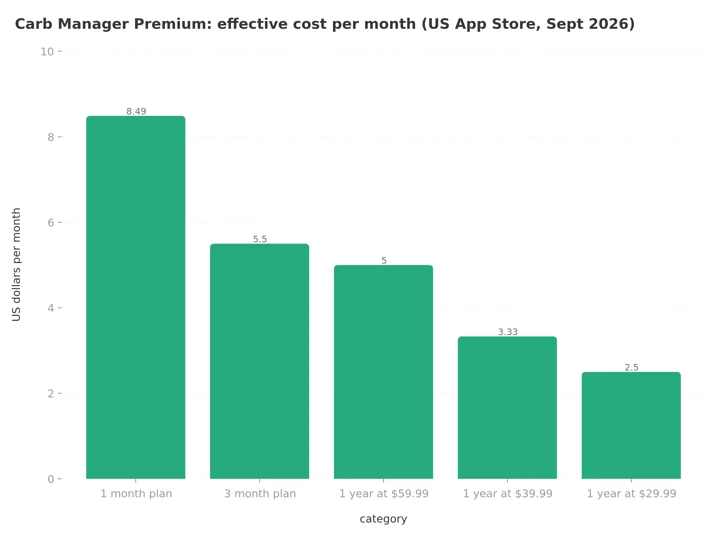 Figure 1: Even the most expensive yearly price, $59.99, costs less per month than the three-month plan. The $39.99 plan works out to $3.33 a month.
Even at the top of that range, Carb Manager stays cheap for the category. In my cheapest nutrition app comparison, it is one of only three apps under $40 a year, and the cheapest one whose annual price does not depend on a promotion. The annual plan comparison across calorie trackers shows the same pattern, and in the under $10 monthly roundup its $8.49 monthly plan sits under the limit.
What Carb Manager Premium adds
Nothing about net carb math changes when you pay. Premium adds convenience and depth on top of the free tracker. From the Premium page and the free vs Premium comparison:
| Feature | Free (Basic) | Premium |
|---|---|---|
| Net carb, macro and calorie tracking | Yes | Yes |
| Barcode scanning | Yes, per the App Store description | Yes |
| Food database and custom foods | Yes | Yes |
| Ketone, glucose, insulin, GKI logging | Yes | Yes |
| Exclusive test-kitchen recipes | No | 5,000+ |
| Recipe library access | User-submitted | 360,000+ from around the web |
| Meal plans and shopping lists | No | Yes, auto-generated |
| Recipe import from websites | No | Yes |
| Keto Academy video course | No | Yes |
| Intermittent fasting | No | Yes |
| Fitness device sync (Fitbit, Garmin, other trackers) | No | Yes |
| Carb cycling and per-meal goals | No | Yes |
| Smart Macros auto-adjusting goals | No | Yes |
| Advanced reports and correlations | No | Yes |
| Price | $0 | $8.49/mo or $39.99/yr |
Two paid features carry most of the value. Meal plans with auto-generated shopping lists answer the "what do I cook this week" question that makes many people quit keto. Device sync is the other one; if your activity lives in a Fitbit or Garmin, the free tier will not pull it in.
Where Carb Manager's own pages disagree
I compared four official sources while researching this post: the App Store description, the Google Play description, the Premium page and the help center. They do not tell one consistent story about what is free.
- Barcode scanning. The App Store description says "UNLIMITED free barcode scan." The Premium page lists "Barcode Scanner" under its "Keto made fast" Premium features. The App Store description is the more specific claim, and reviews treat scanning as free, so free is the better bet.
- Voice logging. The help center's Subscribe to Premium article lists voice logging as a Premium feature. The free vs Premium page describes the Basic tier's food lookup as "snap, scan, and voice logging." The help center is the operational document, so expect voice to require Premium.
- Intermittent fasting. The Google Play description lists "an intermittent fasting tracker" among the things the app covers next to "free net carb tracking," while the free vs Premium page marks intermittent fasting "Premium only." The comparison page is the one that itemizes tiers, so treat fasting as paid.
- Micronutrients. The comparison page says Basic tracks "a variety of micronutrients," while the Premium page lists "Full nutrient tracking" as part of membership. A Google Play reviewer from January 2025 complains: "Have to pay to see your nutrients when that is a free feature in other apps." Expect some nutrient detail on free and the full panel on Premium.
None of this is unusual for a large app whose marketing pages date from different years. It explains why two people can argue about whether Carb Manager is "really" free and both quote official sources.
IMPORTANT
Checkpoint: halfway through.
⏱️ Progress 2/4 • ~4 minutes in
✅ Step 1: What the free tier gives you
✅ Step 2: What Premium costs, and why the store shows extra prices
⬜ Step 3: Trials, cancelling and refunds
⬜ The buying order that beats the annual discount (coming up)
The Carb Manager free trial, and what the pages do not say
Carb Manager's free vs Premium page carries a "Get a Free Trial" button, and App Store reviewers mention trying Premium before paying. What the public pages do not publish is the trial length. The App Store description says only that "we offer an annual subscription with more details in-app," and no official page we checked states a number of days.
So the practical guidance is general: the trial terms appear on the paywall screen at signup, and when the trial ends an auto-renewing subscription begins. The App Store description notes that the subscription "automatically renews unless auto-renew is turned off at least 24-hours before the end of the current period." Read the renewal date on that screen, and set a phone reminder two days before it. The same advice applies across the category; my refund rules for calorie tracking apps guide covers the store mechanics.
 Mark the renewal date the day you subscribe, not the week it charges you.
How to cancel Carb Manager Premium
The steps come from the help center's cancellation article, last updated April 2024 and still the current document.
- Open Carb Manager and go to Settings.
- In the My Settings section, select Subscription.
- Select Manage Subscription.
- Tap the button for the billing platform shown. Web (Fastspring) means you subscribed on carbmanager.com; otherwise you will see App Store or Google Play.
- Finish the cancellation on that platform's page.
Three details from the same article are worth keeping:
- Timing. Cancel "more than 24 hours before the end of your billing cycle" for it to take effect on time. On a $39.99 annual plan, that means checking the renewal date now, not in eleven months.
- Uninstalling does not cancel. The article states this explicitly, and it is the most common billing mistake across subscription apps.
- Your data survives. After cancellation you keep Premium until the paid period ends, then lose Premium features while keeping "your daily logs, custom meal plans, foods, recipes, and favorites."
WARNING
Deleting the app does not stop the charge. Cancel through Settings or the store first, then uninstall if you want to.
If you cannot remember where you subscribed, the help center's refund article suggests reading your card statement: APPLE.COM/BILL means the App Store, GOOGLE means Play, and FS *CARBMANAGER PREMIUM means the website.
Carb Manager refund rules by platform
Carb Manager's refund article splits the answer by where you paid, and the two paths are very different.
App Store (iOS). Apple handles everything. Carb Manager cannot issue an iOS refund itself. The article says Apple "typically honors refund requests that are made within a few days of the original purchase," at its own discretion, through Apple's refund process. Cancel the subscription first, then request the refund.
Google Play and website purchases. Here the policy is clear and generous: "We fully honor refund requests that are made within seven days of the original purchase. We do not offer prorated refunds." Contact support through the app so your account details attach automatically, or email if you cannot open the app. A guaranteed seven-day window honored by the company is better than most of this category offers; several fasting apps route everything to the stores, as covered in the fasting app refund guide.
For buyers, this means: if you are unsure whether you will keep the app, subscribing on Android or on the website gives you a real exit, and subscribing on iOS leaves you dependent on Apple's judgment.
IMPORTANT
Checkpoint: one section left before the reveal.
⏱️ Progress 3/4 • ~6 minutes in
✅ Step 1: What the free tier gives you
✅ Step 2: What Premium costs, and why the store shows extra prices
✅ Step 3: Trials, cancelling and refunds
⬜ The buying order that beats the annual discount (next)

Monthly or annual: the buying order that beats the discount
The math says annual and the research on app use says start small. Both are right at different moments.
At $39.99 a year against $8.49 a month, the annual plan pays for itself in under five months. If you already know you will track all year, buying twelve months for the price of about four and a half is the clear choice.
The problem is that most people do not keep using an app all year. A 2024 JMIR scoping review of 18 studies with 525,824 participants found a median of 70% of users stopped using lifestyle and mental health apps within the first 100 days (Kidman et al., 2024). A 2026 scoping review of calorie-counting apps reported self-monitoring with MyFitnessPal falling from 5.4 to 1.4 days a week between weeks 4 and 12, and Lose It! use dropping to 4 days a week by week 12 (Dugas et al., 2026). An annual plan bought on day one is a bet against those numbers.
The tracking itself is worth doing. In a 12-month mHealth trial of 502 adults, higher adherence to diet self-monitoring was associated with greater odds of losing 5% or more of body weight (Burke et al., 2025). In an 8-week study of 90 adults using a calorie counting app, more weeks of consistent self-monitoring was linked with more weight lost (Payne et al., 2022). And a meta-analysis of 11 trials found app-based weight loss clearest at 4 to 6 months, with the effect limited beyond 6 months (Pujia et al., 2025), which is exactly the window an annual purchase needs you to outlast.
So here is the order that fits the evidence:
- Run the free tier for two weeks. Net carb tracking is the entire task for many keto eaters, and it costs nothing here.
- Pay $8.49 for one month only when you hit a need the free tier cannot cover: meal plans, device sync, fasting programs.
- Switch to the $39.99 annual plan once you have three months of logging behind you. At that point the discount is real money and most of the drop-off risk is behind you.
Where Carb Manager stops
Carb Manager is built for one eating pattern. Net carbs, ketones, GKI and carb cycling are keto tools, and if you eat that way, few apps at this price are as specialized. If you do not eat low-carb, most of what makes the app distinctive is irrelevant to you, and the keto framing of recipes and plans gets in the way.
The second limit is logging effort for food without a barcode. Scanning handles packaged food well, but home-cooked plates mean database searches and portion guesses. In a 2025 survey on mobile health apps, unobtrusiveness had the strongest link with people's intention to keep using an app (Mohd Johari et al., 2025), and database searching is the least unobtrusive part of logging.
I work on NutriScan, which attacks that step with photo logging: you photograph the cooked meal, tag how it was cooked, and the app estimates calories, protein, carbs and fat, then lets you correct the portion before saving. The free plan includes 5 meal scans a week, enough to test it on the plates a database handles badly. Published testing of AI food recognition reports accuracy from 46% to 97% across apps (Li et al., 2024), so photo estimates are a fast starting point you adjust, not a lab measurement. NutriScan has no barcode scanner, so for packaged food Carb Manager's free scanner is the faster tool.

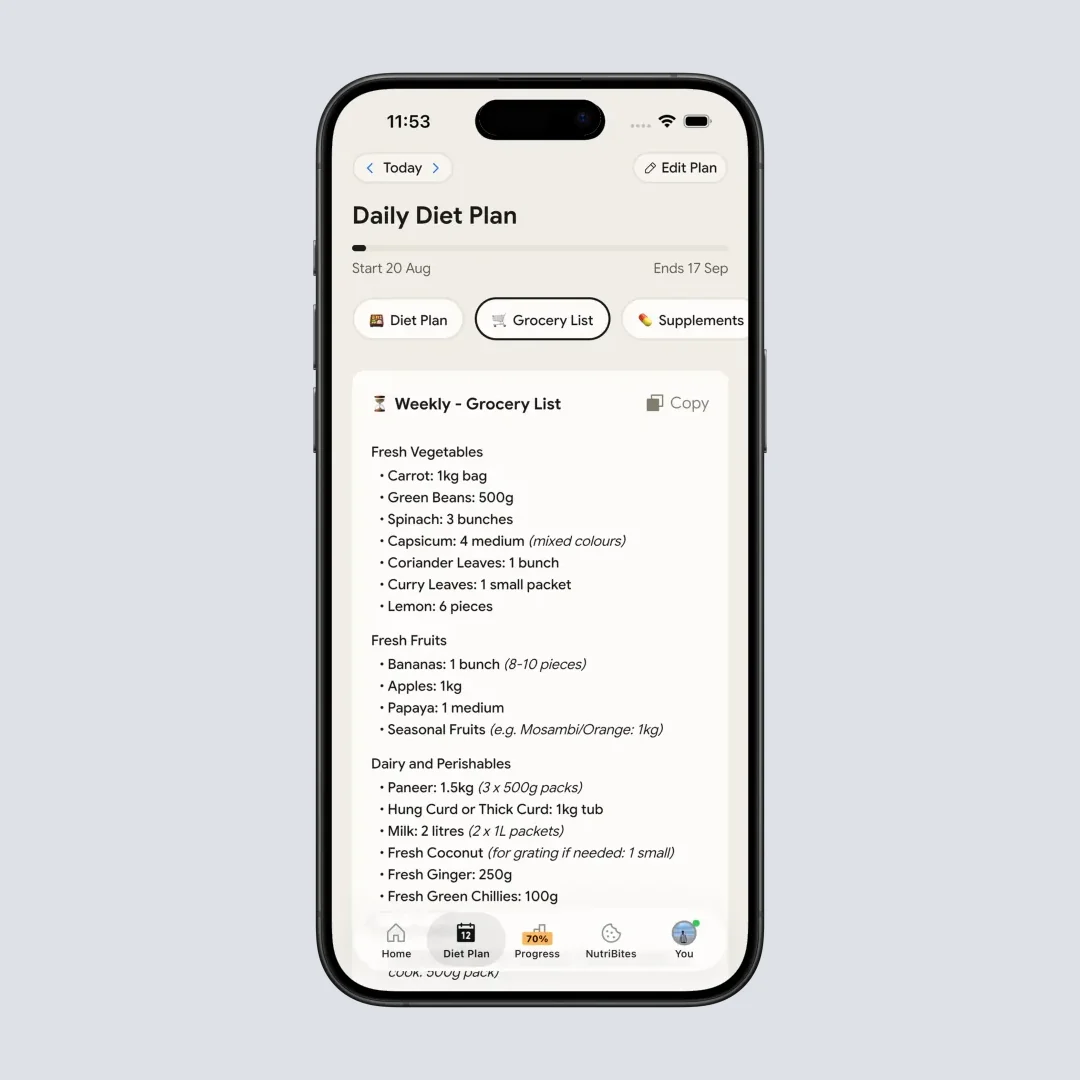
For low-carb shoppers, NutriScan's keto grocery list generator builds a week's list from a diet plan, and Premium users get a goal-based grocery list inside the app (Home > Diet Plan > Grocery List). That covers some of the same ground as Carb Manager's paid shopping lists.
Neither approach replaces the other. If your diet is strict keto and your food is mostly packaged or repeated, Carb Manager's free tier may be all you ever need. If your meals are cooked and varied, a photo-first logger removes more typing per day.
Who should pay for Carb Manager Premium
Stay free if you mainly need a net carb ceiling and a barcode scanner. The free tier covers the daily keto loop, including ketone and glucose logging.
Pay monthly ($8.49) if you want meal plans, shopping lists, fasting programs or device sync for a defined push, such as a 60-day cut or a pre-holiday reset, and you are not yet sure the habit will stick.
Pay annual ($39.99) if you have already tracked for a few months and plan to continue. The per-month cost drops to $3.33, and it is one of the cheapest steady annual prices among the major trackers.
Skip it if you do not eat low-carb, or your meals are mostly home-cooked and you want photo logging. Different tools own those jobs.
Check the renewal date the paywall shows before you buy, remember the seven-day refund window only exists on Android and web purchases, and let the free tier prove the app fits your food before you pay.
FAQ
Is Carb Manager free? Yes. Net carb tracking, macro and calorie goals, barcode scanning, a 1M+ food database, exercise and water logging, weight charts, ketone and glucose logging, and the community are all free. The App Store description states barcode scanning is unlimited and free.
How much does Carb Manager Premium cost? The published prices are $8.49 a month, $16.49 for three months, or $39.99 a year ($3.33 a month). The App Store listing also carries yearly purchases at $29.99 and $59.99 and an unlabeled $49.99 entry under the same Premium name, so paywall offers vary. The website quotes the annual plan at $39.99.
What does Carb Manager Premium add? Exclusive recipes, meal plans with shopping lists, recipe import, the Keto Academy course, intermittent fasting, fitness device sync, carb cycling, Smart Macros, full nutrient tracking and advanced reports.
Does Carb Manager have a free trial? The free vs Premium page carries a Get a Free Trial button, but no official page publishes its length. The exact terms and the renewal date appear on the paywall screen before you confirm the purchase.
How do I cancel Carb Manager Premium? Go to Settings, then Subscription, then Manage Subscription, and complete the cancellation on the platform shown: App Store, Google Play, or Web (Fastspring) for website purchases. Do it more than 24 hours before the billing cycle ends. Your logs and recipes remain after Premium ends.
Can I get a Carb Manager refund? On iOS, only through Apple, which decides case by case. For Google Play and website purchases, Carb Manager says it fully honors refund requests made within seven days of purchase, with no prorated refunds later in the term.
IMPORTANT
Recap: everything you covered.
⏱️ Progress 4/4 • Done
✅ Step 1: The free tier covers net carbs, scanning and biomarkers
✅ Step 2: Premium is $39.99 a year published, with price tests in the store
✅ Step 3: Cancel 24+ hours early; 7-day refunds only on Android and web
✅ The buying order: two free weeks, one paid month, then annual after three months