Is Yuka Free? Yuka Premium Pricing 2026 Explained
 ChatGPT
  Claude
  AI Mode
  Perplexity
Yuka's App Store listing carries exactly three in-app purchases, $10.00, $15.00 and $20.00, and all three are called "Premium Member." That is the whole price list. There is no weekly plan, no monthly plan, no trial that quietly converts, and no price test that shows one person $29.99 and the next person $59.99. For a category where the paywall is usually the most confusing screen in the app, that is unusual enough to explain properly.
The short version: Yuka is free to use, and most people never pay. The paid version is an optional yearly membership that adds four features and, according to the company, is the main reason the app has no ads. What follows is what the free version does, what the three prices buy, why there are three of them, how to cancel, and where the app stops being useful for someone who wants to track calories rather than judge products.
Is Yuka free? Yes. Barcode scanning, the 0 to 100 score, the additive breakdown and the healthier alternatives all cost nothing, and there are no ads. Premium is an optional yearly membership at $10, $15 or $20, and the features are the same at all three prices.
TL;DR - Yuka Pricing 2026
Free forever: Barcode scan, score out of 100, additive and ingredient breakdown, healthier alternatives, brand call-outs, no ads
Premium adds four things: Product search without scanning, offline mode, dietary preference alerts, unlimited scan history
Three prices, one product: $10, $15 or $20 a year in the US App Store, identical features, so pick $10 unless you want to give more
On the website: $15 a year, or 15 euros in Europe
Annual only: No monthly plan and no free trial, and cancelling has to happen the day before renewal because a mid-year cancellation is not refunded
IMPORTANT
Your Yuka pricing plan at a glance.
A quick roadmap so you can decide in about four minutes.
⏱️ Progress 0/4 • ~0 minutes in • Keep going
⏳ Step 1: What the free tier actually gives you
⏳ Step 2: What Premium adds, and why there are three prices
⏳ Step 3: How to cancel, and who should pay
🔍 The bit that decides it (revealed near the end)
The short answer
Yes, Yuka is free. The core of the app, scanning a barcode and getting a score out of 100 with a breakdown of nutrition, additives and ingredients, costs nothing. Yuka's own help center says it plainly: "Yuka is a free application. However, there is a Premium paid mode allowing access to more features" (Yuka Help).
Premium is an annual subscription. In the US App Store it costs $10, $15 or $20 a year, and you pick which. On yuka.io the price is shown as $15 a year, or 15 euros in Europe, under the heading "Open pricing & commitment-free." There is no monthly option.
What you get without paying
The free version is the full product that 85 million people installed, per the App Store description, and it includes:
- Barcode scanning for food and cosmetics, with a score from 0 to 100 and a color label: excellent (75 and above), good (50 to 74), mediocre (25 to 49) or bad (below 25). The thresholds are written into Yuka's terms, section 3.3.
- A detailed product page showing the nutrition facts behind the score, each additive with its risk level, and the organic bonus if the product carries a certified label.
- Healthier alternatives. When a product scores mediocre or bad, the app recommends similar products with a higher score, chosen by category, availability and rating.
- Top products rankings, free but currently only in France and the United States.
- Brand call-outs. If a product contains an additive Yuka rates as high risk, you can email the brand from inside the app. Available in France, the US, Spain and Italy, and only for users over 18.
- No advertising, on the free tier too. Yuka states on its independence page that brands cannot pay to advertise or to influence a score.
The database behind all of this holds 4 million food products and 2 million cosmetics, according to the store listings. Users add missing products by photographing the label, and the terms note that food contributions may be republished on Open Food Facts.
 Reaching for a box, scanning it, reading the score: that is the whole free version in one move
IMPORTANT
Checkpoint: here is where you are right now.
Quick status update so you always know the next best move.
⏱️ Progress 1/4 • ~1 minute in • Keep going
✅ Step 1: What the free tier gives you (done)
👉 Step 2: What Premium adds, and why there are three prices (you are here)
⏳ Step 3: How to cancel, and who should pay
🧩 The bit that decides it (coming soon)
What Premium adds
Yuka's paid version article and the premium page list the same short set of features. Nothing about the score changes when you pay.
| Feature | Free | Premium Member |
|---|---|---|
| Barcode scan with score | Yes | Yes |
| Additive and ingredient breakdown | Yes | Yes |
| Healthier alternatives | Yes | Yes |
| Search products by name or brand, no scan needed | No | Yes |
| Offline mode | No | Yes, for the most scanned products |
| Dietary preference alerts | No | Yes |
| Scan history | Recent scans | Unlimited |
| Ads | None | None |
| Price | $0 | $10, $15 or $20 a year |
Three of the four paid features deserve a note.
Search is the one most people pay for. Without it, you can only learn a product's score by physically scanning it. With it, you can check a product from home, compare two brands before a shop, or look up something you ate at a friend's place.
Offline mode does not download the full database. Section 6.3.4 of the terms says the offline set "contains only a portion of the Products (representing the most frequently scanned Products)." In a supermarket with poor signal, a common brand will resolve and an unusual one may not.
Dietary alerts flag vegetarian or vegan conflicts, palm oil, gluten, lactose, pork, soy and sulfites, and the healthier-alternative suggestions respect those settings. The terms state the limit plainly: the feature "should therefore not be used by people who have severe allergies that could lead to serious medical complications." In a March 2025 App Store reply to a reviewer with celiac disease, Yuka added that the alerts cannot account for trace amounts of gluten. If you are managing an allergy rather than a preference, read the label; the alert is a convenience, not a safety system.

Why Yuka lets you choose $10, $15 or $20
Most apps run price tests: different users see different numbers for the same plan and nobody is told. Yuka does the opposite. The three prices are shown side by side and you pick one. The help center explains the logic in two sentences: "The features offered are exactly the same for all 3 price points. The idea behind the sliding scale is simply to provide additional financial support to Yuka for those who wish to do so" (Yuka Help).
So the honest guidance is: choose $10 unless you want to give more. There is no feature you are missing at the lower price, and nothing in the terms treats the three tiers differently. Several App Store reviews mention this directly; one reads, "The search feature is available by subscription, but you get to choose what you feel is right to pay."
The price also does not change by platform. The App Store in-app purchase list shows $10.00, $15.00 and $20.00. Yuka's website shows $15 a year as the default and lets you subscribe by card, with the same annual term. Prices outside the US are set in local currency, so the UK, Canadian, Australian and European figures will differ slightly from the dollar amounts.
Put that next to what the calorie trackers charge and the gap is the real story. Yuka's cheapest tier is under a fifth of what most annual tracker plans cost.
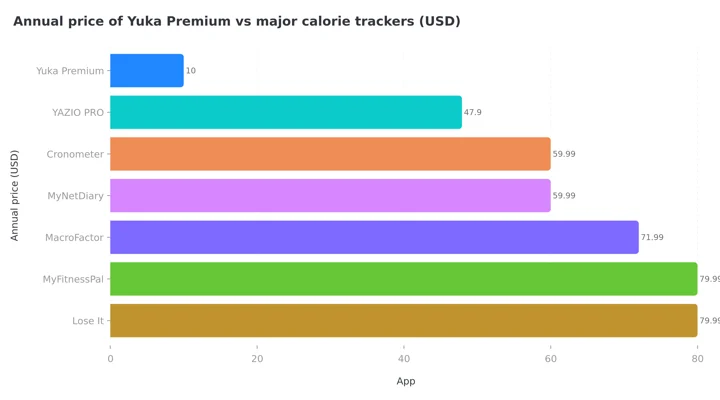 Figure 1: Yuka Premium at its $10 tier against the major calorie trackers. Even at the $20 tier it is the cheapest paid plan on the chart.
IMPORTANT
Checkpoint: midway progress update.
You are halfway, and the decisions get easier from here.
⏱️ Progress 2/4 • ~2 minutes in • Keep going
✅ Step 1: What the free tier gives you (done)
✅ Step 2: What Premium adds, and why there are three prices (done)
👉 Step 3: How to cancel, and who should pay (current)
⏳ The bit that decides it (next)
Where the money goes
Yuka publishes its revenue split every year, which almost no consumer app does. For 2024 the independence page reports $7,174,710 from Premium subscriptions, $137,893 from books and calendars, and $58,043 from services. The company also links its balance sheet as a PDF.
Two things follow from that. First, at roughly $10 to $20 per subscriber per year, those figures imply several hundred thousand paying members out of a user base in the tens of millions, which is consistent with the help center framing Premium as support rather than a gate. Second, the reason the company gives for the no-ads and no-brand-influence policy is that subscriptions pay the bills. Yuca SAS, the Paris company behind the app, is registered as a mission-led company under French commercial law and is a certified B Corp. It describes itself as a team of about 20 people.
None of that makes the score correct, and I will get to the evidence on that below. It does mean the pricing model holds together: the people who pay are funding the app deliberately, and the free tier is the product rather than a route to a paywall.
Where Yuka is not available
This is the part that surprises people who read about the app abroad. Yuka's help center lists the countries where it is on the App Store and Google Play: the United States, Canada, Australia, Great Britain, Ireland, France, Belgium, Switzerland, Luxembourg, Spain, Portugal, Italy, Germany, Mexico and Brazil (Yuka Help). Mexico, Brazil and Portugal were added in July 2026, per the App Store version notes.
India, the rest of Asia, the Middle East, Africa and most of South America are not on the list, and the app is available in six languages: English, French, German, Italian, Portuguese and Spanish. If you are outside those 15 countries, the pricing question does not arise, because you cannot install it from your local store. Even inside them, the database is strongest for products sold in France and the US, where the app has been longest.
How the score is built, and what the evidence says about it
Yuka's food score has three parts, set out in the scoring article: nutritional quality is 60% of the score, additives are 30%, and an organic certification adds a 10% bonus. The nutrition part is a translation of Nutri-Score, the front-of-pack label used in several European countries, which grades products on sugar, sodium, saturated fat, calories, protein, fiber and fruit and vegetable content. One rule overrides the arithmetic: if a product contains an additive Yuka rates as high risk, the score is capped at 49, so the product can never show as "good."
The nutrition half rests on real evidence. In the EPIC cohort, which followed 501,594 adults across 10 European countries, people whose diets scored worse on the nutrient profile behind Nutri-Score had higher all-cause mortality and higher mortality from cancer and from circulatory, respiratory and digestive diseases (Deschasaux et al., 2020). That is an association in a large population, not proof that one product causes harm, but it is the kind of evidence a public health label is supposed to have.
The additive half is where Yuka is more cautious than regulators. The company states in its terms that it "applies the precautionary principle and warns of the presence of certain ingredients and additives, even if the risk is still suspected rather than proven," and that it "does not claim to have any scientific authority." Several of the most upvoted store reviews complain about this in the other direction: a Google Play reviewer notes the app "takes points off the total score if there are any additives at all, even if they are no-risk." Both readings are fair. The score is an opinion built on published sources, and Yuka links those sources product by product, which is more than most scanner apps do.
There is a subtler problem with any single score, which a French study on Nutri-Score documented through focus groups and supermarket observation: shoppers understood the label's intent but often put price and habit first, and many did not know how the score was calculated, which fed mistrust (Cerf et al., 2024). Yuka's detailed product page, free in the app, is the answer to that. Tap through and read why a product scored what it did before you drop it from the cart.
Does scanning change what people buy?
This is the question the price should really turn on. A 2024 scoping review of food purchase apps found 46 unique apps in the literature, and 59% of them were "selection apps" that work exactly like Yuka: scan a barcode, see a rating. Across the 11 evaluation trials the review could find, 73% reported significant effects on behavior, but the authors add that few of those trials covered the barcode-and-rating type specifically, and the ones that did showed mixed results. The recurring failure was not the information but the engagement: people stopped scanning (de Grave et al., 2024).
A 2025 UK trial of the government's Change4Life Food Scanner app, which also scans barcodes and shows sugar and calorie content, illustrates the pattern. Among 126 parents randomized to use the app or not, average app use fell from 14.1 minutes in week two to 6.8 minutes in week twelve, and there was no meaningful difference in children's energy or sugar intake between the groups at three months (Mahdi et al., 2025).
The lesson for a Yuka buyer is practical. Most of the app's value arrives early: the first two weeks, when you scan your cupboard and swap three or four regular purchases, produce most of the benefit. That fits the reviews, where the most common story is "I scanned my pantry and replaced the worst things." Search, the main paid feature, is what keeps the app useful after that phase, because it removes the need to be standing in front of the product. If you know you will use the app only for the initial sweep, the free version covers it. If you want it as a standing reference, the yearly fee is small.
The same scoping review names perceived burden of use as one of the factors behind infrequent engagement, and search is the effort-reducing feature in Yuka's paid set.
Where Yuka stops
Yuka answers one question: is this packaged product a good choice? It does not answer how much you ate. There is no calorie log, no daily target, no meal history, no portion entry, and no way to score a plate of food that did not come with a barcode. That is a design decision, not a gap, and the app's terms say the score "does not guarantee the User better health" and the app "does not provide medical recommendations."
So if your goal is weight loss, diabetes management or hitting a protein target, Yuka is a shopping tool to use alongside a tracker, and it does not replace one. I work on NutriScan, which is built for the other half of the problem: you photograph the meal, cooked food included, and the app estimates calories, protein, carbs and fat and logs them against your daily goal. It also gives every logged meal a NutriScore, packaged food included, so the two ideas coexist in one app. Independent testing of AI food recognition puts accuracy anywhere from 46% to 97% depending on the app and the dish (Li et al., 2024), which is why photo estimates should be checked and corrected, especially for mixed dishes. Neither approach replaces the other. Barcode scanning is close to exact for what is on the label; photo scanning is approximate but covers everything you eat. I compared the three methods in detail in meal scan vs photo scan vs barcode scan, and covered where Yuka and Fooducate each stop in NutriScan vs Fooducate.
For a broader look at which scanner does what, the best barcode scanning apps roundup covers the trackers that also read labels, and the cheapest nutrition app comparison puts Yuka's yearly fee next to the trackers' prices, where it is the lowest paid plan on the list.


How to cancel Yuka Premium
Yuka Premium is a one-year subscription that renews automatically. The terms require you to cancel "no later than the day before the renewal date," and say a cancellation mid-year "is not entitled to reimbursement": you keep Premium until the year ends and the renewal simply does not happen. The steps come from Yuka's cancellation article, updated July 2026.
On iPhone or iPad:
- Open the App Store.
- Tap your account icon at the top right.
- Tap Manage Subscriptions.
- Select Yuka, tap Cancel Subscription, and confirm.
On Android:
- Open the Yuka app.
- Tap the three dots at the top right.
- Tap Account, then Manage My Subscription, then Cancel My Subscription.
- Follow the Play Store prompts to confirm.
Yuka notes the Android in-app path works from the fourth day after subscribing. Before that, use the Play Store app directly: Menu, Payments and subscriptions, Subscriptions, Yuka.
If you subscribed on yuka.io: the company emails you seven days before renewal. To cancel earlier, email [email protected], or use the contact form linked from the help article.
Refunds for store purchases go through Apple or Google under their rules, not through Yuka. Apple reviews requests at reportaproblem.apple.com case by case; Google's window for an automatic refund is 48 hours after purchase. Because Yuka's own terms rule out mid-term refunds, a change of mind after a few weeks is unlikely to succeed, which is one more reason to pick $10 rather than $20 if you are unsure.
Who should pay for Yuka Premium
Pay the $10 if you shop weekly for packaged food, you want to compare products before you leave the house, your supermarket has poor signal, or you follow a diet the alerts cover (vegan, no palm oil, lactose-free) and want the recommendations filtered accordingly. At under a dollar a month it is the cheapest paid plan in this category, and you are funding an ad-free app that publishes its accounts.
Stay on free if you mainly want a one-time audit of what is in your kitchen, you eat mostly unpackaged food, or you are outside the 15 supported countries. The free version already includes the scan, the score, the breakdown and the alternatives, which is more than most apps give away.
Look elsewhere if you need calorie or macro tracking, meal logging, or anything to do with restaurant and home-cooked food. Yuka does not attempt any of that and does not pretend to.
 Still on the fence? The $10 tier makes the decision cheap to get wrong
IMPORTANT
Checkpoint: final stretch before the reveal.
One last nudge, the reveal is next.
⏱️ Progress 3/4 • ~3 minutes in • Keep going
✅ Step 1: What the free tier gives you
✅ Step 2: What Premium adds, and why there are three prices
✅ Step 3: How to cancel, and who should pay
✨ The bit that decides it (about to reveal)
Frequently asked questions
Is Yuka free? Yes. Scanning, the score, the additive breakdown, healthier alternatives and brand call-outs are free, and there are no ads. Yuka's help center describes the app as free with an optional Premium mode.
How much is Yuka Premium? $10, $15 or $20 a year in the US App Store, your choice, with identical features at all three prices. The website shows $15 a year, or 15 euros in Europe. There is no monthly plan.
Why does Yuka show three prices? The company calls it a sliding scale. The extra amount is a voluntary contribution; the help center states the features are exactly the same at each price.
Is there a Yuka free trial? No trial is listed on the App Store, Google Play or the Yuka website. The free version is permanent, so the trial is effectively the free app itself.
Does Yuka count calories? No. It shows the calories per 100 g on a product's page as part of the nutrition breakdown, but it has no log, no daily target and no portion entry. For calorie tracking you need a separate app.
Can I use Yuka in India? Not through the local app stores. Yuka lists 15 supported countries in North America, Europe, Australia, Mexico and Brazil. India is not among them as of August 2026.
Does Yuka Premium work offline? Partly. Offline mode covers the most frequently scanned products, not the full database, according to section 6.3.4 of Yuka's terms.
Can I get a refund after renewal? Yuka's terms say a mid-year cancellation is not refunded. Store refunds are decided by Apple or Google; ask within 48 hours on Google Play, or via reportaproblem.apple.com on iOS, and give a billing reason such as an unintended renewal.
The bit that decides it
Yuka's pricing is one of the least complicated in the nutrition app category: free for the scan and the score, and a single yearly membership at $10, $15 or $20 with no feature difference between the three. Pick $10 unless you want to donate more. Cancel the day before the anniversary, not after. And treat the score as a well-sourced opinion about a packaged product, not a verdict on your diet, because the app itself says exactly that in its terms.
Prices in this piece are from the US App Store and yuka.io, checked on 29 August 2026. Local currency prices, and the list of supported countries, can change.
IMPORTANT
Recap: everything you covered this round.
You finished the run, save this for the next renewal date.
⏱️ Progress 4/4 • ~4 minutes in • Nicely done
✅ Step 1: What the free tier gives you
✅ Step 2: What Premium adds, and why there are three prices
✅ Step 3: How to cancel, and who should pay
✅ The bit that decides it (revealed)