Is Fig Free? Fig+ Price, Scan Limit and Refund Rules
 ChatGPT
 Claude
 AI Mode
 Perplexity

Fig is free for 5 barcode scans a month, and its paid plan, Fig+, is listed on the US App Store at $5.99 or $7.49 a month and from $34.99 to $69.99 a year, according to Fig's help center and the Fig: Food Scanner & Recipes page. Searching the product database is unlimited on the free plan. Unlimited scanning, restaurant menus and extra diet profiles need Fig+.
I work on the NutriScan team, which makes a food tracking app, so treat this as a competitor's reading of public documents. Every price and rule below comes from Fig's terms, its support center, the app store listings and customer reviews, and each one is linked so you can check it.
Prices checked on October 22, 2026. Fig shows its offer inside the app after you build a diet profile, so the price on your screen may differ from the public list.
IMPORTANT
Fig pricing at a glance
- The free plan gives "5 scans per month and unlimited searches", per the help center.
- The App Store lists Fig+ monthly items at $5.99 and $7.49 and annual items from $34.99 to $69.99. Fig's own pricing article gives no dollar amount.
- Fig+ starts with a 7-day trial. After it, the pricing article says the subscription "will automatically renew on an annual basis".
- The refund article offers a refund "within 11 days of your trial starting or 4 days of your purchase". The cancel article and the terms each say something different.
- Fig bills through three systems: Apple, Google Play and a Stripe checkout on its website. The one you used decides where you cancel.
TL;DR
Fig is free to download, with 5 barcode scans a month and unlimited product search. Fig+ adds unlimited scans, restaurant menus, store filtering and up to 5 diet profiles. The 7-day trial renews as a yearly plan, and the refund window is 11 days from the trial start.
IMPORTANT
Your checklist for this guide
⏱️ Progress 0/5 • ~0 minutes in
⏳ Step 1: What the free plan includes, and what Fig+ costs
⏳ Step 2: The 7-day trial and the browser checkout
⏳ Step 3: The refund rules, which three Fig documents state differently
⏳ Step 4: How to cancel, and ways to pay less
🔍 The two dates to put in your calendar before you start a Fig+ trial (revealed in the last steps)
 Fig's own pages give three answers about refunds. Step 3 sorts them out.
Is Fig free? The quick answer
Partly. Fig has a free plan with a monthly scan limit and a paid plan called Fig+.
The help center states the free plan in one line: "The Fig App is free to get started (and quite feature-packed!). In the free version, you get 5 scans per month and unlimited searches." A second article, titled Why isn't Fig 100% free?, is direct about the business: "Fig has a free version but is not 100% free. We simply can't exist without making money."
In practice the free plan works as a searchable product catalog. You enter your allergies or diet, and you can search products that fit for as long as you like. The limit applies to the feature most people download Fig for, scanning a barcode in the store. One shopping trip can use all five monthly scans.
Who runs Fig
Fig is made by Food is Good, Inc., a company in San Diego, California. Section 18.6 of the terms of service lists a San Diego address.
- Size. The App Store shows 4.7 from 17K ratings. Google Play shows 4.6 from 8.15K reviews, more than 500,000 downloads and an October 16, 2026 update. Google Play names the developer as Ahara Biosciences, Inc.; the App Store and the terms name Food is Good, Inc.
- Country. The availability article says "Fig's app is currently available in the US on both iOS and Android." That article was last updated on October 21, 2022.
- Age. Section 2 of the terms requires users to be at least 18.
Fig+ price list: what is public and what is not
Fig's own pricing article contains no numbers. It says: "You can enjoy all the benefits of Fig+ with an annual subscription, which breaks down to about the cost of a cup of coffee each month. For those who prefer flexibility, a monthly option is also available."
Sections 4.1 and 4.3 of the terms send readers to "our pricing page" for the subscription fee. That link goes to the same "How much does Fig+ cost?" support article, which has no dollar amount. I found no page with dollar amounts on the homepage, app page or support center of foodisgood.com. An App Store reviewer made the same complaint on June 11, 2026: "THERE IS NO INFORMATION AS TO HOW MUCH IT COSTS ANYWHERE ON THEIR SITE."
The public numbers come from Apple. These are the in-app purchases on the US App Store page on October 22, 2026, in the order Apple lists them:
| In-app purchase | US price |
|---|---|
| Annual Fig+ | $50.00 |
| Annual Fig+ | $59.99 |
| Monthly Fig+ Access | $7.49 |
| Annual Fig+ | $39.99 |
| Annual Fig+ | $59.99 |
| Monthly Fig+ Access | $5.99 |
| Fig+ | $69.99 |
| Fig+ | $34.99 |
| Annual Fig+ | $60.00 |
| Monthly Fig+ Access | $5.99 |
Apple does not say which price a new buyer sees. Section 4.1 of the terms explains why several can exist at once: Fig "may make promotional offers with different features and different pricing to any of our customers."
Reviews show what people are charged in 2026:
- Seven of the 100 most recent US App Store reviews name $69.99 or $70 as the yearly charge.
- A returning member wrote on August 25, 2026 that they were offered a renewal at $29.99 and that the checkout "said it's charging me $34.99".
- A Google Play reviewer, answered by Fig on August 26, 2026, wrote that after the trial "it's either $10 a month or $50 a year".
What Fig+ costs over a year
This table uses the App Store prices above and assumes each renewal costs the same as the first charge.
| Plan | Charges per year | Yearly cost | Cost per month |
|---|---|---|---|
| Monthly at $5.99 | 12 | $71.88 | $5.99 |
| Monthly at $7.49 | 12 | $89.88 | $7.49 |
| Annual at $34.99 | 1 | $34.99 | $2.92 |
| Annual at $39.99 | 1 | $39.99 | $3.33 |
| Annual at $50.00 | 1 | $50.00 | $4.17 |
| Annual at $59.99 | 1 | $59.99 | $5.00 |
| Annual at $69.99 | 1 | $69.99 | $5.83 |
The monthly plan at $5.99 costs $71.88 over twelve months, more than the highest annual price. The highest annual price is double the lowest.
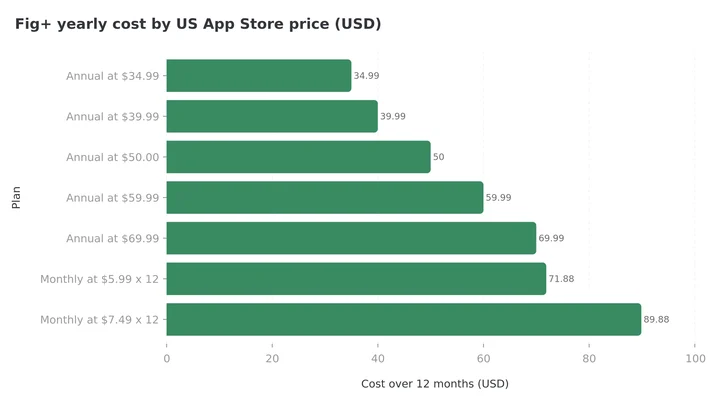 Figure 1: yearly cost of each Fig+ price on the US App Store, assuming every renewal matches the first charge.
Read the offer screen for the amount charged at the end of the trial. Several reviewers say they saw a monthly figure and were billed for a year. One wrote on June 11, 2026: "I just signed up for a free trial and it clearly said $3.99 a month. Then when you go to into your payment info it's says $69.99 a year." I have not seen that screen, so I cannot confirm what it showed. For reference, $69.99 divided by 12 is $5.83.

Fig free vs Fig+: what each plan includes
| Feature | Free | Fig+ |
|---|---|---|
| Search products that fit your diet | Unlimited | Unlimited |
| Barcode scans | 5 per month | Unlimited |
| Diet profiles | Your own | Up to 5, called Multiple Figs |
| Restaurant menus | No | Yes |
| Grocery store filtering | No | Yes |
The rows come from three support articles. The free plan article says that by upgrading "you get unlimited scans, store filtering, early access to Fig Restaurants". The Fig+ article lists "unlimited scans, Fig restaurants, grocery store filtering, and more". The Multiple Figs article says "you can create up to 5 diet profiles within your Fig account" and that the feature "is available on Fig+".
The free plan article was last updated on September 14, 2023, and recent reviews disagree on how usable the free plan is today. One reviewer wrote on May 8, 2026 that the free version is "a really useful tool". Another wrote on June 26, 2026 that the app "constantly blocks you until you sign up or pay". Expect an upgrade screen during setup. Fig's reply to a February 2026 Google Play review says to "tap 'x' on the subscription/upgrade screen for the free version of the app", and describes the free version as "grocery search and a few scans each month".
✓ Step 1 done: free plan and prices → Step 2 next: the trial and the checkout 🔍 The two calendar dates are still ahead, near the end.
The 7-day trial and the browser checkout
The pricing article describes the trial in two sentences: "Everyone is welcome to try Fig+ free for 7 days. If you decide to continue after the trial, your subscription will automatically renew on an annual basis."
The trial converts to a yearly plan, so the first charge is the full annual price.
The checkout is the part I would read most carefully. Fig's cancel article names three ways a person can have paid: "via Stripe on the Fig website", through the App Store, or through the Play Store. Reviews suggest that some iPhone users end up on the Stripe route without noticing. One reviewer described it on August 18, 2026: at the end of setup, "they take you into the browser and have you complete it via Apple Pay". The result, in their words: "You also can't cancel it through Apple subscriptions because they took you out of the app."
I did not go through the checkout myself, so this is the reviewers' account. It explains a repeated complaint: a reviewer wrote on June 26, 2026 that they "tried to cancel through my Apple apps but there is no record of it". Apple Pay on a website is a card payment and creates no Apple subscription, so nothing appears in the iPhone subscription list.
Fig's terms do not help here. Section 4.3 says: "You may cancel the Subscription Service through your device settings on an iOS device or the Google Play store on Android devices." It names two routes, and the website checkout is missing. The terms were last updated on November 19, 2024.
✓ Step 1: free plan and prices ✓ Step 2: trial and checkout → Step 3: refunds, coming up. Two of the three Fig documents contradict each other.
Fig refund policy: three documents, three answers
Fig has published three statements about refunds, and they do not match.
| Source | Last updated | What it says |
|---|---|---|
| Refund article | May 25, 2026 | "we're happy to grant a refund within 11 days of your trial starting or 4 days of your purchase" |
| Cancel article | February 13, 2026 | "Unfortunately, we are unable to offer refunds after the 7 day free trial of Fig+." |
| Terms of service, section 4 | November 19, 2024 | "All fees are in U.S. Dollars and are non-refundable unless otherwise specifically provided for in these Terms." |
The refund article is the newest and the most generous, so it is the one to quote in a request. Its two time limits describe the same window for trial users: a 7-day trial plus 4 days after the charge is 11 days from the start.
The route depends on where you paid:
- Stripe on the Fig website. Email [email protected] and include the email address you signed up with.
- Google Play. Email Fig the same way, or ask Google directly.
- Apple App Store. The refund article says: "Unfortunately, Apple doesn't allow Fig to process refunds. The refund must come from Apple directly". Use Apple's refund form.
One clause in the terms matters for Apple buyers. Section 19.1 says that by making in-app purchases you consent to Fig sharing "data regarding your usage and consumption of purchased content with Apple, as part of our efforts to resolve refund requests." If you want a refund, ask soon after the charge.
Reviews show both outcomes. A reviewer who forgot about the trial wrote on October 5, 2026: "I emailed customer service and had a response within a day. AND I had the entire cost of the app refunded to my credit card." Another wrote on June 20, 2026: "Will not refund." The member charged $34.99 says they emailed three times over two weeks and got no reply.
Auto-renewal: what the terms allow
Section 4.3 of the terms says a subscription "will automatically renew for successive periods of the same duration as the Initial Subscription Period".
Two more rules from section 4:
- The deadline is the renewal date. "Your cancellation must be received before the renewal date in order to avoid charge for the next subscription period."
- A failed payment can cost you the account. Section 4.4 says that if your payment method is no longer valid when a renewal is due, "Fig reserves the right to delete your account and any information or User Content".
How to cancel Fig+
The cancel article gives a path for each checkout.
Paid through Stripe on the Fig website
- Open the billing link in the cancel article. It leads to a login page on billing.foodisgood.com.
- Enter the email address tied to your Fig account. You can confirm it in the app under Profile, then Settings, then Account.
- Follow the prompts to cancel, and screenshot the confirmation. The same article gives an in-app route: Profile, Settings, "Manage Subscription".
Paid through the App Store. Cancel in your Apple account using Apple's steps.
Paid through Google Play. Cancel in your Google account using Google's steps.
If Fig is missing from your Apple or Google subscription list, you most likely paid on the website, and the Stripe path is the one that works. The reviewer who was moved to the browser found the fix: they canceled "by using the email used on your Apple Pay on their stripe portal".
Three ways to pay less for Fig+
The Fig Uplift Program. Fig's support center has an article for people who cannot pay: "If you can't afford Fig+, you can request access through the Fig Uplift Program." The article links to a request form.
Family Sharing on iPhone. The sharing article says Apple Family Sharing works for a paid Fig+ subscription. For Android it says: "Unfortunately, there is no way to share a Fig+ subscription on Android devices."
Promo codes. The promo code article gives the path: Profile, Settings, "Account Management", "Upgrade to Fig+", then "Redeem Promo Code" at the bottom of the screen.
What users say about Fig
I read the 100 most recent US App Store reviews, dated May 18 to October 19, 2026, from Apple's public review feed. Fifty-five gave five stars and 34 gave one star. Thirty-five of the 100 used a billing word such as charge, refund, cancel, renew, subscription, trial, price or free, and 26 of those 35 were one-star reviews.
The complaints repeat two themes:
- Charges after canceling. Thirteen of the 100 reviews mention canceling, and seven of those also describe a charge or a charge attempt. One reviewer wrote on September 18, 2026 that their bank flagged repeated attempts to collect $69.99 after they canceled.
- The yearly price. "I would pay $3.99/month but $70 is too much", a three-star reviewer wrote on August 10, 2026.
The praise is about life with a restricted diet. A reviewer with celiac disease wrote on June 17, 2026 that the app "has been immensely helpful in finding safe foods".
Reviews are self-selected, and people write more often after a billing problem. My reading is that the product is liked and the checkout causes most of the anger.
What Fig can and cannot tell you
Fig's own article How do I responsibly use Fig? says "Fig is meant to be used as a guide, not a crutch." Its limits, in Fig's words:
- The data can be wrong. "It's almost guaranteed that there will be incorrect information in the Fig app at times."
- You still read the label. It is "absolutely CRITICAL to double-check the ingredient and allergen label for any product before you buy it or eat it."
- Shared production lines are not covered. "Fig does not yet account for unlisted cross-contamination".
- Low FODMAP needs a second app. "Fig is best used alongside the Monash app", which gives serving sizes.
- Restaurants. The restaurant article says "Fig does not consider cross-contamination".
Section 15.3 of the terms says Fig "DOES NOT WARRANT THE ACCURACY, COMPLETENESS, RELIABILITY, OR USEFULNESS OF ANY INFORMATION OR CONTENT", and section 16.2 caps its liability at the greater of what you paid in the previous 12 months and US$100.

What the research says about label reading and diet apps
Fig sells help with two jobs: reading labels for allergens, and following an elimination diet such as low FODMAP. I did not find a published trial of Fig itself on PubMed, so these studies are about the problem.
A survey of 40,443 US adults in JAMA Network Open (Gupta et al., 2019) estimated that 10.8% have a convincing food allergy, and 45.3% of food-allergic adults are allergic to multiple foods. Checking a label against several allergens at once is the task a scanner is built for.
Label rules are widely misunderstood. In a survey of 6,684 people in the United States and Canada (Marchisotto et al., 2017), 46% were unsure or wrongly believed that "may contain" warnings are required by law, and 40% bought foods labeled "manufactured in a facility that also processes" an allergen. A green Fig result covers the ingredient list only.
For IBS, a network meta-analysis in Gut (Black et al., 2022) pooled 13 randomized trials with 944 patients and ranked a low FODMAP diet first for global symptoms against a habitual diet. Most of those trials took place in specialist care.
My reading: an ingredient scanner saves reading time, and it cannot replace the label or a dietitian for a severe allergy.
Who Fig+ is worth paying for
Fig+ fits these people well:
- You manage several restrictions at once, or shop for a family with different ones. Multiple Figs covers up to five profiles.
- You are new to a diagnosis such as celiac disease or alpha-gal syndrome and scan many products each week.
- You live in the US and shop at large grocery chains.
The free plan is enough if you mostly plan at home: unlimited search covers a shopping list, and five scans cover the few items you doubt.
Fig+ fits poorly if you live outside the US, if you need cross-contact information for a life-threatening allergy, or if your goal is a health score for packaged food. For that last job, our Yuka pricing guide and Fooducate pricing guide cover two scanners with free barcode scanning, and our Olive pricing guide covers a paid one. Our roundup of barcode scanning apps compares more.
With a diagnosed food allergy, keep following your allergist's instructions. An app result is a starting point for reading the label.
✓ Steps 1 to 4 done. The reveal is next.
The two dates to calendar, and the 5 steps to try Fig+ without an unwanted charge
Fig's refund article sets an 11-day window from the start of the trial: 7 trial days plus 4 days after the first charge. The cancel article and the terms are stricter, so treat these dates as hard limits:
- Day 5 of the trial: the cancel reminder. Cancel before day 7 on the system you paid through.
- Day 11 of the trial: the last day Fig's refund article covers if you were charged anyway.
 Put both dates in your phone before you tap the trial button.
- Use the free plan first. Build your profile, search your usual products and spend the five scans on items you are unsure about. Tap the x on the upgrade screen to stay on the free plan.
- Read the offer screen for the yearly amount. Find the line that states what is charged when the trial ends, and screenshot it.
- Note the checkout you used. A browser purchase goes through Stripe on the Fig website. App Store and Google Play purchases are managed there.
- Set reminders for day five and day eleven. Cancel on the same system you paid through and save the confirmation.
- Ask for a refund fast if you are charged. Fig's refund article allows 11 days from the trial start or 4 days from the purchase. Email [email protected] from your sign-up address, or use Apple's form for an App Store purchase.
Tracking food with a free tier
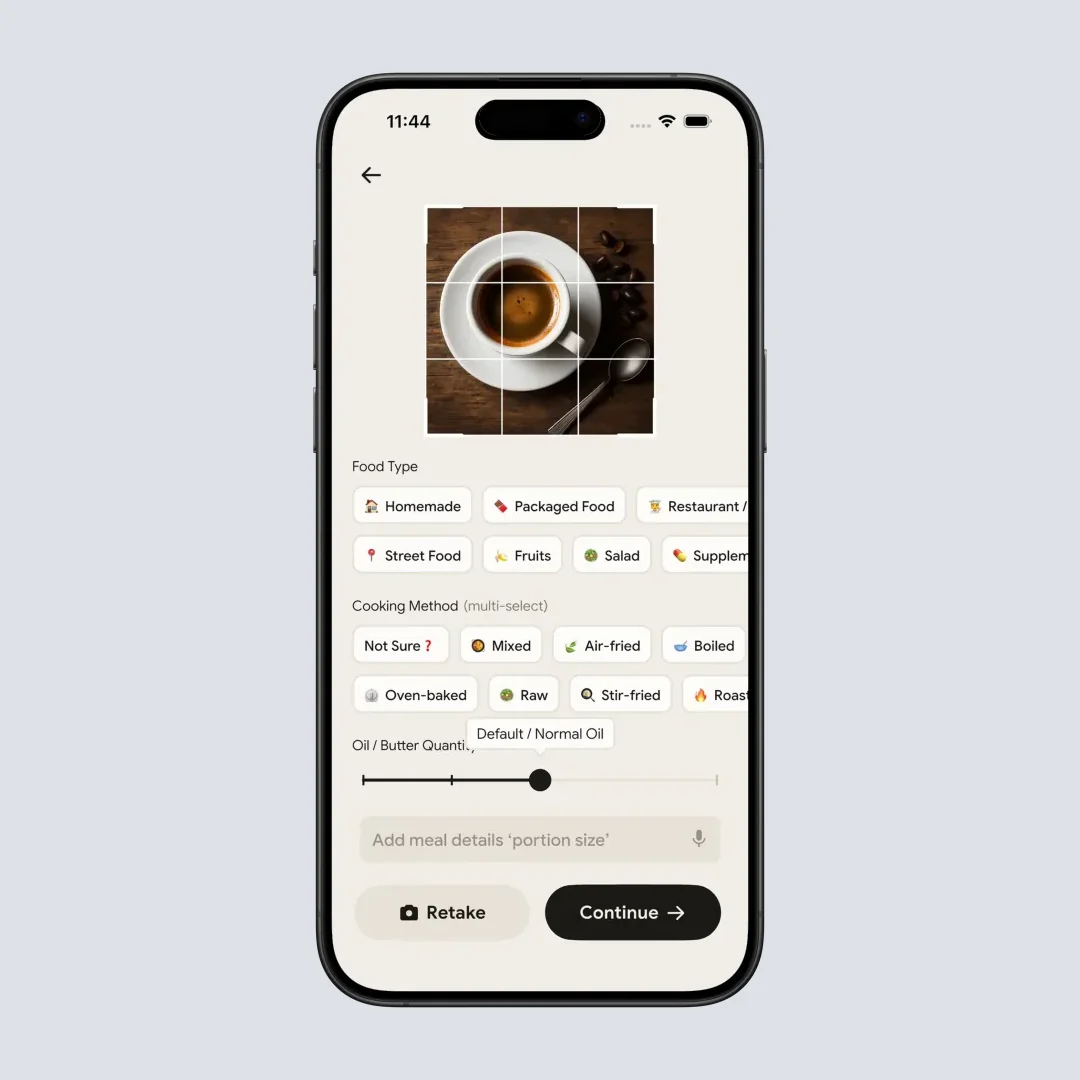
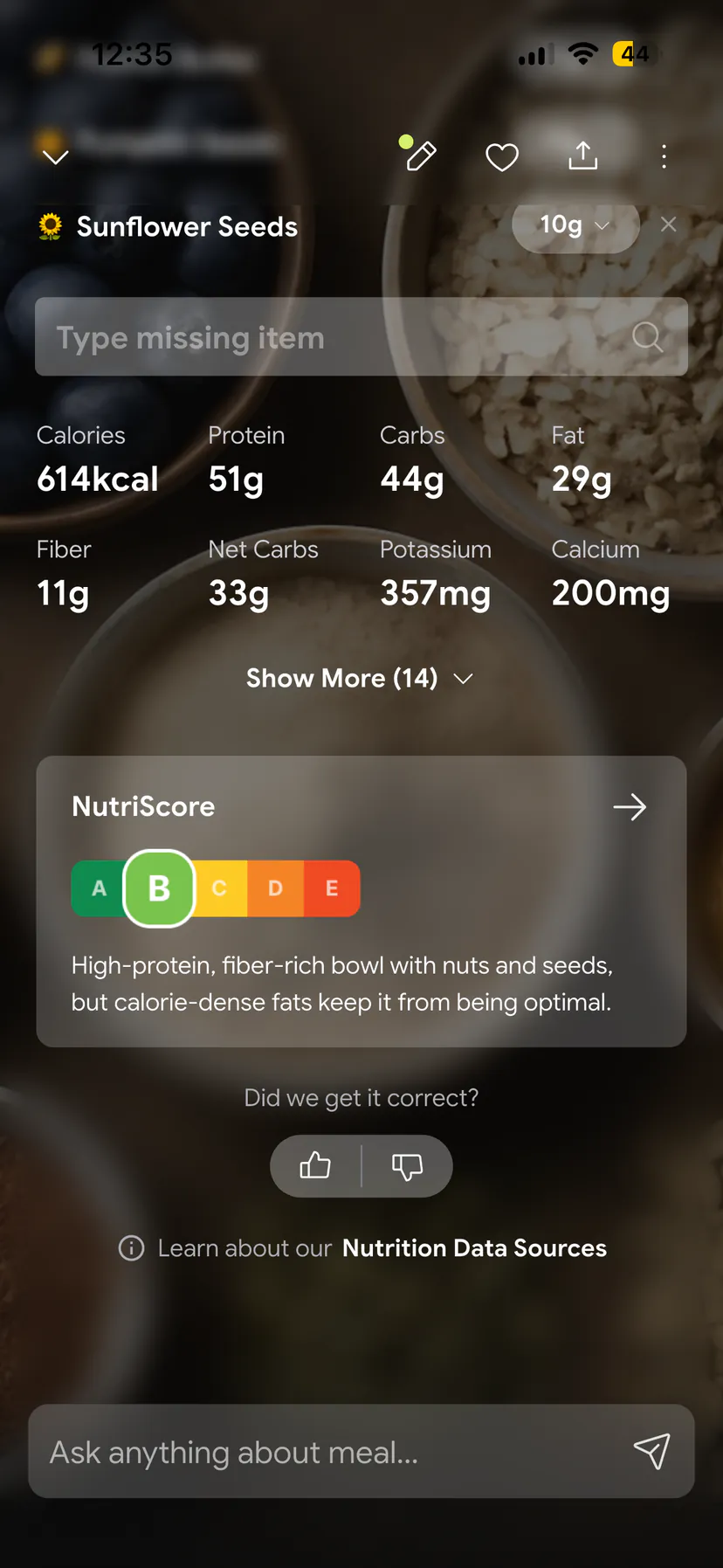
Fig answers one question: can I eat this product? It does not count calories or log meals. If you also want to know how much you eat, a food tracker does that job. NutriScan, the app my team makes, has a Free plan with 5 AI food scans a week and a Premium plan at about $59 a year (US price, which varies by region), and the plans are listed in our pricing breakdown. NutriScan estimates calories and macros from a photo. It is built to log what you ate, not to screen a packaged product's ingredients for allergens, so it does not replace Fig.
Bottom line
Fig is free for searching and for 5 scans a month, and Fig+ is a yearly plan that costs between $34.99 and $69.99 depending on the offer you see. Start on the free plan, screenshot the offer, calendar day five and day eleven, and cancel where you paid. If you also want to log meals and see calories and macros, see how the NutriScan meal scan works, or read about our AI calorie counter.
Fig pricing FAQ
Is Fig free?
Partly. The free plan includes 5 barcode scans a month and unlimited product searches, per Fig's help center. Unlimited scans, restaurant menus, store filtering and extra diet profiles need a Fig+ subscription.
How much does Fig+ cost?
Fig's own pricing article gives no dollar amount. The US App Store lists monthly Fig+ items at $5.99 and $7.49 and annual items from $34.99 to $69.99. Recent reviewers most often report a yearly charge of $69.99.
Does Fig have a free trial?
Yes. Fig+ comes with a 7-day trial. The pricing article says that after the trial the subscription renews on an annual basis, so the first charge is a full year.
Can I get a refund from Fig?
Fig's refund article offers a refund within 11 days of the trial starting or 4 days of the purchase. Website and Google Play buyers email [email protected]. App Store buyers must ask Apple.
How do I cancel Fig+?
Cancel on the system you paid through. For a website purchase, use the Stripe billing link in Fig's cancel article or Manage Subscription in the app settings. For a store purchase, cancel in your Apple or Google account before the renewal date.