Is Olive Free? Olive App Price, Trial and Refund Rules
 ChatGPT
 Claude
 AI Mode
 Perplexity
Olive is free to download, and using it needs an Olive Premium subscription that the US App Store lists at $29.99 to $69.99 a year or $7.99 to $14.99 a month. The store description says so in two lines: "New members can start with a free trial." and "Subscription required." Olive publishes no price on its website, and the store lists ten Olive Premium items without saying who is offered which one.
I work on the NutriScan team, which makes a food tracking app, so treat this as a competitor's reading of public documents. Every price and rule below comes from Olive's website, its terms of service, the app store listings and customer reviews, and each one is linked so you can check it.
Prices and policies checked on October 25, 2026 in the US stores and on Olive's website. Prices in other countries can differ.
TL;DR
- There is no free plan in the store description. It says "Subscription required." and "Olive Premium works on its own".
- Olive's homepage answers "How much does Olive cost?" without a number: "After your trial it's a subscription".
- The App Store lists four yearly prices ($29.99, $39.99, $49.99, $69.99) and two monthly prices ($7.99, $14.99). The offer screen decides which one you see.
- Olive's developer replies describe a 7-day trial, and one reviewer reports 3 days. Olive says Apple requires a payment method to start it.
- The terms say Olive "does not offer refunds or credits for partially used subscription periods".
- Olive's store description also points to a web route, olive.superwall.app/manage, and some reviewers say they were billed by card through Stripe and could not find the subscription in their Apple settings.
IMPORTANT
Your Olive pricing plan at a glance.
A quick roadmap so you can decide before you start the trial.
⏱️ Progress 0/4 • ~0 minutes in • Keep going
⏳ Step 1: The real price list
⏳ Step 2: The trial and who bills you
⏳ Step 3: Refunds, renewal and canceling
🔍 The 48-hour rule that protects your money (revealed near the end)
 That face when a free app asks for a payment method.
Is Olive free? The quick answer
No. You can install Olive at no cost, and after the setup questions the app asks you to start a trial of Olive Premium with a payment method on file.
Olive says this openly when asked. In a reply to an App Store review dated February 23, the developer wrote: "We wish we could make Olive completely free". The reply gives the reason as independence: Olive says it does not take money from brands or run ads, and that subscriptions pay for lab testing.
The store description also answers a question directly: "Do I need peptides to use Olive? No. Olive Premium works on its own."
The terms allow for a free tier. Section 4 says "The Services may include both free and paid offerings." I could not find a description of a free offering on the website or in either store listing. Reviewers report the same. One wrote on July 26, 2026: "Can't even use the app Unless you pay for it".
Who runs Olive
Olive is made by Giga Studios, Inc. The terms describe the company as "a Delaware C Corporation" doing business as Olive, with an address at 131 Continental Dr, Suite 305, Newark, DE 19713.
A few facts from the listings describe the product today:
- Size. The App Store shows 4.8 from 40K ratings. Google Play shows 3.7 from 2.92K reviews and more than 50,000 downloads, with the last update on September 15, 2026. Olive's homepage claims "2 million+ users".
- A second business. Olive now sells a prescription weight loss program next to the scanner. The current App Store name is "Olive: AI Health & Weight Loss" with the subtitle "Habits, Food, Peptides & GLP-1". That program has its own price and its own refund policy, covered below.
Olive Premium price list
Olive does not publish a price list. The only public source is the "In-App Purchases" section of the US App Store page. On October 25, 2026 it listed ten items. Olive changes this list, so treat it as a snapshot.
| Item name on the App Store | Price | How many times it is listed |
|---|---|---|
| Olive Premium (Annual) | $69.99 | 3 |
| Olive Premium (Annual) | $49.99 | 3 |
| Olive Premium (Annual) | $39.99 | 1 |
| Olive Premium (Annual) | $29.99 | 1 |
| Olive Premium (Monthly) | $14.99 | 1 |
| Olive Premium (Monthly) | $7.99 | 1 |
Google Play marks the app "In-app purchases" and its description says "Try Olive Premium with a free trial today", without listing a price I could read.
Eight yearly items at four prices means different people are offered different amounts. Apple shows the names and prices and does not say who gets which one. Reviews give some indications. A reviewer wrote on July 14, 2026 that each time they opened the app they saw a full-screen offer reading "we miss you, here's 80% off". Others name yearly charges near $50.
One amount in a recent review does not match the list. A reviewer wrote on August 24, 2026: "showed 29.99 for the yearly price yet i was charged 54.99". A $29.99 yearly item is on the list today, and $54.99 is not. I cannot tell whether the gap came from an older price, another country, tax, or a card checkout outside the App Store.
The offer screen in the app is the only place that states your price. Screenshot it.
What Olive Premium costs over a year
I calculated these totals from the App Store prices.
| Plan | What you pay | Cost over 12 months |
|---|---|---|
| Monthly at $7.99 | $7.99 each month | $95.88 |
| Monthly at $14.99 | $14.99 each month | $179.88 |
| Yearly at $29.99 | $29.99 once | $29.99 |
| Yearly at $39.99 | $39.99 once | $39.99 |
| Yearly at $49.99 | $49.99 once | $49.99 |
| Yearly at $69.99 | $69.99 once | $69.99 |
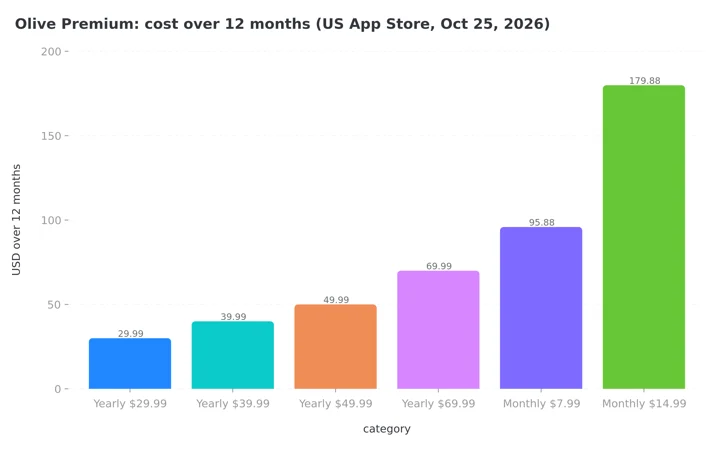 Figure 1: Twelve-month cost of each Olive Premium price on the US App Store, October 25, 2026.
As Figure 1 shows, the $7.99 monthly plan costs more than the $29.99 yearly plan from month 4 and more than the $69.99 yearly plan from month 9 (nine payments come to $71.91). A monthly plan only saves money if you plan to stop within a few months.
What Olive Premium includes
The App Store description ends its pitch with "Subscription required." and lists these features:
- Food scanner. "1.3 million+ products scored for seed oils, artificial dyes, additives, preservatives, hidden sugars, gluten and allergens." Olive's homepage claims "10M+ foods and personal care products", a larger number than the store listing.
- Skincare and cosmetic scanner. Fragrance, parabens, phthalates and endocrine disruptors.
- Water and lab data. "540+ bottled waters scored for PFAS, microplastics and fluoride", lab results for 90 products and 1,174 FDA recalls tracked.
- Swaps and restaurants. Cleaner alternatives for low scores and a map of seed-oil-free restaurants.
- AI companion. Ask Olive questions, a daily check-in, and a food log that builds a Meal Review with calories, protein, carbs, fat, fiber, sugar and sodium from a photo, text or voice.
The listing does not say which of these sit behind Premium. Section 4 of the terms describes Premium as "unlimited scans, personalized recommendations, water testing data, and more." Google Play says Premium will "Unlock unlimited scans, advanced customization options, comprehensive product insights, and premium personalized recommendations."
IMPORTANT
Checkpoint: here is where you are right now.
Step 1 is done, so you know the price list.
⏱️ Progress 1/4 • ~2 minutes in • Keep going
✅ Step 1: The real price list (done)
👉 Step 2: The trial and who bills you (you're here)
⏳ Step 3: Refunds, renewal and canceling
🧩 The 48-hour rule (coming soon)
The Olive free trial: 7 days, with one report of 3
Olive's developer replies describe a 7-day trial. In a reply dated March 5 the company wrote: "We offer a 7-day free trial, and Apple requires users to authorize the subscription upfront before the trial begins." In a reply dated February 1 it added that Olive offers "a free trial with no charge upfront, and Apple, not Olive, requires a payment method for all trials."
Reviewers describe other lengths and prices:
- 3 days. "I was told I was getting a 3 day free trial, however when I signed up, I was immediately charged $28 for an annual subscription", one wrote on September 7, 2026.
Two rules from the terms apply to every version:
- The trial converts. Section 4 says free trials "may convert automatically to paid recurring subscriptions at the then-current rate unless canceled before the end of the promotional period."
- Cancel a day early. Renewal happens "unless you cancel at least 24 hours prior to the renewal date."
Who bills you: Apple, Google or Olive directly
This is the detail I would check before anything else, because it decides where you cancel.
Olive's public answers point to the phone. The homepage says "you can cancel anytime from your phone's settings", and the March 5 developer reply says "You can cancel anytime in your Apple subscription settings".
The store description also lists a second route: "Web: Profile > Settings > Subscription Terms in Olive, or olive.superwall.app/manage." In a reply dated September 23, the developer wrote: "If your subscription was purchased directly through Olive, you can manage or cancel it anytime at olive.superwall.app/manage." So Olive confirms that some subscriptions are bought outside the stores.
Some recent reviewers describe that route. One wrote on September 14, 2026: "billing is through stripe instead of the App Store." The same reviewer said there was no place in the app to cancel. Another wrote on September 26, 2026 that Olive was charging under their Apple subscription even after they canceled, and then tried to charge another year through "link giga studios", which is a Stripe saved-payment label. A third wrote on September 18, 2026 that they were charged $55 and could not find the app among the purchases in their Apple account.
I could not verify these reports. The terms cover both cases. Section 4 says you can cancel "by navigating to Settings > Subscription in the Olive app or contacting your app store provider", and names the stores only "if you subscribed through their platform".
By my reading, a subscription bought directly from Olive is invisible to Apple and Google. Canceling in your phone settings does nothing to it. The receipt email tells you which kind you have:
- A receipt from Apple or Google means a store subscription.
- A receipt from Stripe, Link or Olive means a direct subscription that you cancel with Olive.
IMPORTANT
Checkpoint: midway progress update.
You're halfway, and decisions get easier here.
⏱️ Progress 2/4 • ~5 minutes in • Keep going
✅ Step 1: The real price list (done)
✅ Step 2: The trial and who bills you (done)
👉 Step 3: Refunds, renewal and canceling (current)
⏳ The 48-hour rule (next)
Olive refund policy: three statements
Olive's documents contain three refund statements. Two of them are easy to mix up.
The terms say no refunds for the app. Section 5 says: "Except where required by law, Olive does not offer refunds or credits for partially used subscription periods, promotional offers, or one-time purchases. This includes lifetime plans and family plans." Section 4 repeats it for cancellations.
The page named Refund Policy is about something else. Olive's refund policy page, last updated on February 25, 2026, opens with a warning that it "applies only to OpenLoop Health peptide subscriptions" and does not apply to "the Olive mobile app subscription".
A blog post promises a full refund. In an Olive article about another scanner, the company writes: "If you don't notice a meaningful difference in how you and your family feel in 28 days, Olive provides a full refund." I did not find this 28-day promise in the terms, and the article gives no steps for claiming it.
No route is guaranteed
Apple and Google decide store refunds, and Olive's terms say it does not refund partially used periods except where the law requires it.
If you are charged and want the money back, I would act on the same day:
- Store purchase. Use Apple's refund form or Google Play's refund steps.
- Direct purchase. Email [email protected] with the date and amount. If the 28-day sentence applies to you, quote it and link the article.
Auto-renewal and price changes: what the terms allow
Section 4 of the terms sets the renewal rules:
- Renewal is automatic. A subscription "will automatically renew at the end of each billing cycle".
- Prices can change. "We may change the pricing or features of your subscription at any time." Olive says material changes "will be communicated to you in advance" by email.
- Deleting the account does not cancel. Section 11 says "canceling your account does not automatically cancel any active subscriptions".
How to cancel Olive Premium
Cancel with the company that billed you. The same steps cancel a trial.
If Apple billed you:
- Open the Settings app on your iPhone.
- Tap your name at the top.
- Tap Subscriptions.
- Tap Olive.
- Tap Cancel Subscription or Cancel Free Trial.
If Google billed you:
- Open the Google Play Store app.
- Tap your profile picture.
- Tap Payments and subscriptions, then Subscriptions.
- Select Olive.
- Tap Cancel subscription and follow the prompts.
If you paid Olive directly (card or web):
- Go to olive.superwall.app/manage, or open the Olive app and go to Profile, Settings, then Subscription Terms.
- If you cannot find a cancel option, email [email protected] from the address on the account.
- State the date you want the subscription to end and ask for written confirmation.
Olive's peptide program is a separate bill
Olive's weight loss page advertises a prescription program "Starting at $139" for the first month, with "up to $140 off your first month", and notes that "Final pricing depends on the protocol your clinician selects." It offers "Compounded semaglutide or tirzepatide" after an online consultation, and it lists an Olive app membership as part of the package. The page says you pay nothing unless a clinician approves a plan.
The refund rules for this program also come in two versions. The weight loss page promises a "Full money-back guarantee" and says: "If the Full Protocol isn't for you, tell us and we'll refund you." The refund policy page says that, other than disqualification by the medical provider, "IN NO EVENT SHALL YOU BE ISSUED A REFUND UPON CANCELLATION". It also asks for cancellation requests "at least 72 hours prior to your billing date."
Compounded versions of these drugs carry a caveat from the US Food and Drug Administration. The agency's page on unapproved GLP-1 drugs says "compounded drugs are not FDA approved" and lists 990 reports of adverse events associated with compounded semaglutide. Our Noom Med pricing guide covers how another app prices a similar program.
What users say about Olive
I read the 100 most recent written reviews on the US App Store. They run from June 20 to October 20, 2026.
Sixty-three of the 100 gave one star and 18 gave five stars. Sixty-five used a billing word such as charge, refund, cancel, subscription, trial, price, pay or free. Of those 65, 51 were one-star reviews.
The praise is about shopping. "I've already found a few better swaps because of it and I use it all the time now!", a parent wrote on September 16, 2026.
These numbers need context. The overall rating is 4.8 from about 40,000 ratings, and most ratings come without text. People who write a review after a billing problem are a self-selected group, so the sample tells you what goes wrong when it does go wrong. It does not tell you how often. I could not verify any single report.
What Olive's scores can and cannot tell you
Olive gives products a score out of 100 and flags ingredients it considers a concern, seed oils among them. Three limits are worth knowing.
- The scoring method is Olive's own. One reviewer wrote on August 15, 2026 that "a snickers bar got a 58/100 while pumpernickel bread got 0". I could not reproduce those two scores, and Olive does not publish its formula on the pages I read.
- The terms promise no accuracy. Section 13 says Olive "does not guarantee the accuracy, reliability, or effectiveness of any information, recommendations, or results provided through the Services."
- It is not medical advice. The same section says the service is "not a substitute for professional medical advice, diagnosis, or treatment". The homepage agrees: "Is Olive a doctor? No."
What the research says about scanner apps and Olive's claims
I searched PubMed for a published study of the Olive app and did not find one. The papers below are about similar tools and about GLP-1 drugs, one of Olive's main themes.
Scanner apps teach more than they change. A scoping review in the Journal of Medical Internet Research (de Grave et al., 2024) found 46 food purchase apps. Twenty-seven of them help at the moment of choosing a product, commonly by scanning a barcode and showing a rating. Eight of 11 evaluation trials reported significant findings, and the few trials of scanner-type apps showed mixed results. The authors named infrequent use as a common challenge.
Stopping a GLP-1 drug. Olive's weight loss page calls itself the only company "designed to get you off GLP-1s". In the STEP 1 trial (Wilding et al., 2021), adults on weekly semaglutide lost 14.9% of body weight in 68 weeks, against 2.4% on placebo. In the extension study (Wilding et al., 2022), 327 participants were followed after treatment stopped. One year later they had regained two thirds of the weight they had lost. I found no published trial showing that an app prevents this regain.
My reading of these three papers: a scanner can teach you to read labels, trials of them are few, and the GLP-1 claim on Olive's weight loss page is not backed by a trial of Olive.
IMPORTANT
Checkpoint: final stretch before the reveal.
One last nudge, the reveal is next.
⏱️ Progress 3/4 • ~8 minutes in • Keep going
✅ Step 1: The real price list
✅ Step 2: The trial and who bills you
✅ Step 3: Refunds, renewal and canceling
✨ The 48-hour rule (about to reveal)
Who Olive Premium is worth paying for
Olive Premium fits these people:
- You already avoid seed oils by choice and want a restaurant map built on that rule.
- You were offered one of the lower yearly prices and will use the app every week.
Olive fits poorly if you want a free scanner, if you want to test an app without giving a payment method, or if ads for a weight loss program would bother you.
For free barcode scanning, our Yuka pricing guide and Fooducate pricing guide cover two alternatives. Our roundup of barcode scanning apps compares more, and we have a direct NutriScan vs Olive comparison.
The 48-hour rule: how to try Olive without an unwanted charge
You have been patient, so here is the rule. The terms ask you to cancel at least 24 hours before renewal. A reviewer who read the fine print says the "seven day free trial is actually only six days" once you count that cutoff. Cancel 48 hours early and a time zone, a late-night reminder or a slow settings screen cannot cost you a year.
- Decide before the questions. The setup ends at a trial screen that needs a payment method. Decide first whether you are willing to start a trial.
- Screenshot the offer screen. Record the trial length, the amount and the date of the first charge before you confirm.
- Find out who billed you. Check the receipt email. Apple or Google means a store subscription. Stripe or Link means a direct subscription with Olive, managed at olive.superwall.app/manage.
- Cancel two days early. The terms ask for 24 hours. Cancel with the company that billed you at least 48 hours before the trial ends, and keep the confirmation.
- Act the same day if you are charged. Send a refund request to Apple or Google, or email [email protected] for a direct payment, with the date and amount.
 Step 4 in one gesture.
IMPORTANT
Recap: everything you completed this round.
You finished the run, so save this for next time.
⏱️ Progress 4/4 • ~10 minutes in • Nicely done
✅ Step 1: The real price list
✅ Step 2: The trial and who bills you
✅ Step 3: Refunds, renewal and canceling
✅ The 48-hour rule (revealed)
Tracking food with a free plan
Olive started as a scanner that answers what is in this product. Its store description now also lists a food log that estimates calories and macros, so the two apps overlap more than they did. Olive's weight loss program and contaminant data remain its center. NutriScan, the app my team makes, is built around meal logging: you photograph a meal and get calories, macros and a NutriScore grade for it. It has a Free plan with 5 AI food scans a week and a Premium plan at about $59 a year, and the plans are listed in our pricing breakdown. NutriScan does not test products for contaminants or rate cosmetics, so it does not replace Olive's lab data.
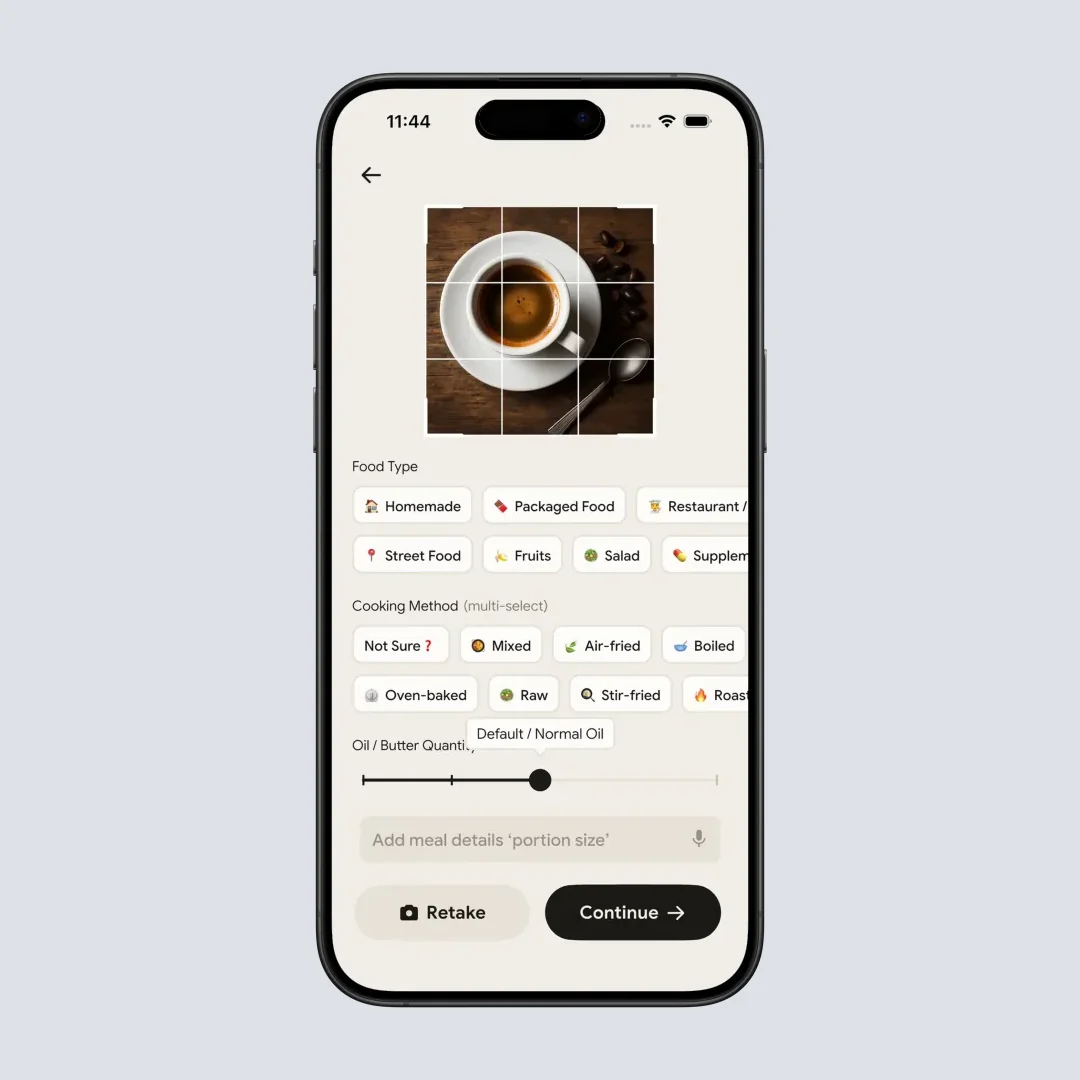
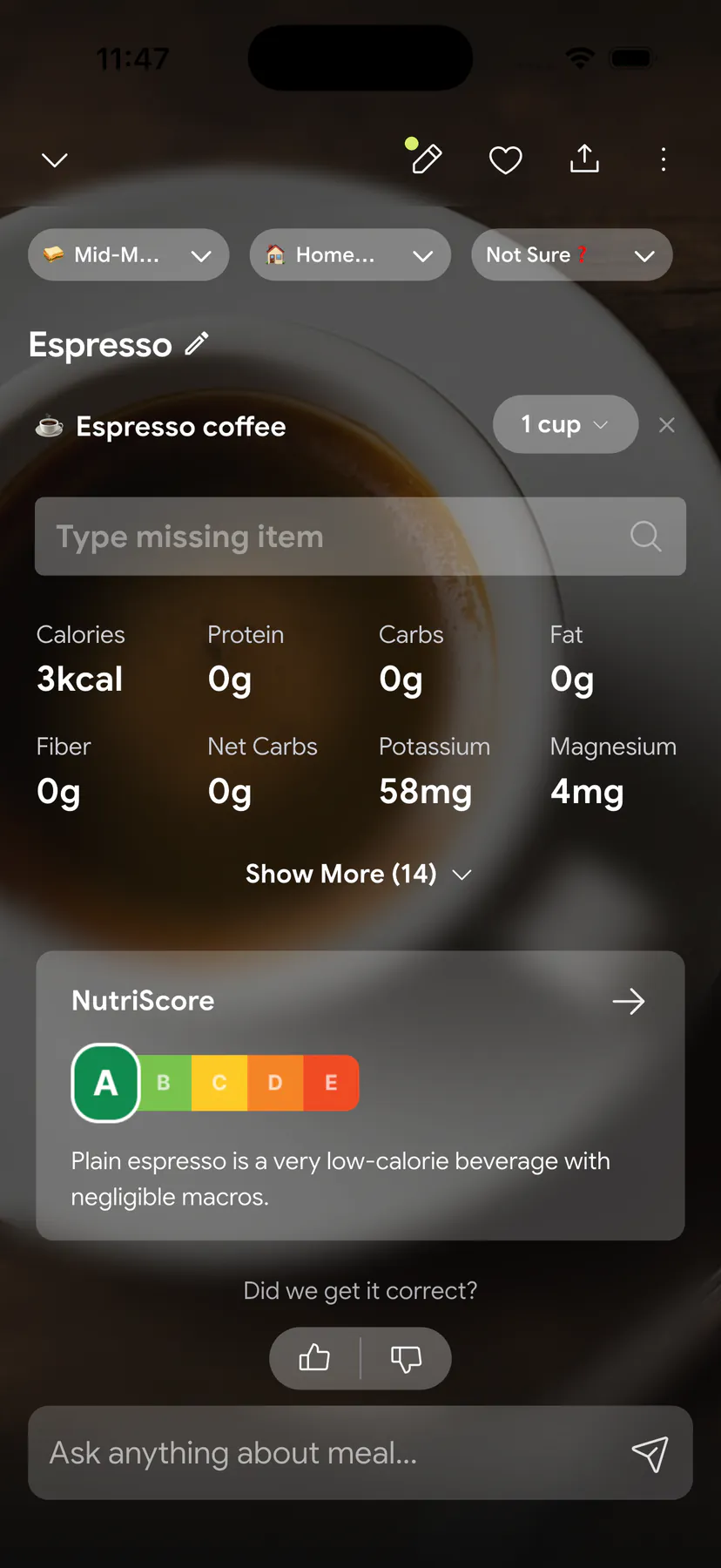
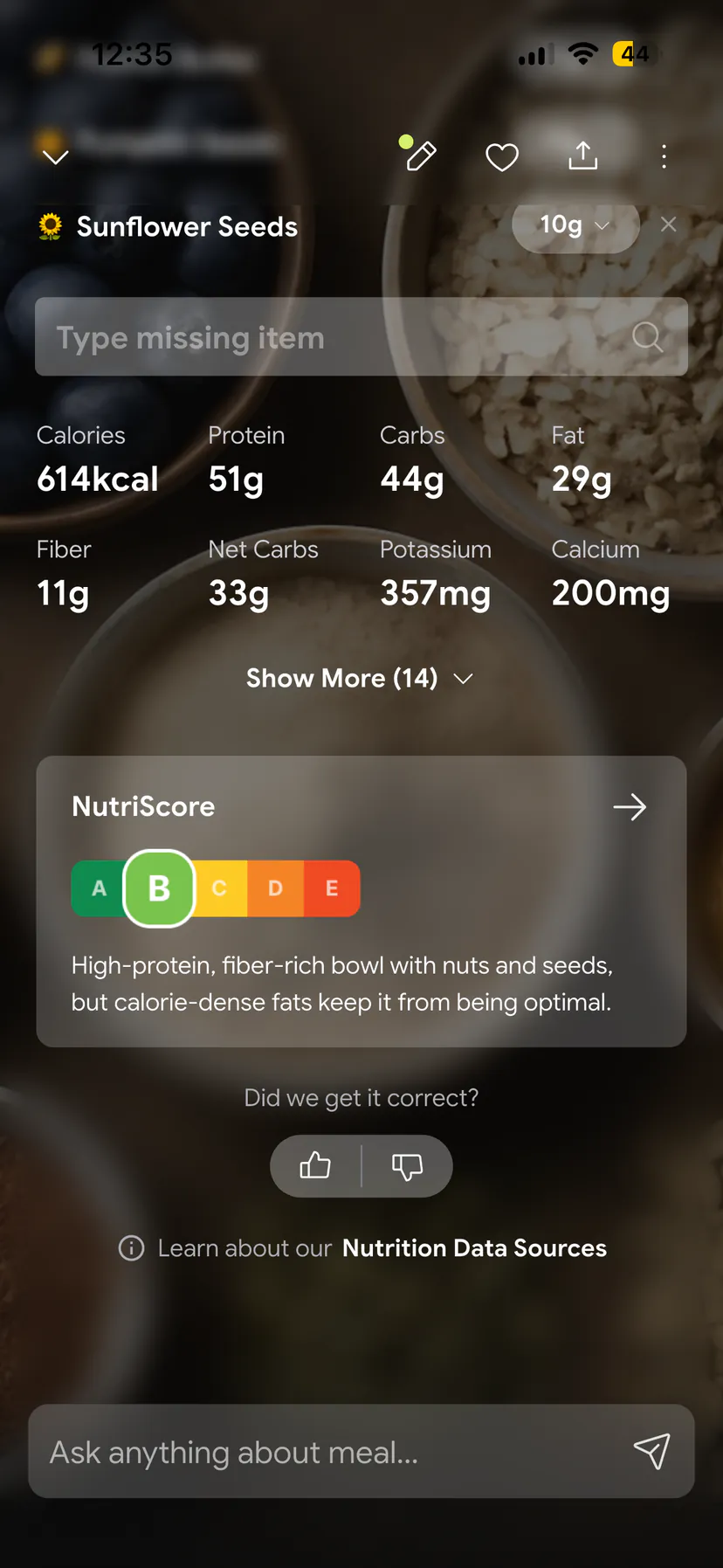
See how the photo flow works in the meal scan guide, how grades work in the NutriScore guide, or set targets with the macro calculator. NutriScan is free to start.
Olive pricing FAQ
Is the Olive app free?
No. The download is free, and Olive's App Store description says "Subscription required." and "New members can start with a free trial."
How much does Olive Premium cost?
Olive does not publish a price on its website. On October 25, 2026 the US App Store listed yearly items at $29.99, $39.99, $49.99 and $69.99 and monthly items at $7.99 and $14.99. The offer screen shows which one you get.
How long is the Olive free trial?
Olive's developer replies describe a 7-day free trial. One reviewer reports a 3-day offer, so check the length on your own offer screen. A payment method is required to start.
Can I get a refund from Olive?
The terms say Olive does not offer refunds for partially used subscription periods except where the law requires it. Apple and Google decide refund requests for store purchases. An Olive blog post describes a 28-day full refund, which the terms do not mention.
How do I cancel Olive Premium?
Cancel with the company that billed you. For Apple, open Settings, tap your name, then Subscriptions. For Google, open the Play Store, then Payments and subscriptions. For a payment made directly to Olive, use olive.superwall.app/manage or email [email protected].